I. Making music
Keys
Chapter 2 placed sounds in time. This chapter is about which notes to play. Of the twelve notes in an octave, a song uses mostly seven, and one of them is home: that choice is the song's key. The studio keeps a song's key, shows it in Key Edit, and can make the keyboard play only its notes, so that nothing you play sounds wrong while you find out what sounds right.
Open the chapter's first song in the editor:
zig build run-studio -- manual/03-keys/c-major --view editor
Twelve notes
A piano's keys repeat every twelve: seven white and five black, from one C
to the next. Each key is a semitone above the one to its left, and
twelve semitones make an octave, where the pitch has doubled and the
note has the same name. The studio names a key by its note and its octave,
as C4, middle C, or A4, the A at 440 Hz. A sharp, #, is a semitone up,
and a flat, b, a semitone down, so the black key between C and D is both
C# and Db.
Scales and keys
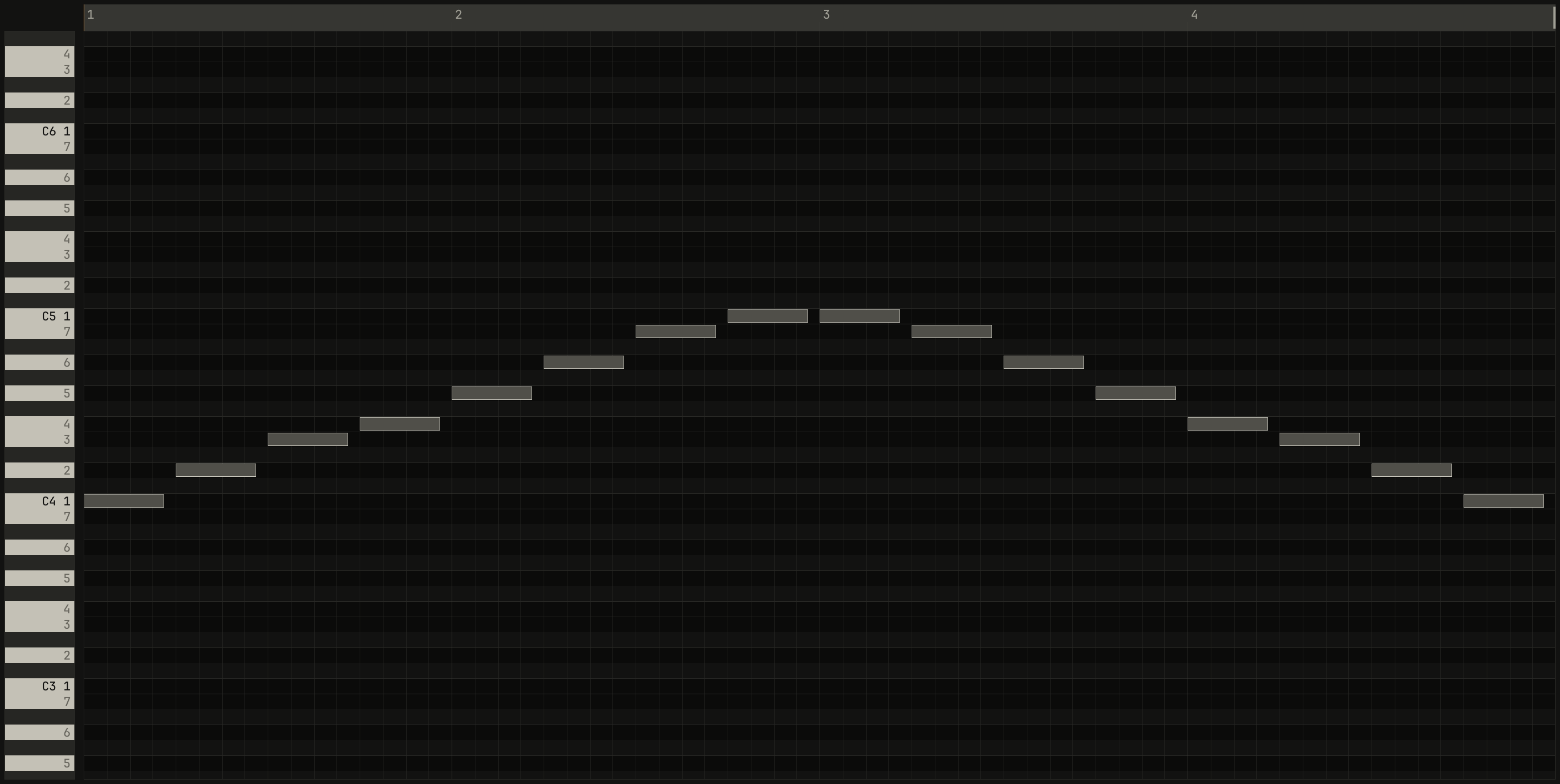
A scale is a set of notes, and the major scale takes seven of the twelve in a fixed pattern of steps: whole, whole, half, whole, whole, whole, half, where a whole step is two semitones. From C, that's the white keys.

0.0 / 9.6 s
peak -20.4 dBFS
openzig build run-studio -- manual/03-keys/c-major --view editor
renderzig build run-studio -- render manual/03-keys/c-major c-major.wav
c-major/song.json
{
  "tempo": 100,
  "end": "5",
  "key": ["1 C major"],
  "devices": [
    { "name": "synth", "type": "synth", "state": { "parts": [{ "patch": "A45", "level": 0, "reverb_send": 15 }] } }
  ],
  "tracks": [
    { "name": "scale", "device": "synth", "channel": 1, "keys": "key", "role": "lead", "clips": [{ "at": "1", "length": "4.0.0", "notes": "c major" }] }
  ],
  "notes": {
    "c major": {
      "length": "4.0.0",
      "notes": [
        "1.1.0 C4 0.0.840 96", "1.2.0 D4 0.0.840 88", "1.3.0 E4 0.0.840 92", "1.4.0 F4 0.0.840 88",
        "2.1.0 G4 0.0.840 96", "2.2.0 A4 0.0.840 88", "2.3.0 B4 0.0.840 92", "2.4.0 C5 0.0.840 100",
        "3.1.0 C5 0.0.840 96", "3.2.0 B4 0.0.840 88", "3.3.0 A4 0.0.840 92", "3.4.0 G4 0.0.840 88",
        "4.1.0 F4 0.0.840 92", "4.2.0 E4 0.0.840 88", "4.3.0 D4 0.0.840 90", "4.4.0 C4 0.0.840 96"
      ]
    }
  }
}
Key Edit draws a row for every semitone. With a key, the rows of its notes
are lighter and the others darker, and the strip of piano keys at the left
numbers each note of the key by its degree, 1 to 7, counting up from
the tonic. The tonic, the 1, carries its name as well, C4 1. Every note
of the scale sits on a light row, one row a degree.
The song's key is in the bar, beside the tempo and the swing: the key at
the song position, as C major ▾. A click on it drops the key list: the
twelve tonics, then the modes, each with a line on how it sounds, then
from bar N and the two keyboard layouts this chapter ends with.
Up and Down try each one, and the selected track
plays its scale up and down, so you hear a key before you choose it;
Enter writes it, and Esc leaves the key as it was.
- Guess. In a song with notes, the list opens with
guessat its head: the key the notes are most likely in, with the next likeliest beside it, asguess A minorandor C major. Each note weighs the time it sounds, and the weights are matched against a profile of how much each degree is heard in major and minor music, the method Carol Krumhansl and Mark Schmuckler devised, with David Temperley's profiles. A song without a key readsno keyin the bar. - A change of key.
from bar Nturns on writing the key from the song position's bar onward, rather than the song's whole key. - Moving the song. Shift+Enter moves the whole song to the key chosen: every notes clip but a drum part's goes up or down, whichever is nearer, and the chords go with it. It's one edit, and Ctrl+Z puts it back.
The degrees and their pulls
The degrees aren't equal. The tonic is home, and the others lean, some toward home and some away from it. That leaning is most of what makes a melody move. The hint over each degree in Key Edit's strip says what it does; in C major:
| Degree | Note | The hint says |
|---|---|---|
| 1 | C | the tonic. Home: where a tune feels finished. |
| 2 | D | a step above home. It leans down to 1 or up to 3. |
| 3 | E | the major third. It makes the key sound major. |
| 4 | F | away from home. It pulls down to 3. |
| 5 | G | the dominant. Tension that wants to go home to 1. |
| 6 | A | the relative key's home, a step above 5. |
| 7 | B | the leading note. It pulls up to 1. |
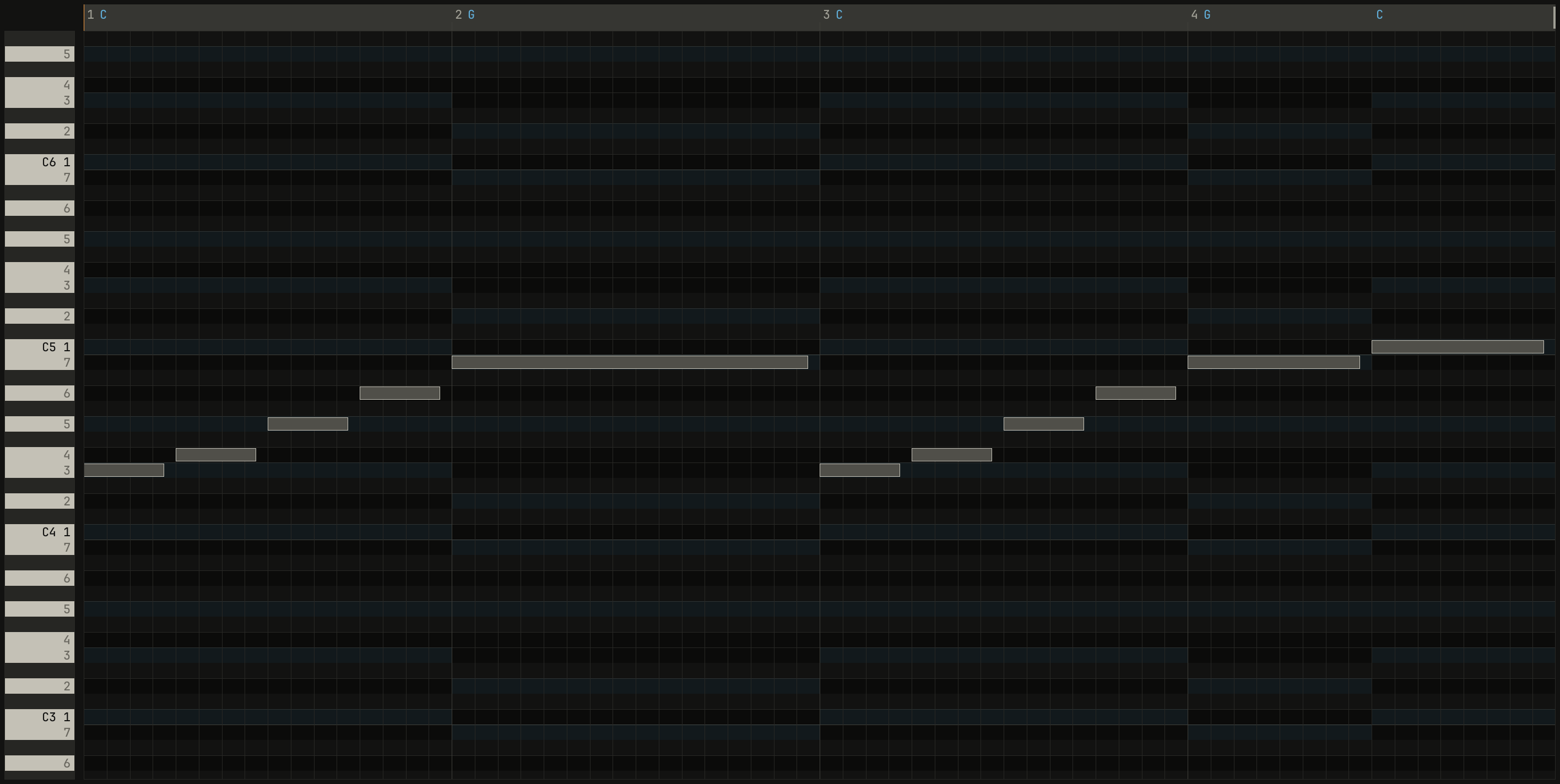
The strongest pull is the 7th, a semitone under home.
0.0 / 10.4 s
peak -18.5 dBFS
openzig build run-studio -- manual/03-keys/pull --view editor
renderzig build run-studio -- render manual/03-keys/pull pull.wav
pull/song.json
{
  "tempo": 92,
  "end": "5",
  "key": ["1 C major"],
  "chords": ["1 C", "2 G", "3 C", "4 G", "4.3 C"],
  "devices": [
    { "name": "synth", "type": "synth", "state": { "parts": [
      { "patch": "A45", "level": 0, "reverb_send": 15 },
      { "patch": "A31", "level": -8, "reverb_send": 20 }
    ] } }
  ],
  "tracks": [
    { "name": "tune", "device": "synth", "channel": 1, "keys": "key", "role": "lead", "clips": [{ "at": "1", "length": "4.0.0", "notes": "tune" }] },
    { "name": "pad", "device": "synth", "channel": 2, "keys": "chord 7", "role": "pad", "clips": [{ "at": "2", "length": "1.0.0", "notes": "pad 2" }, { "at": "4", "length": "1.0.0", "notes": "pad 4" }] }
  ],
  "notes": {
    "tune": {
      "length": "4.0.0",
      "notes": [
        "1.1.0 E4 0.0.840 92", "1.2.0 F4 0.0.840 88", "1.3.0 G4 0.0.840 92", "1.4.0 A4 0.0.840 88",
        "2.1.0 B4 0.3.840 96",
        "3.1.0 E4 0.0.840 92", "3.2.0 F4 0.0.840 88", "3.3.0 G4 0.0.840 92", "3.4.0 A4 0.0.840 88",
        "4.1.0 B4 0.1.840 96", "4.3.0 C5 0.1.840 100"
      ]
    },
    "pad 2": { "length": "1.0.0", "follow": { "pattern": "whole", "low": "F3" } },
    "pad 4": { "length": "1.0.0", "follow": { "pattern": "whole", "low": "F3" } }
  }
}
The first phrase stops on the leading note and waits; the second takes the last semitone home. Ending a phrase on 1 sounds finished, on 5 like a comma, and on 7 or 2 like a question.
Major and minor
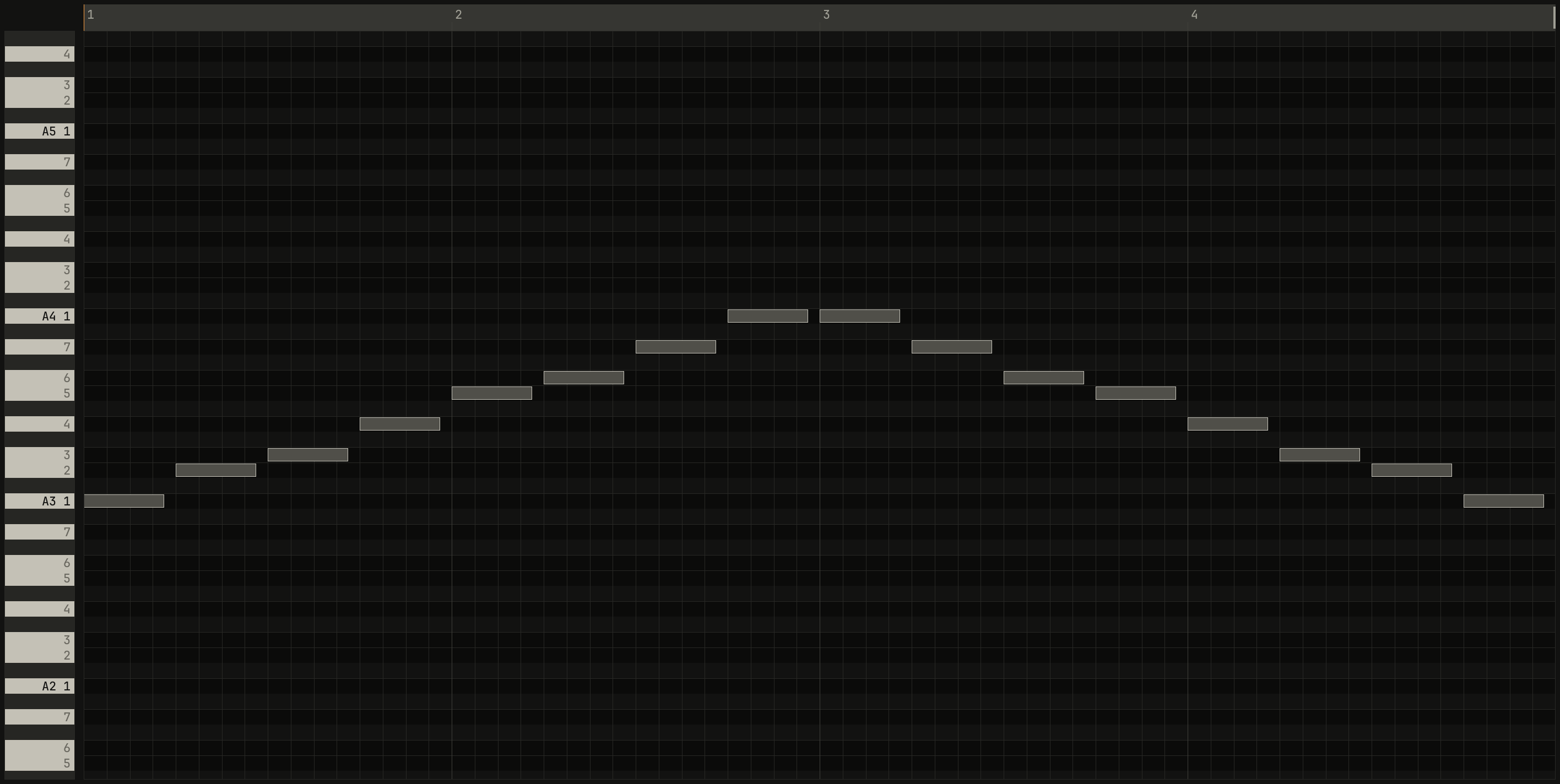
The natural minor scale goes whole, half, whole, whole, half, whole,
whole. From A, that's the white keys again: A minor has exactly C major's
notes, with A as home instead of C. Two keys that share their notes this way
are relative keys. The key list's guess says so when the notes fit
both, with the other beside it: or C major: relative keys share their
notes.
0.0 / 9.6 s
peak -20.3 dBFS
openzig build run-studio -- manual/03-keys/a-minor --view editor
renderzig build run-studio -- render manual/03-keys/a-minor a-minor.wav
a-minor/song.json
{
  "tempo": 100,
  "end": "5",
  "key": ["1 A minor"],
  "devices": [
    { "name": "synth", "type": "synth", "state": { "parts": [{ "patch": "A45", "level": 0, "reverb_send": 15 }] } }
  ],
  "tracks": [
    { "name": "scale", "device": "synth", "channel": 1, "keys": "key", "role": "lead", "clips": [{ "at": "1", "length": "4.0.0", "notes": "a minor" }] }
  ],
  "notes": {
    "a minor": {
      "length": "4.0.0",
      "notes": [
        "1.1.0 A3 0.0.840 96", "1.2.0 B3 0.0.840 88", "1.3.0 C4 0.0.840 92", "1.4.0 D4 0.0.840 88",
        "2.1.0 E4 0.0.840 96", "2.2.0 F4 0.0.840 88", "2.3.0 G4 0.0.840 92", "2.4.0 A4 0.0.840 100",
        "3.1.0 A4 0.0.840 96", "3.2.0 G4 0.0.840 88", "3.3.0 F4 0.0.840 92", "3.4.0 E4 0.0.840 88",
        "4.1.0 D4 0.0.840 92", "4.2.0 C4 0.0.840 88", "4.3.0 B3 0.0.840 90", "4.4.0 A3 0.0.840 96"
      ]
    }
  }
}
The difference is the third. Major's 3rd is four semitones above home, and minor's three: C to E against A to C. That one semitone is most of why major sounds bright and minor dark. C minor, the parallel key of C major, keeps C as home and lowers the 3rd, the 6th, and the 7th: E, A, and B become Eb, Ab, and Bb.
The modes
Start the white keys on another note and you get another mode. Each keeps seven notes and moves one or two of them a semitone from major or minor, and that one note is the mode's color. The studio's key can be in six of them:
| Mode | Steps from home | From C | How it sounds |
|---|---|---|---|
| major | 0 2 4 5 7 9 11 | C D E F G A B | bright and settled |
| minor | 0 2 3 5 7 8 10 | C D Eb F G Ab Bb | dark and sad |
| dorian | 0 2 3 5 7 9 10 | C D Eb F G A Bb | minor, with a brighter 6th |
| phrygian | 0 1 3 5 7 8 10 | C Db Eb F G Ab Bb | minor, with a tense flat 2nd |
| lydian | 0 2 4 6 7 9 11 | C D E F# G A B | major, with a floating sharp 4th |
| mixolydian | 0 2 4 5 7 9 10 | C D E F G A Bb | major, with a bluesy flat 7th |
The words in the last column are the key list's own. Locrian, the seventh mode, is left out: its tonic chord is diminished, and doesn't sound like home.

0.0 / 24.0 s
peak -16.4 dBFS
openzig build run-studio -- manual/03-keys/modes
renderzig build run-studio -- render manual/03-keys/modes modes.wav --from 1 --to 13
modes/song.json
{
  "tempo": 120,
  "end": "13",
  "sections": ["1 major", "3 minor", "5 dorian", "7 phrygian", "9 lydian", "11 mixolydian"],
  "key": ["1 C major", "3 C minor", "5 C dorian", "7 C phrygian", "9 C lydian", "11 C mixolydian"],
  "chords": ["1 C", "3 Cm", "5 Cm", "7 Cm", "9 C", "11 C"],
  "devices": [
    { "name": "synth", "type": "synth", "state": { "parts": [
      { "patch": "A45", "level": 0, "reverb_send": 15 },
      { "patch": "A31", "level": -8, "reverb_send": 20 }
    ] } }
  ],
  "tracks": [
    { "name": "scale", "device": "synth", "channel": 1, "keys": "key", "role": "lead", "clips": [{ "at": "1", "length": "2.0.0", "notes": "major" }, { "at": "3", "length": "2.0.0", "notes": "minor" }, { "at": "5", "length": "2.0.0", "notes": "dorian" }, { "at": "7", "length": "2.0.0", "notes": "phrygian" }, { "at": "9", "length": "2.0.0", "notes": "lydian" }, { "at": "11", "length": "2.0.0", "notes": "mixolydian" }] },
    { "name": "pad", "device": "synth", "channel": 2, "keys": "chord 7", "role": "pad", "clips": [{ "at": "1", "length": "12.0.0", "notes": "pad" }] }
  ],
  "notes": {
    "major": {
      "length": "2.0.0",
      "notes": [
        "1.1.0 C4 0.0.420 96", "1.1.480 D4 0.0.420 84", "1.2.0 E4 0.0.420 96", "1.2.480 F4 0.0.420 84",
        "1.3.0 G4 0.0.420 96", "1.3.480 A4 0.0.420 84", "1.4.0 B4 0.0.420 96", "1.4.480 C5 0.0.420 84",
        "2.1.0 B4 0.0.420 92", "2.1.480 A4 0.0.420 84", "2.2.0 G4 0.0.420 92", "2.2.480 F4 0.0.420 84",
        "2.3.0 E4 0.0.420 92", "2.3.480 D4 0.0.420 84", "2.4.0 C4 0.0.900 96"
      ]
    },
    "minor": {
      "length": "2.0.0",
      "notes": [
        "1.1.0 C4 0.0.420 96", "1.1.480 D4 0.0.420 84", "1.2.0 D#4 0.0.420 96", "1.2.480 F4 0.0.420 84",
        "1.3.0 G4 0.0.420 96", "1.3.480 G#4 0.0.420 84", "1.4.0 A#4 0.0.420 96", "1.4.480 C5 0.0.420 84",
        "2.1.0 A#4 0.0.420 92", "2.1.480 G#4 0.0.420 84", "2.2.0 G4 0.0.420 92", "2.2.480 F4 0.0.420 84",
        "2.3.0 D#4 0.0.420 92", "2.3.480 D4 0.0.420 84", "2.4.0 C4 0.0.900 96"
      ]
    },
    "dorian": {
      "length": "2.0.0",
      "notes": [
        "1.1.0 C4 0.0.420 96", "1.1.480 D4 0.0.420 84", "1.2.0 D#4 0.0.420 96", "1.2.480 F4 0.0.420 84",
        "1.3.0 G4 0.0.420 96", "1.3.480 A4 0.0.420 84", "1.4.0 A#4 0.0.420 96", "1.4.480 C5 0.0.420 84",
        "2.1.0 A#4 0.0.420 92", "2.1.480 A4 0.0.420 84", "2.2.0 G4 0.0.420 92", "2.2.480 F4 0.0.420 84",
        "2.3.0 D#4 0.0.420 92", "2.3.480 D4 0.0.420 84", "2.4.0 C4 0.0.900 96"
      ]
    },
    "phrygian": {
      "length": "2.0.0",
      "notes": [
        "1.1.0 C4 0.0.420 96", "1.1.480 C#4 0.0.420 84", "1.2.0 D#4 0.0.420 96", "1.2.480 F4 0.0.420 84",
        "1.3.0 G4 0.0.420 96", "1.3.480 G#4 0.0.420 84", "1.4.0 A#4 0.0.420 96", "1.4.480 C5 0.0.420 84",
        "2.1.0 A#4 0.0.420 92", "2.1.480 G#4 0.0.420 84", "2.2.0 G4 0.0.420 92", "2.2.480 F4 0.0.420 84",
        "2.3.0 D#4 0.0.420 92", "2.3.480 C#4 0.0.420 84", "2.4.0 C4 0.0.900 96"
      ]
    },
    "lydian": {
      "length": "2.0.0",
      "notes": [
        "1.1.0 C4 0.0.420 96", "1.1.480 D4 0.0.420 84", "1.2.0 E4 0.0.420 96", "1.2.480 F#4 0.0.420 84",
        "1.3.0 G4 0.0.420 96", "1.3.480 A4 0.0.420 84", "1.4.0 B4 0.0.420 96", "1.4.480 C5 0.0.420 84",
        "2.1.0 B4 0.0.420 92", "2.1.480 A4 0.0.420 84", "2.2.0 G4 0.0.420 92", "2.2.480 F#4 0.0.420 84",
        "2.3.0 E4 0.0.420 92", "2.3.480 D4 0.0.420 84", "2.4.0 C4 0.0.900 96"
      ]
    },
    "mixolydian": {
      "length": "2.0.0",
      "notes": [
        "1.1.0 C4 0.0.420 96", "1.1.480 D4 0.0.420 84", "1.2.0 E4 0.0.420 96", "1.2.480 F4 0.0.420 84",
        "1.3.0 G4 0.0.420 96", "1.3.480 A4 0.0.420 84", "1.4.0 A#4 0.0.420 96", "1.4.480 C5 0.0.420 84",
        "2.1.0 A#4 0.0.420 92", "2.1.480 A4 0.0.420 84", "2.2.0 G4 0.0.420 92", "2.2.480 F4 0.0.420 84",
        "2.3.0 E4 0.0.420 92", "2.3.480 D4 0.0.420 84", "2.4.0 C4 0.0.900 96"
      ]
    },
    "pad": { "length": "12.0.0", "follow": { "pattern": "whole", "low": "F3" } }
  }
}
Dorian is the minor of funk, house, and Miles Davis's "So What";
mixolydian the major of rock and the blues; lydian the floating major of
film scores. The band over the sections shows marks after each name, such
as scale~: the coach's count of what changes from one section to the
next, which chapter 8 explains.
Keys that stay in the key
Each track has a way for the keys to play it, plays ▾ in the inspector at
the track list's foot while the track is selected: all, key, pent, or a
kind of chord, which a click lists. The way to play acts wherever a note
comes in, from the letter keys, a MIDI keyboard, or the MiniLab's keys, so all
of them keep one rule:
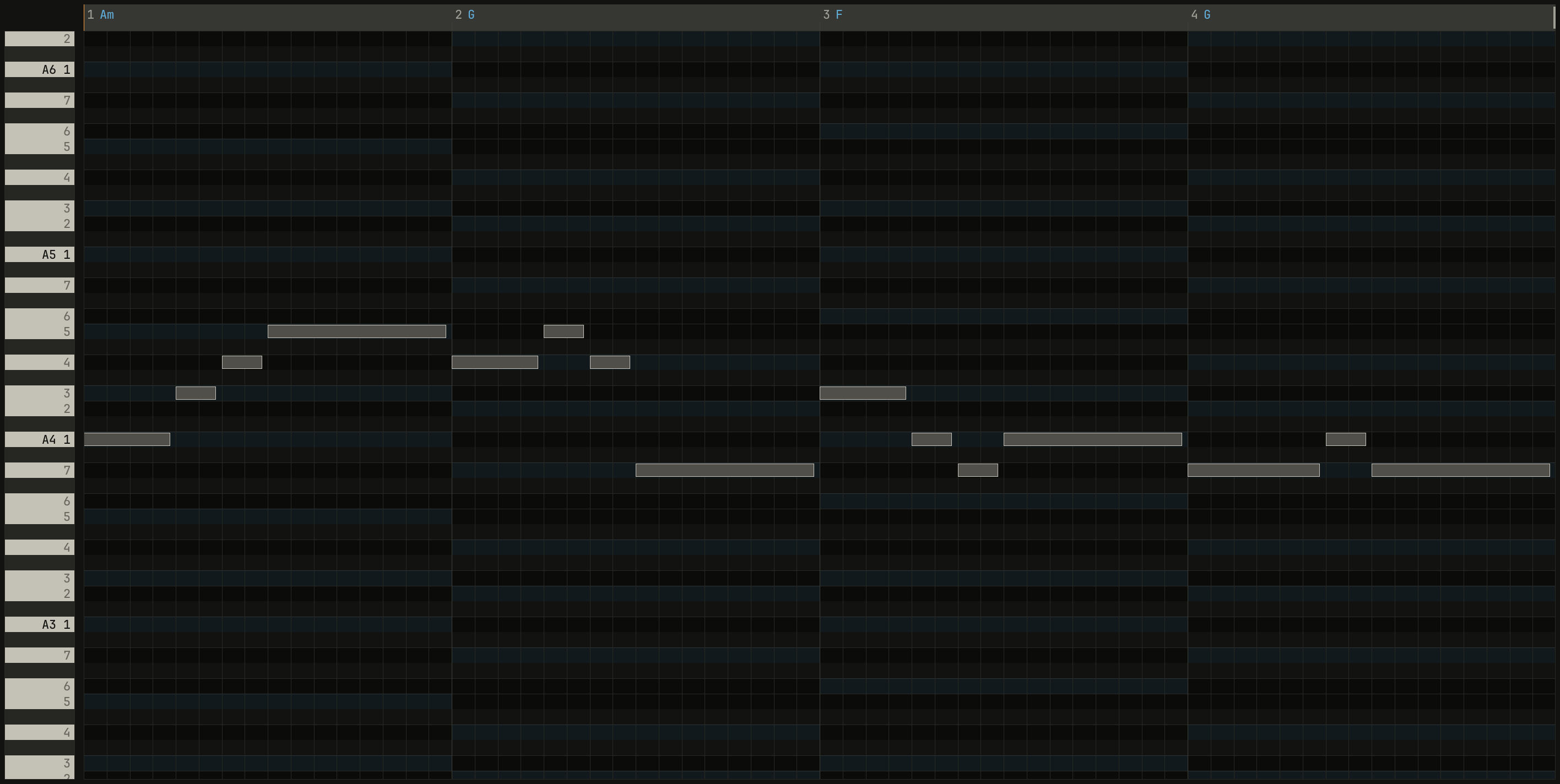
allplays every semitone, as a keyboard does.keyplays the key's seven notes.pentplays five of them, the pentatonic scale: 1 2 3 5 6 in a major mode, and 1 b3 4 5 b7 in a minor one. It leaves out the two notes a semitone from another, so no two notes of it clash, and any order of them sounds like a tune.chordplays a chord under one finger, which is chapter 4's.
0.0 / 9.6 s
peak -18.3 dBFS
pent, in A minor: every note is A, C, D, E, or G, degrees 1, 3, 4, 5, and 7 of the key. A pad holds Am, G, F, and G under it.openzig build run-studio -- manual/03-keys/pent --view editor
renderzig build run-studio -- render manual/03-keys/pent pent.wav
pent/song.json
{
  "tempo": 100,
  "end": "5",
  "key": ["1 A minor"],
  "chords": ["1 Am", "2 G", "3 F", "4 G"],
  "devices": [
    { "name": "synth", "type": "synth", "state": { "parts": [
      { "patch": "A61", "level": -4, "delay_send": 15 },
      { "patch": "A31", "level": -8, "reverb_send": 20 }
    ] } }
  ],
  "tracks": [
    { "name": "lead", "device": "synth", "channel": 1, "keys": "pent", "role": "lead", "clips": [{ "at": "1", "length": "4.0.0", "notes": "lead" }] },
    { "name": "pad", "device": "synth", "channel": 2, "keys": "chord 7", "role": "pad", "clips": [{ "at": "1", "length": "4.0.0", "notes": "pad" }] }
  ],
  "notes": {
    "lead": {
      "length": "4.0.0",
      "notes": [
        "1.1.0 A4 0.0.900 96", "1.2.0 C5 0.0.420 88", "1.2.480 D5 0.0.420 90", "1.3.0 E5 0.1.900 100",
        "2.1.0 D5 0.0.900 94", "2.2.0 E5 0.0.420 88", "2.2.480 D5 0.0.420 88", "2.3.0 G4 0.1.900 96",
        "3.1.0 C5 0.0.900 96", "3.2.0 A4 0.0.420 88", "3.2.480 G4 0.0.420 88", "3.3.0 A4 0.1.900 96",
        "4.1.0 G4 0.1.420 94", "4.2.480 A4 0.0.420 88", "4.3.0 G4 0.1.900 92"
      ]
    },
    "pad": { "length": "4.0.0", "follow": { "pattern": "whole", "low": "F3" } }
  }
}
How the keys reach the key's notes is a window setting, the two keys:
items at the key list's foot:
easy, the first, puts the key's notes on the white keys, from the tonic up, and the black keys play nothing. On the letter keys,Aplays the tonic in the octaveZandXset,Sthe 2nd, and so on: in A minor at octave 4,Aplays A4. The home row,Ato', holds eleven notes, an octave and a half, and inpenttwo octaves.snapkeeps every key where it is on the keyboard, and moves a key outside the scale to the scale's nearest note, the upper one on a tie. You see the key's real shape, and nothing sounds wrong.
easy is for playing at once; snap teaches where a key lies on the
keyboard. In C major they play alike, since its notes are the white keys.
Laurie Spiegel's Music Mouse did the same in 1986, snapping what its mouse
played to a scale chosen from the computer's keys.
What's recorded is what sounded: a pass recorded in pent holds the notes
the keys made, so it plays back the same on a track in all. A device's own
keyboard in its view plays every key as it is, and so does a click on Key
Edit's strip, which sounds the row clicked. A track on a drum machine plays
its voices, whatever its way to play.
Try it in the window
- Open the
pentsong, select the lead, and play along on the home row as it loops. Nothing you press clashes with the pad. - Click the key in the bar and step through the tonics and the modes with
Up and Down, listening to each scale. Try
snapand play the black keys. - In
c-major, rest the pointer on each degree in Key Edit's strip and read what it pulls toward. - In the modes song, mute the pad and listen to the scales alone: the modes sound alike without a home to hear them against.
- Load a song of your own without a key, click
no key ▾in the bar, and see whatguessmakes of it.
Next: chapter 4, chords, several notes of the key at once.