I. From a sound to a voice
Programs and keygroups
One recording can't make an instrument: played far from its root, it stops sounding like what was recorded, and one strike can't be both soft and loud. A program puts many samples together, as the S1000 did: its keygroups span the keys, each playing samples recorded near those keys, and in each keygroup up to four zones of velocity play samples recorded soft and hard. This chapter builds programs, and takes apart the one the library holds, the Salamander Grand Piano.
Open the window on the chapter's first song, the piano struck harder and harder:
zig build run-studio -- manual/sampler/02-programs/layers --view device
Programs
A program is the sound a channel plays: its keygroups, and the controls of
the program page that are the program's. The bank holds 100, numbered 1
to 100, and each of the sixteen channels plays one; channels may share a
program, and a song may hold programs no channel plays. The S1000's manual,
on page 10:
Program: The term for a collection of keygroups which will all be selected together when the program is selected. Different programs can be assigned to different MIDI channels, so that when a sequencer is connected to the S1000, multi-timbral output is possible.
Selecting a program on a channel, with the header's arrows, the program
list in the arrange view, or a program event in a clip, gives the channel
the program's sound. Turning a control of the sound turns it in the
program, so every channel playing that program changes with it, and the
song keeps it there. A program event in a clip reads its number, as
1.1.0 program 2. new, in the header, starts a program on the first
unused number, named program and its number, and selects it; a program
the panel makes as it needs one, for a keygroup added to an empty number,
is named the same way.
Two controls on the program page are the program's own, not sounds of a
voice: voices, how many of the sixteen voices a channel playing it holds
at once, from 1 to 16, and kg xfade, whether its keygroups crossfade where their keys
overlap.
Keygroups
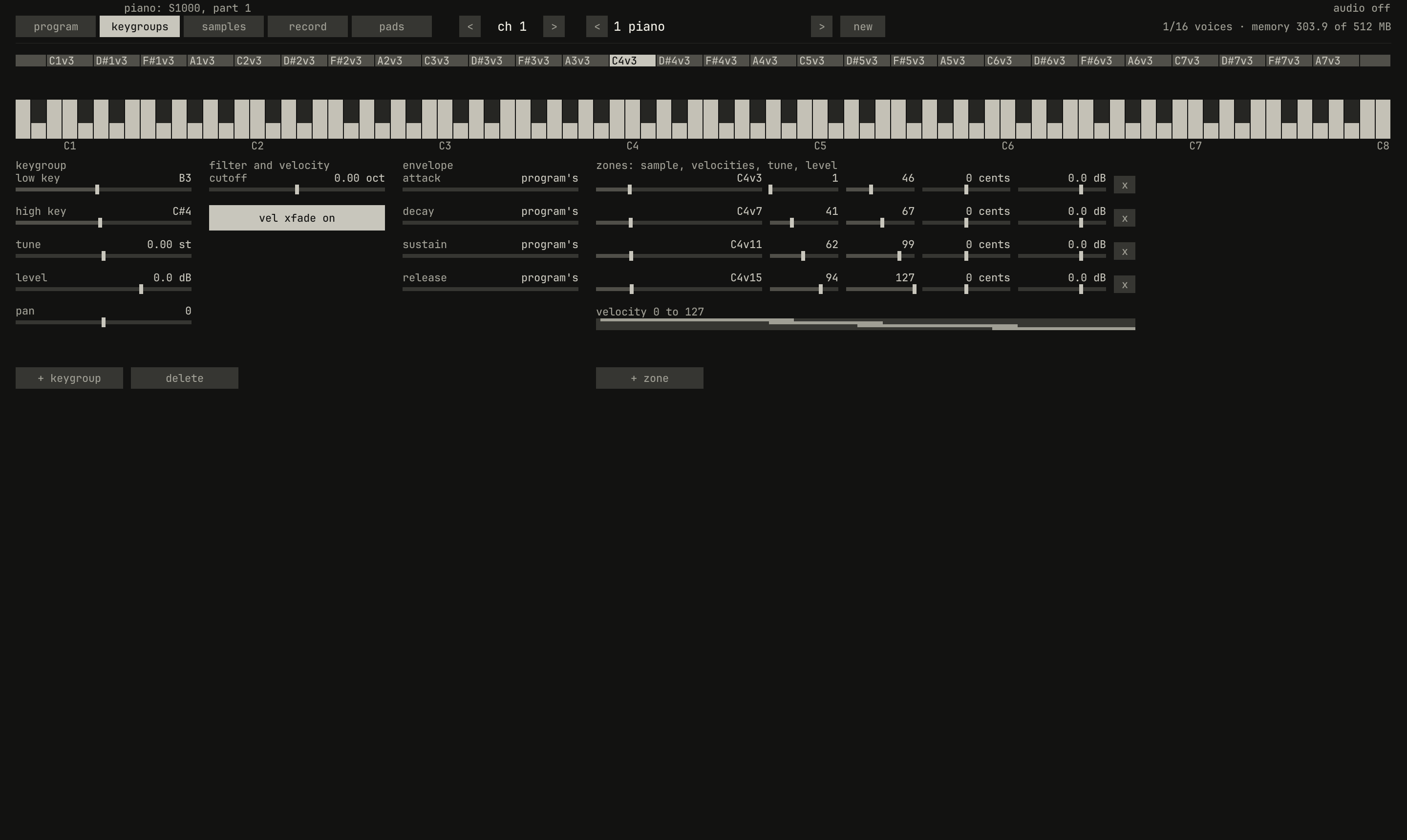
C4v3 to C4v15, with their velocities drawn under them.scriptzig build run-studio -- manual/sampler/02-programs/layers --view device --track 1 --script manual/sampler/02-programs/select.txt
layers/song.json
{
  "tempo": 120,
  "end": "5",
  "devices": [{
    "name": "S1000",
    "type": "sampler",
    "state": {
      "channels": [{ "channel": 1, "program": 1 }],
      "programs": [{ "program": 1, "file": "programs/piano.json" }]
    }
  }],
  "tracks": [{
    "name": "piano",
    "device": "S1000",
    "channel": 1,
    "clips": [{ "at": "1", "length": "4.0.0", "notes": "harder" }]
  }],
  "notes": {
    "harder": {
      "length": "4.0.0",
      "notes": ["1.1.0 C4 0.3.0 20", "2.1.0 C4 0.3.0 54", "3.1.0 C4 0.3.0 80", "4.1.0 C4 0.3.0 120"]
    }
  }
}
select.txt
# The keygroups page, with C4 clicked low on its key: the keygroup that
# plays it is selected, and its four zones fill the fields.
click 143 67
wait 0.1
click 648 175
wait 0.3
capture select.png
A keygroup spans keys from its low key to its high key, and plays its
zones' samples on them, each from its own root. It adds to the program's
sound a tune of its own, from −48 to 48 semitones, a level, from −60 to
24 dB, a pan, and a cutoff, octaves above or below the program's
filter. Its envelope, attack, decay, sustain, and release, reads
program's until one is set, and then replaces the program's amplifier
envelope for its notes; a double-click puts it back to the program's. The
S1000's manual, on page 10:
Keygroup: The term for a collection of a number of parameters of up to four samples - their name, keyspan, filtering, envelopes, etc.
The bars over the keyboard are the keygroups, lowest first, in up to three lanes where they overlap, each named for its first zone's sample; the selected one is bright, and any a voice is playing is amber. The keyboard shows a piano's 88 keys, and further either way if a keygroup reaches past them; in a song with a key, the notes outside it are dimmed. A click on a key plays it, at a velocity from soft at its top edge to full at its bottom, and selects the keygroup that plays it; a click on a bar selects that keygroup.
+ keygroup adds a keygroup above the program's highest one, from the
next key up to G9, or over every key in a program that has none, playing
the sample selected on the samples page. delete takes the selected
keygroup away. map to keys, on the samples page, adds a keygroup over
every key playing the sample selected there, so every key plays it around
its root.
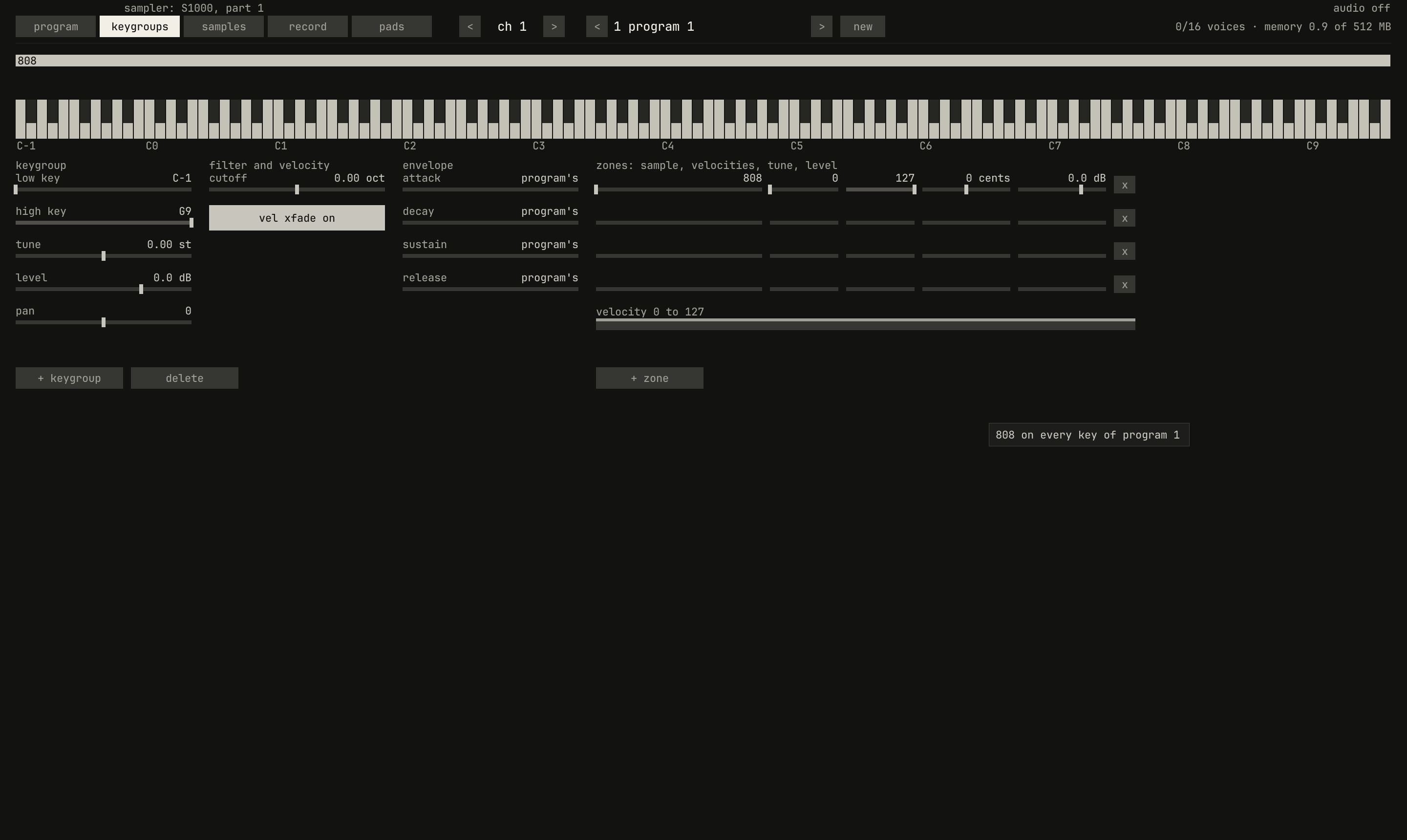
breaks/808.wav and pressing map to keys: one keygroup, 808, over every key from C−1 to G9, which stretches the keyboard to show them all.scriptzig build run-studio -- manual/sampler/02-programs/empty --view device --track 1 --script manual/sampler/02-programs/map.txt
empty/song.json
{
  "tempo": 120,
  "end": "2",
  "devices": [{ "name": "S1000", "type": "sampler" }],
  "tracks": [{ "name": "sampler", "device": "S1000", "channel": 1 }]
}
map.txt
# Load the 808 break from the library, put it on every key with map to
# keys, and show the keygroups page.
click 229 67
wait 0.1
click 100 541
wait 0.1
click 100 523
wait 0.1
click 998 455
wait 0.1
click 143 67
wait 0.1
capture map.png
A program holds as many keygroups as the bank has free, 512 among all the programs, more than the S1000's 99. A note plays every keygroup whose keys hold it, up to eight samples at once.
Velocity zones
0.0 / 8.0 s
peak -1.7 dBFS
C4v3, C4v7, C4v11, and C4v15, recordings of four strengths of strike. Listen for the tone brightening as well as the level rising.openzig build run-studio -- manual/sampler/02-programs/layers
renderzig build run-studio -- render manual/sampler/02-programs/layers layers.wav
layers/song.json
{
  "tempo": 120,
  "end": "5",
  "devices": [{
    "name": "S1000",
    "type": "sampler",
    "state": {
      "channels": [{ "channel": 1, "program": 1 }],
      "programs": [{ "program": 1, "file": "programs/piano.json" }]
    }
  }],
  "tracks": [{
    "name": "piano",
    "device": "S1000",
    "channel": 1,
    "clips": [{ "at": "1", "length": "4.0.0", "notes": "harder" }]
  }],
  "notes": {
    "harder": {
      "length": "4.0.0",
      "notes": ["1.1.0 C4 0.3.0 20", "2.1.0 C4 0.3.0 54", "3.1.0 C4 0.3.0 80", "4.1.0 C4 0.3.0 120"]
    }
  }
}
A keygroup's four rows of zones, under zones: sample, velocities, tune,
level, are its samples. Each plays when a note's velocity falls between
its low and high velocity, with its own tune, in cents, and level, in dB,
and + zone adds one playing the sample selected on the samples page;
x takes one away. The velocity bar below draws each zone's range on a
lane of its own. The S1000's manual says why, on page 57:
Within a keygroup, these four samples can be set to play at different velocities. The tonal characteristics of acoustic instruments can vary radically from loud to soft (a classic example of an instrument which does this is the Japanese end-blown flute, the shakuhachi), and so you may want to take a few samples of the same instrument being played at different volumes, as well as different pitches.
A piano is such an instrument. Struck at 120, the C4 peaks 22.6 dB above
the C4 struck at 20; about 10 dB of that is the program's velocity
control (chapter 3), and the rest is the
recordings. The two spectra show more than the level: in the soft strike,
the eighth partial is 39 dB under the fundamental, and in the hard strike
23 dB under, so the hard strike is brighter.
With vel xfade on, as a new keygroup has it, zones whose velocities
overlap crossfade there: a note in the overlap plays both, each at a
share of its level that falls across the overlap toward the zone's edge,
and the two shares always sum to one, so two recordings of one sound keep
one level through it. The piano's zones overlap by six velocities, and at
velocity 44, in the overlap of its first two zones, from 41 to 46, the
first plays at 3/7 of its level and the second at 4/7. With vel xfade
off, zones that overlap layer, each at its full level: the S1000's manual
suggests strings played softly with brass added when played harder. Zones
that start on the same velocity, or one inside another, layer either
way.
Keygroups that overlap
Keygroups may overlap too, as zones do, and with kg xfade on, as a new
program has it, they crossfade over the keys they share, the S1000's
"overlapping group CROSSFADE". Its manual, on page 52: "If ON, then any
keygroups whose keyspans overlap will automatically be crossfaded at the
overlap points, giving a smoother sound for multisampled programs." A
keygroup from C2 to E4 overlapping one from C4 to C6 shares five keys: on
C4 the lower plays at 5/6 and the upper at 1/6, on D4 each at half, and on
E4 the lower at 1/6 and the upper at 5/6. With kg xfade off, both play in
full, a layer.
The piano
The library's piano, programs/piano.json, is the Salamander Grand Piano,
a Yamaha C5 recorded by Alexander Holm in 16 velocity layers on every third
key, at 48 kHz and 24 bits. The program holds 30 keygroups from A0 to C8,
each two or three keys around the key its samples were recorded on, so no
key plays a sample more than a semitone from its root. Each keygroup has
four zones, from velocity 1 to 46, 41 to 67, 62 to 99, and 94 to 127,
playing the third, seventh, eleventh, and fifteenth of the sixteen layers:
120 samples, 303 MB of the sample memory. Its velocity is 73%, its
release a second, and its top seven keygroups, from F6 up, where a piano
has no dampers, keep a release of their own of five seconds.
The S1000's manual, on page 10, names what it is:
Multisampling: When sampling a sound, replaying it at a radically higher or lower pitch will produce strange and unnatural effects. To overcome this problem, samples should be taken from across the pitch range of an instrument and assigned to different keyspans across the keyboard. This is known as multisampling.
A note on the piano plays one zone, or two in an overlap, a voice each, so sixteen voices hold eight notes at least. A chord held with the pedal down uses them fast; chapter 3 says which voice goes when a new note needs one.
SFZ
The piano came from SFZ, the text format most free multisamples are
written in, which studio import-sfz reads into a program file:
studio import-sfz library/my-kit/kit.sfz library/programs/kit.json --name kit
The SFZ has to be in the library folder, where the program's samples are
named. The import reads the part of SFZ a multisample needs: the samples
and their key ranges, velocity ranges, root keys, tuning, transposition,
levels, pan, offsets and ends, loops, the amplifier's envelope, and how
much velocity sets the level, from the <control>, <global>, <master>,
<group>, and <region> headers.
- Regions on one key range become one keygroup. More than four, as a piano's velocity layers, fold into four zones: the layers split into four bands, each zone plays the layer above its band's middle, and neighbouring zones overlap by six velocities, where they crossfade.
- The envelope and velocity come from the first region, and the release from what most regions have; a keygroup whose release differs keeps its own.
- Loops come from
loop_startandloop_end, or the file's own loops;loop_continuousplays in release,loop_sustainuntil release, andone_shotas one shot. - Left out: regions played by a key coming up, as a piano's release
noises, round robins after the first, the pedal's samples, and every
opcode the program has no place for, such as filters, LFOs, and
off_by.
The Salamander's SFZ has 641 regions. The import makes 30 keygroups and 120
samples of them, folds the velocity layers of all 30, and leaves out 161
regions, its release noises and the pedal's. --name names the program,
and a program file loads with a click in the library on the samples
page, into the program the channel plays, or by its name in a song
(chapter 7).
Next: chapter 3, the voice, which plays a sample at its pitch, filters it, and shapes it.