I. From a sound to a voice
Samples
A sample is a stretch of a recording: a WAV file in the library, the key it
was recorded at, where it starts and ends, a gain, and its loops. None of
those change the file. Trimming, looping, and normalizing a sample set
numbers that say how to play it, so the recording stays as it was made,
and one recording can be many samples, as a break's sixteen slices are.
This chapter is about one sample at a time, on the samples page: loading
it, tuning it, trimming it, and looping it so a short recording sustains as
long as a key is held.
Open the window on the chapter's first song, which has a sampler and nothing in it:
zig build run-studio -- manual/sampler/01-samples/empty --view device
Files and the library
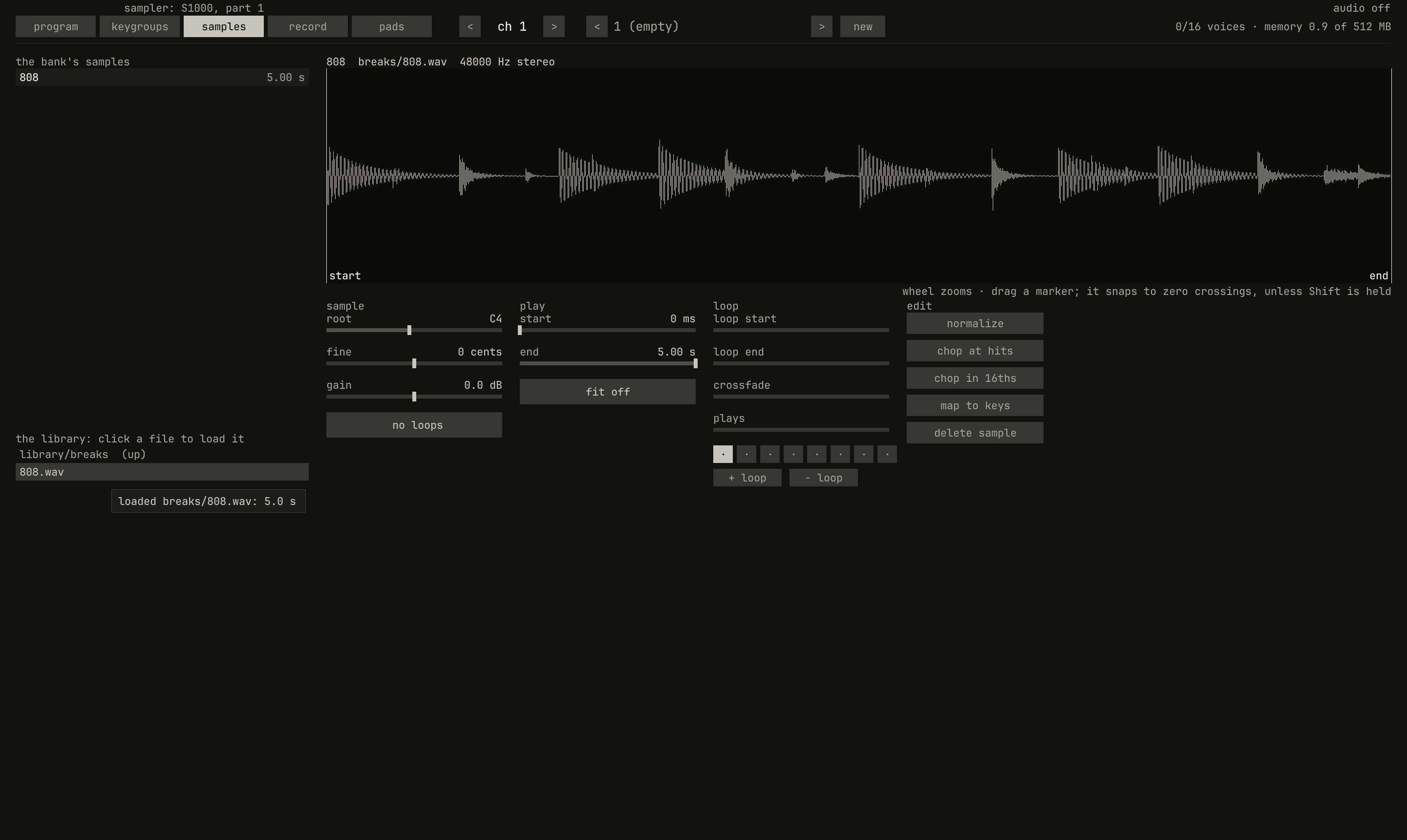
samples page of an empty sampler, after a click on breaks/ in the library and one on 808.wav: the break is the bank's first sample, selected, and its waveform fills the top.scriptzig build run-studio -- manual/sampler/01-samples/empty --view device --track 1 --script manual/sampler/01-samples/library.txt
empty/song.json
{
  "tempo": 120,
  "end": "2",
  "devices": [{ "name": "S1000", "type": "sampler" }],
  "tracks": [{ "name": "sampler", "device": "S1000", "channel": 1 }]
}
library.txt
# The samples page on an empty sampler: open breaks/ in the library and
# load 808.wav, which becomes the bank's first sample.
click 229 67
wait 0.1
click 100 541
wait 0.1
click 100 523
wait 0.1
capture library.png
The sampler plays WAV files, 16, 24, or 32-bit, or 32-bit float, mono or
stereo, at any sample rate. It finds them in the library folder, library/
unless --library DIR names another, and names each by its place there,
as breaks/808.wav, so a song that names it finds it on any machine whose
library holds it.
The lower list on the page is the library. Its first line is the folder it
shows, with (up) to go back; then the folders in it, then its WAV files
and program files. A click on a folder opens it, and a click on a WAV file
loads it as a new sample, named after the file, and selects it; a note
says how long it is. The upper list is the bank's samples, 256 at
most, each with how long it plays: a click selects one. A sample still
loading reads loading, and one whose file isn't there reads missing,
in red, and plays nothing. A WAV file dropped on the device view loads
into the selected track's sampler too, and one dropped on the arrange view
goes on a track of its own (chapter 6).
A file loads once however many samples play it, into the sample memory,
one pool every sampler shares, 512 MB unless --sample-memory MB says
otherwise. The pool holds 16-bit frames, the S1000's, whatever the file
held; the header's memory says how much of it the bank's sounds take.
When a song opens, the studio reads each file's header and takes its room,
and a thread of its own reads the frames, so the song opens at once and
each sample sounds once it has arrived. A render, a capture, and a window
script load every sample before they start, so they play the same every
time. A sound stays in the pool until another song opens that doesn't name
it; a sample deleted from a song keeps its room until then. The pool holds
1024 sounds, and a file that doesn't fit fails to load, with the message
the sample memory is full: give the studio more with --sample-memory.
A file with a smpl chunk, as many sample libraries write them, brings its
root, its fine tuning, and its loops when it loads from the list.
The root key
0.0 / 6.0 s
peak -4.5 dBFS
openzig build run-studio -- manual/sampler/01-samples/root
renderzig build run-studio -- render manual/sampler/01-samples/root root.wav
root/song.json
{
  "tempo": 120,
  "end": "4",
  "devices": [{
    "name": "S1000",
    "type": "sampler",
    "state": {
      "channels": [{ "channel": 1, "program": 1 }],
      "programs": [{
        "program": 1,
        "name": "one C",
        "keygroups": [{ "keys": "C-1 G9", "zones": [{ "sample": "C4" }] }]
      }],
      "samples": {
        "C4": { "file": "SalamanderGrandPianoV3_48khz24bit/48khz24bit/C4v11.wav", "root": "C4" }
      }
    }
  }],
  "tracks": [{
    "name": "piano",
    "device": "S1000",
    "channel": 1,
    "clips": [{ "at": "1", "length": "3.0.0", "notes": "octaves" }]
  }],
  "notes": {
    "octaves": {
      "length": "3.0.0",
      "notes": ["1.1.0 C3 0.3.0 127", "2.1.0 C4 0.3.0 127", "3.1.0 C5 0.3.0 127"]
    }
  }
}
Each sample has a root: the key that plays it as it was recorded. Every other key plays it a semitone a key away, by playing it faster or slower, as a tape played at another speed does: an octave up plays it twice as fast, at twice the pitch, and it lasts half as long; an octave down, half as fast and twice as long. The level plot overlays the three notes from each one's start. The C4 falls about 23 dB a second, the C5 about 46 until it reaches the hum the strings leave, and the C3 about 10: the whole recording, its decay with it, plays at another speed.
A file without a root in a smpl chunk loads with its root at C4. On the
page, root sets it, from C−1 to G9, and fine says how many cents sharp
of it the recording sounds, from −100 to 100, so the sampler can take them
off: a C4 recorded 20 cents sharp, with root at C4 and fine at 20,
plays in tune. The S1000 called the root the original pitch, and its manual
says, on page 34:
Make this parameter equal to the pitch of the sample source. For unpitched sounds, of course, this can be any value.
A recording played far from its root stops sounding like what was recorded: the C3 here is a slower, duller piano, not a lower one, and its noises are slowed down with it. The cure is more recordings, a few keys apart, each played near its own root, which is what a program's keygroups are for (chapter 2).
Start, end, and gain
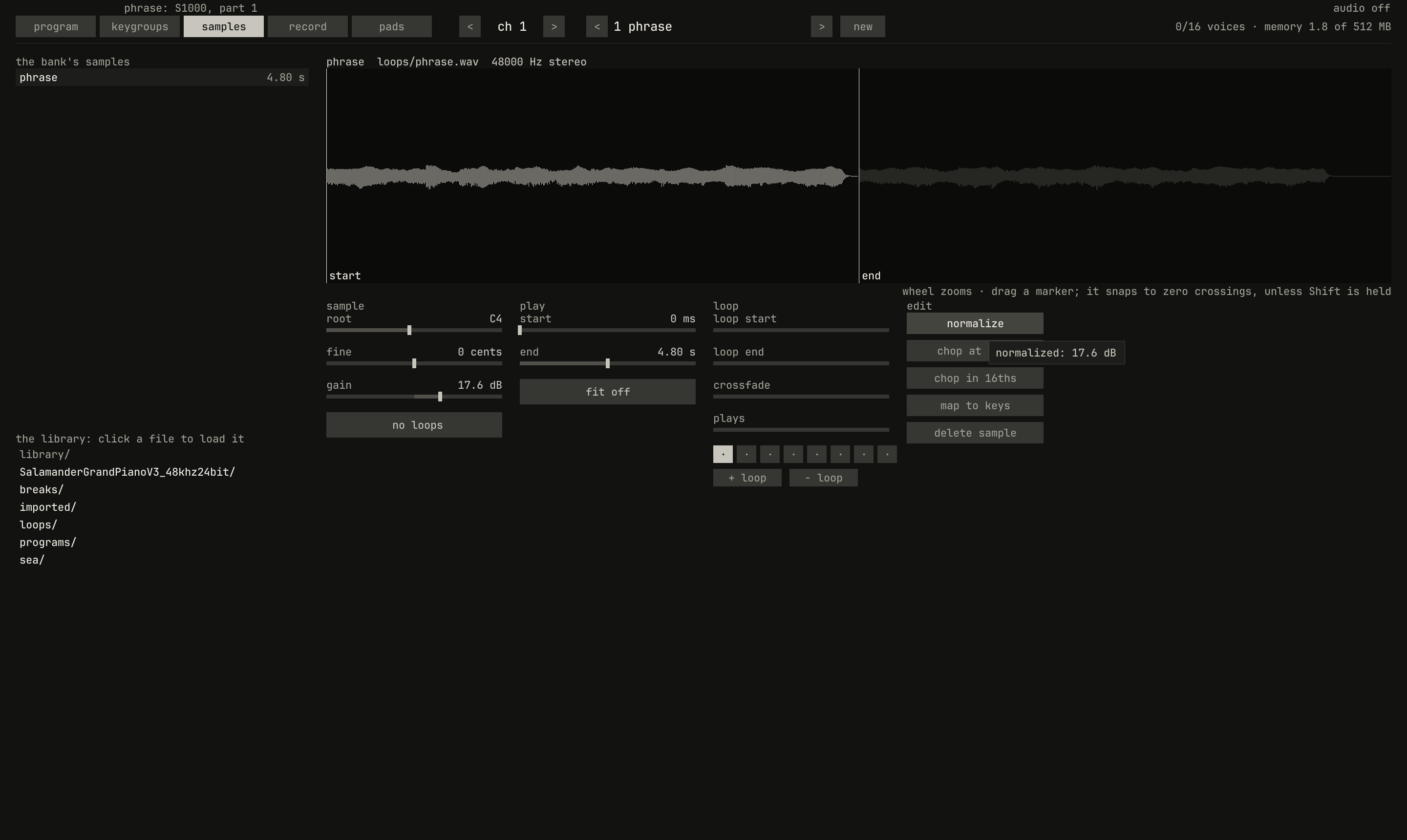
loops/phrase.wav, trimmed to its first two bars, after a click on normalize: gain reads 17.6 dB, the level that brings the loudest frame between start and end to full scale.scriptzig build run-studio -- manual/sampler/01-samples/phrase --view device --track 1 --script manual/sampler/01-samples/normalize.txt
phrase/song.json
{
  "tempo": 100,
  "end": "5",
  "devices": [{
    "name": "S1000",
    "type": "sampler",
    "state": {
      "channels": [{ "channel": 1, "program": 1 }],
      "programs": [{
        "program": 1,
        "name": "phrase",
        "keygroups": [{ "keys": "C-1 G9", "zones": [{ "sample": "phrase" }] }]
      }],
      "samples": {
        "phrase": { "file": "loops/phrase.wav", "root": "C4", "end": 230400 }
      }
    }
  }],
  "tracks": [{
    "name": "phrase",
    "device": "S1000",
    "channel": 1,
    "clips": [{ "at": "1", "length": "2.0.0", "notes": "once" }]
  }],
  "notes": {
    "once": { "length": "2.0.0", "notes": ["1.1.0 C4 2.0.0 127"] }
  }
}
normalize.txt
# The samples page, and normalize pressed on the phrase's first two bars.
click 229 67
wait 0.1
click 998 371
wait 0.1
capture normalize.png
start and end trim the sample: what plays runs from one to the other,
and the waveform draws it bright and the rest dim. Each is a marker on the
waveform too, which a drag moves. A point dragged snaps to the nearest
frame within 3 ms where the sound's first channel crosses zero, so the cut
lands where the wave is silent; Shift held as it's dragged leaves it where
it's put. The wheel over the waveform zooms around the pointer, down to 64
frames across. The last 2 ms before a sample's end fade out, so a slice that
stops in the middle of a sound doesn't click.
gain raises or lowers the sample, from −60 to 60 dB, as it plays.
normalize sets it to bring the loudest frame between start and end
to full scale, and says how far. The phrase was rendered by the studio at
its usual level, its peak 17.6 dB below full scale, so normalize lifts it
by that. As with every edit here, the frames stay as they were. On the
S1000, a trim cut the frames away, and its manual warns, on page 38, "there is no way of getting the trimmed portion back, except by
reloading the 'raw' sample from disk." Here, start dragged back to 0
brings it back.
Loops
0.0 / 9.6 s
peak -5.6 dBFS
openzig build run-studio -- manual/sampler/01-samples/stutter
renderzig build run-studio -- render manual/sampler/01-samples/stutter stutter.wav
stutter/song.json
{
  "tempo": 100,
  "end": "5",
  "devices": [{
    "name": "S1000",
    "type": "sampler",
    "state": {
      "channels": [{ "channel": 1, "program": 1 }],
      "programs": [{
        "program": 1,
        "name": "stutter",
        "sound": { "release": 30 },
        "keygroups": [{ "keys": "C-1 G9", "zones": [{ "sample": "phrase" }] }]
      }],
      "samples": {
        "phrase": {
          "file": "loops/phrase.wav", "root": "C4", "end": 230400, "gain": 12, "mode": "until_release",
          "loops": ["0 28800 0 4", "70150 96164 4800 hold"]
        }
      }
    }
  }],
  "tracks": [{
    "name": "phrase",
    "device": "S1000",
    "channel": 1,
    "clips": [{ "at": "1", "length": "4.0.0", "notes": "held" }]
  }],
  "notes": {
    "held": { "length": "4.0.0", "notes": ["1.1.0 C4 2.0.0 127"] }
  }
}
A loop is a stretch of the sample that plays again: when playing reaches its end, it jumps back to its start. A loop plays a number of times, from 1 to 100, or holds, playing for as long as the key is down. A sample has up to eight, which play in order, each when playing reaches it. The S1000 had the same, and its manual's example, on page 39, is what this song does:
For example, in the illustration below, the vocal phrase "Pump up the house" has been recorded. When it is to be replayed, we want a "stutter" effect on the first part of the word "pump", and the final "s" of the word "house" to be looped as long as the key is held down, and then to fade out. We achieve this by setting two loop points - one for a finite time, which gives us four repetitions of the "pu" sound, and the last loop is set to "HOLD" (an infinite time) to give us the effect we want.
Here the first loop is the phrase's first beat, from frame 0 to 28800, a beat at 100 BPM, which the song's tempo is, so its four passes keep time. The second is 0.54 s of the held E5, three cycles of its vibrato, so the pitch at the loop's end meets the pitch at its start. The S1000 counted a loop's time in milliseconds and played as many whole passes as fitted; this sampler counts the passes.
What the loops do when the key comes up depends on the sample's mode, the S1000's four:
mode |
On the page | The S1000's | What the key does |
|---|---|---|---|
in_release |
in release |
LOOP IN RELEASE | The loops play on through the release, as the sound fades. |
until_release |
until release |
LOOP UNTIL RELEASE | The loop playing finishes its pass and plays once more, then the rest of the sample plays as it fades. |
none |
no loops |
NO LOOPING | The sample plays straight through, loops or not, until the key comes up. |
one_shot |
one shot |
PLAY TO SAMPLE END | The sample plays to its end whatever the key does, as a drum hit. |
The S1000's manual says what until release is for, on page 45: "a useful setting for sounds which have a definite attack, an indefinite sustain period (set with the loop), and a definite release characteristic." In every mode but one shot the key coming up starts the release of the amplifier's envelope too, so what the sample plays after it is heard only as long as the release lasts; these songs set it to 3 or 30 seconds, where a new program's is 0.3.
0.0 / 9.6 s
peak -1.6 dBFS
openzig build run-studio -- manual/sampler/01-samples/modes
renderzig build run-studio -- render manual/sampler/01-samples/modes keyup.wav --from 1 --to 5
modes/song.json
{
  "tempo": 100,
  "end": "9",
  "devices": [{
    "name": "S1000",
    "type": "sampler",
    "state": {
      "channels": [{ "channel": 1, "program": 1 }],
      "programs": [{
        "program": 1,
        "name": "modes",
        "sound": { "release": 3 },
        "keygroups": [
          { "keys": "C4", "zones": [{ "sample": "in release" }] },
          { "keys": "D4", "zones": [{ "sample": "until release" }] },
          { "keys": "E4", "zones": [{ "sample": "no loops" }] },
          { "keys": "F4", "zones": [{ "sample": "one shot" }] }
        ]
      }],
      "samples": {
        "in release": { "file": "loops/phrase.wav", "root": "C4", "end": 230400, "gain": 16, "mode": "in_release", "loops": ["70150 96164 4800 hold"] },
        "until release": { "file": "loops/phrase.wav", "root": "D4", "end": 230400, "gain": 16, "mode": "until_release", "loops": ["70150 96164 4800 hold"] },
        "no loops": { "file": "loops/phrase.wav", "root": "E4", "end": 230400, "gain": 16, "mode": "none", "loops": ["70150 96164 4800 hold"] },
        "one shot": { "file": "loops/phrase.wav", "root": "F4", "end": 230400, "gain": 16, "mode": "one_shot", "loops": ["70150 96164 4800 hold"] }
      }
    }
  }],
  "tracks": [{
    "name": "phrase",
    "device": "S1000",
    "channel": 1,
    "clips": [{ "at": "1", "length": "8.0.0", "notes": "keys" }]
  }],
  "notes": {
    "keys": {
      "length": "8.0.0",
      "notes": ["1.1.0 C4 1.0.0 127", "3.1.0 D4 1.0.0 127", "5.1.0 E4 0.1.0 127", "7.1.0 F4 0.1.0 127"]
    }
  }
}0.0 / 9.6 s
peak -1.6 dBFS
openzig build run-studio -- manual/sampler/01-samples/modes
renderzig build run-studio -- render manual/sampler/01-samples/modes oneshot.wav --from 5 --to 9
modes/song.json
{
  "tempo": 100,
  "end": "9",
  "devices": [{
    "name": "S1000",
    "type": "sampler",
    "state": {
      "channels": [{ "channel": 1, "program": 1 }],
      "programs": [{
        "program": 1,
        "name": "modes",
        "sound": { "release": 3 },
        "keygroups": [
          { "keys": "C4", "zones": [{ "sample": "in release" }] },
          { "keys": "D4", "zones": [{ "sample": "until release" }] },
          { "keys": "E4", "zones": [{ "sample": "no loops" }] },
          { "keys": "F4", "zones": [{ "sample": "one shot" }] }
        ]
      }],
      "samples": {
        "in release": { "file": "loops/phrase.wav", "root": "C4", "end": 230400, "gain": 16, "mode": "in_release", "loops": ["70150 96164 4800 hold"] },
        "until release": { "file": "loops/phrase.wav", "root": "D4", "end": 230400, "gain": 16, "mode": "until_release", "loops": ["70150 96164 4800 hold"] },
        "no loops": { "file": "loops/phrase.wav", "root": "E4", "end": 230400, "gain": 16, "mode": "none", "loops": ["70150 96164 4800 hold"] },
        "one shot": { "file": "loops/phrase.wav", "root": "F4", "end": 230400, "gain": 16, "mode": "one_shot", "loops": ["70150 96164 4800 hold"] }
      }
    }
  }],
  "tracks": [{
    "name": "phrase",
    "device": "S1000",
    "channel": 1,
    "clips": [{ "at": "1", "length": "8.0.0", "notes": "keys" }]
  }],
  "notes": {
    "keys": {
      "length": "8.0.0",
      "notes": ["1.1.0 C4 1.0.0 127", "3.1.0 D4 1.0.0 127", "5.1.0 E4 0.1.0 127", "7.1.0 F4 0.1.0 127"]
    }
  }
}
Crossfades
0.0 / 8.0 s
peak -4.5 dBFS
openzig build run-studio -- manual/sampler/01-samples/seam
renderzig build run-studio -- render manual/sampler/01-samples/seam seam.wav
seam/song.json
{
  "tempo": 120,
  "end": "5",
  "devices": [{
    "name": "S1000",
    "type": "sampler",
    "state": {
      "channels": [{ "channel": 1, "program": 1 }],
      "programs": [{
        "program": 1,
        "name": "seams",
        "keygroups": [
          { "keys": "C4", "zones": [{ "sample": "no crossfade" }] },
          { "keys": "D4", "zones": [{ "sample": "crossfade" }] }
        ]
      }],
      "samples": {
        "no crossfade": { "file": "SalamanderGrandPianoV3_48khz24bit/48khz24bit/C4v11.wav", "root": "C4", "mode": "in_release", "loops": ["48000 60000 0 hold"] },
        "crossfade": { "file": "SalamanderGrandPianoV3_48khz24bit/48khz24bit/C4v11.wav", "root": "D4", "mode": "in_release", "loops": ["48000 60000 6000 hold"] }
      }
    }
  }],
  "tracks": [{
    "name": "piano",
    "device": "S1000",
    "channel": 1,
    "clips": [{ "at": "1", "length": "4.0.0", "notes": "held" }]
  }],
  "notes": {
    "held": { "length": "4.0.0", "notes": ["1.1.0 C4 1.3.0 127", "3.1.0 D4 1.3.0 127"] }
  }
}
Where a loop jumps back, the wave at its end meets the wave at its start, and if they don't meet, the jump is a step in the wave, a click on every pass. The S1000's manual gives the rules, on page 41:
Try to match up levels between looped portions and samples (zero crossing points), so that there are no sudden "glitch" points.
As well as the level being the same, the overall direction of the two curves (as shown in the right side of the display) should match (ie both should be rising or both falling).
The snap to zero crossings matches the levels, though not always the directions, since it takes the nearest crossing either way. What hides the seam is the crossfade: over the frames before the loop's end, the sampler fades from them into the same number of frames before the loop's start, so the end of each pass turns into what led up to the start, and the jump lands where the wave already is. It's worked out as the voice plays, on the passes that jump back, so the frames stay as recorded; the S1000's X-FD button did the same by rewriting the sample, which its manual says "will permanently alter the sample" (page 41). A crossfade is no longer than the loop, or than the frames before the loop's start; the panel takes up to 96,000, two seconds at 48 kHz.
A loop that's short against the sound's pitch has its own pitch, its passes a second; the S1000's manual on page 42: "Loop lengths which are too short will generate harmonics - a 'tuned buzz'."
The samples page
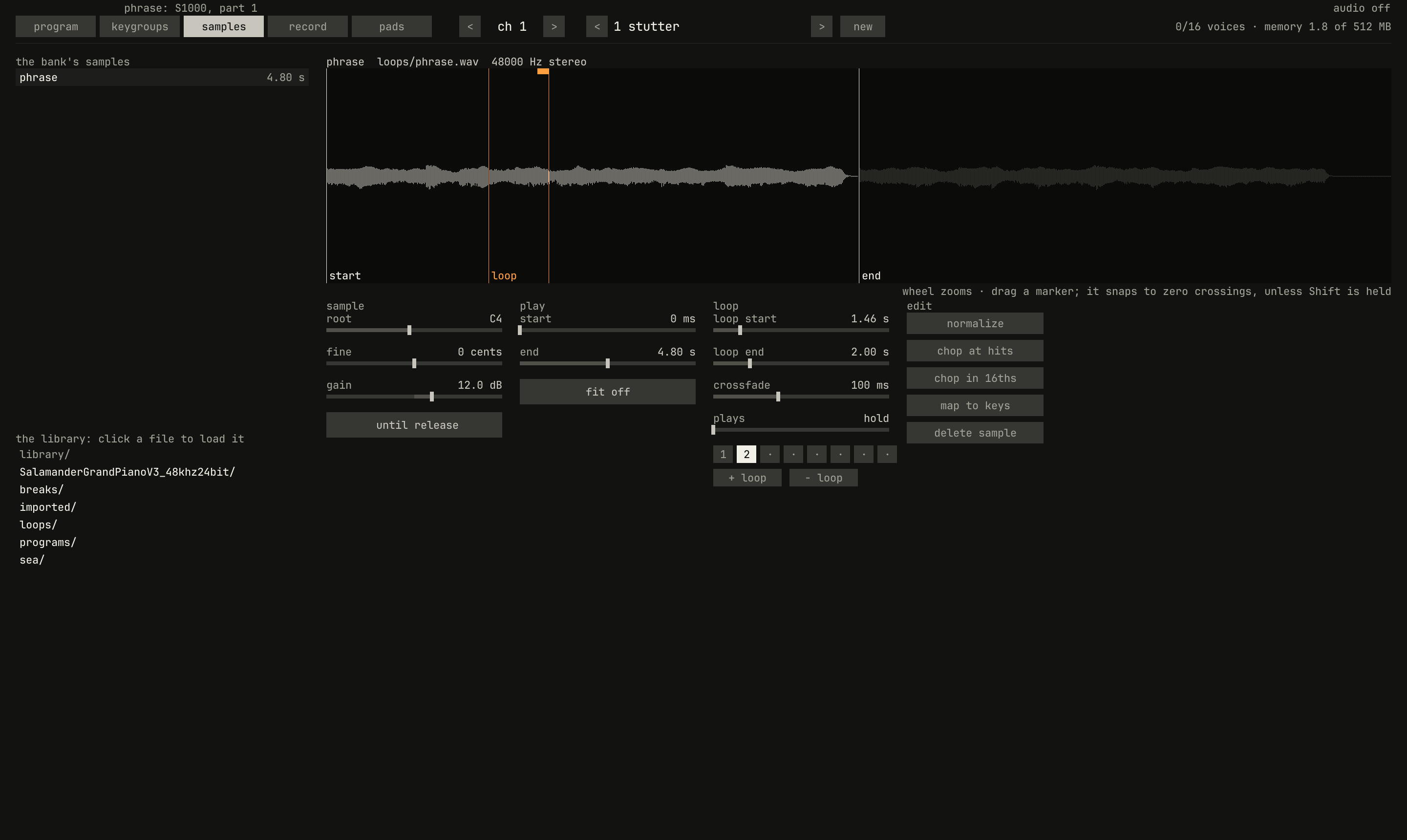
samples page, with loop 2 selected: its start marked loop, its end, and its crossfade, the amber strip at the top before the end. The phrase plays to end, at two bars; past it, the waveform is dim.scriptzig build run-studio -- manual/sampler/01-samples/stutter --view device --track 1 --script manual/sampler/01-samples/loops.txt
stutter/song.json
{
  "tempo": 100,
  "end": "5",
  "devices": [{
    "name": "S1000",
    "type": "sampler",
    "state": {
      "channels": [{ "channel": 1, "program": 1 }],
      "programs": [{
        "program": 1,
        "name": "stutter",
        "sound": { "release": 30 },
        "keygroups": [{ "keys": "C-1 G9", "zones": [{ "sample": "phrase" }] }]
      }],
      "samples": {
        "phrase": {
          "file": "loops/phrase.wav", "root": "C4", "end": 230400, "gain": 12, "mode": "until_release",
          "loops": ["0 28800 0 4", "70150 96164 4800 hold"]
        }
      }
    }
  }],
  "tracks": [{
    "name": "phrase",
    "device": "S1000",
    "channel": 1,
    "clips": [{ "at": "1", "length": "4.0.0", "notes": "held" }]
  }],
  "notes": {
    "held": { "length": "4.0.0", "notes": ["1.1.0 C4 2.0.0 127"] }
  }
}
loops.txt
# The samples page, with the phrase's second loop selected.
click 229 67
wait 0.1
click 764 505
wait 0.1
capture loops.png
The controls under the waveform are the selected sample's, in three
columns. sample: the root, its fine tuning, the gain, and the mode.
play: the start, the end, and fit, which fits the sample to bars of
the song's tempo (chapter 6). loop: the selected loop's
loop start, loop end, crossfade, and how many times it plays,
hold or 1 to 100. Points read in milliseconds or seconds from the
sound's start. While a voice plays the selected sample, an amber line on
the waveform marks where.
Under them, a button for each of the eight loops, numbered where there is
one, selects it, and its markers show on the waveform; + loop adds one
after the last, or from the middle of the sample to its end, and sets the
mode to until release if it was one that plays no loops; − loop takes
the selected one away. The edit buttons at the right are normalize, the
two chops of chapter 4, map to keys of chapter
2, and delete sample, which a sample a keygroup plays
refuses until it's taken out of its zones.
Next: chapter 2, programs and keygroups, samples across the keys and the velocities.