I. Making music
Bass lines
The bass joins the drums to the chords. It plays the lowest notes of the harmony, mostly each chord's root, in a rhythm that locks with the kick, and it's the part people dance to. In the studio a bass can make its own notes from the chord row: you choose a pattern, which says the rhythm and which note of each chord to play, and the bass plays it over whatever chords the row holds, again whenever a chord changes. This chapter shows how, and the patterns a bass can play.
zig build run-studio -- manual/06-bass-lines/roots
Roots
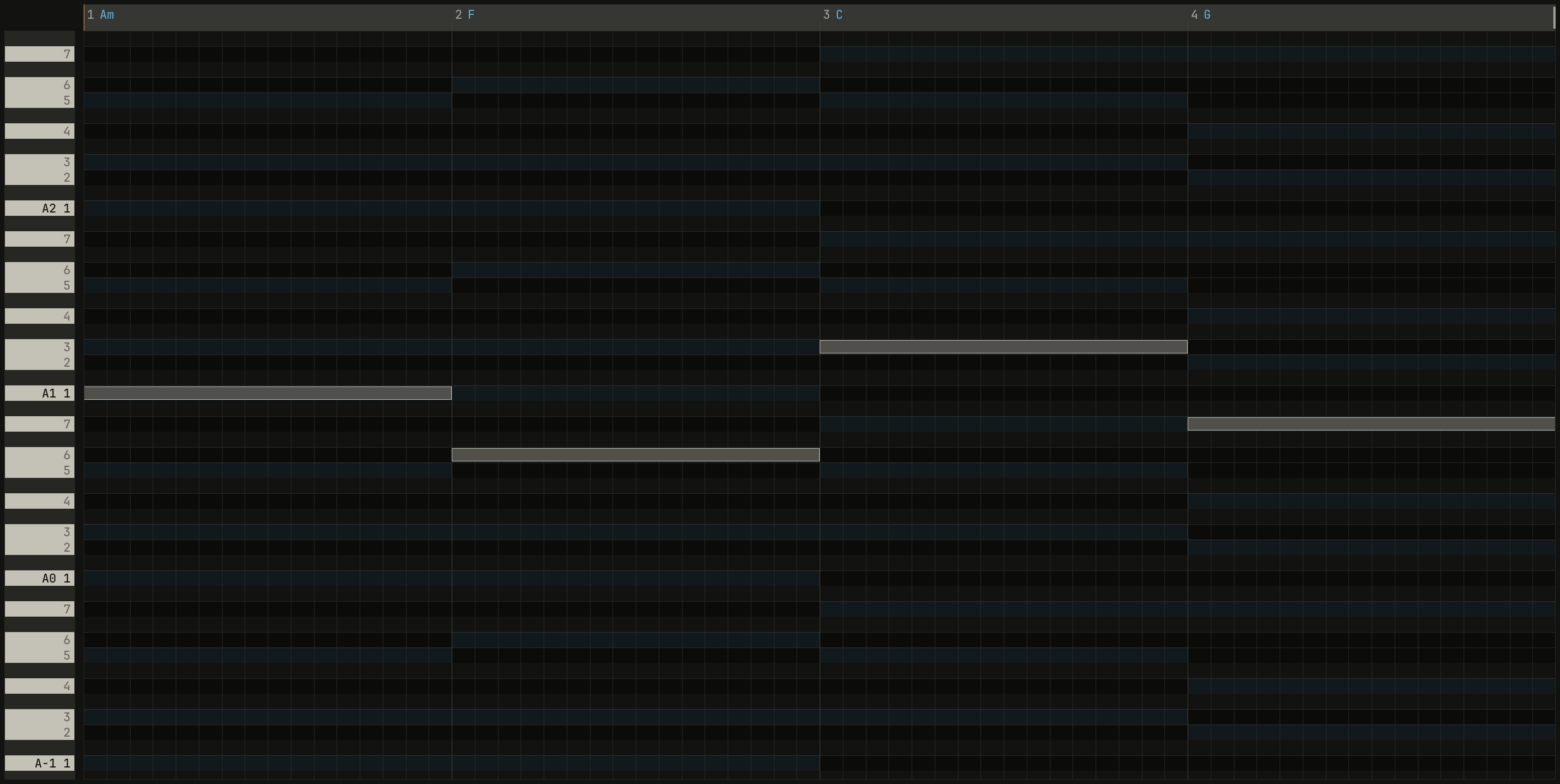
The root is the note a chord is named after, and a bass that plays only roots, one a bar, already sounds right under any progression.

0.0 / 9.6 s
peak -10.3 dBFS
openzig build run-studio -- manual/06-bass-lines/roots --view editor --track 2
renderzig build run-studio -- render manual/06-bass-lines/roots roots.wav
roots/song.json
{
  "tempo": 100,
  "end": "5",
  "key": ["1 A minor"],
  "chords": ["1 Am", "2 F", "3 C", "4 G"],
  "devices": [
    { "name": "synth", "type": "synth", "state": { "parts": [
      { "patch": "A45", "level": -4, "reverb_send": 15 },
      { "patch": "A52", "level": -4 }
    ] } },
    { "name": "808", "type": "drums" }
  ],
  "tracks": [
    { "name": "drums", "device": "808", "channel": 1, "role": "drums", "clips": [{ "at": "1", "length": "4.0.0", "notes": "beat" }] },
    { "name": "bass", "device": "synth", "channel": 2, "keys": "pent", "role": "bass", "clips": [{ "at": "1", "length": "4.0.0", "notes": "bass" }] },
    { "name": "piano", "device": "synth", "channel": 1, "keys": "chord", "role": "chords", "clips": [{ "at": "1", "length": "4.0.0", "notes": "piano" }] }
  ],
  "notes": {
    "beat": {
      "length": "1.0.0",
      "notes": [
        "1.1.0 C2 0.0.240 116", "1.1.0 F#2 0.0.240 84", "1.1.480 F#2 0.0.240 64",
        "1.2.0 D2 0.0.240 100", "1.2.0 F#2 0.0.240 80", "1.2.480 F#2 0.0.240 64",
        "1.3.0 C2 0.0.240 110", "1.3.0 F#2 0.0.240 84", "1.3.480 F#2 0.0.240 64",
        "1.4.0 D2 0.0.240 100", "1.4.0 F#2 0.0.240 80", "1.4.480 F#2 0.0.240 64"
      ]
    },
    "bass": { "length": "4.0.0", "follow": { "pattern": "roots", "low": "E1" } },
    "piano": { "length": "4.0.0", "follow": { "pattern": "halves", "low": "F3" } }
  }
}
The header reads follows roots: the clip makes its notes from the chord
row with the pattern roots. Each chord's root lands in the octave above
the part's lowest note, which is E1 here, so A, F, and G sit in the first
octave and C, which would fall under E1, an octave higher. A bass sits low:
A1 is 55 Hz, and most bass lines lie between E1 and E3. Above that a bass
starts to crowd the chords; below it, small speakers can't play it.
Parts that follow the chords
A clip that follows the chords holds a pattern and a lowest note in
place of notes. Its notes are made from the chord row: the pattern repeats
over the clip, and each of its notes takes its pitch from the chord in force
where it starts. They're made again whenever the song changes, while it
plays, so a chord changed on the row changes the bass on the next block of
audio. In song.json, a followed clip's contents hold only that:
"bass": { "length": "4.0.0", "follow": { "pattern": "roots", "low": "E1" } }
A few rules make it sound like a player:
- A note held across a chord change ends at the change, and the new chord's note starts there, unless it's the same note, which holds on.
- Where the row says
N.C., or holds no chord, the part rests. - A part that plays whole chords voices each one from the last, as the keys
in
chorddo, so it moves smoothly.
There are three ways to start one:
- In the arrange view, Alt and a double-click on an empty spot of a track
starts a followed clip over the section there, or the bar if there's no
section, on the first pattern for the track's role, with the pattern list
open. Up and Down try each pattern as the song
plays, and Enter keeps it. The lane's menu has it too, as
new part that follows the chords. - On a clip you have,
follow the chordsin its menu, from a right-click on it or from its name in Key Edit's header, makes it follow, on its role's first pattern, and each time after steps to the next. With the clip selected,follows ▾in the inspector lists the patterns to try. - By editing the notes: the first edit in Key Edit to a followed clip's notes makes them its own, and it stops following. Ctrl+Z gives the following back.
A part follows the chord row, so the row needs chords first. The notes it makes are ordinary notes: Key Edit shows them, they record and quantize like any others, and you learn the pattern by looking at what it wrote.
Rhythm against the kick
Where the bass plays matters as much as what it plays. A bass note on the same beat as the kick fights it for the same low frequencies; a bass note between the kicks has the low end to itself, and the two take turns.

0.0 / 7.9 s
peak -9.8 dBFS
openzig build run-studio -- manual/06-bass-lines/offbeat
renderzig build run-studio -- render manual/06-bass-lines/offbeat offbeat.wav
offbeat/song.json
{
  "tempo": 122,
  "end": "5",
  "key": ["1 A minor"],
  "chords": ["1 Am7", "2 Dm7", "3 Fmaj7", "4 Em7"],
  "devices": [
    { "name": "synth", "type": "synth", "state": { "parts": [
      { "patch": "A72", "level": -6, "reverb_send": 20 },
      { "patch": "A51", "level": -4 }
    ] } },
    { "name": "808", "type": "drums" }
  ],
  "tracks": [
    { "name": "kick", "device": "808", "channel": 1, "role": "drums", "clips": [{ "at": "1", "length": "4.0.0", "notes": "kick" }] },
    { "name": "bass", "device": "synth", "channel": 2, "keys": "pent", "role": "bass", "clips": [{ "at": "1", "length": "4.0.0", "notes": "bass" }] },
    { "name": "stabs", "device": "synth", "channel": 1, "keys": "chord 7", "role": "chords", "clips": [{ "at": "1", "length": "4.0.0", "notes": "stabs" }] }
  ],
  "notes": {
    "kick": {
      "length": "1.0.0",
      "notes": [
        "1.1.0 C2 0.0.240 120", "1.1.240 F#2 0.0.120 56", "1.1.720 F#2 0.0.120 56",
        "1.2.0 C2 0.0.240 112", "1.2.0 D#2 0.0.240 96", "1.2.240 F#2 0.0.120 56", "1.2.720 F#2 0.0.120 56",
        "1.3.0 C2 0.0.240 116", "1.3.240 F#2 0.0.120 56", "1.3.720 F#2 0.0.120 56",
        "1.4.0 C2 0.0.240 112", "1.4.0 D#2 0.0.240 96", "1.4.240 F#2 0.0.120 56", "1.4.720 F#2 0.0.120 56"
      ]
    },
    "bass": { "length": "4.0.0", "follow": { "pattern": "offbeat", "low": "E1" } },
    "stabs": { "length": "4.0.0", "follow": { "pattern": "stabs", "low": "F3" } }
  }
}
The bass's pattern here is offbeat, house's bounce: the root on the "and"
of every beat, where the open hat sat in chapter 2. The
kick says "down" and the bass says "up". Rock and pop do the opposite, the
bass doubling the kick in eighths, which makes the low end one thick line
rather than two.
The patterns
A pattern is a bar of notes whose keys name the notes of a chord rather than
pitches, in studio/patterns.json, which anyone can read and add to:
| Tone | Plays |
|---|---|
B |
The chord's bass: its root, or the note after a slash |
R |
The root |
3, 5 |
The third and the fifth; 3 is a sus chord's 2nd or 4th, and a power chord's root |
7 |
The seventh, or the root an octave up in a chord without one |
9 |
The ninth, or the scale's 2nd above the root in a chord without one |
C |
The whole chord, voiced |
An octave up is ' and down is ,, as LilyPond writes them. A note of a
pattern reads like a note of song.json, its place, its tone, its length,
and its velocity: root five is
"notes": ["1.1.0 B 0.1.840 104", "1.3.0 5 0.1.840 96"]
the bass on beat 1, and the chord's fifth on beat 3. The library's patterns for a bass:
| Pattern | Plays |
|---|---|
roots |
The bass, held the bar |
quarters |
The bass on every beat |
eighths |
The bass in eighths, as rock and pop play it |
offbeat |
The bass on every off-beat eighth, house's bounce against the kick |
octaves |
The bass and its octave in eighths, disco's |
root five |
The bass on 1 and the fifth on 3 |
tresillo |
The bass on 3 + 3 + 2 eighths |
pump |
Sixteenths with the off-beats accented, trance's |

0.0 / 28.8 s
peak -9.5 dBFS
roots, quarters, eighths, octaves, root five, and tresillo. Each clip is named for its pattern.openzig build run-studio -- manual/06-bass-lines/patterns
renderzig build run-studio -- render manual/06-bass-lines/patterns patterns.wav
patterns/song.json
{
  "tempo": 100,
  "end": "13",
  "key": ["1 A minor"],
  "chords": ["1 Am", "2 F", "3 C", "4 G", "5 Am", "6 F", "7 C", "8 G", "9 Am", "10 F", "11 C", "12 G"],
  "devices": [
    { "name": "synth", "type": "synth", "state": { "parts": [{ "patch": "A52", "level": -4 }] } },
    { "name": "808", "type": "drums" }
  ],
  "tracks": [
    { "name": "drums", "device": "808", "channel": 1, "role": "drums", "clips": [{ "at": "1", "length": "12.0.0", "notes": "beat" }] },
    { "name": "bass", "device": "synth", "channel": 1, "keys": "pent", "role": "bass", "clips": [{ "at": "1", "length": "2.0.0", "notes": "roots" }, { "at": "3", "length": "2.0.0", "notes": "quarters" }, { "at": "5", "length": "2.0.0", "notes": "eighths" }, { "at": "7", "length": "2.0.0", "notes": "octaves" }, { "at": "9", "length": "2.0.0", "notes": "root five" }, { "at": "11", "length": "2.0.0", "notes": "tresillo" }] }
  ],
  "notes": {
    "beat": {
      "length": "1.0.0",
      "notes": [
        "1.1.0 C2 0.0.240 116", "1.1.0 F#2 0.0.240 84", "1.1.480 F#2 0.0.240 64",
        "1.2.0 D2 0.0.240 100", "1.2.0 F#2 0.0.240 80", "1.2.480 F#2 0.0.240 64",
        "1.3.0 C2 0.0.240 110", "1.3.0 F#2 0.0.240 84", "1.3.480 F#2 0.0.240 64",
        "1.4.0 D2 0.0.240 100", "1.4.0 F#2 0.0.240 80", "1.4.480 F#2 0.0.240 64"
      ]
    },
    "roots": { "length": "2.0.0", "follow": { "pattern": "roots", "low": "E1" } },
    "quarters": { "length": "2.0.0", "follow": { "pattern": "quarters", "low": "E1" } },
    "eighths": { "length": "2.0.0", "follow": { "pattern": "eighths", "low": "E1" } },
    "octaves": { "length": "2.0.0", "follow": { "pattern": "octaves", "low": "E1" } },
    "root five": { "length": "2.0.0", "follow": { "pattern": "root five", "low": "E1" } },
    "tresillo": { "length": "2.0.0", "follow": { "pattern": "tresillo", "low": "E1" } }
  }
}
Each is a different player with the same chords. roots leaves room for
everything else; eighths drives; octaves jumps up and down in disco's
way; root five walks like country and old rock and roll; tresillo,
chapter 2's rhythm, swings it Latin. The chords didn't change, only the
pattern, which is why a bass line is mostly rhythm.
Roles
A track says what it's for: its role, role ▾ in the inspector beside its
way to play, which a click lists: drums, bass, chords, pad, lead,
arp, and sample. A new track takes its role from its name, so a track
called bass is a bass, and a role sets the rest:
| Role | Its keys play | Its patterns | Its lowest note | Its sounds in the program list |
|---|---|---|---|---|
bass |
pent |
the bass patterns | E1 | bank A5, the basses |
chords |
chord 7 |
the chord patterns | F3 | banks A1, A4, A7, and B1 |
pad |
chord 7 |
the chord patterns | F3 | banks A2 and A3 |
lead |
pent |
the arpeggios | C4 | banks A6 and B3 |
arp |
chord |
the arpeggios | C4 | bank A7 |
The chord patterns, whole, halves, stabs, pulse, charleston, and
broken, and the arpeggios, up and up down, are the next chapters'.
The coach in chapter 8 reads the roles too.
Try it in the window
- In the
rootssong, click a chord on the row and choose another while the song plays: the bass and the piano follow it on the next beat. - Select the bass's clip and step through the patterns with
follows ▾in the inspector, listening to each against the drums. - Make a new followed clip with Alt and a double-click on an empty track
under the
offbeatsong, and step its pattern list. - Move one of the bass's notes in Key Edit: the clip stops following, and
the header stops saying
follows. Press Ctrl+Z. - Open
studio/patterns.jsonand readtresilloandpumpagainst the table of tones.
Next: chapter 7, melody, the part the studio leaves to you.