I. Making music
Melody
The melody is the part you'd sing, and the one part the studio won't write. It voices chords, writes basses and pads that follow them, and offers beats and forms, but a melody is yours. What it does instead is help: it marks where a note sits against the chord and the key, fits a rough line onto them, and records what you play in time. This chapter is about what makes a line of notes a tune, and the studio's tools for getting one down.
zig build run-studio -- manual/07-melody/chord-tones --view editor
Chord notes on the beat
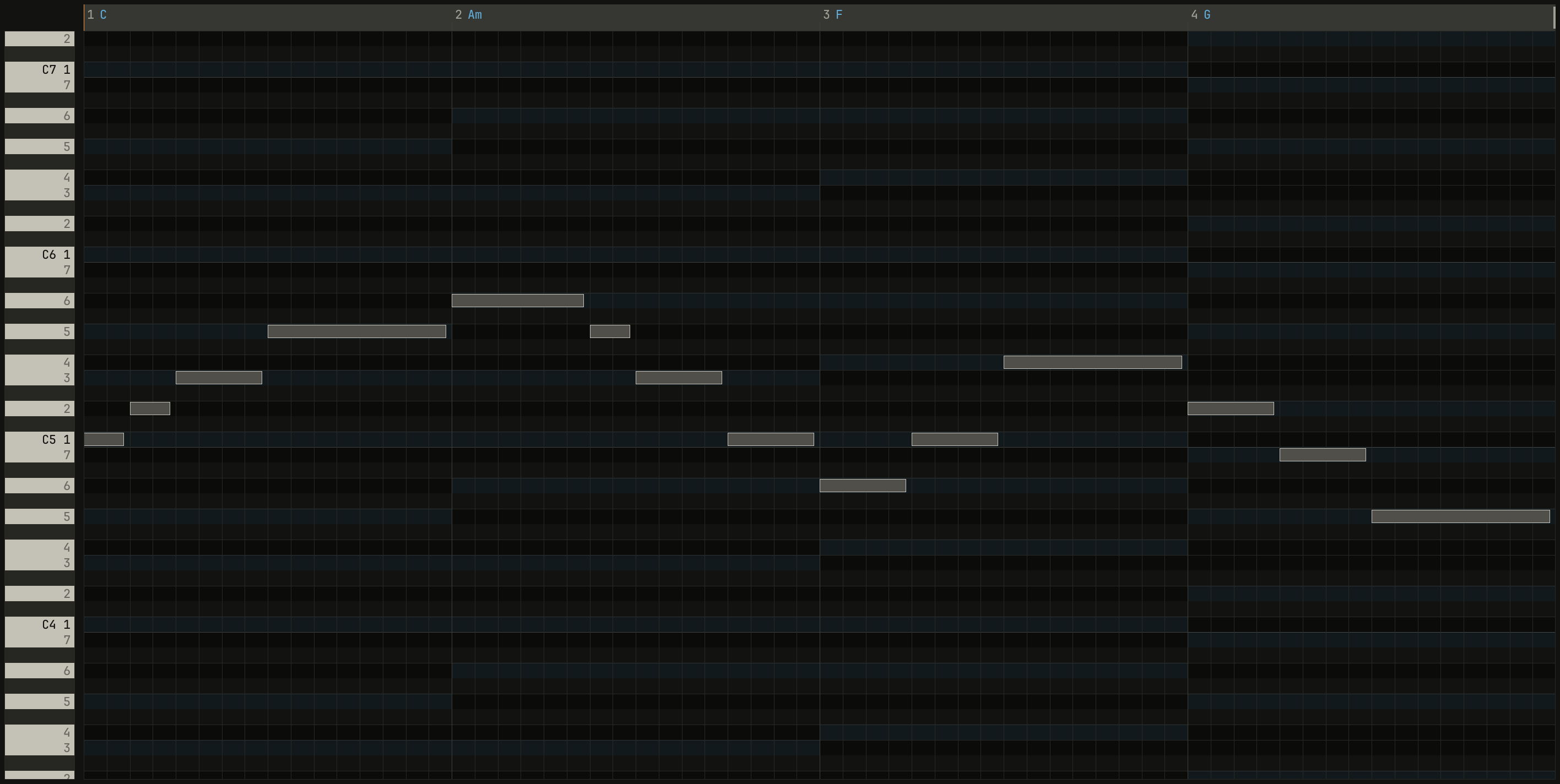
A melody and its chords meet on the beats. Where a note on a beat is one of the chord's notes, the two agree, and the melody sounds like it belongs to the harmony; between the beats it can move freely through the key.
0.0 / 10.0 s
peak -15.0 dBFS
openzig build run-studio -- manual/07-melody/chord-tones --view editor
renderzig build run-studio -- render manual/07-melody/chord-tones chord-tones.wav
chord-tones/song.json
{
  "tempo": 96,
  "end": "5",
  "key": ["1 C major"],
  "chords": ["1 C", "2 Am", "3 F", "4 G"],
  "devices": [
    { "name": "synth", "type": "synth", "state": { "parts": [
      { "patch": "A61", "level": -4, "delay_send": 15 },
      { "patch": "A31", "level": -10, "reverb_send": 20 },
      { "patch": "A52", "level": -8 }
    ] } }
  ],
  "tracks": [
    { "name": "melody", "device": "synth", "channel": 1, "keys": "key", "role": "lead", "clips": [{ "at": "1", "length": "4.0.0", "notes": "melody" }] },
    { "name": "pad", "device": "synth", "channel": 2, "keys": "chord 7", "role": "pad", "clips": [{ "at": "1", "length": "4.0.0", "notes": "pad" }] },
    { "name": "bass", "device": "synth", "channel": 3, "keys": "pent", "role": "bass", "clips": [{ "at": "1", "length": "4.0.0", "notes": "bass" }] }
  ],
  "notes": {
    "melody": {
      "length": "4.0.0",
      "notes": [
        "1.1.0 C5 0.0.420 96", "1.1.480 D5 0.0.420 84", "1.2.0 E5 0.0.900 92", "1.3.0 G5 0.1.900 96",
        "2.1.0 A5 0.1.420 96", "2.2.480 G5 0.0.420 84", "2.3.0 E5 0.0.900 92", "2.4.0 C5 0.0.900 88",
        "3.1.0 A4 0.0.900 92", "3.2.0 C5 0.0.900 90", "3.3.0 F5 0.1.900 96", "4.1.0 D5 0.0.900 92",
        "4.2.0 B4 0.0.900 88", "4.3.0 G4 0.1.900 92"
      ]
    },
    "pad": { "length": "4.0.0", "follow": { "pattern": "whole", "low": "F3" } },
    "bass": { "length": "4.0.0", "follow": { "pattern": "roots", "low": "E1" } }
  }
}
The notes between the beats, the D in the first bar and the G in the second, are passing notes: they step from one chord note to the next. Over Am, the melody starts on A, the chord's root; over F it lands on A again, which is F's third, and the same note sounds different because the chord under it changed. Starting a phrase on the chord's root or third sounds settled; its fifth sounds open.
What Key Edit marks
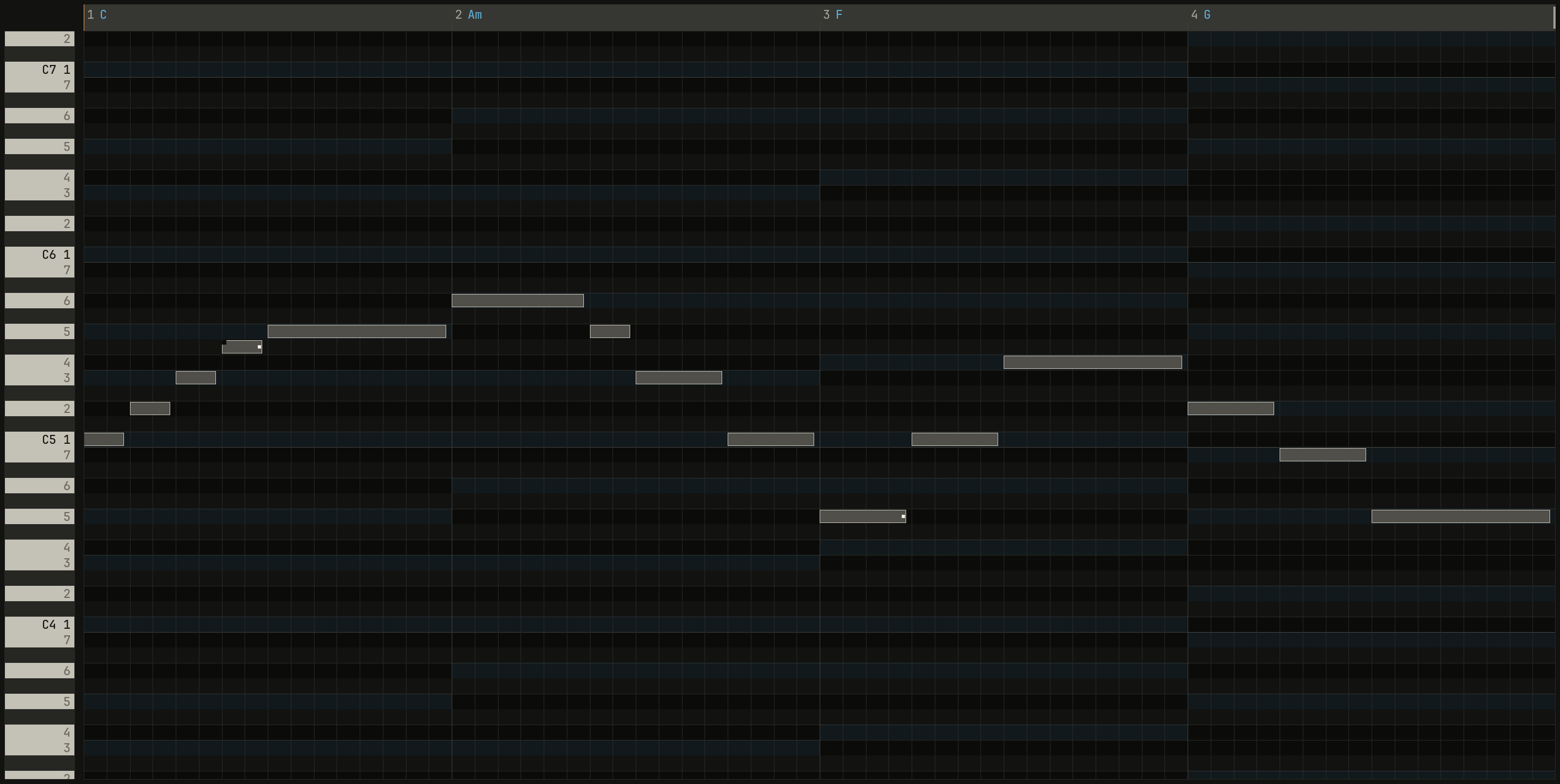
Key Edit names the song's chords along its ruler, and tints the rows of each chord's tones under it, so a note on a lit row is a chord note. It marks the notes that pull against the music around them, and the hint over each says why:
- A notch cut from a note's start: it's outside the key. The hint says
what it does:
F# is outside C major. Passing by step, it's color; held, it wants to rise to G. - A dot on a note on a beat that isn't in its chord, and doesn't step to
one next:
Off the chord on a strong beat: tense. Step to a chord note next, or move it. - A second dot on a note a semitone from a note another track holds at
the same time:
Rubs a semitone against a note of pad: a sharp clash. Move
one of them, or keep it short.
0.0 / 10.0 s
peak -14.8 dBFS
openzig build run-studio -- manual/07-melody/marks --view editor
renderzig build run-studio -- render manual/07-melody/marks marks.wav
marks/song.json
{
  "tempo": 96,
  "end": "5",
  "key": ["1 C major"],
  "chords": ["1 C", "2 Am", "3 F", "4 G"],
  "devices": [
    { "name": "synth", "type": "synth", "state": { "parts": [
      { "patch": "A61", "level": -4, "delay_send": 15 },
      { "patch": "A31", "level": -10, "reverb_send": 20 },
      { "patch": "A52", "level": -8 }
    ] } }
  ],
  "tracks": [
    { "name": "melody", "device": "synth", "channel": 1, "keys": "key", "role": "lead", "clips": [{ "at": "1", "length": "4.0.0", "notes": "melody" }] },
    { "name": "pad", "device": "synth", "channel": 2, "keys": "chord 7", "role": "pad", "clips": [{ "at": "1", "length": "4.0.0", "notes": "pad" }] },
    { "name": "bass", "device": "synth", "channel": 3, "keys": "pent", "role": "bass", "clips": [{ "at": "1", "length": "4.0.0", "notes": "bass" }] }
  ],
  "notes": {
    "melody": {
      "length": "4.0.0",
      "notes": [
        "1.1.0 C5 0.0.420 96", "1.1.480 D5 0.0.420 84", "1.2.0 E5 0.0.420 92", "1.2.480 F#5 0.0.420 84",
        "1.3.0 G5 0.1.900 96", "2.1.0 A5 0.1.420 96", "2.2.480 G5 0.0.420 84", "2.3.0 E5 0.0.900 92",
        "2.4.0 C5 0.0.900 88", "3.1.0 G4 0.0.900 92", "3.2.0 C5 0.0.900 90", "3.3.0 F5 0.1.900 96",
        "4.1.0 D5 0.0.900 92", "4.2.0 B4 0.0.900 88", "4.3.0 G4 0.1.900 92"
      ]
    },
    "pad": { "length": "4.0.0", "follow": { "pattern": "whole", "low": "F3" } },
    "bass": { "length": "4.0.0", "follow": { "pattern": "roots", "low": "E1" } }
  }
}
None of this is wrong. A mark is a hint, never a block, and plenty of good melodies are full of them: the F# here is a chromatic passing note, which jazz and soul use all the time. The marks show you where the tension is, so you can choose it. Ctrl+H hides them and every hint, and shows them again.
Steps and leaps
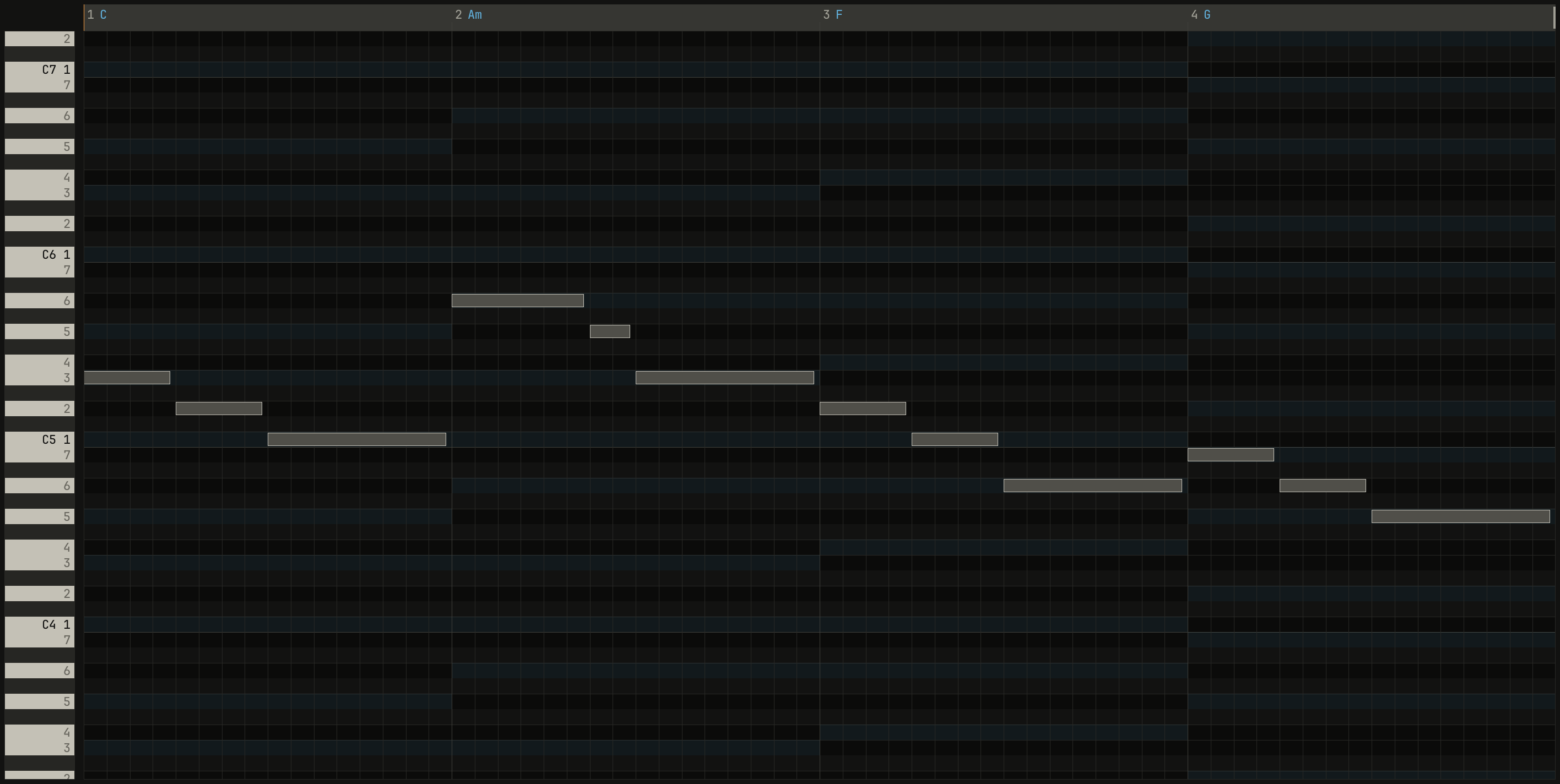
A melody moves by steps, to the next note of the scale up or down, or by leaps, over one or more notes. Steps are smooth and singable; leaps are dramatic. Most memorable melodies move mostly by step, and follow a leap with a step back the other way, as a voice does.
0.0 / 10.0 s
peak -15.7 dBFS
openzig build run-studio -- manual/07-melody/steps --view editor
renderzig build run-studio -- render manual/07-melody/steps steps.wav
steps/song.json
{
  "tempo": 96,
  "end": "5",
  "key": ["1 C major"],
  "chords": ["1 C", "2 Am", "3 F", "4 G"],
  "devices": [
    { "name": "synth", "type": "synth", "state": { "parts": [
      { "patch": "A61", "level": -4, "delay_send": 15 },
      { "patch": "A31", "level": -10, "reverb_send": 20 },
      { "patch": "A52", "level": -8 }
    ] } }
  ],
  "tracks": [
    { "name": "melody", "device": "synth", "channel": 1, "keys": "key", "role": "lead", "clips": [{ "at": "1", "length": "4.0.0", "notes": "melody" }] },
    { "name": "pad", "device": "synth", "channel": 2, "keys": "chord 7", "role": "pad", "clips": [{ "at": "1", "length": "4.0.0", "notes": "pad" }] },
    { "name": "bass", "device": "synth", "channel": 3, "keys": "pent", "role": "bass", "clips": [{ "at": "1", "length": "4.0.0", "notes": "bass" }] }
  ],
  "notes": {
    "melody": {
      "length": "4.0.0",
      "notes": [
        "1.1.0 E5 0.0.900 92", "1.2.0 D5 0.0.900 88", "1.3.0 C5 0.1.900 92", "2.1.0 A5 0.1.420 100",
        "2.2.480 G5 0.0.420 86", "2.3.0 E5 0.1.900 92", "3.1.0 D5 0.0.900 90", "3.2.0 C5 0.0.900 88",
        "3.3.0 A4 0.1.900 92", "4.1.0 B4 0.0.900 92", "4.2.0 A4 0.0.900 88", "4.3.0 G4 0.1.900 92"
      ]
    },
    "pad": { "length": "4.0.0", "follow": { "pattern": "whole", "low": "F3" } },
    "bass": { "length": "4.0.0", "follow": { "pattern": "roots", "low": "E1" } }
  }
}
The leap from C to A is the moment the tune reaches; everything around it is steps. The phrase's shape, up and back down, is an arch, the most common shape a phrase has. It ends on G, the 5th, over the G chord: a comma, not a full stop, so the loop goes round again. End on C over a C chord and it would sound finished.
Rhythm first
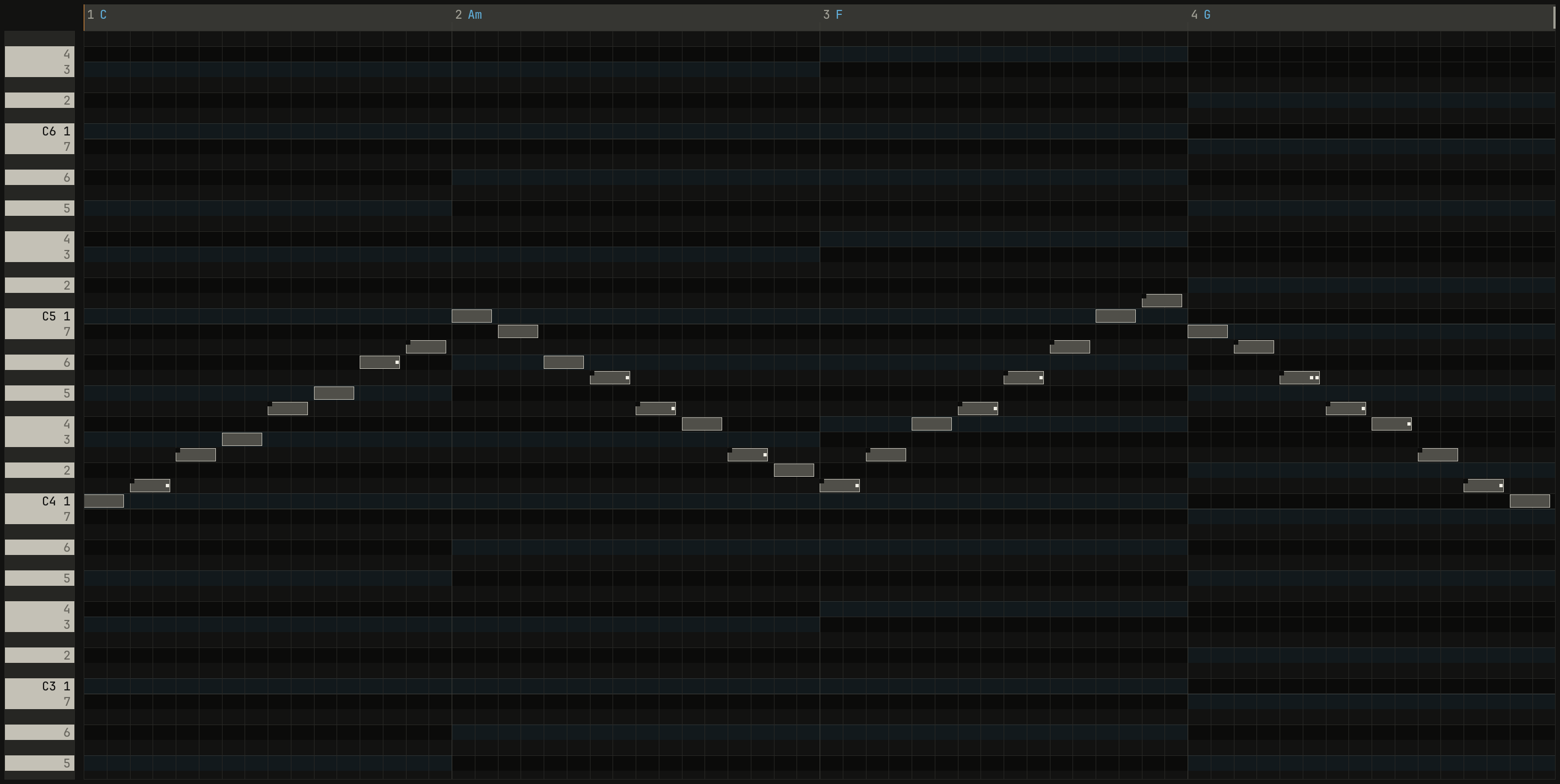
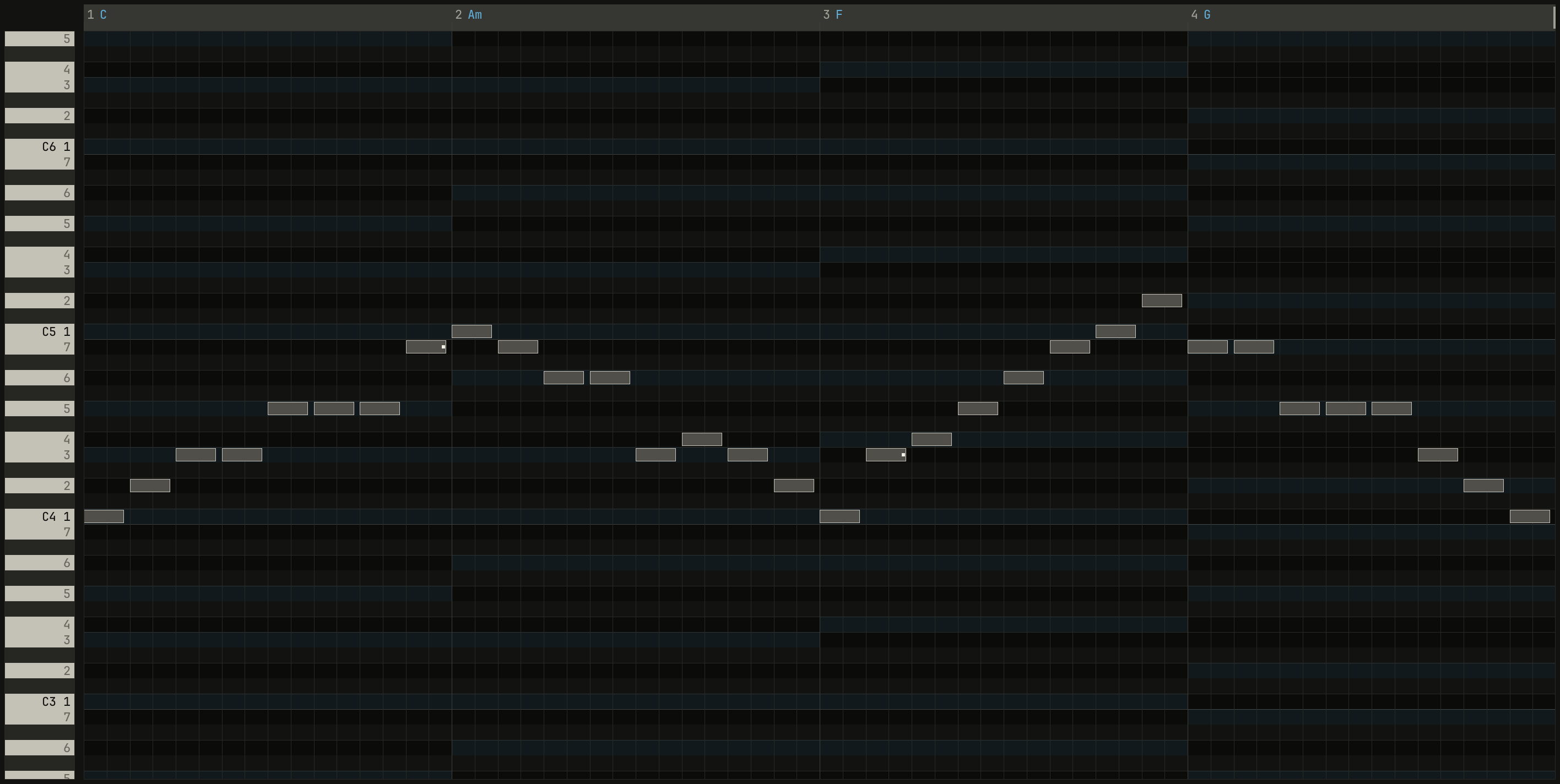
A melody's rhythm is most of what makes it recognizable: clap the rhythm of a song you know and someone can usually name it. So the studio lets you get the rhythm and the shape first, and the notes after. Play the melody's rhythm on any keys, or draw its rough shape in Key Edit, and Ctrl+K fits it: every note on a beat moves to the nearest note of the chord there, and every other note to the nearest note of the key, the upper one on a tie. It fits the notes selected, or all of them, as one edit.
0.0 / 10.0 s
peak -16.5 dBFS
openzig build run-studio -- manual/07-melody/fit --view editor --track 1
renderzig build run-studio -- render manual/07-melody/fit rough.wav --from 1 --to 5
fit/song.json
{
  "tempo": 96,
  "end": "9",
  "key": ["1 C major"],
  "chords": ["1 C", "2 Am", "3 F", "4 G", "5 C", "6 Am", "7 F", "8 G"],
  "devices": [
    { "name": "synth", "type": "synth", "state": { "parts": [
      { "patch": "A61", "level": -4, "delay_send": 15 },
      { "patch": "A52", "level": -8 }
    ] } }
  ],
  "tracks": [
    { "name": "rough", "device": "synth", "channel": 1, "keys": "all", "role": "lead", "clips": [{ "at": "1", "length": "4.0.0", "notes": "rough" }] },
    { "name": "fitted", "device": "synth", "channel": 1, "keys": "all", "role": "lead", "clips": [{ "at": "5", "length": "4.0.0", "notes": "fitted" }] },
    { "name": "bass", "device": "synth", "channel": 2, "keys": "pent", "role": "bass", "clips": [{ "at": "1", "length": "8.0.0", "notes": "bass" }] }
  ],
  "notes": {
    "rough": {
      "length": "4.0.0",
      "notes": [
        "1.1.0 C4 0.0.420 96", "1.1.480 C#4 0.0.420 84", "1.2.0 D#4 0.0.420 96", "1.2.480 E4 0.0.420 84",
        "1.3.0 F#4 0.0.420 96", "1.3.480 G4 0.0.420 84", "1.4.0 A4 0.0.420 96", "1.4.480 A#4 0.0.420 84",
        "2.1.0 C5 0.0.420 96", "2.1.480 B4 0.0.420 84", "2.2.0 A4 0.0.420 96", "2.2.480 G#4 0.0.420 84",
        "2.3.0 F#4 0.0.420 96", "2.3.480 F4 0.0.420 84", "2.4.0 D#4 0.0.420 96", "2.4.480 D4 0.0.420 84",
        "3.1.0 C#4 0.0.420 96", "3.1.480 D#4 0.0.420 84", "3.2.0 F4 0.0.420 96", "3.2.480 F#4 0.0.420 84",
        "3.3.0 G#4 0.0.420 96", "3.3.480 A#4 0.0.420 84", "3.4.0 C5 0.0.420 96", "3.4.480 C#5 0.0.420 84",
        "4.1.0 B4 0.0.420 96", "4.1.480 A#4 0.0.420 84", "4.2.0 G#4 0.0.420 96", "4.2.480 F#4 0.0.420 84",
        "4.3.0 F4 0.0.420 96", "4.3.480 D#4 0.0.420 84", "4.4.0 C#4 0.0.420 96", "4.4.480 C4 0.0.420 84"
      ]
    },
    "fitted": {
      "length": "4.0.0",
      "notes": [
        "1.1.0 C4 0.0.420 96", "1.1.480 D4 0.0.420 84", "1.2.0 E4 0.0.420 96", "1.2.480 E4 0.0.420 84",
        "1.3.0 G4 0.0.420 96", "1.3.480 G4 0.0.420 84", "1.4.0 G4 0.0.420 96", "1.4.480 B4 0.0.420 84",
        "2.1.0 C5 0.0.420 96", "2.1.480 B4 0.0.420 84", "2.2.0 A4 0.0.420 96", "2.2.480 A4 0.0.420 84",
        "2.3.0 E4 0.0.420 96", "2.3.480 F4 0.0.420 84", "2.4.0 E4 0.0.420 96", "2.4.480 D4 0.0.420 84",
        "3.1.0 C4 0.0.420 96", "3.1.480 E4 0.0.420 84", "3.2.0 F4 0.0.420 96", "3.2.480 G4 0.0.420 84",
        "3.3.0 A4 0.0.420 96", "3.3.480 B4 0.0.420 84", "3.4.0 C5 0.0.420 96", "3.4.480 D5 0.0.420 84",
        "4.1.0 B4 0.0.420 96", "4.1.480 B4 0.0.420 84", "4.2.0 G4 0.0.420 96", "4.2.480 G4 0.0.420 84",
        "4.3.0 G4 0.0.420 96", "4.3.480 E4 0.0.420 84", "4.4.0 D4 0.0.420 96", "4.4.480 C4 0.0.420 84"
      ]
    },
    "bass": { "length": "8.0.0", "follow": { "pattern": "roots", "low": "E1" } }
  }
}
0.0 / 10.0 s
peak -16.9 dBFS
openzig build run-studio -- manual/07-melody/fit --view editor --track 2
renderzig build run-studio -- render manual/07-melody/fit fitted.wav --from 5 --to 9
fit/song.json
{
  "tempo": 96,
  "end": "9",
  "key": ["1 C major"],
  "chords": ["1 C", "2 Am", "3 F", "4 G", "5 C", "6 Am", "7 F", "8 G"],
  "devices": [
    { "name": "synth", "type": "synth", "state": { "parts": [
      { "patch": "A61", "level": -4, "delay_send": 15 },
      { "patch": "A52", "level": -8 }
    ] } }
  ],
  "tracks": [
    { "name": "rough", "device": "synth", "channel": 1, "keys": "all", "role": "lead", "clips": [{ "at": "1", "length": "4.0.0", "notes": "rough" }] },
    { "name": "fitted", "device": "synth", "channel": 1, "keys": "all", "role": "lead", "clips": [{ "at": "5", "length": "4.0.0", "notes": "fitted" }] },
    { "name": "bass", "device": "synth", "channel": 2, "keys": "pent", "role": "bass", "clips": [{ "at": "1", "length": "8.0.0", "notes": "bass" }] }
  ],
  "notes": {
    "rough": {
      "length": "4.0.0",
      "notes": [
        "1.1.0 C4 0.0.420 96", "1.1.480 C#4 0.0.420 84", "1.2.0 D#4 0.0.420 96", "1.2.480 E4 0.0.420 84",
        "1.3.0 F#4 0.0.420 96", "1.3.480 G4 0.0.420 84", "1.4.0 A4 0.0.420 96", "1.4.480 A#4 0.0.420 84",
        "2.1.0 C5 0.0.420 96", "2.1.480 B4 0.0.420 84", "2.2.0 A4 0.0.420 96", "2.2.480 G#4 0.0.420 84",
        "2.3.0 F#4 0.0.420 96", "2.3.480 F4 0.0.420 84", "2.4.0 D#4 0.0.420 96", "2.4.480 D4 0.0.420 84",
        "3.1.0 C#4 0.0.420 96", "3.1.480 D#4 0.0.420 84", "3.2.0 F4 0.0.420 96", "3.2.480 F#4 0.0.420 84",
        "3.3.0 G#4 0.0.420 96", "3.3.480 A#4 0.0.420 84", "3.4.0 C5 0.0.420 96", "3.4.480 C#5 0.0.420 84",
        "4.1.0 B4 0.0.420 96", "4.1.480 A#4 0.0.420 84", "4.2.0 G#4 0.0.420 96", "4.2.480 F#4 0.0.420 84",
        "4.3.0 F4 0.0.420 96", "4.3.480 D#4 0.0.420 84", "4.4.0 C#4 0.0.420 96", "4.4.480 C4 0.0.420 84"
      ]
    },
    "fitted": {
      "length": "4.0.0",
      "notes": [
        "1.1.0 C4 0.0.420 96", "1.1.480 D4 0.0.420 84", "1.2.0 E4 0.0.420 96", "1.2.480 E4 0.0.420 84",
        "1.3.0 G4 0.0.420 96", "1.3.480 G4 0.0.420 84", "1.4.0 G4 0.0.420 96", "1.4.480 B4 0.0.420 84",
        "2.1.0 C5 0.0.420 96", "2.1.480 B4 0.0.420 84", "2.2.0 A4 0.0.420 96", "2.2.480 A4 0.0.420 84",
        "2.3.0 E4 0.0.420 96", "2.3.480 F4 0.0.420 84", "2.4.0 E4 0.0.420 96", "2.4.480 D4 0.0.420 84",
        "3.1.0 C4 0.0.420 96", "3.1.480 E4 0.0.420 84", "3.2.0 F4 0.0.420 96", "3.2.480 G4 0.0.420 84",
        "3.3.0 A4 0.0.420 96", "3.3.480 B4 0.0.420 84", "3.4.0 C5 0.0.420 96", "3.4.480 D5 0.0.420 84",
        "4.1.0 B4 0.0.420 96", "4.1.480 B4 0.0.420 84", "4.2.0 G4 0.0.420 96", "4.2.480 G4 0.0.420 84",
        "4.3.0 G4 0.0.420 96", "4.3.480 E4 0.0.420 84", "4.4.0 D4 0.0.420 96", "4.4.480 C4 0.0.420 84"
      ]
    },
    "bass": { "length": "8.0.0", "follow": { "pattern": "roots", "low": "E1" } }
  }
}
The fitted line keeps the rough one's rhythm and its rise and fall, and loses every note outside the key. It's a start, not a melody: where the rough line held still the fitted one repeats a note, and a dot may remain where a key note rubs the bass. Shape it from there, by ear.
Getting it down
Three ways to record a melody besides drawing it:
- Recording it played. The record button in the bar, or
Num *, records the selected track as the song plays. With Shift
and a click on the button, or
quantize as it recordsin its menu, automatic quantize is on, andquantizedshows under it: the notes of each pass land on the arrange view's grid as the pass ends, at the editor's strength. First, the pass's average distance from the grid comes off every note, so a player who's steadily late, or the computer keys' small delay, doesn't drag the grid. A pass is two undo steps, as played and then quantized, so one Ctrl+Z gives your own timing back. - Step input. With
stepon in Key Edit's header and the song stopped, each key you play, or each chord under one finger, writes its notes at the step cursor, a grid step long, and moves the cursor a step. Shift ties, lengthening the last step by a step; Tab rests; Backspace takes the last step back; Left and Right move the cursor. A melody goes in without timing at all. - Slower. - and = slow the song down and bring it back, which chapter 10 uses for practice. A pass recorded at 70% lands in bars, so it plays back in time at 100%.
Play the melody on a track in pent or key, from chapter 3,
and every key you press is in the key; record it with automatic quantize,
and it's in time; fit it with Ctrl+K, and its beats are on the
chords.
Try it in the window
- In
chord-tones, select the lead and play along on the home row in thekeyway to play. Find notes that sound right on each beat. - Rest the pointer on the notched and dotted notes in
marks, and read what each hint says. - Draw eight notes anywhere in the
roughclip, select them, and press Ctrl+K. Press Ctrl+Z and try again with a different shape. - Turn on
stepin Key Edit's header and write a melody one note at a time, with Shift for long notes and Tab for rests. - Shift-click the record button in the bar, record a few bars, and press Ctrl+Z once to hear what you played before it was quantized.
Next: chapter 8, form, the song as a whole.