II. Learning from songs
Practice
Knowing a part and playing it are different things: your hands learn by repetition, slowly at first. The studio turns Key Edit into a practice view for a clip. It plays the rest of the song while you play the part, lights the next key to press, and then, as you improve, waits for you, plays the notes for you while you keep the rhythm, marks how close you came, or speeds up after every clean pass.
zig build run-studio -- manual/10-practice/ode --view editor
A part to learn

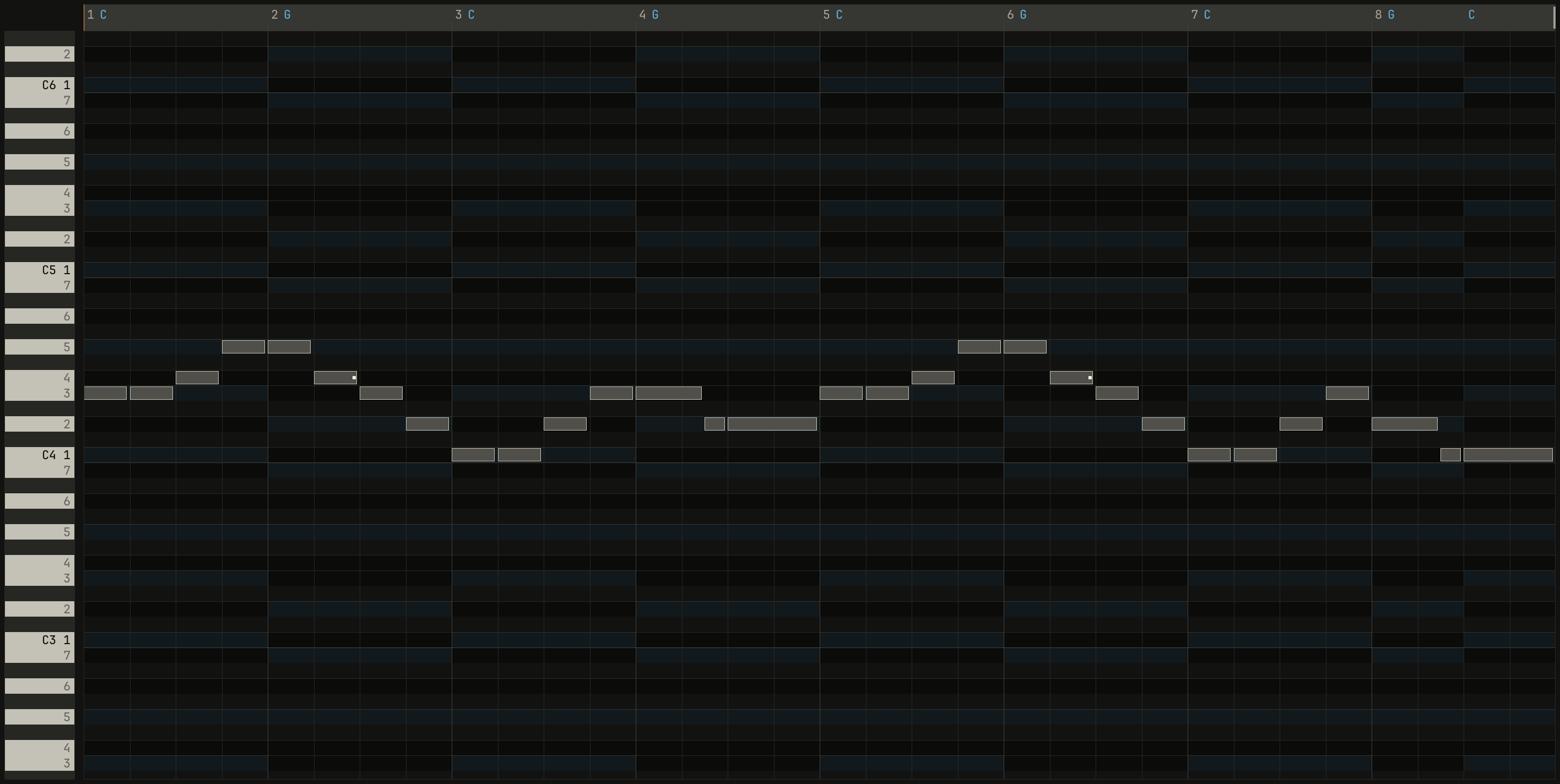
0.0 / 19.2 s
peak -16.8 dBFS
openzig build run-studio -- manual/10-practice/ode --view editor
renderzig build run-studio -- render manual/10-practice/ode ode.wav
ode/song.json
{
  "tempo": 100,
  "end": "9",
  "key": ["1 C major"],
  "chords": ["1 C", "2 G", "3 C", "4 G", "5 C", "6 G", "7 C", "8 G", "8.3 C"],
  "devices": [
    { "name": "synth", "type": "synth", "state": { "parts": [
      { "patch": "A45", "level": 0, "reverb_send": 15 },
      { "patch": "A52", "level": -8 }
    ] } }
  ],
  "tracks": [
    { "name": "tune", "device": "synth", "channel": 1, "keys": "key", "role": "lead", "clips": [{ "at": "1", "length": "8.0.0", "notes": "tune" }] },
    { "name": "bass", "device": "synth", "channel": 2, "keys": "pent", "role": "bass", "clips": [{ "at": "1", "length": "8.0.0", "notes": "bass" }] }
  ],
  "notes": {
    "tune": {
      "length": "8.0.0",
      "notes": [
        "1.1.0 E4 0.0.900 92", "1.2.0 E4 0.0.900 88", "1.3.0 F4 0.0.900 90", "1.4.0 G4 0.0.900 90",
        "2.1.0 G4 0.0.900 92", "2.2.0 F4 0.0.900 88", "2.3.0 E4 0.0.900 90", "2.4.0 D4 0.0.900 88",
        "3.1.0 C4 0.0.900 92", "3.2.0 C4 0.0.900 88", "3.3.0 D4 0.0.900 90", "3.4.0 E4 0.0.900 90",
        "4.1.0 E4 0.1.420 94", "4.2.480 D4 0.0.420 86", "4.3.0 D4 0.1.900 90",
        "5.1.0 E4 0.0.900 92", "5.2.0 E4 0.0.900 88", "5.3.0 F4 0.0.900 90", "5.4.0 G4 0.0.900 90",
        "6.1.0 G4 0.0.900 92", "6.2.0 F4 0.0.900 88", "6.3.0 E4 0.0.900 90", "6.4.0 D4 0.0.900 88",
        "7.1.0 C4 0.0.900 92", "7.2.0 C4 0.0.900 88", "7.3.0 D4 0.0.900 90", "7.4.0 E4 0.0.900 90",
        "8.1.0 D4 0.1.420 94", "8.2.480 C4 0.0.420 86", "8.3.0 C4 0.1.900 92"
      ]
    },
    "bass": { "length": "8.0.0", "follow": { "pattern": "root five", "low": "E1" } }
  }
}
Start with a tune that fits under one hand. This one moves entirely by
step, and its two halves differ only at the end: the first stops on D, the
2nd, a question, and the second on C, home, the answer. The track plays in
key, so on the letter keys in the easy layout the five notes are the
first five keys of the home row, A to G.
The practice view
practice, at the right of Key Edit's header, turns the editor into a
practice view for its clip:
- The clip's track goes quiet, as if muted, so you play its part over the rest of the song.
- The roll follows the song position as it plays.
- The piano strip lights the keys the next note asks for, in a cool color of their own, apart from the amber of what sounds. The Casiotone 701 lit the next key with a lamp over it in 1981.
The header's grid and quantize give way to the four ways to practice, a
choice, and exact, a switch:
| Way | You | The studio |
|---|---|---|
one key |
Play the rhythm, on any key | Plays the part's next note or chord at its own pitch, at your velocity, while you hold the key |
wait |
Find the keys | Stops at each note until its keys are down, then goes on |
play |
Play it, at the speed set | Marks each note on time, early, late, or wrong |
auto |
Play it through | As play, and raises the speed 5% after a pass with no note missed or wrong, and none 50 ms out |
The practice view opens in wait. Any octave of a note counts unless
exact is on, so a part written low can be played wherever your hand is.
one keyis Casio's One Key Play, from the VL-1 of 1981: tap the rhythm on any key, and each tap plays the next note of the part, or the one nearest the song position while it plays. You learn the rhythm with the pitches taken care of.waitstops the song at each note until you've found its keys, and waits for all of a chord's. You learn where the notes are without the song running away from you.playkeeps going at the speed set, and marks each note you play: a tick where you played it, to the left of the note for early and to the right for late, in the cool color within 30 ms.autoisplaythat rewards you: after a clean pass, the speed rises 5%.
A practice pass isn't recorded, but recording works in practice as anywhere,
so a pass in one key records your rhythm on the part's pitches.
How it went
After each pass of a cycle, when the song loops back, or when it stops, Key Edit's header says how the pass went:
pass 3 · 14 of 16 · 28 ms late · 1 wrong
The pass's number, the notes you hit of those in the pass, how far off you were on average, early or late, and the notes you played that weren't the part's. Set the locators around the bars you're learning and turn cycle on, and each loop is a pass.
Slower, then faster
A hard passage is easier slowly. - slows the song by 5% a press,
down to 50%, and = brings it back, up to 100%; played at 70%
shows under the tempo while it's under full speed. The speed is the
window's, as solo is: it doesn't change the song's tempo, its file, or what
it renders. Everything plays slower together: the drums, the chords, and the
parts that follow them.
The way up, from not knowing a part to playing it:
wait, at full speed, until you know where every note is.one key, until the rhythm is in your hands.autofrom 60%: press - eight times, and play pass after pass. Each clean pass, with nothing missed, nothing wrong, and nothing more than 50 ms out, adds 5%, and the speed climbs back to 100% on its own.playat full speed, reading the passes, until they're clean.
A pass recorded at a slower speed lands in bars, so it plays back in time at full speed: once you can play it at 70%, record it at 70%.
Try it in the window
- Open
odein Key Edit, select the tune, clickpractice, and press Space. Find each note as the song waits for it. - Switch to
one keyand tap the rhythm on any one key. - Set the locators around bars 1 to 4, turn cycle on, press -
eight times, and practice in
autountil the speed is back at 100%, and the tag under the tempo is gone. - Practice the lead of the pop template, Ctrl+N and
pop, after writing one in chapter 7. - Turn on
exactand play the tune in the octave it's written in.
That's the last chapter on music. Every song in this manual is a folder in
manual/: open one, change it, and make it yours.
Next: chapter 11, in your own words, asking the studio for all of this without knowing its names yet.