III. In your own words
In your own words
Every chapter so far has taught a word: a borrowed chord, a build, a sus chord, a pentatonic scale. Before you have the words, you have what you mean: "darker", "more like a club", "the bit where it drops", "a warm wobbly bass", "why does this sound off?". The studio takes what you mean in your own words and answers in its own, so each time it does something, it also tells you what that thing is called. Next time you can ask for it by name, or do it yourself.
The studio understands words with a small model, TypeSafe's Jev, which reads text and picks from the choices the studio gives it. It doesn't write music, notes, or text. It only picks among the things the studio can already do. The music stays in code, and what you keep is an ordinary edit, one undo, saved in the song.
zig build run-studio -- manual/11-words/song
Saying what you want
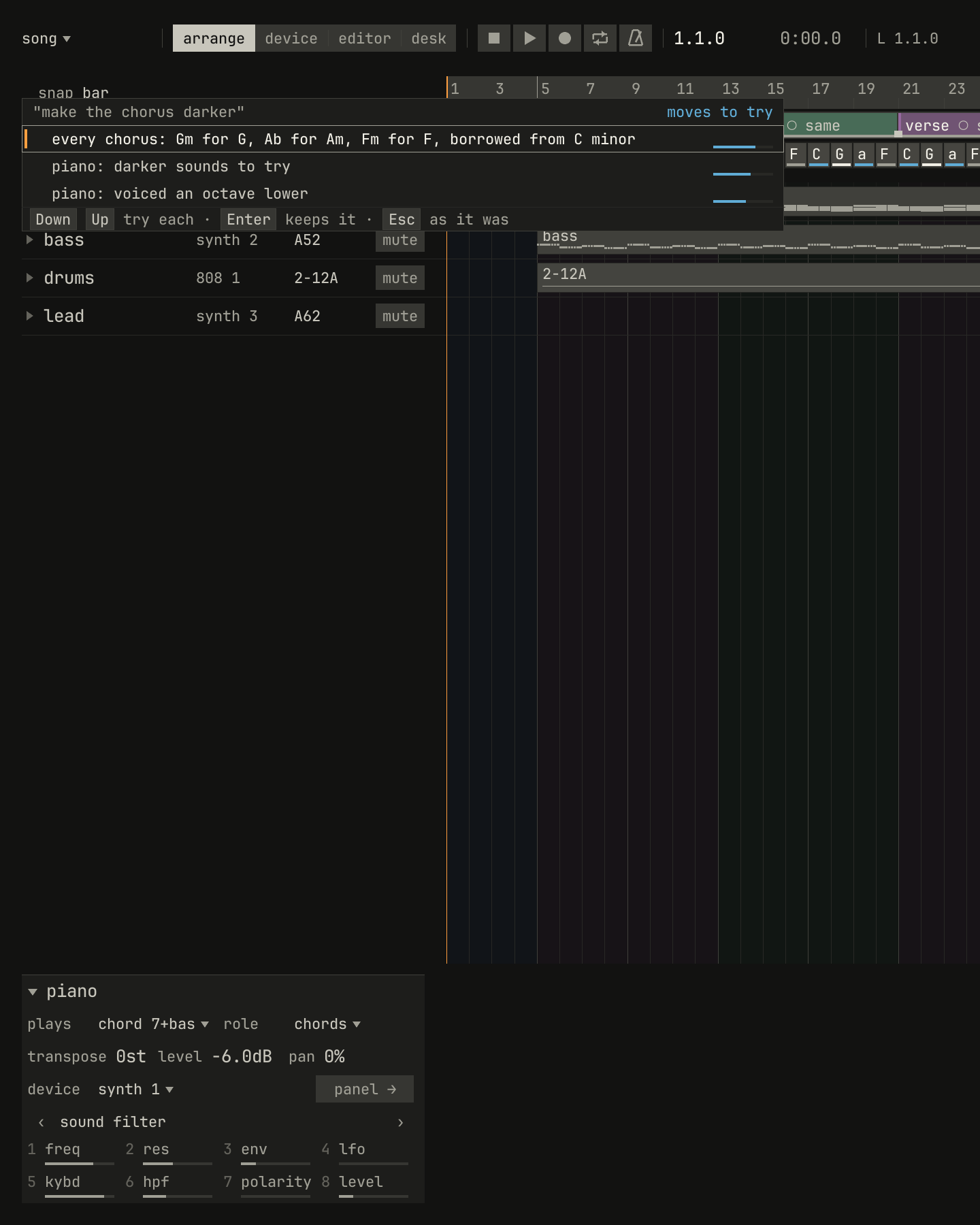
Ctrl+Space opens the say line under the song's name, in any view. Type what you want, and Enter sends it. The panel under the bar shows how the studio read it:
scriptzig build run-studio -- manual/11-words/song --ai replay manual/11-words/answers --script manual/11-words/darker.txt
song/song.json
{
  "tempo": 100,
  "brief": "hopeful, with a build into a big last chorus",
  "end": "65",
  "sections": ["1 intro", "5 verse", "13 chorus", "21 verse", "29 chorus", "37 bridge", "45 chorus", "53 chorus", "61 outro"],
  "key": ["1 C major"],
  "chords": ["1 C", "2 G", "3 Am", "4 F", "5 C", "6 G", "7 Am", "8 F", "9 C", "10 G", "11 Am", "12 F", "13 C", "14 G", "15 Am", "16 F", "17 C", "18 G", "19 Am", "20 F", "21 C", "22 G", "23 Am", "24 F", "25 C", "26 G", "27 Am", "28 F", "29 C", "30 G", "31 Am", "32 F", "33 C", "34 G", "35 Am", "36 F", "37 C", "38 G", "39 Am", "40 F", "41 C", "42 G", "43 Am", "44 F", "45 C", "46 G", "47 Am", "48 F", "49 C", "50 G", "51 Am", "52 F", "53 C", "54 G", "55 Am", "56 F", "57 C", "58 G", "59 Am", "60 F", "61 C", "62 G", "63 Am", "64 F"],
  "devices": [
    { "name": "synth", "type": "synth", "state": { "parts": [
      { "patch": "A45", "level": -6, "reverb_send": 15 },
      { "patch": "A52", "level": -4 },
      { "patch": "A62", "level": -8, "delay_send": 15 }
    ] } },
    { "name": "808", "type": "drums", "state": { "program": "2-12A" } }
  ],
  "tracks": [
    { "name": "piano", "device": "synth", "channel": 1, "keys": "chord 7 bass", "role": "chords", "clips": [{ "at": "1", "length": "64.0.0", "notes": "piano" }] },
    { "name": "bass", "device": "synth", "channel": 2, "keys": "pent", "role": "bass", "clips": [{ "at": "5", "length": "56.0.0", "notes": "bass" }] },
    { "name": "drums", "device": "808", "channel": 1, "role": "drums", "clips": [{ "at": "5", "length": "56.0.0", "pattern": "2-12A" }] },
    { "name": "lead", "device": "synth", "channel": 3, "keys": "pent", "role": "lead" }
  ],
  "notes": {
    "piano": { "length": "64.0.0", "follow": { "pattern": "halves", "low": "F3" } },
    "bass": { "length": "56.0.0", "follow": { "pattern": "eighths", "low": "E1" } }
  }
}
darker.txt
# Said, and read as a mood: its moves, the first playing at once.
wait 0.2
say make the chorus darker
wait 0.3
capture darker.png
What happens next depends on how sure the reading is:
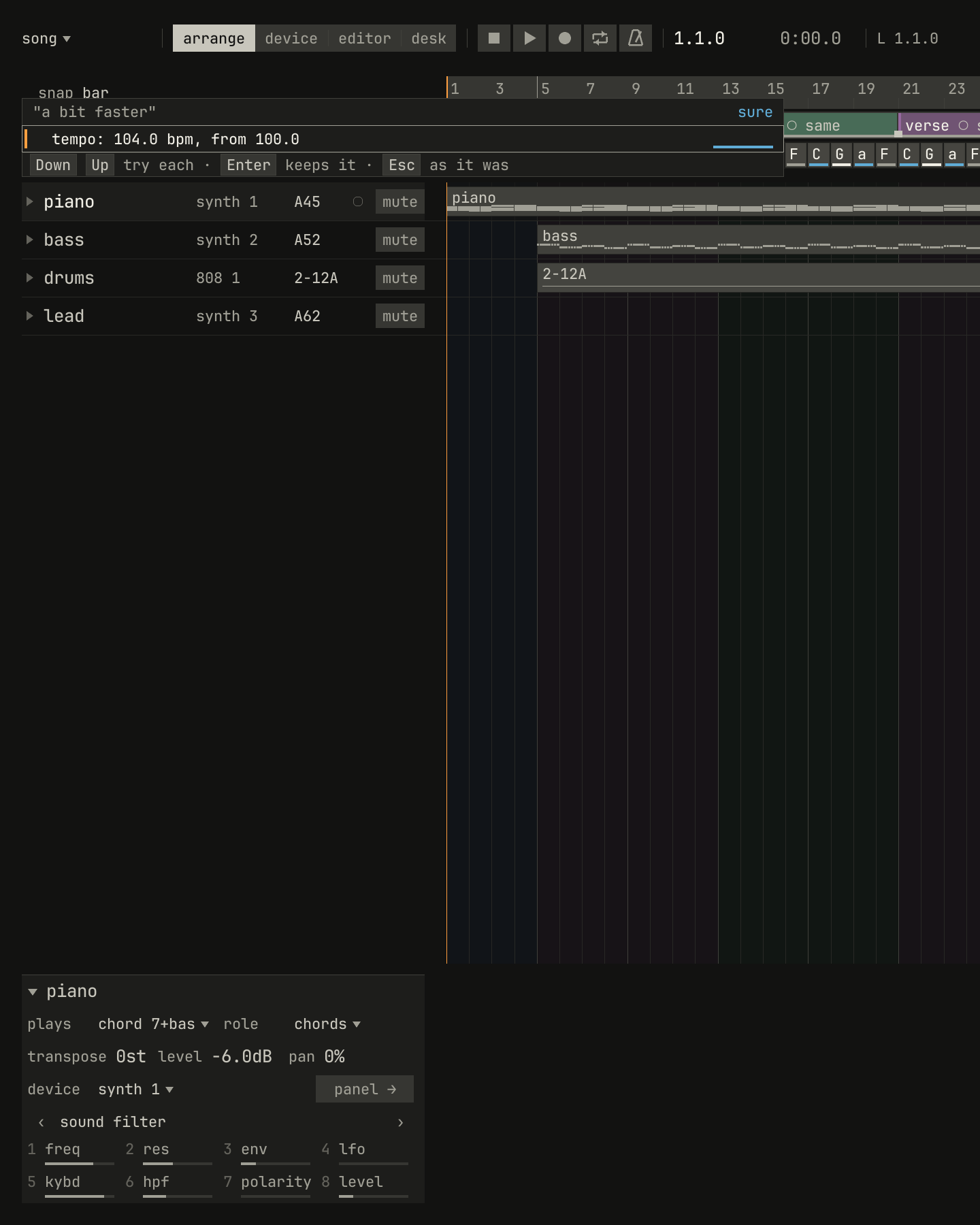
- Sure: the first reading plays at once, through a preview: the song plays as if it had the change, and nothing is kept until you press Enter. Esc plays the song as it was.
- Not sure: the panel lists the likeliest readings. Down and Up step through them, and each one plays as you reach it. Enter keeps the one playing.
- Not understood: nothing plays. The panel says three things you could say instead, and a click on one says it.
scriptzig build run-studio -- manual/11-words/song --ai replay manual/11-words/answers --script manual/11-words/faster.txt
song/song.json
{
  "tempo": 100,
  "brief": "hopeful, with a build into a big last chorus",
  "end": "65",
  "sections": ["1 intro", "5 verse", "13 chorus", "21 verse", "29 chorus", "37 bridge", "45 chorus", "53 chorus", "61 outro"],
  "key": ["1 C major"],
  "chords": ["1 C", "2 G", "3 Am", "4 F", "5 C", "6 G", "7 Am", "8 F", "9 C", "10 G", "11 Am", "12 F", "13 C", "14 G", "15 Am", "16 F", "17 C", "18 G", "19 Am", "20 F", "21 C", "22 G", "23 Am", "24 F", "25 C", "26 G", "27 Am", "28 F", "29 C", "30 G", "31 Am", "32 F", "33 C", "34 G", "35 Am", "36 F", "37 C", "38 G", "39 Am", "40 F", "41 C", "42 G", "43 Am", "44 F", "45 C", "46 G", "47 Am", "48 F", "49 C", "50 G", "51 Am", "52 F", "53 C", "54 G", "55 Am", "56 F", "57 C", "58 G", "59 Am", "60 F", "61 C", "62 G", "63 Am", "64 F"],
  "devices": [
    { "name": "synth", "type": "synth", "state": { "parts": [
      { "patch": "A45", "level": -6, "reverb_send": 15 },
      { "patch": "A52", "level": -4 },
      { "patch": "A62", "level": -8, "delay_send": 15 }
    ] } },
    { "name": "808", "type": "drums", "state": { "program": "2-12A" } }
  ],
  "tracks": [
    { "name": "piano", "device": "synth", "channel": 1, "keys": "chord 7 bass", "role": "chords", "clips": [{ "at": "1", "length": "64.0.0", "notes": "piano" }] },
    { "name": "bass", "device": "synth", "channel": 2, "keys": "pent", "role": "bass", "clips": [{ "at": "5", "length": "56.0.0", "notes": "bass" }] },
    { "name": "drums", "device": "808", "channel": 1, "role": "drums", "clips": [{ "at": "5", "length": "56.0.0", "pattern": "2-12A" }] },
    { "name": "lead", "device": "synth", "channel": 3, "keys": "pent", "role": "lead" }
  ],
  "notes": {
    "piano": { "length": "64.0.0", "follow": { "pattern": "halves", "low": "F3" } },
    "bass": { "length": "56.0.0", "follow": { "pattern": "eighths", "low": "E1" } }
  }
}
faster.txt
# A confident reading plays at once; Enter keeps it.
wait 0.2
say a bit faster
wait 0.2
capture faster.png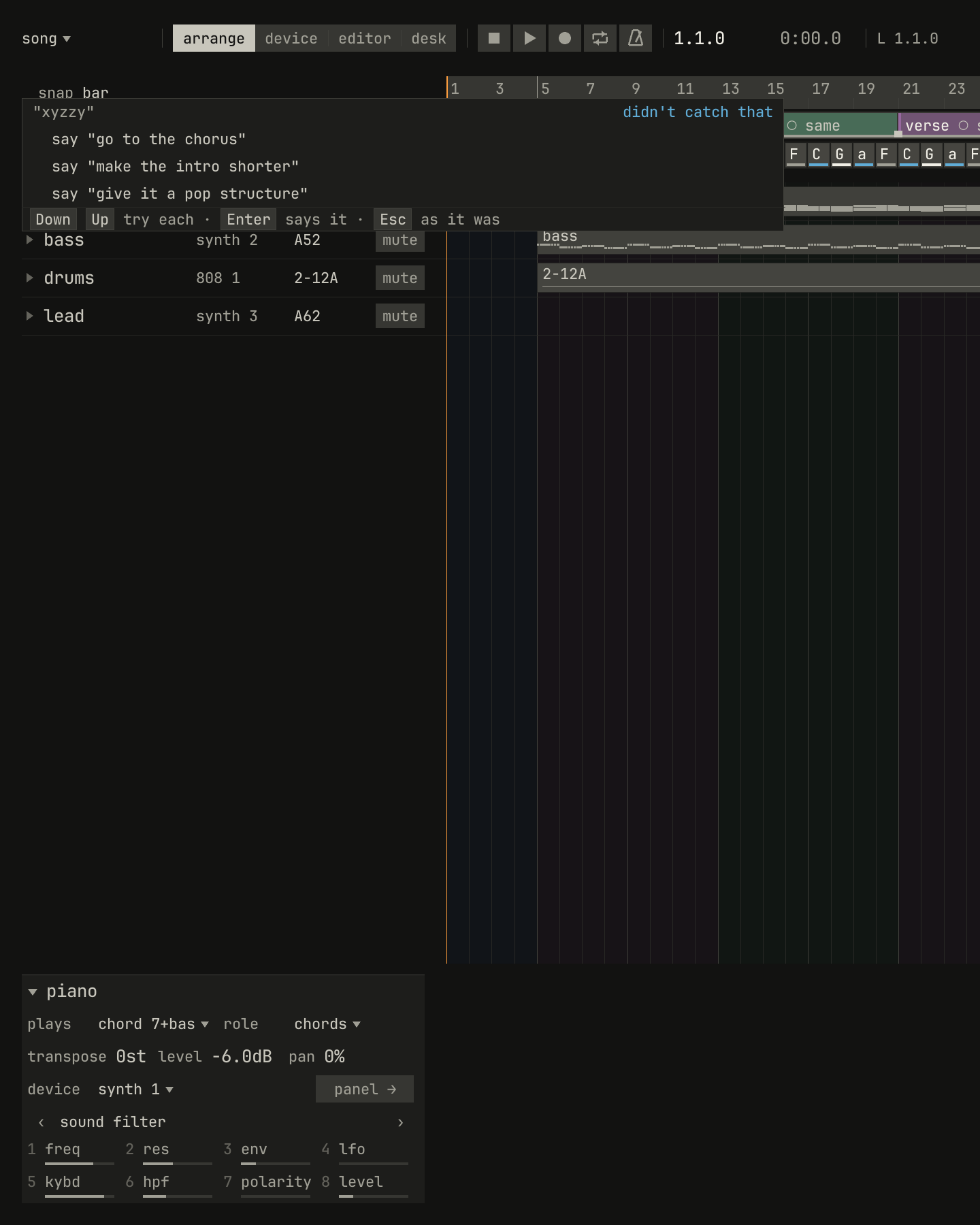
scriptzig build run-studio -- manual/11-words/song --ai replay manual/11-words/answers --script manual/11-words/nonsense.txt
song/song.json
{
  "tempo": 100,
  "brief": "hopeful, with a build into a big last chorus",
  "end": "65",
  "sections": ["1 intro", "5 verse", "13 chorus", "21 verse", "29 chorus", "37 bridge", "45 chorus", "53 chorus", "61 outro"],
  "key": ["1 C major"],
  "chords": ["1 C", "2 G", "3 Am", "4 F", "5 C", "6 G", "7 Am", "8 F", "9 C", "10 G", "11 Am", "12 F", "13 C", "14 G", "15 Am", "16 F", "17 C", "18 G", "19 Am", "20 F", "21 C", "22 G", "23 Am", "24 F", "25 C", "26 G", "27 Am", "28 F", "29 C", "30 G", "31 Am", "32 F", "33 C", "34 G", "35 Am", "36 F", "37 C", "38 G", "39 Am", "40 F", "41 C", "42 G", "43 Am", "44 F", "45 C", "46 G", "47 Am", "48 F", "49 C", "50 G", "51 Am", "52 F", "53 C", "54 G", "55 Am", "56 F", "57 C", "58 G", "59 Am", "60 F", "61 C", "62 G", "63 Am", "64 F"],
  "devices": [
    { "name": "synth", "type": "synth", "state": { "parts": [
      { "patch": "A45", "level": -6, "reverb_send": 15 },
      { "patch": "A52", "level": -4 },
      { "patch": "A62", "level": -8, "delay_send": 15 }
    ] } },
    { "name": "808", "type": "drums", "state": { "program": "2-12A" } }
  ],
  "tracks": [
    { "name": "piano", "device": "synth", "channel": 1, "keys": "chord 7 bass", "role": "chords", "clips": [{ "at": "1", "length": "64.0.0", "notes": "piano" }] },
    { "name": "bass", "device": "synth", "channel": 2, "keys": "pent", "role": "bass", "clips": [{ "at": "5", "length": "56.0.0", "notes": "bass" }] },
    { "name": "drums", "device": "808", "channel": 1, "role": "drums", "clips": [{ "at": "5", "length": "56.0.0", "pattern": "2-12A" }] },
    { "name": "lead", "device": "synth", "channel": 3, "keys": "pent", "role": "lead" }
  ],
  "notes": {
    "piano": { "length": "64.0.0", "follow": { "pattern": "halves", "low": "F3" } },
    "bass": { "length": "56.0.0", "follow": { "pattern": "eighths", "low": "E1" } }
  }
}
nonsense.txt
# Words it can't read: nothing plays, and it says what it can do.
wait 0.2
say xyzzy
wait 0.2
capture nonsense.png
A request can ask for two things at once, such as "darker and put a fill before it". The studio reads both and plays them together as one preview, kept as one edit. When you leave something out, such as which section, the studio uses what's selected, or else the whole song. It doesn't guess.
Changes that move a lot, such as a new key or taking a section away, are listed but play only when you step to them. They're marked with →.
What you can ask for
| You might say | The studio | The word it teaches |
|---|---|---|
| "put it in D major", "make it minor" | Moves the song to the key, its chords on their degrees | key, mode |
| "faster", "set it to 96" | Changes the tempo, 4% for a bit, 12% for a lot | tempo |
| "more swing", "make it straight" | Changes the swing | swing |
| "darker", "happier", "more tense" | Offers moves that do it, each tried as you step | borrowed chord, voicing |
| "sad chords in the verse" | Lays a progression over the section | progression |
| "richer chords", "add sevenths" | Sevenths and ninths, or back to triads | seventh, ninth, triad |
| "the bass is too busy" | A busier or simpler pattern for a part that follows | pattern |
| "bass an octave down" | Moves the part an octave | octave, register |
| "add a pad", "put some drums in" | A new track for the role, following the chords | role |
| "no drums in the breakdown" | Takes the part out of those bars | arranging by taking away |
| "a warmer pad", "a wobbly bass" | Opens the part's sounds, ranked by your words | the sound's words |
| "more reverb on the lead" | Raises the part's send | send, reverb, delay |
| "a house beat" | Opens the drums' rhythms, ranked by your words | the rhythm's style |
| "add claps", "lose the hi-hats" | Adds or takes away one drum's hits | the drum's name |
| "a fill before the chorus" | A fill, a build, a drop out, a crash, or a stop | transition |
| "give it a pop structure" | Lays out a form's sections | form |
| "make the intro shorter" | Inserts, deletes, or copies the section's bars | section |
| "only notes that fit" | Sets how the keys play the track | key, pent, chord |
| "practise the lead" | Opens practice on the part | practice |
| "go to the chorus", "loop the verse" | Moves the song position, or loops the bars | locators, cycle |
| "this song is about the sea" | Sets the song's brief | brief |
| "why...?", "what's...?", "how do I...?" | Answers the question | the answer's word |
Up and Down in an empty say line step through
what you've said before. Each line is kept with what the studio did for it,
in said.json in the studio's settings folder: a glossary of your words
and the studio's.
Finding things by their words
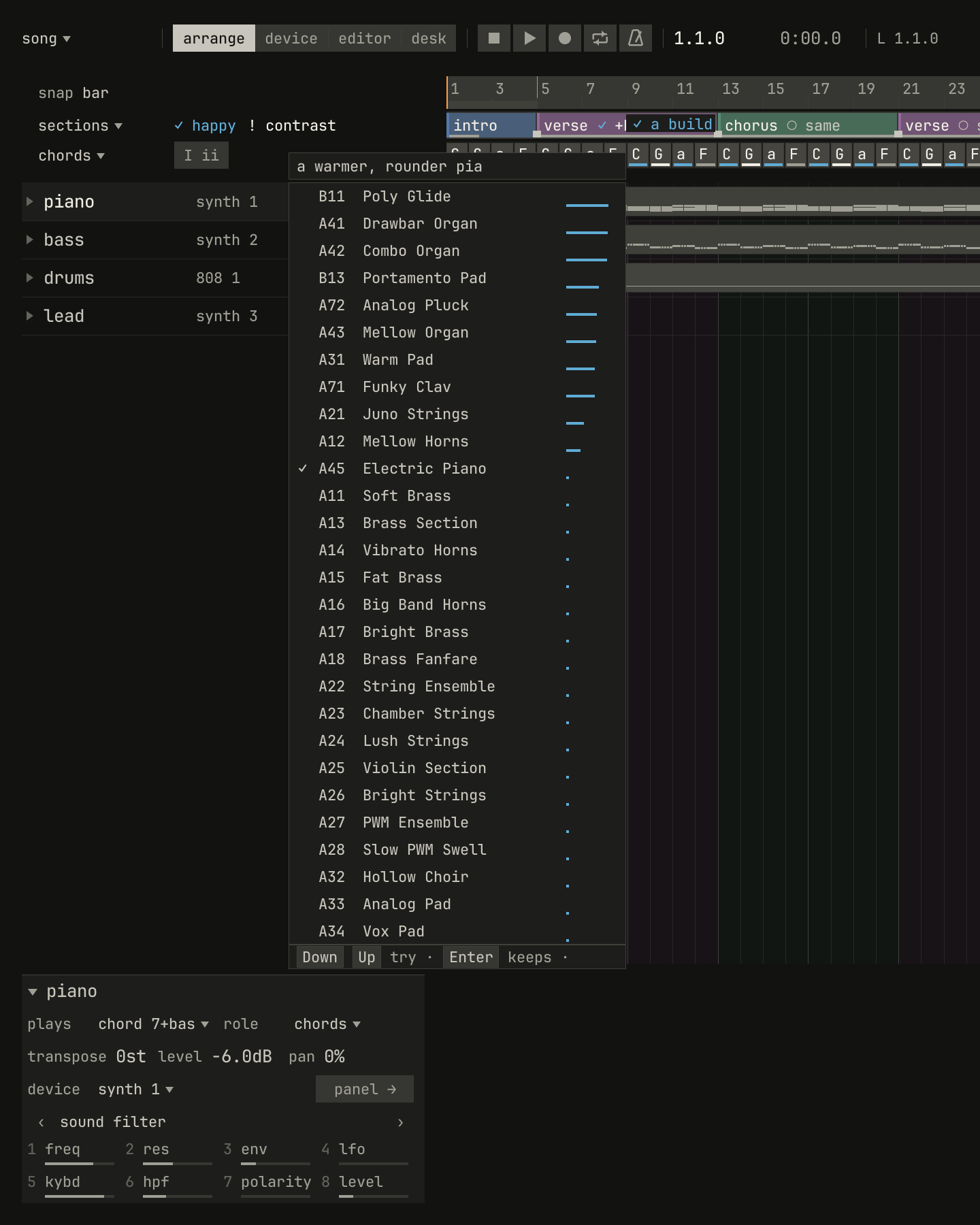
The program list, the progressions, the patterns, the transitions, and the forms each have a field at the top. Click it, or press / while the list is open, and type what you're looking for. After a short pause the list ranks itself by your words. The bar next to each item shows how well it fits. Enter gives the keys back, so the letter keys play notes again.
scriptzig build run-studio -- manual/11-words/song --ai replay manual/11-words/answers --script manual/11-words/sound.txt
song/song.json
{
  "tempo": 100,
  "brief": "hopeful, with a build into a big last chorus",
  "end": "65",
  "sections": ["1 intro", "5 verse", "13 chorus", "21 verse", "29 chorus", "37 bridge", "45 chorus", "53 chorus", "61 outro"],
  "key": ["1 C major"],
  "chords": ["1 C", "2 G", "3 Am", "4 F", "5 C", "6 G", "7 Am", "8 F", "9 C", "10 G", "11 Am", "12 F", "13 C", "14 G", "15 Am", "16 F", "17 C", "18 G", "19 Am", "20 F", "21 C", "22 G", "23 Am", "24 F", "25 C", "26 G", "27 Am", "28 F", "29 C", "30 G", "31 Am", "32 F", "33 C", "34 G", "35 Am", "36 F", "37 C", "38 G", "39 Am", "40 F", "41 C", "42 G", "43 Am", "44 F", "45 C", "46 G", "47 Am", "48 F", "49 C", "50 G", "51 Am", "52 F", "53 C", "54 G", "55 Am", "56 F", "57 C", "58 G", "59 Am", "60 F", "61 C", "62 G", "63 Am", "64 F"],
  "devices": [
    { "name": "synth", "type": "synth", "state": { "parts": [
      { "patch": "A45", "level": -6, "reverb_send": 15 },
      { "patch": "A52", "level": -4 },
      { "patch": "A62", "level": -8, "delay_send": 15 }
    ] } },
    { "name": "808", "type": "drums", "state": { "program": "2-12A" } }
  ],
  "tracks": [
    { "name": "piano", "device": "synth", "channel": 1, "keys": "chord 7 bass", "role": "chords", "clips": [{ "at": "1", "length": "64.0.0", "notes": "piano" }] },
    { "name": "bass", "device": "synth", "channel": 2, "keys": "pent", "role": "bass", "clips": [{ "at": "5", "length": "56.0.0", "notes": "bass" }] },
    { "name": "drums", "device": "808", "channel": 1, "role": "drums", "clips": [{ "at": "5", "length": "56.0.0", "pattern": "2-12A" }] },
    { "name": "lead", "device": "synth", "channel": 3, "keys": "pent", "role": "lead" }
  ],
  "notes": {
    "piano": { "length": "64.0.0", "follow": { "pattern": "halves", "low": "F3" } },
    "bass": { "length": "56.0.0", "follow": { "pattern": "eighths", "low": "E1" } }
  }
}
sound.txt
# A sound found by its words: the piano's program list, ranked.
wait 0.2
say a warmer, rounder piano
wait 0.6
capture sound.png
The ranking happens in two passes. First the model ranks every candidate
at once. Then it checks the ten likeliest one by one against what you
asked. If none of the ten fits, the field says nothing close. With the
field empty, a list ranks by the song's brief and where it's going.
"Like this but darker" ranks against the sound the part has now.
Asking questions
A question goes to the tutor. It answers with the studio's own words, the same ones the hints and these chapters use:
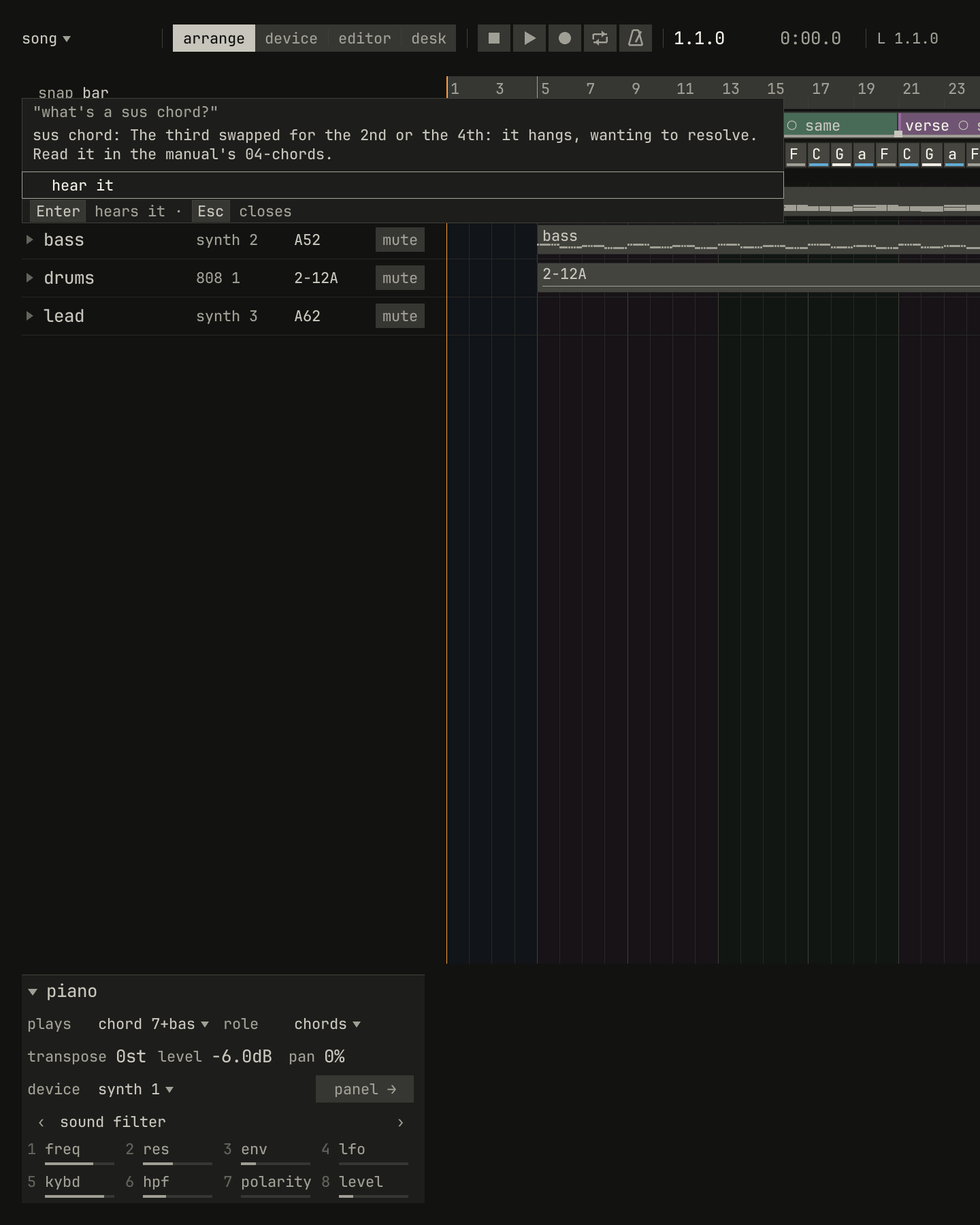
scriptzig build run-studio -- manual/11-words/song --ai replay manual/11-words/answers --script manual/11-words/question.txt
song/song.json
{
  "tempo": 100,
  "brief": "hopeful, with a build into a big last chorus",
  "end": "65",
  "sections": ["1 intro", "5 verse", "13 chorus", "21 verse", "29 chorus", "37 bridge", "45 chorus", "53 chorus", "61 outro"],
  "key": ["1 C major"],
  "chords": ["1 C", "2 G", "3 Am", "4 F", "5 C", "6 G", "7 Am", "8 F", "9 C", "10 G", "11 Am", "12 F", "13 C", "14 G", "15 Am", "16 F", "17 C", "18 G", "19 Am", "20 F", "21 C", "22 G", "23 Am", "24 F", "25 C", "26 G", "27 Am", "28 F", "29 C", "30 G", "31 Am", "32 F", "33 C", "34 G", "35 Am", "36 F", "37 C", "38 G", "39 Am", "40 F", "41 C", "42 G", "43 Am", "44 F", "45 C", "46 G", "47 Am", "48 F", "49 C", "50 G", "51 Am", "52 F", "53 C", "54 G", "55 Am", "56 F", "57 C", "58 G", "59 Am", "60 F", "61 C", "62 G", "63 Am", "64 F"],
  "devices": [
    { "name": "synth", "type": "synth", "state": { "parts": [
      { "patch": "A45", "level": -6, "reverb_send": 15 },
      { "patch": "A52", "level": -4 },
      { "patch": "A62", "level": -8, "delay_send": 15 }
    ] } },
    { "name": "808", "type": "drums", "state": { "program": "2-12A" } }
  ],
  "tracks": [
    { "name": "piano", "device": "synth", "channel": 1, "keys": "chord 7 bass", "role": "chords", "clips": [{ "at": "1", "length": "64.0.0", "notes": "piano" }] },
    { "name": "bass", "device": "synth", "channel": 2, "keys": "pent", "role": "bass", "clips": [{ "at": "5", "length": "56.0.0", "notes": "bass" }] },
    { "name": "drums", "device": "808", "channel": 1, "role": "drums", "clips": [{ "at": "5", "length": "56.0.0", "pattern": "2-12A" }] },
    { "name": "lead", "device": "synth", "channel": 3, "keys": "pent", "role": "lead" }
  ],
  "notes": {
    "piano": { "length": "64.0.0", "follow": { "pattern": "halves", "low": "F3" } },
    "bass": { "length": "56.0.0", "follow": { "pattern": "eighths", "low": "E1" } }
  }
}
question.txt
# A question, answered in the studio's own words.
wait 0.2
say what's a sus chord?
wait 0.2
capture question.png- Why something sounds the way it does, as "why does bar 6 sound off?": the studio looks at the bar for a note outside the key, two notes a semitone apart, a note off its chord on a beat, a crowded low end, or a section where nothing changes. It answers with the best explanation and moves to the spot.
- What a word means: the concept's line, an example to hear, and the chapter that teaches it.
- How to do something: the command and its keys, and Enter does it.
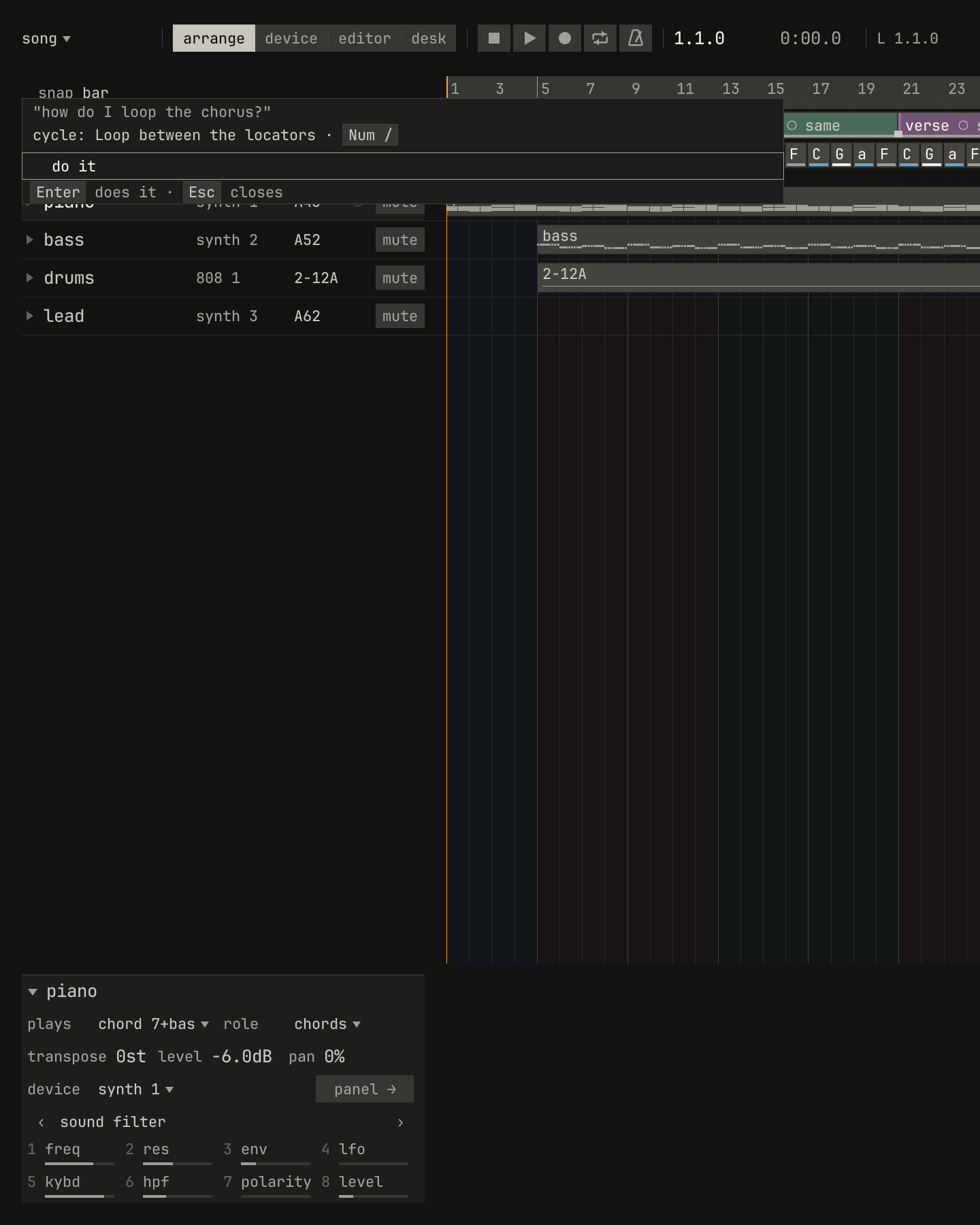
scriptzig build run-studio -- manual/11-words/song --ai replay manual/11-words/answers --script manual/11-words/how.txt
song/song.json
{
  "tempo": 100,
  "brief": "hopeful, with a build into a big last chorus",
  "end": "65",
  "sections": ["1 intro", "5 verse", "13 chorus", "21 verse", "29 chorus", "37 bridge", "45 chorus", "53 chorus", "61 outro"],
  "key": ["1 C major"],
  "chords": ["1 C", "2 G", "3 Am", "4 F", "5 C", "6 G", "7 Am", "8 F", "9 C", "10 G", "11 Am", "12 F", "13 C", "14 G", "15 Am", "16 F", "17 C", "18 G", "19 Am", "20 F", "21 C", "22 G", "23 Am", "24 F", "25 C", "26 G", "27 Am", "28 F", "29 C", "30 G", "31 Am", "32 F", "33 C", "34 G", "35 Am", "36 F", "37 C", "38 G", "39 Am", "40 F", "41 C", "42 G", "43 Am", "44 F", "45 C", "46 G", "47 Am", "48 F", "49 C", "50 G", "51 Am", "52 F", "53 C", "54 G", "55 Am", "56 F", "57 C", "58 G", "59 Am", "60 F", "61 C", "62 G", "63 Am", "64 F"],
  "devices": [
    { "name": "synth", "type": "synth", "state": { "parts": [
      { "patch": "A45", "level": -6, "reverb_send": 15 },
      { "patch": "A52", "level": -4 },
      { "patch": "A62", "level": -8, "delay_send": 15 }
    ] } },
    { "name": "808", "type": "drums", "state": { "program": "2-12A" } }
  ],
  "tracks": [
    { "name": "piano", "device": "synth", "channel": 1, "keys": "chord 7 bass", "role": "chords", "clips": [{ "at": "1", "length": "64.0.0", "notes": "piano" }] },
    { "name": "bass", "device": "synth", "channel": 2, "keys": "pent", "role": "bass", "clips": [{ "at": "5", "length": "56.0.0", "notes": "bass" }] },
    { "name": "drums", "device": "808", "channel": 1, "role": "drums", "clips": [{ "at": "5", "length": "56.0.0", "pattern": "2-12A" }] },
    { "name": "lead", "device": "synth", "channel": 3, "keys": "pent", "role": "lead" }
  ],
  "notes": {
    "piano": { "length": "64.0.0", "follow": { "pattern": "halves", "low": "F3" } },
    "bass": { "length": "56.0.0", "follow": { "pattern": "eighths", "low": "E1" } }
  }
}
how.txt
# How to do something: read as a question or as a loop, so listed; Down
# tries the question, and the tutor answers with the command and its key.
wait 0.2
say how do I loop the chorus?
wait 0.2
key down
wait 0.4
capture how.png
While you practise, telling the tutor how it went, such as "I keep losing
my place after the chorus", suggests the next step a teacher would: slow
down, loop the bars you missed, switch to one key or wait, or keep
going.
Starting from a description
Ctrl+N's first line, describe, starts a song from a few words,
such as "rainy night lo-fi, sad and slow" or "like a 90s house track". The
studio picks a template, a mode, a tempo range, a swing, a progression, and
a beat, then a sound for each part where the words point at one. The card
shows each choice and how sure it was:
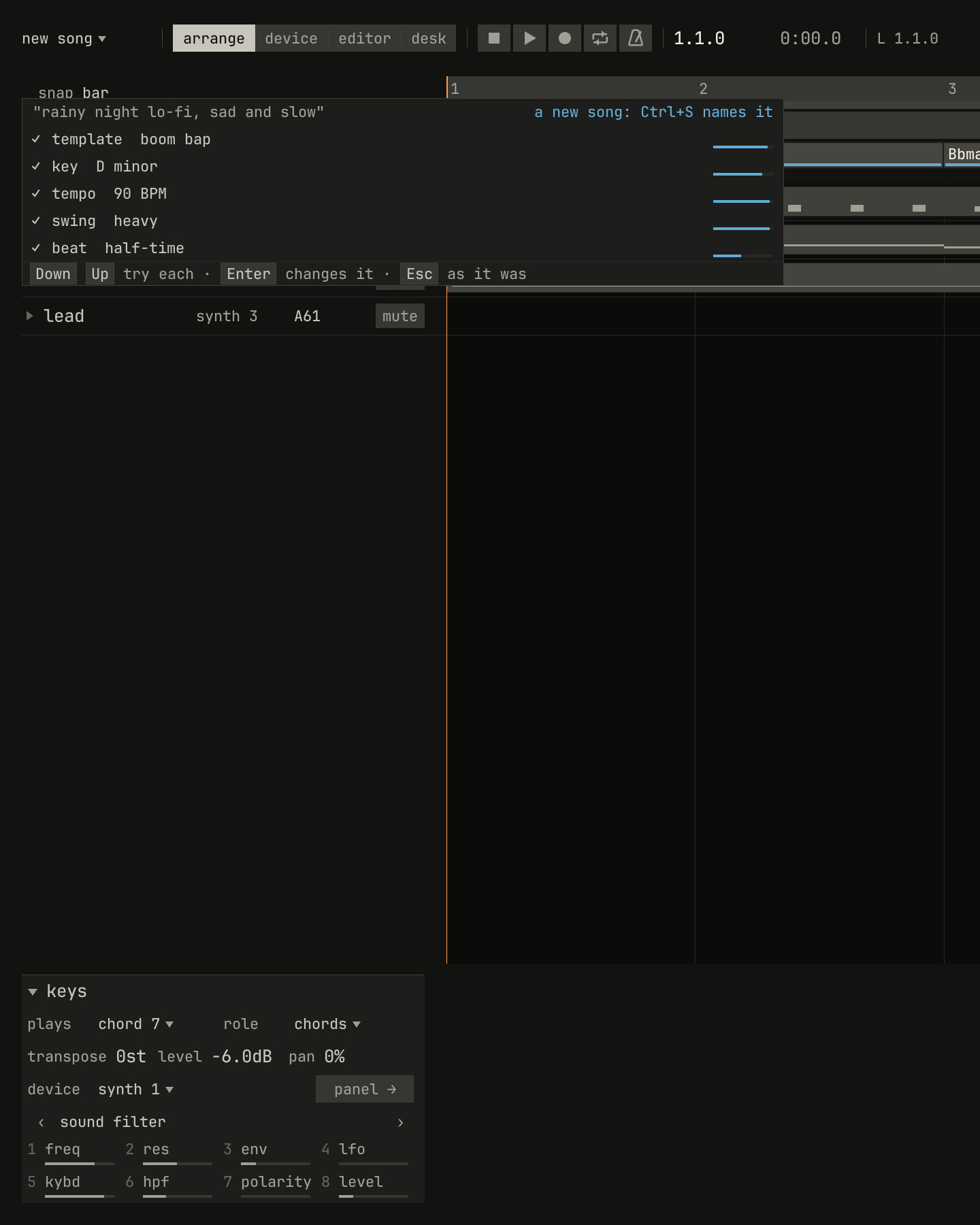
scriptzig build run-studio -- manual/11-words/song --ai replay manual/11-words/answers --script manual/11-words/describe.txt
song/song.json
{
  "tempo": 100,
  "brief": "hopeful, with a build into a big last chorus",
  "end": "65",
  "sections": ["1 intro", "5 verse", "13 chorus", "21 verse", "29 chorus", "37 bridge", "45 chorus", "53 chorus", "61 outro"],
  "key": ["1 C major"],
  "chords": ["1 C", "2 G", "3 Am", "4 F", "5 C", "6 G", "7 Am", "8 F", "9 C", "10 G", "11 Am", "12 F", "13 C", "14 G", "15 Am", "16 F", "17 C", "18 G", "19 Am", "20 F", "21 C", "22 G", "23 Am", "24 F", "25 C", "26 G", "27 Am", "28 F", "29 C", "30 G", "31 Am", "32 F", "33 C", "34 G", "35 Am", "36 F", "37 C", "38 G", "39 Am", "40 F", "41 C", "42 G", "43 Am", "44 F", "45 C", "46 G", "47 Am", "48 F", "49 C", "50 G", "51 Am", "52 F", "53 C", "54 G", "55 Am", "56 F", "57 C", "58 G", "59 Am", "60 F", "61 C", "62 G", "63 Am", "64 F"],
  "devices": [
    { "name": "synth", "type": "synth", "state": { "parts": [
      { "patch": "A45", "level": -6, "reverb_send": 15 },
      { "patch": "A52", "level": -4 },
      { "patch": "A62", "level": -8, "delay_send": 15 }
    ] } },
    { "name": "808", "type": "drums", "state": { "program": "2-12A" } }
  ],
  "tracks": [
    { "name": "piano", "device": "synth", "channel": 1, "keys": "chord 7 bass", "role": "chords", "clips": [{ "at": "1", "length": "64.0.0", "notes": "piano" }] },
    { "name": "bass", "device": "synth", "channel": 2, "keys": "pent", "role": "bass", "clips": [{ "at": "5", "length": "56.0.0", "notes": "bass" }] },
    { "name": "drums", "device": "808", "channel": 1, "role": "drums", "clips": [{ "at": "5", "length": "56.0.0", "pattern": "2-12A" }] },
    { "name": "lead", "device": "synth", "channel": 3, "keys": "pent", "role": "lead" }
  ],
  "notes": {
    "piano": { "length": "64.0.0", "follow": { "pattern": "halves", "low": "F3" } },
    "bass": { "length": "56.0.0", "follow": { "pattern": "eighths", "low": "E1" } }
  }
}
describe.txt
# A song described, and the card of what was chosen.
wait 0.2
key ctrl+n
choose describe
type rainy night lo-fi, sad and slow
key enter
wait 0.6
capture describe.png
A number you type wins over a range, so "house at 124" plays at 124 BPM. The description becomes the song's brief.
The brief and its goals
A song's brief says what the song is meant to be, in a line:
"brief": "hopeful, with a build into a big last chorus" in song.json.
Double-click the song's name to type it. Lists rank by it, and the coach
reads it for goals: a build, a drop, a calm start, contrast between verse
and chorus, a fade, a length, sparse or dense, sad or happy. Each goal the
brief asks for shows on the band: ✓ where the song keeps it, and ! where
it doesn't. Hover over a goal to see why.
What leaves the machine
Only words leave the machine: what you typed, and the studio's words for
the song that a question needs, such as piano: chords, warm, struck.
Never audio, a file, or a path. A light under the song's name shows when a
request is in flight. TypeSafe says Jev isn't trained on its customers'
requests; see its data processing agreement, linked from its models page.
The model is optional. The studio reads the key from TYPESAFE_API_KEY.
Without it, everything in the earlier chapters works the same, and
Ctrl+Space says ai: no key. Every request and its answer are cached by a
hash of the request, with the model's version pinned, so asking the same
thing twice sends it once. A render never depends on a request: what an
answer did is an edit in the song. The figures in this chapter replay
recorded answers, so they build without a key:
zig-out/bin/studio manual/11-words/song --ai replay manual/11-words/answers --script manual/11-words/darker.txt
Try it in the window
- Open the pop template with Ctrl+N, then Ctrl+Space and "make the chorus darker". Step through the moves and keep one. Its name is the word to remember.
- Say "add a pad", then "a warmer pad", and keep a sound from the list.
- Say "why does bar 14 sound off?" after drawing a note outside the key.
- Describe a song with Ctrl+N's first line, and change what the card chose.
Next: chapter 12, songs, tracks, and devices, the first of the chapters on the studio's tools.