IV. Working in the studio
Songs, tracks, and devices
A song in the studio is a folder, its parts are tracks, and its sounds come from devices: a synth, a drum machine, and a sampler, each a box with channels, as a 1989 sequencer played a rack of MIDI modules. This chapter is about all three: starting, opening, saving, and exporting a song; adding, naming, moving, muting, and deleting its tracks; and putting each track on a device, a channel, and a program.
Open the window on the chapter's song, four bars in D minor on a synth and a drum machine:
zig build run-studio -- manual/12-songs/rack

0.0 / 8.6 s
peak -11.7 dBFS
808, and the bass, the pad, and an arpeggio on three of the synth's four channels. Listen for the arpeggio coming in at bar 3.openzig build run-studio -- manual/12-songs/rack
renderzig build run-studio -- render manual/12-songs/rack rack.wav
rack/song.json
{
  "tempo": 112,
  "end": "5",
  "key": ["1 D minor"],
  "chords": ["1 Dm7", "3 Bbmaj7"],
  "devices": [
    { "name": "synth", "type": "synth", "state": { "parts": [
      { "patch": "A31", "level": -12, "reverb_send": 20 },
      { "patch": "A51", "level": -6 },
      { "patch": "B84", "level": -12, "delay_send": 20 }
    ] } },
    { "name": "808", "type": "drums", "state": { "program": "2-1A" } }
  ],
  "tracks": [
    { "name": "drums", "device": "808", "channel": 1, "role": "drums", "clips": [{ "at": "1", "length": "4.0.0", "pattern": "2-1A" }] },
    { "name": "bass", "device": "synth", "channel": 2, "role": "bass", "clips": [{ "at": "1", "length": "4.0.0", "notes": "bass" }] },
    { "name": "pad", "device": "synth", "channel": 1, "keys": "chord 7", "role": "pad", "clips": [{ "at": "1", "length": "4.0.0", "notes": "pad" }] },
    { "name": "arp", "device": "synth", "channel": 3, "role": "arp", "clips": [{ "at": "3", "length": "2.0.0", "pattern": "B84" }] }
  ],
  "notes": {
    "bass": { "length": "4.0.0", "follow": { "pattern": "offbeat", "low": "D1" } },
    "pad": { "length": "4.0.0", "follow": { "pattern": "whole", "low": "F3" } }
  }
}
A song is a folder
A song is a folder holding one file, song.json: the tempo and the swing,
the sections, the key and the chords, the devices and their states, the
desk, the tracks with their clips and lanes, the notes the clips play, the
groups, and the mute scenes. Audio tracks keep what they record beside
it, in audio/. The folder's name is the song's, at the bar's left; a
click on it drops the song's menu. Chapter 20 reads the
file line by line.
A song holds up to 8 devices and 64 tracks, and lasts an hour at most. An
edit that would go past any of them changes nothing, and a callout at the
pointer says why, as a song holds at most 64 tracks.
Starting a song
Ctrl+N drops a list of ways to start from the song's name:
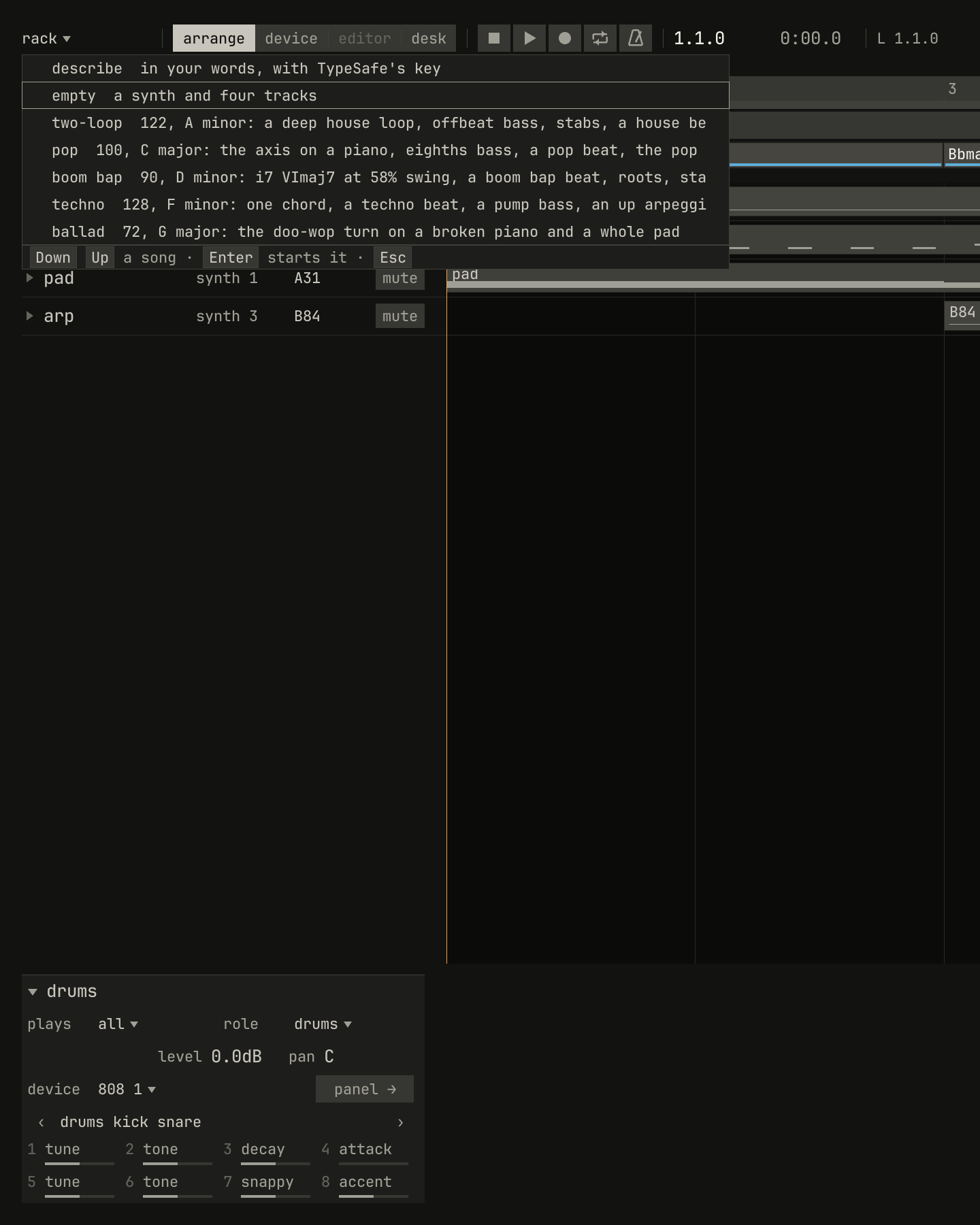
empty, and Enter starts the song lit.scriptzig build run-studio -- manual/12-songs/rack --script manual/12-songs/new.txt
rack/song.json
{
  "tempo": 112,
  "end": "5",
  "key": ["1 D minor"],
  "chords": ["1 Dm7", "3 Bbmaj7"],
  "devices": [
    { "name": "synth", "type": "synth", "state": { "parts": [
      { "patch": "A31", "level": -12, "reverb_send": 20 },
      { "patch": "A51", "level": -6 },
      { "patch": "B84", "level": -12, "delay_send": 20 }
    ] } },
    { "name": "808", "type": "drums", "state": { "program": "2-1A" } }
  ],
  "tracks": [
    { "name": "drums", "device": "808", "channel": 1, "role": "drums", "clips": [{ "at": "1", "length": "4.0.0", "pattern": "2-1A" }] },
    { "name": "bass", "device": "synth", "channel": 2, "role": "bass", "clips": [{ "at": "1", "length": "4.0.0", "notes": "bass" }] },
    { "name": "pad", "device": "synth", "channel": 1, "keys": "chord 7", "role": "pad", "clips": [{ "at": "1", "length": "4.0.0", "notes": "pad" }] },
    { "name": "arp", "device": "synth", "channel": 3, "role": "arp", "clips": [{ "at": "3", "length": "2.0.0", "pattern": "B84" }] }
  ],
  "notes": {
    "bass": { "length": "4.0.0", "follow": { "pattern": "offbeat", "low": "D1" } },
    "pad": { "length": "4.0.0", "follow": { "pattern": "whole", "low": "F3" } }
  }
}
new.txt
# Ctrl+N drops the list of ways to start a song from the song's name.
wait 0.2
key ctrl+n
wait 0.1
capture new.pngdescribestarts a song from a few words, with TypeSafe's model, as chapter 11 tells.emptyis a synth and four tracks,part 1topart 4, one on each of its channels, 32 bars long and without a clip. The window opens on one when it's given no song.- The templates are a few bars each, with roles, ways to play, and
followers set, so Space plays the start of a song in a style:
two-loop,pop,boom bap,techno, andballad. Chapter 1 starts from one.
A new song has no folder yet, and its name reads new song until it's saved.
Starting one, or opening another song, replaces the one in the window
without asking, so save first.
Dropping a file on the window opens it too: a song's folder or its
song.json, a synth take (.txt), a synth project (.json), or a Standard
MIDI File (.mid), which chapter 9
imports. All but a song's folder open as a new song without a name. A WAV
file dropped on the arrange view goes onto a sampler instead, at the bar
it's dropped on, as the
sampler's book tells, or with Shift held becomes the
song's reference, chapter 9's.
Opening and saving
Ctrl+O opens a field under the song's name, holding the song's own folder, to type on from as in a shell: a song's folder, or any file a drop takes. Enter opens it, and Esc leaves the field.
Ctrl+S saves the song into its folder, and a callout says so,
saved rack/song.json. A new song's first Ctrl+S asks for a folder
first, with the first free song-1, song-2, and so on typed for it.
Ctrl+Shift+S asks for another folder, with the song's own selected, so
typing replaces it; the folder is made if it isn't there, and the song saves
there from then on.
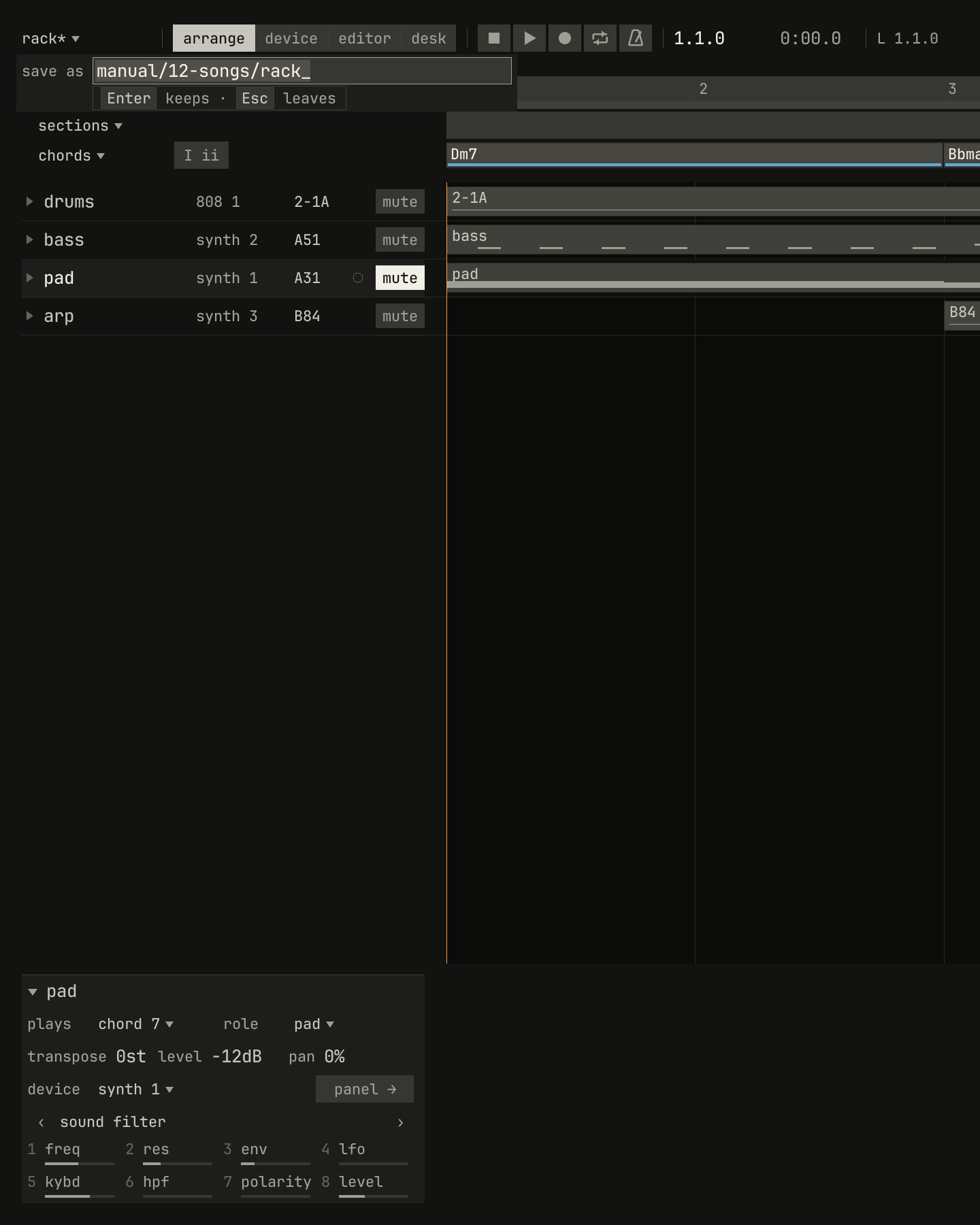
rack*; then Ctrl+Shift+S, and a field under the name with the song's folder selected.scriptzig build run-studio -- manual/12-songs/rack --script manual/12-songs/save-as.txt
rack/song.json
{
  "tempo": 112,
  "end": "5",
  "key": ["1 D minor"],
  "chords": ["1 Dm7", "3 Bbmaj7"],
  "devices": [
    { "name": "synth", "type": "synth", "state": { "parts": [
      { "patch": "A31", "level": -12, "reverb_send": 20 },
      { "patch": "A51", "level": -6 },
      { "patch": "B84", "level": -12, "delay_send": 20 }
    ] } },
    { "name": "808", "type": "drums", "state": { "program": "2-1A" } }
  ],
  "tracks": [
    { "name": "drums", "device": "808", "channel": 1, "role": "drums", "clips": [{ "at": "1", "length": "4.0.0", "pattern": "2-1A" }] },
    { "name": "bass", "device": "synth", "channel": 2, "role": "bass", "clips": [{ "at": "1", "length": "4.0.0", "notes": "bass" }] },
    { "name": "pad", "device": "synth", "channel": 1, "keys": "chord 7", "role": "pad", "clips": [{ "at": "1", "length": "4.0.0", "notes": "pad" }] },
    { "name": "arp", "device": "synth", "channel": 3, "role": "arp", "clips": [{ "at": "3", "length": "2.0.0", "pattern": "B84" }] }
  ],
  "notes": {
    "bass": { "length": "4.0.0", "follow": { "pattern": "offbeat", "low": "D1" } },
    "pad": { "length": "4.0.0", "follow": { "pattern": "whole", "low": "F3" } }
  }
}
save-as.txt
# A click on the pad's mute is an edit, so the name reads rack*; then
# Ctrl+Shift+S opens the field under the name, the folder selected.
wait 0.2
click mute pad
key ctrl+shift+s
wait 0.1
capture save-as.png
A * after the name means the song has changed since it was saved: an
edit, or a control moved on a device's panel or the desk, which the song
keeps too. Quitting with Ctrl+Q doesn't ask either.
Exporting a WAV
Ctrl+Shift+R saves the song, then writes it to a WAV file in its folder,
named after it: rack/rack.wav. It's the file studio render writes, byte
for byte, so the export and the command below are the same:
zig build run-studio -- render manual/12-songs/rack rack.wav
With cycle on, the export writes only the bars between the locators, which
chapter 13 sets. It renders on a thread of its
own, from a copy of the song, so the window plays on; the tag under the
song's name counts the bars, export bar 3, and a callout says where it
wrote. A new song asks for its folder first.
The track list
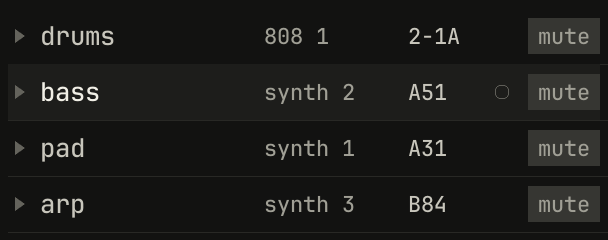
mute.openzig build run-studio -- manual/12-songs/rack --track 2
rack/song.json
{
  "tempo": 112,
  "end": "5",
  "key": ["1 D minor"],
  "chords": ["1 Dm7", "3 Bbmaj7"],
  "devices": [
    { "name": "synth", "type": "synth", "state": { "parts": [
      { "patch": "A31", "level": -12, "reverb_send": 20 },
      { "patch": "A51", "level": -6 },
      { "patch": "B84", "level": -12, "delay_send": 20 }
    ] } },
    { "name": "808", "type": "drums", "state": { "program": "2-1A" } }
  ],
  "tracks": [
    { "name": "drums", "device": "808", "channel": 1, "role": "drums", "clips": [{ "at": "1", "length": "4.0.0", "pattern": "2-1A" }] },
    { "name": "bass", "device": "synth", "channel": 2, "role": "bass", "clips": [{ "at": "1", "length": "4.0.0", "notes": "bass" }] },
    { "name": "pad", "device": "synth", "channel": 1, "keys": "chord 7", "role": "pad", "clips": [{ "at": "1", "length": "4.0.0", "notes": "pad" }] },
    { "name": "arp", "device": "synth", "channel": 3, "role": "arp", "clips": [{ "at": "3", "length": "2.0.0", "pattern": "B84" }] }
  ],
  "notes": {
    "bass": { "length": "4.0.0", "follow": { "pattern": "offbeat", "low": "D1" } },
    "pad": { "length": "4.0.0", "follow": { "pattern": "whole", "low": "F3" } }
  }
}
Each track is a line, left to right:
- The triangle opens the track's lanes of points under it, which chapter 16 draws.
- The name, which a clip made on the track names its notes after.
- The device and the channel, as
synth 2: the device's name, and the channel the track plays on it, from 1. It turns amber while the channel sounds. - The program the channel plays:
A51, a synth's slot, or2-1A, a rhythm of the drum machine's. A synth part playing a sound of its own, out of the bank, readsman. - The record light, a ring on the selected track, filled while it records, as chapter 14 tells.
mute.
A click on a track's name selects it, and Up and Down select the track above or below. The selected track is the one the letter keys, a MIDI keyboard on any channel, and a controller play; the one that records; the one the inspector shows; and the one whose device Ctrl+2 shows.
Adding a track
A double-click below the last track adds one after it, named track 1, or
the first of track 2, track 3, and so on that's free. It goes on the
selected track's device, on the first channel from the selected track's on
that no other track plays, and round to the first; with every channel
played, on the selected track's own. new track, in the menu a right-click
on a track opens, does the same. In a song with no devices, a new track
brings a synth with it. new audio track, in the same menu, adds a track
that plays recordings instead of a device, on a strip of its own
(chapter 14).
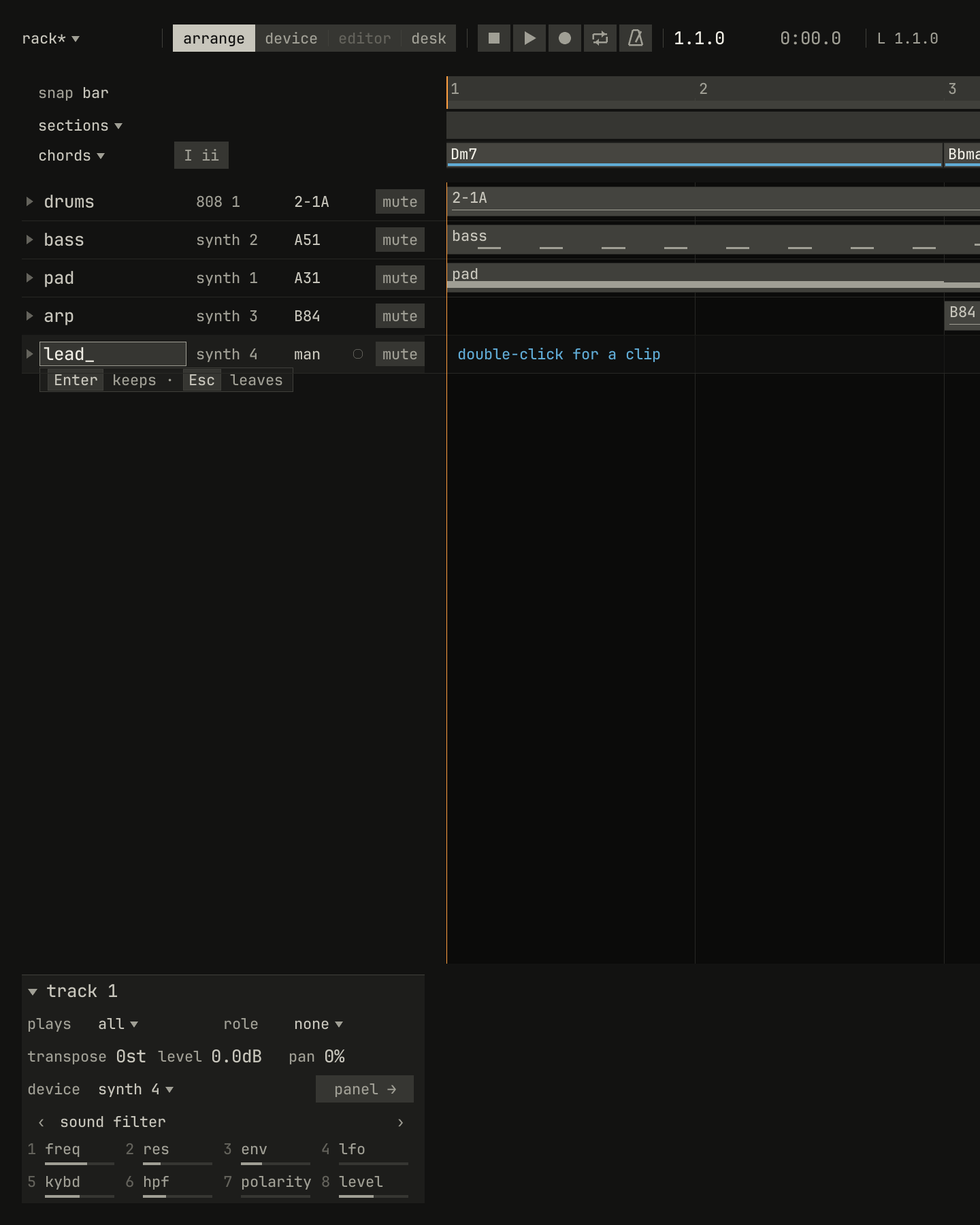
track 1 on synth 4, the synth's only free channel, playing its own sound, man. Then a double-click on its name, and lead typed over it.scriptzig build run-studio -- manual/12-songs/rack --script manual/12-songs/add-track.txt
rack/song.json
{
  "tempo": 112,
  "end": "5",
  "key": ["1 D minor"],
  "chords": ["1 Dm7", "3 Bbmaj7"],
  "devices": [
    { "name": "synth", "type": "synth", "state": { "parts": [
      { "patch": "A31", "level": -12, "reverb_send": 20 },
      { "patch": "A51", "level": -6 },
      { "patch": "B84", "level": -12, "delay_send": 20 }
    ] } },
    { "name": "808", "type": "drums", "state": { "program": "2-1A" } }
  ],
  "tracks": [
    { "name": "drums", "device": "808", "channel": 1, "role": "drums", "clips": [{ "at": "1", "length": "4.0.0", "pattern": "2-1A" }] },
    { "name": "bass", "device": "synth", "channel": 2, "role": "bass", "clips": [{ "at": "1", "length": "4.0.0", "notes": "bass" }] },
    { "name": "pad", "device": "synth", "channel": 1, "keys": "chord 7", "role": "pad", "clips": [{ "at": "1", "length": "4.0.0", "notes": "pad" }] },
    { "name": "arp", "device": "synth", "channel": 3, "role": "arp", "clips": [{ "at": "3", "length": "2.0.0", "pattern": "B84" }] }
  ],
  "notes": {
    "bass": { "length": "4.0.0", "follow": { "pattern": "offbeat", "low": "D1" } },
    "pad": { "length": "4.0.0", "follow": { "pattern": "whole", "low": "F3" } }
  }
}
add-track.txt
# With the bass selected, a double-click below the last track adds one on
# the synth's free channel; a double-click on its name types a new one.
wait 0.2
click track bass
double below tracks
wait 0.1
double track track 1
type lead
wait 0.1
capture add-track.png
A double-click on a track's name types a new one: the name is selected, so typing replaces it, Enter keeps it, and Esc leaves it as it was. Two tracks can't share a name, and a track can't go without one; a callout says so. A drag on a name moves the track up or down the list, and a line shows where it will land. Renaming and moving are edits, and undo takes them back.
Muting and soloing
A click on a track's mute mutes it, from the song's first sample: the track
mutes its channel on its device. Tracks that share a channel share its
mute, so on the drum machine, whose one channel every drum track plays,
muting one drum track quiets them all. A mute is an edit: the song saves it,
and undo takes it back.
Ctrl and a click on mute solos the track, for listening: every track on
another channel goes quiet, as if muted, and the button reads solo in
amber, since it's how you hear the song now. The song, its file, and undo
stay as they were. Ctrl and a click again ends it, and on another track
moves it there. mute and solo are rows of the track's menu too.
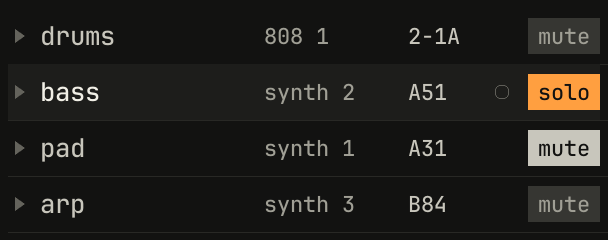
mute stays on under the solo, for when it ends.scriptzig build run-studio -- manual/12-songs/rack --script manual/12-songs/mute-solo.txt
rack/song.json
{
  "tempo": 112,
  "end": "5",
  "key": ["1 D minor"],
  "chords": ["1 Dm7", "3 Bbmaj7"],
  "devices": [
    { "name": "synth", "type": "synth", "state": { "parts": [
      { "patch": "A31", "level": -12, "reverb_send": 20 },
      { "patch": "A51", "level": -6 },
      { "patch": "B84", "level": -12, "delay_send": 20 }
    ] } },
    { "name": "808", "type": "drums", "state": { "program": "2-1A" } }
  ],
  "tracks": [
    { "name": "drums", "device": "808", "channel": 1, "role": "drums", "clips": [{ "at": "1", "length": "4.0.0", "pattern": "2-1A" }] },
    { "name": "bass", "device": "synth", "channel": 2, "role": "bass", "clips": [{ "at": "1", "length": "4.0.0", "notes": "bass" }] },
    { "name": "pad", "device": "synth", "channel": 1, "keys": "chord 7", "role": "pad", "clips": [{ "at": "1", "length": "4.0.0", "notes": "pad" }] },
    { "name": "arp", "device": "synth", "channel": 3, "role": "arp", "clips": [{ "at": "3", "length": "2.0.0", "pattern": "B84" }] }
  ],
  "notes": {
    "bass": { "length": "4.0.0", "follow": { "pattern": "offbeat", "low": "D1" } },
    "pad": { "length": "4.0.0", "follow": { "pattern": "whole", "low": "F3" } }
  }
}
mute-solo.txt
# A click on the pad's mute mutes it; Ctrl and a click on the bass's
# solos it, for listening.
wait 0.2
click mute pad
down ctrl
click mute bass
up ctrl
move 1300 850
wait 0.1
capture mute-solo.png
The inspector for a track
Chapter 0 tours the inspector. With a track selected, it holds the track's settings:
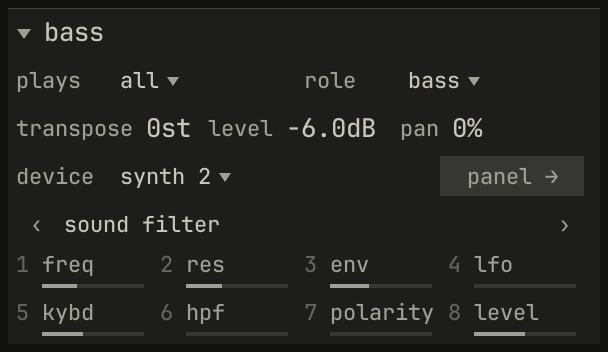
scriptzig build run-studio -- manual/12-songs/rack --script manual/12-songs/inspector.txt
rack/song.json
{
  "tempo": 112,
  "end": "5",
  "key": ["1 D minor"],
  "chords": ["1 Dm7", "3 Bbmaj7"],
  "devices": [
    { "name": "synth", "type": "synth", "state": { "parts": [
      { "patch": "A31", "level": -12, "reverb_send": 20 },
      { "patch": "A51", "level": -6 },
      { "patch": "B84", "level": -12, "delay_send": 20 }
    ] } },
    { "name": "808", "type": "drums", "state": { "program": "2-1A" } }
  ],
  "tracks": [
    { "name": "drums", "device": "808", "channel": 1, "role": "drums", "clips": [{ "at": "1", "length": "4.0.0", "pattern": "2-1A" }] },
    { "name": "bass", "device": "synth", "channel": 2, "role": "bass", "clips": [{ "at": "1", "length": "4.0.0", "notes": "bass" }] },
    { "name": "pad", "device": "synth", "channel": 1, "keys": "chord 7", "role": "pad", "clips": [{ "at": "1", "length": "4.0.0", "notes": "pad" }] },
    { "name": "arp", "device": "synth", "channel": 3, "role": "arp", "clips": [{ "at": "3", "length": "2.0.0", "pattern": "B84" }] }
  ],
  "notes": {
    "bass": { "length": "4.0.0", "follow": { "pattern": "offbeat", "low": "D1" } },
    "pad": { "length": "4.0.0", "follow": { "pattern": "whole", "low": "F3" } }
  }
}
inspector.txt
# A click on the bass's name selects it, and the inspector shows it.
wait 0.2
click track bass
move 1300 850
wait 0.1
capture inspector.png
plays ▾, how the letter keys and MIDI play the track: every semitone, the key's notes, five of them, or a chord under one finger. Chapter 3 lists them.role ▾, what the track is for, which sets the patterns and sounds it is offered: chapter 6.transpose,level, andpan, the channel's own controls on its device: the synth part's, the drum machine's, or the sampler channel's. The drum machine and the sampler have no transposition, and leave it out. Drag one up or down, or turn the wheel over it, finer with Shift.device ▾, the device and the channel, which a click lists as the track list's does, andpanel →, which opens the device view.- The page of eight, eight of the device's controls, a page at a time with ‹ and ›: the synth's filter, its oscillator, its LFO, and its mix. The MiniLab's eight knobs turn the same page, numbered as they are, as chapter 18 tells. A control shows its name, and its value under the pointer.
plays and role are the song's, and edits. The levels and the page are
the device's own controls, as its panel holds them, so the song saves them
but undo leaves them as they are: see undo.
Deleting a track
Ctrl+Delete deletes the selected track, with its clips and lanes,
and delete track in the track's menu does the same. A group's clips on
the track go with it, and so does the track in every mute scene. Undo
brings it all back. The device stays in the song.
Devices
A device is a box with channels, as a multitimbral module of 1989 was: one box, several sounds at once, each on a channel of its own. The studio has three:
| Device | Named | Channels | A channel is |
|---|---|---|---|
| synth | synth |
4 | A part: a whole synth with its own patch, sequence, and level |
| drum machine | 808 |
1 | The whole machine, its twelve voices on twelve keys |
| sampler | S1000 |
16 | A program: a keyboard of samples, or a kit of them on keys |
A track plays one channel of one device. Several tracks can play one channel, as every drum track plays the drum machine's one, and they share its sound, its program, and its mute. Each device has a strip of its own on the desk, chapter 17's, so the sounds on one device share its strip's effects.
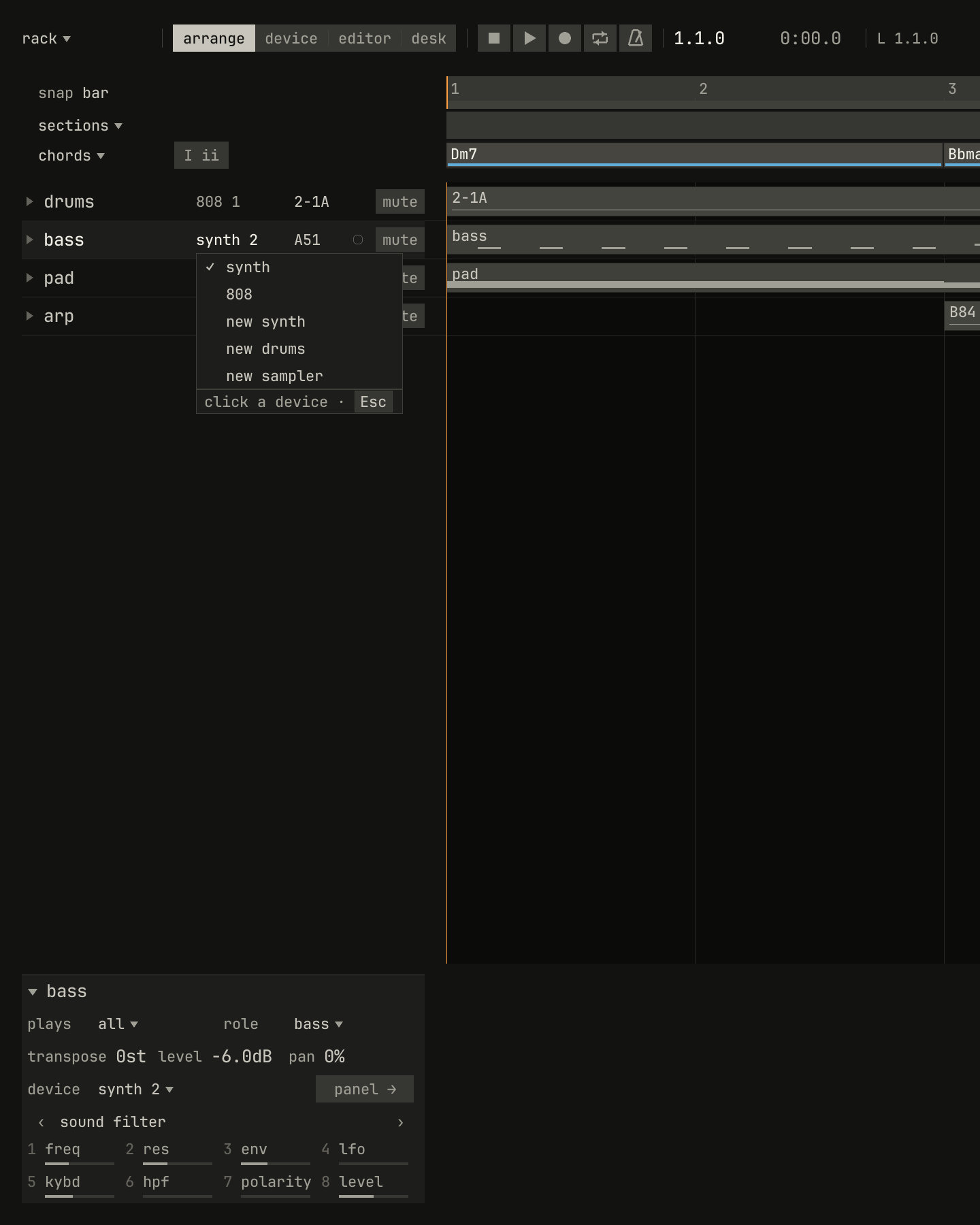
scriptzig build run-studio -- manual/12-songs/rack --script manual/12-songs/devices.txt
rack/song.json
{
  "tempo": 112,
  "end": "5",
  "key": ["1 D minor"],
  "chords": ["1 Dm7", "3 Bbmaj7"],
  "devices": [
    { "name": "synth", "type": "synth", "state": { "parts": [
      { "patch": "A31", "level": -12, "reverb_send": 20 },
      { "patch": "A51", "level": -6 },
      { "patch": "B84", "level": -12, "delay_send": 20 }
    ] } },
    { "name": "808", "type": "drums", "state": { "program": "2-1A" } }
  ],
  "tracks": [
    { "name": "drums", "device": "808", "channel": 1, "role": "drums", "clips": [{ "at": "1", "length": "4.0.0", "pattern": "2-1A" }] },
    { "name": "bass", "device": "synth", "channel": 2, "role": "bass", "clips": [{ "at": "1", "length": "4.0.0", "notes": "bass" }] },
    { "name": "pad", "device": "synth", "channel": 1, "keys": "chord 7", "role": "pad", "clips": [{ "at": "1", "length": "4.0.0", "notes": "pad" }] },
    { "name": "arp", "device": "synth", "channel": 3, "role": "arp", "clips": [{ "at": "3", "length": "2.0.0", "pattern": "B84" }] }
  ],
  "notes": {
    "bass": { "length": "4.0.0", "follow": { "pattern": "offbeat", "low": "D1" } },
    "pad": { "length": "4.0.0", "follow": { "pattern": "whole", "low": "F3" } }
  }
}
devices.txt
# A click on the bass's device drops the song's devices and new ones.
wait 0.2
click device bass
wait 0.1
capture devices.png
A click on a track's device drops the list of the song's devices, and of the
new ones a device can be: new synth, new drums, and new sampler. A new
device starts as its type's defaults have it, a synth on the factory bank
or the drum machine on its factory rhythms, named after its type, synth 2
or 808 2, with a strip at 0 dB. With 8 devices in the song, the list
offers no new ones. A double-click on a track's device opens its view.
The wheel over a track's device steps the track through the device's
channels, round. Two tracks on one channel play one sound: the pad moved
onto the bass's synth 2 plays the bass's patch.
Programs
A device's program is the sound a channel plays, chosen from the device's memory, as a module took a MIDI program change:
- The synth's programs are the slots of its bank,
A11toB88: a patch each, a sound, and on some a sequence and a chord. The last bank,B81toB88, holds eight sequences ready to play. A slot written over with the panel'swriteis kept with the song, and the list marks it with a*. The synth's book tells the bank. - The drum machine's programs are its rhythms, as
2-1A: group 2, rhythm 1, variation A. A rhythm sets no sound; the panel's controls do. - The sampler's programs are its keyboards of samples, by number and
name, as
1 piano: samples spread over the keys, or a kit, a sample on each key. Its list holds the programs in use.
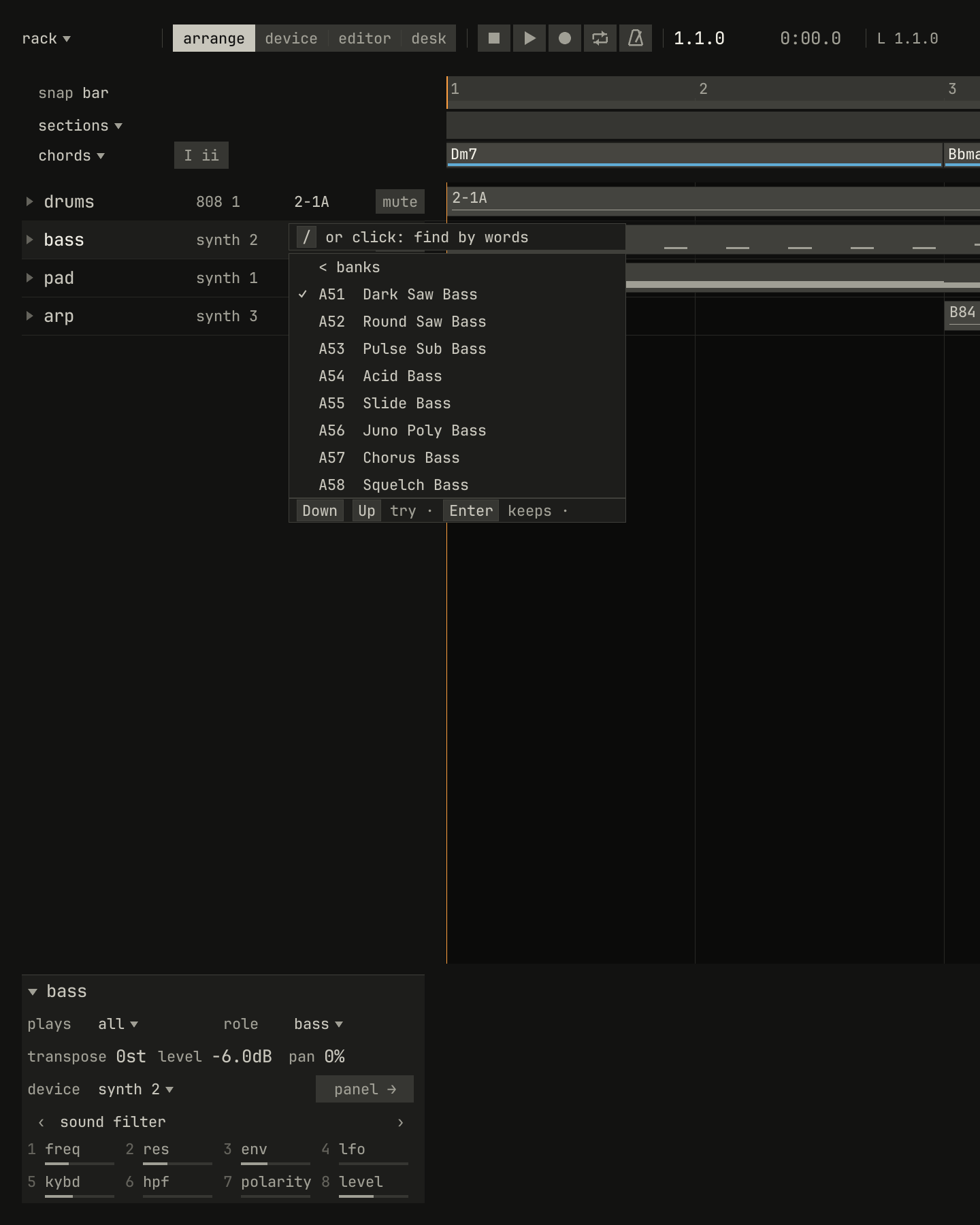
bass. < banks goes back to the sixteen banks by name.scriptzig build run-studio -- manual/12-songs/rack --script manual/12-songs/programs.txt
rack/song.json
{
  "tempo": 112,
  "end": "5",
  "key": ["1 D minor"],
  "chords": ["1 Dm7", "3 Bbmaj7"],
  "devices": [
    { "name": "synth", "type": "synth", "state": { "parts": [
      { "patch": "A31", "level": -12, "reverb_send": 20 },
      { "patch": "A51", "level": -6 },
      { "patch": "B84", "level": -12, "delay_send": 20 }
    ] } },
    { "name": "808", "type": "drums", "state": { "program": "2-1A" } }
  ],
  "tracks": [
    { "name": "drums", "device": "808", "channel": 1, "role": "drums", "clips": [{ "at": "1", "length": "4.0.0", "pattern": "2-1A" }] },
    { "name": "bass", "device": "synth", "channel": 2, "role": "bass", "clips": [{ "at": "1", "length": "4.0.0", "notes": "bass" }] },
    { "name": "pad", "device": "synth", "channel": 1, "keys": "chord 7", "role": "pad", "clips": [{ "at": "1", "length": "4.0.0", "notes": "pad" }] },
    { "name": "arp", "device": "synth", "channel": 3, "role": "arp", "clips": [{ "at": "3", "length": "2.0.0", "pattern": "B84" }] }
  ],
  "notes": {
    "bass": { "length": "4.0.0", "follow": { "pattern": "offbeat", "low": "D1" } },
    "pad": { "length": "4.0.0", "follow": { "pattern": "whole", "low": "F3" } }
  }
}
programs.txt
# A click on the bass's program drops the synth's bank of basses.
wait 0.2
click program bass
wait 0.1
capture programs.png
A click on a track's program drops the device's list, and a program chosen plays at once, while the song plays or the keys do. Down and Up step through the list, choosing as they go, so a sound is tried in a second; Right opens a bank or a group lit, and Left goes back. Enter on a program, or a click away, closes it. The synth's list opens on the bank its role suits, and the field at its head ranks the sounds by words, as chapter 11 tells.
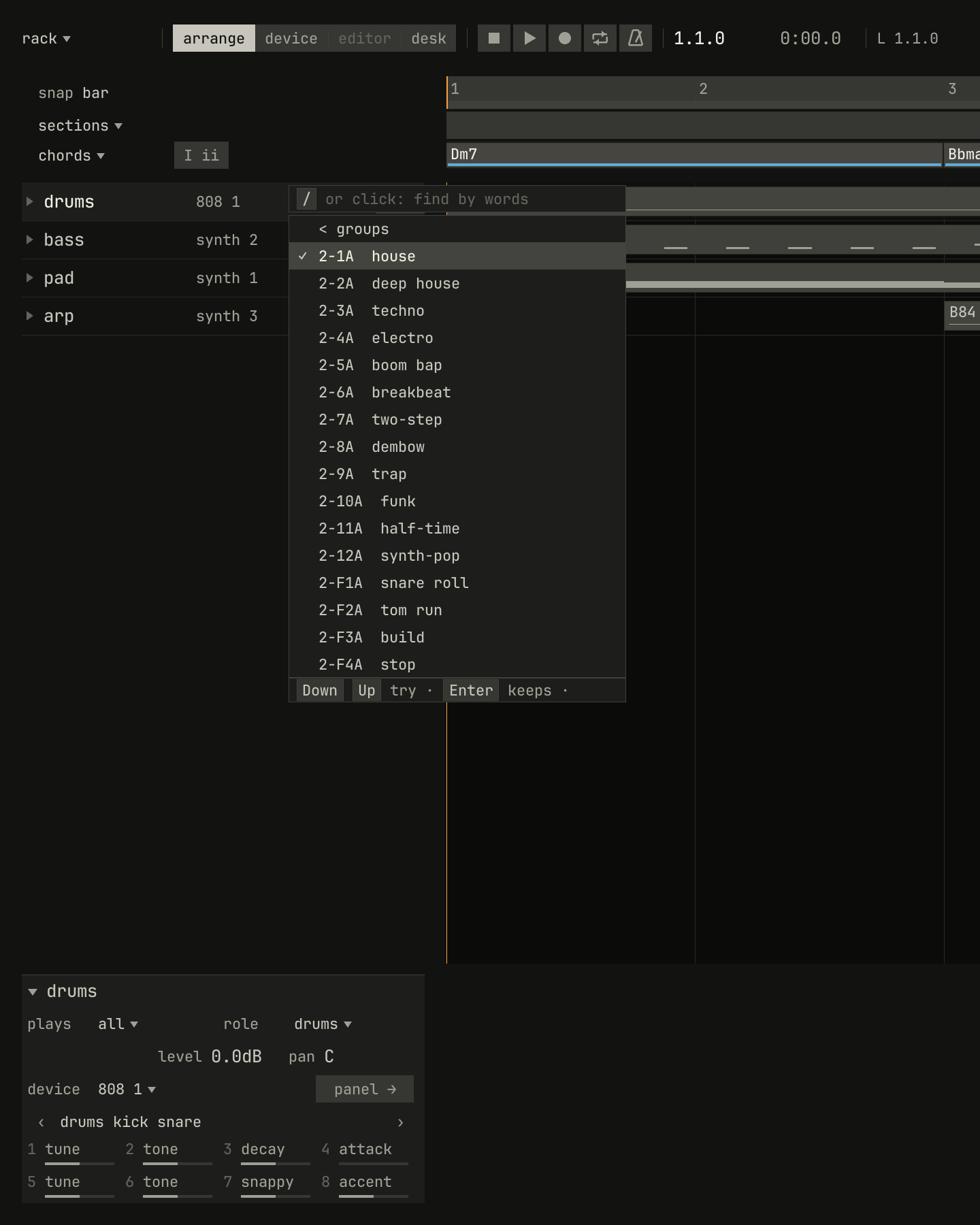
2-1A house is checked: it's what the channel plays.scriptzig build run-studio -- manual/12-songs/rack --script manual/12-songs/rhythms.txt
rack/song.json
{
  "tempo": 112,
  "end": "5",
  "key": ["1 D minor"],
  "chords": ["1 Dm7", "3 Bbmaj7"],
  "devices": [
    { "name": "synth", "type": "synth", "state": { "parts": [
      { "patch": "A31", "level": -12, "reverb_send": 20 },
      { "patch": "A51", "level": -6 },
      { "patch": "B84", "level": -12, "delay_send": 20 }
    ] } },
    { "name": "808", "type": "drums", "state": { "program": "2-1A" } }
  ],
  "tracks": [
    { "name": "drums", "device": "808", "channel": 1, "role": "drums", "clips": [{ "at": "1", "length": "4.0.0", "pattern": "2-1A" }] },
    { "name": "bass", "device": "synth", "channel": 2, "role": "bass", "clips": [{ "at": "1", "length": "4.0.0", "notes": "bass" }] },
    { "name": "pad", "device": "synth", "channel": 1, "keys": "chord 7", "role": "pad", "clips": [{ "at": "1", "length": "4.0.0", "notes": "pad" }] },
    { "name": "arp", "device": "synth", "channel": 3, "role": "arp", "clips": [{ "at": "3", "length": "2.0.0", "pattern": "B84" }] }
  ],
  "notes": {
    "bass": { "length": "4.0.0", "follow": { "pattern": "offbeat", "low": "D1" } },
    "pad": { "length": "4.0.0", "follow": { "pattern": "whole", "low": "F3" } }
  }
}
rhythms.txt
# A click on the drums' program drops the drum machine's groups; a click
# on group 2 opens its rhythms.
wait 0.2
click program drums
wait 0.1
choose group 2
wait 0.1
capture rhythms.png
A program chosen from the list is the device's, as a press on its panel would be: the song keeps it, a recording records it, and undo leaves it. With a pattern clip selected on the track, the list sets the clip's program instead, as an edit, which chapter 13 tells.
The device view
Ctrl+2, a double-click on a track's device, or panel → in the
inspector, shows the selected track's device, its whole panel, in place of
the arrange view. A tag under the views names what it shows, the track, the
device, and the channel, as pad: synth, part 1. Ctrl+1 or
Esc goes back.
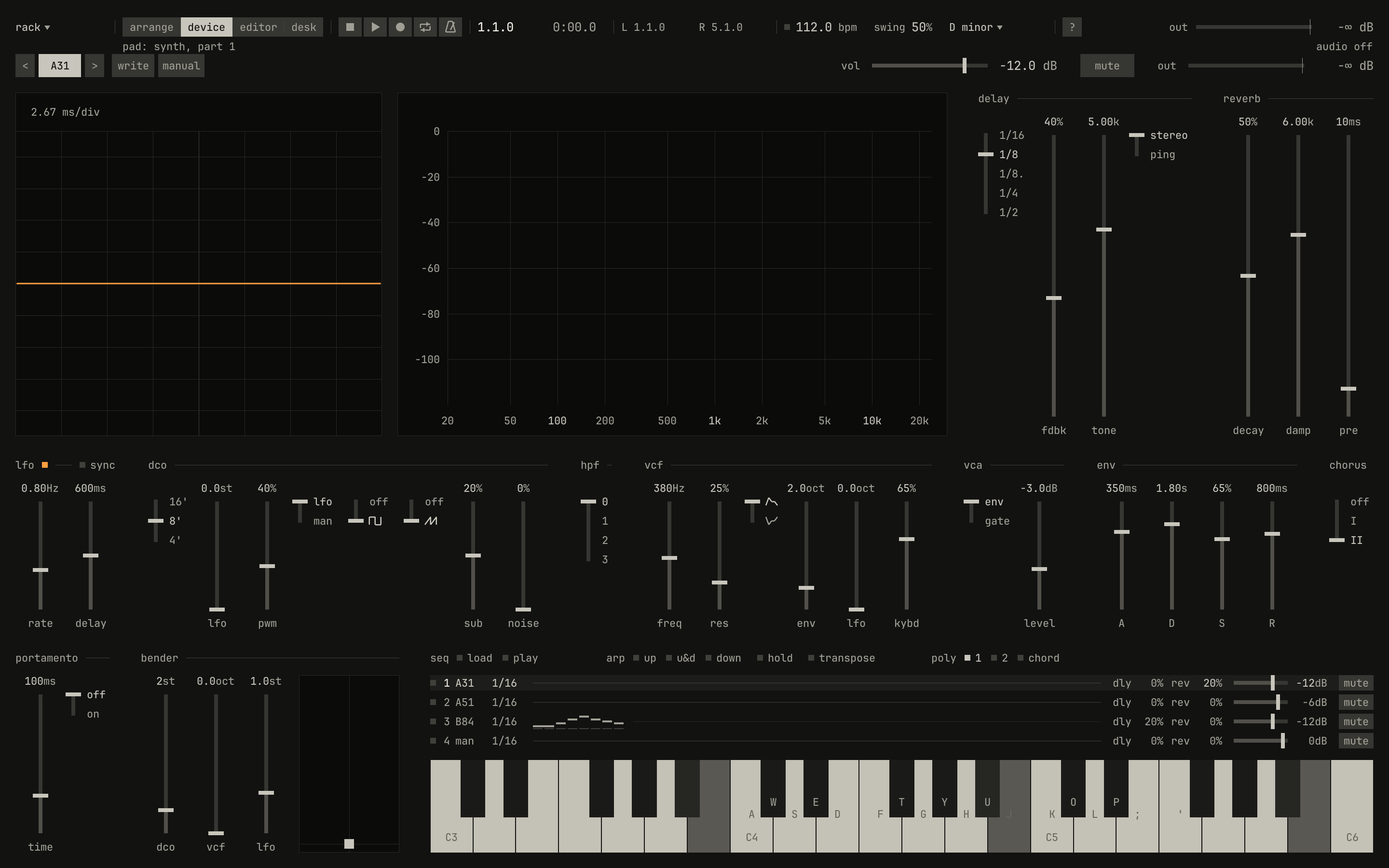
openzig build run-studio -- manual/12-songs/rack --view device --track 3
rack/song.json
{
  "tempo": 112,
  "end": "5",
  "key": ["1 D minor"],
  "chords": ["1 Dm7", "3 Bbmaj7"],
  "devices": [
    { "name": "synth", "type": "synth", "state": { "parts": [
      { "patch": "A31", "level": -12, "reverb_send": 20 },
      { "patch": "A51", "level": -6 },
      { "patch": "B84", "level": -12, "delay_send": 20 }
    ] } },
    { "name": "808", "type": "drums", "state": { "program": "2-1A" } }
  ],
  "tracks": [
    { "name": "drums", "device": "808", "channel": 1, "role": "drums", "clips": [{ "at": "1", "length": "4.0.0", "pattern": "2-1A" }] },
    { "name": "bass", "device": "synth", "channel": 2, "role": "bass", "clips": [{ "at": "1", "length": "4.0.0", "notes": "bass" }] },
    { "name": "pad", "device": "synth", "channel": 1, "keys": "chord 7", "role": "pad", "clips": [{ "at": "1", "length": "4.0.0", "notes": "pad" }] },
    { "name": "arp", "device": "synth", "channel": 3, "role": "arp", "clips": [{ "at": "3", "length": "2.0.0", "pattern": "B84" }] }
  ],
  "notes": {
    "bass": { "length": "4.0.0", "follow": { "pattern": "offbeat", "low": "D1" } },
    "pad": { "length": "4.0.0", "follow": { "pattern": "whole", "low": "F3" } }
  }
}
Each panel keeps the face of the box it comes from, and each has a book of its own:
- The synth, its own window's panel, the SH-101 and the Juno-106 in one: the synth's book.
- The drum machine, the TR-808's face, with the 909's changes: the drum machine's book.
- The sampler, the S1000's pages and the MPC60's pads: the sampler's book.
Turning a control on a panel changes the device's state: the song keeps it, the next pass of a cycle keeps it, and a recording takes it as points on the lanes of the track recording that channel, chapter 14's. The drum machine's and the sampler's panels have no keys of their own, so the studio's letter keys play them, on the drum machine or a sampler's kit two octaves down from a synth's, the home row from C2: the bass drum, or the kit's first pad.
The synth in the studio
The synth in the studio is the synth of its own window, with the studio around it:
- Its four parts are the device's four channels. A track on
synth 2plays part 2, with part 2's patch, sequence, level, and sends. - Its clock follows the transport. The song's tempo and swing are the synth's, so its panel shows neither; its delay's time follows the song's tempo; an arpeggio steps on the song's 16ths; and a part's sequence started mid-bar, from its row or a pattern clip, waits for the next bar.
- The studio keeps a few keys. Space plays the song, not the
part's sequence, and Esc goes back to the arrange view, where in
the synth's window it lets go of every note. Every key with Ctrl is the
studio's: undo, save, the views. So are Shift and Alt with F1 to F10,
which recall mute scenes, so where the synth's window mutes a part with
Shift and F1 to F4, here the
muteon its row does. - The synth takes the rest: the letter keys, which play the part shown on the panel, Z and X, Shift for the hold pedal, Tab, Up and Down for its volume, M to mute it, 1 to 8 and the brackets for slots, Enter to load a sequence, and F1 to F4, which show a part on the panel. A part shown with F1 to F4 plays and turns there, but the selected track stays the same, and the tag still names it.
- F1 is the synth's, so
?in the bar, or Ctrl and/, opens the screen of every command in the device view.
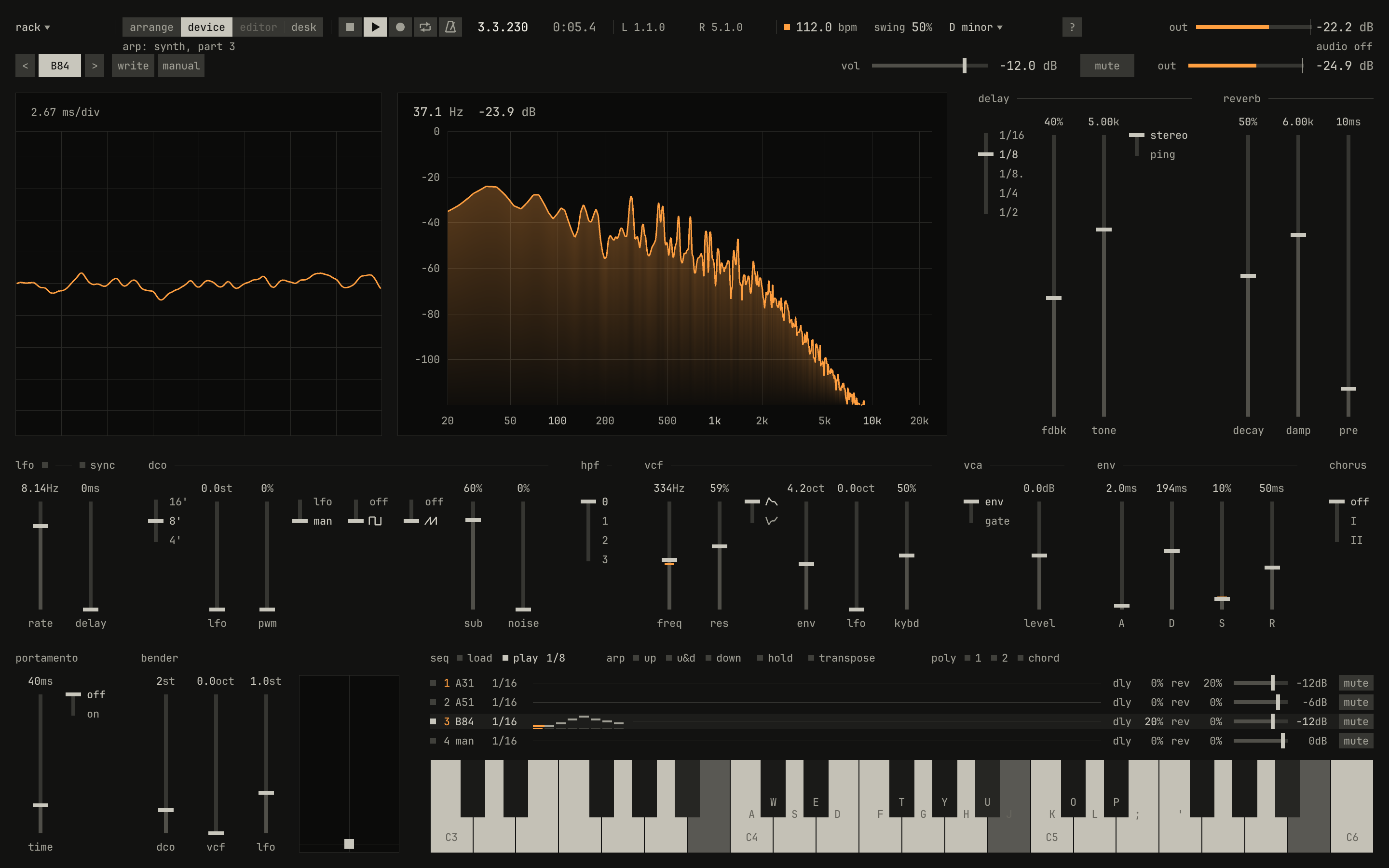
0.0 / 4.3 s
peak -13.0 dBFS
B84's eight steps on the song's 16ths, the step sounding lit, from the bar its pattern clip starts on.openzig build run-studio -- manual/12-songs/rack --view device --track 4 --play 3
renderzig build run-studio -- render manual/12-songs/rack arp.wav --from 3 --to 5
rack/song.json
{
  "tempo": 112,
  "end": "5",
  "key": ["1 D minor"],
  "chords": ["1 Dm7", "3 Bbmaj7"],
  "devices": [
    { "name": "synth", "type": "synth", "state": { "parts": [
      { "patch": "A31", "level": -12, "reverb_send": 20 },
      { "patch": "A51", "level": -6 },
      { "patch": "B84", "level": -12, "delay_send": 20 }
    ] } },
    { "name": "808", "type": "drums", "state": { "program": "2-1A" } }
  ],
  "tracks": [
    { "name": "drums", "device": "808", "channel": 1, "role": "drums", "clips": [{ "at": "1", "length": "4.0.0", "pattern": "2-1A" }] },
    { "name": "bass", "device": "synth", "channel": 2, "role": "bass", "clips": [{ "at": "1", "length": "4.0.0", "notes": "bass" }] },
    { "name": "pad", "device": "synth", "channel": 1, "keys": "chord 7", "role": "pad", "clips": [{ "at": "1", "length": "4.0.0", "notes": "pad" }] },
    { "name": "arp", "device": "synth", "channel": 3, "role": "arp", "clips": [{ "at": "3", "length": "2.0.0", "pattern": "B84" }] }
  ],
  "notes": {
    "bass": { "length": "4.0.0", "follow": { "pattern": "offbeat", "low": "D1" } },
    "pad": { "length": "4.0.0", "follow": { "pattern": "whole", "low": "F3" } }
  }
}
What the synth's own window does with files, the studio does with the song: there are no takes, patch files, or project files here, since the song holds the synth's state, its slots written included, and Ctrl+S saves it. The synth's book tells the panel itself.
Moving a track to another device
Choosing another device from a track's list moves the track there: onto the same channel, if the device has it, or its last; onto a new device's first. Undo moves it back. On a device of another type, what the track holds comes along as far as the new one can play it:
- Its notes, all of them, played now on the new device's keys.
- Its lanes, each to the param of the same name, within its range:
level,pan,muted, and the strip's on the desk, such asdesk_delay, come along; a lane the new device has no param for goes. - Its pattern clips, and programs in its notes, where the new device has
a program of that number. Every synth slot is a drum machine program too,
as MIDI program numbers carry over, but the synth has none past
B88.
Notes another track plays too are copied for the track moved, under a name of their own, so the other track keeps playing them where it is.

new synth, so it plays part 1 of synth 2 and its manual sound; and the arpeggio moved to the 808, whose pattern clip keeps its program's number, which the drum machine reads as rhythm 3-12B.scriptzig build run-studio -- manual/12-songs/rack --script manual/12-songs/moved.txt
rack/song.json
{
  "tempo": 112,
  "end": "5",
  "key": ["1 D minor"],
  "chords": ["1 Dm7", "3 Bbmaj7"],
  "devices": [
    { "name": "synth", "type": "synth", "state": { "parts": [
      { "patch": "A31", "level": -12, "reverb_send": 20 },
      { "patch": "A51", "level": -6 },
      { "patch": "B84", "level": -12, "delay_send": 20 }
    ] } },
    { "name": "808", "type": "drums", "state": { "program": "2-1A" } }
  ],
  "tracks": [
    { "name": "drums", "device": "808", "channel": 1, "role": "drums", "clips": [{ "at": "1", "length": "4.0.0", "pattern": "2-1A" }] },
    { "name": "bass", "device": "synth", "channel": 2, "role": "bass", "clips": [{ "at": "1", "length": "4.0.0", "notes": "bass" }] },
    { "name": "pad", "device": "synth", "channel": 1, "keys": "chord 7", "role": "pad", "clips": [{ "at": "1", "length": "4.0.0", "notes": "pad" }] },
    { "name": "arp", "device": "synth", "channel": 3, "role": "arp", "clips": [{ "at": "3", "length": "2.0.0", "pattern": "B84" }] }
  ],
  "notes": {
    "bass": { "length": "4.0.0", "follow": { "pattern": "offbeat", "low": "D1" } },
    "pad": { "length": "4.0.0", "follow": { "pattern": "whole", "low": "F3" } }
  }
}
moved.txt
# The bass goes to a new synth, and the arpeggio to the drum machine.
wait 0.2
click device bass
choose new synth
wait 0.1
click device arp
choose 808
move 1300 850
wait 0.1
capture moved.png
Adding and removing devices while the song plays
A device added or removed while the song plays is chased, with every other
device, at the song position, as a jump of the song position is: the notes
held there aren't heard, and the delays and reverbs start empty. It's best
done stopped. A device is removed on the desk, chapter 17's,
and only once no track plays it: a callout says a track plays it: move its
tracks to another device first.
While a recording runs, the tracks and the devices stay as they are: an edit that would add, delete, rename, move, or put a track on another device, or add or remove one, is refused until it stops.
Undo
Ctrl+Z undoes the last edit, and Ctrl+Shift+Z redoes it. Undo covers the song as the arrangement, the tracks, and the list of devices hold it: clips and notes, sections and chords, tracks added, renamed, moved, muted, put on other devices, or deleted, and devices added or removed. A device removed and brought back by undo has the state and strip it had when it went.
Undo leaves alone what stands in for hardware: a device's panel, its programs chosen, the levels and the page of eight in the inspector, and the desk. A knob turned on a box in 1989 stayed turned when the sequencer undid an edit, and here too, a sound found stays found while the arrangement goes back and forth under it. The song saves both.
Try it in the window
- Open
manual/12-songs/rack, add a track below the arp, name itlead, and play its channel's sound with the letter keys. ChooseA61from its program list while you play. - Mute the drums, and solo the pad. End the solo and unmute the drums.
- Move the pad onto
synth 2with the wheel over its device, and hear it play the bass's sound. Undo it. - Move the bass to
new drums, play, and undo it. - Start a new song from
technowith Ctrl+N, save it with Ctrl+S, and export it with Ctrl+Shift+R. Open the WAV it wrote.
Next: chapter 13, arranging, placing clips in time, copying them, cutting them, and moving whole bars and sections.