Introduction
The window
Before any music, a tour. This chapter names the parts of the window, says what each kind of control does when you press it and what each color means, and shows where to find a command you don't know yet. The chapters after it use these names.
Open the window on the chapter's song, eight bars in A minor with drums, a bass, keys, and a lead:
zig build run-studio -- manual/00-window/tour
0.0 / 17.1 s
peak -8.5 dBFS
openzig build run-studio -- manual/00-window/tour --play 1
renderzig build run-studio -- render manual/00-window/tour window.wav
tour/song.json
{
  "tempo": 112,
  "end": "9",
  "sections": ["1 A", "5 B"],
  "key": ["1 A minor"],
  "chords": ["1 Am", "2 F", "3 C", "4 G", "5 Am", "6 F", "7 C", "8 G"],
  "devices": [
    { "name": "synth", "type": "synth", "state": { "parts": [
      { "patch": "A45", "level": -8, "reverb_send": 15 },
      { "patch": "A51", "level": -4 },
      { "patch": "A61", "level": -10, "delay_send": 15 }
    ] } },
    { "name": "808", "type": "drums" }
  ],
  "tracks": [
    { "name": "drums", "device": "808", "channel": 1, "role": "drums", "clips": [{ "at": "1", "length": "8.0.0", "notes": "beat" }] },
    { "name": "bass", "device": "synth", "channel": 2, "keys": "pent", "role": "bass", "clips": [{ "at": "1", "length": "8.0.0", "notes": "bass" }] },
    { "name": "keys", "device": "synth", "channel": 1, "keys": "chord 7", "role": "chords", "clips": [{ "at": "5", "length": "4.0.0", "notes": "keys" }] },
    { "name": "lead", "device": "synth", "channel": 3, "keys": "pent", "role": "lead", "clips": [{ "at": "5", "length": "4.0.0", "notes": "lead" }] }
  ],
  "notes": {
    "beat": {
      "length": "1.0.0",
      "notes": [
        "1.1.0 C2 0.0.240 120", "1.1.480 F#2 0.0.240 70",
        "1.2.0 C2 0.0.240 112", "1.2.0 D#2 0.0.240 100", "1.2.480 F#2 0.0.240 76",
        "1.3.0 C2 0.0.240 116", "1.3.480 F#2 0.0.240 70",
        "1.4.0 C2 0.0.240 112", "1.4.0 D#2 0.0.240 100", "1.4.480 F#2 0.0.240 80"
      ]
    },
    "bass": { "length": "8.0.0", "follow": { "pattern": "offbeat", "low": "E1" } },
    "keys": { "length": "4.0.0", "follow": { "pattern": "halves", "low": "F3" } },
    "lead": {
      "length": "4.0.0",
      "notes": [
        "1.1.0 E5 0.0.900 100", "1.2.0 D5 0.0.420 92", "1.2.480 C5 0.0.420 92", "1.3.0 A4 0.1.900 96",
        "2.1.0 C5 0.0.900 96", "2.2.0 D5 0.0.900 92", "2.3.0 C5 0.0.900 94", "2.4.0 A4 0.0.900 90",
        "3.1.0 E5 0.1.420 100", "3.2.480 G5 0.0.420 96", "3.3.0 E5 0.0.900 96", "3.4.0 D5 0.0.900 92",
        "4.1.0 D5 0.0.900 96", "4.2.0 E5 0.0.420 90", "4.2.480 D5 0.0.420 92", "4.3.0 G4 0.1.900 100"
      ]
    }
  }
}
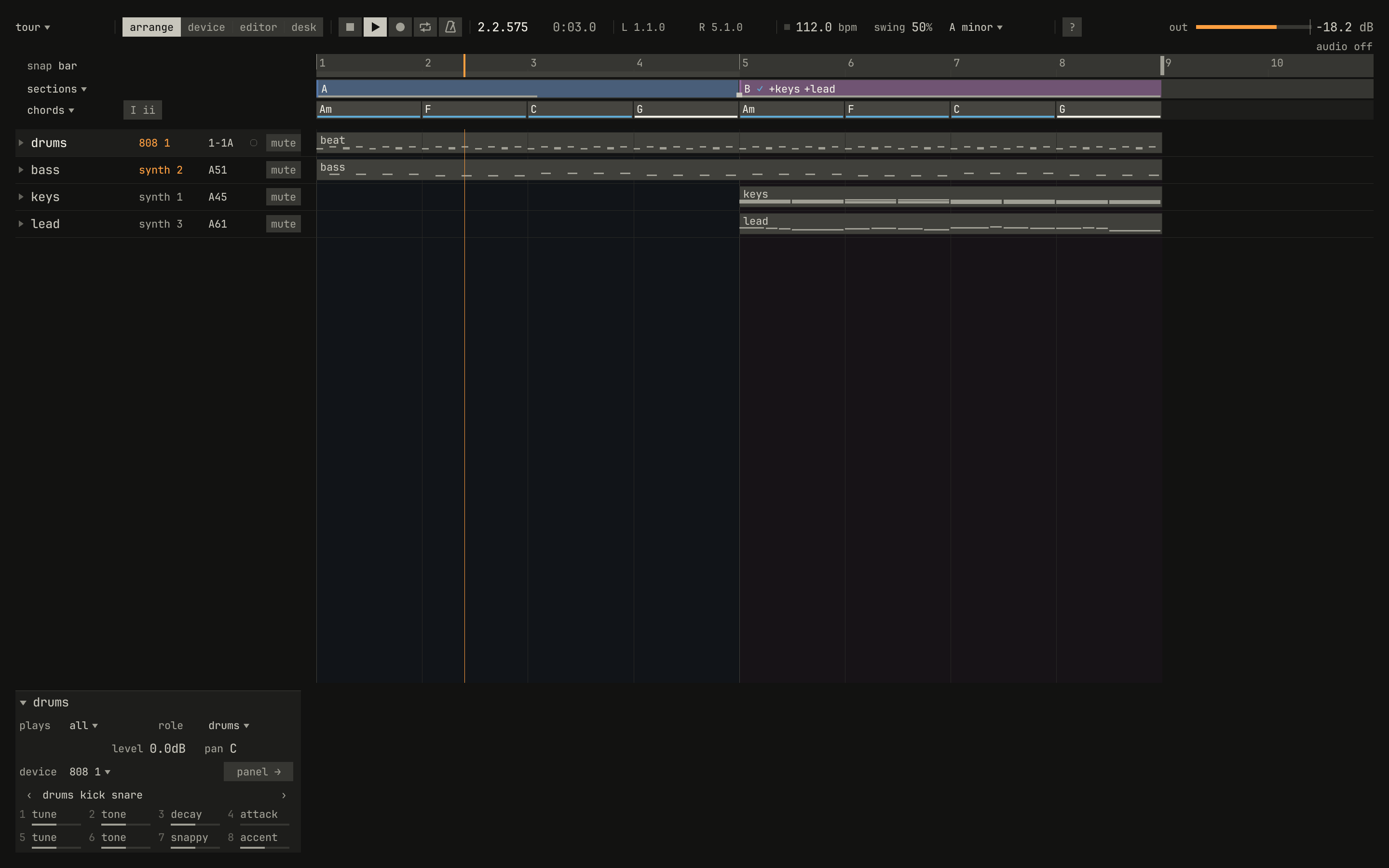
The window is two places. Along the top, the bar holds the song and where you are in it. Under it, a view holds the work: the song's tracks and clips, a device's panel, an editor, or the desk. Everything else opens when you ask for it, beside what it acts on, and goes when you're done.
The bar

?, and the meter.openzig build run-studio -- manual/00-window/tour --play 1
tour/song.json
{
  "tempo": 112,
  "end": "9",
  "sections": ["1 A", "5 B"],
  "key": ["1 A minor"],
  "chords": ["1 Am", "2 F", "3 C", "4 G", "5 Am", "6 F", "7 C", "8 G"],
  "devices": [
    { "name": "synth", "type": "synth", "state": { "parts": [
      { "patch": "A45", "level": -8, "reverb_send": 15 },
      { "patch": "A51", "level": -4 },
      { "patch": "A61", "level": -10, "delay_send": 15 }
    ] } },
    { "name": "808", "type": "drums" }
  ],
  "tracks": [
    { "name": "drums", "device": "808", "channel": 1, "role": "drums", "clips": [{ "at": "1", "length": "8.0.0", "notes": "beat" }] },
    { "name": "bass", "device": "synth", "channel": 2, "keys": "pent", "role": "bass", "clips": [{ "at": "1", "length": "8.0.0", "notes": "bass" }] },
    { "name": "keys", "device": "synth", "channel": 1, "keys": "chord 7", "role": "chords", "clips": [{ "at": "5", "length": "4.0.0", "notes": "keys" }] },
    { "name": "lead", "device": "synth", "channel": 3, "keys": "pent", "role": "lead", "clips": [{ "at": "5", "length": "4.0.0", "notes": "lead" }] }
  ],
  "notes": {
    "beat": {
      "length": "1.0.0",
      "notes": [
        "1.1.0 C2 0.0.240 120", "1.1.480 F#2 0.0.240 70",
        "1.2.0 C2 0.0.240 112", "1.2.0 D#2 0.0.240 100", "1.2.480 F#2 0.0.240 76",
        "1.3.0 C2 0.0.240 116", "1.3.480 F#2 0.0.240 70",
        "1.4.0 C2 0.0.240 112", "1.4.0 D#2 0.0.240 100", "1.4.480 F#2 0.0.240 80"
      ]
    },
    "bass": { "length": "8.0.0", "follow": { "pattern": "offbeat", "low": "E1" } },
    "keys": { "length": "4.0.0", "follow": { "pattern": "halves", "low": "F3" } },
    "lead": {
      "length": "4.0.0",
      "notes": [
        "1.1.0 E5 0.0.900 100", "1.2.0 D5 0.0.420 92", "1.2.480 C5 0.0.420 92", "1.3.0 A4 0.1.900 96",
        "2.1.0 C5 0.0.900 96", "2.2.0 D5 0.0.900 92", "2.3.0 C5 0.0.900 94", "2.4.0 A4 0.0.900 90",
        "3.1.0 E5 0.1.420 100", "3.2.480 G5 0.0.420 96", "3.3.0 E5 0.0.900 96", "3.4.0 D5 0.0.900 92",
        "4.1.0 D5 0.0.900 96", "4.2.0 E5 0.0.420 90", "4.2.480 D5 0.0.420 92", "4.3.0 G4 0.1.900 100"
      ]
    }
  }
}
From left to right:
- The song's name, with
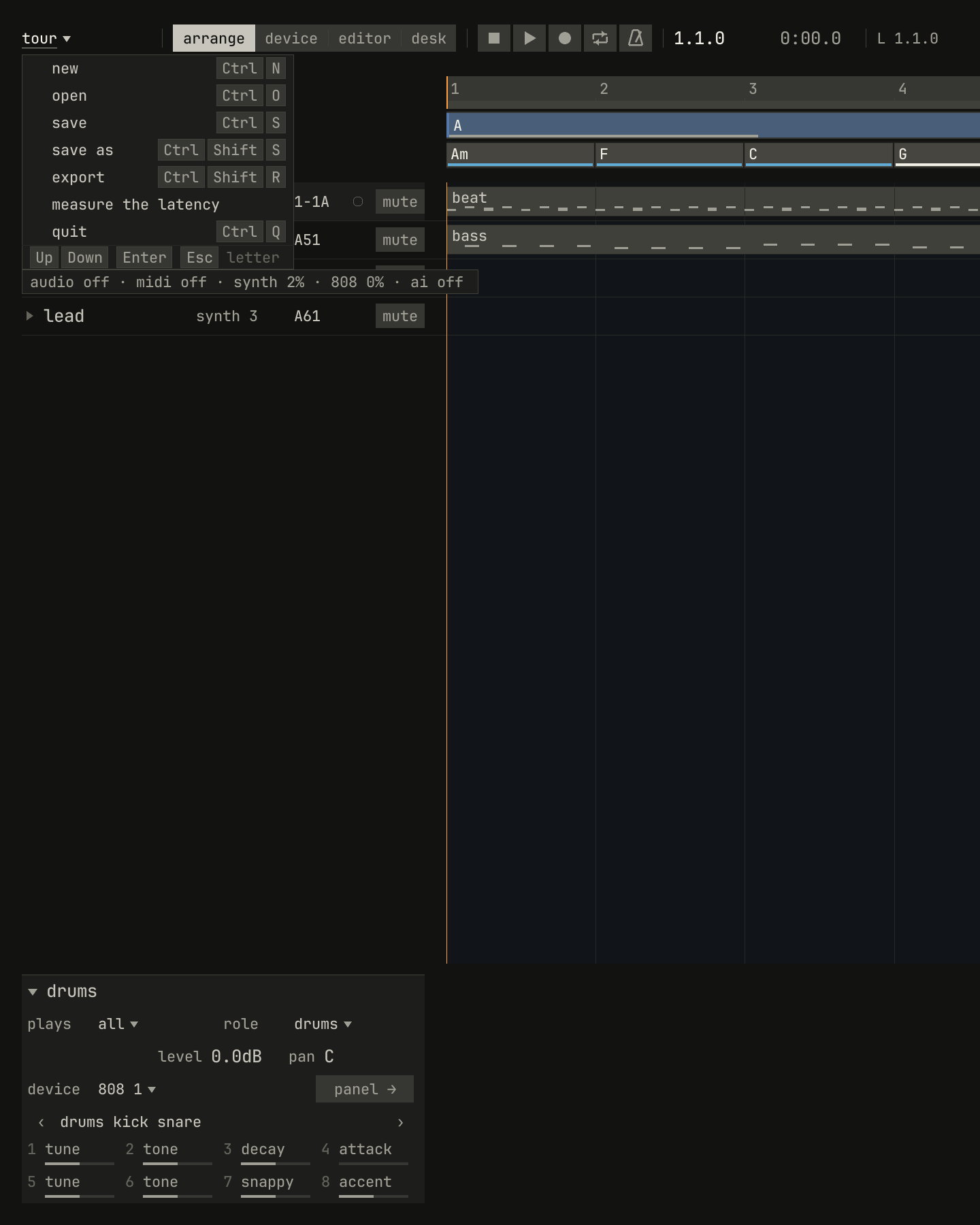
*after it while it isn't saved. A click on it drops the song's menu: new, open, save, save as, export, and quit, each with its key. Its foot says how the audio and MIDI are doing, and how hard each device works. - The views:
arrange,device,editor, anddesk, with Ctrl+1 to Ctrl+4. - The transport: stop, play, record, and cycle, drawn as a tape deck draws them, and the click, drawn as a metronome. Space plays and stops.
- The song position, as
bar.beat.tick, and the time. - The locators,
LandR: the bars that cycle loops and a punch-in records. - The tempo, with a light on each beat, and the swing.
- The key at the song position, as the tempo is.
?, which opens the screen of every command.- The meter, the level of what leaves the studio.
scriptzig build run-studio -- manual/00-window/tour --script manual/00-window/song-menu.txt
tour/song.json
{
  "tempo": 112,
  "end": "9",
  "sections": ["1 A", "5 B"],
  "key": ["1 A minor"],
  "chords": ["1 Am", "2 F", "3 C", "4 G", "5 Am", "6 F", "7 C", "8 G"],
  "devices": [
    { "name": "synth", "type": "synth", "state": { "parts": [
      { "patch": "A45", "level": -8, "reverb_send": 15 },
      { "patch": "A51", "level": -4 },
      { "patch": "A61", "level": -10, "delay_send": 15 }
    ] } },
    { "name": "808", "type": "drums" }
  ],
  "tracks": [
    { "name": "drums", "device": "808", "channel": 1, "role": "drums", "clips": [{ "at": "1", "length": "8.0.0", "notes": "beat" }] },
    { "name": "bass", "device": "synth", "channel": 2, "keys": "pent", "role": "bass", "clips": [{ "at": "1", "length": "8.0.0", "notes": "bass" }] },
    { "name": "keys", "device": "synth", "channel": 1, "keys": "chord 7", "role": "chords", "clips": [{ "at": "5", "length": "4.0.0", "notes": "keys" }] },
    { "name": "lead", "device": "synth", "channel": 3, "keys": "pent", "role": "lead", "clips": [{ "at": "5", "length": "4.0.0", "notes": "lead" }] }
  ],
  "notes": {
    "beat": {
      "length": "1.0.0",
      "notes": [
        "1.1.0 C2 0.0.240 120", "1.1.480 F#2 0.0.240 70",
        "1.2.0 C2 0.0.240 112", "1.2.0 D#2 0.0.240 100", "1.2.480 F#2 0.0.240 76",
        "1.3.0 C2 0.0.240 116", "1.3.480 F#2 0.0.240 70",
        "1.4.0 C2 0.0.240 112", "1.4.0 D#2 0.0.240 100", "1.4.480 F#2 0.0.240 80"
      ]
    },
    "bass": { "length": "8.0.0", "follow": { "pattern": "offbeat", "low": "E1" } },
    "keys": { "length": "4.0.0", "follow": { "pattern": "halves", "low": "F3" } },
    "lead": {
      "length": "4.0.0",
      "notes": [
        "1.1.0 E5 0.0.900 100", "1.2.0 D5 0.0.420 92", "1.2.480 C5 0.0.420 92", "1.3.0 A4 0.1.900 96",
        "2.1.0 C5 0.0.900 96", "2.2.0 D5 0.0.900 92", "2.3.0 C5 0.0.900 94", "2.4.0 A4 0.0.900 90",
        "3.1.0 E5 0.1.420 100", "3.2.480 G5 0.0.420 96", "3.3.0 E5 0.0.900 96", "3.4.0 D5 0.0.900 92",
        "4.1.0 D5 0.0.900 96", "4.2.0 E5 0.0.420 90", "4.2.480 D5 0.0.420 92", "4.3.0 G4 0.1.900 100"
      ]
    }
  }
}
song-menu.txt
# The song's menu, dropped from its name at the bar's left.
wait 0.2
click song
wait 0.1
capture song-menu.png
The views
Ctrl+1 shows the arrange view, the song as a whole. Across
the top, the ruler counts the bars, the band under it names the sections,
and the chord row under that holds the chords. Each track is a line: its
name, its device, its program, a light for the track that records, and
mute. Its clips run across to the right.
Over the track list, the song's rows have headers, as the tracks do:
snap bar says how a drag snaps, by the bar, or by the beat with Ctrl
held; sections ▾ and chords ▾ drop their rows' menus; and I ii names
the chords by their numerals.
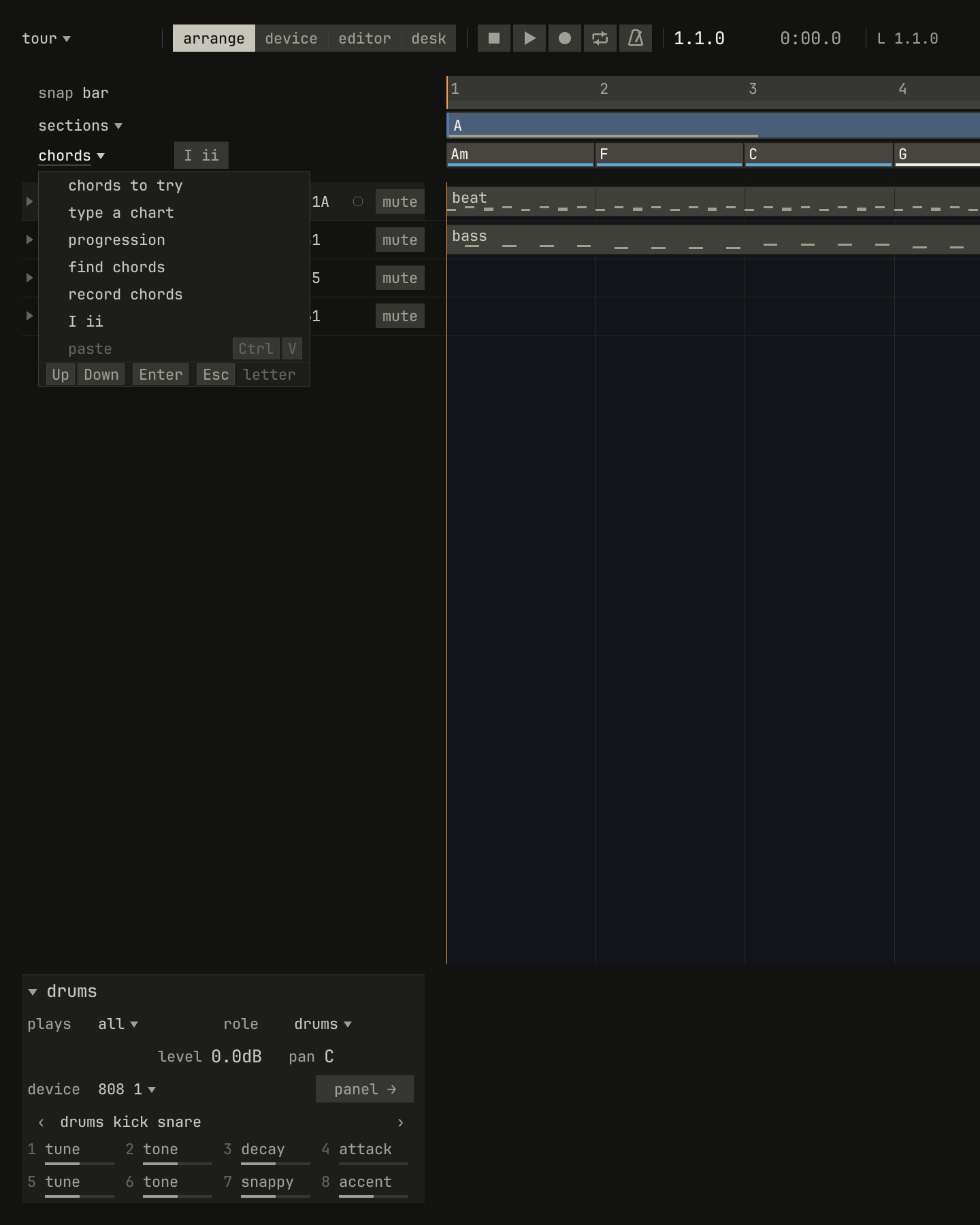
chords ▾: chords to try, a chart typed, a progression, chords found from the notes, and chords recorded as you play them.scriptzig build run-studio -- manual/00-window/tour --script manual/00-window/headers.txt
tour/song.json
{
  "tempo": 112,
  "end": "9",
  "sections": ["1 A", "5 B"],
  "key": ["1 A minor"],
  "chords": ["1 Am", "2 F", "3 C", "4 G", "5 Am", "6 F", "7 C", "8 G"],
  "devices": [
    { "name": "synth", "type": "synth", "state": { "parts": [
      { "patch": "A45", "level": -8, "reverb_send": 15 },
      { "patch": "A51", "level": -4 },
      { "patch": "A61", "level": -10, "delay_send": 15 }
    ] } },
    { "name": "808", "type": "drums" }
  ],
  "tracks": [
    { "name": "drums", "device": "808", "channel": 1, "role": "drums", "clips": [{ "at": "1", "length": "8.0.0", "notes": "beat" }] },
    { "name": "bass", "device": "synth", "channel": 2, "keys": "pent", "role": "bass", "clips": [{ "at": "1", "length": "8.0.0", "notes": "bass" }] },
    { "name": "keys", "device": "synth", "channel": 1, "keys": "chord 7", "role": "chords", "clips": [{ "at": "5", "length": "4.0.0", "notes": "keys" }] },
    { "name": "lead", "device": "synth", "channel": 3, "keys": "pent", "role": "lead", "clips": [{ "at": "5", "length": "4.0.0", "notes": "lead" }] }
  ],
  "notes": {
    "beat": {
      "length": "1.0.0",
      "notes": [
        "1.1.0 C2 0.0.240 120", "1.1.480 F#2 0.0.240 70",
        "1.2.0 C2 0.0.240 112", "1.2.0 D#2 0.0.240 100", "1.2.480 F#2 0.0.240 76",
        "1.3.0 C2 0.0.240 116", "1.3.480 F#2 0.0.240 70",
        "1.4.0 C2 0.0.240 112", "1.4.0 D#2 0.0.240 100", "1.4.480 F#2 0.0.240 80"
      ]
    },
    "bass": { "length": "8.0.0", "follow": { "pattern": "offbeat", "low": "E1" } },
    "keys": { "length": "4.0.0", "follow": { "pattern": "halves", "low": "F3" } },
    "lead": {
      "length": "4.0.0",
      "notes": [
        "1.1.0 E5 0.0.900 100", "1.2.0 D5 0.0.420 92", "1.2.480 C5 0.0.420 92", "1.3.0 A4 0.1.900 96",
        "2.1.0 C5 0.0.900 96", "2.2.0 D5 0.0.900 92", "2.3.0 C5 0.0.900 94", "2.4.0 A4 0.0.900 90",
        "3.1.0 E5 0.1.420 100", "3.2.480 G5 0.0.420 96", "3.3.0 E5 0.0.900 96", "3.4.0 D5 0.0.900 92",
        "4.1.0 D5 0.0.900 96", "4.2.0 E5 0.0.420 90", "4.2.480 D5 0.0.420 92", "4.3.0 G4 0.1.900 100"
      ]
    }
  }
}
headers.txt
# The chord row's header drops its menu.
wait 0.2
click chords
wait 0.1
capture headers.png
The other three views:
- The device view, Ctrl+2, is the selected track's device,
its whole panel: the synth's, the drum machine's, or the sampler's. The
panels keep the faces of the boxes they come from, and a tag under the
views names what the panel shows, as
bass: synth, part 2. - The editor, Ctrl+3, opens the selected clip: Key Edit for notes, Drum Edit for a drum track's hits, or List Edit for every note as a line. Tab steps between them, and so does the choice at the header's left.
- The desk, Ctrl+4, is a strip a device, with the returns and the master: the studio's mixer.

step and practice.openzig build run-studio -- manual/00-window/tour --view editor --track 4
tour/song.json
{
  "tempo": 112,
  "end": "9",
  "sections": ["1 A", "5 B"],
  "key": ["1 A minor"],
  "chords": ["1 Am", "2 F", "3 C", "4 G", "5 Am", "6 F", "7 C", "8 G"],
  "devices": [
    { "name": "synth", "type": "synth", "state": { "parts": [
      { "patch": "A45", "level": -8, "reverb_send": 15 },
      { "patch": "A51", "level": -4 },
      { "patch": "A61", "level": -10, "delay_send": 15 }
    ] } },
    { "name": "808", "type": "drums" }
  ],
  "tracks": [
    { "name": "drums", "device": "808", "channel": 1, "role": "drums", "clips": [{ "at": "1", "length": "8.0.0", "notes": "beat" }] },
    { "name": "bass", "device": "synth", "channel": 2, "keys": "pent", "role": "bass", "clips": [{ "at": "1", "length": "8.0.0", "notes": "bass" }] },
    { "name": "keys", "device": "synth", "channel": 1, "keys": "chord 7", "role": "chords", "clips": [{ "at": "5", "length": "4.0.0", "notes": "keys" }] },
    { "name": "lead", "device": "synth", "channel": 3, "keys": "pent", "role": "lead", "clips": [{ "at": "5", "length": "4.0.0", "notes": "lead" }] }
  ],
  "notes": {
    "beat": {
      "length": "1.0.0",
      "notes": [
        "1.1.0 C2 0.0.240 120", "1.1.480 F#2 0.0.240 70",
        "1.2.0 C2 0.0.240 112", "1.2.0 D#2 0.0.240 100", "1.2.480 F#2 0.0.240 76",
        "1.3.0 C2 0.0.240 116", "1.3.480 F#2 0.0.240 70",
        "1.4.0 C2 0.0.240 112", "1.4.0 D#2 0.0.240 100", "1.4.480 F#2 0.0.240 80"
      ]
    },
    "bass": { "length": "8.0.0", "follow": { "pattern": "offbeat", "low": "E1" } },
    "keys": { "length": "4.0.0", "follow": { "pattern": "halves", "low": "F3" } },
    "lead": {
      "length": "4.0.0",
      "notes": [
        "1.1.0 E5 0.0.900 100", "1.2.0 D5 0.0.420 92", "1.2.480 C5 0.0.420 92", "1.3.0 A4 0.1.900 96",
        "2.1.0 C5 0.0.900 96", "2.2.0 D5 0.0.900 92", "2.3.0 C5 0.0.900 94", "2.4.0 A4 0.0.900 90",
        "3.1.0 E5 0.1.420 100", "3.2.480 G5 0.0.420 96", "3.3.0 E5 0.0.900 96", "3.4.0 D5 0.0.900 92",
        "4.1.0 D5 0.0.900 96", "4.2.0 E5 0.0.420 90", "4.2.480 D5 0.0.420 92", "4.3.0 G4 0.1.900 100"
      ]
    }
  }
}
Esc goes back to the arrange view, and there stops the song and lets go of every note. A view that can't show, such as the editor in a song without clips, is quiet in the bar, and its hint says why.
The kinds of control
Every control is one of six kinds, and each kind is drawn one way everywhere, so a control's look says what a press will do:
| Kind | A press | Drawn | In the window |
|---|---|---|---|
| Command | Acts once | A word on a grey well | panel →, try others, a menu's rows |
| Switch | Turns something on or off | A word on a well, inverted while it's on | I ii, mute |
| Choice | Picks one of a few | Words joined into one bar, the one chosen inverted | The views, the editors |
| Value | Sets a number | The value bright, its unit dim, and no well | 112.0 bpm, swing 50%, grid 1/16 |
| List | Opens a list to pick from | A name with ▾ | A minor ▾, chords ▾, pent ▾ |
| Mode | Changes what the keys and the mouse do | A switch with a mark at its left | step, practice |
A value is underlined under the pointer. Drag it up or down, or turn the
wheel over it, in finer steps with Shift held; a double-click types it.
A control that can't act where you are stays where it is, quiet, and its
hint says why: paste with nothing copied, or device in a song without
tracks. Nothing moves because of what's selected or under the pointer.
What the colors mean
The window is grey, and every state reads in grey alone: a shape, an inversion, or a word. A color adds one meaning on top:
- Amber is what sounds. The song position, the meter, the beat light, the keys held, recording, solo, and a slower speed. If it's amber, you're hearing it now.
- Blue is the studio teaching. The keys practice asks for next, the
chords' names and their notes in Key Edit, the line under a chord that
is home, the coach's
✓, and an empty place's words. - Red is a fault: clipping, a file that didn't load, an error. A hint is never red.
- Bright is selected: a clip, a note, a chord, a section, or a track, framed and filled the same way.
- The sections' hues are the sections, washed down every track.
The inspector
scriptzig build run-studio -- manual/00-window/tour --script manual/00-window/inspector.txt
tour/song.json
{
  "tempo": 112,
  "end": "9",
  "sections": ["1 A", "5 B"],
  "key": ["1 A minor"],
  "chords": ["1 Am", "2 F", "3 C", "4 G", "5 Am", "6 F", "7 C", "8 G"],
  "devices": [
    { "name": "synth", "type": "synth", "state": { "parts": [
      { "patch": "A45", "level": -8, "reverb_send": 15 },
      { "patch": "A51", "level": -4 },
      { "patch": "A61", "level": -10, "delay_send": 15 }
    ] } },
    { "name": "808", "type": "drums" }
  ],
  "tracks": [
    { "name": "drums", "device": "808", "channel": 1, "role": "drums", "clips": [{ "at": "1", "length": "8.0.0", "notes": "beat" }] },
    { "name": "bass", "device": "synth", "channel": 2, "keys": "pent", "role": "bass", "clips": [{ "at": "1", "length": "8.0.0", "notes": "bass" }] },
    { "name": "keys", "device": "synth", "channel": 1, "keys": "chord 7", "role": "chords", "clips": [{ "at": "5", "length": "4.0.0", "notes": "keys" }] },
    { "name": "lead", "device": "synth", "channel": 3, "keys": "pent", "role": "lead", "clips": [{ "at": "5", "length": "4.0.0", "notes": "lead" }] }
  ],
  "notes": {
    "beat": {
      "length": "1.0.0",
      "notes": [
        "1.1.0 C2 0.0.240 120", "1.1.480 F#2 0.0.240 70",
        "1.2.0 C2 0.0.240 112", "1.2.0 D#2 0.0.240 100", "1.2.480 F#2 0.0.240 76",
        "1.3.0 C2 0.0.240 116", "1.3.480 F#2 0.0.240 70",
        "1.4.0 C2 0.0.240 112", "1.4.0 D#2 0.0.240 100", "1.4.480 F#2 0.0.240 80"
      ]
    },
    "bass": { "length": "8.0.0", "follow": { "pattern": "offbeat", "low": "E1" } },
    "keys": { "length": "4.0.0", "follow": { "pattern": "halves", "low": "F3" } },
    "lead": {
      "length": "4.0.0",
      "notes": [
        "1.1.0 E5 0.0.900 100", "1.2.0 D5 0.0.420 92", "1.2.480 C5 0.0.420 92", "1.3.0 A4 0.1.900 96",
        "2.1.0 C5 0.0.900 96", "2.2.0 D5 0.0.900 92", "2.3.0 C5 0.0.900 94", "2.4.0 A4 0.0.900 90",
        "3.1.0 E5 0.1.420 100", "3.2.480 G5 0.0.420 96", "3.3.0 E5 0.0.900 96", "3.4.0 D5 0.0.900 92",
        "4.1.0 D5 0.0.900 96", "4.2.0 E5 0.0.420 90", "4.2.480 D5 0.0.420 92", "4.3.0 G4 0.1.900 100"
      ]
    }
  }
}
inspector.txt
# A click on a track's name selects it, and the inspector shows it.
wait 0.2
click track bass
wait 0.1
capture inspector.png
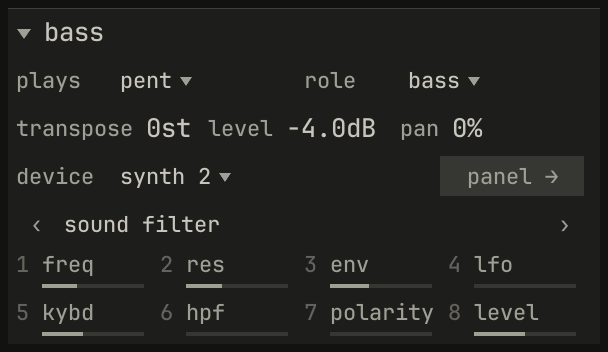
The inspector, at the foot of the track list, shows what's selected and its settings, as values and lists. A click on its title folds it to that line, and again opens it.
- A track: how the keys play it, its role, transposition, level, and
pan, its device, and eight of its sound's controls, a page at a time with
‹ and ›, numbered as the MiniLab's knobs that turn them.
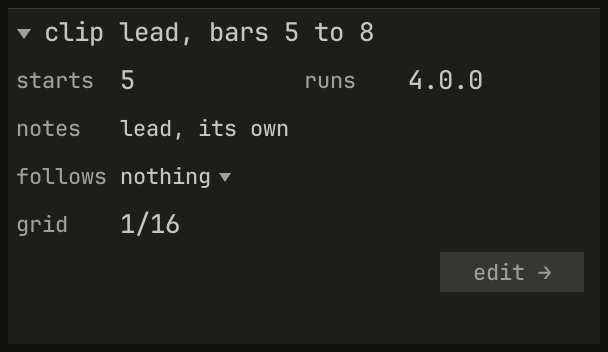
panel →opens the device view. - A clip: where it starts and how long it runs, whether its notes are
its own or linked, what it follows, and the grid Q quantizes to.
edit →opens its editor. - A section: its bars, and the coach's count of what changes as it starts.
- A chord: its name and numeral, what it does in the key, and
try others.
scriptzig build run-studio -- manual/00-window/tour --script manual/00-window/clip.txt
tour/song.json
{
  "tempo": 112,
  "end": "9",
  "sections": ["1 A", "5 B"],
  "key": ["1 A minor"],
  "chords": ["1 Am", "2 F", "3 C", "4 G", "5 Am", "6 F", "7 C", "8 G"],
  "devices": [
    { "name": "synth", "type": "synth", "state": { "parts": [
      { "patch": "A45", "level": -8, "reverb_send": 15 },
      { "patch": "A51", "level": -4 },
      { "patch": "A61", "level": -10, "delay_send": 15 }
    ] } },
    { "name": "808", "type": "drums" }
  ],
  "tracks": [
    { "name": "drums", "device": "808", "channel": 1, "role": "drums", "clips": [{ "at": "1", "length": "8.0.0", "notes": "beat" }] },
    { "name": "bass", "device": "synth", "channel": 2, "keys": "pent", "role": "bass", "clips": [{ "at": "1", "length": "8.0.0", "notes": "bass" }] },
    { "name": "keys", "device": "synth", "channel": 1, "keys": "chord 7", "role": "chords", "clips": [{ "at": "5", "length": "4.0.0", "notes": "keys" }] },
    { "name": "lead", "device": "synth", "channel": 3, "keys": "pent", "role": "lead", "clips": [{ "at": "5", "length": "4.0.0", "notes": "lead" }] }
  ],
  "notes": {
    "beat": {
      "length": "1.0.0",
      "notes": [
        "1.1.0 C2 0.0.240 120", "1.1.480 F#2 0.0.240 70",
        "1.2.0 C2 0.0.240 112", "1.2.0 D#2 0.0.240 100", "1.2.480 F#2 0.0.240 76",
        "1.3.0 C2 0.0.240 116", "1.3.480 F#2 0.0.240 70",
        "1.4.0 C2 0.0.240 112", "1.4.0 D#2 0.0.240 100", "1.4.480 F#2 0.0.240 80"
      ]
    },
    "bass": { "length": "8.0.0", "follow": { "pattern": "offbeat", "low": "E1" } },
    "keys": { "length": "4.0.0", "follow": { "pattern": "halves", "low": "F3" } },
    "lead": {
      "length": "4.0.0",
      "notes": [
        "1.1.0 E5 0.0.900 100", "1.2.0 D5 0.0.420 92", "1.2.480 C5 0.0.420 92", "1.3.0 A4 0.1.900 96",
        "2.1.0 C5 0.0.900 96", "2.2.0 D5 0.0.900 92", "2.3.0 C5 0.0.900 94", "2.4.0 A4 0.0.900 90",
        "3.1.0 E5 0.1.420 100", "3.2.480 G5 0.0.420 96", "3.3.0 E5 0.0.900 96", "3.4.0 D5 0.0.900 92",
        "4.1.0 D5 0.0.900 96", "4.2.0 E5 0.0.420 90", "4.2.480 D5 0.0.420 92", "4.3.0 G4 0.1.900 100"
      ]
    }
  }
}
clip.txt
# A click on a clip selects it, and the inspector shows the clip.
wait 0.2
click lane lead bar 6
wait 0.1
capture clip.png
The menu at the pointer
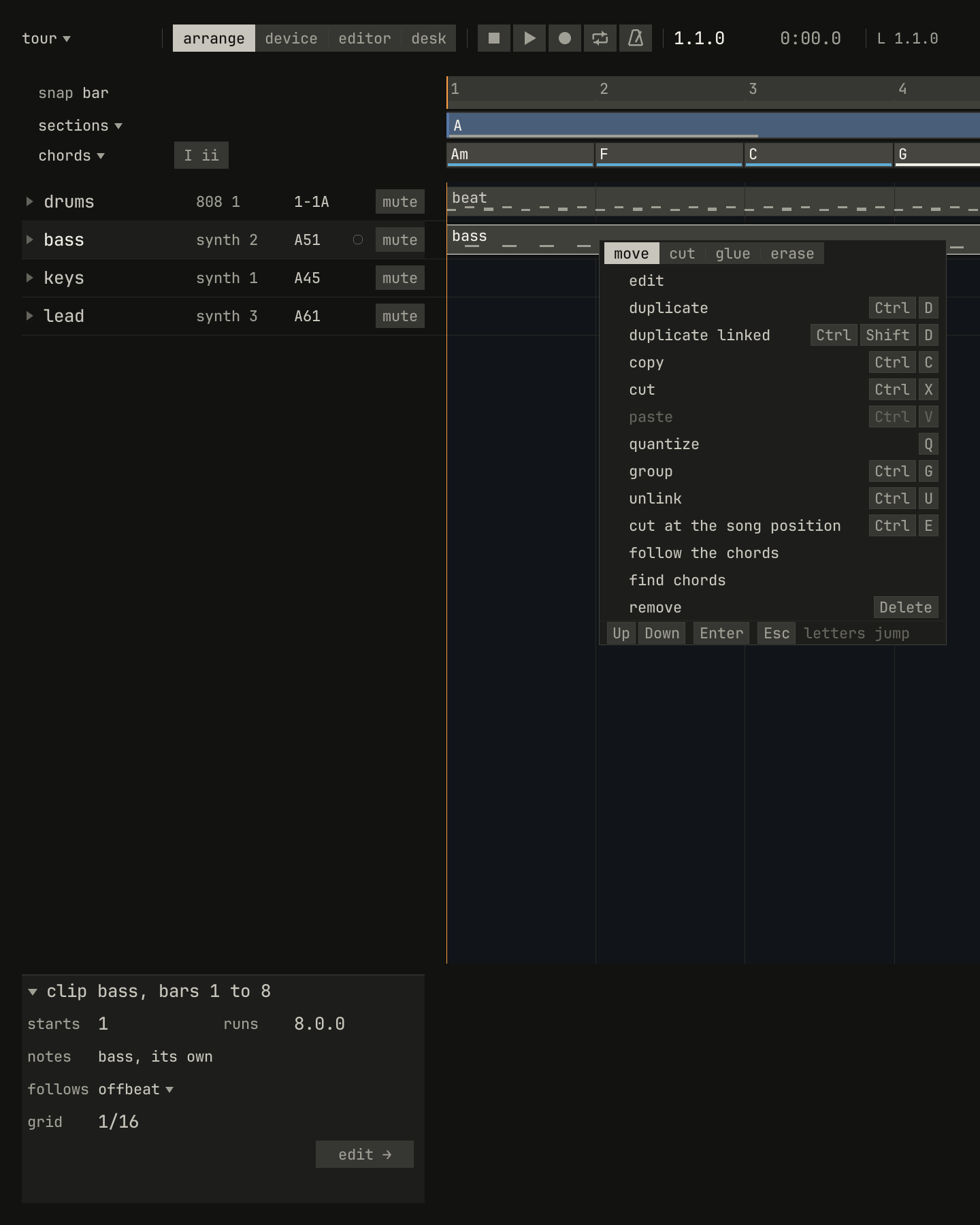
paste is quiet, with nothing copied. The keys at the foot work while it's open.scriptzig build run-studio -- manual/00-window/tour --script manual/00-window/menu.txt
tour/song.json
{
  "tempo": 112,
  "end": "9",
  "sections": ["1 A", "5 B"],
  "key": ["1 A minor"],
  "chords": ["1 Am", "2 F", "3 C", "4 G", "5 Am", "6 F", "7 C", "8 G"],
  "devices": [
    { "name": "synth", "type": "synth", "state": { "parts": [
      { "patch": "A45", "level": -8, "reverb_send": 15 },
      { "patch": "A51", "level": -4 },
      { "patch": "A61", "level": -10, "delay_send": 15 }
    ] } },
    { "name": "808", "type": "drums" }
  ],
  "tracks": [
    { "name": "drums", "device": "808", "channel": 1, "role": "drums", "clips": [{ "at": "1", "length": "8.0.0", "notes": "beat" }] },
    { "name": "bass", "device": "synth", "channel": 2, "keys": "pent", "role": "bass", "clips": [{ "at": "1", "length": "8.0.0", "notes": "bass" }] },
    { "name": "keys", "device": "synth", "channel": 1, "keys": "chord 7", "role": "chords", "clips": [{ "at": "5", "length": "4.0.0", "notes": "keys" }] },
    { "name": "lead", "device": "synth", "channel": 3, "keys": "pent", "role": "lead", "clips": [{ "at": "5", "length": "4.0.0", "notes": "lead" }] }
  ],
  "notes": {
    "beat": {
      "length": "1.0.0",
      "notes": [
        "1.1.0 C2 0.0.240 120", "1.1.480 F#2 0.0.240 70",
        "1.2.0 C2 0.0.240 112", "1.2.0 D#2 0.0.240 100", "1.2.480 F#2 0.0.240 76",
        "1.3.0 C2 0.0.240 116", "1.3.480 F#2 0.0.240 70",
        "1.4.0 C2 0.0.240 112", "1.4.0 D#2 0.0.240 100", "1.4.480 F#2 0.0.240 80"
      ]
    },
    "bass": { "length": "8.0.0", "follow": { "pattern": "offbeat", "low": "E1" } },
    "keys": { "length": "4.0.0", "follow": { "pattern": "halves", "low": "F3" } },
    "lead": {
      "length": "4.0.0",
      "notes": [
        "1.1.0 E5 0.0.900 100", "1.2.0 D5 0.0.420 92", "1.2.480 C5 0.0.420 92", "1.3.0 A4 0.1.900 96",
        "2.1.0 C5 0.0.900 96", "2.2.0 D5 0.0.900 92", "2.3.0 C5 0.0.900 94", "2.4.0 A4 0.0.900 90",
        "3.1.0 E5 0.1.420 100", "3.2.480 G5 0.0.420 96", "3.3.0 E5 0.0.900 96", "3.4.0 D5 0.0.900 92",
        "4.1.0 D5 0.0.900 96", "4.2.0 E5 0.0.420 90", "4.2.480 D5 0.0.420 92", "4.3.0 G4 0.1.900 100"
      ]
    }
  }
}
menu.txt
# A right-click on the bass's clip opens its menu at the pointer.
wait 0.2
rclick lane bass bar 2
wait 0.1
capture menu.png
A right-click anywhere opens the menu for what's under the pointer, and
selects it first. In the arrange view and the editors, the menu's first row
is the tools, move cut glue erase, or in Key Edit move draw cut; then
come the commands for the thing, each with its key, quiet where it can't
act. Up and Down move through the rows, Enter runs one, and letters jump to
a row.
A right-click never removes anything. Delete removes what's
selected, and the menu's remove row says so.
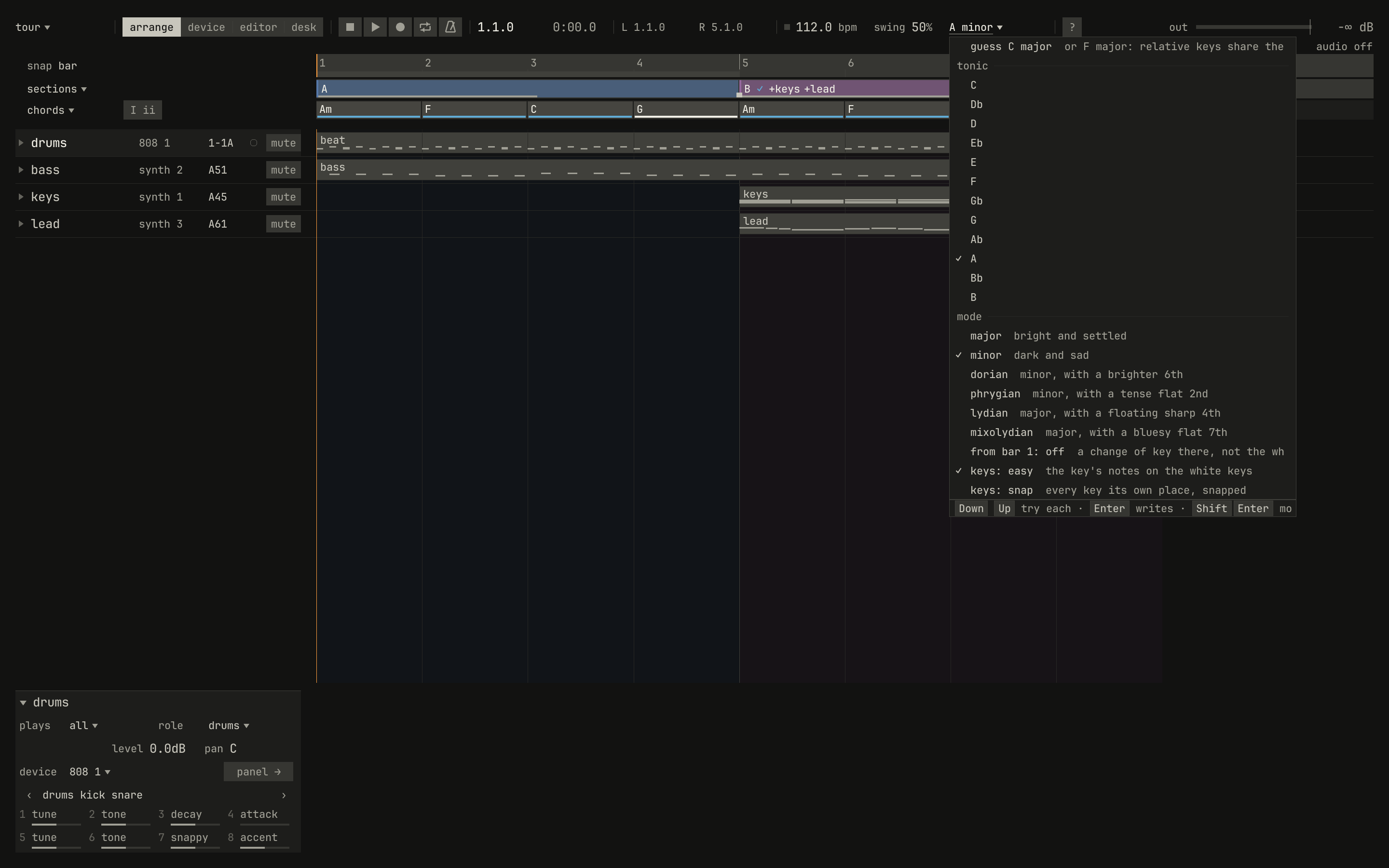
A name with ▾ opens a list for what it names: the key, a track's way to play, a program. A list tries each item as you step to it, so you hear it before you choose: Down and Up step, Enter keeps the item tried, and Esc puts back what was there.
scriptzig build run-studio -- manual/00-window/tour --script manual/00-window/key-list.txt
tour/song.json
{
  "tempo": 112,
  "end": "9",
  "sections": ["1 A", "5 B"],
  "key": ["1 A minor"],
  "chords": ["1 Am", "2 F", "3 C", "4 G", "5 Am", "6 F", "7 C", "8 G"],
  "devices": [
    { "name": "synth", "type": "synth", "state": { "parts": [
      { "patch": "A45", "level": -8, "reverb_send": 15 },
      { "patch": "A51", "level": -4 },
      { "patch": "A61", "level": -10, "delay_send": 15 }
    ] } },
    { "name": "808", "type": "drums" }
  ],
  "tracks": [
    { "name": "drums", "device": "808", "channel": 1, "role": "drums", "clips": [{ "at": "1", "length": "8.0.0", "notes": "beat" }] },
    { "name": "bass", "device": "synth", "channel": 2, "keys": "pent", "role": "bass", "clips": [{ "at": "1", "length": "8.0.0", "notes": "bass" }] },
    { "name": "keys", "device": "synth", "channel": 1, "keys": "chord 7", "role": "chords", "clips": [{ "at": "5", "length": "4.0.0", "notes": "keys" }] },
    { "name": "lead", "device": "synth", "channel": 3, "keys": "pent", "role": "lead", "clips": [{ "at": "5", "length": "4.0.0", "notes": "lead" }] }
  ],
  "notes": {
    "beat": {
      "length": "1.0.0",
      "notes": [
        "1.1.0 C2 0.0.240 120", "1.1.480 F#2 0.0.240 70",
        "1.2.0 C2 0.0.240 112", "1.2.0 D#2 0.0.240 100", "1.2.480 F#2 0.0.240 76",
        "1.3.0 C2 0.0.240 116", "1.3.480 F#2 0.0.240 70",
        "1.4.0 C2 0.0.240 112", "1.4.0 D#2 0.0.240 100", "1.4.480 F#2 0.0.240 80"
      ]
    },
    "bass": { "length": "8.0.0", "follow": { "pattern": "offbeat", "low": "E1" } },
    "keys": { "length": "4.0.0", "follow": { "pattern": "halves", "low": "F3" } },
    "lead": {
      "length": "4.0.0",
      "notes": [
        "1.1.0 E5 0.0.900 100", "1.2.0 D5 0.0.420 92", "1.2.480 C5 0.0.420 92", "1.3.0 A4 0.1.900 96",
        "2.1.0 C5 0.0.900 96", "2.2.0 D5 0.0.900 92", "2.3.0 C5 0.0.900 94", "2.4.0 A4 0.0.900 90",
        "3.1.0 E5 0.1.420 100", "3.2.480 G5 0.0.420 96", "3.3.0 E5 0.0.900 96", "3.4.0 D5 0.0.900 92",
        "4.1.0 D5 0.0.900 96", "4.2.0 E5 0.0.420 90", "4.2.480 D5 0.0.420 92", "4.3.0 G4 0.1.900 100"
      ]
    }
  }
}
key-list.txt
# The key in the bar drops the key list.
wait 0.2
click key
wait 0.2
capture key-list.png
Callouts and tags
What a press did, or why it couldn't, is said beside the pointer, where your eyes are, in a callout that lasts three seconds. A key that works somewhere else, pressed where it does nothing, changes nothing and says where it works:

scriptzig build run-studio -- manual/00-window/tour --script manual/00-window/callout.txt
tour/song.json
{
  "tempo": 112,
  "end": "9",
  "sections": ["1 A", "5 B"],
  "key": ["1 A minor"],
  "chords": ["1 Am", "2 F", "3 C", "4 G", "5 Am", "6 F", "7 C", "8 G"],
  "devices": [
    { "name": "synth", "type": "synth", "state": { "parts": [
      { "patch": "A45", "level": -8, "reverb_send": 15 },
      { "patch": "A51", "level": -4 },
      { "patch": "A61", "level": -10, "delay_send": 15 }
    ] } },
    { "name": "808", "type": "drums" }
  ],
  "tracks": [
    { "name": "drums", "device": "808", "channel": 1, "role": "drums", "clips": [{ "at": "1", "length": "8.0.0", "notes": "beat" }] },
    { "name": "bass", "device": "synth", "channel": 2, "keys": "pent", "role": "bass", "clips": [{ "at": "1", "length": "8.0.0", "notes": "bass" }] },
    { "name": "keys", "device": "synth", "channel": 1, "keys": "chord 7", "role": "chords", "clips": [{ "at": "5", "length": "4.0.0", "notes": "keys" }] },
    { "name": "lead", "device": "synth", "channel": 3, "keys": "pent", "role": "lead", "clips": [{ "at": "5", "length": "4.0.0", "notes": "lead" }] }
  ],
  "notes": {
    "beat": {
      "length": "1.0.0",
      "notes": [
        "1.1.0 C2 0.0.240 120", "1.1.480 F#2 0.0.240 70",
        "1.2.0 C2 0.0.240 112", "1.2.0 D#2 0.0.240 100", "1.2.480 F#2 0.0.240 76",
        "1.3.0 C2 0.0.240 116", "1.3.480 F#2 0.0.240 70",
        "1.4.0 C2 0.0.240 112", "1.4.0 D#2 0.0.240 100", "1.4.480 F#2 0.0.240 80"
      ]
    },
    "bass": { "length": "8.0.0", "follow": { "pattern": "offbeat", "low": "E1" } },
    "keys": { "length": "4.0.0", "follow": { "pattern": "halves", "low": "F3" } },
    "lead": {
      "length": "4.0.0",
      "notes": [
        "1.1.0 E5 0.0.900 100", "1.2.0 D5 0.0.420 92", "1.2.480 C5 0.0.420 92", "1.3.0 A4 0.1.900 96",
        "2.1.0 C5 0.0.900 96", "2.2.0 D5 0.0.900 92", "2.3.0 C5 0.0.900 94", "2.4.0 A4 0.0.900 90",
        "3.1.0 E5 0.1.420 100", "3.2.480 G5 0.0.420 96", "3.3.0 E5 0.0.900 96", "3.4.0 D5 0.0.900 92",
        "4.1.0 D5 0.0.900 96", "4.2.0 E5 0.0.420 90", "4.2.480 D5 0.0.420 92", "4.3.0 G4 0.1.900 100"
      ]
    }
  }
}
callout.txt
# Ctrl+K fits notes to the chords in Key Edit. Pressed in the arrange
# view, it changes nothing and says where it works.
wait 0.2
move lane bass bar 3
key ctrl+k
wait 0.1
capture callout.png
A command run from a menu says its key for next time, until you've used the key:
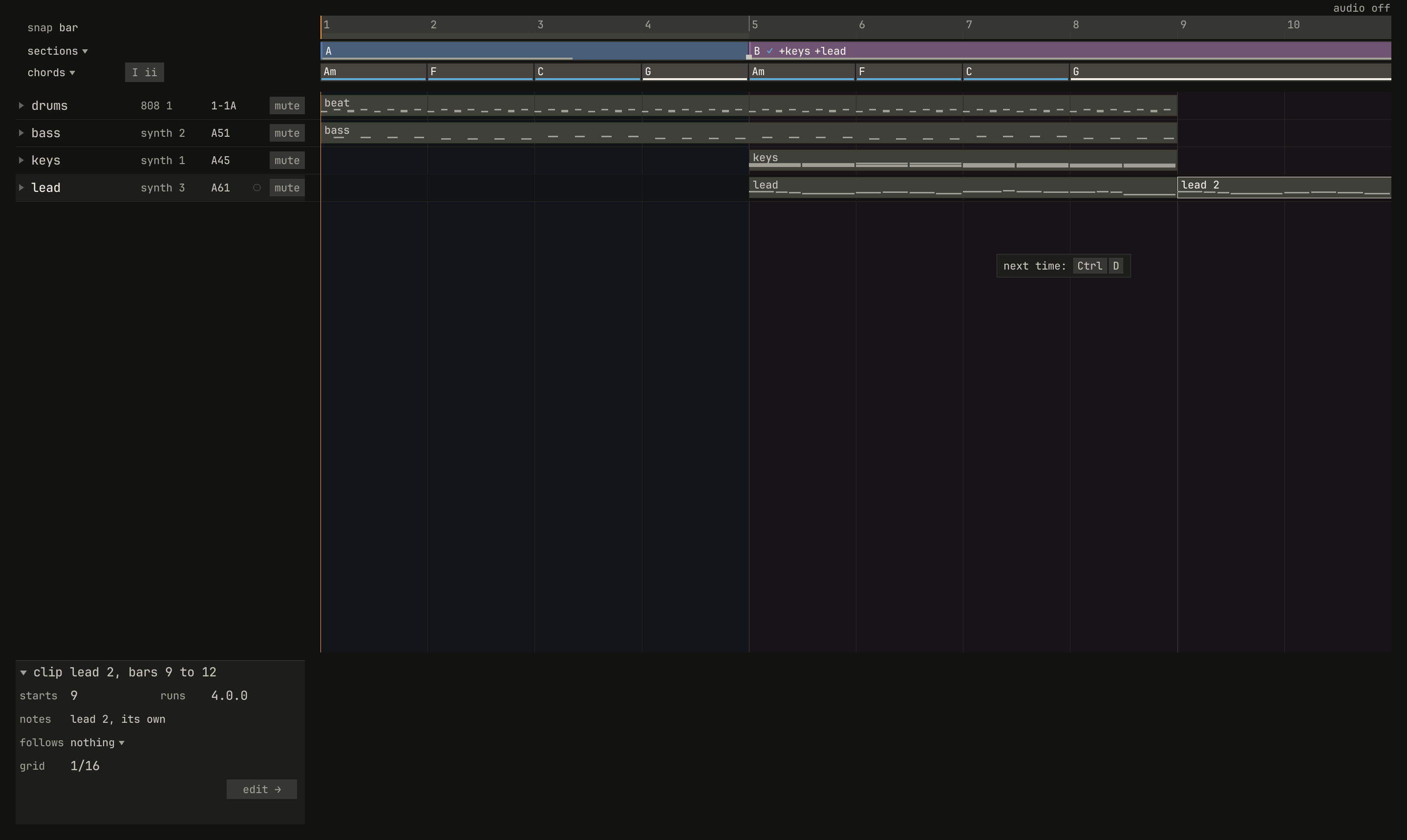
duplicate, chosen from the lead's menu, copies the clip after itself and says its key.scriptzig build run-studio -- manual/00-window/tour --script manual/00-window/next-time.txt
tour/song.json
{
  "tempo": 112,
  "end": "9",
  "sections": ["1 A", "5 B"],
  "key": ["1 A minor"],
  "chords": ["1 Am", "2 F", "3 C", "4 G", "5 Am", "6 F", "7 C", "8 G"],
  "devices": [
    { "name": "synth", "type": "synth", "state": { "parts": [
      { "patch": "A45", "level": -8, "reverb_send": 15 },
      { "patch": "A51", "level": -4 },
      { "patch": "A61", "level": -10, "delay_send": 15 }
    ] } },
    { "name": "808", "type": "drums" }
  ],
  "tracks": [
    { "name": "drums", "device": "808", "channel": 1, "role": "drums", "clips": [{ "at": "1", "length": "8.0.0", "notes": "beat" }] },
    { "name": "bass", "device": "synth", "channel": 2, "keys": "pent", "role": "bass", "clips": [{ "at": "1", "length": "8.0.0", "notes": "bass" }] },
    { "name": "keys", "device": "synth", "channel": 1, "keys": "chord 7", "role": "chords", "clips": [{ "at": "5", "length": "4.0.0", "notes": "keys" }] },
    { "name": "lead", "device": "synth", "channel": 3, "keys": "pent", "role": "lead", "clips": [{ "at": "5", "length": "4.0.0", "notes": "lead" }] }
  ],
  "notes": {
    "beat": {
      "length": "1.0.0",
      "notes": [
        "1.1.0 C2 0.0.240 120", "1.1.480 F#2 0.0.240 70",
        "1.2.0 C2 0.0.240 112", "1.2.0 D#2 0.0.240 100", "1.2.480 F#2 0.0.240 76",
        "1.3.0 C2 0.0.240 116", "1.3.480 F#2 0.0.240 70",
        "1.4.0 C2 0.0.240 112", "1.4.0 D#2 0.0.240 100", "1.4.480 F#2 0.0.240 80"
      ]
    },
    "bass": { "length": "8.0.0", "follow": { "pattern": "offbeat", "low": "E1" } },
    "keys": { "length": "4.0.0", "follow": { "pattern": "halves", "low": "F3" } },
    "lead": {
      "length": "4.0.0",
      "notes": [
        "1.1.0 E5 0.0.900 100", "1.2.0 D5 0.0.420 92", "1.2.480 C5 0.0.420 92", "1.3.0 A4 0.1.900 96",
        "2.1.0 C5 0.0.900 96", "2.2.0 D5 0.0.900 92", "2.3.0 C5 0.0.900 94", "2.4.0 A4 0.0.900 90",
        "3.1.0 E5 0.1.420 100", "3.2.480 G5 0.0.420 96", "3.3.0 E5 0.0.900 96", "3.4.0 D5 0.0.900 92",
        "4.1.0 D5 0.0.900 96", "4.2.0 E5 0.0.420 90", "4.2.480 D5 0.0.420 92", "4.3.0 G4 0.1.900 100"
      ]
    }
  }
}
next-time.txt
# Duplicate, chosen from the clip's menu, says its key for next time.
wait 0.2
rclick lane lead bar 6
choose duplicate
wait 0.1
capture next-time.png
The studio's state is a tag in the margin under the bar: the speed the song plays at under the tempo, how the song records under the record button, an export as it runs under the song's name, and the audio's state under the meter.

scriptzig build run-studio -- manual/00-window/tour --script manual/00-window/tags.txt
tour/song.json
{
  "tempo": 112,
  "end": "9",
  "sections": ["1 A", "5 B"],
  "key": ["1 A minor"],
  "chords": ["1 Am", "2 F", "3 C", "4 G", "5 Am", "6 F", "7 C", "8 G"],
  "devices": [
    { "name": "synth", "type": "synth", "state": { "parts": [
      { "patch": "A45", "level": -8, "reverb_send": 15 },
      { "patch": "A51", "level": -4 },
      { "patch": "A61", "level": -10, "delay_send": 15 }
    ] } },
    { "name": "808", "type": "drums" }
  ],
  "tracks": [
    { "name": "drums", "device": "808", "channel": 1, "role": "drums", "clips": [{ "at": "1", "length": "8.0.0", "notes": "beat" }] },
    { "name": "bass", "device": "synth", "channel": 2, "keys": "pent", "role": "bass", "clips": [{ "at": "1", "length": "8.0.0", "notes": "bass" }] },
    { "name": "keys", "device": "synth", "channel": 1, "keys": "chord 7", "role": "chords", "clips": [{ "at": "5", "length": "4.0.0", "notes": "keys" }] },
    { "name": "lead", "device": "synth", "channel": 3, "keys": "pent", "role": "lead", "clips": [{ "at": "5", "length": "4.0.0", "notes": "lead" }] }
  ],
  "notes": {
    "beat": {
      "length": "1.0.0",
      "notes": [
        "1.1.0 C2 0.0.240 120", "1.1.480 F#2 0.0.240 70",
        "1.2.0 C2 0.0.240 112", "1.2.0 D#2 0.0.240 100", "1.2.480 F#2 0.0.240 76",
        "1.3.0 C2 0.0.240 116", "1.3.480 F#2 0.0.240 70",
        "1.4.0 C2 0.0.240 112", "1.4.0 D#2 0.0.240 100", "1.4.480 F#2 0.0.240 80"
      ]
    },
    "bass": { "length": "8.0.0", "follow": { "pattern": "offbeat", "low": "E1" } },
    "keys": { "length": "4.0.0", "follow": { "pattern": "halves", "low": "F3" } },
    "lead": {
      "length": "4.0.0",
      "notes": [
        "1.1.0 E5 0.0.900 100", "1.2.0 D5 0.0.420 92", "1.2.480 C5 0.0.420 92", "1.3.0 A4 0.1.900 96",
        "2.1.0 C5 0.0.900 96", "2.2.0 D5 0.0.900 92", "2.3.0 C5 0.0.900 94", "2.4.0 A4 0.0.900 90",
        "3.1.0 E5 0.1.420 100", "3.2.480 G5 0.0.420 96", "3.3.0 E5 0.0.900 96", "3.4.0 D5 0.0.900 92",
        "4.1.0 D5 0.0.900 96", "4.2.0 E5 0.0.420 90", "4.2.480 D5 0.0.420 92", "4.3.0 G4 0.1.900 100"
      ]
    }
  }
}
tags.txt
# Three presses of - play the song at 85%: the tempo reads slower, and a
# tag under it says so.
wait 0.2
move 1300 850
key -
key -
key -
wait 3.5
capture tags.png
A mode's keys show on the mode's own thing while it's on: at a menu's or a list's foot, under a name being typed, beside the step cursor, and in the editor's header while you practice.
Hints and marks
When the pointer rests on something for a moment, a hint beside it says what it is and why it works: a control and its key, a chord and where it goes, a degree and how it pulls.

scriptzig build run-studio -- manual/00-window/tour --script manual/00-window/hint.txt
tour/song.json
{
  "tempo": 112,
  "end": "9",
  "sections": ["1 A", "5 B"],
  "key": ["1 A minor"],
  "chords": ["1 Am", "2 F", "3 C", "4 G", "5 Am", "6 F", "7 C", "8 G"],
  "devices": [
    { "name": "synth", "type": "synth", "state": { "parts": [
      { "patch": "A45", "level": -8, "reverb_send": 15 },
      { "patch": "A51", "level": -4 },
      { "patch": "A61", "level": -10, "delay_send": 15 }
    ] } },
    { "name": "808", "type": "drums" }
  ],
  "tracks": [
    { "name": "drums", "device": "808", "channel": 1, "role": "drums", "clips": [{ "at": "1", "length": "8.0.0", "notes": "beat" }] },
    { "name": "bass", "device": "synth", "channel": 2, "keys": "pent", "role": "bass", "clips": [{ "at": "1", "length": "8.0.0", "notes": "bass" }] },
    { "name": "keys", "device": "synth", "channel": 1, "keys": "chord 7", "role": "chords", "clips": [{ "at": "5", "length": "4.0.0", "notes": "keys" }] },
    { "name": "lead", "device": "synth", "channel": 3, "keys": "pent", "role": "lead", "clips": [{ "at": "5", "length": "4.0.0", "notes": "lead" }] }
  ],
  "notes": {
    "beat": {
      "length": "1.0.0",
      "notes": [
        "1.1.0 C2 0.0.240 120", "1.1.480 F#2 0.0.240 70",
        "1.2.0 C2 0.0.240 112", "1.2.0 D#2 0.0.240 100", "1.2.480 F#2 0.0.240 76",
        "1.3.0 C2 0.0.240 116", "1.3.480 F#2 0.0.240 70",
        "1.4.0 C2 0.0.240 112", "1.4.0 D#2 0.0.240 100", "1.4.480 F#2 0.0.240 80"
      ]
    },
    "bass": { "length": "8.0.0", "follow": { "pattern": "offbeat", "low": "E1" } },
    "keys": { "length": "4.0.0", "follow": { "pattern": "halves", "low": "F3" } },
    "lead": {
      "length": "4.0.0",
      "notes": [
        "1.1.0 E5 0.0.900 100", "1.2.0 D5 0.0.420 92", "1.2.480 C5 0.0.420 92", "1.3.0 A4 0.1.900 96",
        "2.1.0 C5 0.0.900 96", "2.2.0 D5 0.0.900 92", "2.3.0 C5 0.0.900 94", "2.4.0 A4 0.0.900 90",
        "3.1.0 E5 0.1.420 100", "3.2.480 G5 0.0.420 96", "3.3.0 E5 0.0.900 96", "3.4.0 D5 0.0.900 92",
        "4.1.0 D5 0.0.900 96", "4.2.0 E5 0.0.420 90", "4.2.480 D5 0.0.420 92", "4.3.0 G4 0.1.900 100"
      ]
    }
  }
}
hint.txt
# The pointer rests on a chord, and its hint shows.
wait 0.2
move chords bar 6
wait 1
capture hint.png
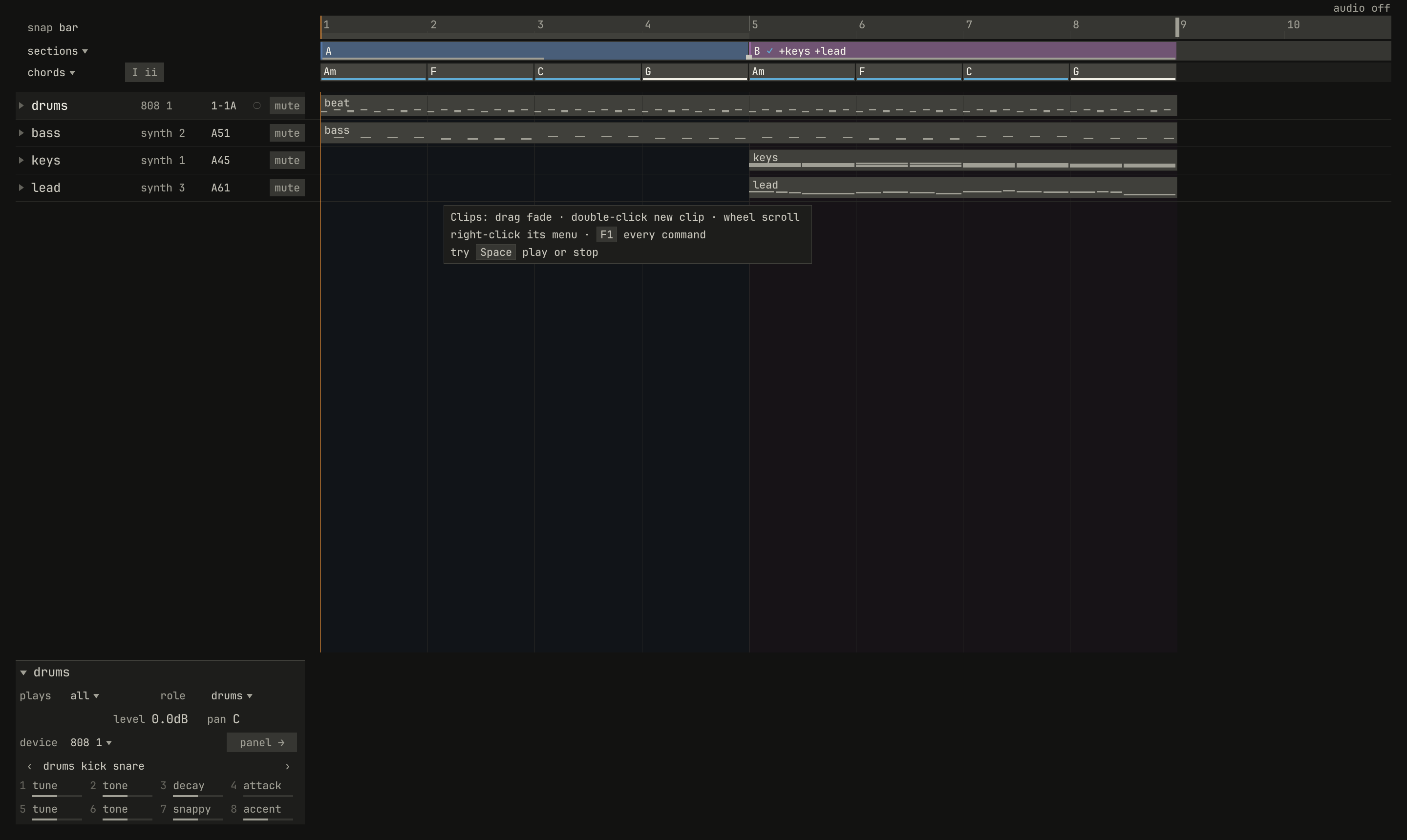
Over an empty place, the hint says what the area takes from the mouse, and offers one command you haven't used yet, never while the song plays:
scriptzig build run-studio -- manual/00-window/tour --script manual/00-window/area.txt
tour/song.json
{
  "tempo": 112,
  "end": "9",
  "sections": ["1 A", "5 B"],
  "key": ["1 A minor"],
  "chords": ["1 Am", "2 F", "3 C", "4 G", "5 Am", "6 F", "7 C", "8 G"],
  "devices": [
    { "name": "synth", "type": "synth", "state": { "parts": [
      { "patch": "A45", "level": -8, "reverb_send": 15 },
      { "patch": "A51", "level": -4 },
      { "patch": "A61", "level": -10, "delay_send": 15 }
    ] } },
    { "name": "808", "type": "drums" }
  ],
  "tracks": [
    { "name": "drums", "device": "808", "channel": 1, "role": "drums", "clips": [{ "at": "1", "length": "8.0.0", "notes": "beat" }] },
    { "name": "bass", "device": "synth", "channel": 2, "keys": "pent", "role": "bass", "clips": [{ "at": "1", "length": "8.0.0", "notes": "bass" }] },
    { "name": "keys", "device": "synth", "channel": 1, "keys": "chord 7", "role": "chords", "clips": [{ "at": "5", "length": "4.0.0", "notes": "keys" }] },
    { "name": "lead", "device": "synth", "channel": 3, "keys": "pent", "role": "lead", "clips": [{ "at": "5", "length": "4.0.0", "notes": "lead" }] }
  ],
  "notes": {
    "beat": {
      "length": "1.0.0",
      "notes": [
        "1.1.0 C2 0.0.240 120", "1.1.480 F#2 0.0.240 70",
        "1.2.0 C2 0.0.240 112", "1.2.0 D#2 0.0.240 100", "1.2.480 F#2 0.0.240 76",
        "1.3.0 C2 0.0.240 116", "1.3.480 F#2 0.0.240 70",
        "1.4.0 C2 0.0.240 112", "1.4.0 D#2 0.0.240 100", "1.4.480 F#2 0.0.240 80"
      ]
    },
    "bass": { "length": "8.0.0", "follow": { "pattern": "offbeat", "low": "E1" } },
    "keys": { "length": "4.0.0", "follow": { "pattern": "halves", "low": "F3" } },
    "lead": {
      "length": "4.0.0",
      "notes": [
        "1.1.0 E5 0.0.900 100", "1.2.0 D5 0.0.420 92", "1.2.480 C5 0.0.420 92", "1.3.0 A4 0.1.900 96",
        "2.1.0 C5 0.0.900 96", "2.2.0 D5 0.0.900 92", "2.3.0 C5 0.0.900 94", "2.4.0 A4 0.0.900 90",
        "3.1.0 E5 0.1.420 100", "3.2.480 G5 0.0.420 96", "3.3.0 E5 0.0.900 96", "3.4.0 D5 0.0.900 92",
        "4.1.0 D5 0.0.900 96", "4.2.0 E5 0.0.420 90", "4.2.480 D5 0.0.420 92", "4.3.0 G4 0.1.900 100"
      ]
    }
  }
}
area.txt
# The pointer rests on an empty place in the clips, and the hint says
# what the area takes, and one thing to try.
wait 0.2
move lane lead bar 2
wait 1
capture area.png
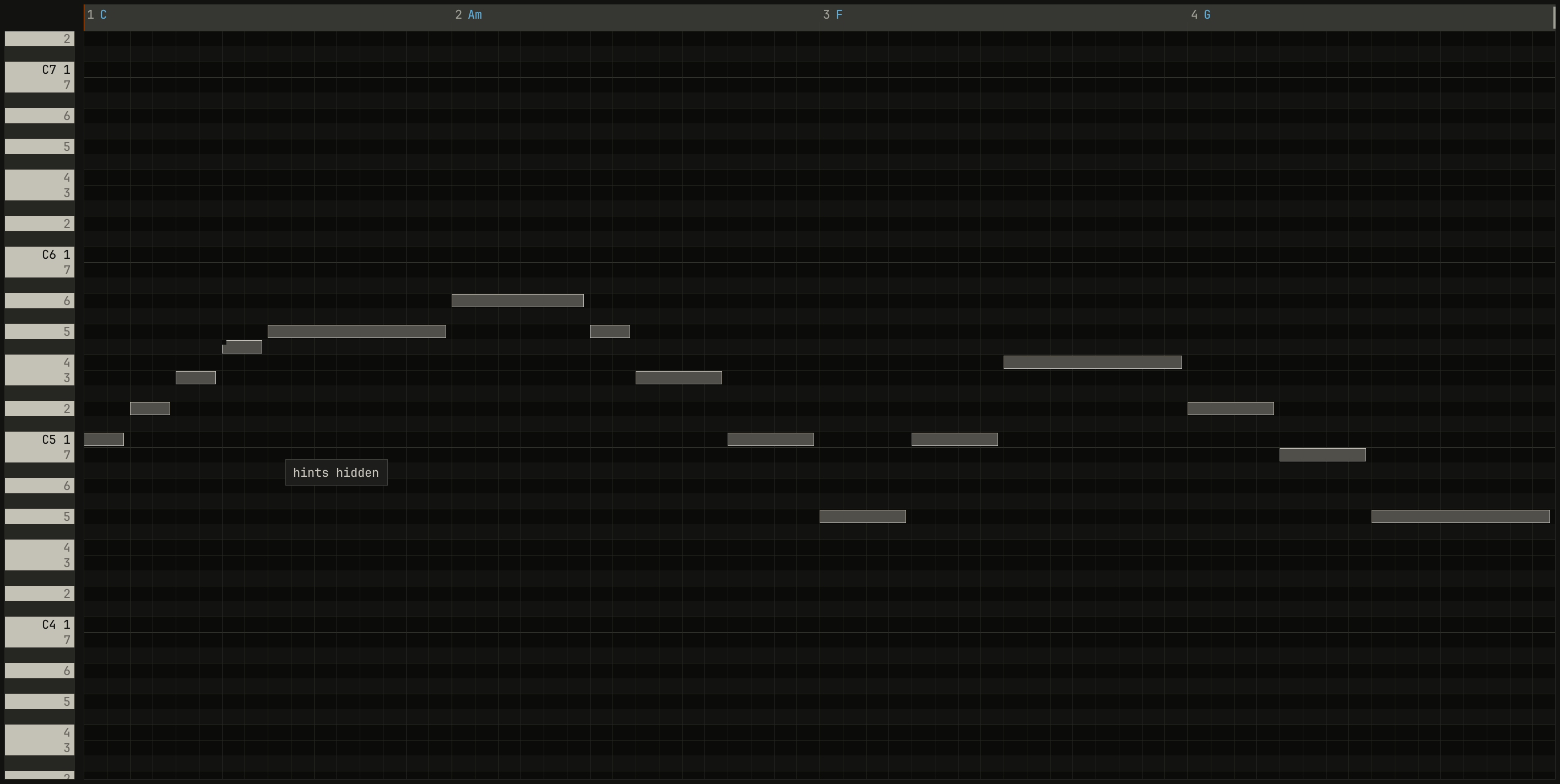
The marks are small shapes the window draws on the music: in Key Edit, a
notch cut from a note outside the key, a dot at the end of a note off its
chord on a beat, two dots for a semitone's rub against another track, a
hollow note for another track's; on the band, the coach's ✓, ○ same,
and !; under each chord, a line for what it does in the key. Each has a
shape, so it reads without its color. Chapter 19
lists every one.
, with its marks: an F# in the first bar, notched at its start, since it's outside C major, and dotted at its end; and a G on the F bar's first beat, dotted, since it's off the chord. The chords' names run along the ruler in blue.: the roll](00-window/marks-roll.png)
openzig build run-studio -- manual/07-melody/marks --view editor
manual/07-melody/marks/song.json
{
  "tempo": 96,
  "end": "5",
  "key": ["1 C major"],
  "chords": ["1 C", "2 Am", "3 F", "4 G"],
  "devices": [
    { "name": "synth", "type": "synth", "state": { "parts": [
      { "patch": "A61", "level": -4, "delay_send": 15 },
      { "patch": "A31", "level": -10, "reverb_send": 20 },
      { "patch": "A52", "level": -8 }
    ] } }
  ],
  "tracks": [
    { "name": "melody", "device": "synth", "channel": 1, "keys": "key", "role": "lead", "clips": [{ "at": "1", "length": "4.0.0", "notes": "melody" }] },
    { "name": "pad", "device": "synth", "channel": 2, "keys": "chord 7", "role": "pad", "clips": [{ "at": "1", "length": "4.0.0", "notes": "pad" }] },
    { "name": "bass", "device": "synth", "channel": 3, "keys": "pent", "role": "bass", "clips": [{ "at": "1", "length": "4.0.0", "notes": "bass" }] }
  ],
  "notes": {
    "melody": {
      "length": "4.0.0",
      "notes": [
        "1.1.0 C5 0.0.420 96", "1.1.480 D5 0.0.420 84", "1.2.0 E5 0.0.420 92", "1.2.480 F#5 0.0.420 84",
        "1.3.0 G5 0.1.900 96", "2.1.0 A5 0.1.420 96", "2.2.480 G5 0.0.420 84", "2.3.0 E5 0.0.900 92",
        "2.4.0 C5 0.0.900 88", "3.1.0 G4 0.0.900 92", "3.2.0 C5 0.0.900 90", "3.3.0 F5 0.1.900 96",
        "4.1.0 D5 0.0.900 92", "4.2.0 B4 0.0.900 88", "4.3.0 G4 0.1.900 92"
      ]
    },
    "pad": { "length": "4.0.0", "follow": { "pattern": "whole", "low": "F3" } },
    "bass": { "length": "4.0.0", "follow": { "pattern": "roots", "low": "E1" } }
  }
}Ctrl+H hides every hint and Key Edit's dots and tints, and
Ctrl+H again shows them; the notch on a note outside the key stays. show ▾, in Key Edit's header, has the same switch, beside the
ghosts and the reference's pitches.
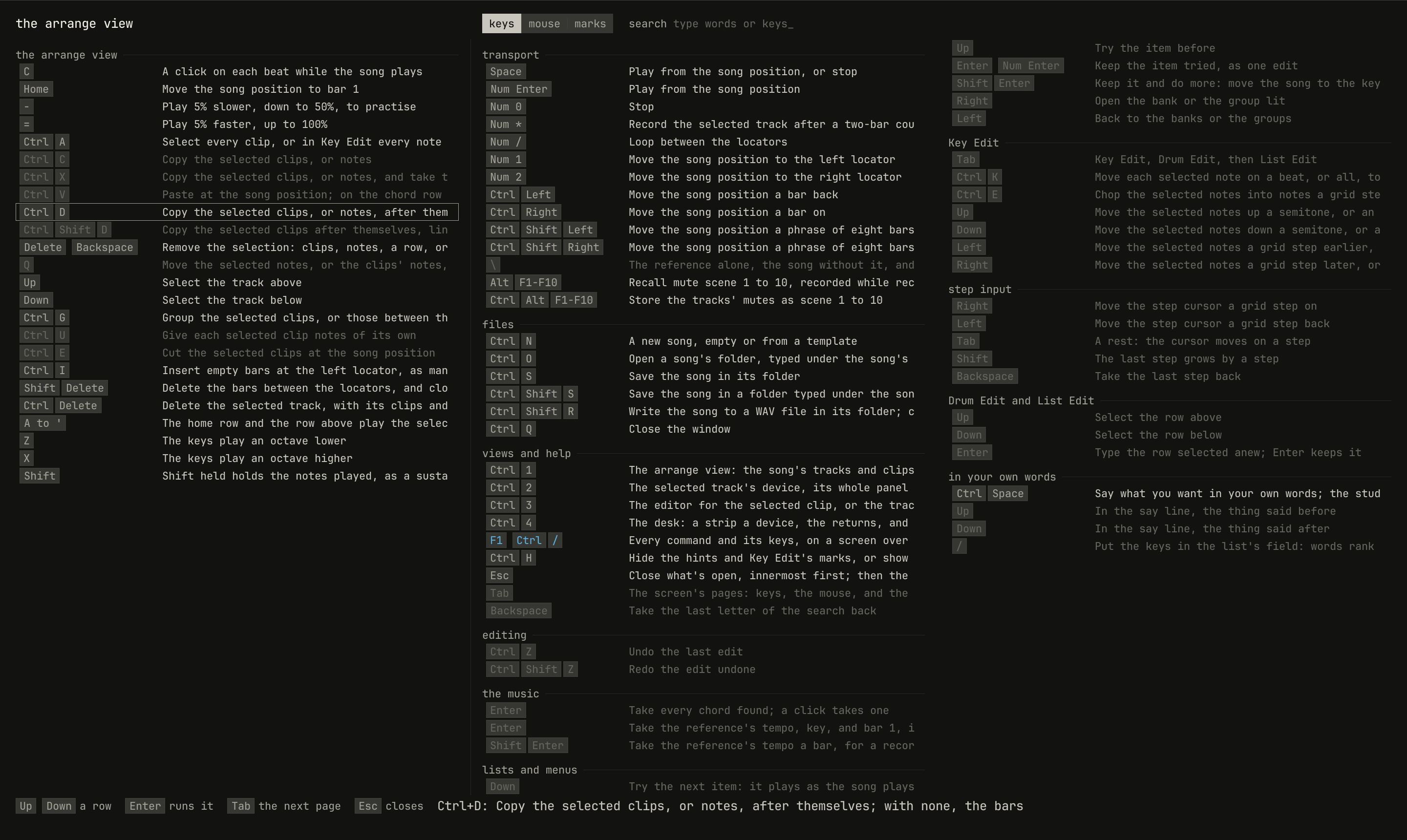
Every command
F1, or ? in the bar, opens the screen of every command over
the view. The song plays on under it, and the transport stays in the bar.
Its first column holds the commands of the view you're in, and of the mode,
if one is on; the other groups follow in columns. Tab turns to
the mouse's gestures and to the marks.
scriptzig build run-studio -- manual/00-window/tour --script manual/00-window/screen.txt
tour/song.json
{
  "tempo": 112,
  "end": "9",
  "sections": ["1 A", "5 B"],
  "key": ["1 A minor"],
  "chords": ["1 Am", "2 F", "3 C", "4 G", "5 Am", "6 F", "7 C", "8 G"],
  "devices": [
    { "name": "synth", "type": "synth", "state": { "parts": [
      { "patch": "A45", "level": -8, "reverb_send": 15 },
      { "patch": "A51", "level": -4 },
      { "patch": "A61", "level": -10, "delay_send": 15 }
    ] } },
    { "name": "808", "type": "drums" }
  ],
  "tracks": [
    { "name": "drums", "device": "808", "channel": 1, "role": "drums", "clips": [{ "at": "1", "length": "8.0.0", "notes": "beat" }] },
    { "name": "bass", "device": "synth", "channel": 2, "keys": "pent", "role": "bass", "clips": [{ "at": "1", "length": "8.0.0", "notes": "bass" }] },
    { "name": "keys", "device": "synth", "channel": 1, "keys": "chord 7", "role": "chords", "clips": [{ "at": "5", "length": "4.0.0", "notes": "keys" }] },
    { "name": "lead", "device": "synth", "channel": 3, "keys": "pent", "role": "lead", "clips": [{ "at": "5", "length": "4.0.0", "notes": "lead" }] }
  ],
  "notes": {
    "beat": {
      "length": "1.0.0",
      "notes": [
        "1.1.0 C2 0.0.240 120", "1.1.480 F#2 0.0.240 70",
        "1.2.0 C2 0.0.240 112", "1.2.0 D#2 0.0.240 100", "1.2.480 F#2 0.0.240 76",
        "1.3.0 C2 0.0.240 116", "1.3.480 F#2 0.0.240 70",
        "1.4.0 C2 0.0.240 112", "1.4.0 D#2 0.0.240 100", "1.4.480 F#2 0.0.240 80"
      ]
    },
    "bass": { "length": "8.0.0", "follow": { "pattern": "offbeat", "low": "E1" } },
    "keys": { "length": "4.0.0", "follow": { "pattern": "halves", "low": "F3" } },
    "lead": {
      "length": "4.0.0",
      "notes": [
        "1.1.0 E5 0.0.900 100", "1.2.0 D5 0.0.420 92", "1.2.480 C5 0.0.420 92", "1.3.0 A4 0.1.900 96",
        "2.1.0 C5 0.0.900 96", "2.2.0 D5 0.0.900 92", "2.3.0 C5 0.0.900 94", "2.4.0 A4 0.0.900 90",
        "3.1.0 E5 0.1.420 100", "3.2.480 G5 0.0.420 96", "3.3.0 E5 0.0.900 96", "3.4.0 D5 0.0.900 92",
        "4.1.0 D5 0.0.900 96", "4.2.0 E5 0.0.420 90", "4.2.480 D5 0.0.420 92", "4.3.0 G4 0.1.900 100"
      ]
    }
  }
}
screen.txt
# F1 opens the screen of every command; Ctrl+D, pressed with it open,
# lights duplicate's row and does nothing else.
wait 0.2
key f1
key ctrl+d
wait 0.1
capture screen.png
The screen answers three questions:
- What does this key do? Press it with the screen open. Its row lights, and nothing happens. A key that works only elsewhere says where.
- What's the key for this? Type a word, such as
looporchord, and the rows narrow to those whose words or keys hold it. Backspace takes a letter back. - Which keys haven't I tried? The caps of the keys you've used are
blue, so the rest stand out. The window remembers them from one session
to the next, in
~/.config/studio/keys.json.
Up and Down light a row, and Enter runs it, as its key would, where it
applies. F1 or Esc closes the screen. In the device view,
the synth's panel takes F1 to F4 for its parts, so ? opens the screen
there. Until you've pressed a key, the first time the window opens, a
callout under ? says where to start.
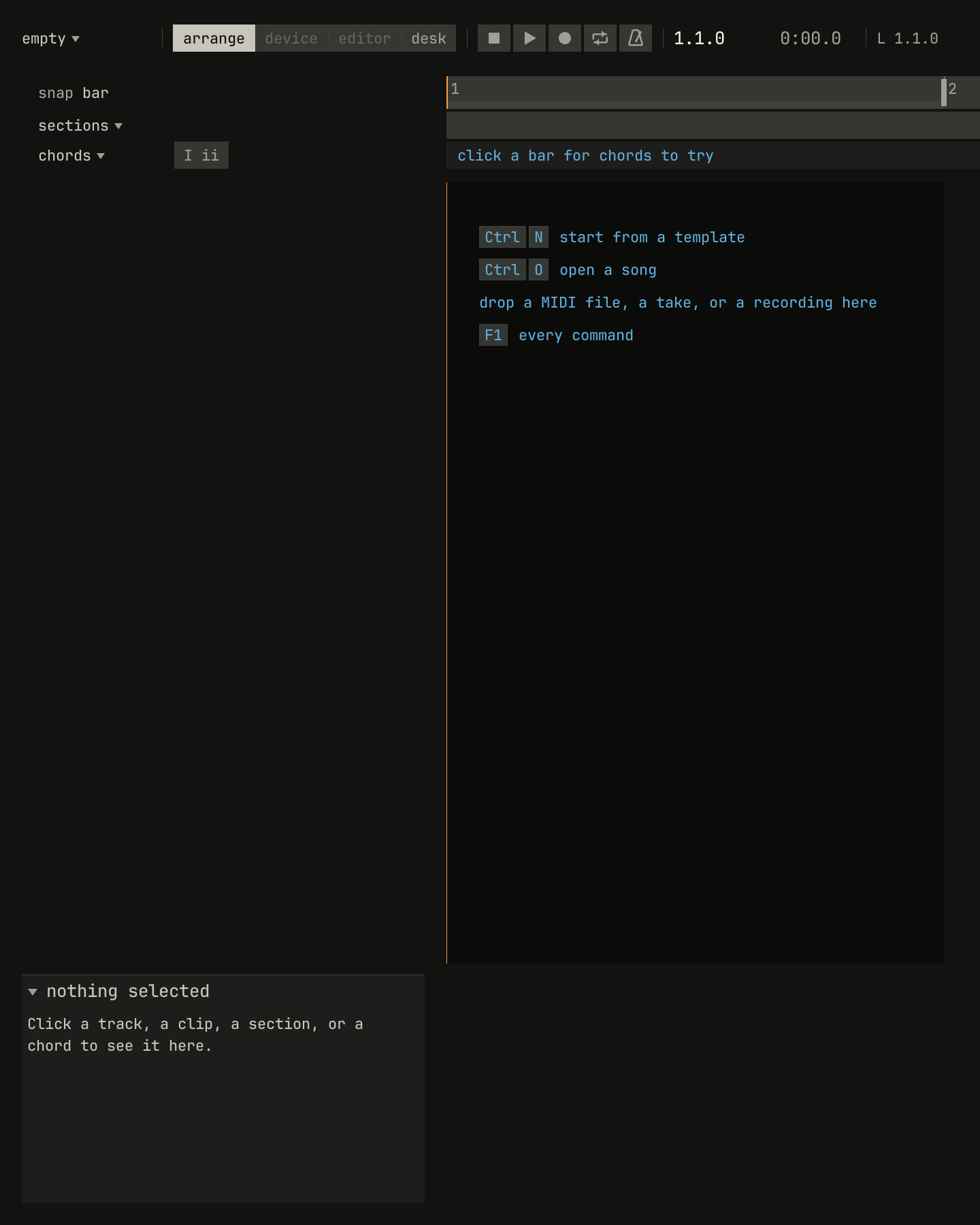
Empty places
An empty place says what goes there, in blue, until something does. A song
without tracks shows a card of ways to start, each line a click that does
it; an empty chord row says click a bar for chords to try; and the
inspector, with nothing selected, says what to click.
openzig build run-studio -- manual/00-window/empty
empty/song.json
{}Modes
A mode changes what the keys and the mouse do until it ends: practice, step input, recording, a list or a menu open, a name being typed. Each shows itself on its own thing, with its keys and its way out, and Esc leaves the innermost first.
: the header holds the four ways to practice and says the mode's keys, the song waits for E, and the key to press is lit in blue on the piano strip.: the view](00-window/practice-view.png)
scriptzig build run-studio -- manual/10-practice/ode --view editor --script manual/00-window/practice.txt
manual/10-practice/ode/song.json
{
  "tempo": 100,
  "end": "9",
  "key": ["1 C major"],
  "chords": ["1 C", "2 G", "3 C", "4 G", "5 C", "6 G", "7 C", "8 G", "8.3 C"],
  "devices": [
    { "name": "synth", "type": "synth", "state": { "parts": [
      { "patch": "A45", "level": 0, "reverb_send": 15 },
      { "patch": "A52", "level": -8 }
    ] } }
  ],
  "tracks": [
    { "name": "tune", "device": "synth", "channel": 1, "keys": "key", "role": "lead", "clips": [{ "at": "1", "length": "8.0.0", "notes": "tune" }] },
    { "name": "bass", "device": "synth", "channel": 2, "keys": "pent", "role": "bass", "clips": [{ "at": "1", "length": "8.0.0", "notes": "bass" }] }
  ],
  "notes": {
    "tune": {
      "length": "8.0.0",
      "notes": [
        "1.1.0 E4 0.0.900 92", "1.2.0 E4 0.0.900 88", "1.3.0 F4 0.0.900 90", "1.4.0 G4 0.0.900 90",
        "2.1.0 G4 0.0.900 92", "2.2.0 F4 0.0.900 88", "2.3.0 E4 0.0.900 90", "2.4.0 D4 0.0.900 88",
        "3.1.0 C4 0.0.900 92", "3.2.0 C4 0.0.900 88", "3.3.0 D4 0.0.900 90", "3.4.0 E4 0.0.900 90",
        "4.1.0 E4 0.1.420 94", "4.2.480 D4 0.0.420 86", "4.3.0 D4 0.1.900 90",
        "5.1.0 E4 0.0.900 92", "5.2.0 E4 0.0.900 88", "5.3.0 F4 0.0.900 90", "5.4.0 G4 0.0.900 90",
        "6.1.0 G4 0.0.900 92", "6.2.0 F4 0.0.900 88", "6.3.0 E4 0.0.900 90", "6.4.0 D4 0.0.900 88",
        "7.1.0 C4 0.0.900 92", "7.2.0 C4 0.0.900 88", "7.3.0 D4 0.0.900 90", "7.4.0 E4 0.0.900 90",
        "8.1.0 D4 0.1.420 94", "8.2.480 C4 0.0.420 86", "8.3.0 C4 0.1.900 92"
      ]
    },
    "bass": { "length": "8.0.0", "follow": { "pattern": "root five", "low": "E1" } }
  }
}
practice.txt
# Practice, on: the song waits at the first note for its key, lit.
wait 0.2
click practice
key space
wait 1
capture practice.png
Next: chapter 1, a first song, made from a template in one sitting, a step at a time.