Introduction
A first song
This chapter makes a song from nothing, in one sitting, with the computer's keys and the mouse. It needs no piano and no theory: you start from a template, move it to a key you like, try chords for its verse, pick a beat and a bass line, play a melody on keys that can't go wrong, lay it out as a song, and practise your part. Each step names its idea and the chapter that teaches it properly. Here, you only need to hear it work.
Open the window on a new song:
zig build run-studio
The song as it stands after each step is a folder in
manual/01-first-song/, so you can start from any of them, as
zig build run-studio -- manual/01-first-song/chords for the song with its
new chords.
A song to start from
Ctrl+N drops a list under the song's name: describe, which sets a
song up from your words, as chapter 11 explains; empty,
a synth and four tracks; and five templates, each the start of a song in a
style, with its tempo, key, and parts in place. Down twice lights
pop, and Enter starts a new song from it.
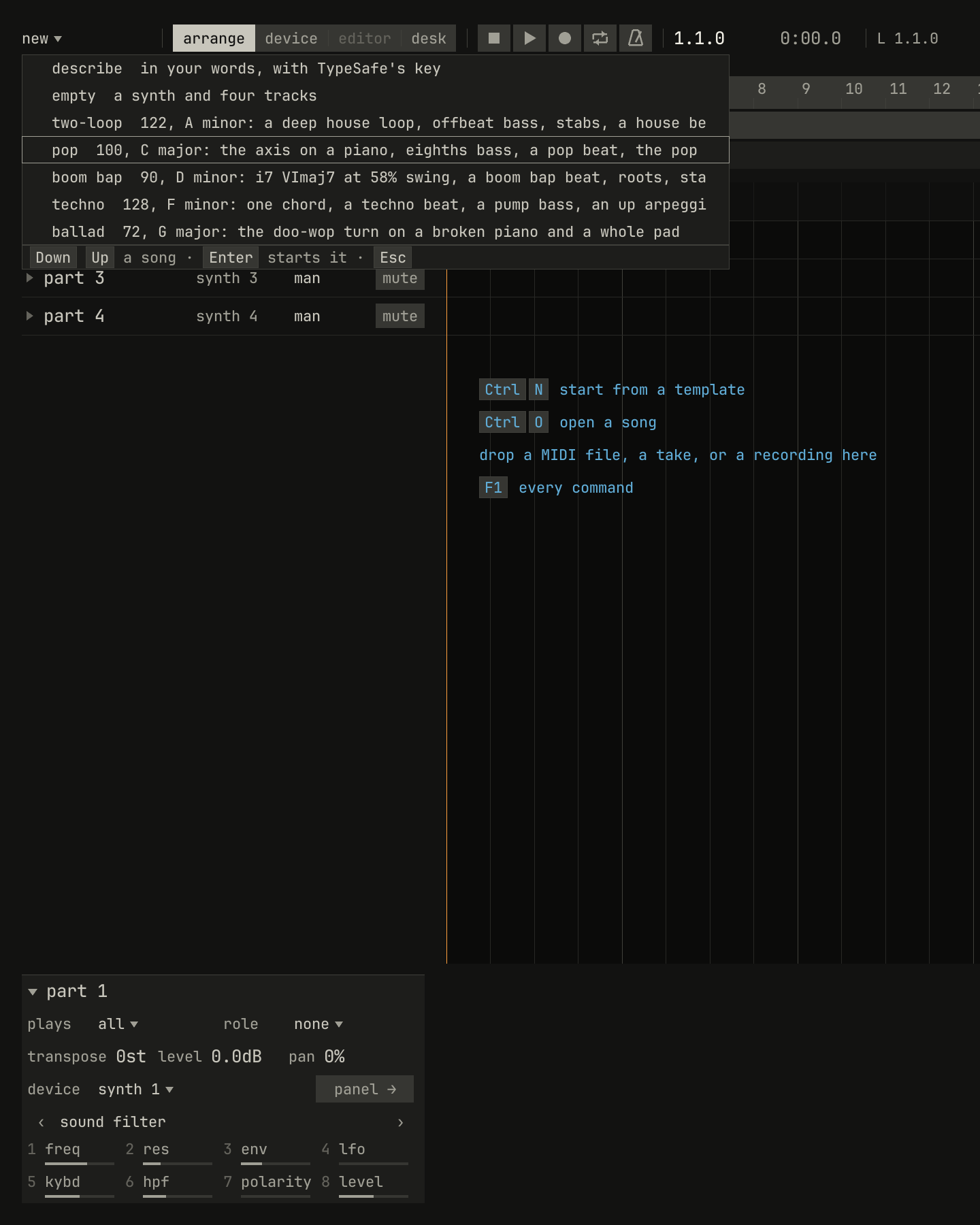
pop lit: 100 BPM in C major, the axis on a piano, an eighths bass, a pop beat, and the pop form. The lines are cut at the list's edge.scriptzig build run-studio -- manual/01-first-song/new --script manual/01-first-song/new.txt
new/song.json
{
  "tempo": 120,
  "end": "33",
  "devices": [{ "name": "synth", "type": "synth" }],
  "tracks": [
    { "name": "part 1", "device": "synth", "channel": 1 },
    { "name": "part 2", "device": "synth", "channel": 2 },
    { "name": "part 3", "device": "synth", "channel": 3 },
    { "name": "part 4", "device": "synth", "channel": 4 }
  ]
}
new.txt
# Ctrl+N drops the songs to start from, and Down twice lights pop.
wait 0.2
key ctrl+n
key down
key down
wait 0.1
capture new.png
A template plays at once: Space plays and stops. Pop's is 64 bars, in the nine sections of a pop song, and has four tracks:
- piano plays the chords, and makes its notes itself from the chord row under the sections, which holds C, G, Am, and F, a chord a bar, all the way through.
- bass makes its notes from the chords too, in eighth notes, from the verse on.
- drums is the drum machine, playing a synth-pop beat from the verse on.
- lead is empty. The melody is yours.


0.0 / 9.6 s
peak -10.5 dBFS
openzig build run-studio -- studio/templates/pop
renderzig build run-studio -- render studio/templates/pop pop.wav --from 5 --to 9
studio/templates/pop/song.json
{
  "tempo": 100,
  "end": "65",
  "sections": ["1 intro", "5 verse", "13 chorus", "21 verse", "29 chorus", "37 bridge", "45 chorus", "53 chorus", "61 outro"],
  "key": ["1 C major"],
  "chords": ["1 C", "2 G", "3 Am", "4 F", "5 C", "6 G", "7 Am", "8 F", "9 C", "10 G", "11 Am", "12 F", "13 C", "14 G", "15 Am", "16 F", "17 C", "18 G", "19 Am", "20 F", "21 C", "22 G", "23 Am", "24 F", "25 C", "26 G", "27 Am", "28 F", "29 C", "30 G", "31 Am", "32 F", "33 C", "34 G", "35 Am", "36 F", "37 C", "38 G", "39 Am", "40 F", "41 C", "42 G", "43 Am", "44 F", "45 C", "46 G", "47 Am", "48 F", "49 C", "50 G", "51 Am", "52 F", "53 C", "54 G", "55 Am", "56 F", "57 C", "58 G", "59 Am", "60 F", "61 C", "62 G", "63 Am", "64 F"],
  "devices": [
    { "name": "synth", "type": "synth", "state": { "parts": [
      { "patch": "A45", "level": -6, "reverb_send": 15 },
      { "patch": "A52", "level": -4 },
      { "patch": "A62", "level": -8, "delay_send": 15 }
    ] } },
    { "name": "808", "type": "drums", "state": { "program": "2-12A" } }
  ],
  "tracks": [
    { "name": "piano", "device": "synth", "channel": 1, "keys": "chord 7 bass", "role": "chords", "clips": [{ "at": "1", "length": "64.0.0", "notes": "piano" }] },
    { "name": "bass", "device": "synth", "channel": 2, "keys": "pent", "role": "bass", "clips": [{ "at": "5", "length": "56.0.0", "notes": "bass" }] },
    { "name": "drums", "device": "808", "channel": 1, "role": "drums", "clips": [{ "at": "5", "length": "56.0.0", "pattern": "2-12A" }] },
    { "name": "lead", "device": "synth", "channel": 3, "keys": "pent", "role": "lead" }
  ],
  "notes": {
    "piano": { "length": "64.0.0", "follow": { "pattern": "halves", "low": "F3" } },
    "bass": { "length": "56.0.0", "follow": { "pattern": "eighths", "low": "E1" } }
  }
}
It opens as a new song without a name, and the first Ctrl+S asks for one. The front page lists the five templates.
A key that suits you
A song's key is the notes it uses and the one that sounds like home.
The bar names it, C major ▾. Click it, and the key list drops. Each key
you step to with Down plays its scale on the piano, so you
choose by ear: a key that sounds right to you, or suits the voice that will
sing. This song goes to D major, a tone above C.
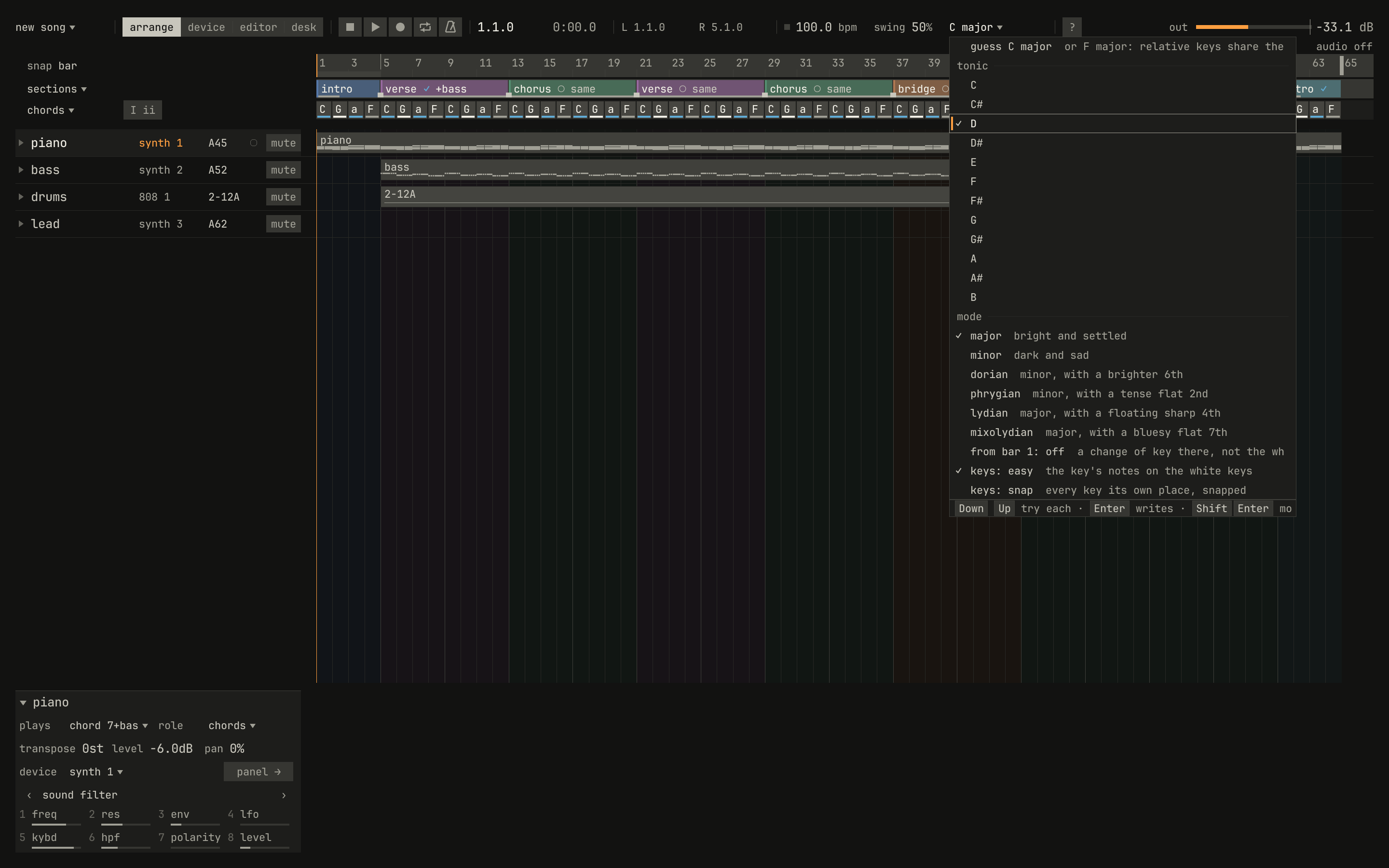
C major, since nothing is kept yet. At the list's head is the studio's guess from the notes.scriptzig build run-studio -- manual/01-first-song/new --script manual/01-first-song/key.txt
new/song.json
{
  "tempo": 120,
  "end": "33",
  "devices": [{ "name": "synth", "type": "synth" }],
  "tracks": [
    { "name": "part 1", "device": "synth", "channel": 1 },
    { "name": "part 2", "device": "synth", "channel": 2 },
    { "name": "part 3", "device": "synth", "channel": 3 },
    { "name": "part 4", "device": "synth", "channel": 4 }
  ]
}
key.txt
# Enter on pop starts a new song from it, and its callout goes after three
# seconds. The key in the bar drops the key list, and Down steps from the
# guess through C and C# to D, each key playing its scale on the piano.
wait 0.2
key ctrl+n
key down
key down
key enter
wait 3.2
click key
key down
wait 0.5
key down
wait 0.5
key down
wait 0.5
key down
move 700 700
wait 0.3
capture key.pngShift+Enter keeps D major and moves the whole song there: the chords go up a tone, C G Am F becoming D A Bm G, and the piano and the bass, which make their notes from the chords, go with them. The song sounds much as it did, a tone higher. Enter alone would rename the key and leave C G Am F where they were, three of them outside it. What a key is, and why one note of it sounds like home, is chapter 3's.
Chords for the verse
The template plays the same four chords in every section. A verse that moves differently from its chorus helps the chorus arrive, so the verse gets chords of its own.
Click the verse on the band. It's selected, and the locators, L and R
in the bar, go to its first bar and the bar after its last, 5 and 13. Turn
on cycle, the loop in the bar's transport, and click L to go to bar 5:
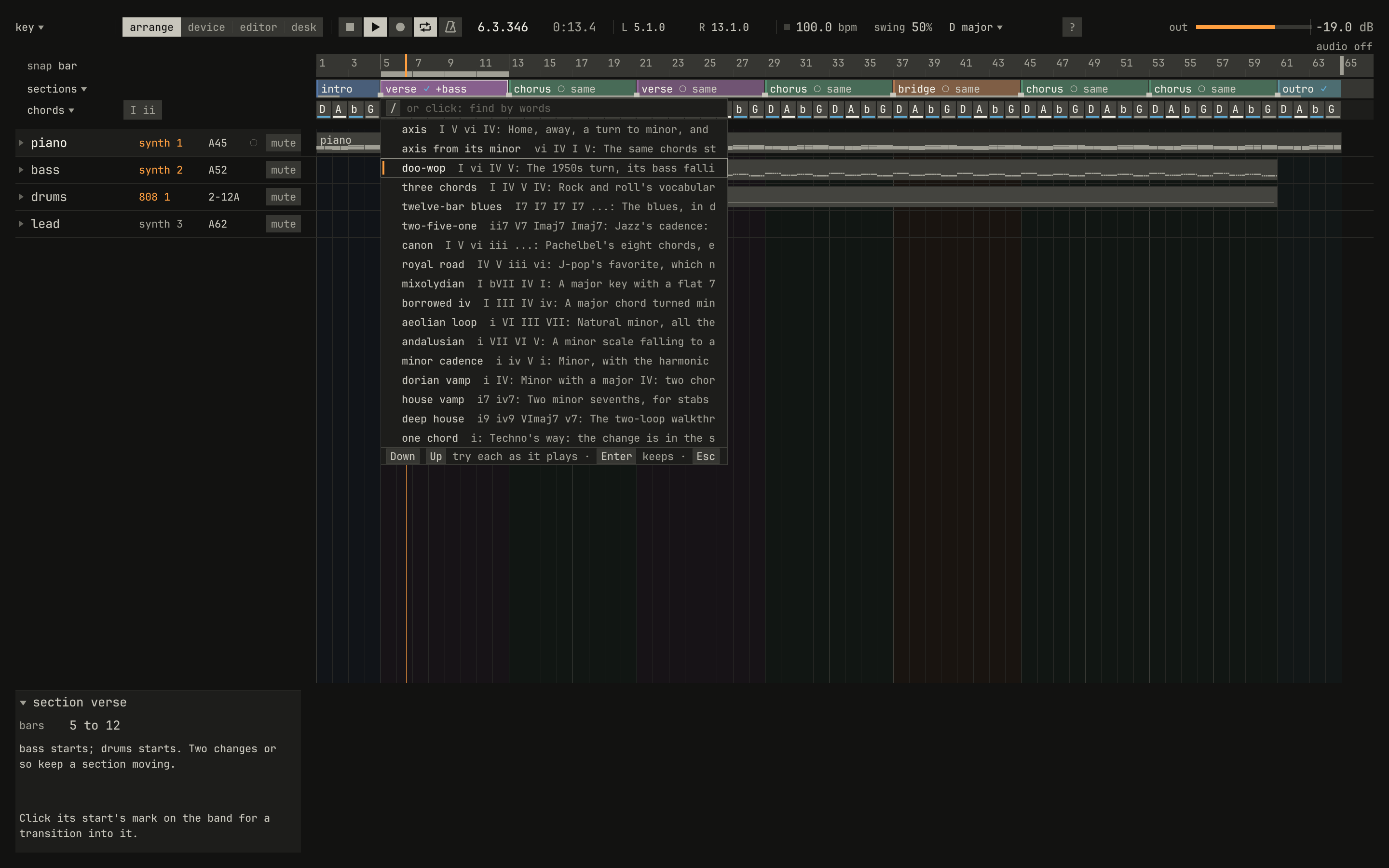
Space plays the verse round and round. Then chords ▾, over the
track list, drops the chord row's menu, and its progression opens a list
of progressions for the bars selected. Each one you step to plays at once,
as the verse loops: the axis, the chords the song has now; the axis from
its minor, the same chords started on Bm; and the doo-wop turn, D Bm G A.
Enter keeps the doo-wop.
scriptzig build run-studio -- manual/01-first-song/key --script manual/01-first-song/progression.txt
key/song.json
{
  "tempo": 100,
  "end": "65",
  "sections": ["1 intro", "5 verse", "13 chorus", "21 verse", "29 chorus", "37 bridge", "45 chorus", "53 chorus", "61 outro"],
  "key": ["1 D major"],
  "chords": ["1 D", "2 A", "3 Bm", "4 G", "5 D", "6 A", "7 Bm", "8 G", "9 D", "10 A", "11 Bm", "12 G", "13 D", "14 A", "15 Bm", "16 G", "17 D", "18 A", "19 Bm", "20 G", "21 D", "22 A", "23 Bm", "24 G", "25 D", "26 A", "27 Bm", "28 G", "29 D", "30 A", "31 Bm", "32 G", "33 D", "34 A", "35 Bm", "36 G", "37 D", "38 A", "39 Bm", "40 G", "41 D", "42 A", "43 Bm", "44 G", "45 D", "46 A", "47 Bm", "48 G", "49 D", "50 A", "51 Bm", "52 G", "53 D", "54 A", "55 Bm", "56 G", "57 D", "58 A", "59 Bm", "60 G", "61 D", "62 A", "63 Bm", "64 G"],
  "devices": [
    { "name": "synth", "type": "synth", "state": { "parts": [
      { "patch": "A45", "level": -6, "reverb_send": 15 },
      { "patch": "A52", "level": -4 },
      { "patch": "A62", "level": -8, "delay_send": 15 }
    ] } },
    { "name": "808", "type": "drums", "state": { "program": "2-12A" } }
  ],
  "tracks": [
    { "name": "piano", "device": "synth", "channel": 1, "keys": "chord 7 bass", "role": "chords", "clips": [{ "at": "1", "length": "64.0.0", "notes": "piano" }] },
    { "name": "bass", "device": "synth", "channel": 2, "keys": "pent", "role": "bass", "clips": [{ "at": "5", "length": "56.0.0", "notes": "bass" }] },
    { "name": "drums", "device": "808", "channel": 1, "role": "drums", "clips": [{ "at": "5", "length": "56.0.0", "pattern": "2-12A" }] },
    { "name": "lead", "device": "synth", "channel": 3, "keys": "pent", "role": "lead" }
  ],
  "notes": {
    "piano": { "length": "64.0.0", "follow": { "pattern": "halves", "low": "F3" } },
    "bass": { "length": "56.0.0", "follow": { "pattern": "eighths", "low": "E1" } }
  }
}
progression.txt
# The verse, clicked on the band, sets the locators over its bars; cycle
# plays them round from the left locator, and the chord row's progressions
# try the axis, the axis from its minor, and the doo-wop turn.
wait 0.2
click sections bar 7
click cycle
click left
key space
click chords
choose progression
key down
wait 1.2
key down
wait 1.2
key down
move 700 700
wait 1.2
capture progression.png
Space stops, and a click turns cycle off.

0.0 / 9.6 s
peak -10.6 dBFS
b is Bm, its root alone in small letters. The clip is the verse's first four bars: compare it with the template's.openzig build run-studio -- manual/01-first-song/chords
renderzig build run-studio -- render manual/01-first-song/chords chords.wav --from 5 --to 9
chords/song.json
{
  "tempo": 100,
  "end": "65",
  "sections": ["1 intro", "5 verse", "13 chorus", "21 verse", "29 chorus", "37 bridge", "45 chorus", "53 chorus", "61 outro"],
  "key": ["1 D major"],
  "chords": ["1 D", "2 A", "3 Bm", "4 G", "5 D", "6 Bm", "7 G", "8 A", "9 D", "10 Bm", "11 G", "12 A", "13 D", "14 A", "15 Bm", "16 G", "17 D", "18 A", "19 Bm", "20 G", "21 D", "22 A", "23 Bm", "24 G", "25 D", "26 A", "27 Bm", "28 G", "29 D", "30 A", "31 Bm", "32 G", "33 D", "34 A", "35 Bm", "36 G", "37 D", "38 A", "39 Bm", "40 G", "41 D", "42 A", "43 Bm", "44 G", "45 D", "46 A", "47 Bm", "48 G", "49 D", "50 A", "51 Bm", "52 G", "53 D", "54 A", "55 Bm", "56 G", "57 D", "58 A", "59 Bm", "60 G", "61 D", "62 A", "63 Bm", "64 G"],
  "devices": [
    { "name": "synth", "type": "synth", "state": { "parts": [
      { "patch": "A45", "level": -6, "reverb_send": 15 },
      { "patch": "A52", "level": -4 },
      { "patch": "A62", "level": -8, "delay_send": 15 }
    ] } },
    { "name": "808", "type": "drums", "state": { "program": "2-12A" } }
  ],
  "tracks": [
    { "name": "piano", "device": "synth", "channel": 1, "keys": "chord 7 bass", "role": "chords", "clips": [{ "at": "1", "length": "64.0.0", "notes": "piano" }] },
    { "name": "bass", "device": "synth", "channel": 2, "keys": "pent", "role": "bass", "clips": [{ "at": "5", "length": "56.0.0", "notes": "bass" }] },
    { "name": "drums", "device": "808", "channel": 1, "role": "drums", "clips": [{ "at": "5", "length": "56.0.0", "pattern": "2-12A" }] },
    { "name": "lead", "device": "synth", "channel": 3, "keys": "pent", "role": "lead" }
  ],
  "notes": {
    "piano": { "length": "64.0.0", "follow": { "pattern": "halves", "low": "F3" } },
    "bass": { "length": "56.0.0", "follow": { "pattern": "eighths", "low": "E1" } }
  }
}
A chord on the row holds no notes. The piano and the bass read it and make their notes from it, so a chord changed there changes both. Chapter 4 explains the chord row, and chapter 5 the progressions, and why some chords follow others.
A beat
The beat is the drum machine's synth-pop. To hear others, click the drum
clip to select it, then the drum track's program, 2-12A in its row, which
drops the drum machine's groups. Down twice lights group 2, its
beats by style, and Right opens it. Play the song, and each beat
you step to plays in the clip: house, deep house, techno, and on down to
funk, which this song keeps with Enter.
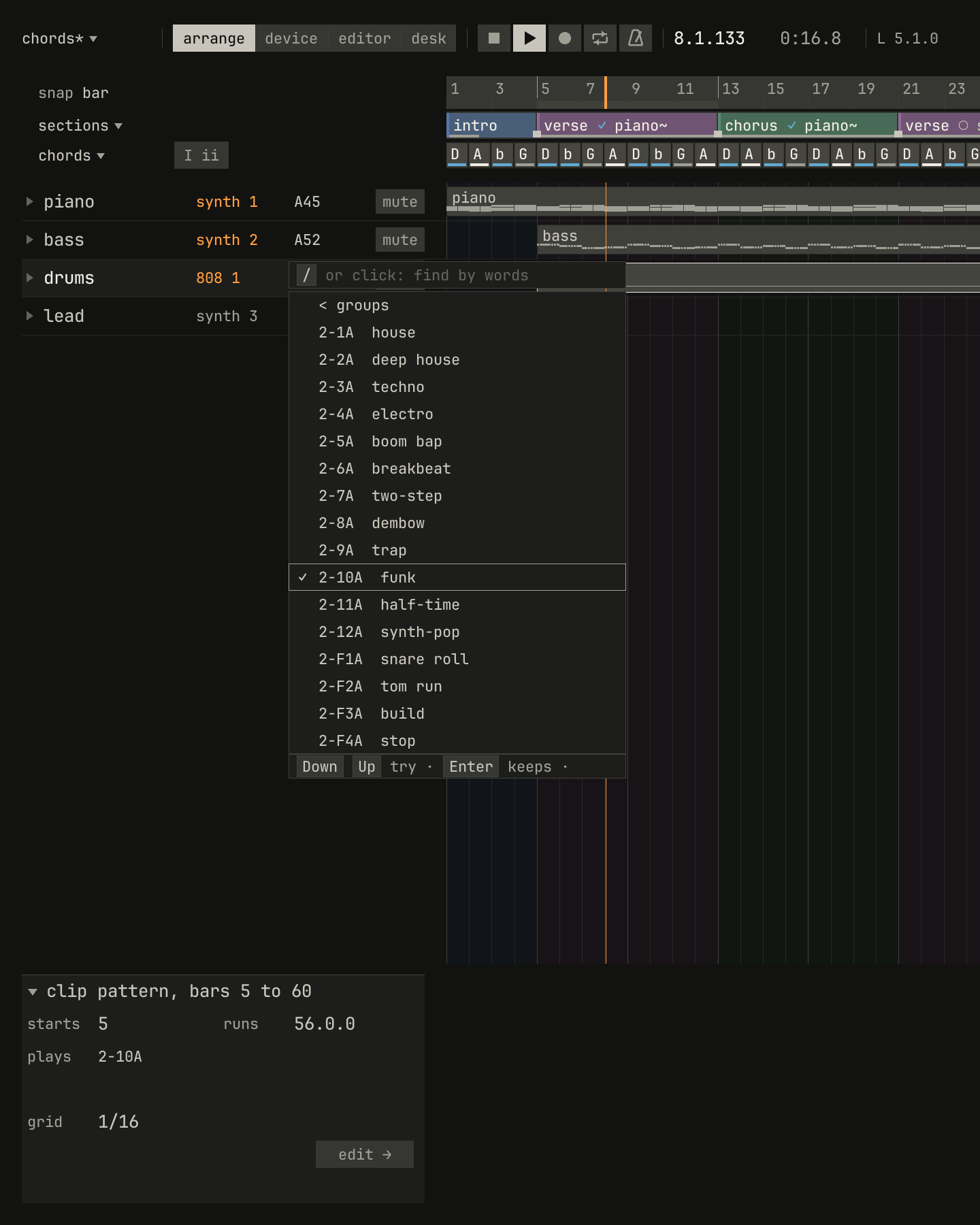
2-10A. A beat that wants a swing the song doesn't have says so as you pass it, as boom bap and two-step do.scriptzig build run-studio -- manual/01-first-song/chords --script manual/01-first-song/beat.txt
chords/song.json
{
  "tempo": 100,
  "end": "65",
  "sections": ["1 intro", "5 verse", "13 chorus", "21 verse", "29 chorus", "37 bridge", "45 chorus", "53 chorus", "61 outro"],
  "key": ["1 D major"],
  "chords": ["1 D", "2 A", "3 Bm", "4 G", "5 D", "6 Bm", "7 G", "8 A", "9 D", "10 Bm", "11 G", "12 A", "13 D", "14 A", "15 Bm", "16 G", "17 D", "18 A", "19 Bm", "20 G", "21 D", "22 A", "23 Bm", "24 G", "25 D", "26 A", "27 Bm", "28 G", "29 D", "30 A", "31 Bm", "32 G", "33 D", "34 A", "35 Bm", "36 G", "37 D", "38 A", "39 Bm", "40 G", "41 D", "42 A", "43 Bm", "44 G", "45 D", "46 A", "47 Bm", "48 G", "49 D", "50 A", "51 Bm", "52 G", "53 D", "54 A", "55 Bm", "56 G", "57 D", "58 A", "59 Bm", "60 G", "61 D", "62 A", "63 Bm", "64 G"],
  "devices": [
    { "name": "synth", "type": "synth", "state": { "parts": [
      { "patch": "A45", "level": -6, "reverb_send": 15 },
      { "patch": "A52", "level": -4 },
      { "patch": "A62", "level": -8, "delay_send": 15 }
    ] } },
    { "name": "808", "type": "drums", "state": { "program": "2-12A" } }
  ],
  "tracks": [
    { "name": "piano", "device": "synth", "channel": 1, "keys": "chord 7 bass", "role": "chords", "clips": [{ "at": "1", "length": "64.0.0", "notes": "piano" }] },
    { "name": "bass", "device": "synth", "channel": 2, "keys": "pent", "role": "bass", "clips": [{ "at": "5", "length": "56.0.0", "notes": "bass" }] },
    { "name": "drums", "device": "808", "channel": 1, "role": "drums", "clips": [{ "at": "5", "length": "56.0.0", "pattern": "2-12A" }] },
    { "name": "lead", "device": "synth", "channel": 3, "keys": "pent", "role": "lead" }
  ],
  "notes": {
    "piano": { "length": "64.0.0", "follow": { "pattern": "halves", "low": "F3" } },
    "bass": { "length": "56.0.0", "follow": { "pattern": "eighths", "low": "E1" } }
  }
}
beat.txt
# The drum clip selected, the drum track's program drops the drum machine's
# groups. Right opens group 2, and with the song playing from the verse,
# each beat stepped to plays in the clip, from house to funk.
wait 0.2
click sections bar 7
click left
click lane drums bar 23
click program drums
key down
key down
key right
key space
key down
wait 0.6
key down
wait 0.6
key down
wait 0.6
key down
wait 0.6
key down
wait 0.6
key down
wait 0.6
key down
wait 0.6
key down
wait 0.6
key down
wait 0.6
key down
move 700 700
wait 1.5
capture beat.png
A beat is a kick, a snare, and hi-hats in a pattern that repeats every bar. Chapter 2 builds them from the grid up, and its last section names every beat in the list.
A bass line
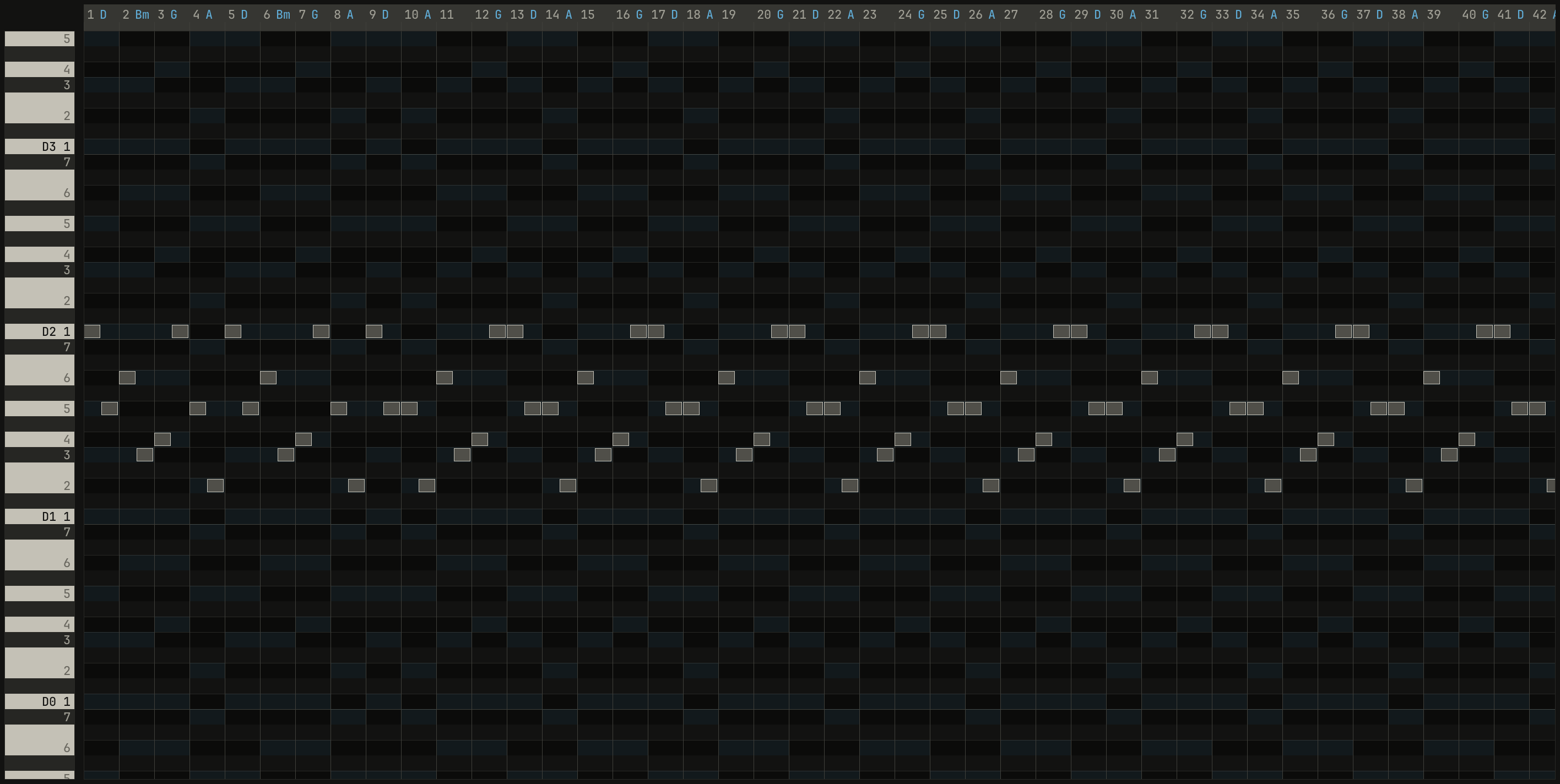
Double-click the bass's clip, and Key Edit opens on it. Its header says
follows eighths: the bass holds no notes of its own, only a pattern, and
makes its notes from the chord row, as the piano does. The clip's name in
the header, bass ▾, drops the clip's menu, and follow the chords there
steps to the next pattern each time you choose it: offbeat, octaves,
then root five, each chord's root on beat 1 and its fifth on beat 3.

0.0 / 9.6 s
peak -12.8 dBFS
root five: the first 42 of the clip's 56 bars, two notes in each, the chord's root and then its fifth, rising and falling with the chords named along the ruler, which counts the clip's bars from its start. The clip is the verse's first four bars, with funk.openzig build run-studio -- manual/01-first-song/bass --view editor --track 2
renderzig build run-studio -- render manual/01-first-song/bass bass.wav --from 5 --to 9
bass/song.json
{
  "tempo": 100,
  "end": "65",
  "sections": ["1 intro", "5 verse", "13 chorus", "21 verse", "29 chorus", "37 bridge", "45 chorus", "53 chorus", "61 outro"],
  "key": ["1 D major"],
  "chords": ["1 D", "2 A", "3 Bm", "4 G", "5 D", "6 Bm", "7 G", "8 A", "9 D", "10 Bm", "11 G", "12 A", "13 D", "14 A", "15 Bm", "16 G", "17 D", "18 A", "19 Bm", "20 G", "21 D", "22 A", "23 Bm", "24 G", "25 D", "26 A", "27 Bm", "28 G", "29 D", "30 A", "31 Bm", "32 G", "33 D", "34 A", "35 Bm", "36 G", "37 D", "38 A", "39 Bm", "40 G", "41 D", "42 A", "43 Bm", "44 G", "45 D", "46 A", "47 Bm", "48 G", "49 D", "50 A", "51 Bm", "52 G", "53 D", "54 A", "55 Bm", "56 G", "57 D", "58 A", "59 Bm", "60 G", "61 D", "62 A", "63 Bm", "64 G"],
  "devices": [
    { "name": "synth", "type": "synth", "state": { "parts": [
      { "patch": "A45", "level": -6, "reverb_send": 15 },
      { "patch": "A52", "level": -4 },
      { "patch": "A62", "level": -8, "delay_send": 15 }
    ] } },
    { "name": "808", "type": "drums", "state": { "program": "2-12A" } }
  ],
  "tracks": [
    { "name": "piano", "device": "synth", "channel": 1, "keys": "chord 7 bass", "role": "chords", "clips": [{ "at": "1", "length": "64.0.0", "notes": "piano" }] },
    { "name": "bass", "device": "synth", "channel": 2, "keys": "pent", "role": "bass", "clips": [{ "at": "5", "length": "56.0.0", "notes": "bass" }] },
    { "name": "drums", "device": "808", "channel": 1, "role": "drums", "clips": [{ "at": "5", "length": "56.0.0", "pattern": "2-10A" }] },
    { "name": "lead", "device": "synth", "channel": 3, "keys": "pent", "role": "lead" }
  ],
  "notes": {
    "piano": { "length": "64.0.0", "follow": { "pattern": "halves", "low": "F3" } },
    "bass": { "length": "56.0.0", "follow": { "pattern": "root five", "low": "E1" } }
  }
}
A pattern says when the bass plays and which note of the chord, so the same chords make a different bass with each. Chapter 6 plays the patterns, and says why a bass plays mostly roots. Esc goes back to the arrange view.
A melody
The melody is the one part the studio doesn't write. You play it, on the computer's keys, and three things make that easy:
- Keys that can't go wrong. The lead plays in
pent, asplays ▾in the inspector says with the lead selected: the home row plays only the five notes of D major's pentatonic scale,AtoHplaying D, E, F#, A, B, and D again an octave up. No two of them clash, so every key you press fits. Chapter 3 explains why. - A count-in. Recording counts two bars in, so you're playing in time from the first note.
- Time kept for you. Shift and a click on the record button turns on
automatic quantize, and
quantizedshows under the button: each note you record lands on the grid, after your average lateness comes off.
Click the lead's empty lane to select the lead, click the first chorus on
the band to put the locators over it, bars 13 to 21, and click L.
Shift-click the record button, then click it: two bars count in, and the
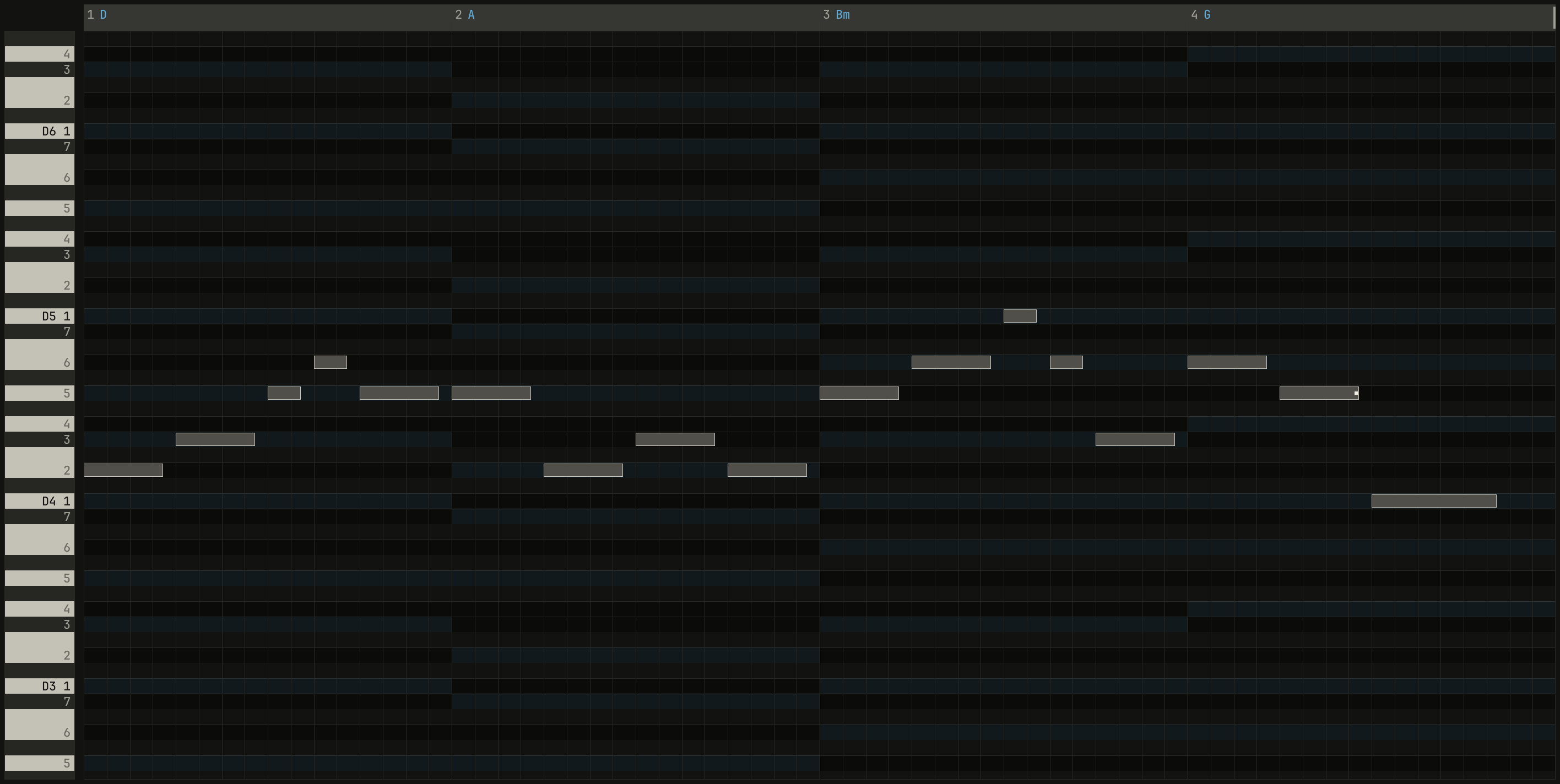
chorus plays. Play along. This song's melody is four bars, a key a beat
but for two pairs of eighths, F G and H G:
| Bar | Chord | Keys | Notes |
|---|---|---|---|
| 13 | D | S D F G F | E F# A B A |
| 14 | A | F S D S | A E F# E |
| 15 | Bm | F G H G D | A B D B F# |
| 16 | G | G F A | B A D, held |
Click record again to keep the take, a clip over bars 13 to 16, and Space stops. Ctrl+3 opens the take in Key Edit.
0.0 / 9.6 s
peak -12.6 dBFS
openzig build run-studio -- manual/01-first-song/take --view editor --track 4
renderzig build run-studio -- render manual/01-first-song/take take.wav --from 13 --to 17
take/song.json
{
  "tempo": 100,
  "end": "65",
  "sections": ["1 intro", "5 verse", "13 chorus", "21 verse", "29 chorus", "37 bridge", "45 chorus", "53 chorus", "61 outro"],
  "key": ["1 D major"],
  "chords": ["1 D", "2 A", "3 Bm", "4 G", "5 D", "6 Bm", "7 G", "8 A", "9 D", "10 Bm", "11 G", "12 A", "13 D", "14 A", "15 Bm", "16 G", "17 D", "18 A", "19 Bm", "20 G", "21 D", "22 A", "23 Bm", "24 G", "25 D", "26 A", "27 Bm", "28 G", "29 D", "30 A", "31 Bm", "32 G", "33 D", "34 A", "35 Bm", "36 G", "37 D", "38 A", "39 Bm", "40 G", "41 D", "42 A", "43 Bm", "44 G", "45 D", "46 A", "47 Bm", "48 G", "49 D", "50 A", "51 Bm", "52 G", "53 D", "54 A", "55 Bm", "56 G", "57 D", "58 A", "59 Bm", "60 G", "61 D", "62 A", "63 Bm", "64 G"],
  "devices": [
    { "name": "synth", "type": "synth", "state": { "parts": [
      { "patch": "A45", "level": -6, "reverb_send": 15 },
      { "patch": "A52", "level": -4 },
      { "patch": "A62", "level": -8, "delay_send": 15 }
    ] } },
    { "name": "808", "type": "drums", "state": { "program": "2-12A" } }
  ],
  "tracks": [
    { "name": "piano", "device": "synth", "channel": 1, "keys": "chord 7 bass", "role": "chords", "clips": [{ "at": "1", "length": "64.0.0", "notes": "piano" }] },
    { "name": "bass", "device": "synth", "channel": 2, "keys": "pent", "role": "bass", "clips": [{ "at": "5", "length": "56.0.0", "notes": "bass" }] },
    { "name": "drums", "device": "808", "channel": 1, "role": "drums", "clips": [{ "at": "5", "length": "56.0.0", "pattern": "2-10A" }] },
    { "name": "lead", "device": "synth", "channel": 3, "keys": "pent", "role": "lead", "clips": [{ "at": "13", "length": "4.0.0", "notes": "lead" }] }
  ],
  "notes": {
    "piano": { "length": "64.0.0", "follow": { "pattern": "halves", "low": "F3" } },
    "bass": { "length": "56.0.0", "follow": { "pattern": "root five", "low": "E1" } },
    "lead": { "length": "4.0.0", "notes": [
      "1.1.0 E4 0.0.827 127",
      "1.2.0 F#4 0.0.827 127",
      "1.3.0 A4 0.0.347 127",
      "1.3.480 B4 0.0.347 127",
      "1.4.0 A4 0.0.827 127",
      "2.1.0 A4 0.0.827 127",
      "2.2.0 E4 0.0.827 127",
      "2.3.0 F#4 0.0.827 127",
      "2.4.0 E4 0.0.827 127",
      "3.1.0 A4 0.0.827 127",
      "3.2.0 B4 0.0.827 127",
      "3.3.0 D5 0.0.347 127",
      "3.3.480 B4 0.0.347 127",
      "3.4.0 F#4 0.0.827 127",
      "4.1.0 B4 0.0.827 127",
      "4.2.0 A4 0.0.827 127",
      "4.3.0 D4 0.1.347 127"
    ] }
  }
}
Recording is chapter 14's, and automatic quantize chapter 7's.
Fitted to the chords
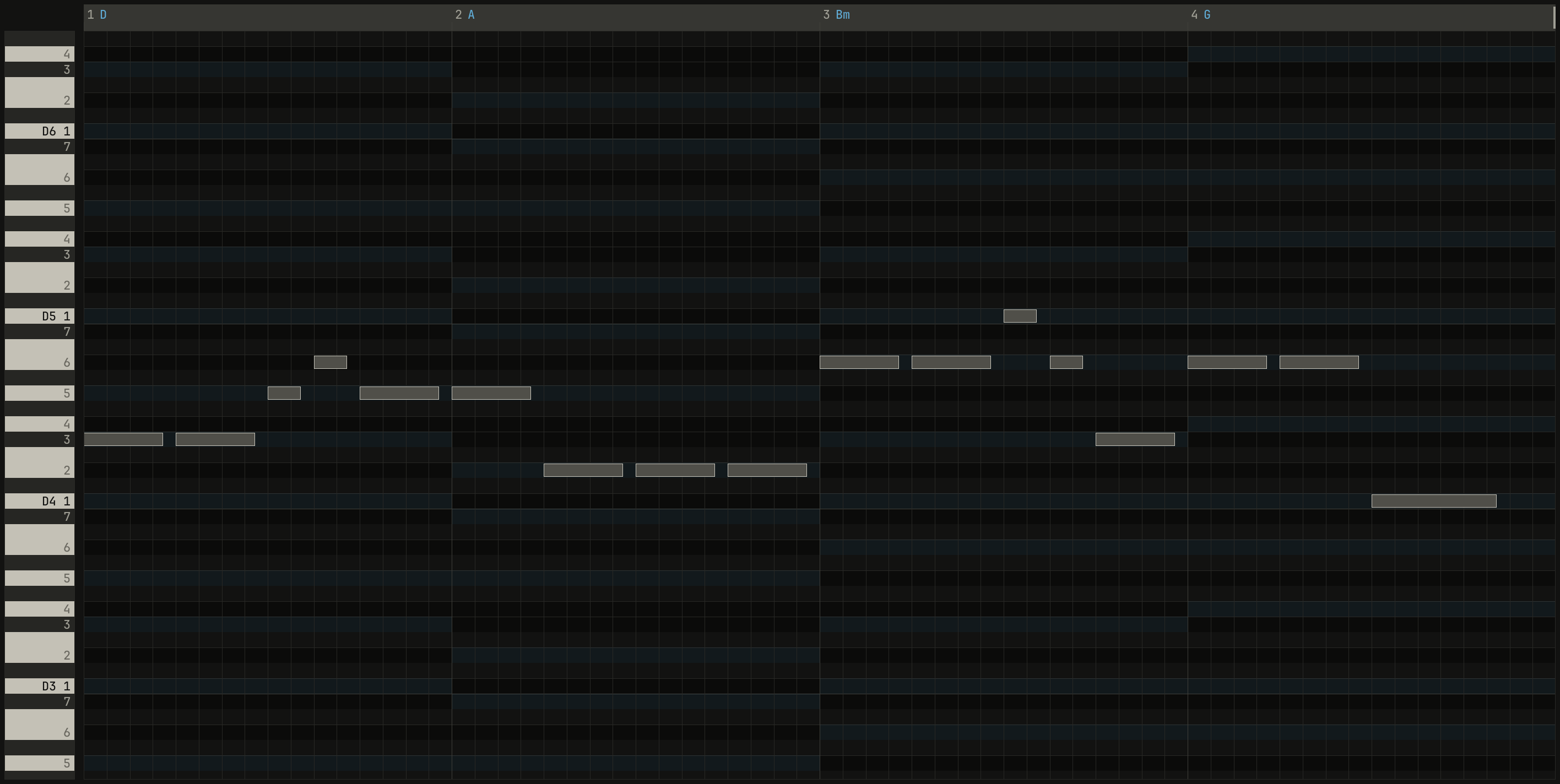
Every note is in the key, but a note on a beat that isn't in the chord there can sound unsettled. With Key Edit open on the take, Ctrl+K fits it: each note on a beat moves to the nearest note of the chord there, the upper one on a tie, and each note between the beats to the nearest note of the key. The rhythm and the shape stay yours.
0.0 / 9.6 s
peak -12.8 dBFS
openzig build run-studio -- manual/01-first-song/melody --view editor --track 4
renderzig build run-studio -- render manual/01-first-song/melody melody.wav --from 13 --to 17
melody/song.json
{
  "tempo": 100,
  "end": "65",
  "sections": ["1 intro", "5 verse", "13 chorus", "21 verse", "29 chorus", "37 bridge", "45 chorus", "53 chorus", "61 outro"],
  "key": ["1 D major"],
  "chords": ["1 D", "2 A", "3 Bm", "4 G", "5 D", "6 Bm", "7 G", "8 A", "9 D", "10 Bm", "11 G", "12 A", "13 D", "14 A", "15 Bm", "16 G", "17 D", "18 A", "19 Bm", "20 G", "21 D", "22 A", "23 Bm", "24 G", "25 D", "26 A", "27 Bm", "28 G", "29 D", "30 A", "31 Bm", "32 G", "33 D", "34 A", "35 Bm", "36 G", "37 D", "38 A", "39 Bm", "40 G", "41 D", "42 A", "43 Bm", "44 G", "45 D", "46 A", "47 Bm", "48 G", "49 D", "50 A", "51 Bm", "52 G", "53 D", "54 A", "55 Bm", "56 G", "57 D", "58 A", "59 Bm", "60 G", "61 D", "62 A", "63 Bm", "64 G"],
  "devices": [
    { "name": "synth", "type": "synth", "state": { "parts": [
      { "patch": "A45", "level": -6, "reverb_send": 15 },
      { "patch": "A52", "level": -4 },
      { "patch": "A62", "level": -8, "delay_send": 15 }
    ] } },
    { "name": "808", "type": "drums", "state": { "program": "2-12A" } }
  ],
  "tracks": [
    { "name": "piano", "device": "synth", "channel": 1, "keys": "chord 7 bass", "role": "chords", "clips": [{ "at": "1", "length": "64.0.0", "notes": "piano" }] },
    { "name": "bass", "device": "synth", "channel": 2, "keys": "pent", "role": "bass", "clips": [{ "at": "5", "length": "56.0.0", "notes": "bass" }] },
    { "name": "drums", "device": "808", "channel": 1, "role": "drums", "clips": [{ "at": "5", "length": "56.0.0", "pattern": "2-10A" }] },
    { "name": "lead", "device": "synth", "channel": 3, "keys": "pent", "role": "lead", "clips": [{ "at": "13", "length": "4.0.0", "notes": "lead" }] }
  ],
  "notes": {
    "piano": { "length": "64.0.0", "follow": { "pattern": "halves", "low": "F3" } },
    "bass": { "length": "56.0.0", "follow": { "pattern": "root five", "low": "E1" } },
    "lead": { "length": "4.0.0", "notes": [
      "1.1.0 F#4 0.0.827 127",
      "1.2.0 F#4 0.0.827 127",
      "1.3.0 A4 0.0.347 127",
      "1.3.480 B4 0.0.347 127",
      "1.4.0 A4 0.0.827 127",
      "2.1.0 A4 0.0.827 127",
      "2.2.0 E4 0.0.827 127",
      "2.3.0 E4 0.0.827 127",
      "2.4.0 E4 0.0.827 127",
      "3.1.0 B4 0.0.827 127",
      "3.2.0 B4 0.0.827 127",
      "3.3.0 D5 0.0.347 127",
      "3.3.480 B4 0.0.347 127",
      "3.4.0 F#4 0.0.827 127",
      "4.1.0 B4 0.0.827 127",
      "4.2.0 B4 0.0.827 127",
      "4.3.0 D4 0.1.347 127"
    ] }
  }
}
Fitting is a start, not a verdict: listen, and move what you don't like. Chapter 7 is about what makes a line of notes a tune. Esc goes back to the arrange view.
The form
The template laid out the pop form from the start: intro, verse, chorus,
verse, chorus, bridge, two choruses, and outro. Zoom in, with Ctrl and the
wheel over the clips, and the band shows the coach's count after each
section's name: what changes as the section starts. +bass is a track that
starts, −lead one that stops, and piano~ one that plays on both sides,
differently. ✓ says the section changes enough, and ○ same that it
doesn't change at all.

○ same.scriptzig build run-studio -- manual/01-first-song/melody --script manual/01-first-song/form.txt
melody/song.json
{
  "tempo": 100,
  "end": "65",
  "sections": ["1 intro", "5 verse", "13 chorus", "21 verse", "29 chorus", "37 bridge", "45 chorus", "53 chorus", "61 outro"],
  "key": ["1 D major"],
  "chords": ["1 D", "2 A", "3 Bm", "4 G", "5 D", "6 Bm", "7 G", "8 A", "9 D", "10 Bm", "11 G", "12 A", "13 D", "14 A", "15 Bm", "16 G", "17 D", "18 A", "19 Bm", "20 G", "21 D", "22 A", "23 Bm", "24 G", "25 D", "26 A", "27 Bm", "28 G", "29 D", "30 A", "31 Bm", "32 G", "33 D", "34 A", "35 Bm", "36 G", "37 D", "38 A", "39 Bm", "40 G", "41 D", "42 A", "43 Bm", "44 G", "45 D", "46 A", "47 Bm", "48 G", "49 D", "50 A", "51 Bm", "52 G", "53 D", "54 A", "55 Bm", "56 G", "57 D", "58 A", "59 Bm", "60 G", "61 D", "62 A", "63 Bm", "64 G"],
  "devices": [
    { "name": "synth", "type": "synth", "state": { "parts": [
      { "patch": "A45", "level": -6, "reverb_send": 15 },
      { "patch": "A52", "level": -4 },
      { "patch": "A62", "level": -8, "delay_send": 15 }
    ] } },
    { "name": "808", "type": "drums", "state": { "program": "2-12A" } }
  ],
  "tracks": [
    { "name": "piano", "device": "synth", "channel": 1, "keys": "chord 7 bass", "role": "chords", "clips": [{ "at": "1", "length": "64.0.0", "notes": "piano" }] },
    { "name": "bass", "device": "synth", "channel": 2, "keys": "pent", "role": "bass", "clips": [{ "at": "5", "length": "56.0.0", "notes": "bass" }] },
    { "name": "drums", "device": "808", "channel": 1, "role": "drums", "clips": [{ "at": "5", "length": "56.0.0", "pattern": "2-10A" }] },
    { "name": "lead", "device": "synth", "channel": 3, "keys": "pent", "role": "lead", "clips": [{ "at": "13", "length": "4.0.0", "notes": "lead" }] }
  ],
  "notes": {
    "piano": { "length": "64.0.0", "follow": { "pattern": "halves", "low": "F3" } },
    "bass": { "length": "56.0.0", "follow": { "pattern": "root five", "low": "E1" } },
    "lead": { "length": "4.0.0", "notes": [
      "1.1.0 F#4 0.0.827 127",
      "1.2.0 F#4 0.0.827 127",
      "1.3.0 A4 0.0.347 127",
      "1.3.480 B4 0.0.347 127",
      "1.4.0 A4 0.0.827 127",
      "2.1.0 A4 0.0.827 127",
      "2.2.0 E4 0.0.827 127",
      "2.3.0 E4 0.0.827 127",
      "2.4.0 E4 0.0.827 127",
      "3.1.0 B4 0.0.827 127",
      "3.2.0 B4 0.0.827 127",
      "3.3.0 D5 0.0.347 127",
      "3.3.480 B4 0.0.347 127",
      "3.4.0 F#4 0.0.827 127",
      "4.1.0 B4 0.0.827 127",
      "4.2.0 B4 0.0.827 127",
      "4.3.0 D4 0.1.347 127"
    ] }
  }
}
form.txt
# Ctrl and the wheel zoom in from bar 1, until the coach's counts after
# each section's name fit.
wait 0.2
down ctrl
move clips bar 1
wheel 1
wheel 1
wheel 1
up ctrl
move 700 700
wait 0.2
capture form.png
The rest of the song reads the same way: the bridge and the last two choruses change nothing either, since the lead plays only in the first chorus. Those rings are where the song needs work, which is chapter 8's, and chapter 13's: copy the lead into the other choruses, give the bridge chords of its own, take the drums out of a verse. The hint over a section, and the inspector with a section selected, say its count in words.
A fill into the chorus
The moment between two sections can sound pasted together, and a fill on
the drums leads the ear across it. Where the chorus starts, at the band's
foot, is a small mark. Click it: the transitions drop, the locators go two
bars either side of the boundary, 11 to 15, and cycle turns on. Click L
and play, and Down tries fill as the song plays round;
Enter writes it, the drum machine's snare roll, as a clip of a
bar before the chorus. Alt and a click on the mark plays across the
boundary again, to check it. Then stop, and turn cycle off.


0.0 / 48.0 s
peak -10.6 dBFS
2-F1A. The coach now counts four changes into the chorus, the drums among them, and marks it !. The clip is the song from its start to the end of the first chorus: listen at 26 seconds for the snare roll, and the lead coming in after it.openzig build run-studio -- manual/01-first-song/first-song --play 1
renderzig build run-studio -- render manual/01-first-song/first-song fill.wav --from 1 --to 21
first-song/song.json
{
  "tempo": 100,
  "end": "65",
  "sections": ["1 intro", "5 verse", "13 chorus", "21 verse", "29 chorus", "37 bridge", "45 chorus", "53 chorus", "61 outro"],
  "key": ["1 D major"],
  "chords": ["1 D", "2 A", "3 Bm", "4 G", "5 D", "6 Bm", "7 G", "8 A", "9 D", "10 Bm", "11 G", "12 A", "13 D", "14 A", "15 Bm", "16 G", "17 D", "18 A", "19 Bm", "20 G", "21 D", "22 A", "23 Bm", "24 G", "25 D", "26 A", "27 Bm", "28 G", "29 D", "30 A", "31 Bm", "32 G", "33 D", "34 A", "35 Bm", "36 G", "37 D", "38 A", "39 Bm", "40 G", "41 D", "42 A", "43 Bm", "44 G", "45 D", "46 A", "47 Bm", "48 G", "49 D", "50 A", "51 Bm", "52 G", "53 D", "54 A", "55 Bm", "56 G", "57 D", "58 A", "59 Bm", "60 G", "61 D", "62 A", "63 Bm", "64 G"],
  "devices": [
    { "name": "synth", "type": "synth", "state": { "parts": [
      { "patch": "A45", "level": -6, "reverb_send": 15 },
      { "patch": "A52", "level": -4 },
      { "patch": "A62", "level": -8, "delay_send": 15 }
    ] } },
    { "name": "808", "type": "drums", "state": { "program": "2-12A" } }
  ],
  "tracks": [
    { "name": "piano", "device": "synth", "channel": 1, "keys": "chord 7 bass", "role": "chords", "clips": [{ "at": "1", "length": "64.0.0", "notes": "piano" }] },
    { "name": "bass", "device": "synth", "channel": 2, "keys": "pent", "role": "bass", "clips": [{ "at": "5", "length": "56.0.0", "notes": "bass" }] },
    { "name": "drums", "device": "808", "channel": 1, "role": "drums", "clips": [
      { "at": "5", "length": "56.0.0", "pattern": "2-10A" },
      { "at": "12", "length": "1.0.0", "pattern": "2-F1A" }
    ] },
    { "name": "lead", "device": "synth", "channel": 3, "keys": "pent", "role": "lead", "clips": [{ "at": "13", "length": "4.0.0", "notes": "lead" }] }
  ],
  "notes": {
    "piano": { "length": "64.0.0", "follow": { "pattern": "halves", "low": "F3" } },
    "bass": { "length": "56.0.0", "follow": { "pattern": "root five", "low": "E1" } },
    "lead": { "length": "4.0.0", "notes": [
      "1.1.0 F#4 0.0.827 127",
      "1.2.0 F#4 0.0.827 127",
      "1.3.0 A4 0.0.347 127",
      "1.3.480 B4 0.0.347 127",
      "1.4.0 A4 0.0.827 127",
      "2.1.0 A4 0.0.827 127",
      "2.2.0 E4 0.0.827 127",
      "2.3.0 E4 0.0.827 127",
      "2.4.0 E4 0.0.827 127",
      "3.1.0 B4 0.0.827 127",
      "3.2.0 B4 0.0.827 127",
      "3.3.0 D5 0.0.347 127",
      "3.3.480 B4 0.0.347 127",
      "3.4.0 F#4 0.0.827 127",
      "4.1.0 B4 0.0.827 127",
      "4.2.0 B4 0.0.827 127",
      "4.3.0 D4 0.1.347 127"
    ] }
  }
}
Four changes draw a !, a lot at once, which a chorus can take.
Chapter 8 has the other transitions: a build,
a drop out, a crash, and a stop.
Practice
The melody is yours to play, not only to record. Click the chorus on the
band for the locators, double-click the lead's clip, and click practice
in Key Edit's header. The lead goes quiet, and the piano strip lights the
note it plays next. In wait, the song stops at each note until you press
its key, so you learn where the notes are without the song running away.
Click L and play.

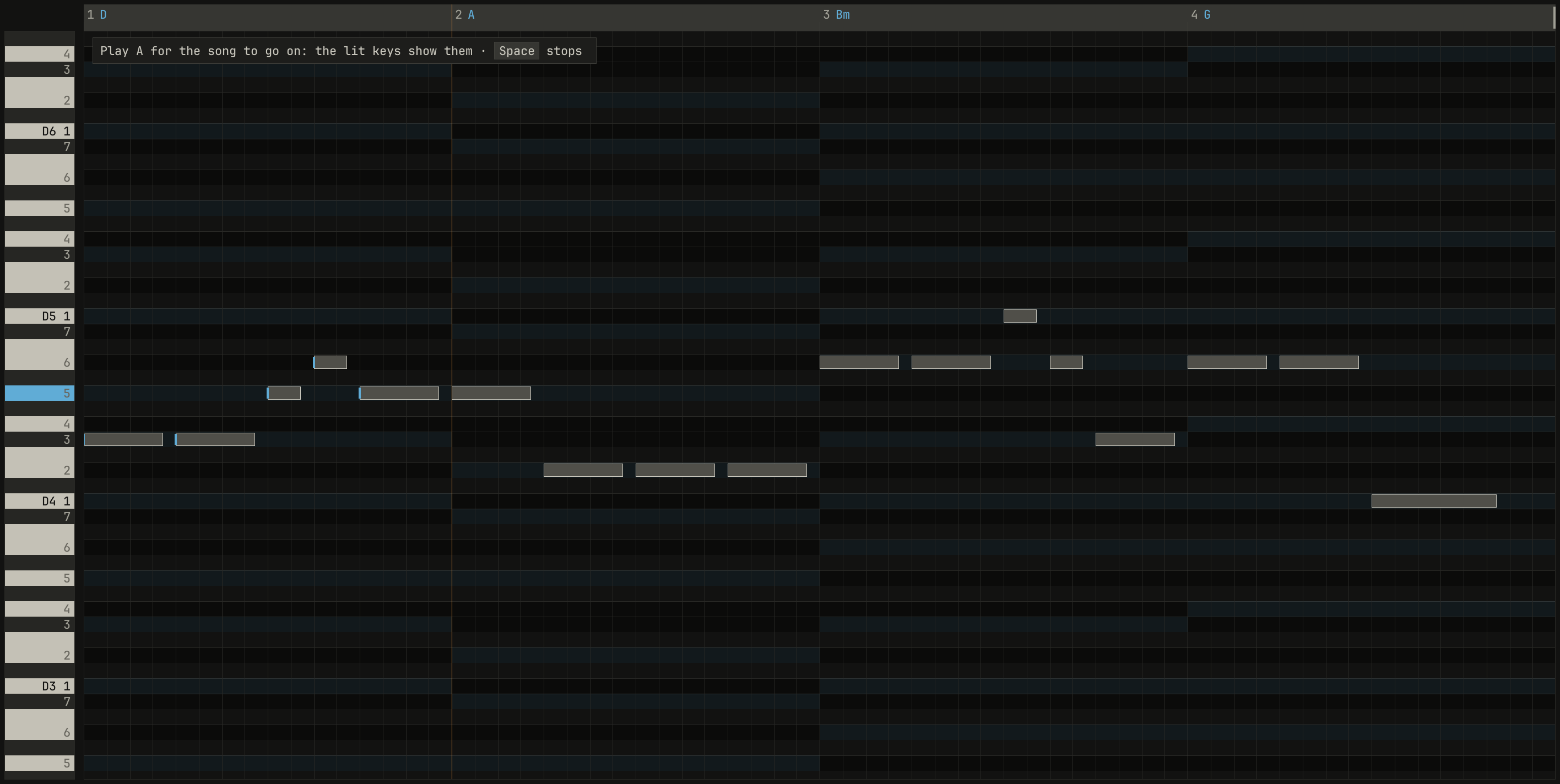
wait, five notes in: the song has stopped at the second bar for A, lit in blue on the piano strip, and the callout says so. In pent, the F key plays it.scriptzig build run-studio -- manual/01-first-song/first-song --script manual/01-first-song/practice.txt
first-song/song.json
{
  "tempo": 100,
  "end": "65",
  "sections": ["1 intro", "5 verse", "13 chorus", "21 verse", "29 chorus", "37 bridge", "45 chorus", "53 chorus", "61 outro"],
  "key": ["1 D major"],
  "chords": ["1 D", "2 A", "3 Bm", "4 G", "5 D", "6 Bm", "7 G", "8 A", "9 D", "10 Bm", "11 G", "12 A", "13 D", "14 A", "15 Bm", "16 G", "17 D", "18 A", "19 Bm", "20 G", "21 D", "22 A", "23 Bm", "24 G", "25 D", "26 A", "27 Bm", "28 G", "29 D", "30 A", "31 Bm", "32 G", "33 D", "34 A", "35 Bm", "36 G", "37 D", "38 A", "39 Bm", "40 G", "41 D", "42 A", "43 Bm", "44 G", "45 D", "46 A", "47 Bm", "48 G", "49 D", "50 A", "51 Bm", "52 G", "53 D", "54 A", "55 Bm", "56 G", "57 D", "58 A", "59 Bm", "60 G", "61 D", "62 A", "63 Bm", "64 G"],
  "devices": [
    { "name": "synth", "type": "synth", "state": { "parts": [
      { "patch": "A45", "level": -6, "reverb_send": 15 },
      { "patch": "A52", "level": -4 },
      { "patch": "A62", "level": -8, "delay_send": 15 }
    ] } },
    { "name": "808", "type": "drums", "state": { "program": "2-12A" } }
  ],
  "tracks": [
    { "name": "piano", "device": "synth", "channel": 1, "keys": "chord 7 bass", "role": "chords", "clips": [{ "at": "1", "length": "64.0.0", "notes": "piano" }] },
    { "name": "bass", "device": "synth", "channel": 2, "keys": "pent", "role": "bass", "clips": [{ "at": "5", "length": "56.0.0", "notes": "bass" }] },
    { "name": "drums", "device": "808", "channel": 1, "role": "drums", "clips": [
      { "at": "5", "length": "56.0.0", "pattern": "2-10A" },
      { "at": "12", "length": "1.0.0", "pattern": "2-F1A" }
    ] },
    { "name": "lead", "device": "synth", "channel": 3, "keys": "pent", "role": "lead", "clips": [{ "at": "13", "length": "4.0.0", "notes": "lead" }] }
  ],
  "notes": {
    "piano": { "length": "64.0.0", "follow": { "pattern": "halves", "low": "F3" } },
    "bass": { "length": "56.0.0", "follow": { "pattern": "root five", "low": "E1" } },
    "lead": { "length": "4.0.0", "notes": [
      "1.1.0 F#4 0.0.827 127",
      "1.2.0 F#4 0.0.827 127",
      "1.3.0 A4 0.0.347 127",
      "1.3.480 B4 0.0.347 127",
      "1.4.0 A4 0.0.827 127",
      "2.1.0 A4 0.0.827 127",
      "2.2.0 E4 0.0.827 127",
      "2.3.0 E4 0.0.827 127",
      "2.4.0 E4 0.0.827 127",
      "3.1.0 B4 0.0.827 127",
      "3.2.0 B4 0.0.827 127",
      "3.3.0 D5 0.0.347 127",
      "3.3.480 B4 0.0.347 127",
      "3.4.0 F#4 0.0.827 127",
      "4.1.0 B4 0.0.827 127",
      "4.2.0 B4 0.0.827 127",
      "4.3.0 D4 0.1.347 127"
    ] }
  }
}
practice.txt
# The chorus selected for the locators, the lead's clip opened, and
# practice on, in wait: the song stops at each note until its key is
# down. Five notes in, it waits at bar 14 for A, lit on the strip.
wait 0.2
click sections bar 17
double lane lead bar 14
click practice
click way wait
click left
key space
wait 1
down d
wait 0.05
up d
wait 0.8
down d
wait 0.05
up d
wait 0.8
down f
wait 0.05
up f
wait 0.8
down g
wait 0.05
up g
wait 0.8
down f
wait 0.05
up f
wait 0.8
move 700 1000
wait 0.1
capture practice.png
Stop after the last note, and the header counts the pass:
pass 1 · 17 of 17 · 0 ms late · 0 wrong.
Chapter 10 takes a part from wait to playing it in
time, slower and then faster.
Saving it
Ctrl+Shift+S asks for a folder under the song's name: type one, such as
first-song, and Enter saves the song in it, as song.json. From then on
Ctrl+S saves it there. Ctrl+Shift+R writes the song to a WAV file
in the same folder, named for it, as first-song.wav: the whole song, or
with cycle on, the bars it loops. Chapter 20 says what a
song's folder holds.
Try it in the window
- Select the lead's clip and press Ctrl+D: the chorus plays its melody twice. Read the coach's count at the second verse.
- In the
melodysong, select the bass's clip and step throughfollows ▾in the inspector, hearing each pattern under the melody. - Record a melody of your own over the verse, in
pent, and fit it with Ctrl+K. Press Ctrl+Z to hear it before it was fitted. - Practise the lead in
one key, tapping its rhythm on any key. - Start again from another template, and take the same steps.
- Run
zig-out/bin/studio --script studio/examples/first-song/build.txt: the window makes this song by itself, hidden, and saves it inzig-out/first-song.
Next: chapter 2, the grid, the pulse everything in a song is placed against.