II. Rhythms
Playing and writing on the panel
The 808 was played with its own buttons: pick a rhythm, press start, tap in a fill. It was written with them too, a step at a time, with the instrument picked on a knob and the sixteen step buttons as the measure. The drum machine's panel works the same way. This chapter plays it, then writes a rhythm from nothing on it.
zig build run-studio -- manual/drums/07-panel/machine --view device
The chapter's song is a drum machine as it comes from the factory, on a track with no clips, so the panel is the only thing that plays it. The figures are window scripts, the clicks this chapter describes, beside each song's folder.
Picking a rhythm
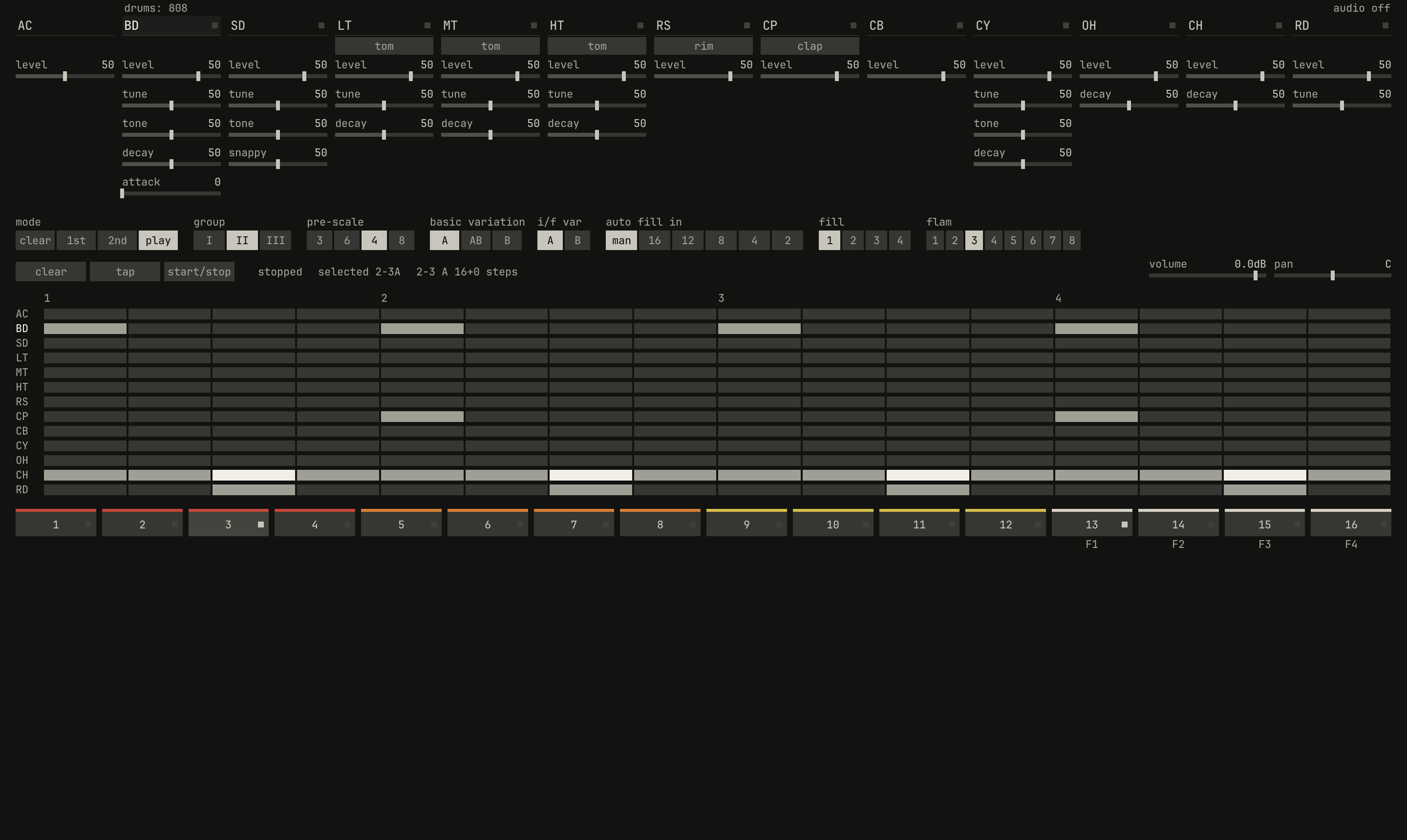
group at II, then step button 3: rhythm 2-3, techno, is selected, its button lit and its grid shown. The line reads selected 2-3A.scriptzig build run-studio -- manual/drums/07-panel/machine --view device --script manual/drums/07-panel/pick.txt
machine/song.json
{
  "tempo": 120,
  "end": "5",
  "devices": [{ "name": "808", "type": "drums" }],
  "tracks": [
    { "name": "drums", "device": "808", "channel": 1, "role": "drums" }
  ]
}
pick.txt
# Picks rhythm 2-3 in play mode: group II, then step button 3.
wait 0.2
click 248 286      # group: II
click 234 575      # step 3: rhythm 2-3, techno
wait 0.2
capture pick.png
In play mode, the step buttons pick rhythms: buttons 1 to 12 the group's
basic rhythms, in the variation the basic variation switch is at, and 13
to 16 its fills. group picks which group they pick from, without
changing what's selected until a step button is pressed. The button of the
rhythm selected lights white, as the 808's flashes.
A rhythm picked while the drum machine plays takes over at the end of the measure playing, so the beat never breaks. The 808's manual, page 13:
It is possible to switch from one BASIC RHYTHM to another while the Rhythm is playing. The TR-808 will always finish the measure it is playing before switching to the newly selected Rhythm.
The 808 makes an exception: picked on the first beat of a measure, the new rhythm starts on the second beat of that measure. The drum machine always waits for the measure's end. A switch of the variation waits too.
Start and stop
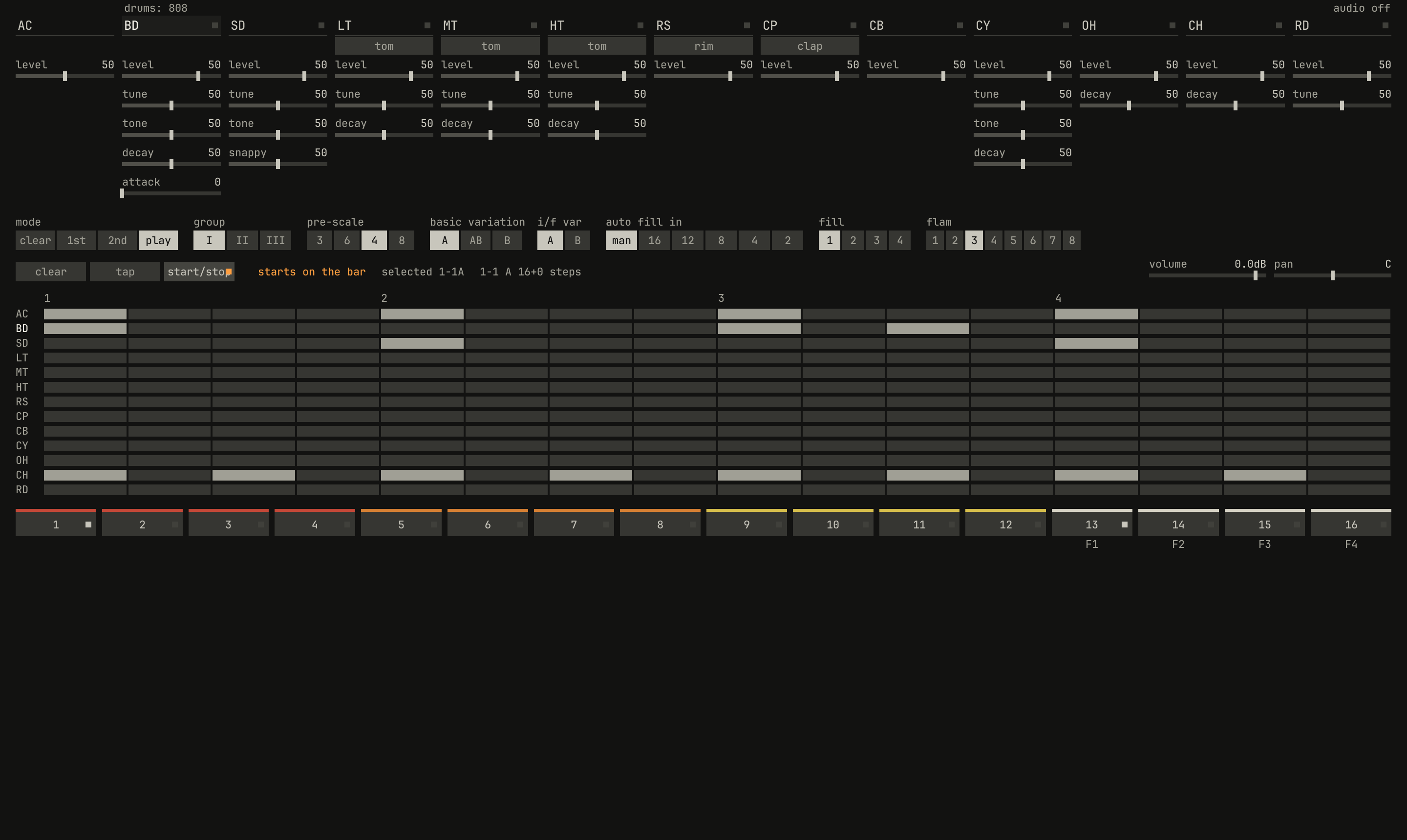
start/stop pressed with the song stopped: the line reads starts on the bar in amber, and the button's light waits amber until the bar comes.scriptzig build run-studio -- manual/drums/07-panel/machine --view device --script manual/drums/07-panel/start.txt
machine/song.json
{
  "tempo": 120,
  "end": "5",
  "devices": [{ "name": "808", "type": "drums" }],
  "tracks": [
    { "name": "drums", "device": "808", "channel": 1, "role": "drums" }
  ]
}
start.txt
# Starts the rhythm with the song stopped: it waits for the bar.
wait 0.3
click 204 318      # start/stop
wait 0.3
capture start.png
start/stop starts the rhythm selected, on the next bar of the song's
clock, as every start in the studio waits for the bar, or stops it at
once. The song needn't be playing: stopped, its clock still counts bars,
and the drum machine plays on it. The line on the panel says starts on the
bar in amber while it waits, then the rhythm and step playing; the step
buttons' amber light runs along with the steps, as the 808's LEDs "flash in
sequence from the left to the right of the unit" (page 13).
start/stop is the drum machine's run control, which a pattern clip
turns on at its start and off at its end; chapter 8 is
clips.
Fills
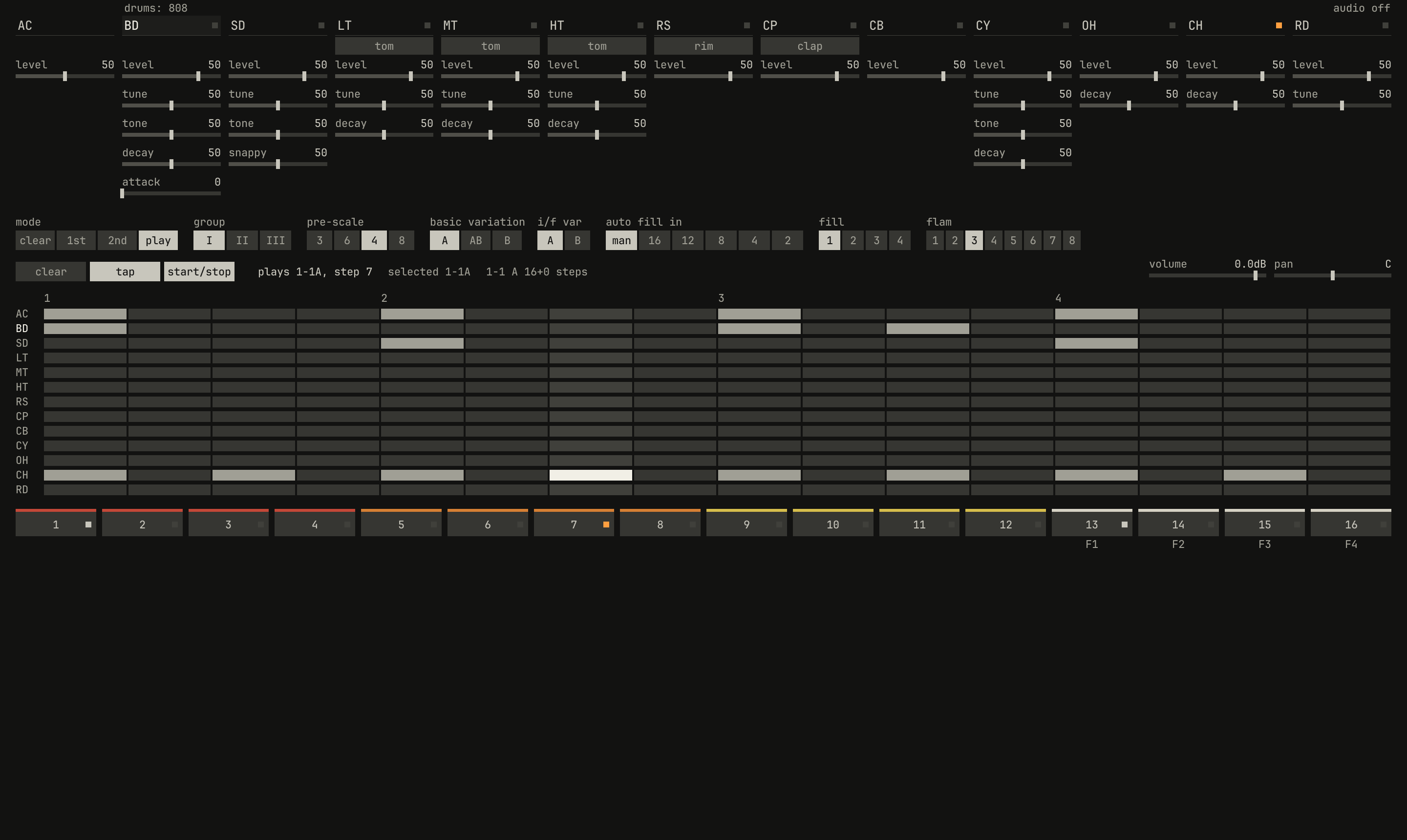
rock playing, and tap pressed during its first measure: the button stays lit until the fill selected, 1, takes over at the measure's end. The line reads plays 1-1A, step 7.scriptzig build run-studio -- manual/drums/07-panel/machine --view device --script manual/drums/07-panel/tap.txt
machine/song.json
{
  "tempo": 120,
  "end": "5",
  "devices": [{ "name": "808", "type": "drums" }],
  "tracks": [
    { "name": "drums", "device": "808", "channel": 1, "role": "drums" }
  ]
}
tap.txt
# Starts rock, 1-1, then taps fill 1 in during its first measure.
wait 0.2
click 204 318      # start/stop: it starts on the bar, at 2 seconds
wait 2.4
click 128 318      # tap: fill 1, the next measure
wait 0.2
capture tap.png
tap plays the fill-in the fill selector picks, in the variation i/f
var picks. Pressed while the rhythm plays, it plays the fill once, in the
next measure, and the basic rhythm comes back after it. The 808's manual,
page 14:
At the end of the measure in which you pressed the TAP button, the TR-808 will switch to INTRO/FILL IN #3 and play it once, and switch back to BASIC RHYTHM #3. In this way you can add FILL IN rhythms wherever you want in a piece of music.
Pressed while the rhythm is stopped, tap makes the fill an intro: the
next start plays it first, then the basic rhythm. tap stays lit while a
fill waits. A step button from 13 to 16 in play mode picks the fill that
tap plays, as the fill selector does, without playing it.
0.0 / 7.9 s
peak -13.2 dBFS
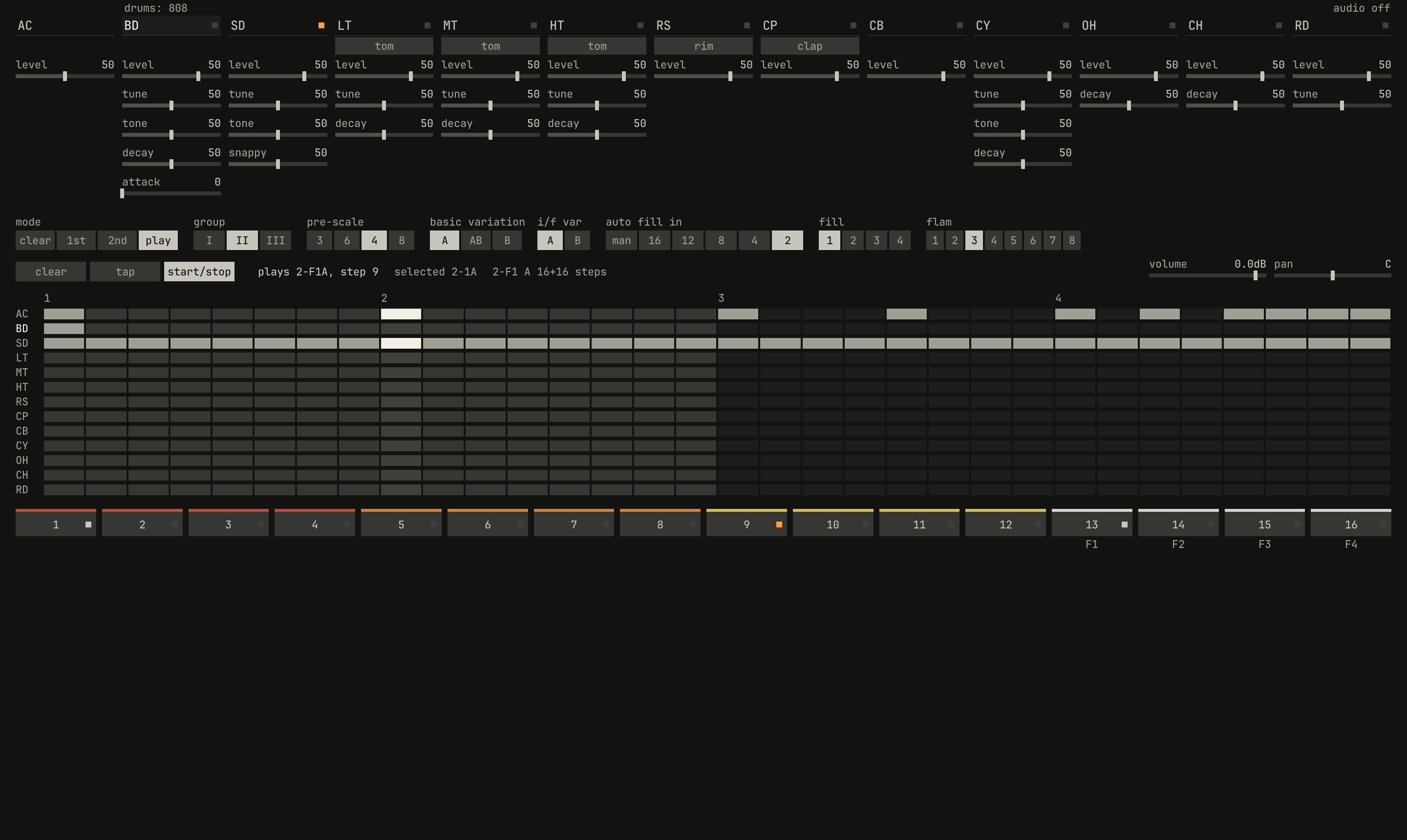
house with auto fill in at 2 and fill at 1: every second measure is the fill, group 2's snare roll. The picture is in the second bar, on the fill.openzig build run-studio -- manual/drums/07-panel/autofill --view device --play 1
renderzig build run-studio -- render manual/drums/07-panel/autofill autofill.wav
autofill/song.json
{
  "tempo": 122,
  "end": "5",
  "devices": [{ "name": "808", "type": "drums", "state": { "program": "2-1A", "auto_fill": "2", "fill": "1" } }],
  "tracks": [
    { "name": "drums", "device": "808", "channel": 1, "role": "drums", "clips": [{ "at": "1", "length": "4.0.0", "pattern": "2-1A" }] }
  ]
}
auto fill in plays the fill on its own: at 2, every second measure, and
at 4, 8, 12, or 16, every so many; at man, only when tapped. It
counts the measures from the start, the fills tapped in among them and an
intro not, as the 808's manual says (page 14): "the INTRO is not counted in
the number of measures in the FILL IN function." A fill tapped in still
plays with auto fill on.
Writing a part
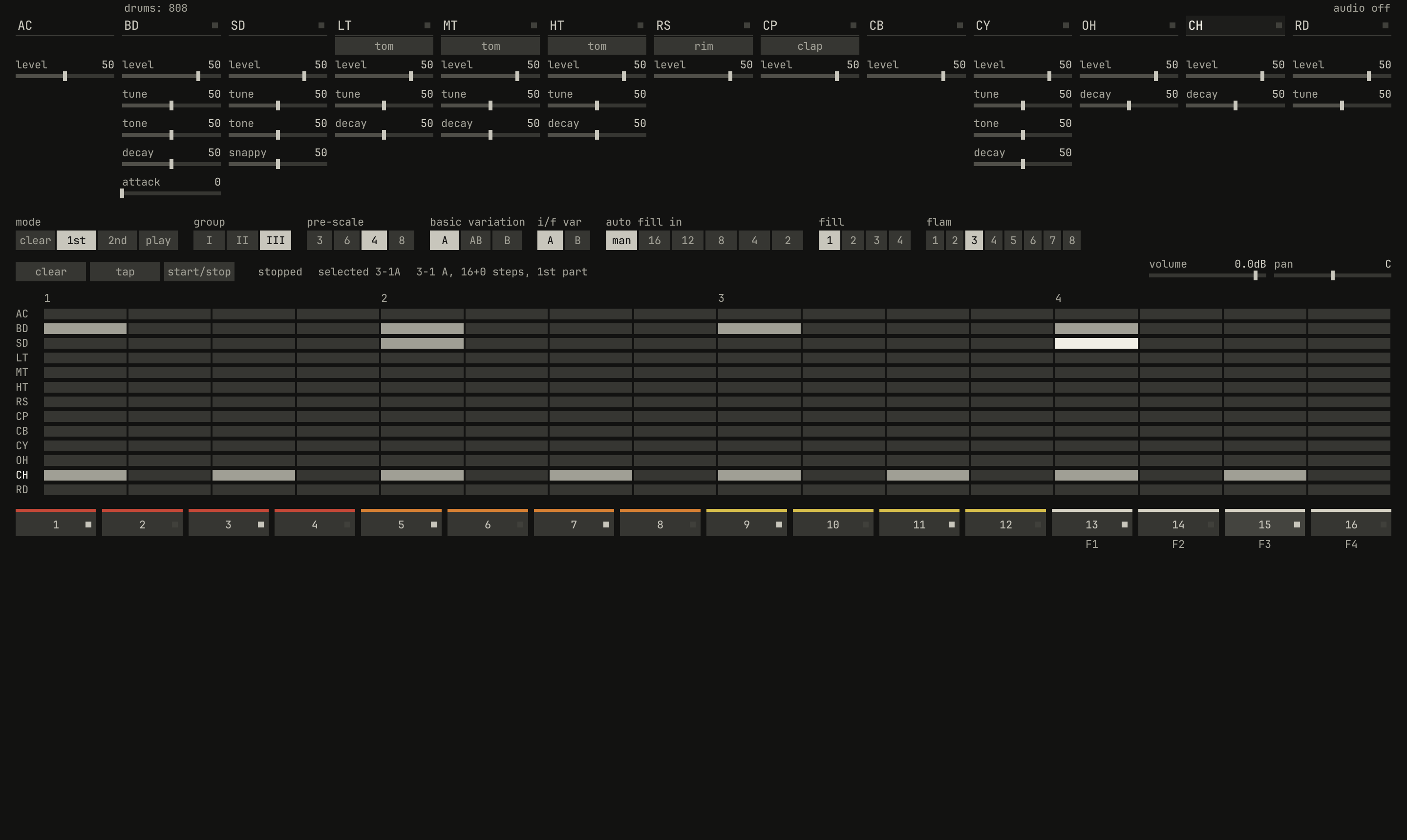
3-1: the bass drum on the beats, the snare on 2 and 4, the second accented, and the closed hi-hat on every 8th. CH is the instrument selected, and the step buttons light its hits. The line reads 3-1 A, 16+0 steps, 1st part.scriptzig build run-studio -- manual/drums/07-panel/machine --view device --script manual/drums/07-panel/write.txt
machine/song.json
{
  "tempo": 120,
  "end": "5",
  "devices": [{ "name": "808", "type": "drums" }],
  "tracks": [
    { "name": "drums", "device": "808", "channel": 1, "role": "drums" }
  ]
}
write.txt
# Writes a beat into rhythm 3-1, the first of the empty group III.
wait 0.2
click 282 286      # group: III
click 57 575       # step 1: rhythm 3-1
click 78 286       # mode: 1st
# BD is selected as the panel opens: the bass drum on the four beats
click 57 575
click 411 575
click 764 575
click 1118 575
click 284 66       # SD: the snare, on 2 and 4
click 411 575
click 1118 575
click 1118 575     # a second click accents step 13
click 1264 66      # CH: the closed hi-hat, on every 8th
click 57 575
click 234 575
click 411 575
click 587 575
click 764 575
click 941 575
click 1118 575
click 1294 575
wait 0.3
capture write.png
To write, pick the rhythm in play mode, then turn mode to 1st. The step
buttons become the steps of the rhythm's 1st part, in the variation the
switch is at, A or B (A at AB), or for a fill, i/f var's. They write
the instrument selected: the voice whose name was clicked last, or AC
for the accent row. A step button's light shows the instrument's hit there:
dark for none, white for a hit, amber for an accented one.
The script behind the figure does what the 808's manual does with its first
rhythm (page 15): pick group III, empty in a fresh drum machine, and
button 1; turn mode to 1st; then, with BD selected, click steps 1, 5,
9, and 13. Click SD and steps 5 and 13; click CH and the odd steps.
A click on a step steps its hit round: none, a hit, an accented hit, as on
the 909, and none again. Voices without an accent of their own go straight
from a hit to none, and so does AC. A right click on a drum's step flams
it, or takes the flam away. A click in the grid writes there too, in any
mode, on any row, so you can write a voice without selecting it; in play
mode while the rhythm runs, it writes the measure playing.
0.0 / 4.0 s
peak -13.5 dBFS
3-1A, for two bars.openzig build run-studio -- manual/drums/07-panel/beat
renderzig build run-studio -- render manual/drums/07-panel/beat beat.wav
beat/song.json
{
  "tempo": 120,
  "end": "3",
  "devices": [{
    "name": "808", "type": "drums",
    "state": {
      "program": "3-1A",
      "rhythms": {
        "3-1": { "scale": 4, "steps": 16, "A": ["BD x...x...x...x...", "SD ....x.......X...", "CH x.x.x.x.x.x.x.x."] }
      }
    }
  }],
  "tracks": [
    { "name": "drums", "device": "808", "channel": 1, "role": "drums", "clips": [{ "at": "1", "length": "2.0.0", "pattern": "3-1A" }] }
  ]
}
What's written goes to the drum machine at once, so a rhythm running plays each hit from the next time round, and into the song, which saves it in the drum machine's state. Undo doesn't take it back: like a knob, it's the instrument's, not the arrangement's.
Two parts and the last step
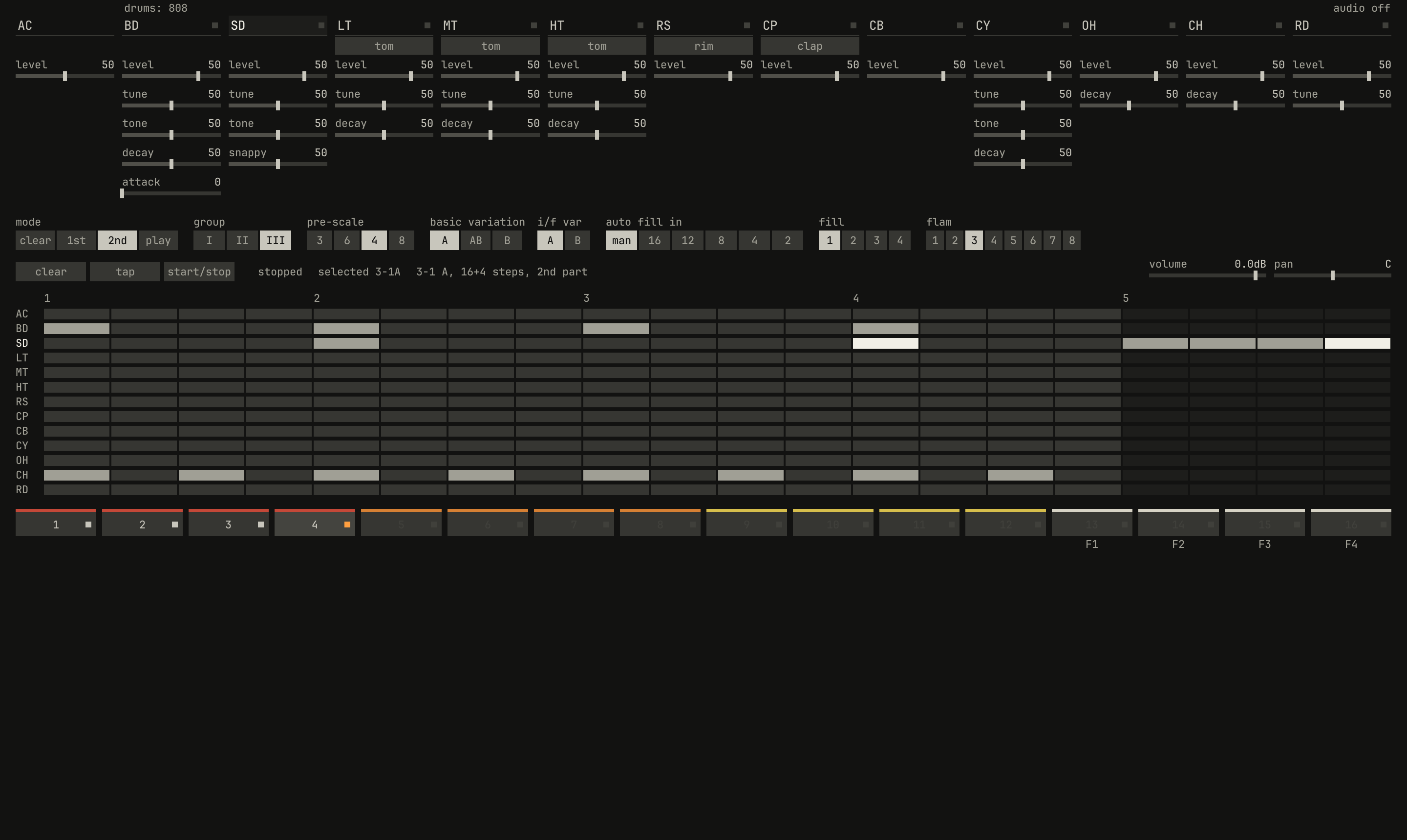
mode at 2nd, clear, then step 4, sets its last step, and the snare fills its four steps. The grid has 20 columns, the line reads 16+4 steps, 2nd part, and the step buttons past 4 are dim.scriptzig build run-studio -- manual/drums/07-panel/machine --view device --script manual/drums/07-panel/parts.txt
machine/song.json
{
  "tempo": 120,
  "end": "5",
  "devices": [{ "name": "808", "type": "drums" }],
  "tracks": [
    { "name": "drums", "device": "808", "channel": 1, "role": "drums" }
  ]
}
parts.txt
# Writes the beat, then a 2nd part of four steps: a snare pickup into the next bar.
wait 0.2
click 282 286      # group: III
click 57 575       # step 1: rhythm 3-1
click 78 286       # mode: 1st
# BD is selected as the panel opens: the bass drum on the four beats
click 57 575
click 411 575
click 764 575
click 1118 575
click 284 66       # SD: the snare, on 2 and 4
click 411 575
click 1118 575
click 1118 575     # a second click accents step 13
click 1264 66      # CH: the closed hi-hat, on every 8th
click 57 575
click 234 575
click 411 575
click 587 575
click 764 575
click 941 575
click 1118 575
click 1294 575
click 120 286      # mode: 2nd
click 52 318       # clear, then a step: the 2nd part's last step
click 322 575      # step 4: four steps
click 284 66       # SD
click 57 575
click 146 575
click 234 575
click 322 575
click 322 575      # accented
wait 0.3
capture parts.png
2nd writes the rhythm's 2nd part the same way, its steps on buttons 1 to
- A fresh rhythm's 2nd part has no steps, so first set its last step:
press
clear, which lights while it waits, then the step that's to be the last. The 808 did it holdingCLEARdown (page 17): "While holding it down press the switch for Step #12, then release the CLEAR button. You have just set a 12 Step pattern". In1st, the same sets the 1st part's last step.
0.0 / 6.0 s
peak -13.5 dBFS
openzig build run-studio -- manual/drums/07-panel/parts
renderzig build run-studio -- render manual/drums/07-panel/parts parts-heard.wav
parts/song.json
{
  "tempo": 120,
  "end": "4",
  "devices": [{
    "name": "808", "type": "drums",
    "state": {
      "program": "3-1A",
      "rhythms": {
        "3-1": { "scale": 4, "steps": [16, 4], "A": ["BD x...x...x...x...", "SD ....x.......X... xxxX", "CH x.x.x.x.x.x.x.x."] }
      }
    }
  }],
  "tracks": [
    { "name": "drums", "device": "808", "channel": 1, "role": "drums", "clips": [{ "at": "1", "length": "3.0.0", "pattern": "3-1A" }] }
  ]
}
A measure of 16 and 4 steps of 16ths is five beats long, a bar of 5/4, so it runs against the song's bars of four, as chapter 6 showed. Steps written past a last step stay, unplayed, until the part is lengthened.
Tap write and clearing
In 1st or 2nd, while the rhythm runs, tap writes the instrument
selected on the step playing: the 808's tap programming, which its manual
describes on page 15: "You can now reprogram the SNARE DRUM simply by
pressing the TAP button at appropriate places in the measure." It lands on
the step playing when you press, so with the tempo turned down it's easier
to keep in time. It only writes; a click on the step button takes a hit
away.
mode at clear empties a rhythm: pick it with a step button, as in play
mode, and press clear. With the basic variation switch at A it
empties A, at B it empties B, and at AB both, and resets the rhythm to
16 steps of 16ths without a name, as the 808's manual says of its AB
position (page 18): "both A and B memories will be erased at the same
time." A fill always empties both. A note beside the pointer says
cleared 3-1.
Controls
| Name | Range | Default | Curve |
|---|---|---|---|
auto_fill | manual / 16 / 12 / 8 / 4 / 2 | manual | switch |
fill | 1 / 2 / 3 / 4 | 1 | switch |
fill_variation | A / B | A | switch |
fill_variation | A / B | A | switch |
run | off / play | off | switch |
Next: chapter 8, in the song, the drum machine played from clips, notes, the keys, and a controller.