Rhythm composer
Owner's Manual
0.0 / 7.9 s
peak -13.2 dBFS
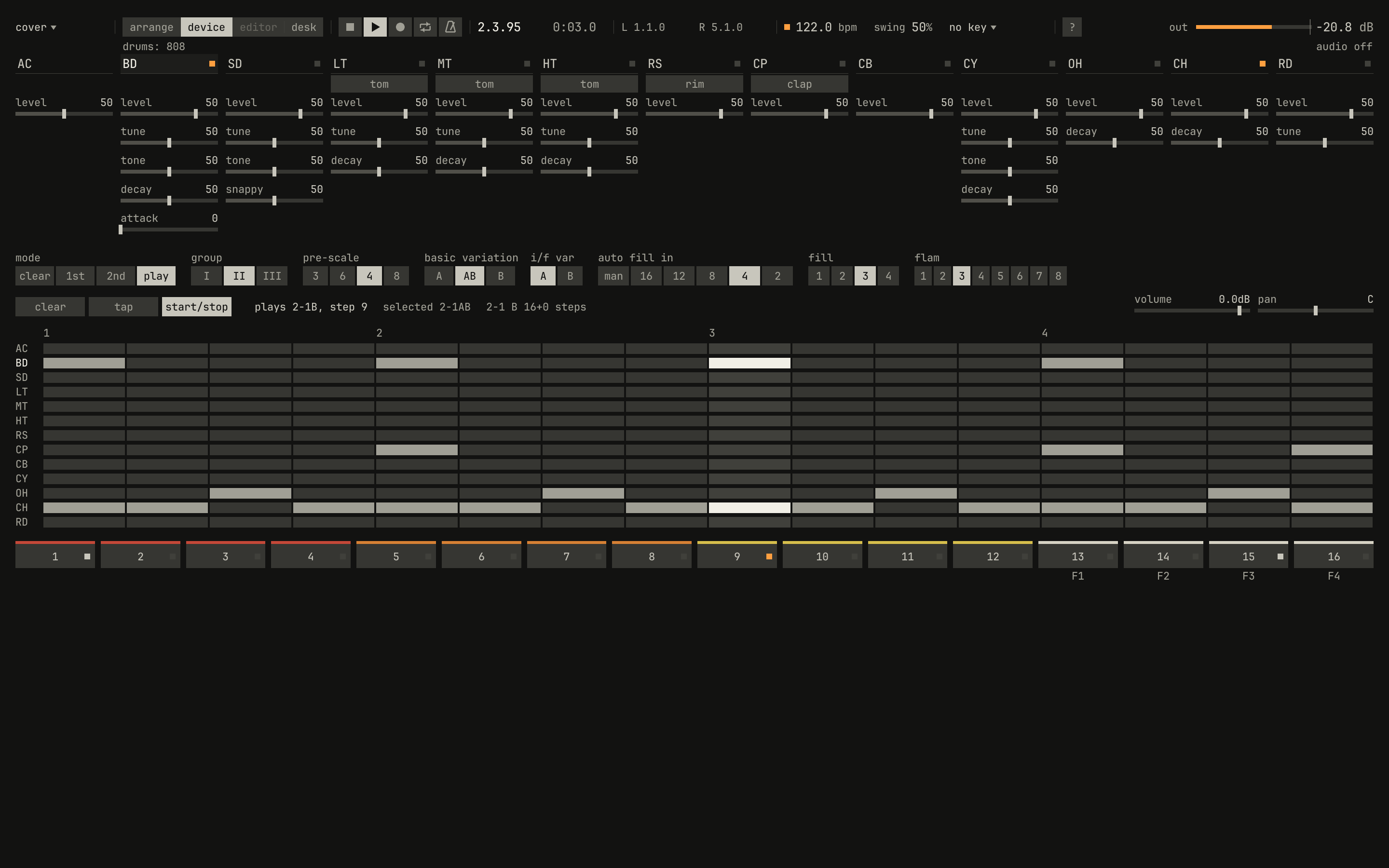
house, rhythm 1 of group 2, in A and B by turns, with the fill build on every fourth measure. The picture is three seconds in, on step 9 of the B measure: the bass drum's and the closed hi-hat's lights are lit, and the step's column is bright in the grid.openzig build run-studio -- manual/drums/index/cover --view device --play 1
renderzig build run-studio -- render manual/drums/index/cover cover.wav
cover/song.json
{
  "tempo": 122,
  "end": "5",
  "devices": [{ "name": "808", "type": "drums", "state": { "program": "2-1AB", "auto_fill": "4", "fill": "3" } }],
  "tracks": [
    { "name": "drums", "device": "808", "channel": 1, "role": "drums", "clips": [{ "at": "1", "length": "4.0.0", "pattern": "2-1AB" }] }
  ]
}
This is the manual for the studio's drum machine, a Roland TR-808 grown by the TR-909's controls. It teaches what a drum machine is and how this one makes its sounds, using the instrument itself as the apparatus: every sound in it was rendered by the studio, every picture is a capture of the drum machine's panel, and every example is a small song you can open, play, and change.
The TR-808 Rhythm Composer of 1980 made its drums from circuits rather than recordings: a bass drum is a filter rung like a bell, a snare is two of them and a burst of noise, and the cymbals are six square waves beating against each other. The TR-909 of 1983 kept the idea and gave each voice more controls. This drum machine follows the 808's circuits, voice by voice, and adds the 909's controls to them.
- Twelve voices after the 808's circuits: a bass drum, a snare, three toms that switch to congas, a rim shot that switches to claves, a hand clap that switches to maracas, a cowbell, a cymbal, open and closed hi-hats, and the 909's ride.
- Bridged-T resonators for the drums: a filter that rings when it's struck, falling in pitch as it fades, as the 808's does.
- Filtered noise for the snares, the clap, and the maracas, and six square oscillators, the 808's metal, for the cowbell, the cymbal, the hi-hats, and the ride.
- Pitches, decay times, and levels tuned to the table of typical values in the 808's service notes, with and without accent.
- The 909's controls: the bass drum's tune and attack, the snare's and the toms' tune, the toms' and the closed hi-hat's decay, and the cymbal's tune.
- The 909's memory: 48 rhythms in three groups of the 808's sixteen, each with an A and a B variation of up to 32 steps in two parts, at a pre-scale of 3, 4, 6, or 8 steps a beat, with the 808's accent, the 909's accent on a voice of its own, and its flams.
- Fills tapped in, played as intros, or played every 2, 4, 8, 12, or 16 measures.
- Factory rhythms: the 808's kind in group 1, and twelve styles to start from in group 2, each with its fill-ins.
Before you start
The drum machine lives in the studio: it has no window of its own, and plays on a song's tracks as a synth does. Its panel is a view of the studio's window, the device view, which shows the selected track's device. Open the cover's song there:
zig build run-studio -- manual/drums/index/cover --view device
Space plays the song, and the drum machine with it. Ctrl+2
shows the selected track's device, and Ctrl+1 goes back to the
song's tracks. On a drum machine's track, the letter keys play its voices:
A is the bass drum, S the snare. The studio's own manual, of which this
book is a part, is at the studio's front page; its
chapter 0 is a tour of the window.
How to read this
Each chapter has the drum machine's panel open beside you. Part I takes the voices one circuit at a time: what each is, what each control does to it, and what accent does. Part II is the rhythms: how the memory holds them, and how the panel plays and writes them. Part III is the drum machine in a song, played from clips, Drum Edit, the keys, and a controller. The reference holds every control, key, and rhythm in tables.
A figure has a picture of the panel, a clip, plots of the clip that the
panel can't draw, such as its level over a second or its pitch as it falls,
and a recipe: the song's song.json and the two commands that reproduce the
figure, one to open the window as the picture shows it and one to render
the clip to a WAV file. The songs are small folders in manual/drums/,
beside the chapters, and nothing in a figure was drawn by hand.
Most songs here sound one voice at a time, with its level turned up so it's easy to hear. A hit without accent is a note of velocity 64, as the 909 sends one; chapter 5 says why.
A control has two names. On the panel it has a short label under its
voice's name, such as decay under BD; in song files, lanes, and the
tables it has a longer one, such as bd_decay. Each chapter ends with a
table of its controls.
Contents
Introduction
I. The voices
- 1The bass drum
A filter that rings · Decay · The first half cycle · Accent and the sigh · Tune · Tone · Attack · Hits that overlap · Controls
- 2Toms, congas, rim shot, and claves
Three toms · Tune · Decay · Congas · Rim shot and claves · Controls
- 3Snare, clap, and maracas
A drum and its snares · Snappy · Tone · The hand clap · Maracas · Controls
- 4The metal
The cowbell · Six squares · The cymbal's three bands · Tone and tune · Open and closed hi-hats · The ride · Controls
- 5Accent
The accent row · A voice's own accent · Accent on each voice · Velocity · Controls
II. Rhythms
- 6Rhythms and the memory
Forty-eight rhythms · A and B · Steps and the pre-scale · Two parts · A measure isn't always a bar · Accents and flams · Swing · The factory rhythms
- 7Playing and writing on the panel
Picking a rhythm · Start and stop · Fills · Writing a part · Two parts and the last step · Tap write and clearing · Controls
III. In the studio
IV. Reference