III. In the studio
In the song
The 808 composed songs on its own: its compose mode kept the rhythms you picked as it played, in order, up to 768 measures (its manual, page 21). The studio's arrangement takes its place. A song plays the drum machine in two ways, often at once: pattern clips, which run its own rhythm player on a rhythm from the memory, and notes, which strike its voices from a clip as a synth's notes play a synth. This chapter is both, then the letter keys, a controller, the desk, and recording.
zig build run-studio -- manual/drums/08-song/clips
Pattern clips

0.0 / 11.6 s
peak -12.8 dBFS
house in A and B by turns for three bars, the fill build on the fourth, and techno in A and B for two.openzig build run-studio -- manual/drums/08-song/clips
renderzig build run-studio -- render manual/drums/08-song/clips clips.wav
clips/song.json
{
  "tempo": 124,
  "end": "7",
  "devices": [{ "name": "808", "type": "drums", "state": { "program": "2-1AB" } }],
  "tracks": [
    {
      "name": "drums", "device": "808", "channel": 1, "role": "drums",
      "clips": [
        { "at": "1", "length": "3.0.0", "pattern": "2-1AB" },
        { "at": "4", "length": "1.0.0", "pattern": "2-F3A" },
        { "at": "5", "length": "2.0.0", "pattern": "2-3AB" }
      ]
    }
  ]
}
A pattern clip is a stretch of a drum track that plays a program, a
rhythm in a variation, named as chapter 6 names
them: 2-1AB, 2-F3A. At its start it selects the program and starts the
drum machine, as the panel's step button and start/stop would, on the
song's clock; at its end it stops it, unless another pattern clip carries
on. Clips of one program that touch play as one, so a clip cut in two, or
copied after itself, plays as it did.
Ctrl and a double-click on an empty place of a drum track makes a pattern clip a bar long, of the program the track's row shows. A click on that program drops a list of the drum machine's groups, and a group's rhythms by name; with a pattern clip selected, the clip takes the one picked. A double-click on a pattern clip shows the drum machine's panel. Drag a clip's right edge to make it longer: the rhythm plays on, measure after measure. Arranging, in the studio's manual, is clips in full.
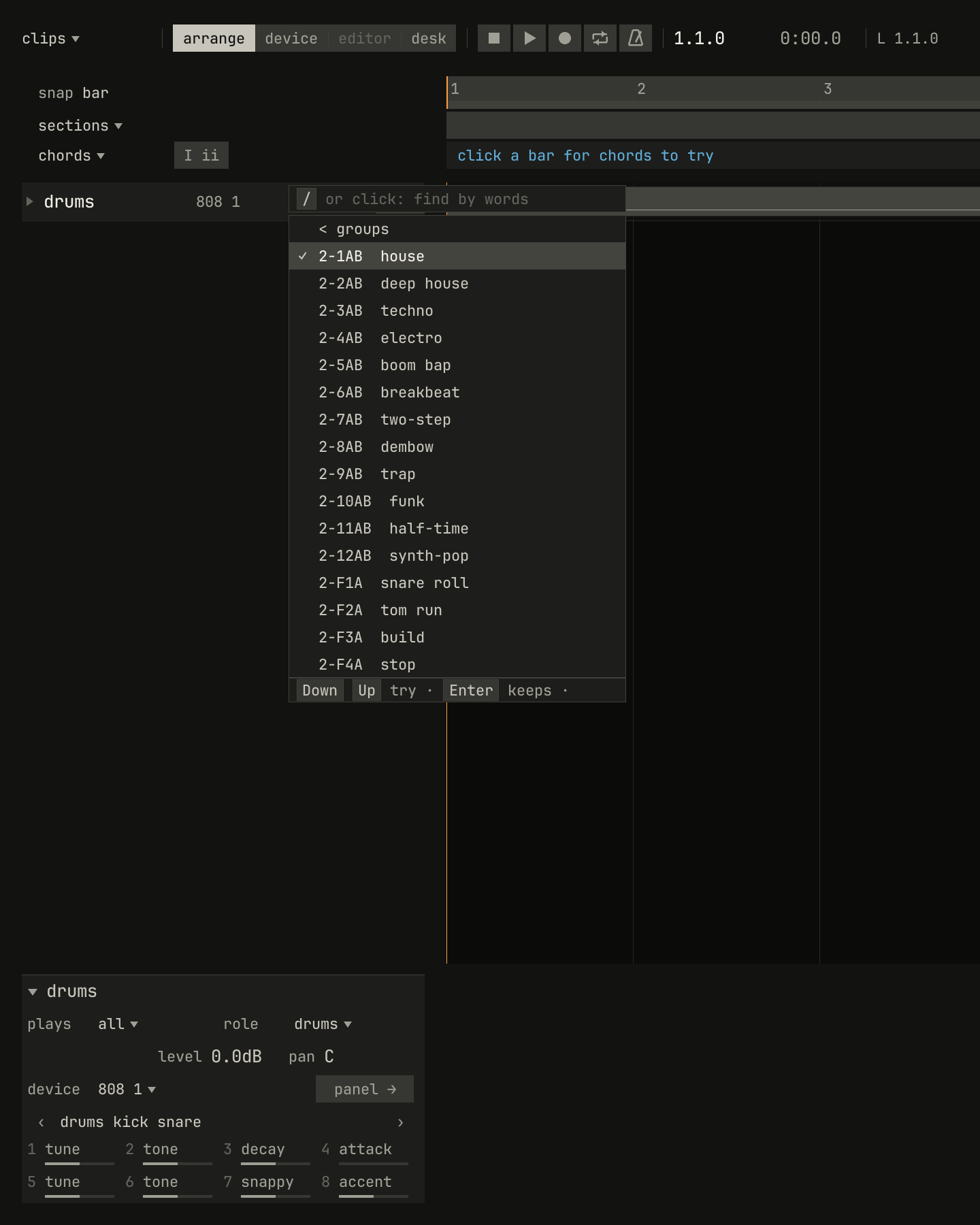
2-1AB, then group 2: its rhythms by name, in the variation the track shows, and its four fills.scriptzig build run-studio -- manual/drums/08-song/clips --script manual/drums/08-song/program-list.txt
clips/song.json
{
  "tempo": 124,
  "end": "7",
  "devices": [{ "name": "808", "type": "drums", "state": { "program": "2-1AB" } }],
  "tracks": [
    {
      "name": "drums", "device": "808", "channel": 1, "role": "drums",
      "clips": [
        { "at": "1", "length": "3.0.0", "pattern": "2-1AB" },
        { "at": "4", "length": "1.0.0", "pattern": "2-F3A" },
        { "at": "5", "length": "2.0.0", "pattern": "2-3AB" }
      ]
    }
  ]
}
program-list.txt
# Opens the drum track's program list, then group 2's rhythms.
wait 0.2
click program drums
wait 0.2
choose group 2
wait 0.2
capture list.png
A change on the measure

0.0 / 6.0 s
peak -15.6 dBFS
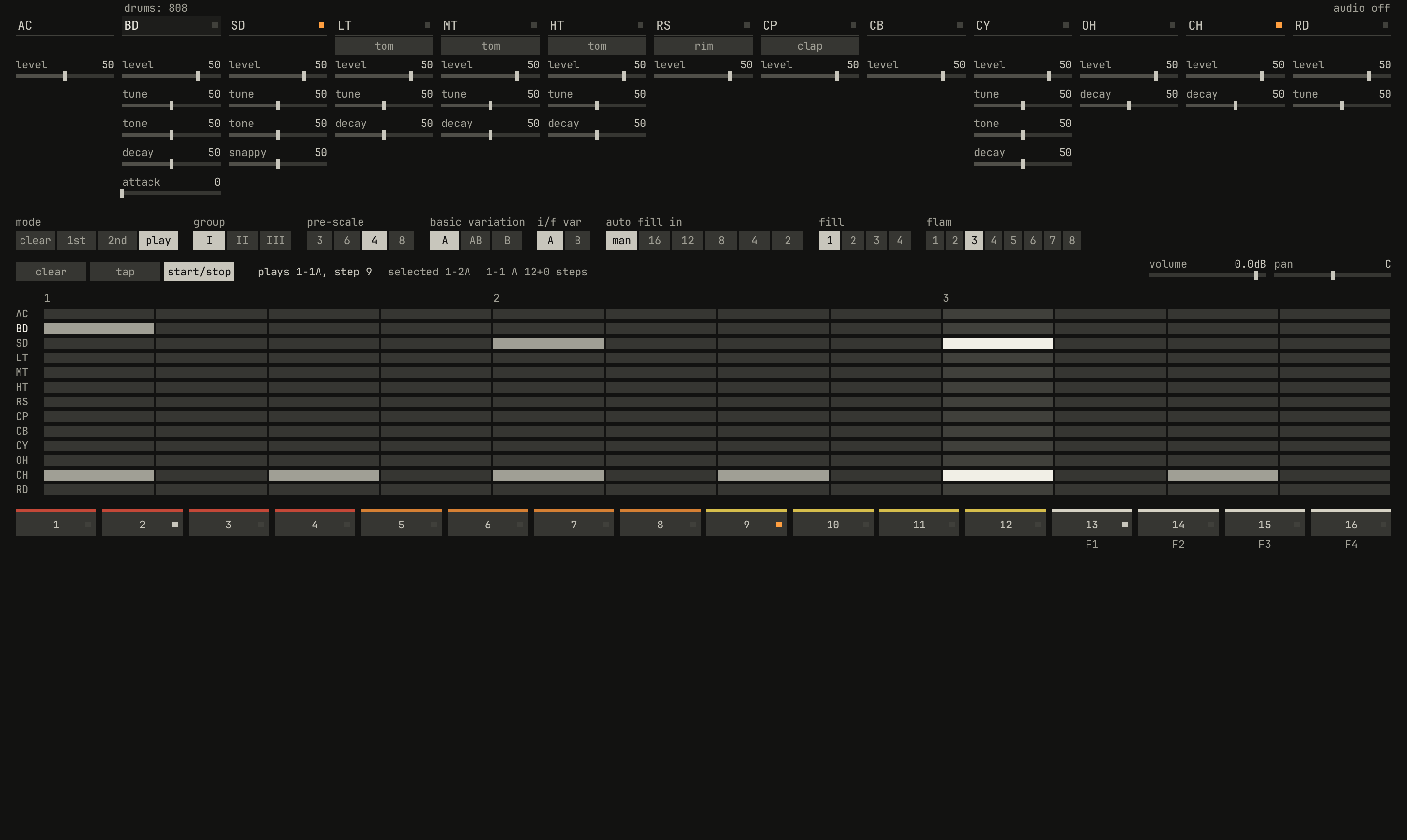
1-1, twelve 16ths, then a clip of 1-2 from bar 2. The picture is in bar 2, beat 2: the line reads plays 1-1A, step 9 and selected 1-2A. 1-1's measure ends on bar 2's third beat, and 1-2 starts there.openzig build run-studio -- manual/drums/08-song/measure --view device --play 1
renderzig build run-studio -- render manual/drums/08-song/measure measure.wav
measure/song.json
{
  "tempo": 120,
  "end": "4",
  "devices": [{
    "name": "808", "type": "drums",
    "state": {
      "program": "1-1A",
      "rhythms": {
        "1-1": { "name": "waltz", "scale": 4, "steps": 12, "A": ["BD x...........", "SD ....x...x...", "CH x.x.x.x.x.x."] },
        "1-2": { "name": "crash", "scale": 4, "steps": 16, "A": ["BD x...x...x...x...", "SD ....x.......x.xx", "CY x...............", "CH ..x...x...x...x."] }
      }
    }
  }],
  "tracks": [
    {
      "name": "drums", "device": "808", "channel": 1, "role": "drums",
      "clips": [{ "at": "1", "length": "1.0.0", "pattern": "1-1A" }, { "at": "2", "length": "2.0.0", "pattern": "1-2A" }]
    }
  ]
}
A pattern clip that follows another selects its rhythm while the drum
machine plays, and a rhythm selected while it plays waits for the end of
the measure, as on the 808. When the measures are bars, 16 steps of 16ths,
the change lands on the clip's first bar, and that's all there is to it.
When they aren't, the change lands where the measure ends: in the song,
1-1's measures are three beats long, so the clip at bar 2 waits two
beats, and 1-2's four-beat measures then run from the third beat of each
bar. Listen for the cymbal that starts each of 1-2's measures: it crashes
on the third beat of bars 2 and 3, half a bar from where the clip starts.
So rhythms of odd lengths belong in their own stretch of a song, started by a clip of their own after a stop, or kept with others of the same length.
Fills and intros in clips
A clip of a fill, as 2-F3A above, plays it once, as tap would: from the
end of the measure playing, which is the clip's start when the measures are
bars. Then the basic rhythm selected comes back, for as long as the clip
lasts. Make a fill clip a bar long, and start the next rhythm's clip right
after it.
A fill clip at the start of a stretch, with the drum machine stopped, is an
intro: it plays first, and the basic rhythm the panel has selected
follows it. auto_fill, the panel's auto fill in, works in a song as on
the panel, counting measures from each start, and a lane can turn it on for
a chorus and off again.
Notes on its keys
0.0 / 4.8 s
peak -14.0 dBFS
openzig build run-studio -- manual/drums/08-song/notes --view editor
renderzig build run-studio -- render manual/drums/08-song/notes notes.wav
notes/song.json
{
  "tempo": 100,
  "end": "3",
  "devices": [{ "name": "808", "type": "drums", "state": { "accent": 60 } }],
  "tracks": [
    { "name": "drums", "device": "808", "channel": 1, "role": "drums", "clips": [{ "at": "1", "length": "2.0.0", "notes": "beat" }] }
  ],
  "notes": {
    "beat": {
      "length": "1.0.0",
      "notes": [
        "1.1.0 C2 0.0.240 96", "1.1.0 F#2 0.0.240 80", "1.1.480 F#2 0.0.240 64",
        "1.2.0 D2 0.0.240 96", "1.2.0 F#2 0.0.240 80", "1.2.480 F#2 0.0.240 64", "1.2.720 D2 0.0.240 40",
        "1.3.0 C2 0.0.240 64", "1.3.240 C2 0.0.240 64", "1.3.0 F#2 0.0.240 80", "1.3.480 F#2 0.0.240 64",
        "1.4.0 D2 0.0.240 96", "1.4.0 F#2 0.0.240 80", "1.4.480 A#2 0.0.240 72", "1.4.720 D2 0.0.240 40"
      ]
    }
  }
}
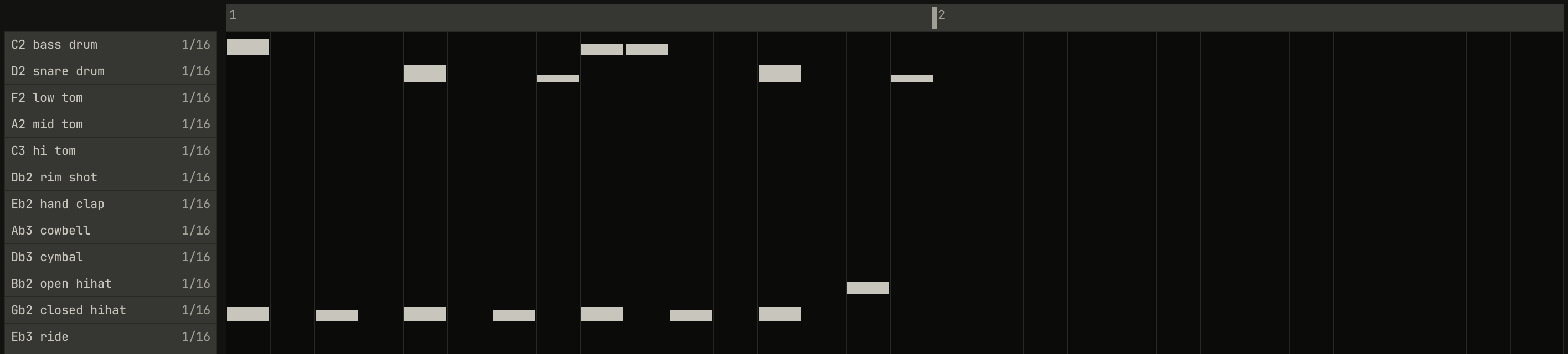
A notes clip on a drum track plays the drum machine's voices on their keys, and opens in Drum Edit, a row for each voice in the panel's order. Each voice is on the key the 909's MIDI chart gives it, and the cowbell, which the 909 lacks, on General MIDI's:
| Key | Note | Name |
|---|---|---|
| 36 | C2 | bass drum |
| 38 | D2 | snare drum |
| 41 | F2 | low tom |
| 45 | A2 | mid tom |
| 48 | C3 | hi tom |
| 37 | C#2 | rim shot |
| 39 | D#2 | hand clap |
| 56 | G#3 | cowbell |
| 49 | C#3 | cymbal |
| 46 | A#2 | open hihat |
| 42 | F#2 | closed hihat |
| 51 | D#3 | ride |
Some voices take a second key, as the 909 does: 35 plays the bass drum, 40 the snare, 43 the low tom, 44 the closed hi-hat, 47 the mid tom, and 50 the hi tom. Drum Edit adds a row for any key the clip plays beyond the twelve.
A note's velocity is its accent, as chapter 5
measured: 64 a plain hit, 96 one at the accent level, softer below 64. A
note on a voice sounds as a step would; the voice's switches and knobs, as
they stand, shape it. Notes and a pattern clip can play at once, from two
clips or two tracks on the drum machine's one channel: a crash on a
section's first beat over a rhythm, or a ghost snare over a clip.
The editors, in the studio's manual, is Drum Edit in
full.
The letter keys
On a drum machine's track, the letter keys play its voices, two octaves
below where they play a synth, so the home row starts on C2: A plays the
bass drum, S the snare, D the snare's second key, and F, H, and K
the low, mid, and hi toms. On the row above, W is the rim shot, E the
clap, T the closed hi-hat, U the open hi-hat, O the cymbal, and P
the ride. The cowbell, on G#3, is out of reach until X, which
puts it on Y. They play in every view: the arrange view, the editors but
List Edit, the desk, and the drum machine's panel.
A letter key strikes at velocity 127, at the accent level: with the
panel's accent at 0, every key is a plain hit.
A controller
An Arturia MiniLab 37 plays the drum machine from its pads, knobs, and faders when a drum track is selected. The pads play its voices, with their velocity as accent: bank A the bass drum, snare, three toms, rim shot, clap, and cowbell, and bank B's first four the cymbal, the hi-hats, and the ride. The knobs turn its controls a page at a time, and the encoder turns the pages:
| Page | Knobs 1 to 8 |
|---|---|
| 1 kick snare | bd_tune, bd_tone, bd_decay, bd_attack, sd_tune, sd_tone, sd_snappy, accent |
| 2 toms | lt_tune, lt_decay, mt_tune, mt_decay, ht_tune, ht_decay, lt_level, mt_level |
| 3 cymbals | cy_tune, cy_tone, cy_decay, oh_decay, ch_decay, rd_tune, cy_level, rd_level |
| 4 levels | ht_level, rs_level, cp_level, cb_level, oh_level, ch_level, pan, level |
Switched to the device's own four, the faders are the bass drum's, the snare's, and the two hi-hats' levels. A controller, in the studio's manual, is the MiniLab in full.
The desk
The drum machine is one channel, so on the desk it has one strip: every
voice through the same EQ, sends, and fader. Its volume and pan on the
panel come first, then the strip. To treat the snare apart from the rest,
as the 808's separate outputs allowed, put a second drum machine in the song
for it. The desk, in the studio's manual, is the strips.
Recording
Recording the drum track records what's played on it: notes from the keys,
a controller's pads, or MIDI, into a notes clip; knobs turned on the panel,
into the track's lanes; and the panel's rhythms, as pattern clips. A
rhythm picked on the panel while the drum machine plays starts its clip
where the drum machine took it up, at the end of the measure, so the take
plays back as it was played; a fill tapped in records as a clip a measure
long. start/stop starts a clip on the next bar and ends it at once. The
auto fill isn't recorded: the drum machine plays it from its control, there
as it did live. Recording, in the studio's manual,
is takes.
Next: chapter 9, reference.