II. Breaks, takes, and songs
Sounds in the song
A studio of the late 1980s flew a vocal phrase or a drum loop into a song
from a sampler, a note triggering it at the bar it belonged on. The studio
does the same with any WAV file: dropped on the arrange view, it goes on a
track at the bar where it's dropped, on a sampler, played by a note as long
as the sound. A loop made at a tempo near the song's fits the song's bars
by itself, as a tape played a little faster or slower would; fit fits any
sound to bars by hand.
Open the window on the chapter's first song, a beat on the drum machine at 118 BPM, and drop a WAV file below its track:
zig build run-studio -- manual/sampler/06-songs/drop
A file dropped on the arrange view
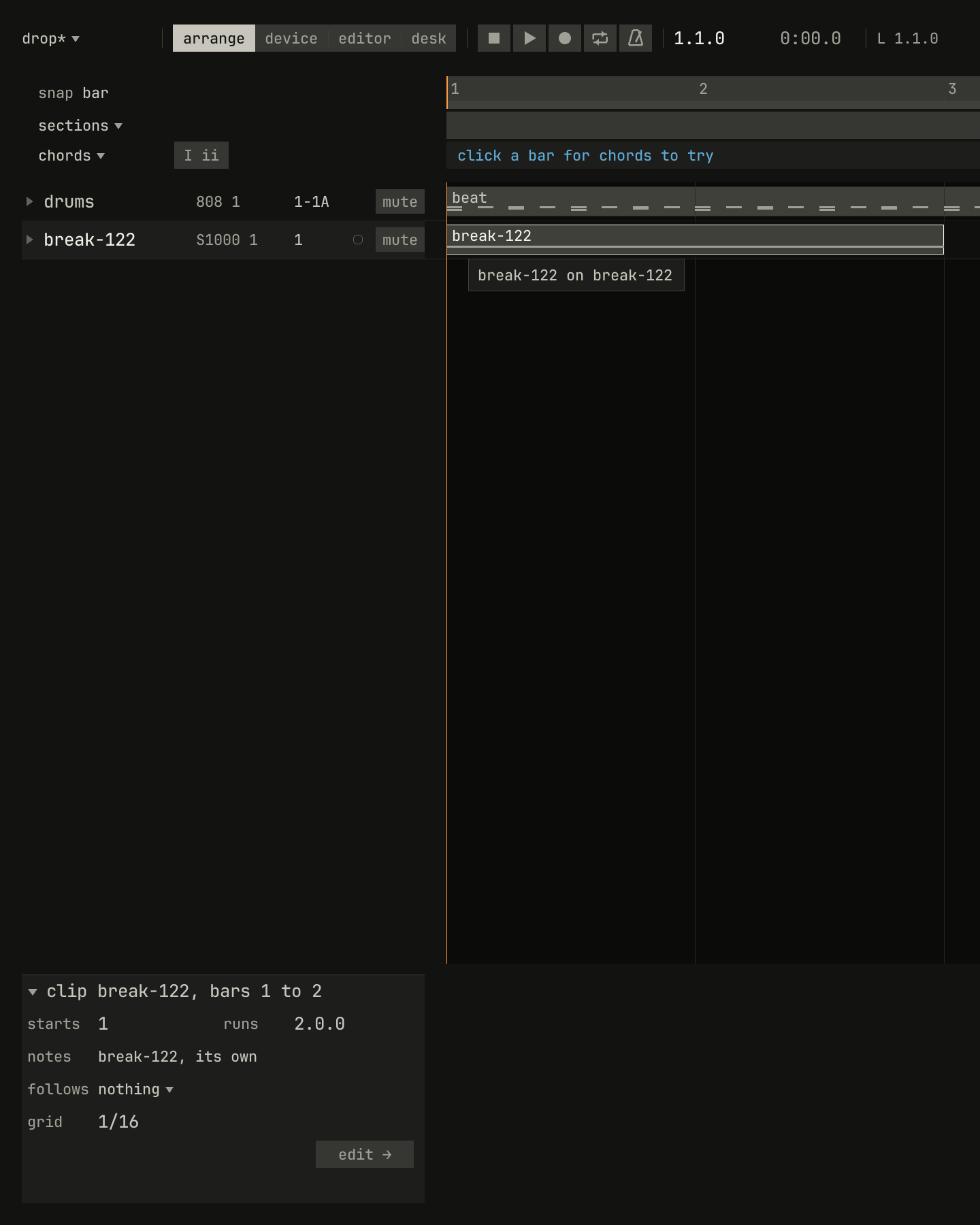
loops/break-122.wav, two bars of the 808 break rendered at 122 BPM, dropped below the tracks at bar 1 of a song at 118: a new track named after the file, on a new sampler, S1000, with a clip two bars long, selected, which the inspector describes.scriptzig build run-studio -- manual/sampler/06-songs/drop --script manual/sampler/06-songs/drop.txt
drop/song.json
{
  "tempo": 118,
  "end": "5",
  "devices": [{ "name": "808", "type": "drums" }],
  "tracks": [{
    "name": "drums",
    "device": "808",
    "channel": 1,
    "clips": [{ "at": "1", "length": "4.0.0", "notes": "beat" }]
  }],
  "notes": {
    "beat": {
      "length": "1.0.0",
      "notes": [
        "1.1.0 C2 0.0.240 120", "1.2.0 D2 0.0.240 110", "1.3.0 C2 0.0.240 120", "1.4.0 D2 0.0.240 110",
        "1.1.0 F#2 0.0.240 70", "1.1.480 F#2 0.0.240 60", "1.2.0 F#2 0.0.240 70", "1.2.480 F#2 0.0.240 60",
        "1.3.0 F#2 0.0.240 70", "1.3.480 F#2 0.0.240 60", "1.4.0 F#2 0.0.240 70", "1.4.480 F#2 0.0.240 60"
      ]
    }
  }
}
drop.txt
# Drop the break at 122 BPM below the tracks, at bar 1.
drop library/loops/break-122.wav below tracks bar 1
wait 0.2
capture drop.png
A WAV file dropped on the arrange view goes on the track under the pointer, at the start of the bar under it:
- On a sampler's track whose program has no keygroups, it goes on
every key, around its root, as
map to keysputs it; on a kit, on its next free pad, as a pad picks it. A program that plays keys, as the piano does, keeps them, and the sound takes a new track on the same sampler's next free channel. - Anywhere else, or below the last track, it takes a new track named
after the file, on the song's first sampler with a channel no track
plays, or on a new sampler,
S1000orS1000 2and on; the channel plays a new program named after the file too.
On the track, a clip at the bar plays one note on the key that plays the
sound at its own pitch, C4 for a file without a root, at velocity 100, as
long as the sound, rounded up to a beat; the clip lasts whole bars. The
sound plays while the note holds, its mode no loops, so trimming the clip
or its note stops it there. Several files dropped at once each take a
track, at the same bar. The track and the clip are one edit, which undo
takes away whole; the sample stays in the sampler's bank.
A file from outside the library is copied into it first, into
library/imported/, so the song names it there; another file of the same
name takes a number, as imported/loop-2.wav, and the same file dropped
again is the copy already there. In the other views, a WAV file dropped on
the window loads into the selected track's sampler as a new sample, on its
samples page, and goes on no track.
Fitted to the bars
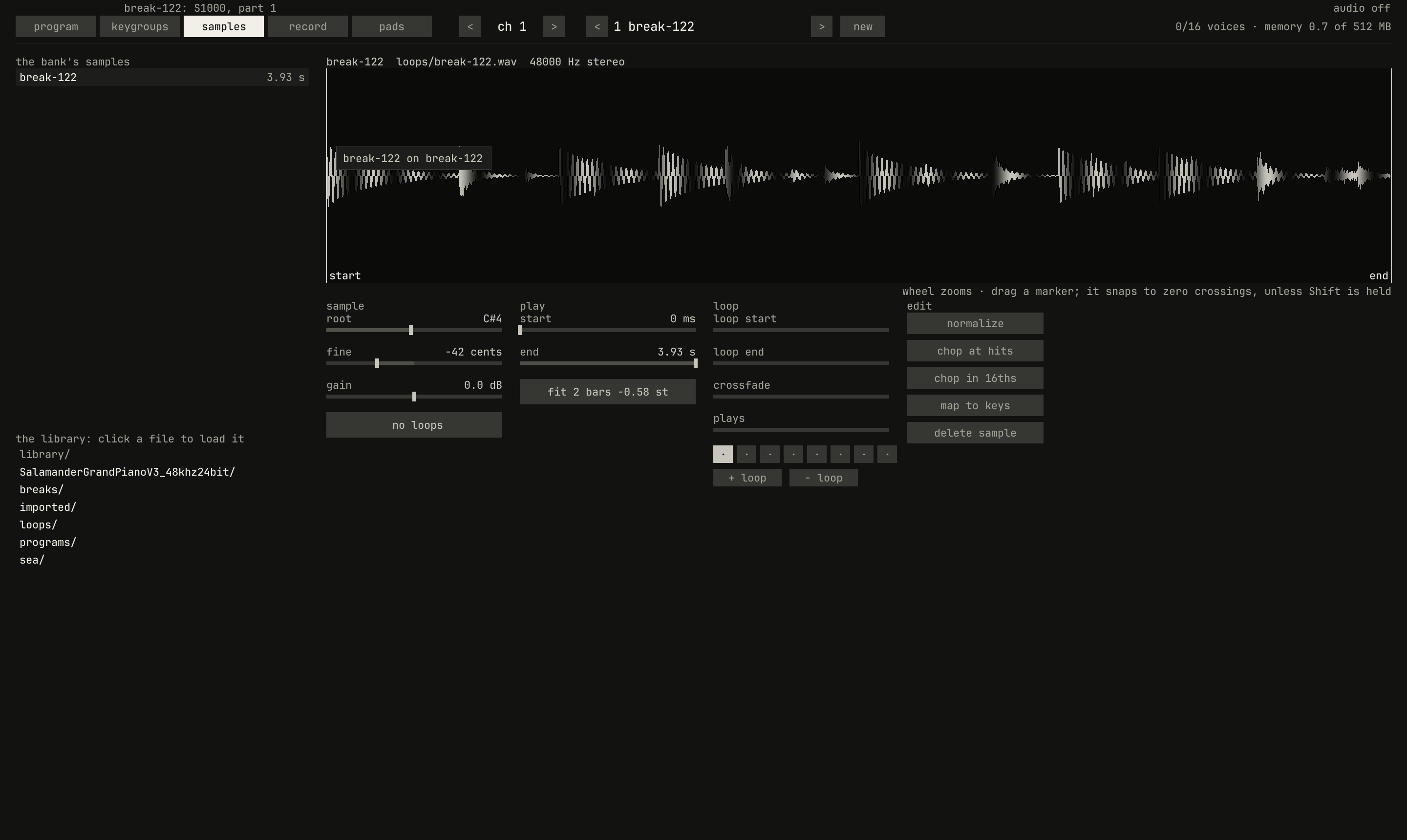
samples page: fit reads 2 bars -0.58 st. It lasted 3.93 seconds at 122 BPM, and two bars at 118 last 4.07, so it plays 3.4% slower and 0.58 semitones lower.scriptzig build run-studio -- manual/sampler/06-songs/drop --script manual/sampler/06-songs/fit.txt
drop/song.json
{
  "tempo": 118,
  "end": "5",
  "devices": [{ "name": "808", "type": "drums" }],
  "tracks": [{
    "name": "drums",
    "device": "808",
    "channel": 1,
    "clips": [{ "at": "1", "length": "4.0.0", "notes": "beat" }]
  }],
  "notes": {
    "beat": {
      "length": "1.0.0",
      "notes": [
        "1.1.0 C2 0.0.240 120", "1.2.0 D2 0.0.240 110", "1.3.0 C2 0.0.240 120", "1.4.0 D2 0.0.240 110",
        "1.1.0 F#2 0.0.240 70", "1.1.480 F#2 0.0.240 60", "1.2.0 F#2 0.0.240 70", "1.2.480 F#2 0.0.240 60",
        "1.3.0 F#2 0.0.240 70", "1.3.480 F#2 0.0.240 60", "1.4.0 F#2 0.0.240 70", "1.4.480 F#2 0.0.240 60"
      ]
    }
  }
}
fit.txt
# Drop the break at 122 BPM below the tracks, at bar 1, show its sampler,
# and turn to the samples page.
drop library/loops/break-122.wav below tracks bar 1
wait 0.2
key ctrl+2
wait 0.1
click 229 67
wait 0.1
capture fit.pngfit, in the play column of the samples page, fits the stretch from
the sample's start to its end to 1, 2, 4, 8, or 16 bars at the song's
tempo where it stands, or off, a click a step. It does it as a tape at
another speed would: it moves the sample's root and its fine tuning, so every key plays it faster and higher, or slower and
lower, until it lasts those bars. The readout says how far: 2 bars -0.58
st, slower and lower by 0.58 semitones. off puts it back at its own
speed.
A drop fits by itself when the sound lasts within 6% of 1, 2, 4, 8, or 16
bars, a semitone's change of speed or less, as a loop made at a nearby
tempo does; otherwise it plays at its own speed. The break here, rendered
at 122 BPM, is 3.4% off two bars at 118, and fits. A phrase at its own
tempo of 100 BPM, 4.72 bars long at 118, doesn't, and a click on fit
three times, to 4 bars, plays it 2.87 semitones higher to last four. The
dropped clip's note lasts as long as the sound at its own speed or as
fitted, whichever is longer, so fitting it faster later never cuts it
short; trim the clip to the bars it now fills.
0.0 / 8.1 s
peak -5.5 dBFS
openzig build run-studio -- manual/sampler/06-songs/fitted
renderzig build run-studio -- render manual/sampler/06-songs/fitted fitted.wav
fitted/song.json
{
  "tempo": 118,
  "end": "5",
  "devices": [
    {
      "name": "808",
      "type": "drums",
      "state": {
        "level": 0,
        "accent": 70,
        "voices": {
          "bd": { "level": 80, "tune": 45, "tone": 45, "decay": 70 },
          "sd": { "level": 70, "tone": 55, "snappy": 70 },
          "ch": { "level": 55 },
          "oh": { "level": 50, "decay": 40 }
        }
      }
    },
    {
      "name": "S1000",
      "type": "sampler",
      "state": {
        "channels": [{ "channel": 1, "program": 1 }, { "channel": 2, "program": 2 }],
        "programs": [
          { "program": 1, "name": "own speed", "keygroups": [{ "keys": "C-1 G9", "zones": [{ "sample": "own speed" }] }] },
          { "program": 2, "name": "fitted", "keygroups": [{ "keys": "C-1 G9", "zones": [{ "sample": "fitted" }] }] }
        ],
        "samples": {
          "own speed": { "file": "loops/break-122.wav", "root": "C4" },
          "fitted": { "file": "loops/break-122.wav", "root": "C#4", "cents": -42.29164 }
        }
      }
    }
  ],
  "tracks": [
    { "name": "drums", "device": "808", "channel": 1, "clips": [{ "at": "1", "length": "2.0.0", "notes": "break" }, { "at": "3", "length": "2.0.0", "notes": "break" }] },
    { "name": "own speed", "device": "S1000", "channel": 1, "clips": [{ "at": "1", "length": "2.0.0", "notes": "loop" }] },
    { "name": "fitted", "device": "S1000", "channel": 2, "clips": [{ "at": "3", "length": "2.0.0", "notes": "loop" }] }
  ],
  "notes": {
    "break": {
      "length": "2.0.0",
      "notes": [
        "1.1.0 C2 0.0.240 120",
        "1.1.0 F#2 0.0.240 80",
        "1.1.480 F#2 0.0.240 64",
        "1.2.0 D2 0.0.240 110",
        "1.2.0 F#2 0.0.240 80",
        "1.2.480 F#2 0.0.240 64",
        "1.2.720 C2 0.0.240 100",
        "1.3.0 F#2 0.0.240 80",
        "1.3.480 C2 0.0.240 120",
        "1.3.480 F#2 0.0.240 64",
        "1.4.0 D2 0.0.240 110",
        "1.4.0 F#2 0.0.240 80",
        "1.4.480 F#2 0.0.240 64",
        "1.4.720 D2 0.0.240 60",
        "2.1.0 C2 0.0.240 120",
        "2.1.0 F#2 0.0.240 80",
        "2.1.480 F#2 0.0.240 64",
        "2.2.0 D2 0.0.240 110",
        "2.2.0 F#2 0.0.240 80",
        "2.2.480 C2 0.0.240 100",
        "2.2.720 D2 0.0.240 60",
        "2.3.0 F#2 0.0.240 80",
        "2.3.240 C2 0.0.240 110",
        "2.3.480 F#2 0.0.240 64",
        "2.4.0 D2 0.0.240 120",
        "2.4.480 A#2 0.0.240 80",
        "2.4.720 D2 0.0.240 70"
      ]
    },
    "loop": { "length": "2.0.0", "notes": ["1.1.0 C4 2.0.0 100"] }
  }
}
Fitting changes the pitch with the speed: a loop fitted 3.4% slower plays
0.58 semitones flat, as a tape would. The S1000 could stretch a sample in
time instead, "altering the length of a sampled rhythm passage to fit in
with the rest of the track without altering the pitch" (page 45); this
sampler doesn't. A tempo changed later leaves a fitted sample where it
was, and fit, clicked round to its bars again, fits it to the new one.
fit keeps nothing of its own. It reckons how far a sample plays from its
own speed from how far its root and fine tuning lie from its file's own,
the root in the file's smpl chunk, or C4, so a song saved with a fitted
sample opens fitted. A sample whose root was moved for another reason
reads as moved too. A slice of a chop, rooted on its pad's key, or a piano
sample rooted by its SFZ, reads its distance from C4, the root its file
doesn't give: the chop's third slice, on D2, reads 22.00 st, though it
plays at its own speed on its own key, and off would root it on C4.
Playing from the middle
A note starts its sample from the sample's start. Played from the middle of a dropped sound's clip, the sound stays silent until its next note, as any sampler's note would; cut a clip in two and its second half is silent until a note starts in it. Only the song's reference, below, plays from where it would be, as a recording does.
The reference
A WAV file dropped with Shift is the song's reference: a recording to
recreate the song against. It goes on a track of its own, marked ref, on
a sampler of its own, at bar 1, at its own speed, never fitted, since the
song's tempo follows it instead. It plays in the window, but not in an
export or a render unless studio render is given --with-reference, and
at a practice speed below 100% it plays slower and lower, as tape did.
Recreating is about what the studio
reads from it and how to work against it.
A sampler of its own
Sounds on one sampler share its strip on the desk, so a sound that wants
an echo the others don't takes a sampler of its own: new sampler, in a
track's device list (songs, tracks, and devices), and
the desk gives it a strip (the desk). A song holds eight
devices, so a synth, the drum machine, and six samplers. Clips of dropped
sounds move, copy, and repeat as any clips do (arranging).
Next: chapter 7, reference, every control, and the sampler's part of a song's file.