II. Breaks, takes, and songs
Pads and breaks
In 1988 Roger Linn's MPC60 put a drum machine's sixteen pads on a sampler,
and a way of making music with them: a drum break recorded from a record,
cut into its hits, one a pad, and played back in a new order, with note
repeat rolling a hit on the beat. The sampler's pads page is the
MPC60's. This chapter chops the studio's 808 break onto the pads, plays
the slices, and rolls them.
Open the window on the chapter's first song, the break as one sample:
zig build run-studio -- manual/sampler/04-pads/break --view device
The pads page
The pads are on sixteen keys, from C2 to D♯3, where General MIDI's drums
start, and where the 808's do. On the page they're laid out as on the
MPC60, four by four, pad 1 at the bottom left and pad 16 at the top right.
Each shows its name, its key, and the sample it plays, or empty; a pad
struck lights along its top edge for a fifth of a second, from the song, a
controller, or a click. A click on a pad plays it, at velocity 100, and
selects it, framed; a click on a sample in the list at the right then puts
that sample on the selected pad, on a keygroup of the pad's key alone,
tuned to play it at its own pitch. A program that plays keys, as the piano
does, keeps them: the panel says to start a new one for its pads.
| Key | Note | Name |
|---|---|---|
| 36 | C2 | pad 1 |
| 37 | C#2 | pad 2 |
| 38 | D2 | pad 3 |
| 39 | D#2 | pad 4 |
| 40 | E2 | pad 5 |
| 41 | F2 | pad 6 |
| 42 | F#2 | pad 7 |
| 43 | G2 | pad 8 |
| 44 | G#2 | pad 9 |
| 45 | A2 | pad 10 |
| 46 | A#2 | pad 11 |
| 47 | B2 | pad 12 |
| 48 | C3 | pad 13 |
| 49 | C#3 | pad 14 |
| 50 | D3 | pad 15 |
| 51 | D#3 | pad 16 |
The keys play the pads too: the MiniLab's pads play them, eight a bank
(chapter 18), and on a kit the letter keys do,
from A on the home row for C2, as they play the drum machine's voices. A
kit is a program whose keygroups each hold one key, as every program
the pads make does. The editor opens a kit's clips in Drum Edit, a row a
pad (the editors); a piano's open in Key Edit.
Beside the pads are the channel's repeat, 16 levels, and of pad,
below, and its level and pan.
Chopping a break
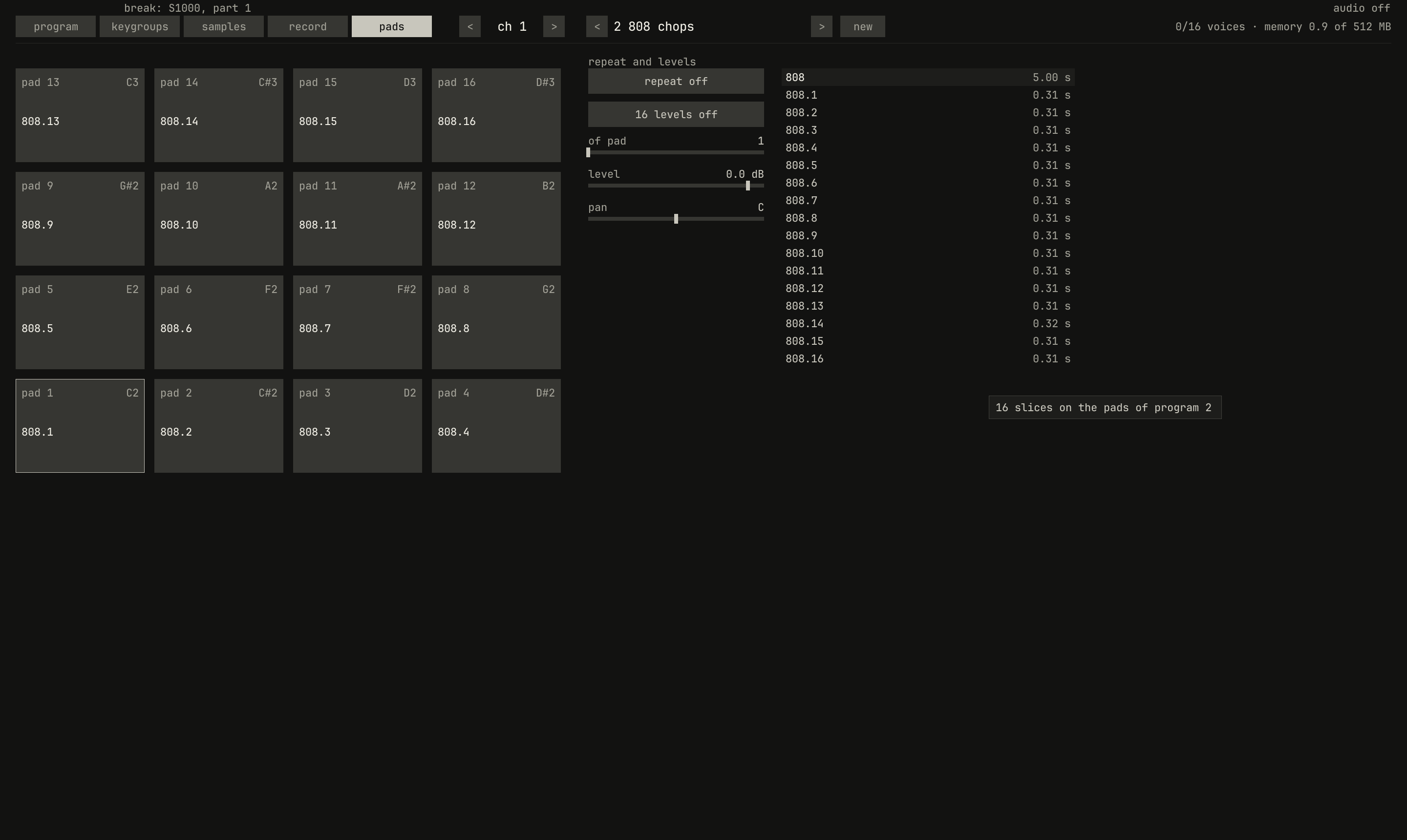
808, after chop in 16ths on the samples page: a new program, 808 chops, with a slice on each pad, 808.1 to 808.16, each an eighth note of the two bars. The channel plays it, and the panel shows its pads.scriptzig build run-studio -- manual/sampler/04-pads/break --view device --track 1 --script manual/sampler/04-pads/chop.txt
break/song.json
{
  "tempo": 96,
  "end": "3",
  "devices": [{
    "name": "S1000",
    "type": "sampler",
    "state": {
      "channels": [{ "channel": 1, "program": 1 }],
      "programs": [{
        "program": 1,
        "name": "break",
        "keygroups": [{ "keys": "C4", "zones": [{ "sample": "808" }] }]
      }],
      "samples": {
        "808": { "file": "breaks/808.wav", "root": "C4", "mode": "one_shot" }
      }
    }
  }],
  "tracks": [{
    "name": "break",
    "device": "S1000",
    "channel": 1,
    "clips": [{ "at": "1", "length": "2.0.0", "notes": "once" }]
  }],
  "notes": {
    "once": { "length": "2.0.0", "notes": ["1.1.0 C4 0.0.480 110"] }
  }
}
chop.txt
# The samples page with the break selected, and chop in 16ths pressed:
# the panel turns to the pads page of the new program.
click 229 67
wait 0.1
click 998 427
wait 0.1
capture chop.png
The samples page has two chops, for the sample selected: chop in 16ths
and chop at hits. Each makes a new program, named after the sample, as
808 chops, cuts the sample into slices, up to sixteen, and puts them on
the pads from pad 1: each a new sample of the same sound, starting where
its slice starts and ending where the next one does, a one shot, with its
root on its pad's key so it plays at its own pitch. The channel selects
the program, and the panel turns to its pads. The slices are named after
the sample, 808.1 to 808.16, and a second chop of the same sample
names its own 808.1-2 and on.
chop in 16ths cuts the stretch from the sample's start to its end into
sixteen equal slices, each moved to the nearest zero crossing within an
eighth of a slice. The studio's break is two bars, so each slice is an
eighth note; trimmed to one bar first, with end, it would be sixteenths.
chop at hits looks for the hits instead. It measures the level every
5 ms and takes the moments where it rises most over the step before, the
strongest first, at least 50 ms apart, up to sixteen, and moves each back
to the quiet just before it. On the 808 break it finds each of the six
kicks twice, at its click and again 50 to 75 ms later, where the level of
the kick's low note still rises and falls from one 5 ms step to the next;
with three of the snares and one more spot in a kick, that fills the
sixteen pads, and the snare on bar 1's last beat and the quiet hits get
none. On this break, chop in 16ths is the better cut.
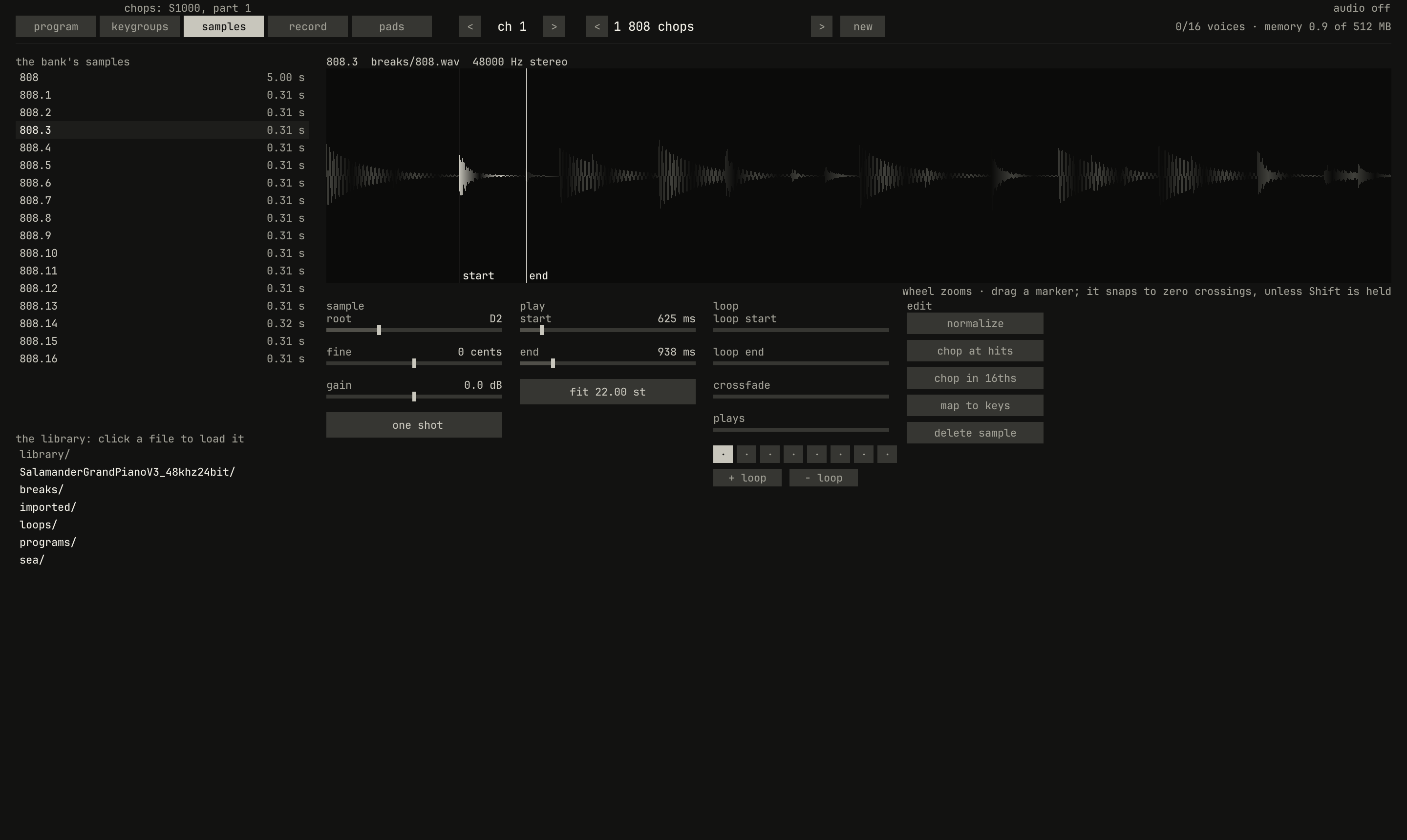
808.3, on the samples page: the whole break's waveform, with the slice's stretch, beat 2's snare and hat, bright between its start and end. Every slice plays the one sound, breaks/808.wav.scriptzig build run-studio -- manual/sampler/04-pads/beat --view device --track 1 --script manual/sampler/04-pads/slice.txt
beat/song.json
{
  "tempo": 96,
  "end": "3",
  "devices": [{
    "name": "S1000",
    "type": "sampler",
    "state": {
      "channels": [
        { "channel": 1, "program": 1 }
      ],
      "programs": [
        {
          "program": 1,
          "name": "808 chops",
          "keygroups": [
            { "keys": "C2", "zones": [{ "sample": "808.1" }] },
            { "keys": "C#2", "zones": [{ "sample": "808.2" }] },
            { "keys": "D2", "zones": [{ "sample": "808.3" }] },
            { "keys": "D#2", "zones": [{ "sample": "808.4" }] },
            { "keys": "E2", "zones": [{ "sample": "808.5" }] },
            { "keys": "F2", "zones": [{ "sample": "808.6" }] },
            { "keys": "F#2", "zones": [{ "sample": "808.7" }] },
            { "keys": "G2", "zones": [{ "sample": "808.8" }] },
            { "keys": "G#2", "zones": [{ "sample": "808.9" }] },
            { "keys": "A2", "zones": [{ "sample": "808.10" }] },
            { "keys": "A#2", "zones": [{ "sample": "808.11" }] },
            { "keys": "B2", "zones": [{ "sample": "808.12" }] },
            { "keys": "C3", "zones": [{ "sample": "808.13" }] },
            { "keys": "C#3", "zones": [{ "sample": "808.14" }] },
            { "keys": "D3", "zones": [{ "sample": "808.15" }] },
            { "keys": "D#3", "zones": [{ "sample": "808.16" }] }
          ]
        }
      ],
      "samples": {
        "808": { "file": "breaks/808.wav", "root": "C4", "mode": "one_shot" },
        "808.1": { "file": "breaks/808.wav", "root": "C2", "end": 15031, "mode": "one_shot" },
        "808.2": { "file": "breaks/808.wav", "root": "C#2", "start": 15031, "end": 30007, "mode": "one_shot" },
        "808.3": { "file": "breaks/808.wav", "root": "D2", "start": 30007, "end": 45003, "mode": "one_shot" },
        "808.4": { "file": "breaks/808.wav", "root": "D#2", "start": 45003, "end": 59858, "mode": "one_shot" },
        "808.5": { "file": "breaks/808.wav", "root": "E2", "start": 59858, "end": 74933, "mode": "one_shot" },
        "808.6": { "file": "breaks/808.wav", "root": "F2", "start": 74933, "end": 90009, "mode": "one_shot" },
        "808.7": { "file": "breaks/808.wav", "root": "F#2", "start": 90009, "end": 105001, "mode": "one_shot" },
        "808.8": { "file": "breaks/808.wav", "root": "G2", "start": 105001, "end": 120000, "mode": "one_shot" },
        "808.9": { "file": "breaks/808.wav", "root": "G#2", "start": 120000, "end": 135020, "mode": "one_shot" },
        "808.10": { "file": "breaks/808.wav", "root": "A2", "start": 135020, "end": 150043, "mode": "one_shot" },
        "808.11": { "file": "breaks/808.wav", "root": "A#2", "start": 150043, "end": 165001, "mode": "one_shot" },
        "808.12": { "file": "breaks/808.wav", "root": "B2", "start": 165001, "end": 180025, "mode": "one_shot" },
        "808.13": { "file": "breaks/808.wav", "root": "C3", "start": 180025, "end": 194808, "mode": "one_shot" },
        "808.14": { "file": "breaks/808.wav", "root": "C#3", "start": 194808, "end": 210004, "mode": "one_shot" },
        "808.15": { "file": "breaks/808.wav", "root": "D3", "start": 210004, "end": 225001, "mode": "one_shot" },
        "808.16": { "file": "breaks/808.wav", "root": "D#3", "start": 225001, "end": 240001, "mode": "one_shot" }
      }
    }
  }],
  "tracks": [
    { "name": "chops", "device": "S1000", "channel": 1, "clips": [{ "at": "1", "length": "2.0.0", "notes": "beat" }] }
  ],
  "notes": {
    "beat": {
      "length": "2.0.0",
      "notes": [
        "1.1.0 C2 0.0.480 110",
        "1.1.480 C#2 0.0.480 110",
        "1.2.0 D2 0.0.480 110",
        "1.2.480 B2 0.0.480 110",
        "1.3.0 F2 0.0.480 110",
        "1.3.480 F2 0.0.480 110",
        "1.4.0 F#2 0.0.480 110",
        "1.4.480 D#3 0.0.480 110",
        "2.1.0 G#2 0.0.480 110",
        "2.1.480 C3 0.0.480 110",
        "2.2.0 A#2 0.0.480 110",
        "2.2.480 D#2 0.0.480 110",
        "2.3.0 C2 0.0.480 110",
        "2.3.480 C#3 0.0.480 110",
        "2.4.0 D3 0.0.480 110",
        "2.4.480 G2 0.0.480 110"
      ]
    }
  }
}
slice.txt
# The samples page, with the third slice, 808.3, selected in the bank.
click 229 67
wait 0.1
click 166 173
wait 0.1
capture slice.png
A slice is a sample like any other, and its start and end drag, so a cut that lands late moves back by hand, snapping to zero crossings.
Playing the slices
0.0 / 5.0 s
peak -11.6 dBFS
openzig build run-studio -- manual/sampler/04-pads/beat --view editor --track 1
renderzig build run-studio -- render manual/sampler/04-pads/beat beat.wav
beat/song.json
{
  "tempo": 96,
  "end": "3",
  "devices": [{
    "name": "S1000",
    "type": "sampler",
    "state": {
      "channels": [
        { "channel": 1, "program": 1 }
      ],
      "programs": [
        {
          "program": 1,
          "name": "808 chops",
          "keygroups": [
            { "keys": "C2", "zones": [{ "sample": "808.1" }] },
            { "keys": "C#2", "zones": [{ "sample": "808.2" }] },
            { "keys": "D2", "zones": [{ "sample": "808.3" }] },
            { "keys": "D#2", "zones": [{ "sample": "808.4" }] },
            { "keys": "E2", "zones": [{ "sample": "808.5" }] },
            { "keys": "F2", "zones": [{ "sample": "808.6" }] },
            { "keys": "F#2", "zones": [{ "sample": "808.7" }] },
            { "keys": "G2", "zones": [{ "sample": "808.8" }] },
            { "keys": "G#2", "zones": [{ "sample": "808.9" }] },
            { "keys": "A2", "zones": [{ "sample": "808.10" }] },
            { "keys": "A#2", "zones": [{ "sample": "808.11" }] },
            { "keys": "B2", "zones": [{ "sample": "808.12" }] },
            { "keys": "C3", "zones": [{ "sample": "808.13" }] },
            { "keys": "C#3", "zones": [{ "sample": "808.14" }] },
            { "keys": "D3", "zones": [{ "sample": "808.15" }] },
            { "keys": "D#3", "zones": [{ "sample": "808.16" }] }
          ]
        }
      ],
      "samples": {
        "808": { "file": "breaks/808.wav", "root": "C4", "mode": "one_shot" },
        "808.1": { "file": "breaks/808.wav", "root": "C2", "end": 15031, "mode": "one_shot" },
        "808.2": { "file": "breaks/808.wav", "root": "C#2", "start": 15031, "end": 30007, "mode": "one_shot" },
        "808.3": { "file": "breaks/808.wav", "root": "D2", "start": 30007, "end": 45003, "mode": "one_shot" },
        "808.4": { "file": "breaks/808.wav", "root": "D#2", "start": 45003, "end": 59858, "mode": "one_shot" },
        "808.5": { "file": "breaks/808.wav", "root": "E2", "start": 59858, "end": 74933, "mode": "one_shot" },
        "808.6": { "file": "breaks/808.wav", "root": "F2", "start": 74933, "end": 90009, "mode": "one_shot" },
        "808.7": { "file": "breaks/808.wav", "root": "F#2", "start": 90009, "end": 105001, "mode": "one_shot" },
        "808.8": { "file": "breaks/808.wav", "root": "G2", "start": 105001, "end": 120000, "mode": "one_shot" },
        "808.9": { "file": "breaks/808.wav", "root": "G#2", "start": 120000, "end": 135020, "mode": "one_shot" },
        "808.10": { "file": "breaks/808.wav", "root": "A2", "start": 135020, "end": 150043, "mode": "one_shot" },
        "808.11": { "file": "breaks/808.wav", "root": "A#2", "start": 150043, "end": 165001, "mode": "one_shot" },
        "808.12": { "file": "breaks/808.wav", "root": "B2", "start": 165001, "end": 180025, "mode": "one_shot" },
        "808.13": { "file": "breaks/808.wav", "root": "C3", "start": 180025, "end": 194808, "mode": "one_shot" },
        "808.14": { "file": "breaks/808.wav", "root": "C#3", "start": 194808, "end": 210004, "mode": "one_shot" },
        "808.15": { "file": "breaks/808.wav", "root": "D3", "start": 210004, "end": 225001, "mode": "one_shot" },
        "808.16": { "file": "breaks/808.wav", "root": "D#3", "start": 225001, "end": 240001, "mode": "one_shot" }
      }
    }
  }],
  "tracks": [
    { "name": "chops", "device": "S1000", "channel": 1, "clips": [{ "at": "1", "length": "2.0.0", "notes": "beat" }] }
  ],
  "notes": {
    "beat": {
      "length": "2.0.0",
      "notes": [
        "1.1.0 C2 0.0.480 110",
        "1.1.480 C#2 0.0.480 110",
        "1.2.0 D2 0.0.480 110",
        "1.2.480 B2 0.0.480 110",
        "1.3.0 F2 0.0.480 110",
        "1.3.480 F2 0.0.480 110",
        "1.4.0 F#2 0.0.480 110",
        "1.4.480 D#3 0.0.480 110",
        "2.1.0 G#2 0.0.480 110",
        "2.1.480 C3 0.0.480 110",
        "2.2.0 A#2 0.0.480 110",
        "2.2.480 D#2 0.0.480 110",
        "2.3.0 C2 0.0.480 110",
        "2.3.480 C#3 0.0.480 110",
        "2.4.0 D3 0.0.480 110",
        "2.4.480 G2 0.0.480 110"
      ]
    }
  }
}
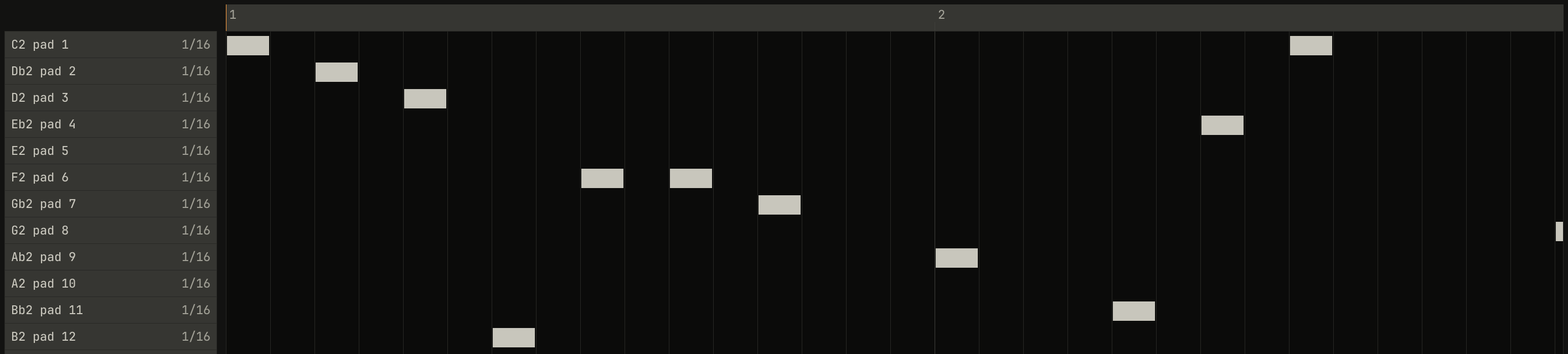
The slices play as any notes do, from a clip, the keys, or a controller. In Drum Edit each row is a pad, named by its key and its pad, and its hits are slices. A slice is a one shot, so it plays to its end however long its note is, and a slice cut at an eighth note keeps time at the tempo it was recorded at, here the break's 96 BPM. At another tempo the slices still start on the notes, so the break follows the song, faster or slower, without changing its pitch, which a whole loop played at another tempo can't do (chapter 6): faster, each slice's tail runs under the next, and slower, a gap opens after each.
Note repeat
0.0 / 5.0 s
peak -9.9 dBFS
808.3, held for two bars with repeat at 1/16 and the song's swing at 62%, with kicks under the second bar. The plot is the first two beats: each pair of 16ths comes long then short, 193 and 119 ms, where straight they'd be 156 each.openzig build run-studio -- manual/sampler/04-pads/repeat
renderzig build run-studio -- render manual/sampler/04-pads/repeat repeat.wav
repeat/song.json
{
  "tempo": 96,
  "swing": 62,
  "end": "3",
  "devices": [{
    "name": "S1000",
    "type": "sampler",
    "state": {
      "channels": [
        { "channel": 1, "program": 1 },
        { "channel": 2, "program": 1, "repeat": "1/16" }
      ],
      "programs": [
        {
          "program": 1,
          "name": "808 chops",
          "keygroups": [
            { "keys": "C2", "zones": [{ "sample": "808.1" }] },
            { "keys": "C#2", "zones": [{ "sample": "808.2" }] },
            { "keys": "D2", "zones": [{ "sample": "808.3" }] },
            { "keys": "D#2", "zones": [{ "sample": "808.4" }] },
            { "keys": "E2", "zones": [{ "sample": "808.5" }] },
            { "keys": "F2", "zones": [{ "sample": "808.6" }] },
            { "keys": "F#2", "zones": [{ "sample": "808.7" }] },
            { "keys": "G2", "zones": [{ "sample": "808.8" }] },
            { "keys": "G#2", "zones": [{ "sample": "808.9" }] },
            { "keys": "A2", "zones": [{ "sample": "808.10" }] },
            { "keys": "A#2", "zones": [{ "sample": "808.11" }] },
            { "keys": "B2", "zones": [{ "sample": "808.12" }] },
            { "keys": "C3", "zones": [{ "sample": "808.13" }] },
            { "keys": "C#3", "zones": [{ "sample": "808.14" }] },
            { "keys": "D3", "zones": [{ "sample": "808.15" }] },
            { "keys": "D#3", "zones": [{ "sample": "808.16" }] }
          ]
        }
      ],
      "samples": {
        "808": { "file": "breaks/808.wav", "root": "C4", "mode": "one_shot" },
        "808.1": { "file": "breaks/808.wav", "root": "C2", "end": 15031, "mode": "one_shot" },
        "808.2": { "file": "breaks/808.wav", "root": "C#2", "start": 15031, "end": 30007, "mode": "one_shot" },
        "808.3": { "file": "breaks/808.wav", "root": "D2", "start": 30007, "end": 45003, "mode": "one_shot" },
        "808.4": { "file": "breaks/808.wav", "root": "D#2", "start": 45003, "end": 59858, "mode": "one_shot" },
        "808.5": { "file": "breaks/808.wav", "root": "E2", "start": 59858, "end": 74933, "mode": "one_shot" },
        "808.6": { "file": "breaks/808.wav", "root": "F2", "start": 74933, "end": 90009, "mode": "one_shot" },
        "808.7": { "file": "breaks/808.wav", "root": "F#2", "start": 90009, "end": 105001, "mode": "one_shot" },
        "808.8": { "file": "breaks/808.wav", "root": "G2", "start": 105001, "end": 120000, "mode": "one_shot" },
        "808.9": { "file": "breaks/808.wav", "root": "G#2", "start": 120000, "end": 135020, "mode": "one_shot" },
        "808.10": { "file": "breaks/808.wav", "root": "A2", "start": 135020, "end": 150043, "mode": "one_shot" },
        "808.11": { "file": "breaks/808.wav", "root": "A#2", "start": 150043, "end": 165001, "mode": "one_shot" },
        "808.12": { "file": "breaks/808.wav", "root": "B2", "start": 165001, "end": 180025, "mode": "one_shot" },
        "808.13": { "file": "breaks/808.wav", "root": "C3", "start": 180025, "end": 194808, "mode": "one_shot" },
        "808.14": { "file": "breaks/808.wav", "root": "C#3", "start": 194808, "end": 210004, "mode": "one_shot" },
        "808.15": { "file": "breaks/808.wav", "root": "D3", "start": 210004, "end": 225001, "mode": "one_shot" },
        "808.16": { "file": "breaks/808.wav", "root": "D#3", "start": 225001, "end": 240001, "mode": "one_shot" }
      }
    }
  }],
  "tracks": [
    { "name": "kicks", "device": "S1000", "channel": 1, "clips": [{ "at": "2", "length": "1.0.0", "notes": "kicks" }] },
    { "name": "roll", "device": "S1000", "channel": 2, "clips": [{ "at": "1", "length": "2.0.0", "notes": "held" }] }
  ],
  "notes": {
    "kicks": { "length": "1.0.0", "notes": ["1.1.0 C2 0.0.480 110", "1.2.0 F2 0.0.480 110", "1.3.0 C2 0.0.480 110", "1.4.0 G#2 0.0.480 110"] },
    "held": { "length": "2.0.0", "notes": ["1.1.0 D2 2.0.0 90"] }
  }
}
repeat plays a held key again on each line of a grid: 1/4, 1/8,
1/8T, 1/16, 1/16T, or 1/32, the T's triplets, or off. A key
plays when it goes down, as always, and then again on every line of the
grid while it's held, at the velocity it went down with; each repeat lets
the one before go first, though a one shot plays on. The grid is the
song's clock, so it lines up with the bars, and swing moves its second
16ths as it moves every note's (the grid); with
the song stopped, it runs on a clock of its own at the song's tempo where
it stopped. On the MPC60, the pad's pressure set each repeat's velocity;
the MiniLab's pads send pressure, which the studio doesn't read yet.
16 levels
0.0 / 5.0 s
peak -1.9 dBFS
16 levels in velocity, louder and brighter pad by pad, and in the second in tune, a semitone higher pad by pad, from F2 to G♯3.openzig build run-studio -- manual/sampler/04-pads/levels
renderzig build run-studio -- render manual/sampler/04-pads/levels levels.wav
levels/song.json
{
  "tempo": 96,
  "end": "3",
  "devices": [{
    "name": "S1000",
    "type": "sampler",
    "state": {
      "channels": [
        { "channel": 1, "program": 1, "levels": "velocity", "levels_pad": 13 },
        { "channel": 2, "program": 1, "levels": "tune", "levels_pad": 13 }
      ],
      "programs": [{ "program": 1, "file": "programs/piano.json" }]
    }
  }],
  "tracks": [
    { "name": "velocity", "device": "S1000", "channel": 1, "clips": [{ "at": "1", "length": "1.0.0", "notes": "pads" }] },
    { "name": "tune", "device": "S1000", "channel": 2, "clips": [{ "at": "2", "length": "1.0.0", "notes": "pads" }] }
  ],
  "notes": {
    "pads": {
      "length": "1.0.0",
      "notes": [
        "1.1.0 C2 0.0.240 100",
        "1.1.240 C#2 0.0.240 100",
        "1.1.480 D2 0.0.240 100",
        "1.1.720 D#2 0.0.240 100",
        "1.2.0 E2 0.0.240 100",
        "1.2.240 F2 0.0.240 100",
        "1.2.480 F#2 0.0.240 100",
        "1.2.720 G2 0.0.240 100",
        "1.3.0 G#2 0.0.240 100",
        "1.3.240 A2 0.0.240 100",
        "1.3.480 A#2 0.0.240 100",
        "1.3.720 B2 0.0.240 100",
        "1.4.0 C3 0.0.240 100",
        "1.4.240 C#3 0.0.240 100",
        "1.4.480 D3 0.0.240 100",
        "1.4.720 D#3 0.0.240 100"
      ]
    }
  }
}
16 levels plays one pad's sound on all sixteen: the pad of pad names,
from 1 to 16. In velocity, each pad strikes it at its own velocity, pad
1 at 7 and on in steps of 8 to pad 16 at 127, so the pads become a row of
strengths to choose from, and on the piano they cross its four zones. In
tune, each pad plays it a semitone apart, pad 8 at its own pitch, pad 1
seven semitones lower and pad 16 eight higher, all from the one sample, as
the MPC60 tuned one drum across its pads. Here of pad is 13, C3, which
on the piano plays its C3 recordings. Keys outside the pads play as they
always do.
The pads' controls
| Name | Range | Default | Curve | For |
|---|---|---|---|---|
level | -60 dB to 6 dB | 0 dB | linear | each channel |
pan | -100% to 100% | 0% | linear | each channel |
muted | off / on | off | switch | each channel |
repeat | off / 1/4 / 1/8 / 1/8T / 1/16 / 1/16T / 1/32 | off | switch | each channel |
levels | off / tune / velocity | off | switch | each channel |
levels_pad | 1 to 16 | 1 | linear, steps of 1 | each channel |
levels_pad | 1 to 16 | 1 | linear, steps of 1 | each channel |
level, from −60 dB, off, to 6 dB, pan, and muted are the channel's
place in the sampler's mix, before its strip on the desk; the arrange
view's mute on a track mutes its channel.
Next: chapter 5, sampling, recording a sample from the input.