IV. Working in the studio
Lanes
A clip says which notes play; a lane says how a control moves while they do: a filter opening over a build, a delay send rising into a chorus, a part fading in. Other studios call it automation. Here each track has a lane for any control of its device, or of the device's strip on the desk, and each lane is a row of points under the track, in bars and beats, that the song plays as it plays the notes. This chapter covers making lanes, their points and shapes, how a lane and the device's panel share a control, the tempo's and the swing's rows, and what happens to lanes when clips and tracks move.
The chapter's song is four bars of an A minor chord on a string pad, with the filter opening the whole way.
zig build run-studio -- manual/16-lanes/sweep
A track's lanes
0.0 / 9.6 s
peak -15.9 dBFS
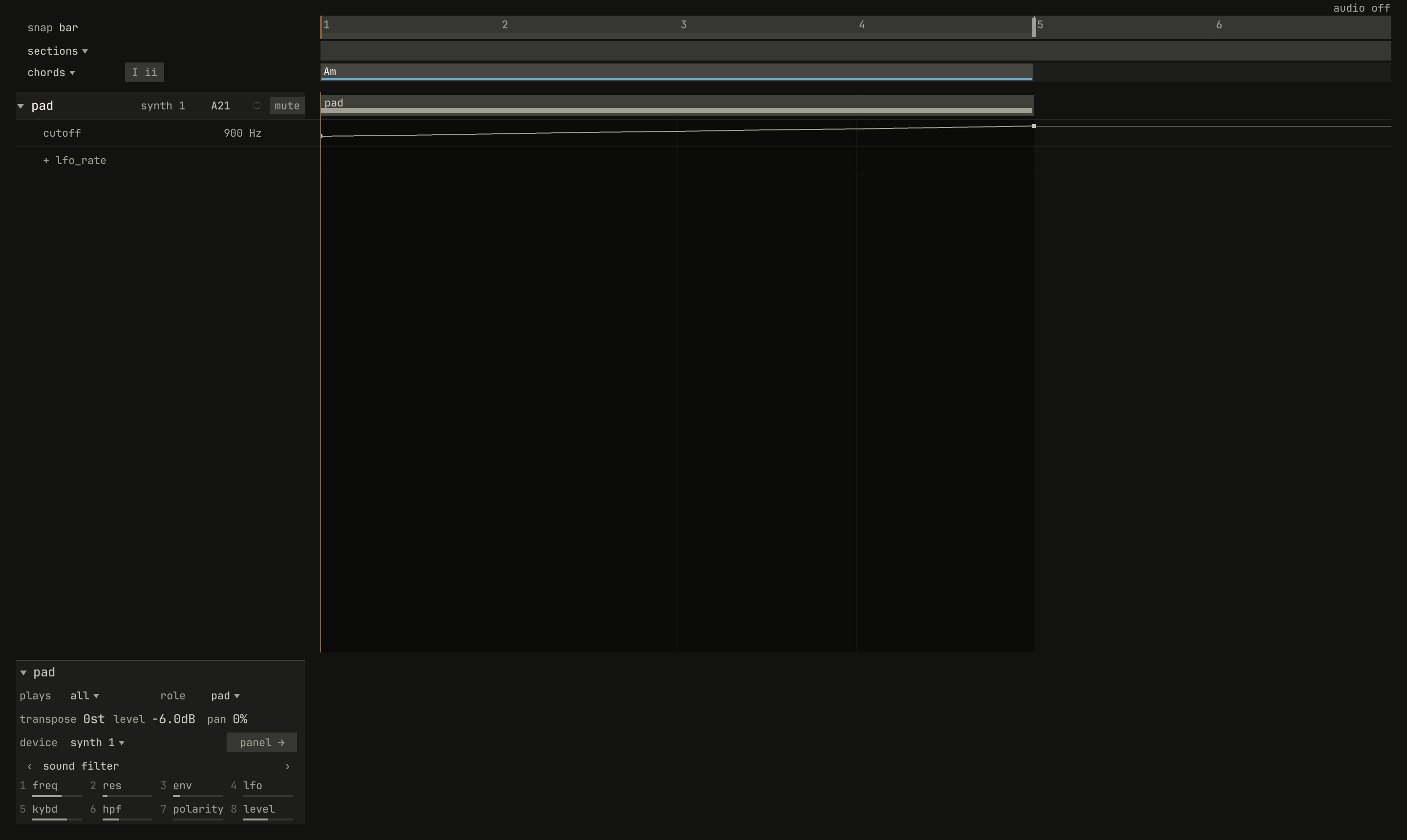
cutoff, rising from 100 Hz at bar 1 to 8,000 Hz at bar 5, and under it the row that adds another. Its readout, 900 Hz, is the patch's own cutoff, which the lane takes over as the song plays. Listen for the chord brightening from dull to open, and see the top of its harmonics climb in the plot.scriptzig build run-studio -- manual/16-lanes/sweep --script manual/16-lanes/sweep.txt
renderzig build run-studio -- render manual/16-lanes/sweep sweep.wav
sweep/song.json
{
  "tempo": 100,
  "end": "5",
  "key": ["1 A minor"],
  "chords": ["1 Am"],
  "devices": [
    { "name": "synth", "type": "synth", "state": { "parts": [{ "patch": "A21", "level": -6 }] } }
  ],
  "tracks": [
    {
      "name": "pad", "device": "synth", "channel": 1, "role": "pad",
      "clips": [{ "at": "1", "length": "4.0.0", "notes": "pad" }],
      "lanes": { "cutoff": ["1 100 exponential", "5 8000"] }
    }
  ],
  "notes": {
    "pad": { "length": "4.0.0", "notes": ["1.1.0 A2 3.3.900 96", "1.1.0 E3 3.3.900 96", "1.1.0 A3 3.3.900 96", "1.1.0 C4 3.3.900 96", "1.1.0 E4 3.3.900 96"] }
  }
}
sweep.txt
# The pad's triangle opens its lanes: the cutoff, rising from bar 1 to
# bar 5.
wait 0.2
click triangle pad
move 1430 890
wait 0.1
capture sweep.png
A click on a track's triangle, left of its name, opens its lanes, and
another closes them; the track's menu has lanes too. The triangle is
brighter on a track that has lanes. Each lane is a row under the track:
- At its left, the control's name, as
cutoffordesk_delay, and the value the control has now, which moves as the song plays. - Across the bars, its points, small squares, and the curve between them, drawn on the control's own scale, as its fader is: the cutoff's fader is exponential, so 100 Hz sits a third of the way up.
A lane plays from its first point. Before it, the control stays where the device's panel has it; after the last point, the lane holds the last value to the song's end.
Adding a lane
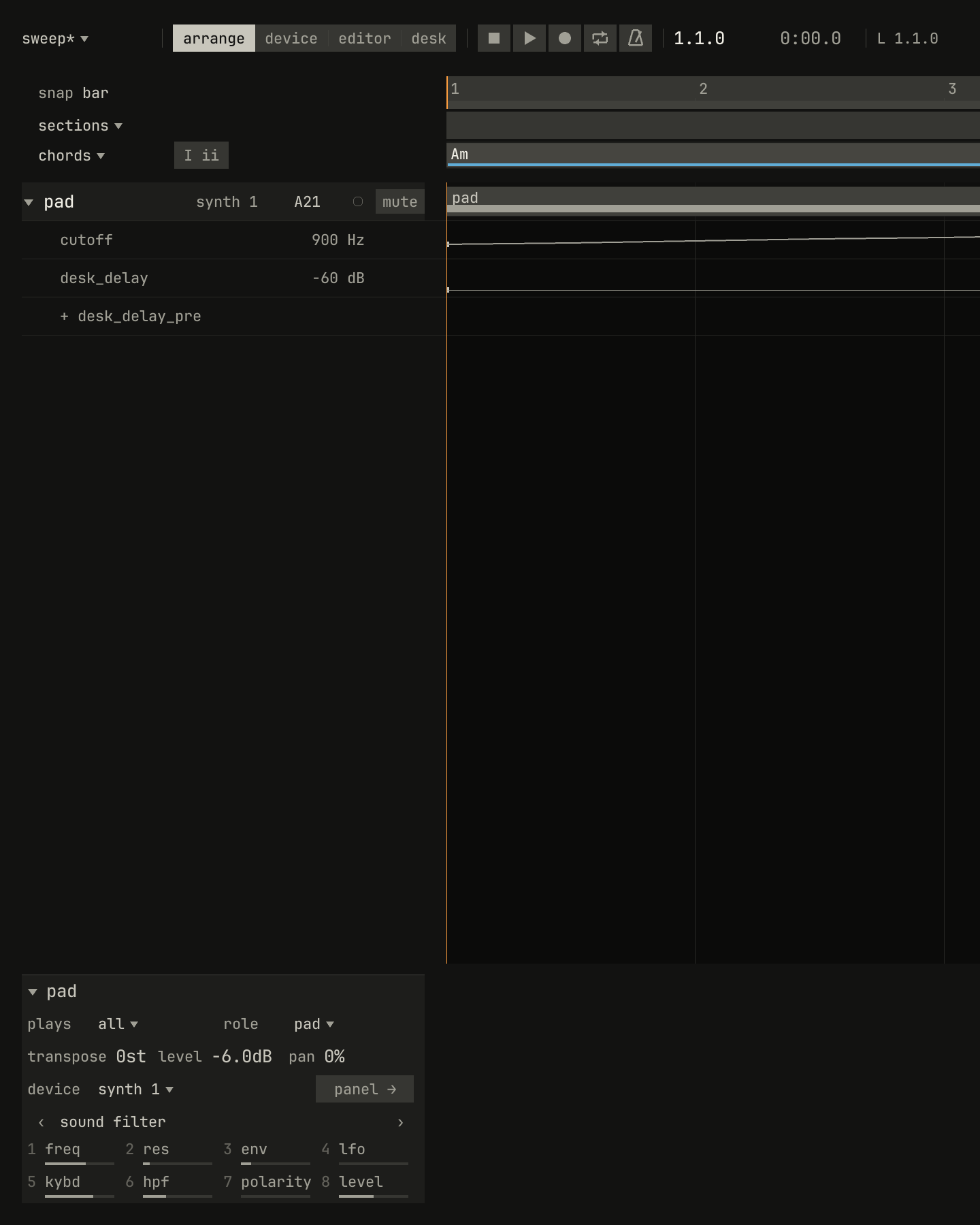
desk_delay, and a click added it: a lane for the delay send of the synth's strip on the desk, with one point at bar 1, at the send's −60 dB, off. The row now offers desk_delay_pre.scriptzig build run-studio -- manual/16-lanes/sweep --script manual/16-lanes/add.txt
sweep/song.json
{
  "tempo": 100,
  "end": "5",
  "key": ["1 A minor"],
  "chords": ["1 Am"],
  "devices": [
    { "name": "synth", "type": "synth", "state": { "parts": [{ "patch": "A21", "level": -6 }] } }
  ],
  "tracks": [
    {
      "name": "pad", "device": "synth", "channel": 1, "role": "pad",
      "clips": [{ "at": "1", "length": "4.0.0", "notes": "pad" }],
      "lanes": { "cutoff": ["1 100 exponential", "5 8000"] }
    }
  ],
  "notes": {
    "pad": { "length": "4.0.0", "notes": ["1.1.0 A2 3.3.900 96", "1.1.0 E3 3.3.900 96", "1.1.0 A3 3.3.900 96", "1.1.0 C4 3.3.900 96", "1.1.0 E4 3.3.900 96"] }
  }
}
add.txt
# The row after the pad's lanes adds one: four notches of the wheel up
# over it pick desk_delay, from the end of the list, and a click adds it.
wait 0.2
click triangle pad
move addlane pad
wheel 1
wheel 1
wheel 1
wheel 1
wait 0.1
click addlane pad
move 1430 890
wait 0.1
capture add.png
The row after a track's lanes adds one. It names the control it adds, as
+ lfo_rate; the wheel over it steps through the controls the track has no
lane for, and a click adds a lane for the one named, with a single point at
bar 1 holding the value the control has now, so the song sounds as it did
until you move a point. The list runs through:
- The device's controls, in the device's own order, the synth's from its LFO on: the synth's faders and switches, the drum machine's voices, or the sampler's program. The control that starts a part's sequence isn't offered, since pattern clips start and stop it.
- Then its strip's on the desk,
desk_level,desk_pan,desk_muted,desk_solo, the EQ's four,desk_delay,desk_delay_pre,desk_reverb, anddesk_reverb_pre(chapter 17).
The wheel turns either way and round, so the strip's controls, at the end,
are a few notches up. With every control laned, the row reads + lane,
and a click on it says so. A strip lane sets the strip of the track's
device, whatever the track's channel, so two tracks on one device with a
lane for the same strip control both set it.
Points
The mouse in a lane:
| Mouse | Does |
|---|---|
| Click or drag an empty place | A point there, its value from the pointer's height; a drag before letting go moves it |
| Drag a point | Moves it, along the bars and up or down |
| Ctrl-click or double-click a point | Its shape: the next of hold, linear, and exponential |
| Right-click a point | Its menu: the tools, shape, and remove point |
| Click a point with the eraser | Takes it away |
A point snaps to the arrange view's grid, the grid the inspector shows
for a selected clip, 1/16 at first; with Ctrl held it goes anywhere. A
lane holds one point a position: a point placed or moved onto another's
position replaces it. Each change is one undo step.
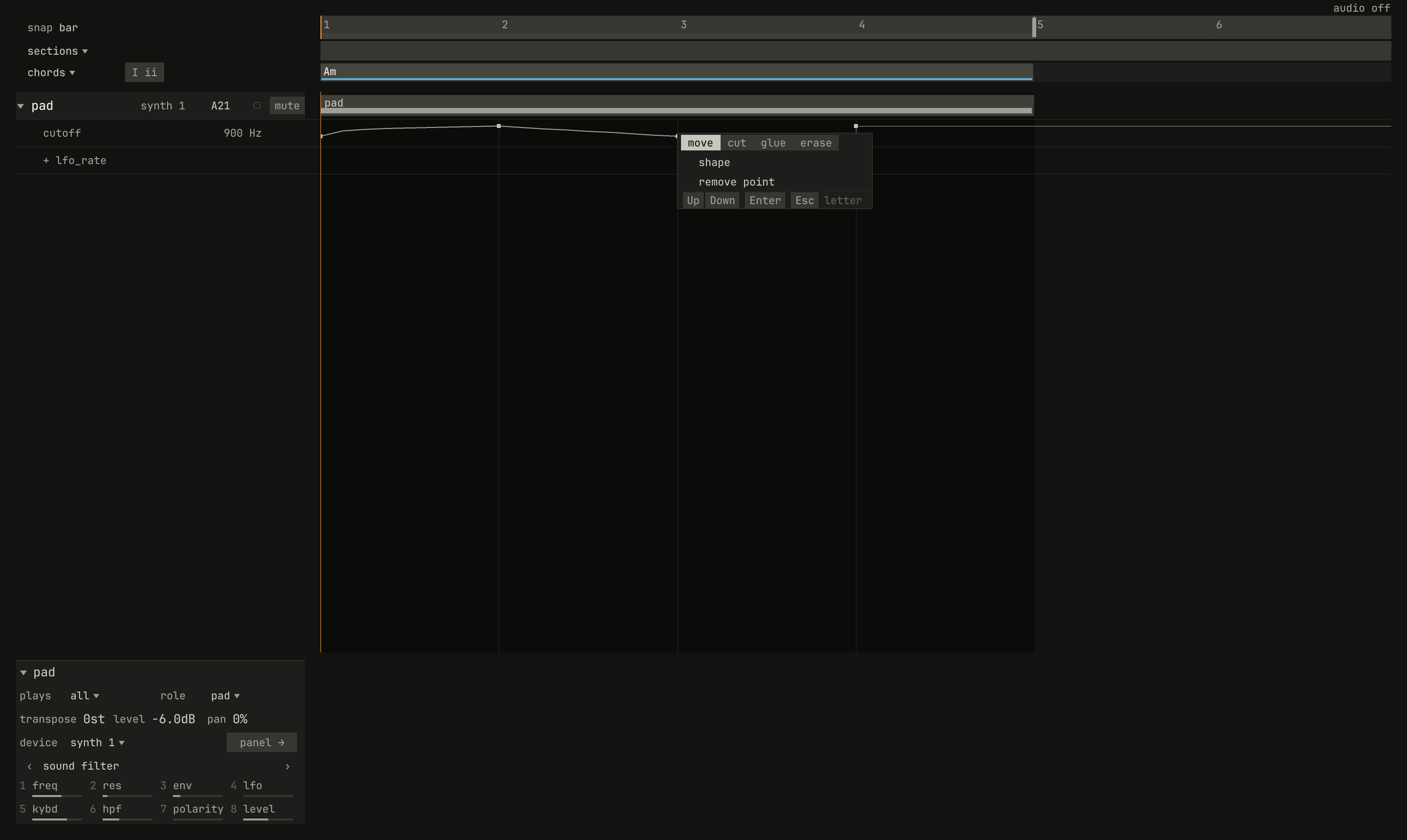
shape and remove point. A right-click never removes; the row does.scriptzig build run-studio -- manual/16-lanes/shapes --script manual/16-lanes/point-menu.txt
shapes/song.json
{
  "tempo": 100,
  "end": "5",
  "key": ["1 A minor"],
  "chords": ["1 Am"],
  "devices": [
    { "name": "synth", "type": "synth", "state": { "parts": [{ "patch": "A21", "level": -6 }] } }
  ],
  "tracks": [
    {
      "name": "pad", "device": "synth", "channel": 1, "role": "pad",
      "clips": [{ "at": "1", "length": "4.0.0", "notes": "pad" }],
      "lanes": { "cutoff": ["1 100 linear", "2 8000 exponential", "3 100", "4 8000"] }
    }
  ],
  "notes": {
    "pad": { "length": "4.0.0", "notes": ["1.1.0 A2 3.3.900 96", "1.1.0 E3 3.3.900 96", "1.1.0 A3 3.3.900 96", "1.1.0 C4 3.3.900 96", "1.1.0 E4 3.3.900 96"] }
  }
}
point-menu.txt
# A right-click on the point at bar 3: the tools, its shape, and
# remove point.
wait 0.2
click triangle pad
rclick point pad cutoff bar 3 mid
wait 0.1
capture point-menu.png
Hold, linear, and exponential
Each point says how the lane gets from it to the next point:
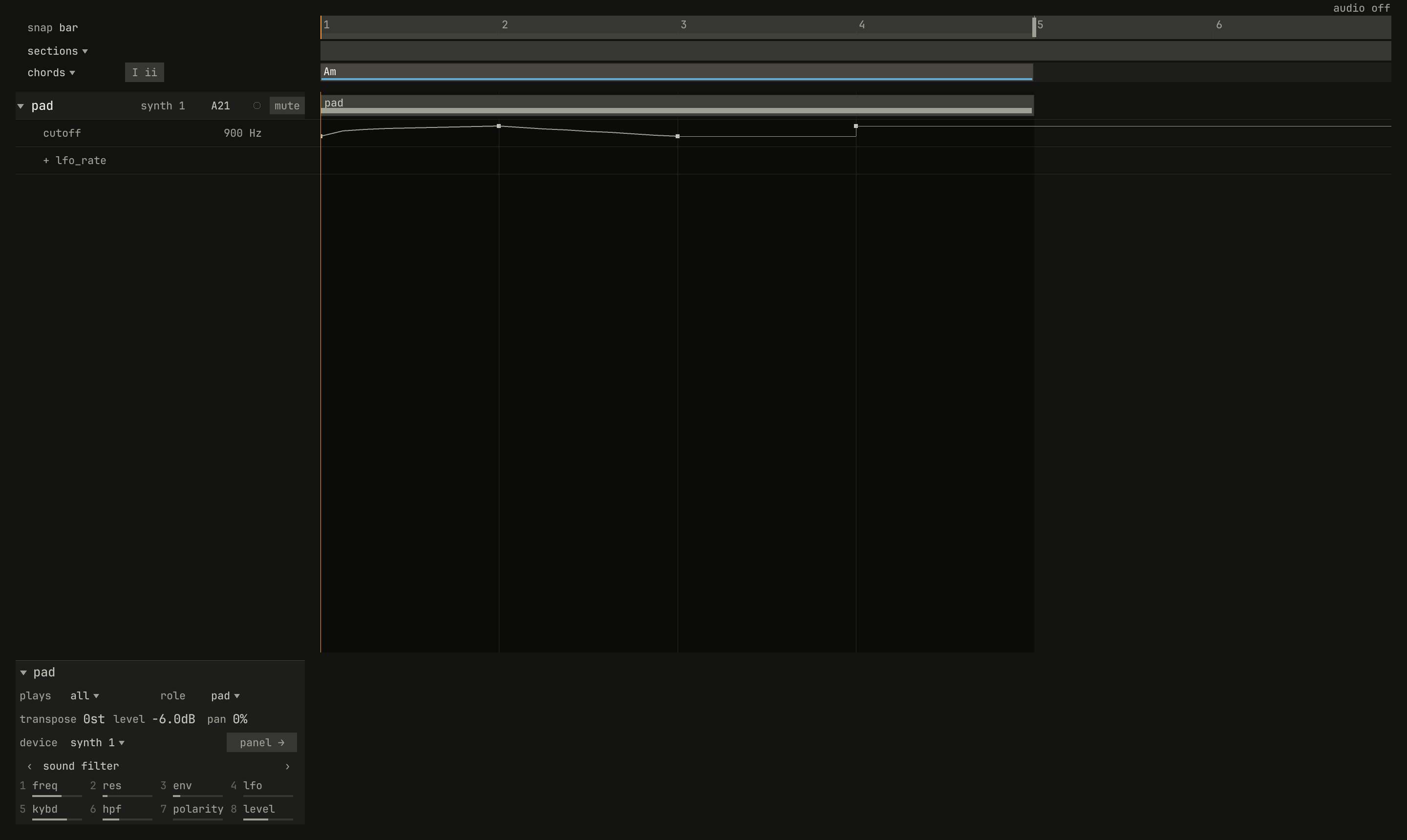
holdkeeps its value until the next point, and jumps there: for a switch, a program-like choice, or a sudden change.linearramps in a straight line of values: even steps of decibels, percent, or hertz.exponentialramps by even ratios: each beat multiplies the value by as much, so a cutoff rises an octave in the same time at any height, as the ear hears pitch.
0.0 / 9.6 s
peak -15.8 dBFS
scriptzig build run-studio -- manual/16-lanes/shapes --script manual/16-lanes/shapes.txt
renderzig build run-studio -- render manual/16-lanes/shapes shapes.wav
shapes/song.json
{
  "tempo": 100,
  "end": "5",
  "key": ["1 A minor"],
  "chords": ["1 Am"],
  "devices": [
    { "name": "synth", "type": "synth", "state": { "parts": [{ "patch": "A21", "level": -6 }] } }
  ],
  "tracks": [
    {
      "name": "pad", "device": "synth", "channel": 1, "role": "pad",
      "clips": [{ "at": "1", "length": "4.0.0", "notes": "pad" }],
      "lanes": { "cutoff": ["1 100 linear", "2 8000 exponential", "3 100", "4 8000"] }
    }
  ],
  "notes": {
    "pad": { "length": "4.0.0", "notes": ["1.1.0 A2 3.3.900 96", "1.1.0 E3 3.3.900 96", "1.1.0 A3 3.3.900 96", "1.1.0 C4 3.3.900 96", "1.1.0 E4 3.3.900 96"] }
  }
}
shapes.txt
# The pad's cutoff lane, open: a linear ramp up, an exponential ramp
# down, a hold, and a jump.
wait 0.2
click triangle pad
move 1430 890
wait 0.1
capture shapes.png
On the lane, the curve is drawn on the control's scale, so the exponential ramp on the cutoff draws straight and the linear one bows up early: it passes 800 Hz, three octaves up, before a tenth of the bar has gone, and spends the rest of the bar on the last three, which is why the plot climbs so fast at the start of bar 1.
A new point takes the shape its control suits: hold for a switch or a
control in whole steps, exponential for one whose fader is exponential,
such as a cutoff, an envelope time, or the desk's EQ frequencies, and
linear for the rest. Ctrl and a click, or a double-click, steps it to the
next. A ramp by ratios needs values above zero, so exponential is offered
only for a control whose range starts above zero, and a switch's point only
holds.
How a lane plays
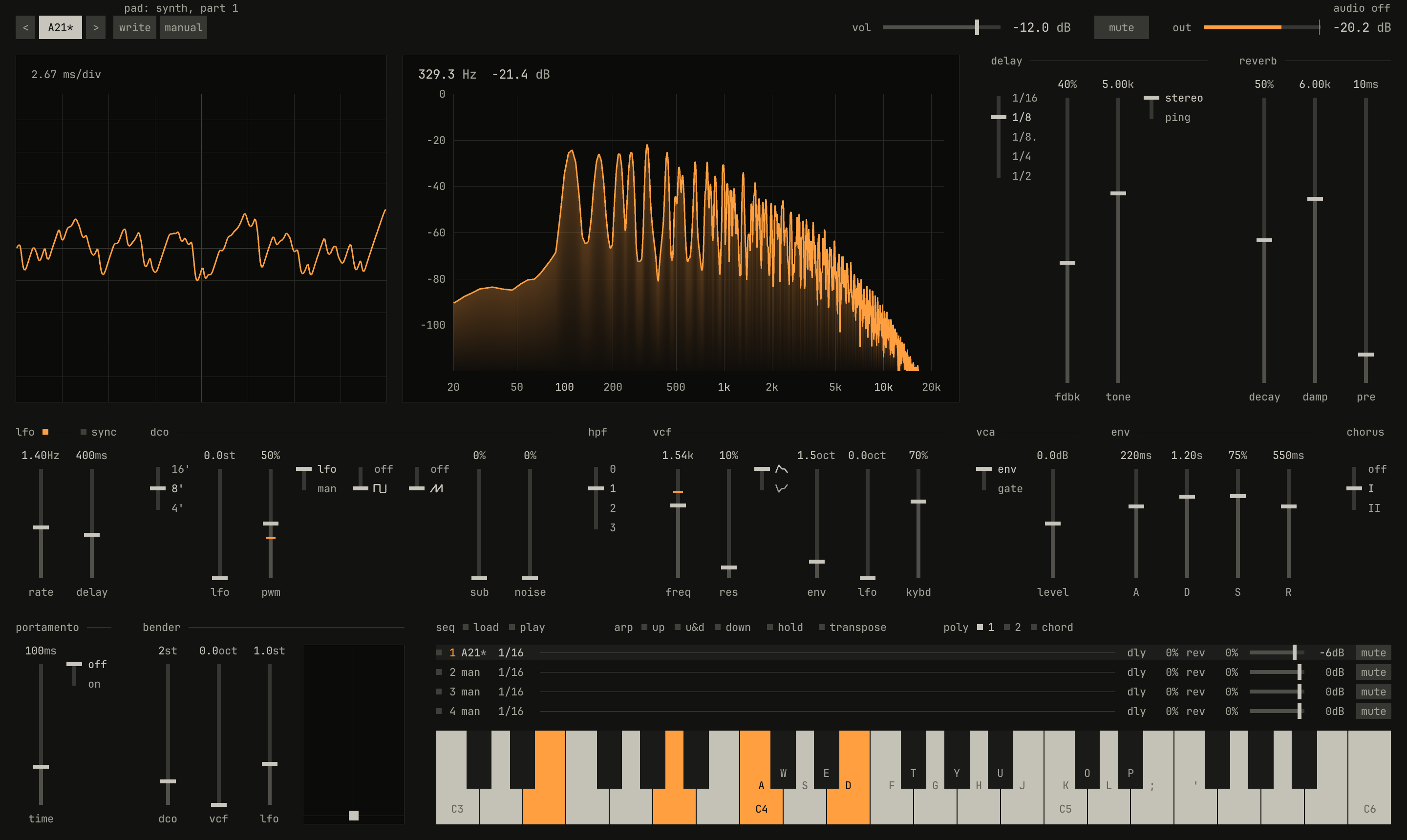
vcf freq fader at 1.54k, where the lane has it, the spectrum falling away above it, and the slot shown as A21*, its sound no longer the factory slot's.openzig build run-studio -- manual/16-lanes/sweep --view device --track 1 --play 1
sweep/song.json
{
  "tempo": 100,
  "end": "5",
  "key": ["1 A minor"],
  "chords": ["1 Am"],
  "devices": [
    { "name": "synth", "type": "synth", "state": { "parts": [{ "patch": "A21", "level": -6 }] } }
  ],
  "tracks": [
    {
      "name": "pad", "device": "synth", "channel": 1, "role": "pad",
      "clips": [{ "at": "1", "length": "4.0.0", "notes": "pad" }],
      "lanes": { "cutoff": ["1 100 exponential", "5 8000"] }
    }
  ],
  "notes": {
    "pad": { "length": "4.0.0", "notes": ["1.1.0 A2 3.3.900 96", "1.1.0 E3 3.3.900 96", "1.1.0 A3 3.3.900 96", "1.1.0 C4 3.3.900 96", "1.1.0 E4 3.3.900 96"] }
  }
}
While the song plays, a point that holds sends its value on its own sample, and a ramp sends a new value every 128 samples, which the device smooths between. The device's panel follows, fader and readout, in the device view, on the desk for a strip's lane, in the lane's own readout, and on the inspector's knobs.
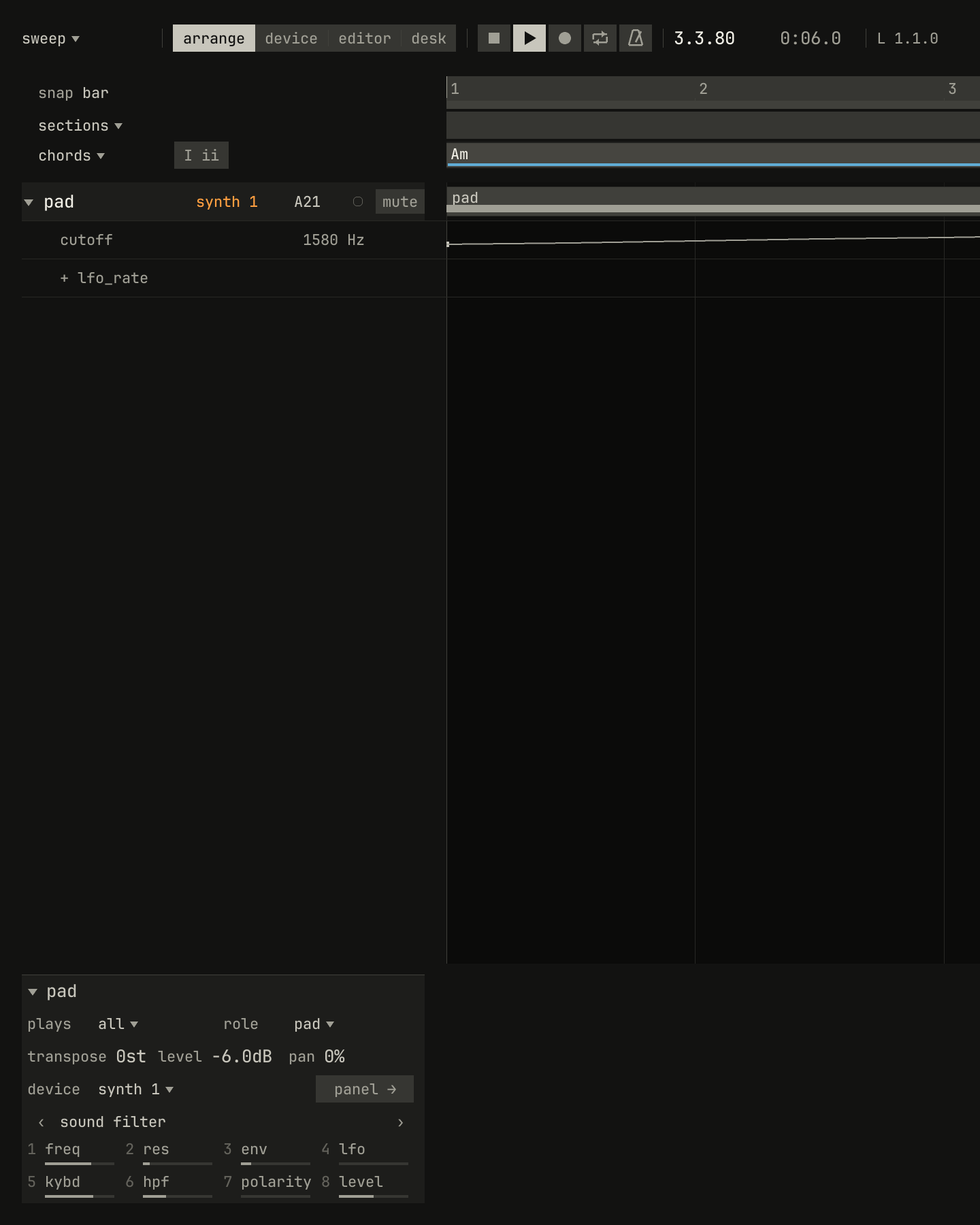
1580 Hz, and the inspector's knob 1, the filter's freq, stands there too.scriptzig build run-studio -- manual/16-lanes/sweep --script manual/16-lanes/playing.txt
sweep/song.json
{
  "tempo": 100,
  "end": "5",
  "key": ["1 A minor"],
  "chords": ["1 Am"],
  "devices": [
    { "name": "synth", "type": "synth", "state": { "parts": [{ "patch": "A21", "level": -6 }] } }
  ],
  "tracks": [
    {
      "name": "pad", "device": "synth", "channel": 1, "role": "pad",
      "clips": [{ "at": "1", "length": "4.0.0", "notes": "pad" }],
      "lanes": { "cutoff": ["1 100 exponential", "5 8000"] }
    }
  ],
  "notes": {
    "pad": { "length": "4.0.0", "notes": ["1.1.0 A2 3.3.900 96", "1.1.0 E3 3.3.900 96", "1.1.0 A3 3.3.900 96", "1.1.0 C4 3.3.900 96", "1.1.0 E4 3.3.900 96"] }
  }
}
playing.txt
# The song playing, six seconds in: the lane's row reads the cutoff the
# synth has now, and the inspector's freq knob stands there too.
wait 0.2
click triangle pad
key space
move 1430 890
wait 6
capture playing.png
The panel and the lane share the control, and while the song plays the lane wins:
- On a ramp, a move on the panel, with the mouse or a knob, lasts until the ramp's next step, a few milliseconds: the fader goes back on its own.
- On a hold, the move stays until the lane's next point, which sets the control again.
- Stopped, a move stays. When the song plays or the song position moves, the studio puts every device where the song has it there, lanes and all, so the control goes back to the lane's value.
A move on the panel changes the device's state, which the song saves, so before a lane's first point the control is where you left it. To change what a lane plays, move its points, or record over it.
Recording a lane
Points needn't be placed by hand. Record on the track, move the control on the device's panel, an inspector knob, a MiniLab knob or fader, or the strip on the desk, and the take writes the move into the lane, keeping only the points needed to play it back within 1% of the control's range (chapter 14). A pass replaces the lane where you moved the control and leaves the rest of it alone, so a filter move can be done again over two bars without touching the eight around them.
The tempo and swing rows
0.0 / 14.0 s
peak -13.2 dBFS
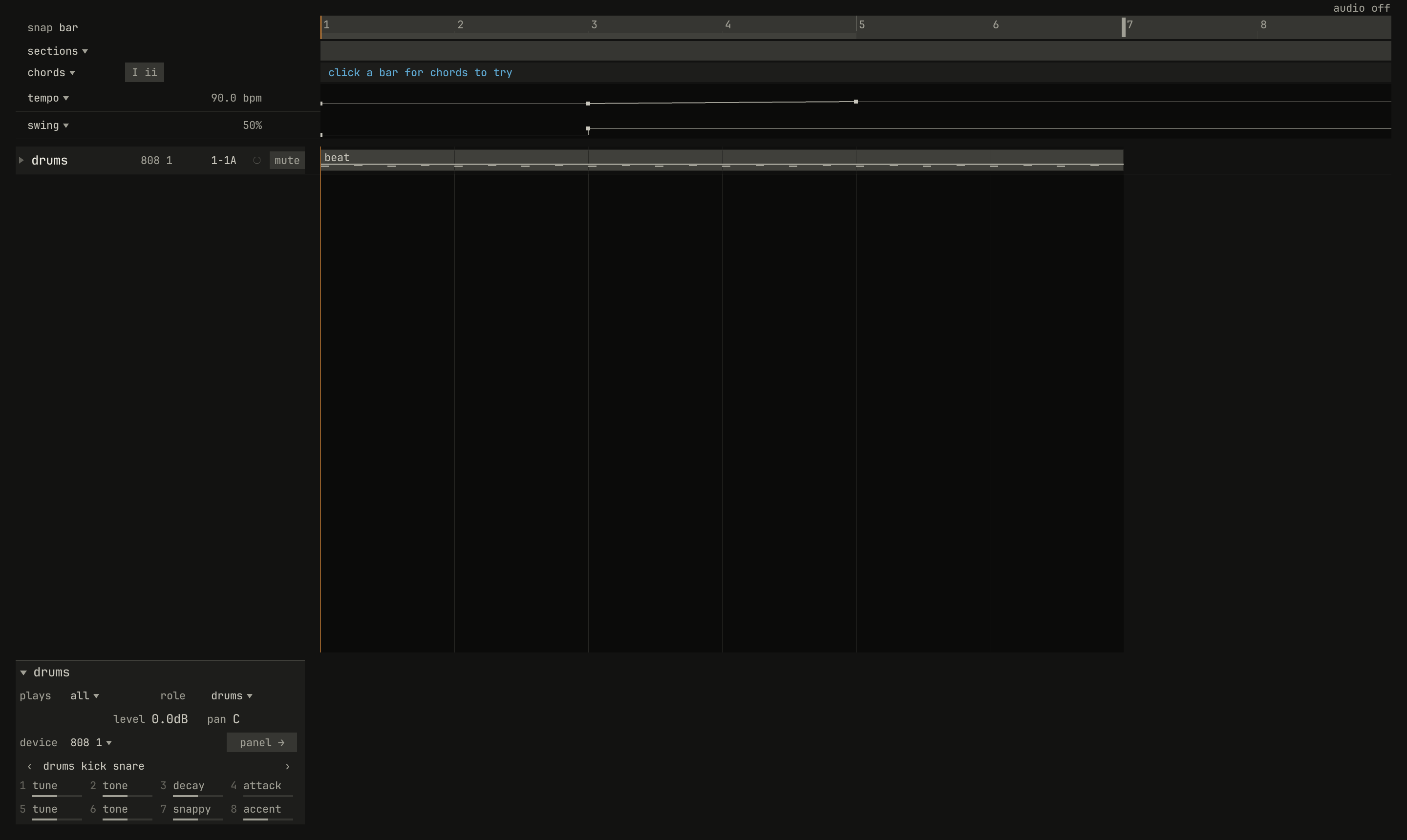
tempo and swing rows, from the ruler's menu: the tempo holds 90 BPM to bar 3 and ramps from there to 120 at bar 5; the swing goes from 50% to 58% at bar 3. Listen for the hats starting to lope at bar 3 as the beat starts to speed up.scriptzig build run-studio -- manual/16-lanes/tempo --script manual/16-lanes/tempo.txt
renderzig build run-studio -- render manual/16-lanes/tempo tempo.wav
tempo/song.json
{
  "tempo": ["1 90", "3 90 ramp", "5 120"],
  "swing": ["1 50", "3 58"],
  "end": "7",
  "devices": [{ "name": "808", "type": "drums" }],
  "tracks": [
    { "name": "drums", "device": "808", "channel": 1, "role": "drums", "clips": [{ "at": "1", "length": "6.0.0", "notes": "beat" }] }
  ],
  "notes": {
    "beat": {
      "length": "1.0.0",
      "notes": [
        "1.1.0 C2 0.0.240 120", "1.1.0 F#2 0.0.240 96", "1.1.240 F#2 0.0.240 60", "1.1.480 F#2 0.0.240 80", "1.1.720 F#2 0.0.240 60",
        "1.2.0 D2 0.0.240 112", "1.2.0 F#2 0.0.240 90", "1.2.240 F#2 0.0.240 60", "1.2.480 F#2 0.0.240 80", "1.2.720 F#2 0.0.240 60",
        "1.3.0 C2 0.0.240 116", "1.3.0 F#2 0.0.240 96", "1.3.240 F#2 0.0.240 60", "1.3.480 F#2 0.0.240 80", "1.3.720 F#2 0.0.240 60",
        "1.4.0 D2 0.0.240 112", "1.4.0 F#2 0.0.240 90", "1.4.240 F#2 0.0.240 60", "1.4.480 F#2 0.0.240 80", "1.4.720 F#2 0.0.240 60"
      ]
    }
  }
}
tempo.txt
# The ruler's menu, and tempo and swing rows: the tempo's and the
# swing's points, under the chord row.
wait 0.2
rclick ruler bar 1
choose tempo and swing rows
move 1430 890
wait 0.1
capture tempo.png
The song's tempo and swing are lanes of the song's own, shown in two rows
under the chord row, pinned while the tracks scroll. tempo and swing rows
shows them, or hides them again, from three menus: the ruler's, sections
▾'s, and the one a right-click on the tempo or the swing in the bar opens.
Each row's header reads the value where the song position is.
Their points edit as a lane's do: a click or a drag places or moves one, by the grid, or anywhere with Ctrl, and its menu or the eraser takes it away. A tempo point holds or ramps to the next, and Ctrl and a click, or a double-click, turns its ramp on or off; a swing point only holds. The song always keeps one tempo point, and the tempo and swing in the bar set the point in force at the song position. A change to the time keeps the song position on its bar.
Lanes and clips
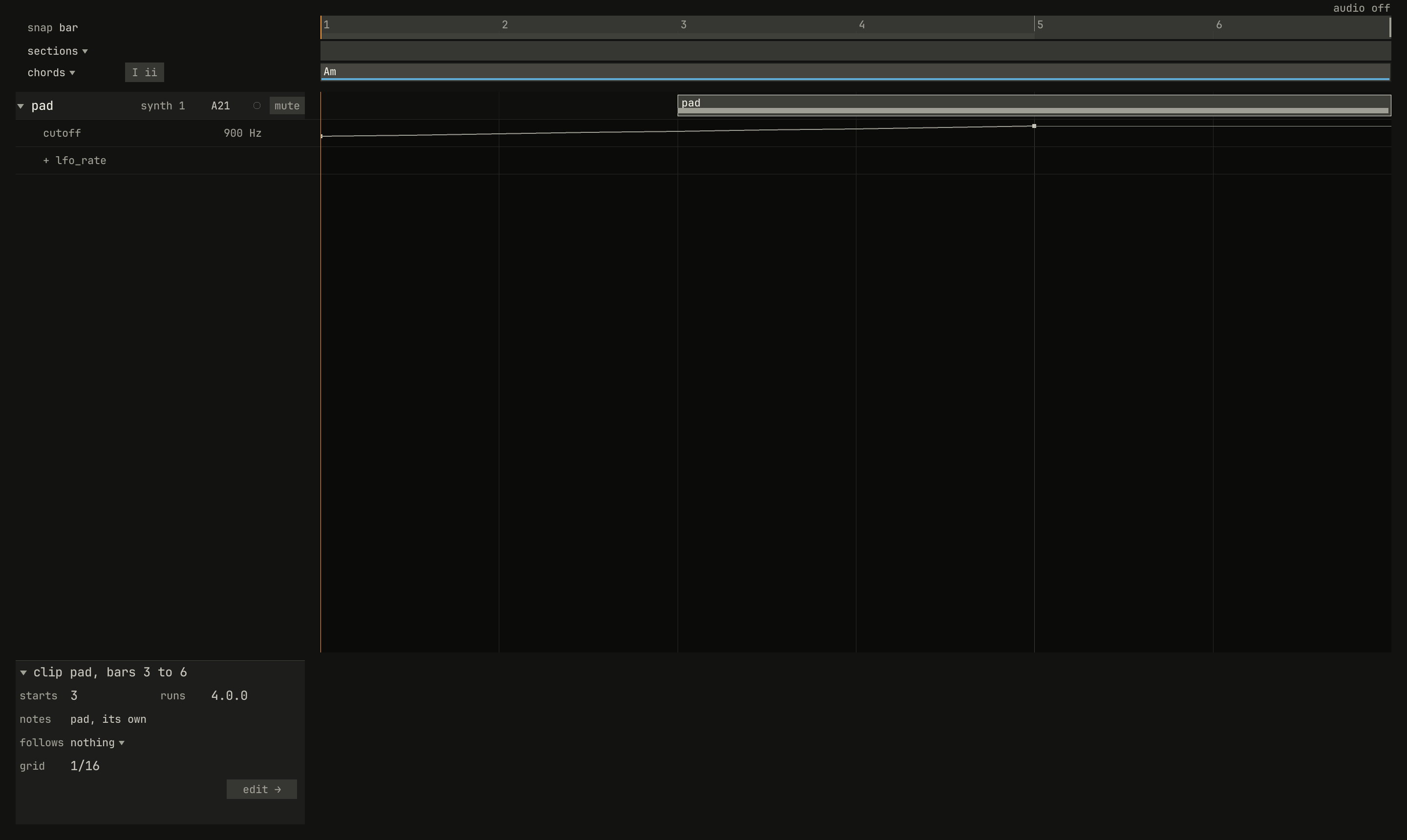
scriptzig build run-studio -- manual/16-lanes/sweep --script manual/16-lanes/moved.txt
sweep/song.json
{
  "tempo": 100,
  "end": "5",
  "key": ["1 A minor"],
  "chords": ["1 Am"],
  "devices": [
    { "name": "synth", "type": "synth", "state": { "parts": [{ "patch": "A21", "level": -6 }] } }
  ],
  "tracks": [
    {
      "name": "pad", "device": "synth", "channel": 1, "role": "pad",
      "clips": [{ "at": "1", "length": "4.0.0", "notes": "pad" }],
      "lanes": { "cutoff": ["1 100 exponential", "5 8000"] }
    }
  ],
  "notes": {
    "pad": { "length": "4.0.0", "notes": ["1.1.0 A2 3.3.900 96", "1.1.0 E3 3.3.900 96", "1.1.0 A3 3.3.900 96", "1.1.0 C4 3.3.900 96", "1.1.0 E4 3.3.900 96"] }
  }
}
moved.txt
# The pad's clip dragged from bar 1 to bar 3. Its lane stays where it
# was.
wait 0.2
click triangle pad
drag lane pad bar 1.2 to lane pad bar 3.2
move 1430 890
wait 0.1
capture moved.png
A lane belongs to its track, not to a clip, and it's laid out in the song's bars. Moving a clip, copying it, linking it, cutting it, or making it longer leaves the lane as it was, so a move in a lane stays on its bars whatever plays there. Duplicate a clip that has a filter opening over it, and the copy plays with whatever the lane does at its new bars.
What moves the song's bars moves the lanes with them: inserting bars, deleting them, duplicating them, and dragging a section to another place take the lanes' points along with the clips, and a lane holds its value across bars inserted (chapter 13).
A track on another device
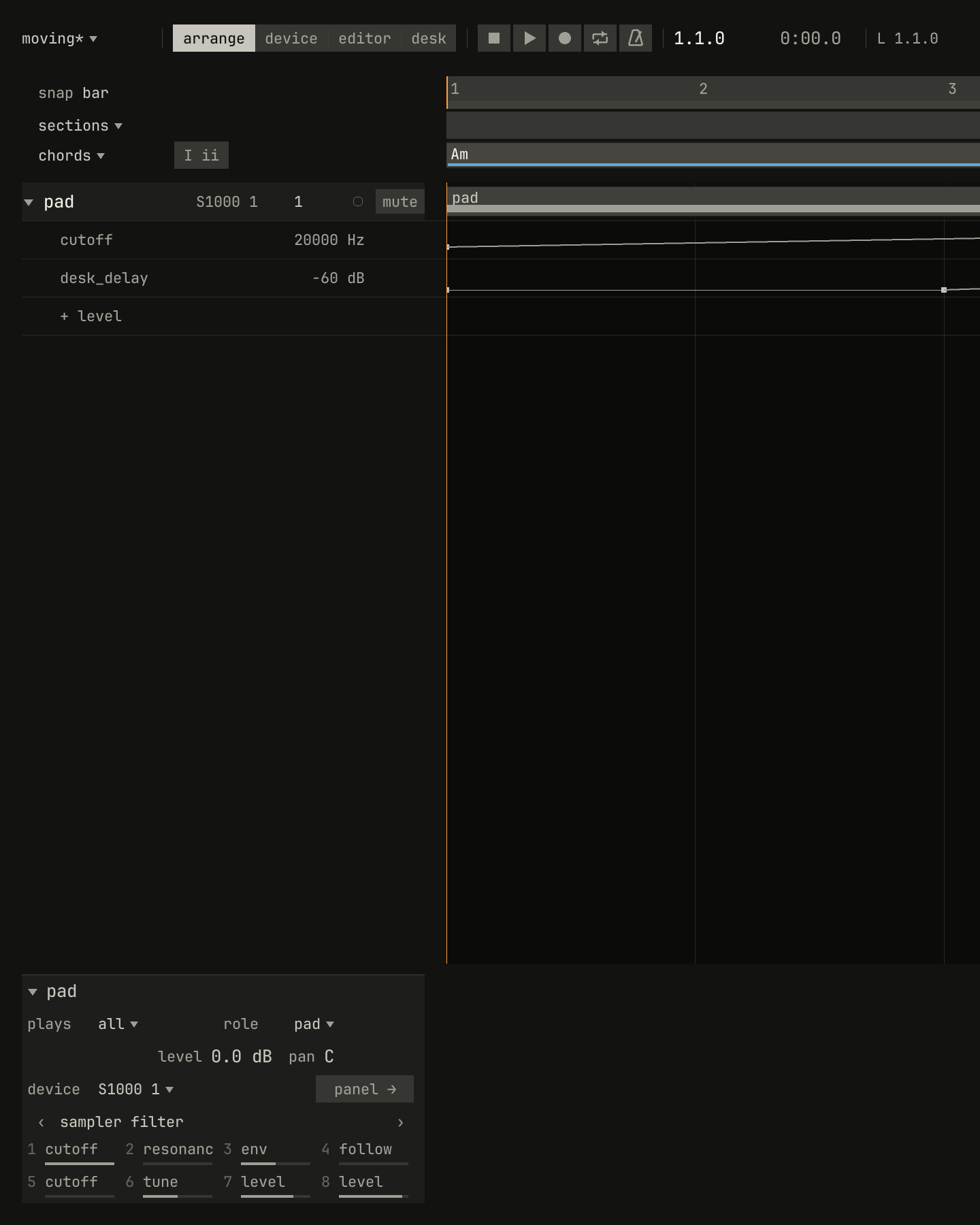
cutoff, sub, and desk_delay, moved to a new sampler from its device's list. The sampler has a cutoff, so that lane came along; it has no sub oscillator, so that lane went; and the strip's lane always comes.scriptzig build run-studio -- manual/16-lanes/moving --script manual/16-lanes/device.txt
moving/song.json
{
  "tempo": 100,
  "end": "5",
  "key": ["1 A minor"],
  "chords": ["1 Am"],
  "devices": [
    { "name": "synth", "type": "synth", "state": { "parts": [{ "patch": "A21", "level": -6 }] } }
  ],
  "tracks": [
    {
      "name": "pad", "device": "synth", "channel": 1, "role": "pad",
      "clips": [{ "at": "1", "length": "4.0.0", "notes": "pad" }],
      "lanes": { "cutoff": ["1 100 exponential", "5 8000"], "sub": ["1 0", "3 60"], "desk_delay": ["1 -60", "3 -60 linear", "5 -18"] }
    }
  ],
  "notes": {
    "pad": { "length": "4.0.0", "notes": ["1.1.0 A2 3.3.900 96", "1.1.0 E3 3.3.900 96", "1.1.0 A3 3.3.900 96", "1.1.0 C4 3.3.900 96", "1.1.0 E4 3.3.900 96"] }
  }
}
device.txt
# The pad, with lanes for cutoff, sub, and desk_delay, moved to a new
# sampler from its device's list.
wait 0.2
click triangle pad
click device pad
choose new sampler
move 1430 890
wait 0.1
capture device.png
A click on a track's device drops the list of the song's devices, and new ones; another device moves the track there, and its lanes go as far as the new device can play them:
- A lane goes to the control of the same name, with each point's value
brought within the new control's range: the synth's
cutoffbecomes the sampler'scutoff, andlevel,pan, andmutedexist on every device. - A lane whose control the device doesn't have goes.
- A strip's lane,
desk_anything, always comes, since every device has a strip. - Points on a switch hold, and an exponential ramp between values on either side of zero becomes linear.
On another channel of the same device, or another device of the same type, every lane comes as it is.
Try it in the window
- In
sweep, open the pad's lanes, Ctrl-click the point at bar 1 to make the ramp linear, and listen. Ctrl-click again for hold. - Click in the cutoff lane at bar 3, near the bottom, for a point that dips the filter, and drag it to the bar's middle with Ctrl held.
- Add a
desk_delaylane with the row's wheel, and click two points into it: off at bar 2, −12 dB at bar 4. - Play the song and drag the inspector's
freqknob: on the ramp it springs back. Stop, drag it, and play again. - Open
tempo, show the tempo and swing rows from the ruler's menu, and drag the 120 BPM point down to 100.
Next: chapter 17, the desk, the mixer every device plays through.