IV. Working in the studio
The desk
The desk is the studio's mixer: how each device sounds in the mix, where it
sits from left to right, how much of it goes to the echo and the room, and
how loud the whole song leaves the studio. It's modeled on the mixer of the
TASCAM Portastudio 244, the four-track cassette studio of 1982, whose
owner's manual is in reference/portastudio-244/. This chapter goes down a
strip, control by control, then across to the returns and the master.
Open the chapter's song, four bars on three devices, at the desk:
zig build run-studio -- manual/17-desk/mix --view desk
0.0 / 8.6 s
peak -9.0 dBFS
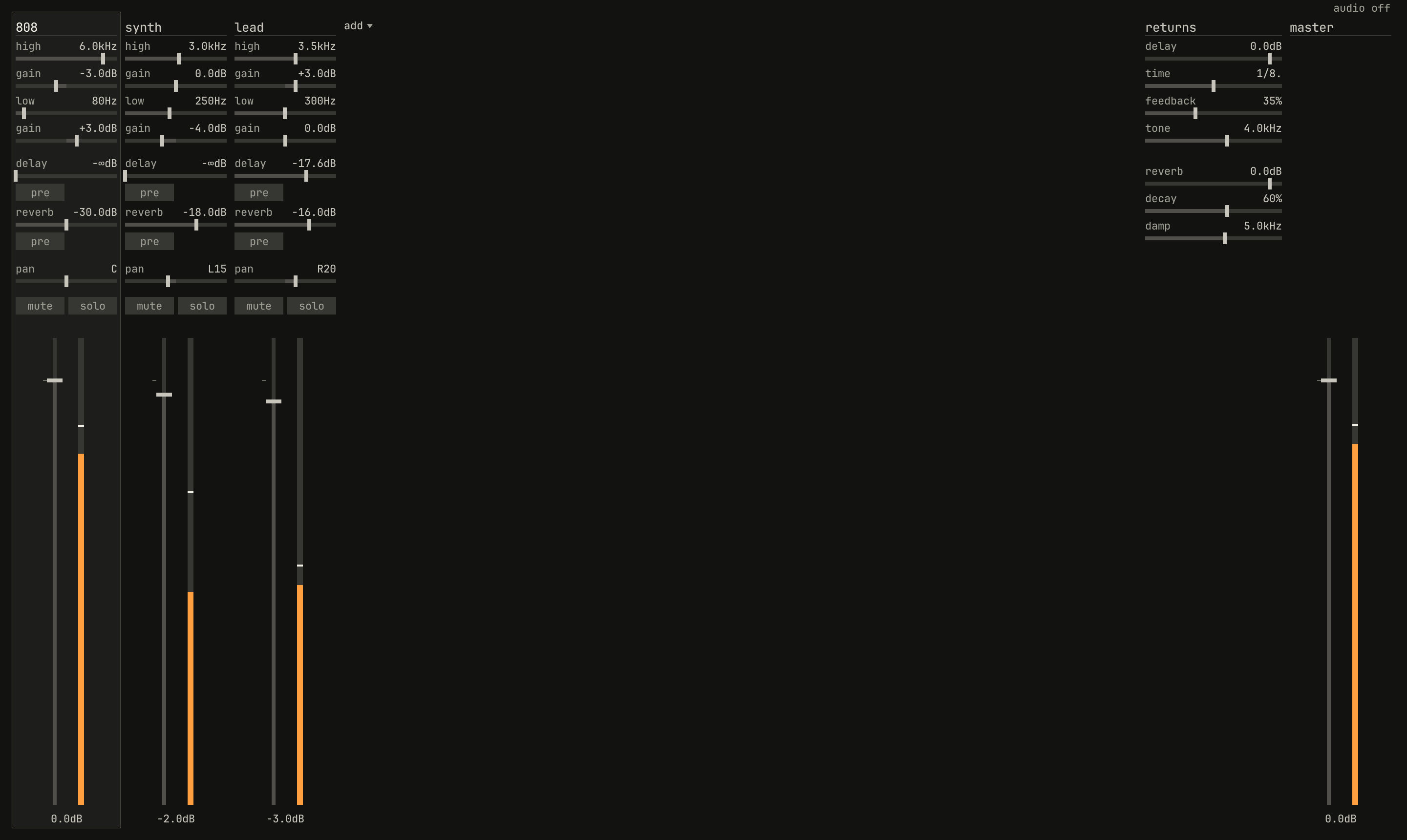
808, synth, and lead, then the returns and the master. The 808 strip is framed, since the drums are the selected track. Each meter holds its peak as a white mark, and the lead's delay send stands at −17.6 dB, where its lane has it six seconds in.openzig build run-studio -- manual/17-desk/mix --view desk --play 1
renderzig build run-studio -- render manual/17-desk/mix desk.wav
mix/song.json
{
  "tempo": 112,
  "end": "5",
  "key": ["1 A minor"],
  "chords": ["1 Am", "2 F", "3 C", "4 G"],
  "devices": [
    { "name": "808", "type": "drums" },
    { "name": "synth", "type": "synth", "state": { "parts": [
      { "patch": "A45", "level": -8 },
      { "patch": "A51", "level": -4 }
    ] } },
    { "name": "lead", "type": "synth", "state": { "parts": [
      { "patch": "A61", "level": -8 }
    ] } }
  ],
  "desk": {
    "master": 0,
    "delay": { "return": 0, "time": "1/8.", "feedback": 35, "tone": 4000 },
    "reverb": { "return": 0, "decay": 60, "damp": 5000 },
    "strips": {
      "808": { "level": 0, "pan": 0, "muted": false, "low_freq": 80, "low_gain": 3, "high_freq": 6000, "high_gain": -3, "reverb": -30 },
      "synth": { "level": -2, "pan": -15, "muted": false, "low_freq": 250, "low_gain": -4, "reverb": -18 },
      "lead": { "level": -3, "pan": 20, "muted": false, "high_freq": 3500, "high_gain": 3, "delay": -14, "reverb": -16 }
    }
  },
  "tracks": [
    { "name": "drums", "device": "808", "channel": 1, "role": "drums", "clips": [{ "at": "1", "length": "4.0.0", "notes": "beat" }] },
    { "name": "bass", "device": "synth", "channel": 2, "role": "bass", "clips": [{ "at": "1", "length": "4.0.0", "notes": "bass" }] },
    { "name": "keys", "device": "synth", "channel": 1, "role": "chords", "clips": [{ "at": "1", "length": "4.0.0", "notes": "keys" }] },
    {
      "name": "lead",
      "device": "lead",
      "channel": 1,
      "role": "lead",
      "clips": [{ "at": "1", "length": "4.0.0", "notes": "lead" }],
      "lanes": { "desk_delay": ["1 -40 linear", "5 -8"] }
    }
  ],
  "notes": {
    "beat": {
      "length": "1.0.0",
      "notes": [
        "1.1.0 C2 0.0.240 120", "1.1.480 F#2 0.0.240 70",
        "1.2.0 C2 0.0.240 112", "1.2.0 D#2 0.0.240 100", "1.2.480 F#2 0.0.240 76",
        "1.3.0 C2 0.0.240 116", "1.3.480 F#2 0.0.240 70",
        "1.4.0 C2 0.0.240 112", "1.4.0 D#2 0.0.240 100", "1.4.480 F#2 0.0.240 80"
      ]
    },
    "bass": { "length": "4.0.0", "follow": { "pattern": "offbeat", "low": "E1" } },
    "keys": { "length": "4.0.0", "follow": { "pattern": "halves", "low": "F3" } },
    "lead": {
      "length": "4.0.0",
      "notes": [
        "1.1.0 E5 0.0.900 100", "1.2.0 D5 0.0.420 92", "1.2.480 C5 0.0.420 92", "1.3.0 A4 0.1.900 96",
        "2.1.0 C5 0.0.900 96", "2.2.0 D5 0.0.900 92", "2.3.0 C5 0.0.900 94", "2.4.0 A4 0.0.900 90",
        "3.1.0 E5 0.1.420 100", "3.2.480 G5 0.0.420 96", "3.3.0 E5 0.0.900 96", "3.4.0 D5 0.0.900 92",
        "4.1.0 D5 0.0.900 96", "4.2.0 E5 0.0.420 90", "4.2.480 D5 0.0.420 92", "4.3.0 G4 0.1.900 100"
      ]
    }
  }
}Ctrl+4 shows the desk. From the left, a strip for each of the
song's devices, in the order the song lists them, each named for its
device, then one for each audio track, named for the track; after the
last, add ▾. On the right, the returns of the studio's own delay and
reverb, and the master fader. The desk shows eight strips at once;
with more, ‹ and › in the names' row, or the wheel over it, move along
them.
A strip a device
A strip takes its device's whole output: everything the device plays, its
own effects included. The song here has four tracks, and the bass and the
keys both play the synth, on its channels 2 and 1, so they share the
synth strip. Each track's own level and pan, in the inspector, are its
device's channel's, before the strip: they balance the tracks a device
plays, and the strip places the device in the mix.
Down a strip, in the order the sound goes through it:
| Row | What it does | Range |
|---|---|---|
high, gain |
The EQ's high band: its frequency and its boost or cut | 1 to 8 kHz, ±15 dB |
low, gain |
The low band | 62 Hz to 1.5 kHz, ±15 dB |
delay, pre |
The send to the studio's delay, and whether it's before the fader | −60 dB, off, to 0 |
reverb, pre |
The send to the studio's reverb | −60 dB, off, to 0 |
pan |
A balance between left and right | L100 to R100 |
mute, solo |
Cut the strip, or every strip but those soloed | |
| The fader | The strip's level into the mix, with its meter beside it | −60 dB, off, to +6 |
A fresh strip, as add ▾ makes it, is flat at 0 dB in the middle with
both sends off, and passes its device bit for bit. The song saves each
strip in its desk, as chapter 20 shows.
The EQ
Each strip has two bands of sweep EQ, as the 244's input modules do: a
gain that boosts or cuts, and a frequency the boost or cut is centred
on. The 244's manual, on page 22, explains the name:
The term "parametric" refers to the adjustable frequency point. The "parameters" or "rules" are not fixed at any specific number, but are continuously variable. Two aspects of the circuit, the frequency center point and the "boost" or "cut" in gain are adjustable without "steps".
To see what a band does, play noise through it, which has every frequency at once, and compare its spectrum with the band flat:
0.0 / 16.0 s
peak -19.8 dBFS
openzig build run-studio -- manual/17-desk/eq
renderzig build run-studio -- render manual/17-desk/eq high.wav --from 1 --to 9
eq/song.json
{
  "tempo": 120,
  "end": "17",
  "devices": [
    { "name": "noise", "type": "synth", "state": { "parts": [
      { "patch": { "saw": "off", "noise": 100, "cutoff": 20000, "resonance": 0, "key_follow": 0, "filter_env": 0, "attack": 0.0015, "sustain": 100, "release": 0.0015 }, "level": -12 }
    ] } }
  ],
  "desk": {
    "strips": { "noise": { "level": 0, "pan": 0, "muted": false } }
  },
  "tracks": [
    {
      "name": "noise",
      "device": "noise",
      "channel": 1,
      "clips": [{ "at": "1", "length": "8.0.0", "notes": "held" }, { "at": "9", "length": "8.0.0", "notes": "held" }],
      "lanes": {
        "desk_high_freq": ["1 3000", "3 1000", "5 8000", "7 3000"],
        "desk_high_gain": ["1 0", "3 15", "7 -15", "9 0"],
        "desk_low_freq": ["1 300", "11 62", "13 1500", "15 300"],
        "desk_low_gain": ["1 0", "11 15", "15 -15"]
      }
    }
  ],
  "notes": {
    "held": { "length": "8.0.0", "notes": ["1.1.0 C4 8.0.0 100"] }
  }
}0.0 / 16.0 s
peak -21.9 dBFS
openzig build run-studio -- manual/17-desk/eq
renderzig build run-studio -- render manual/17-desk/eq low.wav --from 9 --to 17
eq/song.json
{
  "tempo": 120,
  "end": "17",
  "devices": [
    { "name": "noise", "type": "synth", "state": { "parts": [
      { "patch": { "saw": "off", "noise": 100, "cutoff": 20000, "resonance": 0, "key_follow": 0, "filter_env": 0, "attack": 0.0015, "sustain": 100, "release": 0.0015 }, "level": -12 }
    ] } }
  ],
  "desk": {
    "strips": { "noise": { "level": 0, "pan": 0, "muted": false } }
  },
  "tracks": [
    {
      "name": "noise",
      "device": "noise",
      "channel": 1,
      "clips": [{ "at": "1", "length": "8.0.0", "notes": "held" }, { "at": "9", "length": "8.0.0", "notes": "held" }],
      "lanes": {
        "desk_high_freq": ["1 3000", "3 1000", "5 8000", "7 3000"],
        "desk_high_gain": ["1 0", "3 15", "7 -15", "9 0"],
        "desk_low_freq": ["1 300", "11 62", "13 1500", "15 300"],
        "desk_low_gain": ["1 0", "11 15", "15 -15"]
      }
    }
  ],
  "notes": {
    "held": { "length": "8.0.0", "notes": ["1.1.0 C4 8.0.0 100"] }
  }
}
Each band is a bell, at its full gain on its frequency and less either side. The 244's manual gives each band's range but not its width; its graphs on page 22 put the points at half the boost about 1.6 octaves apart, so both bands here are that wide, a Q of 0.85, at any gain. In the first figure, the boost of 15 dB at 1 kHz is half that, 7.5 dB, at about 550 Hz and 1.7 kHz. The noise is the synth's, through its open filter, at a level low enough that the boosts stay far from the limiter; it falls away above 10 kHz in every curve alike, which is the synth, not the EQ.
The 244's manual's advice, on the same page, holds for any EQ:
Even experienced engineers have a tendency to forget that "cutting" the lows will have a similar effect to "boosting" the highs, and puts less of a strain on the electronics.
So before boosting the highs of a dull pad, try cutting its lows; before boosting a bass to be heard, try cutting what covers it in the other strips.
The sends
A send takes some of the strip to the studio's delay or its reverb, from
−60 dB, which is off, to 0 dB. Its pre switch says where it takes it
from: off, after the fader and the pan, so the send follows the fader; on,
before the fader, after the EQ and the mute, so it doesn't. The 244's
manual says what each is for, on page 23 for after the fader:
POST fader is usually used to feed signal to an echo device when a fadeout is planned. As the INPUT fader is lowered, the POST signal will also "fade" and you won't be left with a "ghost player" in your mix.
and on page 21 for before it:
In remix, this type of "send" will allow you to have a signal "walk back" into an echo device when you lower the module fader. As the regular signal diminishes the echo send remains constant, and produces this dramatic effect.
0.0 / 16.0 s
peak -20.5 dBFS
pre off, the second with it on. Overlaid, the two runs match until the fader moves; then the first fades to nothing, and the second keeps its echoes after the fader is off, about 8 dB under the plucks that fed them.openzig build run-studio -- manual/17-desk/sends
renderzig build run-studio -- render manual/17-desk/sends sends.wav
sends/song.json
{
  "tempo": 120,
  "end": "9",
  "devices": [
    { "name": "pluck", "type": "synth", "state": { "parts": [
      { "patch": { "cutoff": 2500, "resonance": 10, "filter_env": 2, "attack": 0.0015, "decay": 0.25, "sustain": 0, "release": 0.2 }, "level": 0 }
    ] } }
  ],
  "desk": {
    "delay": { "return": 0, "time": "1/8.", "feedback": 50, "tone": 5000 },
    "strips": { "pluck": { "level": 0, "pan": 0, "muted": false, "delay": -6 } }
  },
  "tracks": [
    {
      "name": "pluck",
      "device": "pluck",
      "channel": 1,
      "clips": [{ "at": "1", "length": "8.0.0", "notes": "pluck" }],
      "lanes": {
        "desk_level": ["1 0", "2 0 linear", "4 -60", "5 0", "6 0 linear", "8 -60"],
        "desk_delay_pre": ["1 post", "5 pre"]
      }
    }
  ],
  "notes": {
    "pluck": { "length": "1.0.0", "notes": ["1.1.0 A3 0.0.480 110", "1.3.0 E4 0.0.480 100"] }
  }
}
Each strip sets its own sends, as the 808's reverb send at −30 dB and
the lead's at −16 dB in Fig. 17.1, and every strip's go to the same delay
and reverb, the returns'.
The returns
The returns are the studio's own delay and reverb, which every strip sends to, and the level each comes back into the mix at. The 244's manual says it of its own return, on page 26:
This controls the amount added to the MIX of whatever your EFFECT has done to the signal you sent out.
| Row | What it does | Range |
|---|---|---|
delay |
The delay's return | −60 dB, off, to +6 |
time |
The delay's time, in notes at the song's tempo | 1/16, 1/8, 1/8., 1/4, 1/2 |
feedback |
How much of each repeat comes round again | 0 to 95% |
tone |
A low-pass in the repeats, so each is darker than the last | 500 Hz to 16 kHz |
reverb |
The reverb's return | −60 dB, off, to +6 |
decay |
How long the room rings | 0 to 100% |
damp |
A low-pass inside the room, so its tail darkens | 1 to 16 kHz |
They are the synth's delay and plate, built from the same code: the delay and Dattorro's plate that the synth's chapter 10 measures. The synth keeps its own pair for its parts, inside the synth, and the desk's are a second pair, for every device. They differ in three ways:
- Who sends. The synth's take each of its parts, by the part's
delay_sendandreverb_send, in percent. The desk's take whole devices, by a strip's sends, in dB, so the drum machine and the sampler, which have no effects of their own, have these. - Where they are. The synth's effects are part of what the synth plays, so they come through its strip, EQ, fader, and sends included. The desk's join the mix after the strips, through the master.
- What they offer. The desk's delay is stereo only, with none of the synth's ping-pong, and its reverb has a fixed pre-delay of 10 ms, the synth's default.
0.0 / 8.0 s
peak -11.9 dBFS
openzig build run-studio -- manual/17-desk/room
renderzig build run-studio -- render manual/17-desk/room room.wav
room/song.json
{
  "tempo": 120,
  "end": "5",
  "devices": [{ "name": "808", "type": "drums" }],
  "desk": {
    "reverb": { "return": 0, "decay": 60, "damp": 6000 },
    "strips": { "808": { "level": 0, "pan": 0, "muted": false } }
  },
  "tracks": [
    {
      "name": "clap",
      "device": "808",
      "channel": 1,
      "clips": [{ "at": "1", "length": "4.0.0", "notes": "clap" }],
      "lanes": { "desk_reverb": ["1 -60", "3 -6"] }
    }
  ],
  "notes": {
    "clap": { "length": "1.0.0", "notes": ["1.2.0 D#2 0.0.240 110", "1.4.0 D#2 0.0.240 110"] }
  }
}
The delay's time follows the song's tempo, and a new time fades in over 50 ms. Both start empty whenever the song is located or a cycle goes round again, as the synth's do.
Pan
pan places the strip from left to right. It's a balance, as the synth's
parts' pans are: in the middle both sides pass whole, and turning it
toward one side turns the other side down, to nothing at the end.
0.0 / 8.0 s
peak -20.7 dBFS
openzig build run-studio -- manual/17-desk/balance
renderzig build run-studio -- render manual/17-desk/balance pan.wav
balance/song.json
{
  "tempo": 120,
  "end": "5",
  "devices": [
    { "name": "noise", "type": "synth", "state": { "parts": [
      { "patch": { "saw": "off", "noise": 100, "cutoff": 20000, "resonance": 0, "key_follow": 0, "filter_env": 0, "attack": 0.0015, "sustain": 100, "release": 0.0015 }, "level": 0 }
    ] } }
  ],
  "desk": {
    "strips": { "noise": { "level": 0, "pan": 0, "muted": false } }
  },
  "tracks": [
    {
      "name": "noise",
      "device": "noise",
      "channel": 1,
      "clips": [{ "at": "1", "length": "4.0.0", "notes": "held" }],
      "lanes": { "desk_pan": ["1 0", "2 -50", "3 -100", "4 50"] }
    }
  ],
  "notes": {
    "held": { "length": "4.0.0", "notes": ["1.1.0 C4 4.0.0 100"] }
  }
}
The 244's pan does it the other way. Its manual, on page 27:
At dead center, each control is down just enough to compensate for the fact that two sources will have the same signal. This is primarily an active stereo pan requirement. The compensation allows you to "pan" a signal from left to right without getting an unwanted "rise" in sound power as you pass through "center".
The desk's balance keeps the near side whole instead, and never moves one side's sound to the other, so a stereo device, such as the synth with its chorus and its effects, keeps its own spread as the pan moves. A strip turned to either end is 3 dB quieter in power than in the middle.
Mute and solo
mute cuts the strip and both its sends, whether pre or not, with a
glide of 10 ms. solo cuts every strip that isn't soloed, and leaves the
returns, so a soloed strip is heard with its own echoes and reverb. A
device whose strip is muted sleeps once the glide has ended: it runs on
as a chase does, its sequences and controls where the song has them and
its voices still, so it costs next to nothing, and it wakes when the strip
is unmuted. In the arrange view, its tracks show their device dimmed.
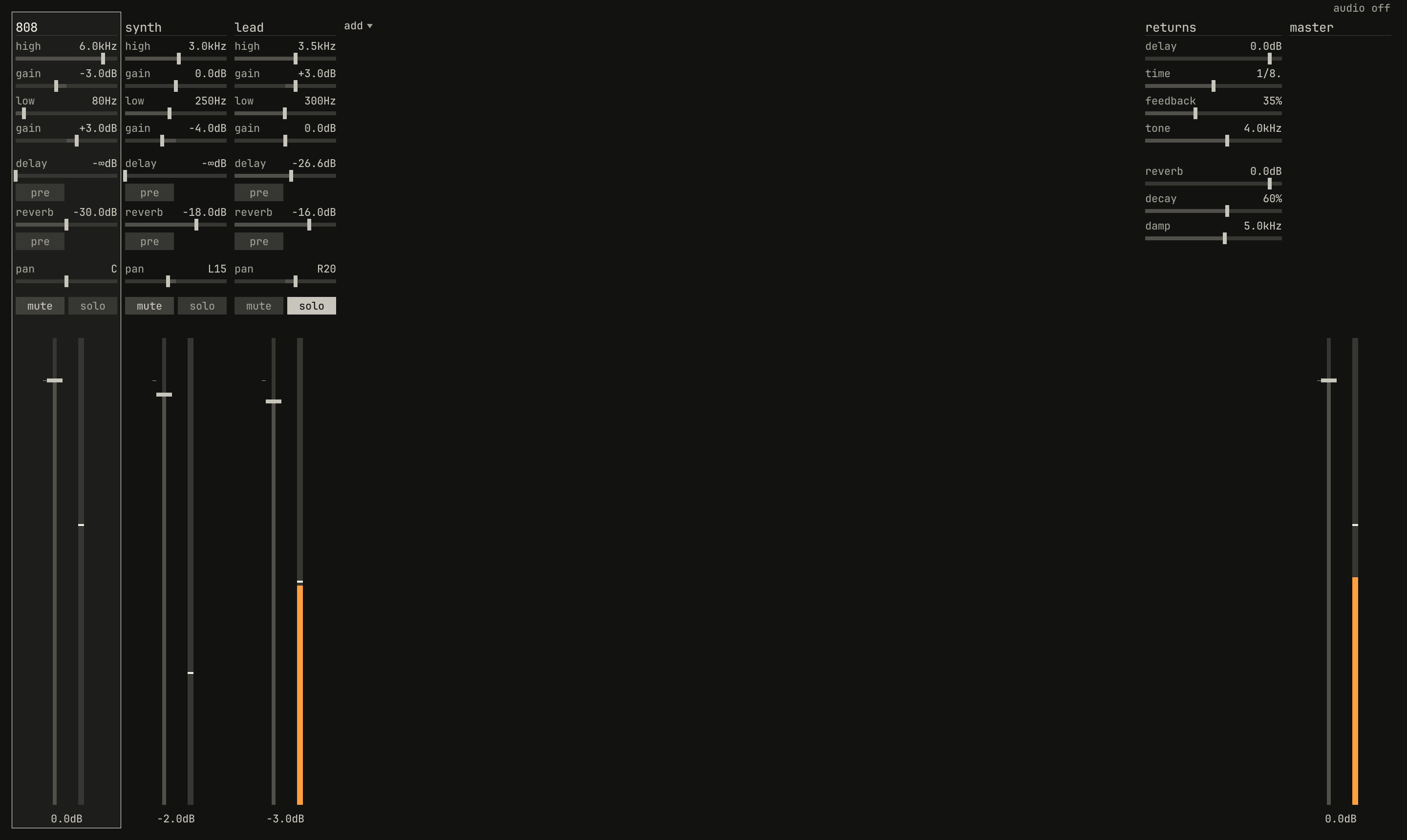
mute switches are half lit: another strip's solo is cutting them, and their meters fall.scriptzig build run-studio -- manual/17-desk/mix --view desk --script manual/17-desk/solo.txt
mix/song.json
{
  "tempo": 112,
  "end": "5",
  "key": ["1 A minor"],
  "chords": ["1 Am", "2 F", "3 C", "4 G"],
  "devices": [
    { "name": "808", "type": "drums" },
    { "name": "synth", "type": "synth", "state": { "parts": [
      { "patch": "A45", "level": -8 },
      { "patch": "A51", "level": -4 }
    ] } },
    { "name": "lead", "type": "synth", "state": { "parts": [
      { "patch": "A61", "level": -8 }
    ] } }
  ],
  "desk": {
    "master": 0,
    "delay": { "return": 0, "time": "1/8.", "feedback": 35, "tone": 4000 },
    "reverb": { "return": 0, "decay": 60, "damp": 5000 },
    "strips": {
      "808": { "level": 0, "pan": 0, "muted": false, "low_freq": 80, "low_gain": 3, "high_freq": 6000, "high_gain": -3, "reverb": -30 },
      "synth": { "level": -2, "pan": -15, "muted": false, "low_freq": 250, "low_gain": -4, "reverb": -18 },
      "lead": { "level": -3, "pan": 20, "muted": false, "high_freq": 3500, "high_gain": 3, "delay": -14, "reverb": -16 }
    }
  },
  "tracks": [
    { "name": "drums", "device": "808", "channel": 1, "role": "drums", "clips": [{ "at": "1", "length": "4.0.0", "notes": "beat" }] },
    { "name": "bass", "device": "synth", "channel": 2, "role": "bass", "clips": [{ "at": "1", "length": "4.0.0", "notes": "bass" }] },
    { "name": "keys", "device": "synth", "channel": 1, "role": "chords", "clips": [{ "at": "1", "length": "4.0.0", "notes": "keys" }] },
    {
      "name": "lead",
      "device": "lead",
      "channel": 1,
      "role": "lead",
      "clips": [{ "at": "1", "length": "4.0.0", "notes": "lead" }],
      "lanes": { "desk_delay": ["1 -40 linear", "5 -8"] }
    }
  ],
  "notes": {
    "beat": {
      "length": "1.0.0",
      "notes": [
        "1.1.0 C2 0.0.240 120", "1.1.480 F#2 0.0.240 70",
        "1.2.0 C2 0.0.240 112", "1.2.0 D#2 0.0.240 100", "1.2.480 F#2 0.0.240 76",
        "1.3.0 C2 0.0.240 116", "1.3.480 F#2 0.0.240 70",
        "1.4.0 C2 0.0.240 112", "1.4.0 D#2 0.0.240 100", "1.4.480 F#2 0.0.240 80"
      ]
    },
    "bass": { "length": "4.0.0", "follow": { "pattern": "offbeat", "low": "E1" } },
    "keys": { "length": "4.0.0", "follow": { "pattern": "halves", "low": "F3" } },
    "lead": {
      "length": "4.0.0",
      "notes": [
        "1.1.0 E5 0.0.900 100", "1.2.0 D5 0.0.420 92", "1.2.480 C5 0.0.420 92", "1.3.0 A4 0.1.900 96",
        "2.1.0 C5 0.0.900 96", "2.2.0 D5 0.0.900 92", "2.3.0 C5 0.0.900 94", "2.4.0 A4 0.0.900 90",
        "3.1.0 E5 0.1.420 100", "3.2.480 G5 0.0.420 96", "3.3.0 E5 0.0.900 96", "3.4.0 D5 0.0.900 92",
        "4.1.0 D5 0.0.900 96", "4.2.0 E5 0.0.420 90", "4.2.480 D5 0.0.420 92", "4.3.0 G4 0.1.900 100"
      ]
    }
  }
}
solo.txt
# Play, then solo the lead's strip, the third.
key space
wait 2
click 319 353
move 2000 2000
wait 1.5
capture solo.png
The 244's manual says what its mute is for, on page 19, and it holds for the desk's:
Prior to your final mix, the use of this mute function will allow you to hold all your preliminary mix settings including the level set by the fader, and still silence a module while you "fine tune" another.
A strip's mute and solo are the desk's, saved with the song and moved by
lanes. The arrange view's mute and solo are a track's: they mute its
channel on its device, before the strip, and the track's mute is an edit
while its solo is for listening and isn't saved
(chapter 12).
The fader and the meter
The fader sets the strip's level into the mix, from −60 dB, the bottom of
its travel, where it's off and reads −∞dB, to +6 dB. A short mark beside
the travel shows 0 dB, where the fader passes the strip as it is. The
readout under it says where it stands.
The meter beside it shows the strip after its fader and pan, from −60 to 0 dBFS. It holds the loudest peak as a white mark for a second and a half, then lets it fall, 30 dB a second, as the meter does, and both turn red while the peak is over 0 dBFS. In Fig. 17.1, each strip's meter shows the peak of the last moment, and its mark the loudest of the last second and a half. The 244's manual, on page 13, on peaks and the eye:
When you are dealing with this kind of sound, believe the LED, it is telling you the truth.
The master
The returns join the strips' mix, and the master fader, from −60 dB to +6,
sets the whole into the limiter, which holds the studio's output under −1
dBFS: it turns the gain down at once when a peak would pass that, and lets
it back up over about a tenth of a second. While it's working, lim lights
red over the master fader, and the master's meter is red.
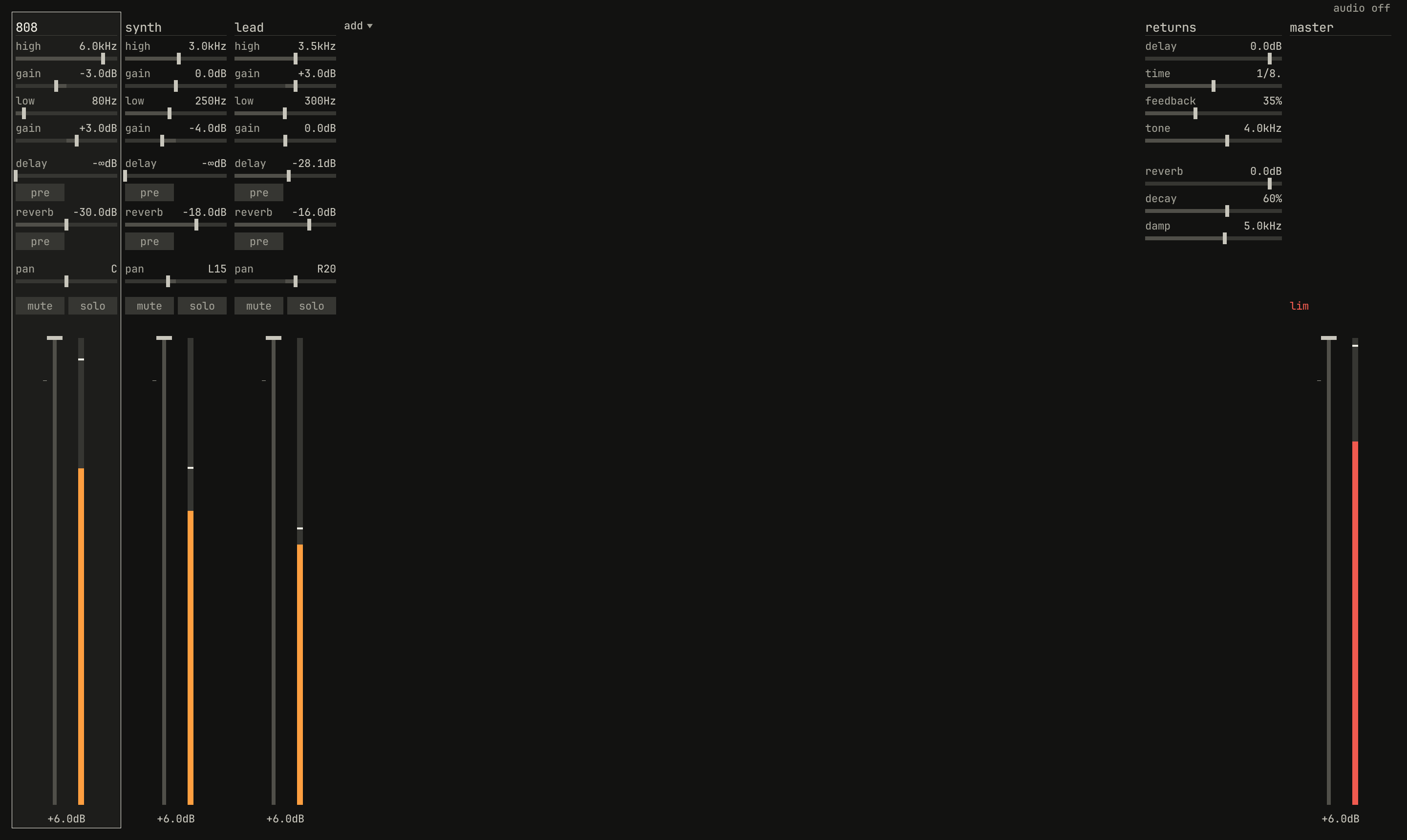
lim lights red over the master fader and in the bar's meter, and the master's meter is red. The strips' own meters stay under 0 dBFS.scriptzig build run-studio -- manual/17-desk/mix --view desk --script manual/17-desk/limit.txt
mix/song.json
{
  "tempo": 112,
  "end": "5",
  "key": ["1 A minor"],
  "chords": ["1 Am", "2 F", "3 C", "4 G"],
  "devices": [
    { "name": "808", "type": "drums" },
    { "name": "synth", "type": "synth", "state": { "parts": [
      { "patch": "A45", "level": -8 },
      { "patch": "A51", "level": -4 }
    ] } },
    { "name": "lead", "type": "synth", "state": { "parts": [
      { "patch": "A61", "level": -8 }
    ] } }
  ],
  "desk": {
    "master": 0,
    "delay": { "return": 0, "time": "1/8.", "feedback": 35, "tone": 4000 },
    "reverb": { "return": 0, "decay": 60, "damp": 5000 },
    "strips": {
      "808": { "level": 0, "pan": 0, "muted": false, "low_freq": 80, "low_gain": 3, "high_freq": 6000, "high_gain": -3, "reverb": -30 },
      "synth": { "level": -2, "pan": -15, "muted": false, "low_freq": 250, "low_gain": -4, "reverb": -18 },
      "lead": { "level": -3, "pan": 20, "muted": false, "high_freq": 3500, "high_gain": 3, "delay": -14, "reverb": -16 }
    }
  },
  "tracks": [
    { "name": "drums", "device": "808", "channel": 1, "role": "drums", "clips": [{ "at": "1", "length": "4.0.0", "notes": "beat" }] },
    { "name": "bass", "device": "synth", "channel": 2, "role": "bass", "clips": [{ "at": "1", "length": "4.0.0", "notes": "bass" }] },
    { "name": "keys", "device": "synth", "channel": 1, "role": "chords", "clips": [{ "at": "1", "length": "4.0.0", "notes": "keys" }] },
    {
      "name": "lead",
      "device": "lead",
      "channel": 1,
      "role": "lead",
      "clips": [{ "at": "1", "length": "4.0.0", "notes": "lead" }],
      "lanes": { "desk_delay": ["1 -40 linear", "5 -8"] }
    }
  ],
  "notes": {
    "beat": {
      "length": "1.0.0",
      "notes": [
        "1.1.0 C2 0.0.240 120", "1.1.480 F#2 0.0.240 70",
        "1.2.0 C2 0.0.240 112", "1.2.0 D#2 0.0.240 100", "1.2.480 F#2 0.0.240 76",
        "1.3.0 C2 0.0.240 116", "1.3.480 F#2 0.0.240 70",
        "1.4.0 C2 0.0.240 112", "1.4.0 D#2 0.0.240 100", "1.4.480 F#2 0.0.240 80"
      ]
    },
    "bass": { "length": "4.0.0", "follow": { "pattern": "offbeat", "low": "E1" } },
    "keys": { "length": "4.0.0", "follow": { "pattern": "halves", "low": "F3" } },
    "lead": {
      "length": "4.0.0",
      "notes": [
        "1.1.0 E5 0.0.900 100", "1.2.0 D5 0.0.420 92", "1.2.480 C5 0.0.420 92", "1.3.0 A4 0.1.900 96",
        "2.1.0 C5 0.0.900 96", "2.2.0 D5 0.0.900 92", "2.3.0 C5 0.0.900 94", "2.4.0 A4 0.0.900 90",
        "3.1.0 E5 0.1.420 100", "3.2.480 G5 0.0.420 96", "3.3.0 E5 0.0.900 96", "3.4.0 D5 0.0.900 92",
        "4.1.0 D5 0.0.900 96", "4.2.0 E5 0.0.420 90", "4.2.480 D5 0.0.420 92", "4.3.0 G4 0.1.900 100"
      ]
    }
  }
}
limit.txt
# Play, then every fader to the top, by the wheel.
key space
wait 1
move 56 600
wheel 100
move 168 600
wheel 100
move 280 600
wheel 100
move 1360 600
wheel 100
move 2000 2000
wait 2
capture limit.png
The meter in the bar is the same output. Keep the master at 0 dB and set the strips under it: the limiter is there to catch a peak, not to make a mix loud.
Working the desk
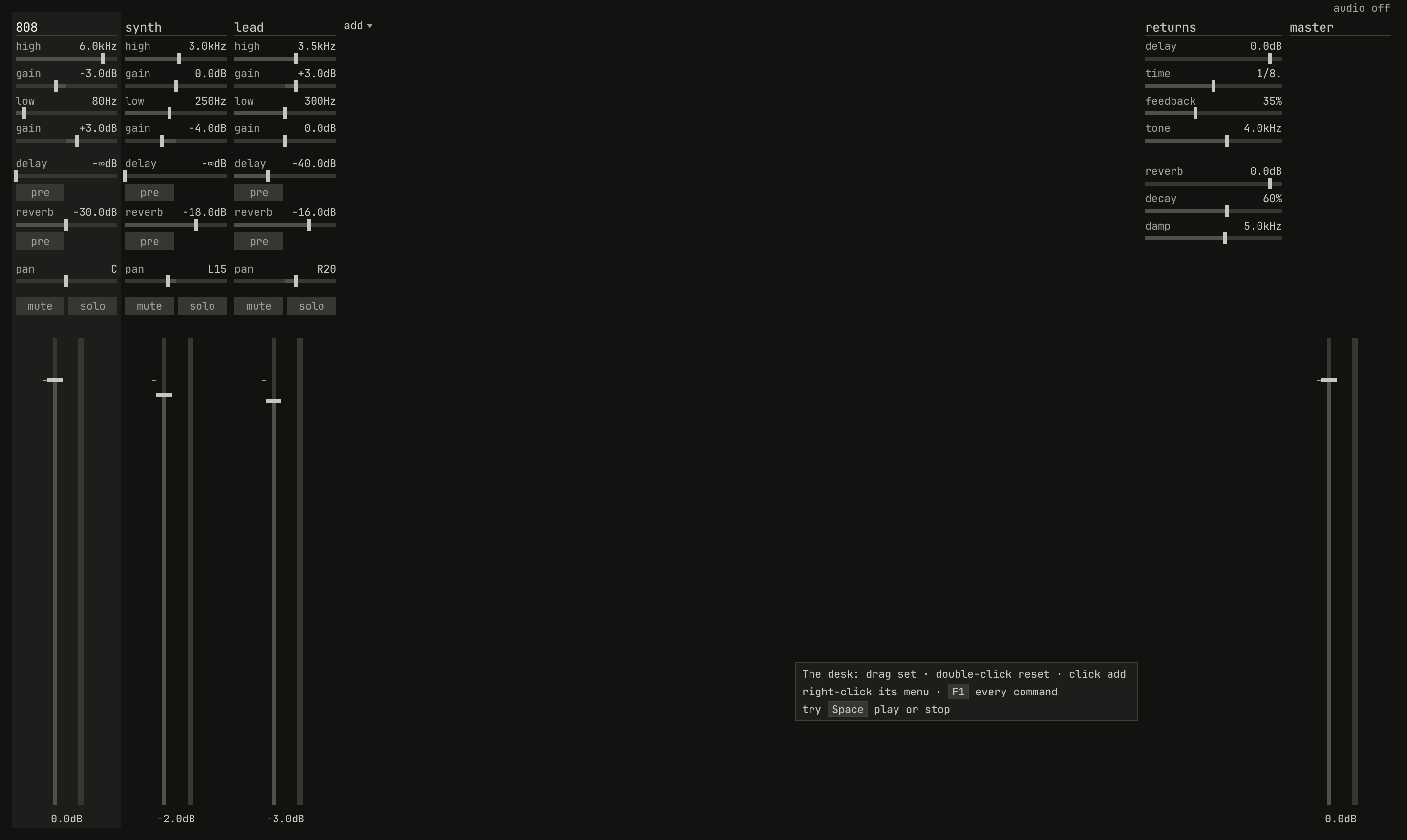
scriptzig build run-studio -- manual/17-desk/mix --view desk --script manual/17-desk/hint.txt
mix/song.json
{
  "tempo": 112,
  "end": "5",
  "key": ["1 A minor"],
  "chords": ["1 Am", "2 F", "3 C", "4 G"],
  "devices": [
    { "name": "808", "type": "drums" },
    { "name": "synth", "type": "synth", "state": { "parts": [
      { "patch": "A45", "level": -8 },
      { "patch": "A51", "level": -4 }
    ] } },
    { "name": "lead", "type": "synth", "state": { "parts": [
      { "patch": "A61", "level": -8 }
    ] } }
  ],
  "desk": {
    "master": 0,
    "delay": { "return": 0, "time": "1/8.", "feedback": 35, "tone": 4000 },
    "reverb": { "return": 0, "decay": 60, "damp": 5000 },
    "strips": {
      "808": { "level": 0, "pan": 0, "muted": false, "low_freq": 80, "low_gain": 3, "high_freq": 6000, "high_gain": -3, "reverb": -30 },
      "synth": { "level": -2, "pan": -15, "muted": false, "low_freq": 250, "low_gain": -4, "reverb": -18 },
      "lead": { "level": -3, "pan": 20, "muted": false, "high_freq": 3500, "high_gain": 3, "delay": -14, "reverb": -16 }
    }
  },
  "tracks": [
    { "name": "drums", "device": "808", "channel": 1, "role": "drums", "clips": [{ "at": "1", "length": "4.0.0", "notes": "beat" }] },
    { "name": "bass", "device": "synth", "channel": 2, "role": "bass", "clips": [{ "at": "1", "length": "4.0.0", "notes": "bass" }] },
    { "name": "keys", "device": "synth", "channel": 1, "role": "chords", "clips": [{ "at": "1", "length": "4.0.0", "notes": "keys" }] },
    {
      "name": "lead",
      "device": "lead",
      "channel": 1,
      "role": "lead",
      "clips": [{ "at": "1", "length": "4.0.0", "notes": "lead" }],
      "lanes": { "desk_delay": ["1 -40 linear", "5 -8"] }
    }
  ],
  "notes": {
    "beat": {
      "length": "1.0.0",
      "notes": [
        "1.1.0 C2 0.0.240 120", "1.1.480 F#2 0.0.240 70",
        "1.2.0 C2 0.0.240 112", "1.2.0 D#2 0.0.240 100", "1.2.480 F#2 0.0.240 76",
        "1.3.0 C2 0.0.240 116", "1.3.480 F#2 0.0.240 70",
        "1.4.0 C2 0.0.240 112", "1.4.0 D#2 0.0.240 100", "1.4.480 F#2 0.0.240 80"
      ]
    },
    "bass": { "length": "4.0.0", "follow": { "pattern": "offbeat", "low": "E1" } },
    "keys": { "length": "4.0.0", "follow": { "pattern": "halves", "low": "F3" } },
    "lead": {
      "length": "4.0.0",
      "notes": [
        "1.1.0 E5 0.0.900 100", "1.2.0 D5 0.0.420 92", "1.2.480 C5 0.0.420 92", "1.3.0 A4 0.1.900 96",
        "2.1.0 C5 0.0.900 96", "2.2.0 D5 0.0.900 92", "2.3.0 C5 0.0.900 94", "2.4.0 A4 0.0.900 90",
        "3.1.0 E5 0.1.420 100", "3.2.480 G5 0.0.420 96", "3.3.0 E5 0.0.900 96", "3.4.0 D5 0.0.900 92",
        "4.1.0 D5 0.0.900 96", "4.2.0 E5 0.0.420 90", "4.2.480 D5 0.0.420 92", "4.3.0 G4 0.1.900 100"
      ]
    }
  }
}
hint.txt
# The pointer resting on the desk's empty middle.
move 800 700
wait 1.5
capture hint.png- Drag a row's slider along, or a fader up and down. The pointer can start anywhere on the row: the control moves by as much as the pointer does, from where it stood.
- The wheel over a row or a fader moves it a hundredth of its travel a
notch, or the delay's
timea step. - A double-click on a control puts it back where a fresh desk has it: a fader at 0 dB, a band flat, a send off.
- A click on a switch,
pre,mute, orsolo, turns it on or off, and one ontimesteps it round.
A click on a strip's name selects the strip, and the first track that plays its device, so the keys play that track; the strip selected is framed. Up and Down select the track above or below, and the frame follows its device. The letter keys play the selected track here as in the arrange view, so a strip can be set while you play the part it carries.
A double-click on a strip's name types a new name for its device, which the tracks and the song then call it by; Enter keeps it and Esc leaves it.
Devices on the desk
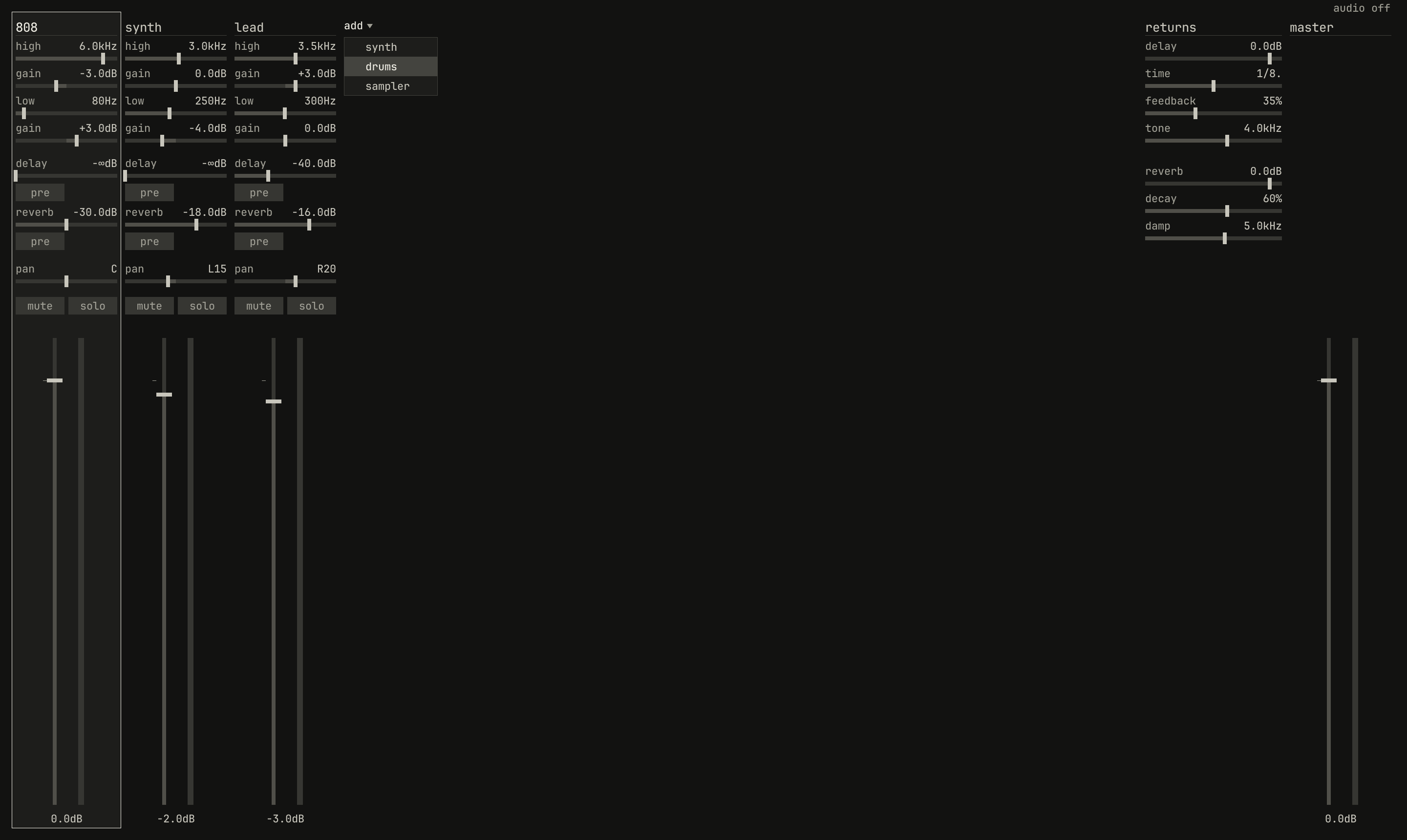
add ▾, after the last strip, opened: the three types of device to add.scriptzig build run-studio -- manual/17-desk/mix --view desk --script manual/17-desk/add.txt
mix/song.json
{
  "tempo": 112,
  "end": "5",
  "key": ["1 A minor"],
  "chords": ["1 Am", "2 F", "3 C", "4 G"],
  "devices": [
    { "name": "808", "type": "drums" },
    { "name": "synth", "type": "synth", "state": { "parts": [
      { "patch": "A45", "level": -8 },
      { "patch": "A51", "level": -4 }
    ] } },
    { "name": "lead", "type": "synth", "state": { "parts": [
      { "patch": "A61", "level": -8 }
    ] } }
  ],
  "desk": {
    "master": 0,
    "delay": { "return": 0, "time": "1/8.", "feedback": 35, "tone": 4000 },
    "reverb": { "return": 0, "decay": 60, "damp": 5000 },
    "strips": {
      "808": { "level": 0, "pan": 0, "muted": false, "low_freq": 80, "low_gain": 3, "high_freq": 6000, "high_gain": -3, "reverb": -30 },
      "synth": { "level": -2, "pan": -15, "muted": false, "low_freq": 250, "low_gain": -4, "reverb": -18 },
      "lead": { "level": -3, "pan": 20, "muted": false, "high_freq": 3500, "high_gain": 3, "delay": -14, "reverb": -16 }
    }
  },
  "tracks": [
    { "name": "drums", "device": "808", "channel": 1, "role": "drums", "clips": [{ "at": "1", "length": "4.0.0", "notes": "beat" }] },
    { "name": "bass", "device": "synth", "channel": 2, "role": "bass", "clips": [{ "at": "1", "length": "4.0.0", "notes": "bass" }] },
    { "name": "keys", "device": "synth", "channel": 1, "role": "chords", "clips": [{ "at": "1", "length": "4.0.0", "notes": "keys" }] },
    {
      "name": "lead",
      "device": "lead",
      "channel": 1,
      "role": "lead",
      "clips": [{ "at": "1", "length": "4.0.0", "notes": "lead" }],
      "lanes": { "desk_delay": ["1 -40 linear", "5 -8"] }
    }
  ],
  "notes": {
    "beat": {
      "length": "1.0.0",
      "notes": [
        "1.1.0 C2 0.0.240 120", "1.1.480 F#2 0.0.240 70",
        "1.2.0 C2 0.0.240 112", "1.2.0 D#2 0.0.240 100", "1.2.480 F#2 0.0.240 76",
        "1.3.0 C2 0.0.240 116", "1.3.480 F#2 0.0.240 70",
        "1.4.0 C2 0.0.240 112", "1.4.0 D#2 0.0.240 100", "1.4.480 F#2 0.0.240 80"
      ]
    },
    "bass": { "length": "4.0.0", "follow": { "pattern": "offbeat", "low": "E1" } },
    "keys": { "length": "4.0.0", "follow": { "pattern": "halves", "low": "F3" } },
    "lead": {
      "length": "4.0.0",
      "notes": [
        "1.1.0 E5 0.0.900 100", "1.2.0 D5 0.0.420 92", "1.2.480 C5 0.0.420 92", "1.3.0 A4 0.1.900 96",
        "2.1.0 C5 0.0.900 96", "2.2.0 D5 0.0.900 92", "2.3.0 C5 0.0.900 94", "2.4.0 A4 0.0.900 90",
        "3.1.0 E5 0.1.420 100", "3.2.480 G5 0.0.420 96", "3.3.0 E5 0.0.900 96", "3.4.0 D5 0.0.900 92",
        "4.1.0 D5 0.0.900 96", "4.2.0 E5 0.0.420 90", "4.2.480 D5 0.0.420 92", "4.3.0 G4 0.1.900 100"
      ]
    }
  }
}
add.txt
# The list under `add ▾`, after the last strip.
click 365 66
move 380 110
wait 0.2
capture add.png
add ▾, after the last strip, adds a device and its strip: a synth on the
factory bank, a drum machine, drums, with its factory rhythms, or an
empty sampler. Each comes with a fresh strip, flat at 0 dB, and a name of
its own, synth, 808, or S1000, with a number after it if the song has
one already, as synth 2. A song holds up to eight devices, and with
eight, add ▾ goes. To play a new device, give a track it, from the
track's device in the arrange view, whose list can add one too
(chapter 12).
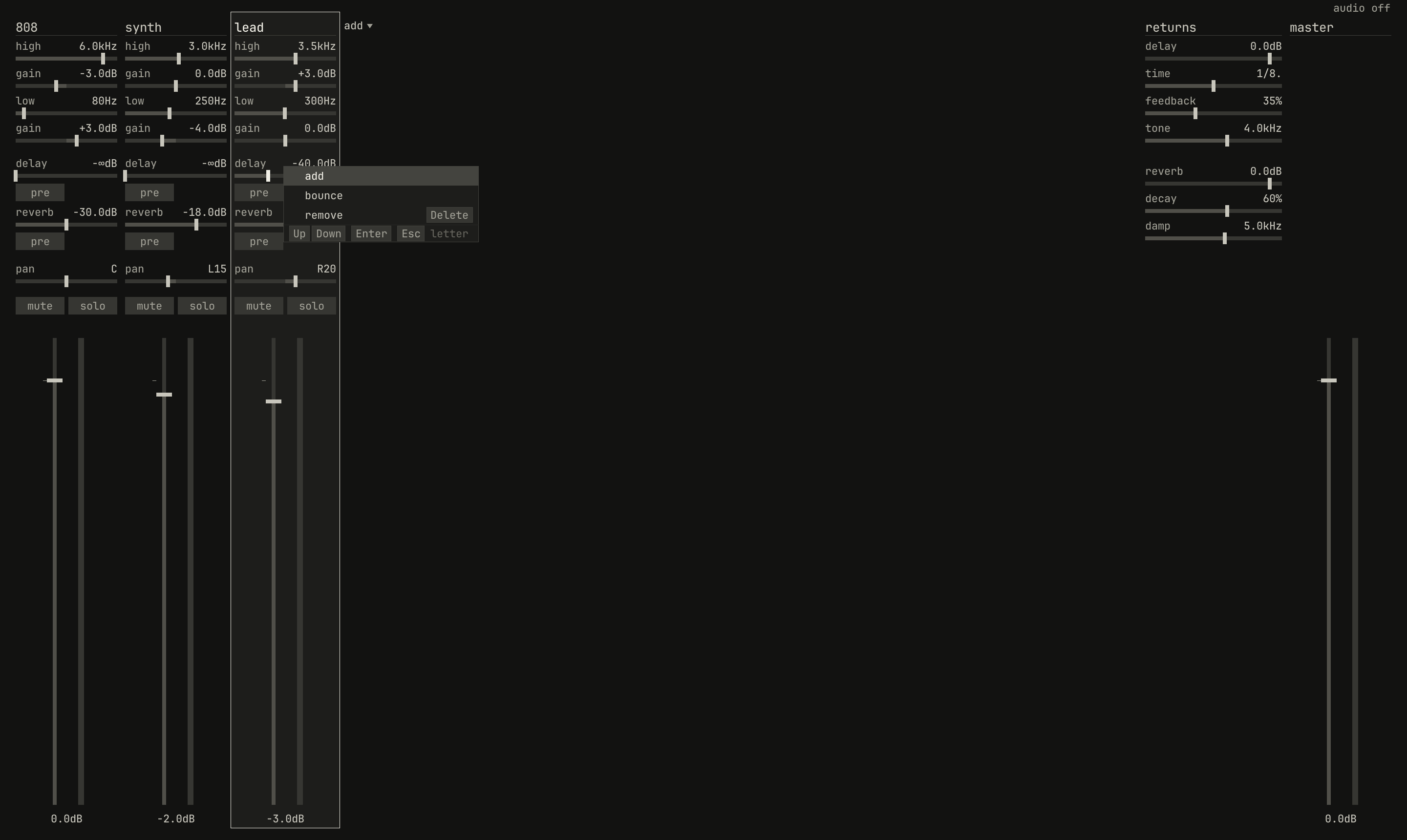
add, and remove, which is Delete.scriptzig build run-studio -- manual/17-desk/mix --view desk --script manual/17-desk/menu.txt
mix/song.json
{
  "tempo": 112,
  "end": "5",
  "key": ["1 A minor"],
  "chords": ["1 Am", "2 F", "3 C", "4 G"],
  "devices": [
    { "name": "808", "type": "drums" },
    { "name": "synth", "type": "synth", "state": { "parts": [
      { "patch": "A45", "level": -8 },
      { "patch": "A51", "level": -4 }
    ] } },
    { "name": "lead", "type": "synth", "state": { "parts": [
      { "patch": "A61", "level": -8 }
    ] } }
  ],
  "desk": {
    "master": 0,
    "delay": { "return": 0, "time": "1/8.", "feedback": 35, "tone": 4000 },
    "reverb": { "return": 0, "decay": 60, "damp": 5000 },
    "strips": {
      "808": { "level": 0, "pan": 0, "muted": false, "low_freq": 80, "low_gain": 3, "high_freq": 6000, "high_gain": -3, "reverb": -30 },
      "synth": { "level": -2, "pan": -15, "muted": false, "low_freq": 250, "low_gain": -4, "reverb": -18 },
      "lead": { "level": -3, "pan": 20, "muted": false, "high_freq": 3500, "high_gain": 3, "delay": -14, "reverb": -16 }
    }
  },
  "tracks": [
    { "name": "drums", "device": "808", "channel": 1, "role": "drums", "clips": [{ "at": "1", "length": "4.0.0", "notes": "beat" }] },
    { "name": "bass", "device": "synth", "channel": 2, "role": "bass", "clips": [{ "at": "1", "length": "4.0.0", "notes": "bass" }] },
    { "name": "keys", "device": "synth", "channel": 1, "role": "chords", "clips": [{ "at": "1", "length": "4.0.0", "notes": "keys" }] },
    {
      "name": "lead",
      "device": "lead",
      "channel": 1,
      "role": "lead",
      "clips": [{ "at": "1", "length": "4.0.0", "notes": "lead" }],
      "lanes": { "desk_delay": ["1 -40 linear", "5 -8"] }
    }
  ],
  "notes": {
    "beat": {
      "length": "1.0.0",
      "notes": [
        "1.1.0 C2 0.0.240 120", "1.1.480 F#2 0.0.240 70",
        "1.2.0 C2 0.0.240 112", "1.2.0 D#2 0.0.240 100", "1.2.480 F#2 0.0.240 76",
        "1.3.0 C2 0.0.240 116", "1.3.480 F#2 0.0.240 70",
        "1.4.0 C2 0.0.240 112", "1.4.0 D#2 0.0.240 100", "1.4.480 F#2 0.0.240 80"
      ]
    },
    "bass": { "length": "4.0.0", "follow": { "pattern": "offbeat", "low": "E1" } },
    "keys": { "length": "4.0.0", "follow": { "pattern": "halves", "low": "F3" } },
    "lead": {
      "length": "4.0.0",
      "notes": [
        "1.1.0 E5 0.0.900 100", "1.2.0 D5 0.0.420 92", "1.2.480 C5 0.0.420 92", "1.3.0 A4 0.1.900 96",
        "2.1.0 C5 0.0.900 96", "2.2.0 D5 0.0.900 92", "2.3.0 C5 0.0.900 94", "2.4.0 A4 0.0.900 90",
        "3.1.0 E5 0.1.420 100", "3.2.480 G5 0.0.420 96", "3.3.0 E5 0.0.900 96", "3.4.0 D5 0.0.900 92",
        "4.1.0 D5 0.0.900 96", "4.2.0 E5 0.0.420 90", "4.2.480 D5 0.0.420 92", "4.3.0 G4 0.1.900 100"
      ]
    }
  }
}
menu.txt
# A right-click on the lead's strip.
rclick 290 210
wait 0.2
capture menu.pngDelete, or remove in the menu a right-click opens on a strip,
removes the selected strip's device, with its strip, once no track plays
it. While one does, it stays, and a callout says why: a track plays it:
move its tracks to another device first. Adding, removing, and renaming a
device change the song, so Ctrl+Z takes them back, and a device
removed comes back with its sound and its strip as they were.
Audio tracks on the desk
Each audio track has a strip of its own, after the devices', with the
same controls, named for the track
(chapter 14). It takes the track's
recordings, and with mon on, the input, before its EQ. A song holds up
to 16 audio tracks, so the desk holds up to 24 strips. An audio track's
strip is saved in its row of song.json, not in the desk, and goes with
the track when it's deleted. Its lanes, as desk_level, are on the track
itself.
Bouncing
bounce, in a track's menu or the desk's, renders strips to a new audio
track, faster than real time: the strips soloed on the desk, or with none
soloed, the track's or the strip selected. It renders the whole song, or
with cycle on, the bars between the locators, and plays each strip as the
mix hears it, after its fader and pan, with what it sends to the delay and
the reverb, through the master at 0 dB and no limiter. The new track is
named after the strip, as synth bounce, or bounce for several strips,
and its clip plays the render
from where it began. Then the strips bounced are muted, so the song sounds
as it did, now from the recording, and a synth bounced sleeps and frees
its share of the computer for more. mute on a strip brings it back; the
mutes aren't undone with the bounce, as a move on the desk isn't.
The desk is hardware
The desk stands in for a mixer on a table, as a device's panel stands in for the device:
- The song saves it. Every strip, the returns, and the master are in
song.json, and a change on the desk marks the song unsaved. - Undo leaves it. Ctrl+Z takes back edits to the song, and a move on the desk isn't one, so undoing a clip's move doesn't undo the fader you moved after it. Locating and cycling leave it too: a move made during one pass of a cycle plays in the next.
- A lane still moves it. Every strip control has a lane, on any track of its device, and while the song plays the desk shows where the lanes put it.
The lanes take the controls' names with desk_ before them:
| Lane | Moves |
|---|---|
desk_level |
The fader |
desk_pan |
The pan |
desk_muted, desk_solo |
The switches, off or on |
desk_high_freq, desk_high_gain |
The high band |
desk_low_freq, desk_low_gain |
The low band |
desk_delay, desk_delay_pre |
The delay send, and its pre, post or pre |
desk_reverb, desk_reverb_pre |
The reverb send, and its pre |
The lead's track in this chapter's song has a desk_delay lane that
raises its delay send from −40 dB to −8 over the four bars, and Fig. 17.1
shows the send part of the way up. The figures of this chapter that
measure the EQ, the sends, the reverb, and the pan are all lanes on the
desk. A move on
the desk holds until the lane's next point, as a move on a device's panel
does. The returns and the master have no lanes: lanes belong to tracks,
and the master section to none. Chapter 16 is about
lanes: adding points, their shapes, and a lane's row in the arrange view.
Recording the desk
While a track records, a move on the desk is recorded into that track's lane, as a move on its device's panel is, if the track plays the strip's device: a fader, a send, a band, a pan, or a switch. A move on another device's strip sounds and isn't recorded.
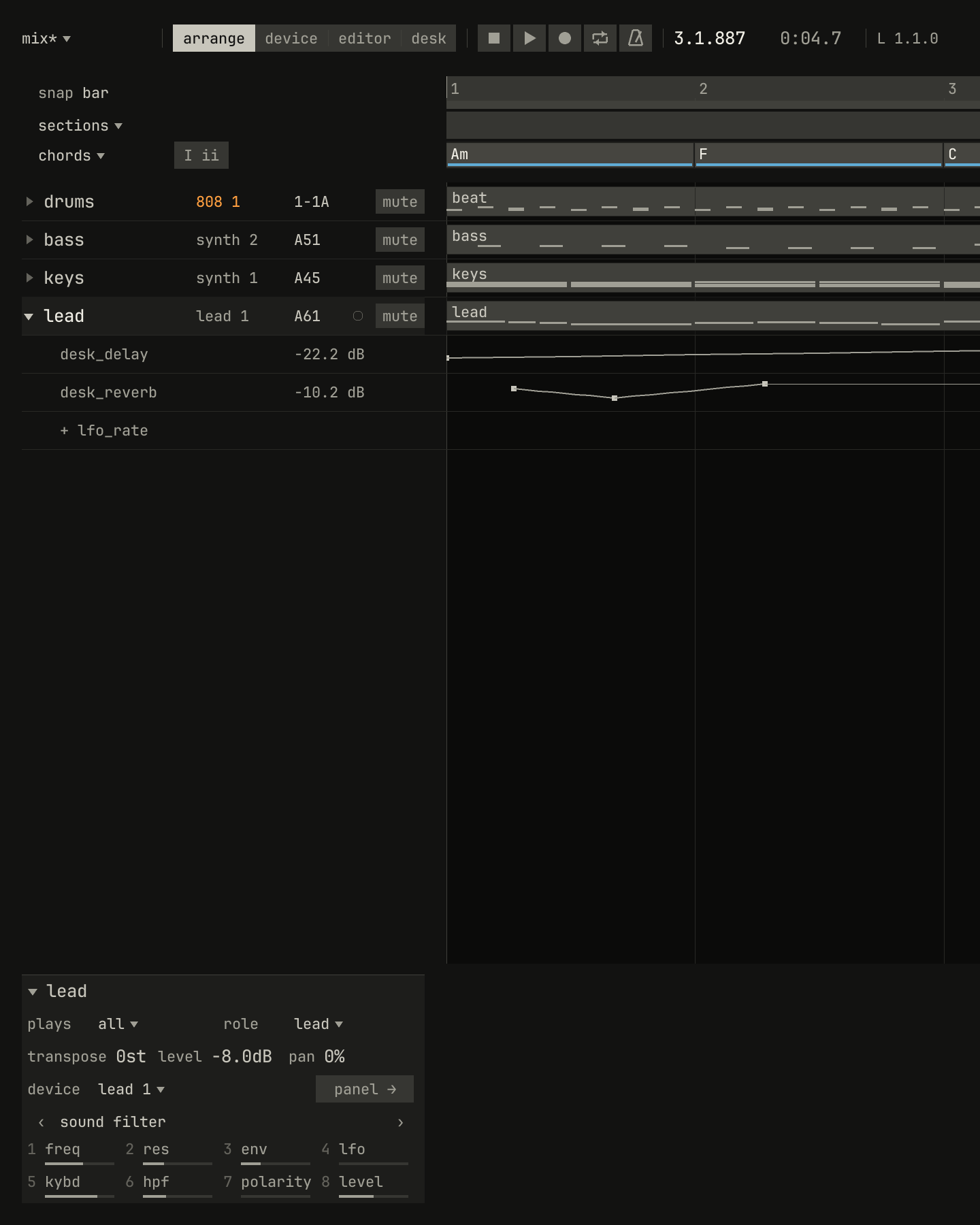
desk_reverb lane, under the desk_delay lane the song had.scriptzig build run-studio -- manual/17-desk/mix --view desk --script manual/17-desk/record.txt
mix/song.json
{
  "tempo": 112,
  "end": "5",
  "key": ["1 A minor"],
  "chords": ["1 Am", "2 F", "3 C", "4 G"],
  "devices": [
    { "name": "808", "type": "drums" },
    { "name": "synth", "type": "synth", "state": { "parts": [
      { "patch": "A45", "level": -8 },
      { "patch": "A51", "level": -4 }
    ] } },
    { "name": "lead", "type": "synth", "state": { "parts": [
      { "patch": "A61", "level": -8 }
    ] } }
  ],
  "desk": {
    "master": 0,
    "delay": { "return": 0, "time": "1/8.", "feedback": 35, "tone": 4000 },
    "reverb": { "return": 0, "decay": 60, "damp": 5000 },
    "strips": {
      "808": { "level": 0, "pan": 0, "muted": false, "low_freq": 80, "low_gain": 3, "high_freq": 6000, "high_gain": -3, "reverb": -30 },
      "synth": { "level": -2, "pan": -15, "muted": false, "low_freq": 250, "low_gain": -4, "reverb": -18 },
      "lead": { "level": -3, "pan": 20, "muted": false, "high_freq": 3500, "high_gain": 3, "delay": -14, "reverb": -16 }
    }
  },
  "tracks": [
    { "name": "drums", "device": "808", "channel": 1, "role": "drums", "clips": [{ "at": "1", "length": "4.0.0", "notes": "beat" }] },
    { "name": "bass", "device": "synth", "channel": 2, "role": "bass", "clips": [{ "at": "1", "length": "4.0.0", "notes": "bass" }] },
    { "name": "keys", "device": "synth", "channel": 1, "role": "chords", "clips": [{ "at": "1", "length": "4.0.0", "notes": "keys" }] },
    {
      "name": "lead",
      "device": "lead",
      "channel": 1,
      "role": "lead",
      "clips": [{ "at": "1", "length": "4.0.0", "notes": "lead" }],
      "lanes": { "desk_delay": ["1 -40 linear", "5 -8"] }
    }
  ],
  "notes": {
    "beat": {
      "length": "1.0.0",
      "notes": [
        "1.1.0 C2 0.0.240 120", "1.1.480 F#2 0.0.240 70",
        "1.2.0 C2 0.0.240 112", "1.2.0 D#2 0.0.240 100", "1.2.480 F#2 0.0.240 76",
        "1.3.0 C2 0.0.240 116", "1.3.480 F#2 0.0.240 70",
        "1.4.0 C2 0.0.240 112", "1.4.0 D#2 0.0.240 100", "1.4.480 F#2 0.0.240 80"
      ]
    },
    "bass": { "length": "4.0.0", "follow": { "pattern": "offbeat", "low": "E1" } },
    "keys": { "length": "4.0.0", "follow": { "pattern": "halves", "low": "F3" } },
    "lead": {
      "length": "4.0.0",
      "notes": [
        "1.1.0 E5 0.0.900 100", "1.2.0 D5 0.0.420 92", "1.2.480 C5 0.0.420 92", "1.3.0 A4 0.1.900 96",
        "2.1.0 C5 0.0.900 96", "2.2.0 D5 0.0.900 92", "2.3.0 C5 0.0.900 94", "2.4.0 A4 0.0.900 90",
        "3.1.0 E5 0.1.420 100", "3.2.480 G5 0.0.420 96", "3.3.0 E5 0.0.900 96", "3.4.0 D5 0.0.900 92",
        "4.1.0 D5 0.0.900 96", "4.2.0 E5 0.0.420 90", "4.2.480 D5 0.0.420 92", "4.3.0 G4 0.1.900 100"
      ]
    }
  }
}
record.txt
# Select the lead by its strip's name, record it, and pull its reverb send
# down and back up on the desk in bar 1, after the two bars' count-in.
# Then its lanes, in the arrange view.
click 280 68
key kp_multiply
wait 4.6
move 316 264
down mouse
wait 0.2
move 306 264
wait 0.2
move 296 264
wait 0.2
move 286 264
wait 0.2
move 276 264
wait 0.2
move 266 264
wait 0.2
move 276 264
wait 0.2
move 286 264
wait 0.2
move 296 264
wait 0.2
move 306 264
wait 0.2
move 316 264
wait 0.2
move 326 264
up mouse
wait 2
key space
key ctrl+1
wait 0.2
click triangle lead
wait 0.2
capture record.png
The take thins the move into a few points, close enough that it replays within 1% of its travel. Recording replaces the lane where it moved, as chapter 14 says of a panel's controls. The returns and the master aren't recorded.
The MiniLab on the desk
While the desk shows, an Arturia MiniLab 37 in its DAW program plays it as
a page of a device: its knobs 1 to 7 turn the selected track's strip,
high, gain, low, gain, delay, reverb, and pan, top to bottom,
and its four faders are the levels of four strips, devices 1 to 4 or 5 to
8, whichever four hold the selected track's. A fader takes hold of a level
only once it crosses it, and the desk draws a hollow mark where the fader
sits until then. The MiniLab's screen names the strip, as desk lead.
Chapter 18 has the rest.
Try it in the window
- Open the song at the desk and play it with Space. Solo each strip in turn and listen to what it carries.
- Sweep the lead's
highwith itsgainat +15 dB, and hear the band move through the lead; then cut it 15 dB and sweep again. - Set the
808's delay send to −12 dB, then turn itspreon, and pull its fader down while the song plays. - Turn the returns'
decayup to 90% anddampdown to 2 kHz, and hear the808's reverb send darken and lengthen. - Pull the master fader to −20 dB and push it back, then double-click it.
- Add a
samplerwithadd ▾, rename it, and remove it with Delete; then remove theleadand read the callout. - Save the song in a folder of its own, select the
synthstrip, andbounceit from the desk's menu. Play the song, then unmute the strip and mute the bounce's, and hear nothing change.
Next: chapter 18, a controller, the MiniLab 37's knobs, faders, and pads on the studio.