IV. Working in the studio
Arranging
Arranging is placing music in time: which clips play on which tracks, from which bar, for how long, and in what order the song's sections come. The arrange view is Cubase's Arrange page of 1989: clips over bars, a tool at the pointer, and edits that copy, link, cut, glue, and group clips, or move whole bars and sections at once. This chapter takes each in turn.
Open the window on the chapter's song, eight bars in two sections:
zig build run-studio -- manual/13-arranging/arrange

0.0 / 16.6 s
peak -13.2 dBFS
openzig build run-studio -- manual/13-arranging/arrange
renderzig build run-studio -- render manual/13-arranging/arrange arrange.wav
arrange/song.json
{
  "tempo": 116,
  "end": "9",
  "sections": ["1 A", "5 B"],
  "key": ["1 A minor"],
  "chords": ["1 Am", "2 F", "3 C", "4 G", "5 Am", "6 F", "7 C", "8 G"],
  "devices": [
    { "name": "synth", "type": "synth", "state": { "parts": [
      { "patch": "A72", "level": -8, "reverb_send": 20 },
      { "patch": "A52", "level": -6 },
      { "patch": "A61", "level": -10, "delay_send": 20 }
    ] } },
    { "name": "808", "type": "drums", "state": { "program": "2-1A" } }
  ],
  "tracks": [
    { "name": "drums", "device": "808", "channel": 1, "role": "drums", "clips": [{ "at": "1", "length": "8.0.0", "pattern": "2-1A" }] },
    { "name": "bass", "device": "synth", "channel": 2, "keys": "pent", "role": "bass", "clips": [{ "at": "1", "length": "8.0.0", "notes": "bass" }] },
    { "name": "keys", "device": "synth", "channel": 1, "keys": "chord 7", "role": "chords", "clips": [
      { "at": "1", "length": "4.0.0", "notes": "keys" },
      { "at": "5", "length": "4.0.0", "notes": "keys" }
    ] },
    { "name": "lead", "device": "synth", "channel": 3, "keys": "pent", "role": "lead", "clips": [{ "at": "5", "length": "4.0.0", "notes": "lead" }] }
  ],
  "notes": {
    "bass": { "length": "8.0.0", "follow": { "pattern": "offbeat", "low": "E1" } },
    "keys": {
      "length": "4.0.0",
      "notes": [
        "1.1.0 A3 0.1.0 96", "1.1.0 C4 0.1.0 96", "1.1.0 E4 0.1.0 96", "1.3.0 A3 0.1.0 90", "1.3.0 C4 0.1.0 90", "1.3.0 E4 0.1.0 90",
        "2.1.0 A3 0.1.0 96", "2.1.0 C4 0.1.0 96", "2.1.0 F4 0.1.0 96", "2.3.0 A3 0.1.0 90", "2.3.0 C4 0.1.0 90", "2.3.0 F4 0.1.0 90",
        "3.1.0 G3 0.1.0 96", "3.1.0 C4 0.1.0 96", "3.1.0 E4 0.1.0 96", "3.3.0 G3 0.1.0 90", "3.3.0 C4 0.1.0 90", "3.3.0 E4 0.1.0 90",
        "4.1.0 G3 0.1.0 96", "4.1.0 B3 0.1.0 96", "4.1.0 D4 0.1.0 96", "4.3.0 G3 0.1.0 90", "4.3.0 B3 0.1.0 90", "4.3.0 D4 0.1.0 90"
      ]
    },
    "lead": {
      "length": "4.0.0",
      "notes": [
        "1.1.0 E5 0.0.900 100", "1.2.0 D5 0.0.420 92", "1.2.480 C5 0.0.420 92", "1.3.0 A4 0.1.900 96",
        "2.1.0 C5 0.0.900 96", "2.2.0 D5 0.0.900 92", "2.3.0 C5 0.0.900 94", "2.4.0 A4 0.0.900 90",
        "3.1.0 E5 0.1.420 100", "3.2.480 G5 0.0.420 96", "3.3.0 E5 0.0.900 96", "3.4.0 D5 0.0.900 92",
        "4.1.0 D5 0.0.900 96", "4.2.0 E5 0.0.420 90", "4.2.480 D5 0.0.420 92", "4.3.0 G4 0.1.900 100"
      ]
    }
  }
}
Clips
A clip plays something on its track from one position for a length, and the arrange view draws it as a box over the bars. It plays one of four things:
- Notes, drawn inside it, which Key Edit edits. A clip's notes have a
name, the clip's label, as
keys; several clips can play the same notes. - A pattern, the program of a device that plays sequences: a rhythm of
the drum machine's, as
2-1A, or a synth slot with a sequence of its own, asB81. A rule runs along its foot, for the steps playing on beneath. The sampler plays no patterns. - A group of other clips, on the group track, which groups tells.
- A recording, on an audio track, drawn as its outline, which audio clips tells.
A double-click on an empty place in a track's lane makes a clip there, from the bar under the pointer:
- A double-click makes a notes clip a bar long, empty, and opens it in Key Edit, chapter 15's.
- Ctrl and a double-click make a pattern clip a bar long, of the program the track shows, on the drum machine or the synth. With the clip selected, the track's program list sets the clip's program, as an edit.
- Alt and a double-click make a clip whose notes follow the chord row, over the whole section under the pointer, with its list of patterns open to try. Chapter 6 tells followers.
The menu a right-click on an empty place opens holds the three as rows:
new clip, new pattern clip, and new part that follows the chords.

2-1A on the drums, from Ctrl and a double-click; and an empty notes clip on the lead, from a double-click.scriptzig build run-studio -- manual/13-arranging/blank --script manual/13-arranging/new-clips.txt
blank/song.json
{
  "tempo": 116,
  "end": "5",
  "sections": ["1 A"],
  "key": ["1 A minor"],
  "chords": ["1 Am", "2 F", "3 C", "4 G"],
  "devices": [
    { "name": "synth", "type": "synth", "state": { "parts": [
      { "patch": "A72", "level": -8 },
      { "patch": "A52", "level": -6 },
      { "patch": "A61", "level": -10 }
    ] } },
    { "name": "808", "type": "drums", "state": { "program": "2-1A" } }
  ],
  "tracks": [
    { "name": "drums", "device": "808", "channel": 1, "role": "drums" },
    { "name": "bass", "device": "synth", "channel": 2, "keys": "pent", "role": "bass" },
    { "name": "lead", "device": "synth", "channel": 3, "keys": "pent", "role": "lead" }
  ]
}
new-clips.txt
# Alt and a double-click on the bass: a part that follows the chords over
# section A, its pattern list open; Enter keeps the first. Ctrl and a
# double-click on the drums: a pattern clip of the rhythm the track shows.
# A double-click on the lead: a notes clip a bar long, opened in Key Edit,
# and Ctrl+1 back.
wait 0.2
down alt
double lane bass bar 1
up alt
wait 0.1
key enter
wait 3
down ctrl
double lane drums bar 1
up ctrl
wait 0.1
double lane lead bar 2
wait 0.1
key ctrl+1
move 1300 850
wait 0.1
capture new-clips.png
A double-click on a clip opens it: a notes clip in its editor, a pattern clip's device in the device view.
A pattern clip starts its rhythm or sequence on a bar line. One that starts off the bar, moved there by beats, waits for the next bar to sound.
The tools
A right-click on a clip opens its menu, and selects it first. The menu's
first row is the tools, as Cubase's toolbox came to the pointer:
move cut glue erase. A click on one picks it, and the slot beside the
ruler names it while it isn't move, as tool cut · Esc for move.
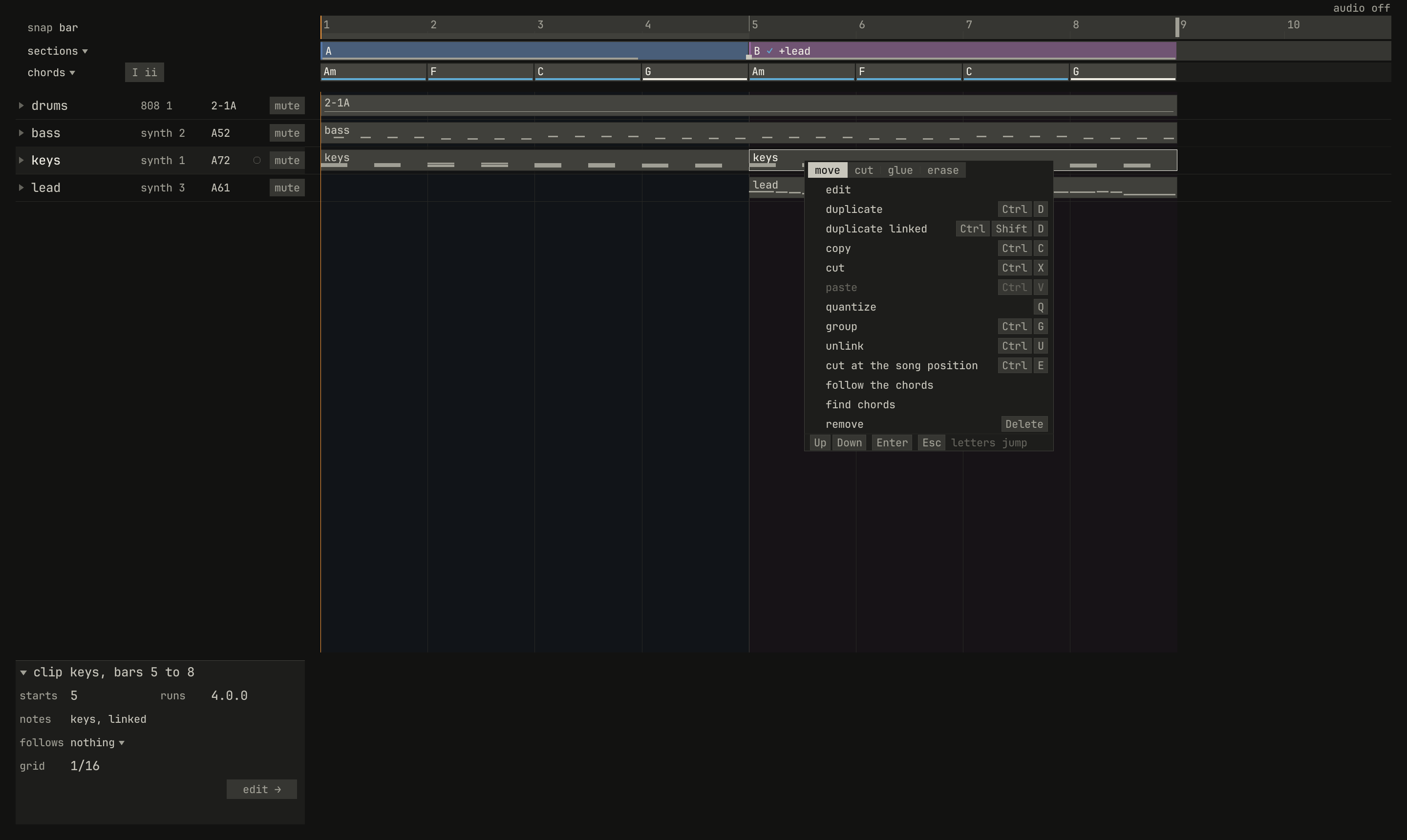
move chosen, and then what can be done to the clip, each row with its key. paste is quiet, with nothing copied.scriptzig build run-studio -- manual/13-arranging/arrange --script manual/13-arranging/tools.txt
arrange/song.json
{
  "tempo": 116,
  "end": "9",
  "sections": ["1 A", "5 B"],
  "key": ["1 A minor"],
  "chords": ["1 Am", "2 F", "3 C", "4 G", "5 Am", "6 F", "7 C", "8 G"],
  "devices": [
    { "name": "synth", "type": "synth", "state": { "parts": [
      { "patch": "A72", "level": -8, "reverb_send": 20 },
      { "patch": "A52", "level": -6 },
      { "patch": "A61", "level": -10, "delay_send": 20 }
    ] } },
    { "name": "808", "type": "drums", "state": { "program": "2-1A" } }
  ],
  "tracks": [
    { "name": "drums", "device": "808", "channel": 1, "role": "drums", "clips": [{ "at": "1", "length": "8.0.0", "pattern": "2-1A" }] },
    { "name": "bass", "device": "synth", "channel": 2, "keys": "pent", "role": "bass", "clips": [{ "at": "1", "length": "8.0.0", "notes": "bass" }] },
    { "name": "keys", "device": "synth", "channel": 1, "keys": "chord 7", "role": "chords", "clips": [
      { "at": "1", "length": "4.0.0", "notes": "keys" },
      { "at": "5", "length": "4.0.0", "notes": "keys" }
    ] },
    { "name": "lead", "device": "synth", "channel": 3, "keys": "pent", "role": "lead", "clips": [{ "at": "5", "length": "4.0.0", "notes": "lead" }] }
  ],
  "notes": {
    "bass": { "length": "8.0.0", "follow": { "pattern": "offbeat", "low": "E1" } },
    "keys": {
      "length": "4.0.0",
      "notes": [
        "1.1.0 A3 0.1.0 96", "1.1.0 C4 0.1.0 96", "1.1.0 E4 0.1.0 96", "1.3.0 A3 0.1.0 90", "1.3.0 C4 0.1.0 90", "1.3.0 E4 0.1.0 90",
        "2.1.0 A3 0.1.0 96", "2.1.0 C4 0.1.0 96", "2.1.0 F4 0.1.0 96", "2.3.0 A3 0.1.0 90", "2.3.0 C4 0.1.0 90", "2.3.0 F4 0.1.0 90",
        "3.1.0 G3 0.1.0 96", "3.1.0 C4 0.1.0 96", "3.1.0 E4 0.1.0 96", "3.3.0 G3 0.1.0 90", "3.3.0 C4 0.1.0 90", "3.3.0 E4 0.1.0 90",
        "4.1.0 G3 0.1.0 96", "4.1.0 B3 0.1.0 96", "4.1.0 D4 0.1.0 96", "4.3.0 G3 0.1.0 90", "4.3.0 B3 0.1.0 90", "4.3.0 D4 0.1.0 90"
      ]
    },
    "lead": {
      "length": "4.0.0",
      "notes": [
        "1.1.0 E5 0.0.900 100", "1.2.0 D5 0.0.420 92", "1.2.480 C5 0.0.420 92", "1.3.0 A4 0.1.900 96",
        "2.1.0 C5 0.0.900 96", "2.2.0 D5 0.0.900 92", "2.3.0 C5 0.0.900 94", "2.4.0 A4 0.0.900 90",
        "3.1.0 E5 0.1.420 100", "3.2.480 G5 0.0.420 96", "3.3.0 E5 0.0.900 96", "3.4.0 D5 0.0.900 92",
        "4.1.0 D5 0.0.900 96", "4.2.0 E5 0.0.420 90", "4.2.480 D5 0.0.420 92", "4.3.0 G4 0.1.900 100"
      ]
    }
  }
}
tools.txt
# A right-click on the keys' second clip opens its menu, the tools first.
wait 0.2
rclick lane keys bar 5.3
wait 0.1
capture tools.pngmove, the arrow, selects clips, drags them and their edges, and draws a box around them.cutcuts a clip where it's clicked, on the bar line nearest the pointer, or the beat with Ctrl held.glueglues a clip to the next one on its track, into one clip from the first's start to the second's end.erasetakes a clip away, or a section, a chord, or a lane's point.
Esc goes back to move. The cut tool's work is also a key:
Ctrl+E cuts the selected clips at the song position.

tool cut · Esc for move.scriptzig build run-studio -- manual/13-arranging/arrange --script manual/13-arranging/cut-tool.txt
arrange/song.json
{
  "tempo": 116,
  "end": "9",
  "sections": ["1 A", "5 B"],
  "key": ["1 A minor"],
  "chords": ["1 Am", "2 F", "3 C", "4 G", "5 Am", "6 F", "7 C", "8 G"],
  "devices": [
    { "name": "synth", "type": "synth", "state": { "parts": [
      { "patch": "A72", "level": -8, "reverb_send": 20 },
      { "patch": "A52", "level": -6 },
      { "patch": "A61", "level": -10, "delay_send": 20 }
    ] } },
    { "name": "808", "type": "drums", "state": { "program": "2-1A" } }
  ],
  "tracks": [
    { "name": "drums", "device": "808", "channel": 1, "role": "drums", "clips": [{ "at": "1", "length": "8.0.0", "pattern": "2-1A" }] },
    { "name": "bass", "device": "synth", "channel": 2, "keys": "pent", "role": "bass", "clips": [{ "at": "1", "length": "8.0.0", "notes": "bass" }] },
    { "name": "keys", "device": "synth", "channel": 1, "keys": "chord 7", "role": "chords", "clips": [
      { "at": "1", "length": "4.0.0", "notes": "keys" },
      { "at": "5", "length": "4.0.0", "notes": "keys" }
    ] },
    { "name": "lead", "device": "synth", "channel": 3, "keys": "pent", "role": "lead", "clips": [{ "at": "5", "length": "4.0.0", "notes": "lead" }] }
  ],
  "notes": {
    "bass": { "length": "8.0.0", "follow": { "pattern": "offbeat", "low": "E1" } },
    "keys": {
      "length": "4.0.0",
      "notes": [
        "1.1.0 A3 0.1.0 96", "1.1.0 C4 0.1.0 96", "1.1.0 E4 0.1.0 96", "1.3.0 A3 0.1.0 90", "1.3.0 C4 0.1.0 90", "1.3.0 E4 0.1.0 90",
        "2.1.0 A3 0.1.0 96", "2.1.0 C4 0.1.0 96", "2.1.0 F4 0.1.0 96", "2.3.0 A3 0.1.0 90", "2.3.0 C4 0.1.0 90", "2.3.0 F4 0.1.0 90",
        "3.1.0 G3 0.1.0 96", "3.1.0 C4 0.1.0 96", "3.1.0 E4 0.1.0 96", "3.3.0 G3 0.1.0 90", "3.3.0 C4 0.1.0 90", "3.3.0 E4 0.1.0 90",
        "4.1.0 G3 0.1.0 96", "4.1.0 B3 0.1.0 96", "4.1.0 D4 0.1.0 96", "4.3.0 G3 0.1.0 90", "4.3.0 B3 0.1.0 90", "4.3.0 D4 0.1.0 90"
      ]
    },
    "lead": {
      "length": "4.0.0",
      "notes": [
        "1.1.0 E5 0.0.900 100", "1.2.0 D5 0.0.420 92", "1.2.480 C5 0.0.420 92", "1.3.0 A4 0.1.900 96",
        "2.1.0 C5 0.0.900 96", "2.2.0 D5 0.0.900 92", "2.3.0 C5 0.0.900 94", "2.4.0 A4 0.0.900 90",
        "3.1.0 E5 0.1.420 100", "3.2.480 G5 0.0.420 96", "3.3.0 E5 0.0.900 96", "3.4.0 D5 0.0.900 92",
        "4.1.0 D5 0.0.900 96", "4.2.0 E5 0.0.420 90", "4.2.480 D5 0.0.420 92", "4.3.0 G4 0.1.900 100"
      ]
    }
  }
}
cut-tool.txt
# The cut tool, chosen from the menu: the header beside the ruler names
# it, and Esc goes back to move.
wait 0.2
rclick lane keys bar 5.3
choose cut
move lane lead bar 3
wait 0.1
capture cut-tool.png
Selecting clips
A click on a clip selects it, framed bright, and the inspector shows it: where it starts, how long it runs, its notes' name and whether they're its own or linked, what it follows, and the grid. Shift and a click add a clip to the selection or take it out; a drag from an empty place draws a box, and selects every clip it touches; Ctrl+A selects every clip in the song. A click on an empty place lets them all go.
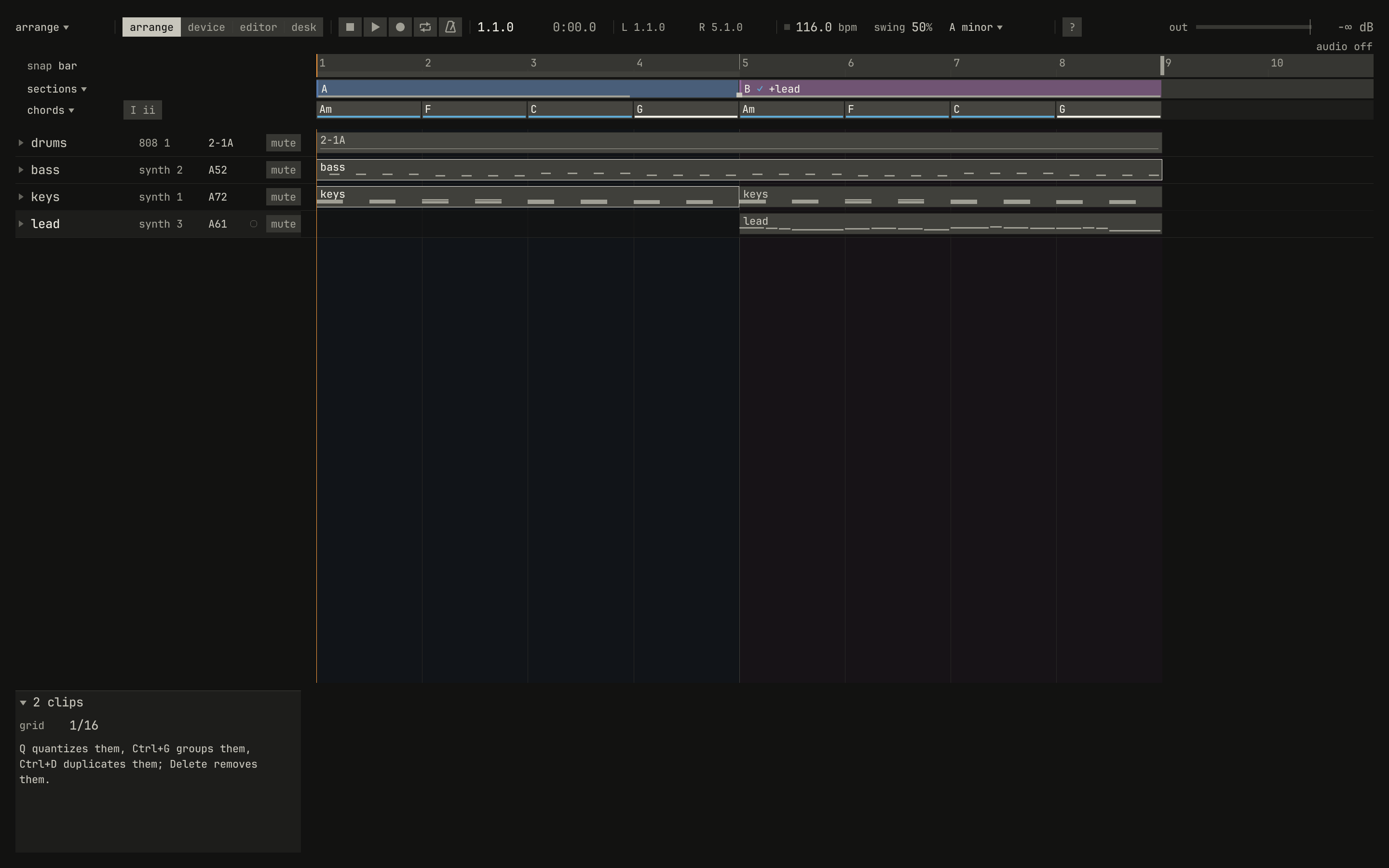
2 clips, and what the keys do to them.scriptzig build run-studio -- manual/13-arranging/arrange --script manual/13-arranging/select.txt
arrange/song.json
{
  "tempo": 116,
  "end": "9",
  "sections": ["1 A", "5 B"],
  "key": ["1 A minor"],
  "chords": ["1 Am", "2 F", "3 C", "4 G", "5 Am", "6 F", "7 C", "8 G"],
  "devices": [
    { "name": "synth", "type": "synth", "state": { "parts": [
      { "patch": "A72", "level": -8, "reverb_send": 20 },
      { "patch": "A52", "level": -6 },
      { "patch": "A61", "level": -10, "delay_send": 20 }
    ] } },
    { "name": "808", "type": "drums", "state": { "program": "2-1A" } }
  ],
  "tracks": [
    { "name": "drums", "device": "808", "channel": 1, "role": "drums", "clips": [{ "at": "1", "length": "8.0.0", "pattern": "2-1A" }] },
    { "name": "bass", "device": "synth", "channel": 2, "keys": "pent", "role": "bass", "clips": [{ "at": "1", "length": "8.0.0", "notes": "bass" }] },
    { "name": "keys", "device": "synth", "channel": 1, "keys": "chord 7", "role": "chords", "clips": [
      { "at": "1", "length": "4.0.0", "notes": "keys" },
      { "at": "5", "length": "4.0.0", "notes": "keys" }
    ] },
    { "name": "lead", "device": "synth", "channel": 3, "keys": "pent", "role": "lead", "clips": [{ "at": "5", "length": "4.0.0", "notes": "lead" }] }
  ],
  "notes": {
    "bass": { "length": "8.0.0", "follow": { "pattern": "offbeat", "low": "E1" } },
    "keys": {
      "length": "4.0.0",
      "notes": [
        "1.1.0 A3 0.1.0 96", "1.1.0 C4 0.1.0 96", "1.1.0 E4 0.1.0 96", "1.3.0 A3 0.1.0 90", "1.3.0 C4 0.1.0 90", "1.3.0 E4 0.1.0 90",
        "2.1.0 A3 0.1.0 96", "2.1.0 C4 0.1.0 96", "2.1.0 F4 0.1.0 96", "2.3.0 A3 0.1.0 90", "2.3.0 C4 0.1.0 90", "2.3.0 F4 0.1.0 90",
        "3.1.0 G3 0.1.0 96", "3.1.0 C4 0.1.0 96", "3.1.0 E4 0.1.0 96", "3.3.0 G3 0.1.0 90", "3.3.0 C4 0.1.0 90", "3.3.0 E4 0.1.0 90",
        "4.1.0 G3 0.1.0 96", "4.1.0 B3 0.1.0 96", "4.1.0 D4 0.1.0 96", "4.3.0 G3 0.1.0 90", "4.3.0 B3 0.1.0 90", "4.3.0 D4 0.1.0 90"
      ]
    },
    "lead": {
      "length": "4.0.0",
      "notes": [
        "1.1.0 E5 0.0.900 100", "1.2.0 D5 0.0.420 92", "1.2.480 C5 0.0.420 92", "1.3.0 A4 0.1.900 96",
        "2.1.0 C5 0.0.900 96", "2.2.0 D5 0.0.900 92", "2.3.0 C5 0.0.900 94", "2.4.0 A4 0.0.900 90",
        "3.1.0 E5 0.1.420 100", "3.2.480 G5 0.0.420 96", "3.3.0 E5 0.0.900 96", "3.4.0 D5 0.0.900 92",
        "4.1.0 D5 0.0.900 96", "4.2.0 E5 0.0.420 90", "4.2.480 D5 0.0.420 92", "4.3.0 G4 0.1.900 100"
      ]
    }
  }
}
select.txt
# A drag from an empty place draws a box: the clips it touches are
# selected, and the inspector says how many.
wait 0.2
drag lane lead bar 1.1 to lane bass bar 4.3
move 1300 850
wait 0.1
capture select.png
Delete removes the clips selected. Ctrl+C copies them, and Ctrl+X copies them and takes them away; Ctrl+V pastes them at the song position's bar, the top one on the selected track and the rest below it as they were, each playing a copy of its notes. The clipboard keeps what it holds through undo, and opening another song empties it.
Moving clips
A drag on a clip moves it, by bars, or by beats with Ctrl held. A drag on a clip that's part of a selection moves the whole selection, the same bars and the same number of tracks, and a ghost of each clip shows where it will land. A clip moves only onto a track that plays its type of device, since its notes name that device's keys and programs; if any one can't, none moves, and a callout says why. No clip goes before bar 1.

scriptzig build run-studio -- manual/13-arranging/arrange --script manual/13-arranging/drag.txt
arrange/song.json
{
  "tempo": 116,
  "end": "9",
  "sections": ["1 A", "5 B"],
  "key": ["1 A minor"],
  "chords": ["1 Am", "2 F", "3 C", "4 G", "5 Am", "6 F", "7 C", "8 G"],
  "devices": [
    { "name": "synth", "type": "synth", "state": { "parts": [
      { "patch": "A72", "level": -8, "reverb_send": 20 },
      { "patch": "A52", "level": -6 },
      { "patch": "A61", "level": -10, "delay_send": 20 }
    ] } },
    { "name": "808", "type": "drums", "state": { "program": "2-1A" } }
  ],
  "tracks": [
    { "name": "drums", "device": "808", "channel": 1, "role": "drums", "clips": [{ "at": "1", "length": "8.0.0", "pattern": "2-1A" }] },
    { "name": "bass", "device": "synth", "channel": 2, "keys": "pent", "role": "bass", "clips": [{ "at": "1", "length": "8.0.0", "notes": "bass" }] },
    { "name": "keys", "device": "synth", "channel": 1, "keys": "chord 7", "role": "chords", "clips": [
      { "at": "1", "length": "4.0.0", "notes": "keys" },
      { "at": "5", "length": "4.0.0", "notes": "keys" }
    ] },
    { "name": "lead", "device": "synth", "channel": 3, "keys": "pent", "role": "lead", "clips": [{ "at": "5", "length": "4.0.0", "notes": "lead" }] }
  ],
  "notes": {
    "bass": { "length": "8.0.0", "follow": { "pattern": "offbeat", "low": "E1" } },
    "keys": {
      "length": "4.0.0",
      "notes": [
        "1.1.0 A3 0.1.0 96", "1.1.0 C4 0.1.0 96", "1.1.0 E4 0.1.0 96", "1.3.0 A3 0.1.0 90", "1.3.0 C4 0.1.0 90", "1.3.0 E4 0.1.0 90",
        "2.1.0 A3 0.1.0 96", "2.1.0 C4 0.1.0 96", "2.1.0 F4 0.1.0 96", "2.3.0 A3 0.1.0 90", "2.3.0 C4 0.1.0 90", "2.3.0 F4 0.1.0 90",
        "3.1.0 G3 0.1.0 96", "3.1.0 C4 0.1.0 96", "3.1.0 E4 0.1.0 96", "3.3.0 G3 0.1.0 90", "3.3.0 C4 0.1.0 90", "3.3.0 E4 0.1.0 90",
        "4.1.0 G3 0.1.0 96", "4.1.0 B3 0.1.0 96", "4.1.0 D4 0.1.0 96", "4.3.0 G3 0.1.0 90", "4.3.0 B3 0.1.0 90", "4.3.0 D4 0.1.0 90"
      ]
    },
    "lead": {
      "length": "4.0.0",
      "notes": [
        "1.1.0 E5 0.0.900 100", "1.2.0 D5 0.0.420 92", "1.2.480 C5 0.0.420 92", "1.3.0 A4 0.1.900 96",
        "2.1.0 C5 0.0.900 96", "2.2.0 D5 0.0.900 92", "2.3.0 C5 0.0.900 94", "2.4.0 A4 0.0.900 90",
        "3.1.0 E5 0.1.420 100", "3.2.480 G5 0.0.420 96", "3.3.0 E5 0.0.900 96", "3.4.0 D5 0.0.900 92",
        "4.1.0 D5 0.0.900 96", "4.2.0 E5 0.0.420 90", "4.2.480 D5 0.0.420 92", "4.3.0 G4 0.1.900 100"
      ]
    }
  }
}
drag.txt
# The lead's clip, held and dragged four bars earlier: its ghost shows
# where it will land.
wait 0.2
move lane lead bar 5.3
down mouse
wait 0.05
move lane lead bar 4.3
wait 0.05
move lane lead bar 1.3
wait 0.1
capture drag.png
up mouse
Copies and linked copies
Alt held as a drag ends drops copies of the clips there, and leaves
them where they were. A copy plays notes of its own, under a name of its
own, as riff 2, so editing one leaves the other as it was. Alt and Shift
drop linked copies: clips that play the same notes, so an edit to one is
an edit to all of them. The inspector says which a clip is, its own or
linked.
Ctrl+D places a copy of the selection right after it, as far as it runs, rounded up to whole bars, and selects the copy, so pressing it again copies on. Ctrl+Shift+D places linked copies. Ctrl+U gives each clip selected notes of its own again, copied from what it played.

0.0 / 12.4 s
peak -13.1 dBFS
riff 2. Listen for the last note of bar 6, an E2 where bars 2 and 4 play B1.openzig build run-studio -- manual/13-arranging/links
renderzig build run-studio -- render manual/13-arranging/links links.wav
links/song.json
{
  "tempo": 116,
  "end": "7",
  "key": ["1 A minor"],
  "devices": [
    { "name": "synth", "type": "synth", "state": { "parts": [
      { "patch": "A52", "level": -6 }
    ] } },
    { "name": "808", "type": "drums", "state": { "program": "2-1A" } }
  ],
  "tracks": [
    { "name": "drums", "device": "808", "channel": 1, "role": "drums", "clips": [{ "at": "1", "length": "6.0.0", "pattern": "2-1A" }] },
    { "name": "bass", "device": "synth", "channel": 1, "role": "bass", "clips": [
      { "at": "1", "length": "2.0.0", "notes": "riff" },
      { "at": "3", "length": "2.0.0", "notes": "riff" },
      { "at": "5", "length": "2.0.0", "notes": "riff 2" }
    ] }
  ],
  "notes": {
    "riff": {
      "length": "2.0.0",
      "notes": [
        "1.1.0 A1 0.0.420 110", "1.1.480 A2 0.0.240 90", "1.2.480 G2 0.0.240 90", "1.3.0 A1 0.0.420 104", "1.4.0 C2 0.0.420 100", "1.4.480 E2 0.0.420 96",
        "2.1.0 F1 0.0.420 110", "2.1.480 F2 0.0.240 90", "2.2.480 E2 0.0.240 90", "2.3.0 F1 0.0.420 104", "2.4.0 G1 0.0.420 100", "2.4.480 B1 0.0.420 96"
      ]
    },
    "riff 2": {
      "length": "2.0.0",
      "notes": [
        "1.1.0 A1 0.0.420 110", "1.1.480 A2 0.0.240 90", "1.2.480 G2 0.0.240 90", "1.3.0 A1 0.0.420 104", "1.4.0 C2 0.0.420 100", "1.4.480 E2 0.0.420 96",
        "2.1.0 F1 0.0.420 110", "2.1.480 F2 0.0.240 90", "2.2.480 E2 0.0.240 90", "2.3.0 F1 0.0.420 104", "2.4.0 G1 0.0.420 100", "2.4.480 E2 0.0.420 96"
      ]
    }
  }
}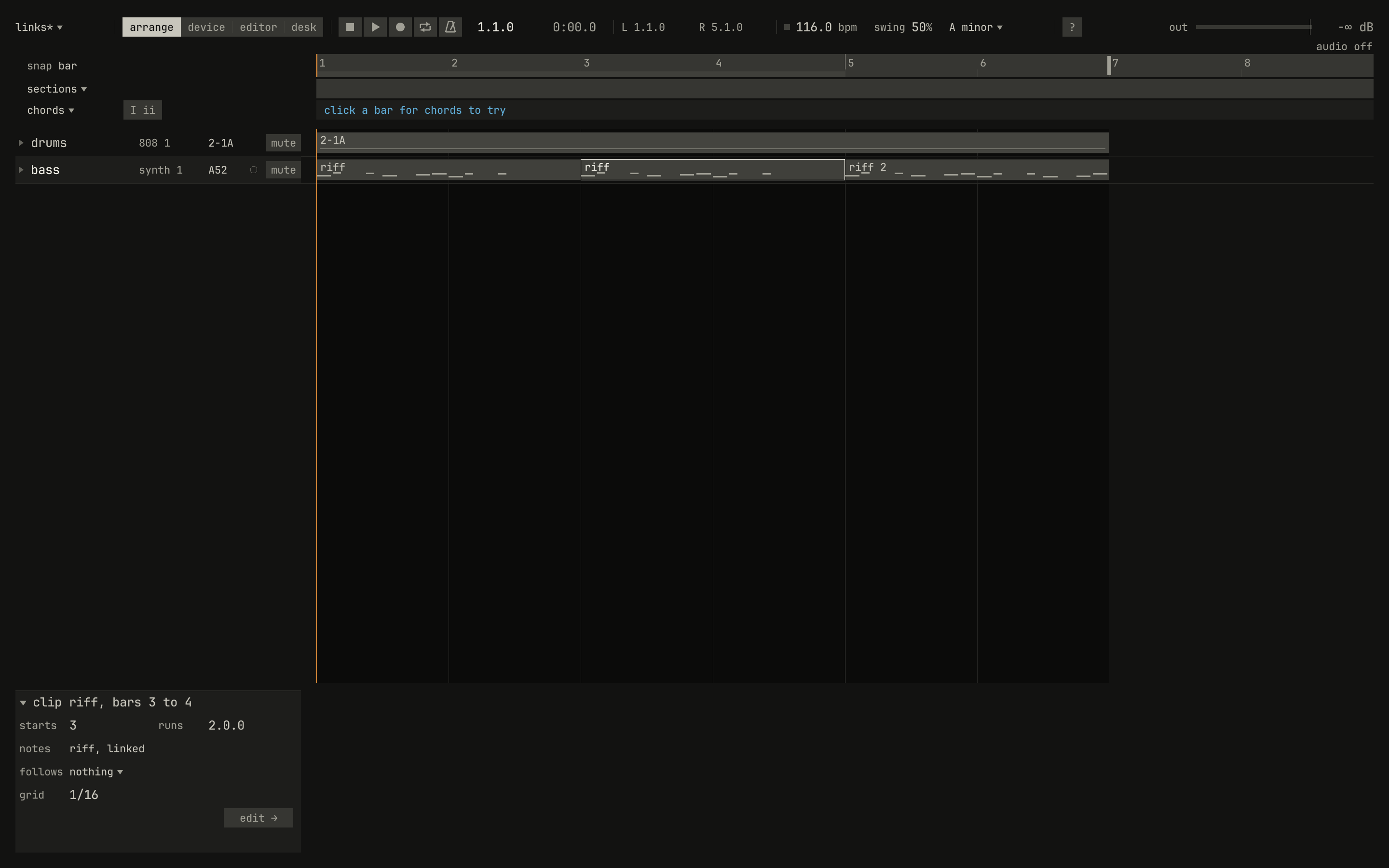
riff, linked. The copy at bar 5, riff 2, plays its own and keeps them.scriptzig build run-studio -- manual/13-arranging/links --script manual/13-arranging/linked.txt
links/song.json
{
  "tempo": 116,
  "end": "7",
  "key": ["1 A minor"],
  "devices": [
    { "name": "synth", "type": "synth", "state": { "parts": [
      { "patch": "A52", "level": -6 }
    ] } },
    { "name": "808", "type": "drums", "state": { "program": "2-1A" } }
  ],
  "tracks": [
    { "name": "drums", "device": "808", "channel": 1, "role": "drums", "clips": [{ "at": "1", "length": "6.0.0", "pattern": "2-1A" }] },
    { "name": "bass", "device": "synth", "channel": 1, "role": "bass", "clips": [
      { "at": "1", "length": "2.0.0", "notes": "riff" },
      { "at": "3", "length": "2.0.0", "notes": "riff" },
      { "at": "5", "length": "2.0.0", "notes": "riff 2" }
    ] }
  ],
  "notes": {
    "riff": {
      "length": "2.0.0",
      "notes": [
        "1.1.0 A1 0.0.420 110", "1.1.480 A2 0.0.240 90", "1.2.480 G2 0.0.240 90", "1.3.0 A1 0.0.420 104", "1.4.0 C2 0.0.420 100", "1.4.480 E2 0.0.420 96",
        "2.1.0 F1 0.0.420 110", "2.1.480 F2 0.0.240 90", "2.2.480 E2 0.0.240 90", "2.3.0 F1 0.0.420 104", "2.4.0 G1 0.0.420 100", "2.4.480 B1 0.0.420 96"
      ]
    },
    "riff 2": {
      "length": "2.0.0",
      "notes": [
        "1.1.0 A1 0.0.420 110", "1.1.480 A2 0.0.240 90", "1.2.480 G2 0.0.240 90", "1.3.0 A1 0.0.420 104", "1.4.0 C2 0.0.420 100", "1.4.480 E2 0.0.420 96",
        "2.1.0 F1 0.0.420 110", "2.1.480 F2 0.0.240 90", "2.2.480 E2 0.0.240 90", "2.3.0 F1 0.0.420 104", "2.4.0 G1 0.0.420 100", "2.4.480 E2 0.0.420 96"
      ]
    }
  }
}
linked.txt
# The first riff opened in Key Edit, and the last notes of its second bar
# deleted: the linked clip at bar 3 loses them too, and the copy at bar 5
# keeps them.
wait 0.2
double lane bass bar 1.2
wait 0.2
drag roll D3 bar 2.2.900 to roll E1 bar 2.4.900
key delete
wait 0.1
key ctrl+1
wait 0.1
click lane bass bar 3.2
move 1300 850
wait 0.1
capture linked.png
A clip that follows the chords plays other notes wherever the chords differ, so its linked copy is a copy.
Resizing and trimming
A drag on a clip's right edge resizes it, by bars, or beats with Ctrl. A notes clip longer than its notes loops them, from the clip's start, and a thin line marks each time they start over; a shorter one plays as far as it reaches. A pattern clip plays its pattern on as long as it runs.

0.0 / 8.3 s
peak -12.9 dBFS
runs 4.0.0 for the clip; Key Edit shows one bar of notes.openzig build run-studio -- manual/13-arranging/loop
renderzig build run-studio -- render manual/13-arranging/loop loop.wav
loop/song.json
{
  "tempo": 116,
  "end": "5",
  "key": ["1 A minor"],
  "devices": [
    { "name": "synth", "type": "synth", "state": { "parts": [
      { "patch": "A52", "level": -6 }
    ] } },
    { "name": "808", "type": "drums", "state": { "program": "2-1A" } }
  ],
  "tracks": [
    { "name": "drums", "device": "808", "channel": 1, "role": "drums", "clips": [{ "at": "1", "length": "4.0.0", "pattern": "2-1A" }] },
    { "name": "bass", "device": "synth", "channel": 1, "role": "bass", "clips": [{ "at": "1", "length": "4.0.0", "notes": "riff" }] }
  ],
  "notes": {
    "riff": {
      "length": "1.0.0",
      "notes": ["1.1.0 A1 0.0.420 110", "1.1.480 A2 0.0.240 90", "1.2.480 G2 0.0.240 90", "1.3.0 A1 0.0.420 104", "1.4.0 C2 0.0.420 100", "1.4.480 E2 0.0.420 96"]
    }
  }
}
A drag on a clip's left edge trims its start, and keeps its end. A notes clip trimmed plays notes of its own from then on, what it played from its new start, so a linked clip trimmed comes unlinked. Dragged out past its start, it plays silence and then all its notes. A pattern clip trimmed starts later.
Cutting and gluing
The cut tool, or Ctrl+E, cuts a clip in two where it's
cut, and changes nothing you hear. A notes clip's second half plays notes of
its own: what the clip played from there. A pattern clip's second half
carries its pattern on, rather than starting it over: it plays from the step
the pattern had reached.

0.0 / 4.1 s
peak -11.8 dBFS
B81, a bass line of sixteen steps, cut at beat 3 of bar 1 into two pattern clips. The render is the uncut clip's, sample for sample: listen across beat 3 of bar 1 for the line running on from its ninth step.openzig build run-studio -- manual/13-arranging/cut
renderzig build run-studio -- render manual/13-arranging/cut cut.wav
cut/song.json
{
  "tempo": 116,
  "end": "3",
  "key": ["1 C minor"],
  "devices": [
    { "name": "synth", "type": "synth", "state": { "parts": [
      { "patch": "B81", "level": -6 }
    ] } },
    { "name": "808", "type": "drums", "state": { "program": "2-1A" } }
  ],
  "tracks": [
    { "name": "drums", "device": "808", "channel": 1, "role": "drums", "clips": [{ "at": "1", "length": "2.0.0", "pattern": "2-1A" }] },
    { "name": "bass", "device": "synth", "channel": 1, "role": "bass", "clips": [
      { "at": "1", "length": "0.2.0", "pattern": "B81" },
      { "at": "1.3", "length": "1.2.0", "pattern": "B81" }
    ] }
  ]
}
The glue tool joins a clip to the next one on its track: two notes clips
into one with the notes of both, or two clips of one pattern into one.
A notes clip doesn't glue to a pattern clip, nor a pattern to another
pattern; a callout says so. Two clips of one pattern placed end to end play
as one clip, glued or not.
Audio clips
On an audio track (chapter 14), a clip
plays a stretch of a recording: a WAV file in the song's audio/ folder,
from a frame of it, for a number of frames, at a gain, with a fade in and
a fade out. Its frames are what it is. It starts on a bar and beat, and a
tempo change moves its start, not its speed, as tape doesn't follow a
click. The box draws the recording's outline at the clip's gain, as tall
as the square root of its level, so a recording that peaks at −18 dBFS,
as the studio's own do, still shows its shape; its fades are lines rising
from its foot.
The edits are the other clips', and each keeps the sound sample for sample:
- A drag on the right edge plays more or less of the recording, as far as it goes; on the left edge, starts later or earlier in it.
- A drag along the top, from a corner or from where a fade ends, sets the fade in or the fade out. The inspector sets the fades to the millisecond and the gain to a tenth of a decibel, with the wheel or a drag.
cut, Ctrl+E, anderasecut and remove audio clips as any; the halves of a cut play on as the whole did, andgluejoins them again, two stretches of one recording, the second going on from where the first ends. A range edit (below) cuts an audio clip where it crosses.
Where clips overlap on an audio track, the one started last plays, as a take punched in on tape plays over the one beneath, and the one under it comes back after it; a clip's fades cross with the clip it covers.
A WAV file dropped on an audio track's row lands there as a clip, from the
bar under the pointer. The studio copies it into the song's audio/ at
48 kHz, so the song's folder is whole on its own, and the same file
dropped again plays the copy made the first time. The song must have a
folder first, which Ctrl+S gives it. studio/examples/tape/build.txt
drops a render of a phrase on Lantern twice, the second time fading out
(chapter 21).
Groups
A group is clips across tracks used as one, as Cubase's Group Tracks
were: a chorus, made once and placed wherever it comes. Ctrl+G groups
the clips selected, or with none selected, every clip that plays between the
locators. The clips leave their tracks for a new group, group 1, and a
clip of it takes their place on the song's group track, groups, which
the first group adds below the last track.
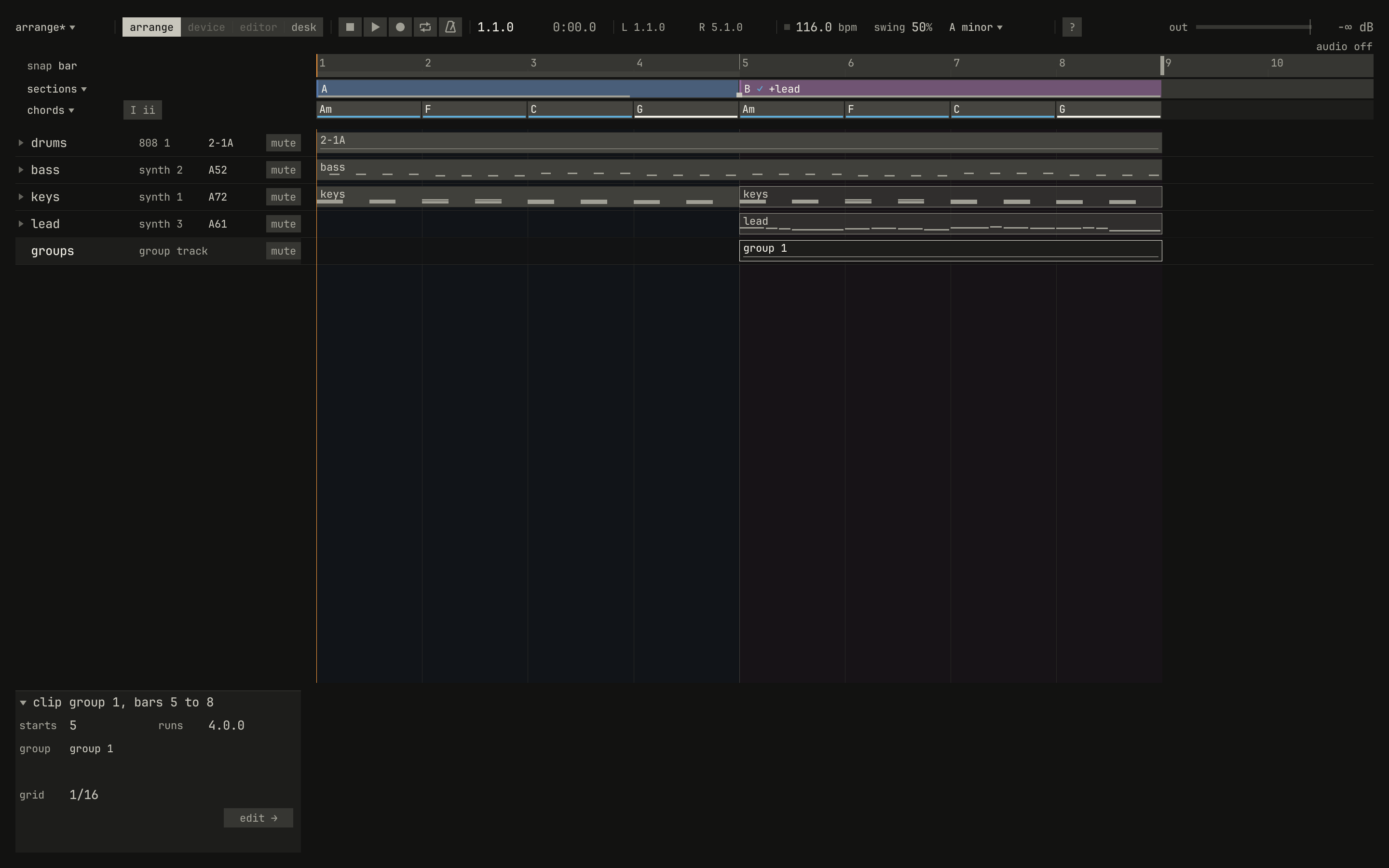
groups, holds one clip of group 1, and each track draws its clip from the group, faint, where it plays.scriptzig build run-studio -- manual/13-arranging/arrange --script manual/13-arranging/group.txt
arrange/song.json
{
  "tempo": 116,
  "end": "9",
  "sections": ["1 A", "5 B"],
  "key": ["1 A minor"],
  "chords": ["1 Am", "2 F", "3 C", "4 G", "5 Am", "6 F", "7 C", "8 G"],
  "devices": [
    { "name": "synth", "type": "synth", "state": { "parts": [
      { "patch": "A72", "level": -8, "reverb_send": 20 },
      { "patch": "A52", "level": -6 },
      { "patch": "A61", "level": -10, "delay_send": 20 }
    ] } },
    { "name": "808", "type": "drums", "state": { "program": "2-1A" } }
  ],
  "tracks": [
    { "name": "drums", "device": "808", "channel": 1, "role": "drums", "clips": [{ "at": "1", "length": "8.0.0", "pattern": "2-1A" }] },
    { "name": "bass", "device": "synth", "channel": 2, "keys": "pent", "role": "bass", "clips": [{ "at": "1", "length": "8.0.0", "notes": "bass" }] },
    { "name": "keys", "device": "synth", "channel": 1, "keys": "chord 7", "role": "chords", "clips": [
      { "at": "1", "length": "4.0.0", "notes": "keys" },
      { "at": "5", "length": "4.0.0", "notes": "keys" }
    ] },
    { "name": "lead", "device": "synth", "channel": 3, "keys": "pent", "role": "lead", "clips": [{ "at": "5", "length": "4.0.0", "notes": "lead" }] }
  ],
  "notes": {
    "bass": { "length": "8.0.0", "follow": { "pattern": "offbeat", "low": "E1" } },
    "keys": {
      "length": "4.0.0",
      "notes": [
        "1.1.0 A3 0.1.0 96", "1.1.0 C4 0.1.0 96", "1.1.0 E4 0.1.0 96", "1.3.0 A3 0.1.0 90", "1.3.0 C4 0.1.0 90", "1.3.0 E4 0.1.0 90",
        "2.1.0 A3 0.1.0 96", "2.1.0 C4 0.1.0 96", "2.1.0 F4 0.1.0 96", "2.3.0 A3 0.1.0 90", "2.3.0 C4 0.1.0 90", "2.3.0 F4 0.1.0 90",
        "3.1.0 G3 0.1.0 96", "3.1.0 C4 0.1.0 96", "3.1.0 E4 0.1.0 96", "3.3.0 G3 0.1.0 90", "3.3.0 C4 0.1.0 90", "3.3.0 E4 0.1.0 90",
        "4.1.0 G3 0.1.0 96", "4.1.0 B3 0.1.0 96", "4.1.0 D4 0.1.0 96", "4.3.0 G3 0.1.0 90", "4.3.0 B3 0.1.0 90", "4.3.0 D4 0.1.0 90"
      ]
    },
    "lead": {
      "length": "4.0.0",
      "notes": [
        "1.1.0 E5 0.0.900 100", "1.2.0 D5 0.0.420 92", "1.2.480 C5 0.0.420 92", "1.3.0 A4 0.1.900 96",
        "2.1.0 C5 0.0.900 96", "2.2.0 D5 0.0.900 92", "2.3.0 C5 0.0.900 94", "2.4.0 A4 0.0.900 90",
        "3.1.0 E5 0.1.420 100", "3.2.480 G5 0.0.420 96", "3.3.0 E5 0.0.900 96", "3.4.0 D5 0.0.900 92",
        "4.1.0 D5 0.0.900 96", "4.2.0 E5 0.0.420 90", "4.2.480 D5 0.0.420 92", "4.3.0 G4 0.1.900 100"
      ]
    }
  }
}
group.txt
# The keys' and the lead's clips in section B, selected and grouped: a
# group track holds the group's clip, and the clips play from it.
wait 0.2
click lane keys bar 6
down shift
click lane lead bar 6
up shift
key ctrl+g
move 1300 850
wait 3.2
capture group.png
A group clip plays its clips on their own tracks, each where it was in the group. Copy the group clip with Ctrl+D or an Alt-drag, and the group plays again there; the clips in it play the same notes in every place, so an edit to one, opened with a double-click where it plays, is an edit everywhere. A group's clip cuts, trims, and glues only where the group starts over, and a part that follows the chords plays its notes as they are once it's in a group. Muting the group track mutes every group, and deleting a track takes its clips out of every group.
Sections
The band under the ruler names stretches of bars sections, each from its bar to the next one's, in a hue of its own washed faintly down the tracks; sections of one name share a hue. A section holds nothing: the clips stay on their tracks, and the section says what the bars are. Chapter 8 tells what sections are for, laying out a form, and the coach's counts along the band.
- A double-click on the band adds a section on the bar line nearest the
pointer, named the first free letter,
A,B,C, and typed at once; on a bar where a section starts, it types the section's name anew. Names may repeat: a verse twice is two sections namedverse. - A click selects a section, puts the locators on its bars, and shows it in the inspector, so cycle loops it and the bar edits below act on it. Shift and a click on another span both and the sections between.
- A drag on a section moves its bars, with everything in them, to before the section nearest the pointer, or to the song's end; with Ctrl, to any bar. With Alt, it drops a copy of them there instead, and with Alt and Shift, a linked copy.
- A drag on its start moves where it starts, and nothing else.
remove section, in its menu, takes the section's name away; its bars join the section before.
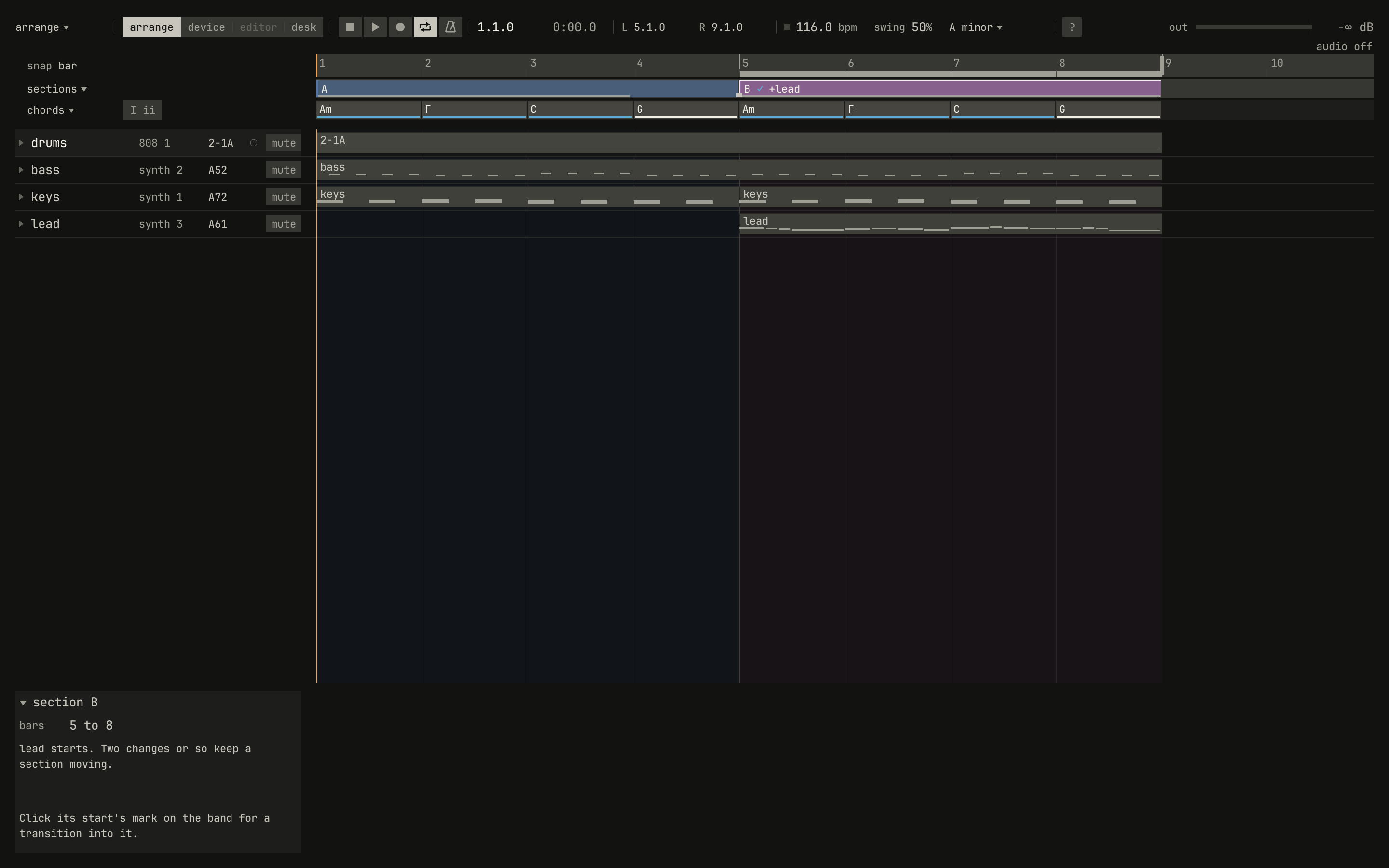
L 5.1.0 and R 9.1.0 in the bar, the ruler marks them, and the inspector shows the section and the coach's word on it.scriptzig build run-studio -- manual/13-arranging/arrange --script manual/13-arranging/section.txt
arrange/song.json
{
  "tempo": 116,
  "end": "9",
  "sections": ["1 A", "5 B"],
  "key": ["1 A minor"],
  "chords": ["1 Am", "2 F", "3 C", "4 G", "5 Am", "6 F", "7 C", "8 G"],
  "devices": [
    { "name": "synth", "type": "synth", "state": { "parts": [
      { "patch": "A72", "level": -8, "reverb_send": 20 },
      { "patch": "A52", "level": -6 },
      { "patch": "A61", "level": -10, "delay_send": 20 }
    ] } },
    { "name": "808", "type": "drums", "state": { "program": "2-1A" } }
  ],
  "tracks": [
    { "name": "drums", "device": "808", "channel": 1, "role": "drums", "clips": [{ "at": "1", "length": "8.0.0", "pattern": "2-1A" }] },
    { "name": "bass", "device": "synth", "channel": 2, "keys": "pent", "role": "bass", "clips": [{ "at": "1", "length": "8.0.0", "notes": "bass" }] },
    { "name": "keys", "device": "synth", "channel": 1, "keys": "chord 7", "role": "chords", "clips": [
      { "at": "1", "length": "4.0.0", "notes": "keys" },
      { "at": "5", "length": "4.0.0", "notes": "keys" }
    ] },
    { "name": "lead", "device": "synth", "channel": 3, "keys": "pent", "role": "lead", "clips": [{ "at": "5", "length": "4.0.0", "notes": "lead" }] }
  ],
  "notes": {
    "bass": { "length": "8.0.0", "follow": { "pattern": "offbeat", "low": "E1" } },
    "keys": {
      "length": "4.0.0",
      "notes": [
        "1.1.0 A3 0.1.0 96", "1.1.0 C4 0.1.0 96", "1.1.0 E4 0.1.0 96", "1.3.0 A3 0.1.0 90", "1.3.0 C4 0.1.0 90", "1.3.0 E4 0.1.0 90",
        "2.1.0 A3 0.1.0 96", "2.1.0 C4 0.1.0 96", "2.1.0 F4 0.1.0 96", "2.3.0 A3 0.1.0 90", "2.3.0 C4 0.1.0 90", "2.3.0 F4 0.1.0 90",
        "3.1.0 G3 0.1.0 96", "3.1.0 C4 0.1.0 96", "3.1.0 E4 0.1.0 96", "3.3.0 G3 0.1.0 90", "3.3.0 C4 0.1.0 90", "3.3.0 E4 0.1.0 90",
        "4.1.0 G3 0.1.0 96", "4.1.0 B3 0.1.0 96", "4.1.0 D4 0.1.0 96", "4.3.0 G3 0.1.0 90", "4.3.0 B3 0.1.0 90", "4.3.0 D4 0.1.0 90"
      ]
    },
    "lead": {
      "length": "4.0.0",
      "notes": [
        "1.1.0 E5 0.0.900 100", "1.2.0 D5 0.0.420 92", "1.2.480 C5 0.0.420 92", "1.3.0 A4 0.1.900 96",
        "2.1.0 C5 0.0.900 96", "2.2.0 D5 0.0.900 92", "2.3.0 C5 0.0.900 94", "2.4.0 A4 0.0.900 90",
        "3.1.0 E5 0.1.420 100", "3.2.480 G5 0.0.420 96", "3.3.0 E5 0.0.900 96", "3.4.0 D5 0.0.900 92",
        "4.1.0 D5 0.0.900 96", "4.2.0 E5 0.0.420 90", "4.2.480 D5 0.0.420 92", "4.3.0 G4 0.1.900 100"
      ]
    }
  }
}
section.txt
# A click on section B puts the locators on its bars, and Num / cycles
# them.
wait 0.2
click sections bar 6
key kp_divide
move 1300 850
wait 0.1
capture section.png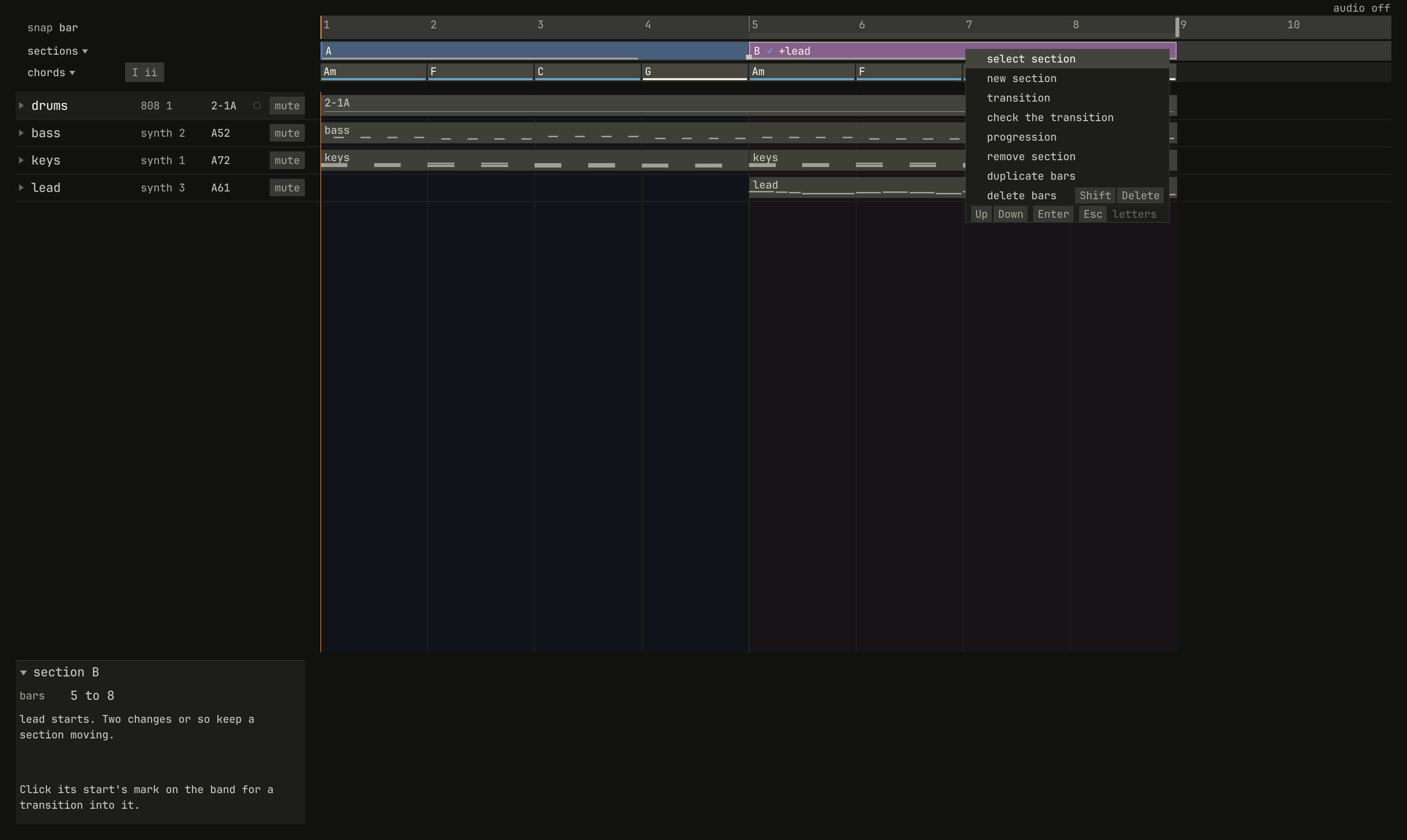
remove section, and its bars duplicated or deleted.scriptzig build run-studio -- manual/13-arranging/arrange --script manual/13-arranging/section-menu.txt
arrange/song.json
{
  "tempo": 116,
  "end": "9",
  "sections": ["1 A", "5 B"],
  "key": ["1 A minor"],
  "chords": ["1 Am", "2 F", "3 C", "4 G", "5 Am", "6 F", "7 C", "8 G"],
  "devices": [
    { "name": "synth", "type": "synth", "state": { "parts": [
      { "patch": "A72", "level": -8, "reverb_send": 20 },
      { "patch": "A52", "level": -6 },
      { "patch": "A61", "level": -10, "delay_send": 20 }
    ] } },
    { "name": "808", "type": "drums", "state": { "program": "2-1A" } }
  ],
  "tracks": [
    { "name": "drums", "device": "808", "channel": 1, "role": "drums", "clips": [{ "at": "1", "length": "8.0.0", "pattern": "2-1A" }] },
    { "name": "bass", "device": "synth", "channel": 2, "keys": "pent", "role": "bass", "clips": [{ "at": "1", "length": "8.0.0", "notes": "bass" }] },
    { "name": "keys", "device": "synth", "channel": 1, "keys": "chord 7", "role": "chords", "clips": [
      { "at": "1", "length": "4.0.0", "notes": "keys" },
      { "at": "5", "length": "4.0.0", "notes": "keys" }
    ] },
    { "name": "lead", "device": "synth", "channel": 3, "keys": "pent", "role": "lead", "clips": [{ "at": "5", "length": "4.0.0", "notes": "lead" }] }
  ],
  "notes": {
    "bass": { "length": "8.0.0", "follow": { "pattern": "offbeat", "low": "E1" } },
    "keys": {
      "length": "4.0.0",
      "notes": [
        "1.1.0 A3 0.1.0 96", "1.1.0 C4 0.1.0 96", "1.1.0 E4 0.1.0 96", "1.3.0 A3 0.1.0 90", "1.3.0 C4 0.1.0 90", "1.3.0 E4 0.1.0 90",
        "2.1.0 A3 0.1.0 96", "2.1.0 C4 0.1.0 96", "2.1.0 F4 0.1.0 96", "2.3.0 A3 0.1.0 90", "2.3.0 C4 0.1.0 90", "2.3.0 F4 0.1.0 90",
        "3.1.0 G3 0.1.0 96", "3.1.0 C4 0.1.0 96", "3.1.0 E4 0.1.0 96", "3.3.0 G3 0.1.0 90", "3.3.0 C4 0.1.0 90", "3.3.0 E4 0.1.0 90",
        "4.1.0 G3 0.1.0 96", "4.1.0 B3 0.1.0 96", "4.1.0 D4 0.1.0 96", "4.3.0 G3 0.1.0 90", "4.3.0 B3 0.1.0 90", "4.3.0 D4 0.1.0 90"
      ]
    },
    "lead": {
      "length": "4.0.0",
      "notes": [
        "1.1.0 E5 0.0.900 100", "1.2.0 D5 0.0.420 92", "1.2.480 C5 0.0.420 92", "1.3.0 A4 0.1.900 96",
        "2.1.0 C5 0.0.900 96", "2.2.0 D5 0.0.900 92", "2.3.0 C5 0.0.900 94", "2.4.0 A4 0.0.900 90",
        "3.1.0 E5 0.1.420 100", "3.2.480 G5 0.0.420 96", "3.3.0 E5 0.0.900 96", "3.4.0 D5 0.0.900 92",
        "4.1.0 D5 0.0.900 96", "4.2.0 E5 0.0.420 90", "4.2.480 D5 0.0.420 92", "4.3.0 G4 0.1.900 100"
      ]
    }
  }
}
section-menu.txt
# A right-click on section B opens its menu.
wait 0.2
rclick sections bar 7
wait 0.1
capture section-menu.png
The ruler and the locators
The ruler counts the bars over the clips. A click on it moves the song
position there, and a drag across it sets the locators, L and R in
the bar, on the bar lines nearest its ends: the bars that cycle loops, the
bar edits act on, and a punch-in records. Num 1 and Num 2 move
the song position to them, and Home to bar 1. The mark at the
song's end, on the ruler, drags it, by bars, but not before the last thing
the song holds.
A right-click on the ruler opens its menu, for the bars between the locators:
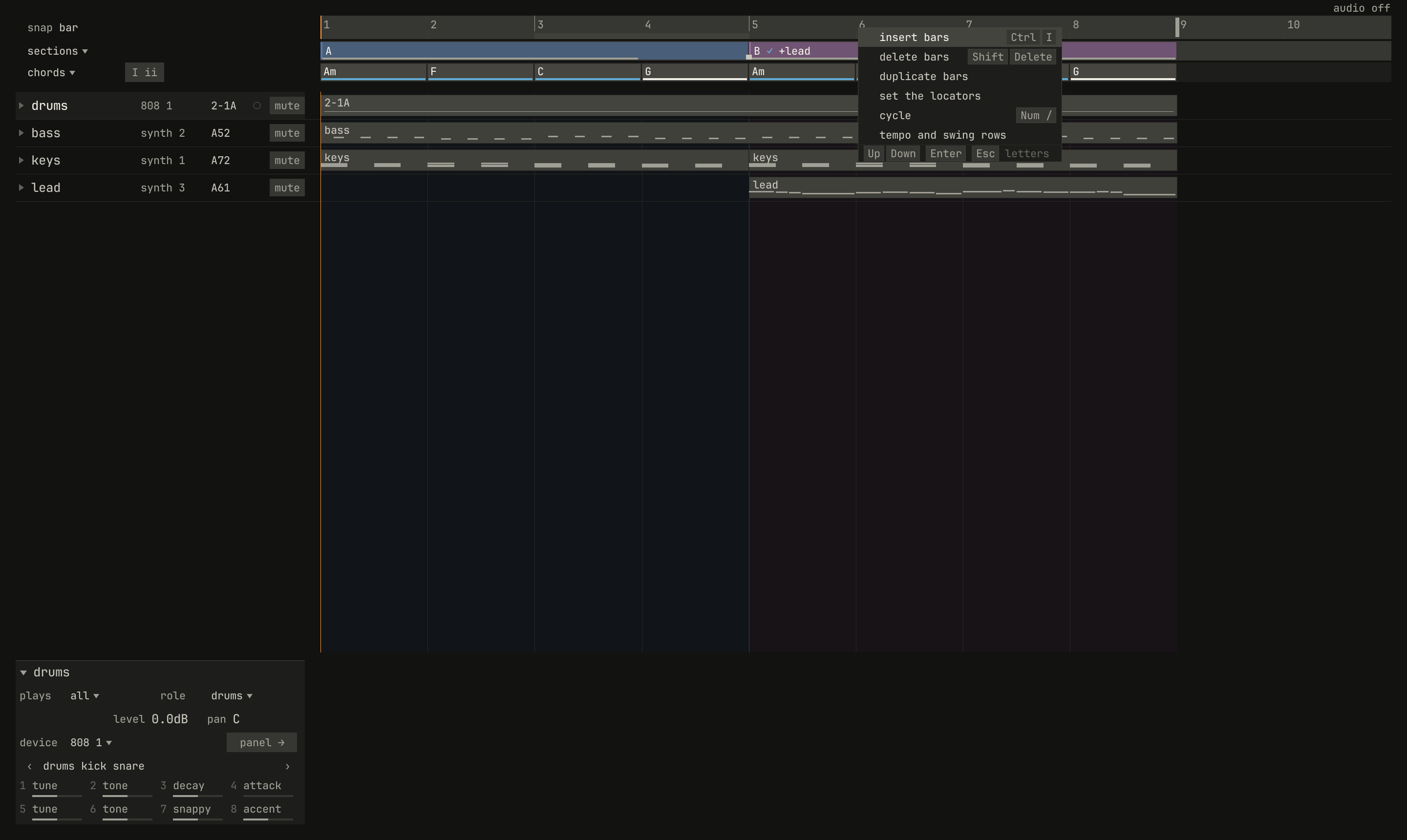
scriptzig build run-studio -- manual/13-arranging/arrange --script manual/13-arranging/ruler-menu.txt
arrange/song.json
{
  "tempo": 116,
  "end": "9",
  "sections": ["1 A", "5 B"],
  "key": ["1 A minor"],
  "chords": ["1 Am", "2 F", "3 C", "4 G", "5 Am", "6 F", "7 C", "8 G"],
  "devices": [
    { "name": "synth", "type": "synth", "state": { "parts": [
      { "patch": "A72", "level": -8, "reverb_send": 20 },
      { "patch": "A52", "level": -6 },
      { "patch": "A61", "level": -10, "delay_send": 20 }
    ] } },
    { "name": "808", "type": "drums", "state": { "program": "2-1A" } }
  ],
  "tracks": [
    { "name": "drums", "device": "808", "channel": 1, "role": "drums", "clips": [{ "at": "1", "length": "8.0.0", "pattern": "2-1A" }] },
    { "name": "bass", "device": "synth", "channel": 2, "keys": "pent", "role": "bass", "clips": [{ "at": "1", "length": "8.0.0", "notes": "bass" }] },
    { "name": "keys", "device": "synth", "channel": 1, "keys": "chord 7", "role": "chords", "clips": [
      { "at": "1", "length": "4.0.0", "notes": "keys" },
      { "at": "5", "length": "4.0.0", "notes": "keys" }
    ] },
    { "name": "lead", "device": "synth", "channel": 3, "keys": "pent", "role": "lead", "clips": [{ "at": "5", "length": "4.0.0", "notes": "lead" }] }
  ],
  "notes": {
    "bass": { "length": "8.0.0", "follow": { "pattern": "offbeat", "low": "E1" } },
    "keys": {
      "length": "4.0.0",
      "notes": [
        "1.1.0 A3 0.1.0 96", "1.1.0 C4 0.1.0 96", "1.1.0 E4 0.1.0 96", "1.3.0 A3 0.1.0 90", "1.3.0 C4 0.1.0 90", "1.3.0 E4 0.1.0 90",
        "2.1.0 A3 0.1.0 96", "2.1.0 C4 0.1.0 96", "2.1.0 F4 0.1.0 96", "2.3.0 A3 0.1.0 90", "2.3.0 C4 0.1.0 90", "2.3.0 F4 0.1.0 90",
        "3.1.0 G3 0.1.0 96", "3.1.0 C4 0.1.0 96", "3.1.0 E4 0.1.0 96", "3.3.0 G3 0.1.0 90", "3.3.0 C4 0.1.0 90", "3.3.0 E4 0.1.0 90",
        "4.1.0 G3 0.1.0 96", "4.1.0 B3 0.1.0 96", "4.1.0 D4 0.1.0 96", "4.3.0 G3 0.1.0 90", "4.3.0 B3 0.1.0 90", "4.3.0 D4 0.1.0 90"
      ]
    },
    "lead": {
      "length": "4.0.0",
      "notes": [
        "1.1.0 E5 0.0.900 100", "1.2.0 D5 0.0.420 92", "1.2.480 C5 0.0.420 92", "1.3.0 A4 0.1.900 96",
        "2.1.0 C5 0.0.900 96", "2.2.0 D5 0.0.900 92", "2.3.0 C5 0.0.900 94", "2.4.0 A4 0.0.900 90",
        "3.1.0 E5 0.1.420 100", "3.2.480 G5 0.0.420 96", "3.3.0 E5 0.0.900 96", "3.4.0 D5 0.0.900 92",
        "4.1.0 D5 0.0.900 96", "4.2.0 E5 0.0.420 90", "4.2.480 D5 0.0.420 92", "4.3.0 G4 0.1.900 100"
      ]
    }
  }
}
ruler-menu.txt
# A drag along the ruler sets the locators over bars 3 and 4; a
# right-click on the ruler, past them, opens its menu.
wait 0.2
drag ruler bar 3 to ruler bar 5
wait 0.1
rclick ruler bar 6
wait 0.1
capture ruler-menu.png
Cycle
Num /, or the bar's cycle button, loops the song between the
locators: when the song position reaches the right one, it goes back to the
left, and the devices play on there as the song has them. A click on a
section and cycle loops the section; a drag along the ruler and cycle loops
any bars. Cycle is the window's: the song doesn't keep it. From the command
line, --cycle FROM TO opens the window looping, as
chapter 21 tells.
Inserting, deleting, and duplicating bars
Three edits act on the bars between the locators and everything in them: clips, lanes' points, tempo and swing points, chords, and sections. The ruler's menu holds all three, and a section's menu the last two:
| Edit | Keys | Does |
|---|---|---|
| insert bars | Ctrl+I | Empty bars at the left locator, as many as the locators span |
| delete bars | Shift+Delete | The bars deleted, and the gap closed |
| duplicate bars | Ctrl+D with no clip selected | A copy of the bars right after them; the locators move onto the copy |
Each is one edit, and keeps what plays outside the bars as it was:
- A clip across a boundary is cut there, as the cut tool cuts it, and a
group's clip cut mid-group refuses the edit, with
a group clip crosses
bar 9 mid-group
. - Copies play notes of their own; Ctrl+Shift+D with no clip selected links them instead.
- A lane, the tempo, the swing, and the chord hold their value across inserted bars, which join the section before them, and go on after them as they would have.
- The song's end and the locators move with the bars after the edit.
- Mutes and mute scenes have no place in time, and stay.

scriptzig build run-studio -- manual/13-arranging/arrange --script manual/13-arranging/insert.txt
arrange/song.json
{
  "tempo": 116,
  "end": "9",
  "sections": ["1 A", "5 B"],
  "key": ["1 A minor"],
  "chords": ["1 Am", "2 F", "3 C", "4 G", "5 Am", "6 F", "7 C", "8 G"],
  "devices": [
    { "name": "synth", "type": "synth", "state": { "parts": [
      { "patch": "A72", "level": -8, "reverb_send": 20 },
      { "patch": "A52", "level": -6 },
      { "patch": "A61", "level": -10, "delay_send": 20 }
    ] } },
    { "name": "808", "type": "drums", "state": { "program": "2-1A" } }
  ],
  "tracks": [
    { "name": "drums", "device": "808", "channel": 1, "role": "drums", "clips": [{ "at": "1", "length": "8.0.0", "pattern": "2-1A" }] },
    { "name": "bass", "device": "synth", "channel": 2, "keys": "pent", "role": "bass", "clips": [{ "at": "1", "length": "8.0.0", "notes": "bass" }] },
    { "name": "keys", "device": "synth", "channel": 1, "keys": "chord 7", "role": "chords", "clips": [
      { "at": "1", "length": "4.0.0", "notes": "keys" },
      { "at": "5", "length": "4.0.0", "notes": "keys" }
    ] },
    { "name": "lead", "device": "synth", "channel": 3, "keys": "pent", "role": "lead", "clips": [{ "at": "5", "length": "4.0.0", "notes": "lead" }] }
  ],
  "notes": {
    "bass": { "length": "8.0.0", "follow": { "pattern": "offbeat", "low": "E1" } },
    "keys": {
      "length": "4.0.0",
      "notes": [
        "1.1.0 A3 0.1.0 96", "1.1.0 C4 0.1.0 96", "1.1.0 E4 0.1.0 96", "1.3.0 A3 0.1.0 90", "1.3.0 C4 0.1.0 90", "1.3.0 E4 0.1.0 90",
        "2.1.0 A3 0.1.0 96", "2.1.0 C4 0.1.0 96", "2.1.0 F4 0.1.0 96", "2.3.0 A3 0.1.0 90", "2.3.0 C4 0.1.0 90", "2.3.0 F4 0.1.0 90",
        "3.1.0 G3 0.1.0 96", "3.1.0 C4 0.1.0 96", "3.1.0 E4 0.1.0 96", "3.3.0 G3 0.1.0 90", "3.3.0 C4 0.1.0 90", "3.3.0 E4 0.1.0 90",
        "4.1.0 G3 0.1.0 96", "4.1.0 B3 0.1.0 96", "4.1.0 D4 0.1.0 96", "4.3.0 G3 0.1.0 90", "4.3.0 B3 0.1.0 90", "4.3.0 D4 0.1.0 90"
      ]
    },
    "lead": {
      "length": "4.0.0",
      "notes": [
        "1.1.0 E5 0.0.900 100", "1.2.0 D5 0.0.420 92", "1.2.480 C5 0.0.420 92", "1.3.0 A4 0.1.900 96",
        "2.1.0 C5 0.0.900 96", "2.2.0 D5 0.0.900 92", "2.3.0 C5 0.0.900 94", "2.4.0 A4 0.0.900 90",
        "3.1.0 E5 0.1.420 100", "3.2.480 G5 0.0.420 96", "3.3.0 E5 0.0.900 96", "3.4.0 D5 0.0.900 92",
        "4.1.0 D5 0.0.900 96", "4.2.0 E5 0.0.420 90", "4.2.480 D5 0.0.420 92", "4.3.0 G4 0.1.900 100"
      ]
    }
  }
}
insert.txt
# Section B clicked, so the locators span bars 5 to 8, and Ctrl+I: four
# empty bars at bar 5. Ctrl and the wheel zoom out to show the song.
wait 0.2
click sections bar 6
key ctrl+i
move lane lead bar 6
down ctrl
wheel -2
up ctrl
move 1300 850
wait 0.1
capture insert.png
Mute scenes
A mute scene is which tracks are muted, kept under a key, as Cubase's were: ten of them, F1 to F10. Ctrl+Alt+F1–F10 stores the tracks' mutes as a scene, and Alt+F1–F10 recalls one, muting the tracks it holds and unmuting the rest. Ctrl, Shift, and an F key store too, and Shift and an F key recall. Storing and recalling are edits, which undo takes back, and a scene not yet stored says so. The song keeps its scenes, by the tracks' names.

scriptzig build run-studio -- manual/13-arranging/arrange --script manual/13-arranging/scenes.txt
arrange/song.json
{
  "tempo": 116,
  "end": "9",
  "sections": ["1 A", "5 B"],
  "key": ["1 A minor"],
  "chords": ["1 Am", "2 F", "3 C", "4 G", "5 Am", "6 F", "7 C", "8 G"],
  "devices": [
    { "name": "synth", "type": "synth", "state": { "parts": [
      { "patch": "A72", "level": -8, "reverb_send": 20 },
      { "patch": "A52", "level": -6 },
      { "patch": "A61", "level": -10, "delay_send": 20 }
    ] } },
    { "name": "808", "type": "drums", "state": { "program": "2-1A" } }
  ],
  "tracks": [
    { "name": "drums", "device": "808", "channel": 1, "role": "drums", "clips": [{ "at": "1", "length": "8.0.0", "pattern": "2-1A" }] },
    { "name": "bass", "device": "synth", "channel": 2, "keys": "pent", "role": "bass", "clips": [{ "at": "1", "length": "8.0.0", "notes": "bass" }] },
    { "name": "keys", "device": "synth", "channel": 1, "keys": "chord 7", "role": "chords", "clips": [
      { "at": "1", "length": "4.0.0", "notes": "keys" },
      { "at": "5", "length": "4.0.0", "notes": "keys" }
    ] },
    { "name": "lead", "device": "synth", "channel": 3, "keys": "pent", "role": "lead", "clips": [{ "at": "5", "length": "4.0.0", "notes": "lead" }] }
  ],
  "notes": {
    "bass": { "length": "8.0.0", "follow": { "pattern": "offbeat", "low": "E1" } },
    "keys": {
      "length": "4.0.0",
      "notes": [
        "1.1.0 A3 0.1.0 96", "1.1.0 C4 0.1.0 96", "1.1.0 E4 0.1.0 96", "1.3.0 A3 0.1.0 90", "1.3.0 C4 0.1.0 90", "1.3.0 E4 0.1.0 90",
        "2.1.0 A3 0.1.0 96", "2.1.0 C4 0.1.0 96", "2.1.0 F4 0.1.0 96", "2.3.0 A3 0.1.0 90", "2.3.0 C4 0.1.0 90", "2.3.0 F4 0.1.0 90",
        "3.1.0 G3 0.1.0 96", "3.1.0 C4 0.1.0 96", "3.1.0 E4 0.1.0 96", "3.3.0 G3 0.1.0 90", "3.3.0 C4 0.1.0 90", "3.3.0 E4 0.1.0 90",
        "4.1.0 G3 0.1.0 96", "4.1.0 B3 0.1.0 96", "4.1.0 D4 0.1.0 96", "4.3.0 G3 0.1.0 90", "4.3.0 B3 0.1.0 90", "4.3.0 D4 0.1.0 90"
      ]
    },
    "lead": {
      "length": "4.0.0",
      "notes": [
        "1.1.0 E5 0.0.900 100", "1.2.0 D5 0.0.420 92", "1.2.480 C5 0.0.420 92", "1.3.0 A4 0.1.900 96",
        "2.1.0 C5 0.0.900 96", "2.2.0 D5 0.0.900 92", "2.3.0 C5 0.0.900 94", "2.4.0 A4 0.0.900 90",
        "3.1.0 E5 0.1.420 100", "3.2.480 G5 0.0.420 96", "3.3.0 E5 0.0.900 96", "3.4.0 D5 0.0.900 92",
        "4.1.0 D5 0.0.900 96", "4.2.0 E5 0.0.420 90", "4.2.480 D5 0.0.420 92", "4.3.0 G4 0.1.900 100"
      ]
    }
  }
}
scenes.txt
# The bass and the keys muted and stored as scene F1; unmuted; then the
# scene recalled, with the pointer over the drums' clip.
wait 0.2
click mute bass
click mute keys
key ctrl+alt+f1
click mute bass
click mute keys
move lane drums bar 2
wait 3.2
key alt+f1
wait 0.1
capture scenes.png
Recalled while the song records, a scene's mutes are recorded too, so a breakdown can be played in on the keys as the song runs: chapter 14 tells it.
Scrolling and zooming
The wheel scrolls the tracks up and down, and over the ruler or the band, the bars, four a notch; a mouse's sideways wheel scrolls the bars anywhere. Ctrl and the wheel zoom in or out about the place under the pointer, from about two bars across the view to hundreds. A song opens fitted to the view, its last bar and two more. While the song plays, the clips page along to keep the song position in view.
Try it in the window
- In
manual/13-arranging/arrange, select the lead's clip and press Ctrl+D twice: copies at bars 9 and 13, each with notes of its own. Undo, and do it with Ctrl+Shift+D. - Alt-drag section A to the song's end, and play the copy.
- Cut the bass's clip at bar 5 with the
cuttool, and glue the halves back. - Select the keys' and the lead's clips in section B, group them with Ctrl+G, and Alt-drag the group's clip to bar 9. Double-click the lead where it plays at bar 9, change a note, and hear it change at bar 5 too.
- Mute the drums and store scene F1, unmute them and store F2, and play, recalling one and then the other.
- In
cut, play bars 1 and 2, then cut the bass's second clip again at bar 2 and play them again: nothing changes.
Next: chapter 14, recording, playing parts into the song.