IV. Working in the studio
Recording
Recording keeps what you play as it happens: the keys you press, the knobs you turn, the patterns you start, and the mutes you call up, each on the bar and beat where it came. The studio records the way a 1989 sequencer did: one track at a time, after a count-in or between the locators, a pass at a time when it loops. This chapter covers what records, where a take lands, the ways to start one, and what the studio does to a pass after you play it. Beside the notes, audio tracks record what the input hears, up to four at once, as the Portastudio 244 recorded its four tracks of tape: audio tracks, near the end, tell them.
The chapter's song is four bars of drums at 100 BPM in C major, with two
empty tracks to record on: keys, which plays chords under one finger, and
lead, which plays the pentatonic scale on the home row, so no key you
press is wrong.
zig build run-studio -- manual/14-recording/take --track 3
The track that records

0.0 / 9.6 s
peak -13.4 dBFS
openzig build run-studio -- manual/14-recording/take --track 3
renderzig build run-studio -- render manual/14-recording/take ready.wav
take/song.json
{
  "tempo": 100,
  "end": "5",
  "key": ["1 C major"],
  "devices": [
    { "name": "synth", "type": "synth", "state": { "parts": [
      { "patch": "A45", "level": -10, "reverb_send": 15 },
      { "patch": "A61", "level": -4, "delay_send": 10 }
    ] } },
    { "name": "808", "type": "drums" }
  ],
  "tracks": [
    { "name": "drums", "device": "808", "channel": 1, "role": "drums", "clips": [{ "at": "1", "length": "4.0.0", "notes": "beat" }] },
    { "name": "keys", "device": "synth", "channel": 1, "keys": "chord 7 bass", "role": "chords", "clips": [] },
    { "name": "lead", "device": "synth", "channel": 2, "keys": "pent", "role": "lead", "clips": [] }
  ],
  "notes": {
    "beat": {
      "length": "1.0.0",
      "notes": [
        "1.1.0 C2 0.0.240 120", "1.1.0 F#2 0.0.240 96", "1.1.480 F#2 0.0.240 72",
        "1.2.0 D2 0.0.240 110", "1.2.0 F#2 0.0.240 90", "1.2.480 F#2 0.0.240 72",
        "1.3.0 C2 0.0.240 116", "1.3.0 F#2 0.0.240 96", "1.3.480 F#2 0.0.240 72",
        "1.4.0 D2 0.0.240 110", "1.4.0 F#2 0.0.240 90", "1.4.480 F#2 0.0.240 72"
      ]
    }
  }
}
The selected track is the one that records, as Cubase's active track was. The ring after its program says so; while it records, the ring fills amber. Select another track, with a click on its name or Up and Down, and the ring moves with it. While a take runs, the letter keys and a keyboard play its track, whatever you select meanwhile.
What a take records, on that track:
- The keys: the letter keys, a MIDI keyboard, and the MiniLab's keys
and strips, all of which play the selected track. A note records
what sounded, after the track's way to play, so a pass played in
pentholds the pentatonic notes the keys made (chapter 3). The letter keys always strike at full velocity, 127; a keyboard records how hard you play. - The pedal: Shift on the letter keys, or a keyboard's sustain pedal, as pedal events in the clip.
- The panel: a control moved on the track's device, with the mouse in the device view or the inspector, a MiniLab knob or fader, or the desk's strip for the device, becomes points on the track's lane for it (below).
- Sequences started: a pattern picked or a part started while the song plays becomes a pattern clip (below).
- Mute scenes recalled, as lanes on every track (below).
Record and the count-in
The record button in the bar, or Num *, starts a take. With the song stopped, the studio counts in two bars first, a ping on each beat, higher on each bar's first, at the tempo where the song stands, and then plays from the song position and records. With the song already playing, it records at once, from where the song is.

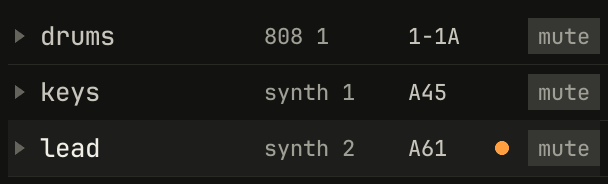
count-in · overdub · Space stops, in amber. The lead's ring has filled.scriptzig build run-studio -- manual/14-recording/take --script manual/14-recording/count-in.txt
take/song.json
{
  "tempo": 100,
  "end": "5",
  "key": ["1 C major"],
  "devices": [
    { "name": "synth", "type": "synth", "state": { "parts": [
      { "patch": "A45", "level": -10, "reverb_send": 15 },
      { "patch": "A61", "level": -4, "delay_send": 10 }
    ] } },
    { "name": "808", "type": "drums" }
  ],
  "tracks": [
    { "name": "drums", "device": "808", "channel": 1, "role": "drums", "clips": [{ "at": "1", "length": "4.0.0", "notes": "beat" }] },
    { "name": "keys", "device": "synth", "channel": 1, "keys": "chord 7 bass", "role": "chords", "clips": [] },
    { "name": "lead", "device": "synth", "channel": 2, "keys": "pent", "role": "lead", "clips": [] }
  ],
  "notes": {
    "beat": {
      "length": "1.0.0",
      "notes": [
        "1.1.0 C2 0.0.240 120", "1.1.0 F#2 0.0.240 96", "1.1.480 F#2 0.0.240 72",
        "1.2.0 D2 0.0.240 110", "1.2.0 F#2 0.0.240 90", "1.2.480 F#2 0.0.240 72",
        "1.3.0 C2 0.0.240 116", "1.3.0 F#2 0.0.240 96", "1.3.480 F#2 0.0.240 72",
        "1.4.0 D2 0.0.240 110", "1.4.0 F#2 0.0.240 90", "1.4.480 F#2 0.0.240 72"
      ]
    }
  }
}
count-in.txt
# The click on, and record pressed: two bars count in, the tag under
# record says so, and the lead's light fills.
wait 0.2
key c
wait 3
click track lead
click record
move 1430 890
wait 1
capture count-in.png
While a take runs, a tag under the transport says how it records: first
count-in, then recording, then the mode for a cycle's passes,
overdub or replace, quantized if automatic quantize is on, and the
key that stops it. Record again stops the take and keeps it, and the song
plays on; Space stops both.
C, or the metronome after cycle in the bar, turns on a click on every beat while the song plays or records, high on each bar's first beat and low on the others, as the count-in's. The click is the window's alone: a render or an export doesn't hear it. The count-in counts whether the click is on or not.
Where a take lands

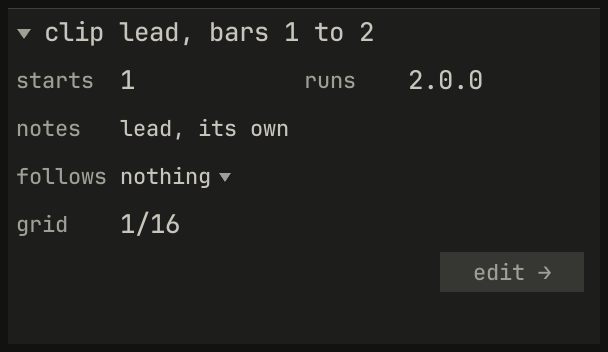
clip lead, bars 1 to 2.scriptzig build run-studio -- manual/14-recording/take --script manual/14-recording/take.txt
take/song.json
{
  "tempo": 100,
  "end": "5",
  "key": ["1 C major"],
  "devices": [
    { "name": "synth", "type": "synth", "state": { "parts": [
      { "patch": "A45", "level": -10, "reverb_send": 15 },
      { "patch": "A61", "level": -4, "delay_send": 10 }
    ] } },
    { "name": "808", "type": "drums" }
  ],
  "tracks": [
    { "name": "drums", "device": "808", "channel": 1, "role": "drums", "clips": [{ "at": "1", "length": "4.0.0", "notes": "beat" }] },
    { "name": "keys", "device": "synth", "channel": 1, "keys": "chord 7 bass", "role": "chords", "clips": [] },
    { "name": "lead", "device": "synth", "channel": 2, "keys": "pent", "role": "lead", "clips": [] }
  ],
  "notes": {
    "beat": {
      "length": "1.0.0",
      "notes": [
        "1.1.0 C2 0.0.240 120", "1.1.0 F#2 0.0.240 96", "1.1.480 F#2 0.0.240 72",
        "1.2.0 D2 0.0.240 110", "1.2.0 F#2 0.0.240 90", "1.2.480 F#2 0.0.240 72",
        "1.3.0 C2 0.0.240 116", "1.3.0 F#2 0.0.240 96", "1.3.480 F#2 0.0.240 72",
        "1.4.0 D2 0.0.240 110", "1.4.0 F#2 0.0.240 90", "1.4.480 F#2 0.0.240 72"
      ]
    }
  }
}
take.txt
# Record, two bars of count-in, and two bars of a phrase on the home row
# in pent, each key 33 to 67 ms late; record again keeps the take.
wait 0.2
click track lead
key x
click record
wait 4.7667
wait 0.05
down a
wait 0.2333
up a
wait 0.35
down d
wait 0.2333
up d
wait 0.3167
down f
wait 0.2333
up f
wait 0.0167
down g
wait 0.2333
up g
wait 0.0667
down f
wait 0.2333
up f
wait 0.3167
down d
wait 0.2333
up d
wait 0.35
down s
wait 0.2333
up s
wait 0.3167
down a
wait 0.8333
up a
click record
key space
move 1430 890
wait 0.1
capture take.png
A take makes a new clip on its track, from the bar line the take starts
in to the bar line after the last thing it took, so a pass that ends in bar
2 makes a clip two bars long. Its notes are its own, named after the track,
lead, or lead 2 if that's taken, and the clip is selected when the take
stops, so Ctrl+3 opens it in Key Edit.
A take that runs toward the song's end doesn't stop there: the song grows eight bars at a time while you play, as a tape runs on. When the take stops, the end goes back to where it was, or to the end of the new clip if that's later.
A take is stored in bars and beats, at the position the song had where each note arrived, so it stays on its beats if the tempo or the swing changes later.
Automatic quantize
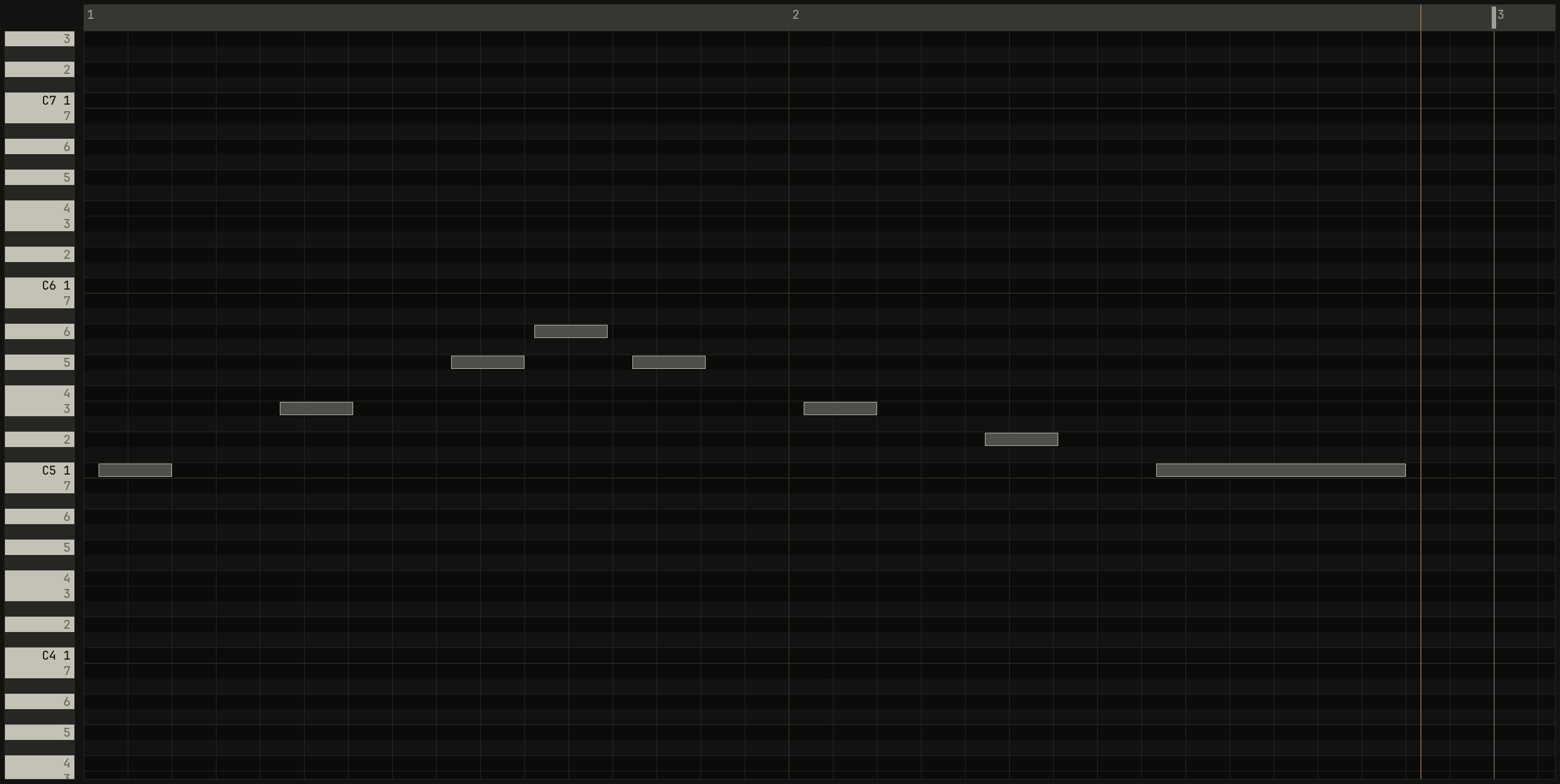
scriptzig build run-studio -- manual/14-recording/take --script manual/14-recording/as-played.txt
take/song.json
{
  "tempo": 100,
  "end": "5",
  "key": ["1 C major"],
  "devices": [
    { "name": "synth", "type": "synth", "state": { "parts": [
      { "patch": "A45", "level": -10, "reverb_send": 15 },
      { "patch": "A61", "level": -4, "delay_send": 10 }
    ] } },
    { "name": "808", "type": "drums" }
  ],
  "tracks": [
    { "name": "drums", "device": "808", "channel": 1, "role": "drums", "clips": [{ "at": "1", "length": "4.0.0", "notes": "beat" }] },
    { "name": "keys", "device": "synth", "channel": 1, "keys": "chord 7 bass", "role": "chords", "clips": [] },
    { "name": "lead", "device": "synth", "channel": 2, "keys": "pent", "role": "lead", "clips": [] }
  ],
  "notes": {
    "beat": {
      "length": "1.0.0",
      "notes": [
        "1.1.0 C2 0.0.240 120", "1.1.0 F#2 0.0.240 96", "1.1.480 F#2 0.0.240 72",
        "1.2.0 D2 0.0.240 110", "1.2.0 F#2 0.0.240 90", "1.2.480 F#2 0.0.240 72",
        "1.3.0 C2 0.0.240 116", "1.3.0 F#2 0.0.240 96", "1.3.480 F#2 0.0.240 72",
        "1.4.0 D2 0.0.240 110", "1.4.0 F#2 0.0.240 90", "1.4.480 F#2 0.0.240 72"
      ]
    }
  }
}
as-played.txt
# The same phrase, quantized as it records, and Ctrl+Z once: the pass
# as it was played.
wait 0.2
click track lead
key x
down shift
click record
up shift
click record
wait 4.7667
wait 0.05
down a
wait 0.2333
up a
wait 0.35
down d
wait 0.2333
up d
wait 0.3167
down f
wait 0.2333
up f
wait 0.0167
down g
wait 0.2333
up g
wait 0.0667
down f
wait 0.2333
up f
wait 0.3167
down d
wait 0.2333
up d
wait 0.35
down s
wait 0.2333
up s
wait 0.3167
down a
wait 0.8333
up a
click record
key space
key ctrl+z
key ctrl+3
move 1430 890
wait 0.1
capture as-played.png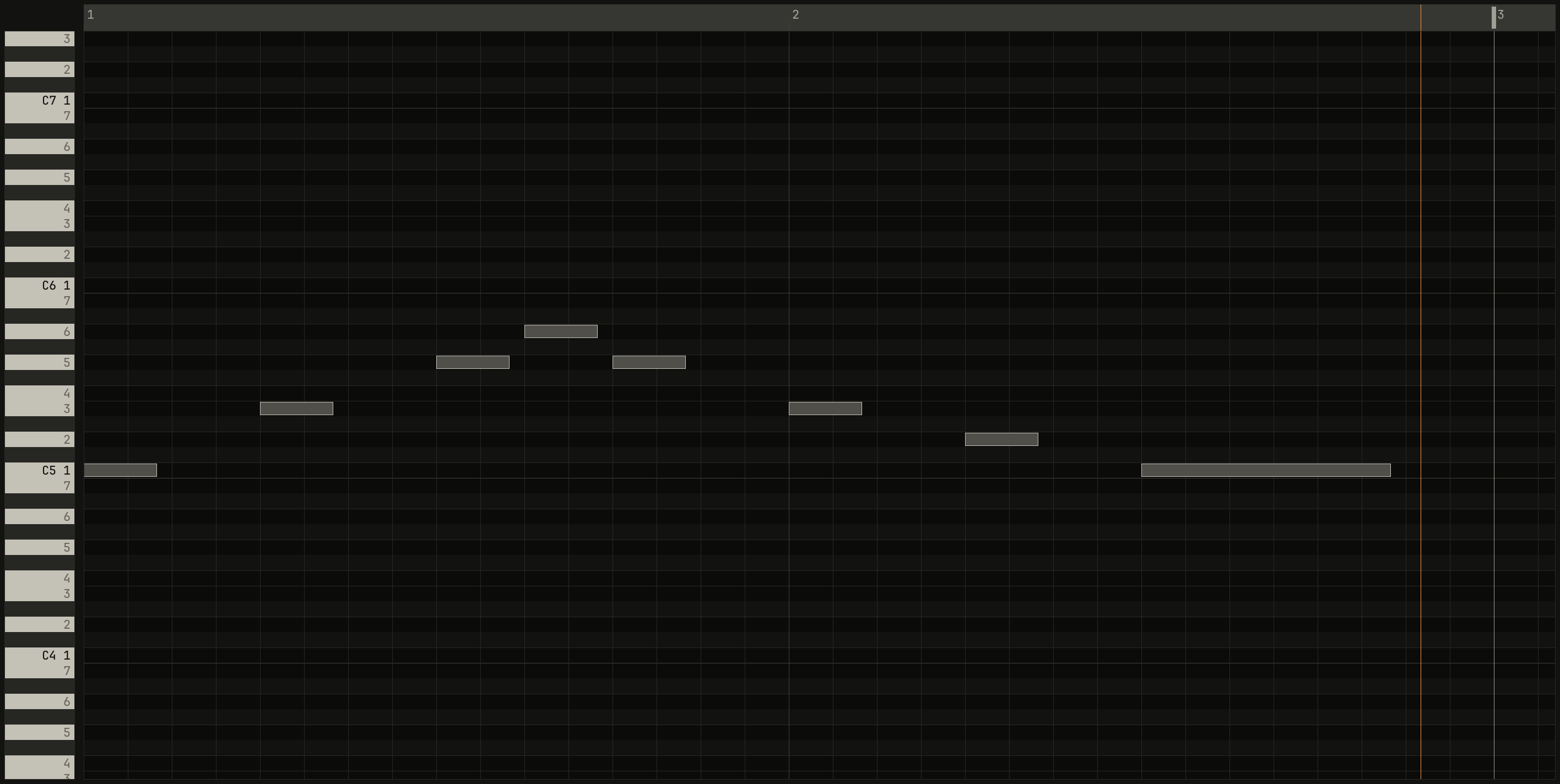
scriptzig build run-studio -- manual/14-recording/take --script manual/14-recording/quantized.txt
take/song.json
{
  "tempo": 100,
  "end": "5",
  "key": ["1 C major"],
  "devices": [
    { "name": "synth", "type": "synth", "state": { "parts": [
      { "patch": "A45", "level": -10, "reverb_send": 15 },
      { "patch": "A61", "level": -4, "delay_send": 10 }
    ] } },
    { "name": "808", "type": "drums" }
  ],
  "tracks": [
    { "name": "drums", "device": "808", "channel": 1, "role": "drums", "clips": [{ "at": "1", "length": "4.0.0", "notes": "beat" }] },
    { "name": "keys", "device": "synth", "channel": 1, "keys": "chord 7 bass", "role": "chords", "clips": [] },
    { "name": "lead", "device": "synth", "channel": 2, "keys": "pent", "role": "lead", "clips": [] }
  ],
  "notes": {
    "beat": {
      "length": "1.0.0",
      "notes": [
        "1.1.0 C2 0.0.240 120", "1.1.0 F#2 0.0.240 96", "1.1.480 F#2 0.0.240 72",
        "1.2.0 D2 0.0.240 110", "1.2.0 F#2 0.0.240 90", "1.2.480 F#2 0.0.240 72",
        "1.3.0 C2 0.0.240 116", "1.3.0 F#2 0.0.240 96", "1.3.480 F#2 0.0.240 72",
        "1.4.0 D2 0.0.240 110", "1.4.0 F#2 0.0.240 90", "1.4.480 F#2 0.0.240 72"
      ]
    }
  }
}
quantized.txt
# The same phrase, with automatic quantize on: Shift and a click on
# record. The take opens in Key Edit.
wait 0.2
click track lead
key x
down shift
click record
up shift
click record
wait 4.7667
wait 0.05
down a
wait 0.2333
up a
wait 0.35
down d
wait 0.2333
up d
wait 0.3167
down f
wait 0.2333
up f
wait 0.0167
down g
wait 0.2333
up g
wait 0.0667
down f
wait 0.2333
up f
wait 0.3167
down d
wait 0.2333
up d
wait 0.35
down s
wait 0.2333
up s
wait 0.3167
down a
wait 0.8333
up a
click record
key space
key ctrl+3
move 1430 890
wait 0.1
capture quantized.png
Shift and a click on record turns automatic quantize on, and quantized
shows under the record button. Each pass then lands on the grid when it
ends, in two steps:
- The pass's average distance from the grid comes off every note it recorded. A player who's steadily late, or the frame a computer key waits for the window, doesn't push the notes onto the wrong line, as Cubase's Over Quantise kept a player's lateness out of the grid.
- Each note then moves toward its nearest grid line by the strength
chosen in the editor's
quantize ▾, 25%, 50%, 75%, or 100%.
The grid is the arrange view's, the grid the inspector shows for a
selected clip, 1/16 at first. The notes the pass added are the only ones
that move: in an overdub, the passes before stay as they are.

0.0 / 9.6 s
peak -11.9 dBFS
openzig build run-studio -- manual/14-recording/passes
renderzig build run-studio -- render manual/14-recording/passes passes.wav
passes/song.json
{
  "tempo": 100,
  "end": "5",
  "key": ["1 C major"],
  "devices": [
    { "name": "synth", "type": "synth", "state": { "parts": [
      { "patch": "A45", "level": -10, "reverb_send": 15 },
      { "patch": "A61", "level": -4, "delay_send": 10 }
    ] } },
    { "name": "808", "type": "drums" }
  ],
  "tracks": [
    { "name": "drums", "device": "808", "channel": 1, "role": "drums", "clips": [{ "at": "1", "length": "4.0.0", "notes": "beat" }] },
    { "name": "keys", "device": "synth", "channel": 1, "keys": "chord 7 bass", "role": "chords", "clips": [] },
    { "name": "lead", "device": "synth", "channel": 2, "keys": "pent", "role": "lead", "clips": [{ "at": "1", "length": "2.0.0", "notes": "as played" }, { "at": "3", "length": "2.0.0", "notes": "quantized" }] }
  ],
  "notes": {
    "beat": {
      "length": "1.0.0",
      "notes": [
        "1.1.0 C2 0.0.240 120", "1.1.0 F#2 0.0.240 96", "1.1.480 F#2 0.0.240 72",
        "1.2.0 D2 0.0.240 110", "1.2.0 F#2 0.0.240 90", "1.2.480 F#2 0.0.240 72",
        "1.3.0 C2 0.0.240 116", "1.3.0 F#2 0.0.240 96", "1.3.480 F#2 0.0.240 72",
        "1.4.0 D2 0.0.240 110", "1.4.0 F#2 0.0.240 90", "1.4.480 F#2 0.0.240 72"
      ]
    },
    "as played": {
      "length": "2.0.0",
      "notes": [
        "1.1.80 C5 0.0.400 127", "1.2.107 E5 0.0.400 127", "1.3.80 G5 0.0.400 127", "1.3.533 A5 0.0.400 127",
        "1.4.107 G5 0.0.400 127", "2.1.80 E5 0.0.400 127", "2.2.107 D5 0.0.400 127", "2.3.80 C5 0.1.400 127"
      ]
    },
    "quantized": {
      "length": "2.0.0",
      "notes": [
        "1.1.0 C5 0.0.400 127", "1.2.0 E5 0.0.400 127", "1.3.0 G5 0.0.400 127", "1.3.480 A5 0.0.400 127",
        "1.4.0 G5 0.0.400 127", "2.1.0 E5 0.0.400 127", "2.2.0 D5 0.0.400 127", "2.3.0 C5 0.1.400 127"
      ]
    }
  }
}
A quantized pass is two undo steps: the pass as played, and then the pass quantized. One Ctrl+Z gives you your own timing back, which is how the first figure above was made. Chapter 7 puts automatic quantize together with the keys that stay in the key and fitting to the chords, to get a melody down.
The record button's menu
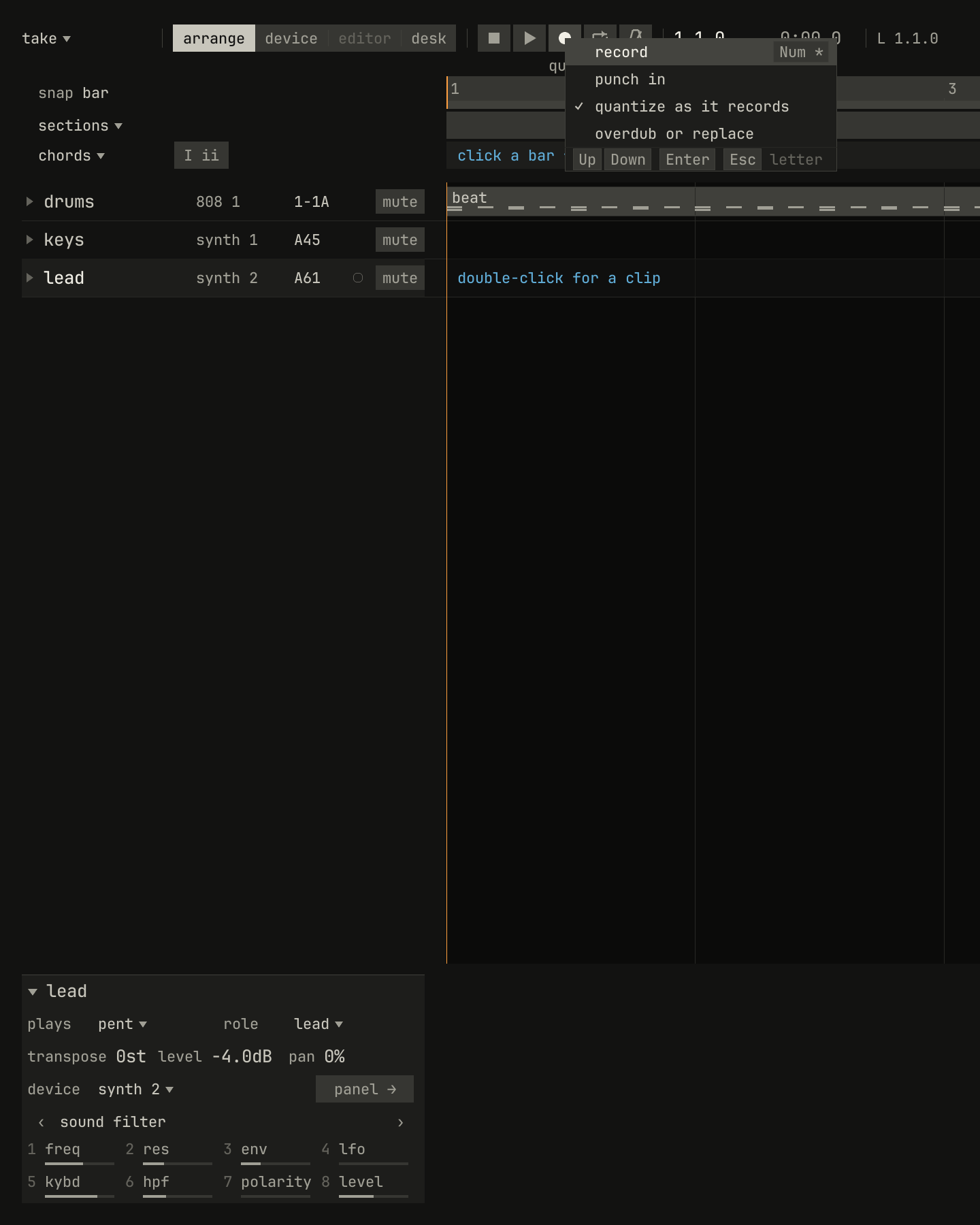
record with its key, then punch in, quantize as it records, ticked here, and overdub or replace.scriptzig build run-studio -- manual/14-recording/take --script manual/14-recording/menu.txt
take/song.json
{
  "tempo": 100,
  "end": "5",
  "key": ["1 C major"],
  "devices": [
    { "name": "synth", "type": "synth", "state": { "parts": [
      { "patch": "A45", "level": -10, "reverb_send": 15 },
      { "patch": "A61", "level": -4, "delay_send": 10 }
    ] } },
    { "name": "808", "type": "drums" }
  ],
  "tracks": [
    { "name": "drums", "device": "808", "channel": 1, "role": "drums", "clips": [{ "at": "1", "length": "4.0.0", "notes": "beat" }] },
    { "name": "keys", "device": "synth", "channel": 1, "keys": "chord 7 bass", "role": "chords", "clips": [] },
    { "name": "lead", "device": "synth", "channel": 2, "keys": "pent", "role": "lead", "clips": [] }
  ],
  "notes": {
    "beat": {
      "length": "1.0.0",
      "notes": [
        "1.1.0 C2 0.0.240 120", "1.1.0 F#2 0.0.240 96", "1.1.480 F#2 0.0.240 72",
        "1.2.0 D2 0.0.240 110", "1.2.0 F#2 0.0.240 90", "1.2.480 F#2 0.0.240 72",
        "1.3.0 C2 0.0.240 116", "1.3.0 F#2 0.0.240 96", "1.3.480 F#2 0.0.240 72",
        "1.4.0 D2 0.0.240 110", "1.4.0 F#2 0.0.240 90", "1.4.480 F#2 0.0.240 72"
      ]
    }
  }
}
menu.txt
# Automatic quantize on, with Shift and a click on record; then the
# record button's menu, with a right-click.
wait 0.2
click track lead
down shift
click record
up shift
wait 3
rclick record
wait 0.1
capture menu.png
A right-click on record drops its menu. Each modifier on a click has its
row here, so nothing needs a modifier you don't know: Ctrl and a click is
punch in, Shift and a click is quantize as it records, and overdub or
replace has no click of its own. A row that's on is ticked.
Punching in
Ctrl and a click on record turns punch in on, and punch in shows
under the button. A take then records only between the locators, L and
R in the bar, which a drag across the ruler sets. Record starts the song
at once, from the song position, with no count-in, so you can play along
before the bars that matter; at the right locator the take stops by itself
and the song plays on.


L to R.scriptzig build run-studio -- manual/14-recording/take --script manual/14-recording/punch.txt
take/song.json
{
  "tempo": 100,
  "end": "5",
  "key": ["1 C major"],
  "devices": [
    { "name": "synth", "type": "synth", "state": { "parts": [
      { "patch": "A45", "level": -10, "reverb_send": 15 },
      { "patch": "A61", "level": -4, "delay_send": 10 }
    ] } },
    { "name": "808", "type": "drums" }
  ],
  "tracks": [
    { "name": "drums", "device": "808", "channel": 1, "role": "drums", "clips": [{ "at": "1", "length": "4.0.0", "notes": "beat" }] },
    { "name": "keys", "device": "synth", "channel": 1, "keys": "chord 7 bass", "role": "chords", "clips": [] },
    { "name": "lead", "device": "synth", "channel": 2, "keys": "pent", "role": "lead", "clips": [] }
  ],
  "notes": {
    "beat": {
      "length": "1.0.0",
      "notes": [
        "1.1.0 C2 0.0.240 120", "1.1.0 F#2 0.0.240 96", "1.1.480 F#2 0.0.240 72",
        "1.2.0 D2 0.0.240 110", "1.2.0 F#2 0.0.240 90", "1.2.480 F#2 0.0.240 72",
        "1.3.0 C2 0.0.240 116", "1.3.0 F#2 0.0.240 96", "1.3.480 F#2 0.0.240 72",
        "1.4.0 D2 0.0.240 110", "1.4.0 F#2 0.0.240 90", "1.4.480 F#2 0.0.240 72"
      ]
    }
  }
}
punch.txt
# The locators on bar 2, punch in on with Ctrl and a click on record,
# and record from bar 1: only bar 2 is kept, and recording stops at the
# right locator while the song plays on.
wait 0.2
click track lead
key x
drag ruler bar 2 to ruler bar 3
down ctrl
click record
up ctrl
click record
wait 0
wait 0.5833
down a
wait 0.5333
up a
wait 0.0333
down d
wait 0.5333
up d
wait 0.0333
down f
wait 0.5333
up f
wait 0.0333
down g
wait 0.5333
up g
wait 0.0333
down f
wait 0.5333
up f
wait 0.0333
down d
wait 0.5333
up d
wait 0.0333
down s
wait 0.5333
up s
wait 0.0333
down a
wait 0.5333
up a
wait 0.0333
down d
wait 0.5333
up d
wait 0.0333
down f
wait 0.5333
up f
wait 0.0333
down g
wait 0.5333
up g
key space
move 1430 890
wait 0.1
capture punch.png
A punched take's clip runs from the left locator to the right one exactly, whatever you played around it. Ctrl and a click again turns punch in off, and record counts in again.
Cycling: overdub or replace
With cycle on, Num / or the button after record, the song loops
between the locators, and a take records a pass each time round. Record
starts the song at the left locator, after the count-in. What each pass does
is overdub or replace, in the record button's menu:
- Overdub, at first, adds each pass to the clip the first one made, so a part builds up a layer at a time, as a drum machine's loop recording does.
- Replace puts each pass in place of the one before, so you play the bars again until a pass is right, and keep the last.
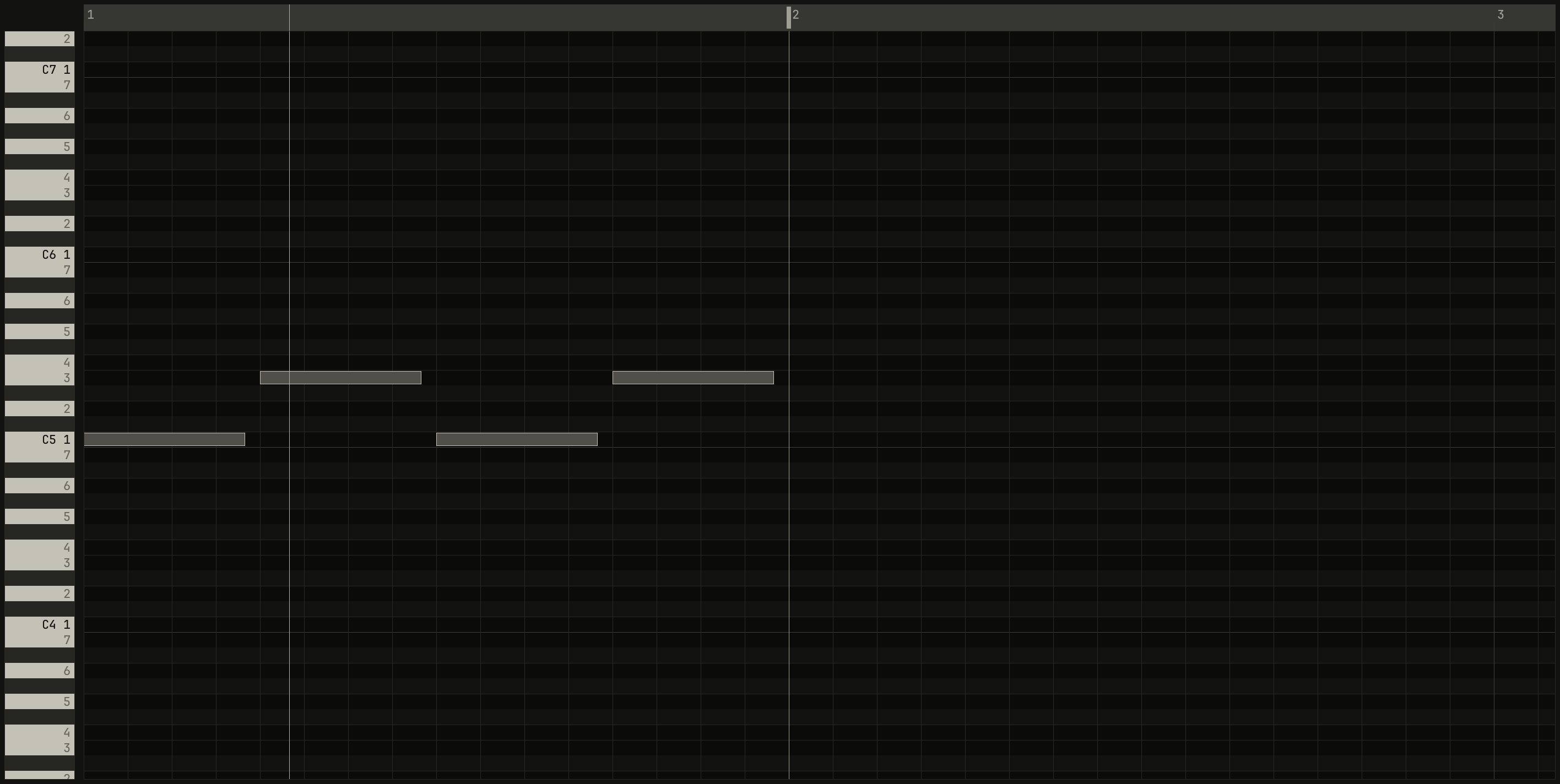
scriptzig build run-studio -- manual/14-recording/take --script manual/14-recording/overdub.txt
take/song.json
{
  "tempo": 100,
  "end": "5",
  "key": ["1 C major"],
  "devices": [
    { "name": "synth", "type": "synth", "state": { "parts": [
      { "patch": "A45", "level": -10, "reverb_send": 15 },
      { "patch": "A61", "level": -4, "delay_send": 10 }
    ] } },
    { "name": "808", "type": "drums" }
  ],
  "tracks": [
    { "name": "drums", "device": "808", "channel": 1, "role": "drums", "clips": [{ "at": "1", "length": "4.0.0", "notes": "beat" }] },
    { "name": "keys", "device": "synth", "channel": 1, "keys": "chord 7 bass", "role": "chords", "clips": [] },
    { "name": "lead", "device": "synth", "channel": 2, "keys": "pent", "role": "lead", "clips": [] }
  ],
  "notes": {
    "beat": {
      "length": "1.0.0",
      "notes": [
        "1.1.0 C2 0.0.240 120", "1.1.0 F#2 0.0.240 96", "1.1.480 F#2 0.0.240 72",
        "1.2.0 D2 0.0.240 110", "1.2.0 F#2 0.0.240 90", "1.2.480 F#2 0.0.240 72",
        "1.3.0 C2 0.0.240 116", "1.3.0 F#2 0.0.240 96", "1.3.480 F#2 0.0.240 72",
        "1.4.0 D2 0.0.240 110", "1.4.0 F#2 0.0.240 90", "1.4.480 F#2 0.0.240 72"
      ]
    }
  }
}
overdub.txt
# The locators on bar 1, cycle on, and record. The first pass
# plays C on beats 1 and 3, the second E on beats 2 and 4, and the third
# nothing.
wait 0.2
click track lead
key x
drag ruler bar 1 to ruler bar 2
click cycle
click record
wait 4.7667
down a
wait 0.5333
up a
wait 0.6333
down a
wait 0.5333
up a
wait 1.2333
down d
wait 0.5333
up d
wait 0.6333
down d
wait 0.5333
up d
wait 0.7
click record
key space
key ctrl+3
move 1430 890
wait 0.1
capture overdub.png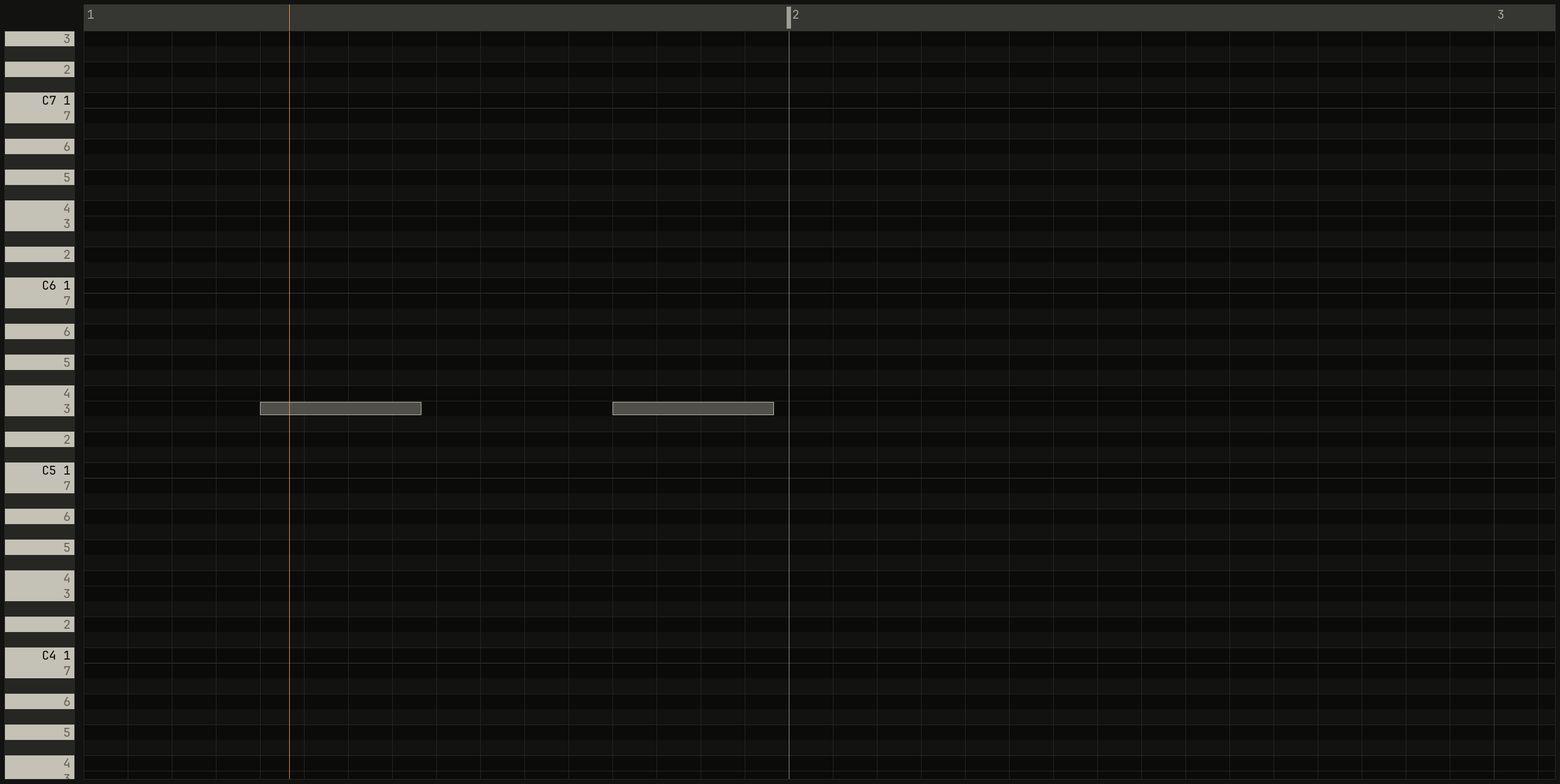
scriptzig build run-studio -- manual/14-recording/take --script manual/14-recording/replace.txt
take/song.json
{
  "tempo": 100,
  "end": "5",
  "key": ["1 C major"],
  "devices": [
    { "name": "synth", "type": "synth", "state": { "parts": [
      { "patch": "A45", "level": -10, "reverb_send": 15 },
      { "patch": "A61", "level": -4, "delay_send": 10 }
    ] } },
    { "name": "808", "type": "drums" }
  ],
  "tracks": [
    { "name": "drums", "device": "808", "channel": 1, "role": "drums", "clips": [{ "at": "1", "length": "4.0.0", "notes": "beat" }] },
    { "name": "keys", "device": "synth", "channel": 1, "keys": "chord 7 bass", "role": "chords", "clips": [] },
    { "name": "lead", "device": "synth", "channel": 2, "keys": "pent", "role": "lead", "clips": [] }
  ],
  "notes": {
    "beat": {
      "length": "1.0.0",
      "notes": [
        "1.1.0 C2 0.0.240 120", "1.1.0 F#2 0.0.240 96", "1.1.480 F#2 0.0.240 72",
        "1.2.0 D2 0.0.240 110", "1.2.0 F#2 0.0.240 90", "1.2.480 F#2 0.0.240 72",
        "1.3.0 C2 0.0.240 116", "1.3.0 F#2 0.0.240 96", "1.3.480 F#2 0.0.240 72",
        "1.4.0 D2 0.0.240 110", "1.4.0 F#2 0.0.240 90", "1.4.480 F#2 0.0.240 72"
      ]
    }
  }
}
replace.txt
# The locators on bar 1, cycle on, and record, in replace. The first pass
# plays C on beats 1 and 3, the second E on beats 2 and 4, and the third
# nothing.
wait 0.2
click track lead
key x
drag ruler bar 1 to ruler bar 2
click cycle
rclick record
choose overdub or replace
click record
wait 4.7667
down a
wait 0.5333
up a
wait 0.6333
down a
wait 0.5333
up a
wait 1.2333
down d
wait 0.5333
up d
wait 0.6333
down d
wait 0.5333
up d
wait 0.7
click record
key space
key ctrl+3
move 1430 890
wait 0.1
capture replace.png
A pass that takes nothing changes nothing, in either mode, so in both figures the third pass, stopped halfway with nothing played, left the clip as it was. The studio keeps each pass a moment before the loop, so the next time round already plays it, and each pass is an edit of its own.
Recording slower
- slows the song down 5% a press, to 50%, and = brings it back, as chapter 10 uses for practice. The count-in counts at the slower tempo too. A take records in bars, not in seconds, so a pass played slowly plays back in time at full speed.

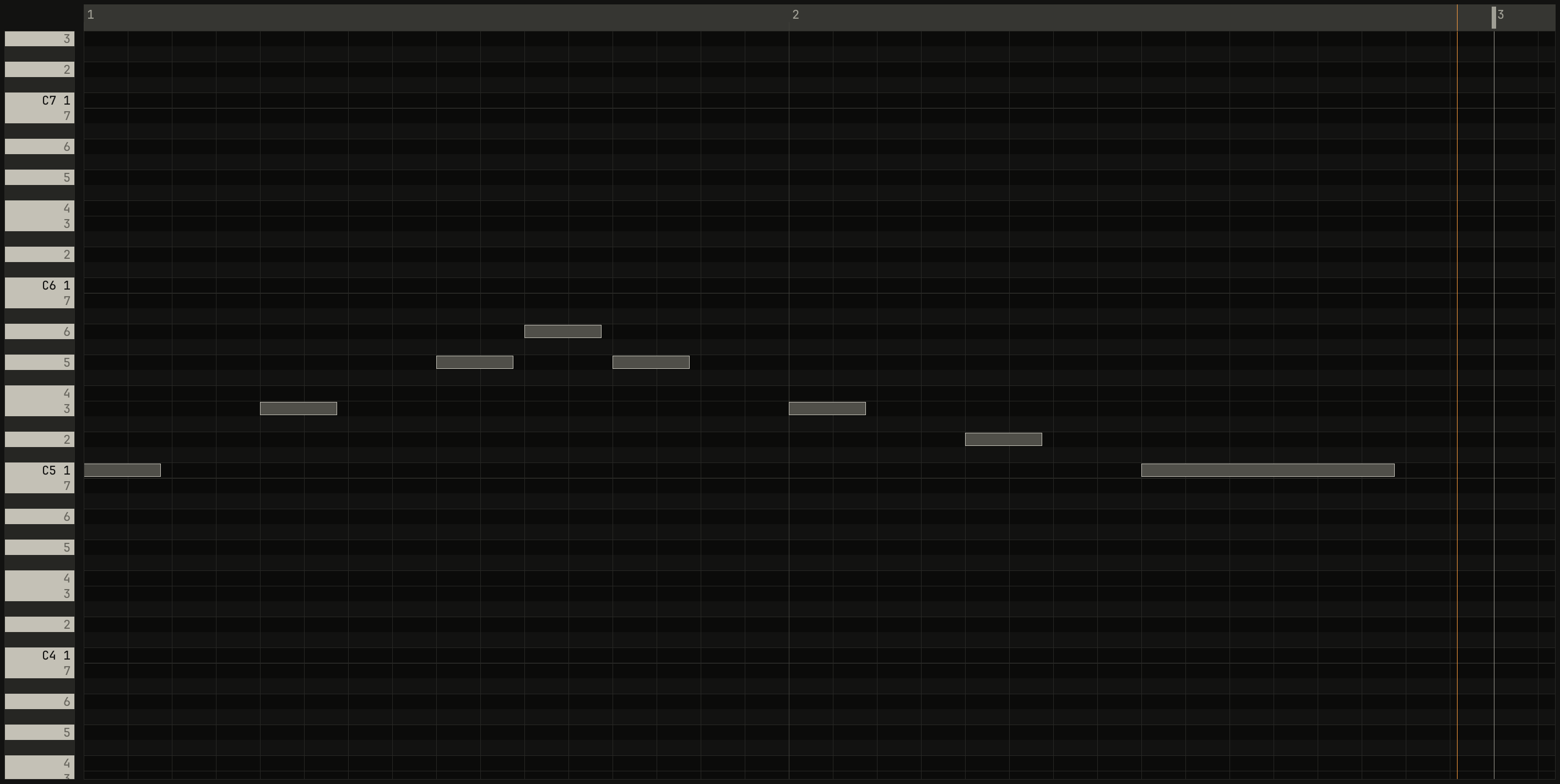
played at 75% shows under it in amber, and the phrase played there sits on the beats. At full speed it plays at 100 BPM, in time.scriptzig build run-studio -- manual/14-recording/take --script manual/14-recording/slower.txt
take/song.json
{
  "tempo": 100,
  "end": "5",
  "key": ["1 C major"],
  "devices": [
    { "name": "synth", "type": "synth", "state": { "parts": [
      { "patch": "A45", "level": -10, "reverb_send": 15 },
      { "patch": "A61", "level": -4, "delay_send": 10 }
    ] } },
    { "name": "808", "type": "drums" }
  ],
  "tracks": [
    { "name": "drums", "device": "808", "channel": 1, "role": "drums", "clips": [{ "at": "1", "length": "4.0.0", "notes": "beat" }] },
    { "name": "keys", "device": "synth", "channel": 1, "keys": "chord 7 bass", "role": "chords", "clips": [] },
    { "name": "lead", "device": "synth", "channel": 2, "keys": "pent", "role": "lead", "clips": [] }
  ],
  "notes": {
    "beat": {
      "length": "1.0.0",
      "notes": [
        "1.1.0 C2 0.0.240 120", "1.1.0 F#2 0.0.240 96", "1.1.480 F#2 0.0.240 72",
        "1.2.0 D2 0.0.240 110", "1.2.0 F#2 0.0.240 90", "1.2.480 F#2 0.0.240 72",
        "1.3.0 C2 0.0.240 116", "1.3.0 F#2 0.0.240 96", "1.3.480 F#2 0.0.240 72",
        "1.4.0 D2 0.0.240 110", "1.4.0 F#2 0.0.240 90", "1.4.480 F#2 0.0.240 72"
      ]
    }
  }
}
slower.txt
# Five presses of - play the song at 75%, and the phrase recorded there
# lands in bars.
wait 0.2
click track lead
key x
key -
key -
key -
key -
key -
click record
wait 6.3667
down a
wait 0.3333
up a
wait 0.4333
down d
wait 0.3333
up d
wait 0.4333
down f
wait 0.3333
up f
wait 0.0333
down g
wait 0.3333
up g
wait 0.0333
down f
wait 0.3333
up f
wait 0.4333
down d
wait 0.3333
up d
wait 0.4333
down s
wait 0.3333
up s
wait 0.4333
down a
wait 1.1333
up a
wait 0.2333
click record
key space
key ctrl+3
move 1430 890
wait 0.1
capture slower.png
The panel into lanes
A control moved on the recording track's device while a take runs becomes
points on the track's lane for that control: a fader in the device view, a
knob of the inspector's page of eight, a MiniLab knob or fader, which move
the panel's controls (chapter 18), and the desk's
strip for the track's device, as desk_level, desk_delay, and so on
(chapter 17). A control of the whole device, such as the
synth's reverb decay, records on any of the device's tracks.
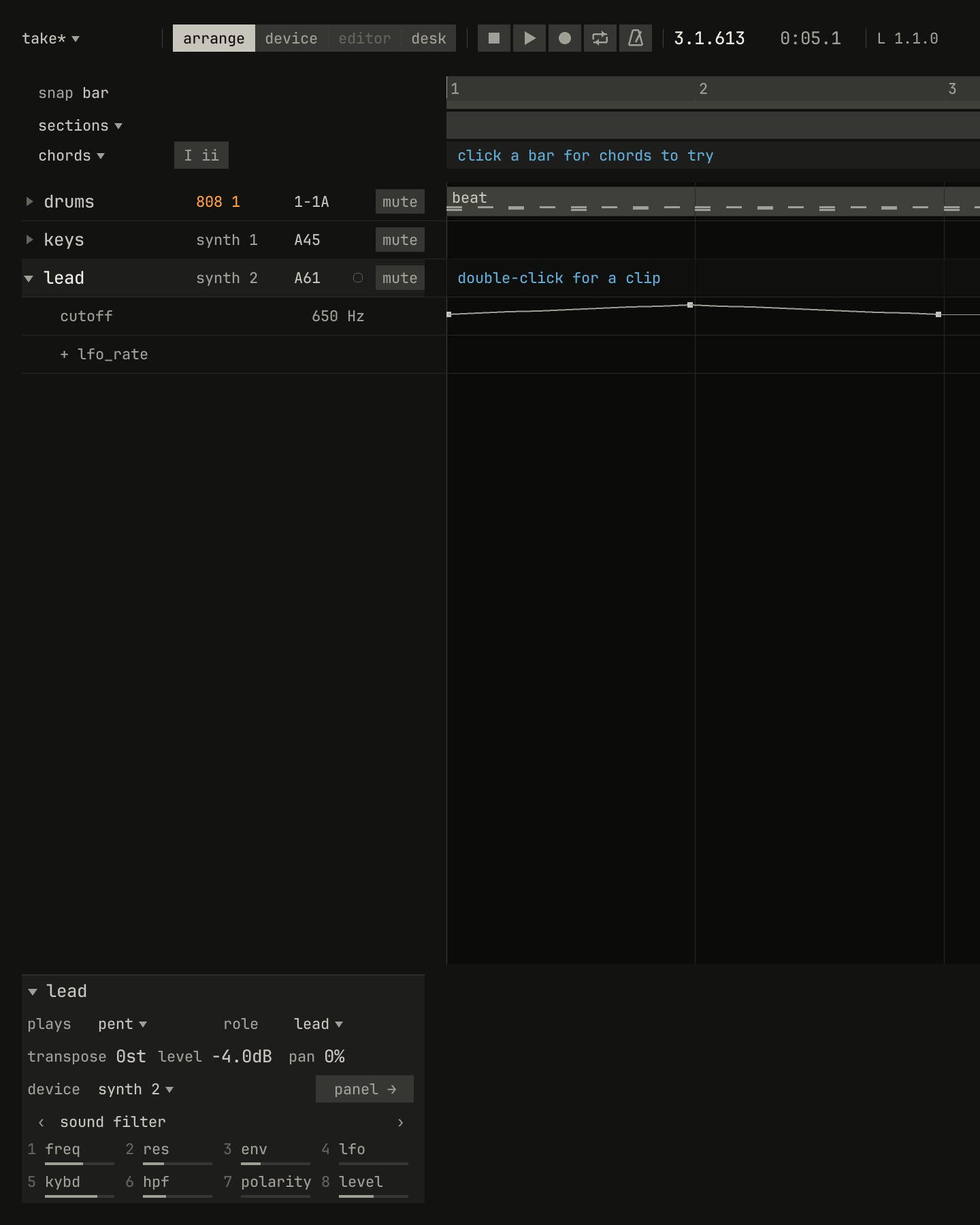
freq, turned up a notch at a time through bar 1 and back down through bar 2. Eighty moves became three points on the lead's cutoff lane.scriptzig build run-studio -- manual/14-recording/take --script manual/14-recording/panel.txt
take/song.json
{
  "tempo": 100,
  "end": "5",
  "key": ["1 C major"],
  "devices": [
    { "name": "synth", "type": "synth", "state": { "parts": [
      { "patch": "A45", "level": -10, "reverb_send": 15 },
      { "patch": "A61", "level": -4, "delay_send": 10 }
    ] } },
    { "name": "808", "type": "drums" }
  ],
  "tracks": [
    { "name": "drums", "device": "808", "channel": 1, "role": "drums", "clips": [{ "at": "1", "length": "4.0.0", "notes": "beat" }] },
    { "name": "keys", "device": "synth", "channel": 1, "keys": "chord 7 bass", "role": "chords", "clips": [] },
    { "name": "lead", "device": "synth", "channel": 2, "keys": "pent", "role": "lead", "clips": [] }
  ],
  "notes": {
    "beat": {
      "length": "1.0.0",
      "notes": [
        "1.1.0 C2 0.0.240 120", "1.1.0 F#2 0.0.240 96", "1.1.480 F#2 0.0.240 72",
        "1.2.0 D2 0.0.240 110", "1.2.0 F#2 0.0.240 90", "1.2.480 F#2 0.0.240 72",
        "1.3.0 C2 0.0.240 116", "1.3.0 F#2 0.0.240 96", "1.3.480 F#2 0.0.240 72",
        "1.4.0 D2 0.0.240 110", "1.4.0 F#2 0.0.240 90", "1.4.480 F#2 0.0.240 72"
      ]
    }
  }
}
panel.txt
# Record on the lead, and turn its filter's freq, knob 1 of the
# inspector's page, up a notch at a time through bar 1 and down through
# bar 2. The lead's lanes show the take.
wait 0.2
click track lead
click record
move inspector knob 1
wait 4.7667
wheel 1
wait 0.05
wheel 1
wait 0.0333
wheel 1
wait 0.05
wheel 1
wait 0.0333
wheel 1
wait 0.05
wheel 1
wait 0.05
wheel 1
wait 0.0333
wheel 1
wait 0.05
wheel 1
wait 0.0333
wheel 1
wait 0.05
wheel 1
wait 0.05
wheel 1
wait 0.0333
wheel 1
wait 0.05
wheel 1
wait 0.0333
wheel 1
wait 0.05
wheel 1
wait 0.05
wheel 1
wait 0.0333
wheel 1
wait 0.05
wheel 1
wait 0.0333
wheel 1
wait 0.05
wheel 1
wait 0.05
wheel 1
wait 0.0333
wheel 1
wait 0.05
wheel 1
wait 0.0333
wheel 1
wait 0.05
wheel 1
wait 0.05
wheel 1
wait 0.0333
wheel 1
wait 0.05
wheel 1
wait 0.0333
wheel 1
wait 0.05
wheel 1
wait 0.05
wheel 1
wait 0.0333
wheel 1
wait 0.05
wheel 1
wait 0.0333
wheel 1
wait 0.05
wheel 1
wait 0.05
wheel 1
wait 0.0333
wheel 1
wait 0.05
wheel 1
wait 0.0333
wheel 1
wait 0.05
wheel -1
wait 0.05
wheel -1
wait 0.0333
wheel -1
wait 0.05
wheel -1
wait 0.0333
wheel -1
wait 0.05
wheel -1
wait 0.05
wheel -1
wait 0.0333
wheel -1
wait 0.05
wheel -1
wait 0.0333
wheel -1
wait 0.05
wheel -1
wait 0.05
wheel -1
wait 0.0333
wheel -1
wait 0.05
wheel -1
wait 0.0333
wheel -1
wait 0.05
wheel -1
wait 0.05
wheel -1
wait 0.0333
wheel -1
wait 0.05
wheel -1
wait 0.0333
wheel -1
wait 0.05
wheel -1
wait 0.05
wheel -1
wait 0.0333
wheel -1
wait 0.05
wheel -1
wait 0.0333
wheel -1
wait 0.05
wheel -1
wait 0.05
wheel -1
wait 0.0333
wheel -1
wait 0.05
wheel -1
wait 0.0333
wheel -1
wait 0.05
wheel -1
wait 0.05
wheel -1
wait 0.0333
wheel -1
wait 0.05
wheel -1
wait 0.0333
wheel -1
wait 0.05
wheel -1
wait 0.05
wheel -1
wait 0.0333
wheel -1
wait 0.05
wheel -1
wait 0.0333
wheel -1
wait 0.3833
click record
key space
click triangle lead
move 1430 890
wait 0.1
capture panel.png
A move is a run of values, a few each beat. The take keeps only the points it needs to play the move back within 1% of the control's range, ramping where the control moved and holding where it waited, on the control's own curve, so an exponential control such as the cutoff ramps exponentially. A pass replaces what the lane held where you moved the control and leaves the rest of the lane as it was. Chapter 16 is about lanes.
Sequences as pattern clips
On a device that plays sequences, the synth or the drum machine, picking a pattern while the song plays records as a pattern clip, which starts where the device started the pattern: the synth's on the next bar, the drum machine's when its measure ends. A program can be picked on the panel, from the track's program list in the arrange view, or with a MiniLab pad, whose pads 5 to 8 start sequences.

2-1A, with 2-3A picked from the track's program list in bar 2. The drum machine started it as bar 3 began, and the take made a pattern clip from bar 3 to the bar the take ended in.scriptzig build run-studio -- manual/14-recording/patterns --script manual/14-recording/patterns.txt
patterns/song.json
{
  "tempo": 120,
  "end": "5",
  "devices": [{ "name": "808", "type": "drums" }],
  "tracks": [
    { "name": "drums", "device": "808", "channel": 1, "role": "drums", "clips": [{ "at": "1", "length": "4.0.0", "pattern": "2-1A" }] }
  ]
}
patterns.txt
# Record on the drums, which play 2-1A, and in bar 2 pick 2-3A from the
# track's program list: the drum machine starts it when its measure ends,
# and the take makes a pattern clip of it from bar 3.
wait 0.2
click track drums
click record
wait 6.2
click program drums
key down
key down
key right
key down
key down
key down
key enter
wait 4
click record
key space
move 1430 890
wait 0.1
capture patterns.png
A pattern clip that starts later on a track plays over one that's still running there, as here. A part started that wasn't playing starts its pattern on the next bar, and a part stopped ends its clip where it stopped.
Mute scenes
Ctrl+Alt+F1–F10 stores which tracks are muted as a mute scene, ten of
them, and Alt+F1–F10 calls one up, as Cubase's did. A scene recalled
while a take records is recorded too: as points on the muted lane of every
track, on the beat you pressed it.
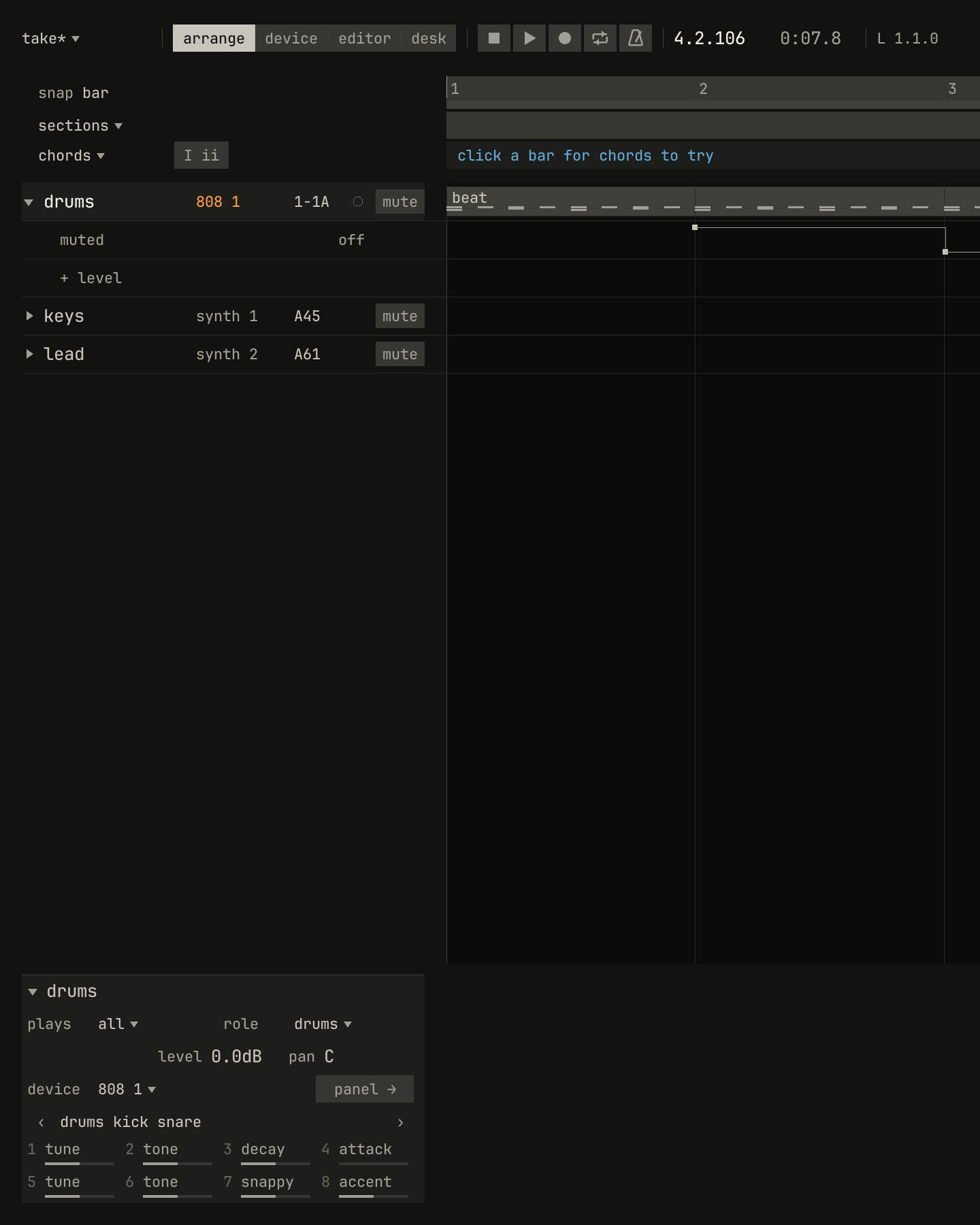
muted lane goes on at bar 2 and off at bar 3.scriptzig build run-studio -- manual/14-recording/take --script manual/14-recording/scenes.txt
take/song.json
{
  "tempo": 100,
  "end": "5",
  "key": ["1 C major"],
  "devices": [
    { "name": "synth", "type": "synth", "state": { "parts": [
      { "patch": "A45", "level": -10, "reverb_send": 15 },
      { "patch": "A61", "level": -4, "delay_send": 10 }
    ] } },
    { "name": "808", "type": "drums" }
  ],
  "tracks": [
    { "name": "drums", "device": "808", "channel": 1, "role": "drums", "clips": [{ "at": "1", "length": "4.0.0", "notes": "beat" }] },
    { "name": "keys", "device": "synth", "channel": 1, "keys": "chord 7 bass", "role": "chords", "clips": [] },
    { "name": "lead", "device": "synth", "channel": 2, "keys": "pent", "role": "lead", "clips": [] }
  ],
  "notes": {
    "beat": {
      "length": "1.0.0",
      "notes": [
        "1.1.0 C2 0.0.240 120", "1.1.0 F#2 0.0.240 96", "1.1.480 F#2 0.0.240 72",
        "1.2.0 D2 0.0.240 110", "1.2.0 F#2 0.0.240 90", "1.2.480 F#2 0.0.240 72",
        "1.3.0 C2 0.0.240 116", "1.3.0 F#2 0.0.240 96", "1.3.480 F#2 0.0.240 72",
        "1.4.0 D2 0.0.240 110", "1.4.0 F#2 0.0.240 90", "1.4.480 F#2 0.0.240 72"
      ]
    }
  }
}
scenes.txt
# Scene 1 stored with every track playing, scene 2 with the drums muted,
# and scene 1 recalled. Then record, and recall scene 2 at bar 2 and
# scene 1 at bar 3. The drums' lanes show the take.
wait 0.2
key ctrl+alt+f1
click mute drums
key ctrl+alt+f2
key alt+f1
wait 3
click track lead
click record
wait 4.7667
wait 2.4
key alt+f2
wait 2.3833
key alt+f1
wait 2.9833
click record
key space
click triangle drums
move 1430 890
wait 0.1
capture scenes.png
A track that was muted outright gets a lane that mutes it from bar 1, and
its mute switch comes off, so the lane decides from then on. The
MiniLab's bank B pads recall scenes 1 to 8.
Chords into the chord row
record chords, in chords ▾'s menu over the track list, records chords
rather than notes: while the song plays, each chord played on the selected
track goes into the chord row, at the nearest beat, named from the notes
held. A light after I ii shows while it's on; the same row turns it off.
Record needn't be on, and the notes themselves aren't kept.

chord 7 bass, and the row holds Cmaj7, Am7, Fmaj7, and G7.scriptzig build run-studio -- manual/14-recording/take --script manual/14-recording/chords.txt
take/song.json
{
  "tempo": 100,
  "end": "5",
  "key": ["1 C major"],
  "devices": [
    { "name": "synth", "type": "synth", "state": { "parts": [
      { "patch": "A45", "level": -10, "reverb_send": 15 },
      { "patch": "A61", "level": -4, "delay_send": 10 }
    ] } },
    { "name": "808", "type": "drums" }
  ],
  "tracks": [
    { "name": "drums", "device": "808", "channel": 1, "role": "drums", "clips": [{ "at": "1", "length": "4.0.0", "notes": "beat" }] },
    { "name": "keys", "device": "synth", "channel": 1, "keys": "chord 7 bass", "role": "chords", "clips": [] },
    { "name": "lead", "device": "synth", "channel": 2, "keys": "pent", "role": "lead", "clips": [] }
  ],
  "notes": {
    "beat": {
      "length": "1.0.0",
      "notes": [
        "1.1.0 C2 0.0.240 120", "1.1.0 F#2 0.0.240 96", "1.1.480 F#2 0.0.240 72",
        "1.2.0 D2 0.0.240 110", "1.2.0 F#2 0.0.240 90", "1.2.480 F#2 0.0.240 72",
        "1.3.0 C2 0.0.240 116", "1.3.0 F#2 0.0.240 96", "1.3.480 F#2 0.0.240 72",
        "1.4.0 D2 0.0.240 110", "1.4.0 F#2 0.0.240 90", "1.4.480 F#2 0.0.240 72"
      ]
    }
  }
}
chords.txt
# Record chords on, from the chord row's menu; the keys, which play in
# chord 7, selected; and the song played, a key a bar: C, Am, F, and G.
wait 0.2
click chords
choose record chords
wait 3
click track keys
key space
wait 0
wait 0.0333
down a
wait 1.7833
up a
wait 0.5833
down h
wait 1.7833
up h
wait 0.5833
down f
wait 1.7833
up f
wait 0.5833
down g
wait 1.7833
up g
wait 0.5
key space
move 1430 890
wait 0.1
capture chords.png
The chords go in as you play, and all those of one pass, from play to stop, are one edit, so one Ctrl+Z takes them away together. The row names what sounded, lowest note and all: played without the bass, Am7 voiced from its C upward reads as C6, the same four notes. Chapter 4 is about the row and its chords.
Undo and a take
Each take is one edit, and each pass of a cycle one more, so Ctrl+Z
takes back the last pass and leaves the ones before; with automatic
quantize, a pass is two. While a take runs, undo and redo don't act:
Ctrl+Z says stop recording to undo. Edits that would move what the
take holds, such as inserting bars, adding or moving a track, or changing
the tempo, are refused too, with a callout that says why, since a take
holds its tracks by their places and its notes by their positions.
A synth take made a song
The synth records its own takes, scripts of everything played in its window (the synth's chapter 13). The studio makes a song of one:
studio import manual/synth/13-scripts/take-1.txt manual/14-recording/imported
The take's project becomes the synth's state. Each part becomes a track
with one clip of its notes, chords, pedals, and programs; a pattern started
becomes a pattern clip; and the controls the take moved become points on
the parts' lanes, its tempo and swing changes points on the song's. Opening
a take, zig build run-studio -- take-1.txt, or dropping one on the window,
makes the same song, new and unsaved.
0.0 / 5.0 s
peak -10.3 dBFS
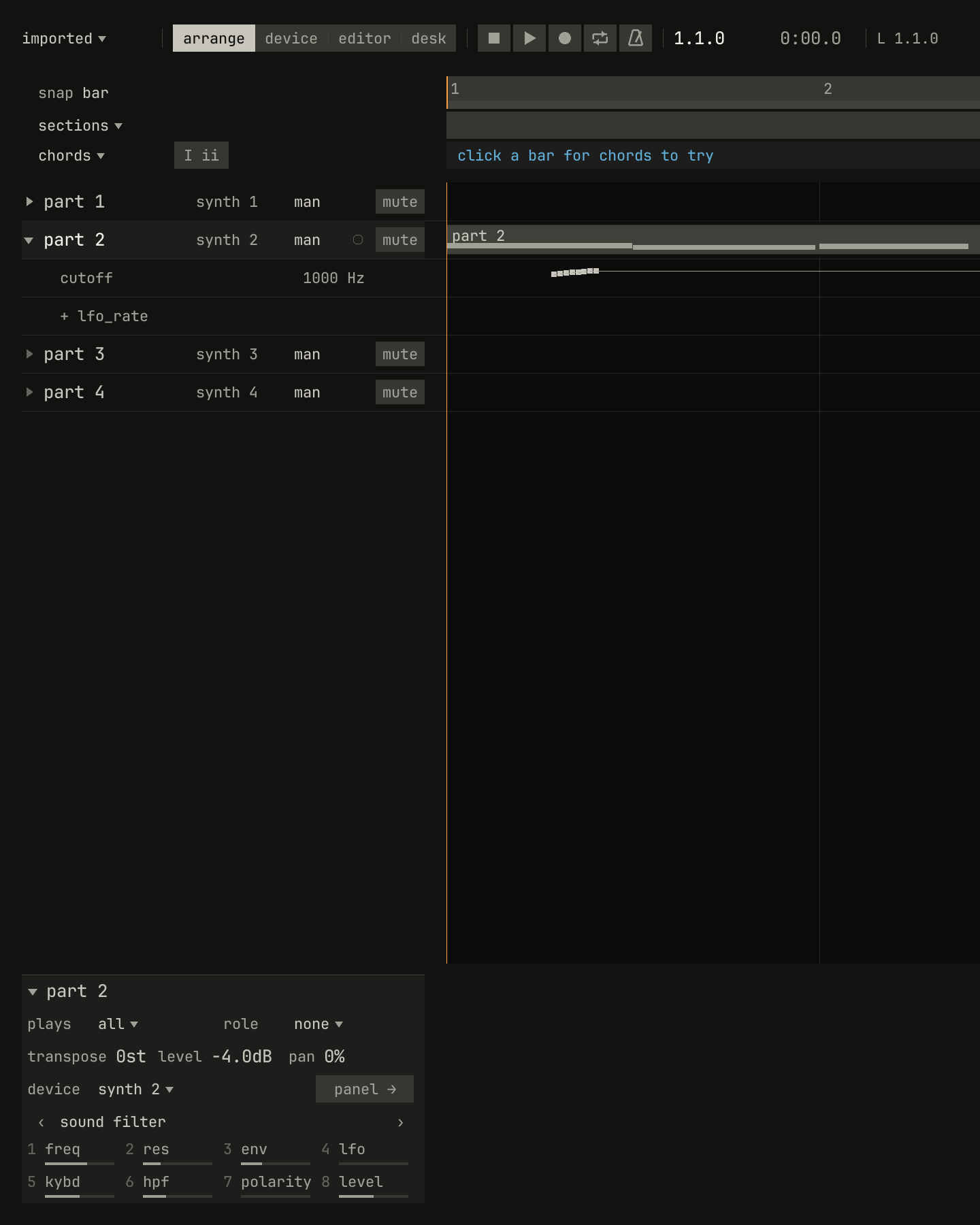
take-1.txt from the synth's chapter 13 as a song: part 2's three chords in one clip, its program change and pedal in the clip, and the eight set cutoff lines of the take as eight points on its cutoff lane, in the second beat. Its render and the synth's of the take are within about a decibel of each other, half a second at a time.scriptzig build run-studio -- manual/14-recording/imported --script manual/14-recording/imported.txt
renderzig build run-studio -- render manual/14-recording/imported imported.wav
imported/song.json
{
  "tempo": 112,
  "swing": 50,
  "end": "3.2.320",
  "devices": [
    {
      "name": "synth",
      "type": "synth",
      "state": {
        "delay_time": "1/8",
        "delay_feedback": 40,
        "delay_tone": 5000,
        "delay_mode": "stereo",
        "reverb_decay": 50,
        "reverb_damp": 6000,
        "reverb_predelay": 0.01,
        "parts": [
          {
            "patch": {
              "lfo_rate": 7.5,
              "lfo_delay": 0,
              "lfo_wave": "triangle",
              "lfo_sync": "off",
              "lfo_division": "step",
              "range": "8'",
              "vco_mod": 0,
              "pwm": 0,
              "pwm_source": "manual",
              "oscillator": "polyblep",
              "pulse": "off",
              "saw": "on",
              "sub": 60,
              "sub_mode": "square1",
              "noise": 0,
              "hpf": "0",
              "slope": "24dB",
              "cutoff": 240,
              "resonance": 50,
              "env_polarity": "normal",
              "filter_env": 4.2,
              "filter_mod": 0,
              "key_follow": 50,
              "vca": "env",
              "vca_level": 0,
              "attack": 0.002,
              "decay": 0.16,
              "sustain": 10,
              "release": 0.05,
              "trigger": "gate",
              "chorus": "off",
              "portamento": 0.04,
              "portamento_mode": "on",
              "bend_vco": 2,
              "bend_vcf": 0,
              "lfo_mod": 1,
              "voice_mode": "mono",
              "sequence": [
                "C2", "C3", "-", "C2", "D#2", "~F2", "G2", "-", "C2", "~C2", "A#1", "C2", "D#3", "-", "G2", "A#2"
              ]
            },
            "level": 0,
            "pan": 0,
            "muted": "off",
            "divide": "1/16",
            "delay_send": 0,
            "reverb_send": 0,
            "arp": "off",
            "transpose": 0,
            "playing": true
          },
          {
            "patch": {
              "lfo_rate": 4,
              "lfo_delay": 0,
              "lfo_wave": "triangle",
              "lfo_sync": "off",
              "lfo_division": "step",
              "range": "8'",
              "vco_mod": 0,
              "pwm": 50,
              "pwm_source": "lfo",
              "oscillator": "polyblep",
              "pulse": "on",
              "saw": "on",
              "sub": 0,
              "sub_mode": "square1",
              "noise": 0,
              "hpf": "1",
              "slope": "24dB",
              "cutoff": 1000,
              "resonance": 25,
              "env_polarity": "normal",
              "filter_env": 3,
              "filter_mod": 0,
              "key_follow": 50,
              "vca": "env",
              "vca_level": 0,
              "attack": 0.3,
              "decay": 0.4,
              "sustain": 60,
              "release": 0.8,
              "trigger": "gate_trig",
              "chorus": "II",
              "portamento": 0.1,
              "portamento_mode": "off",
              "bend_vco": 2,
              "bend_vcf": 0,
              "lfo_mod": 1,
              "voice_mode": "poly1"
            },
            "level": -4,
            "pan": 0,
            "muted": "off",
            "divide": "1/16",
            "delay_send": 0,
            "reverb_send": 0,
            "arp": "off",
            "transpose": 0,
            "playing": false
          },
          {
            "patch": {
              "lfo_rate": 4,
              "lfo_delay": 0,
              "lfo_wave": "triangle",
              "lfo_sync": "off",
              "lfo_division": "step",
              "range": "8'",
              "vco_mod": 0,
              "pwm": 0,
              "pwm_source": "manual",
              "oscillator": "polyblep",
              "pulse": "off",
              "saw": "on",
              "sub": 0,
              "sub_mode": "square1",
              "noise": 0,
              "hpf": "1",
              "slope": "24dB",
              "cutoff": 1000,
              "resonance": 25,
              "env_polarity": "normal",
              "filter_env": 3,
              "filter_mod": 0,
              "key_follow": 50,
              "vca": "env",
              "vca_level": 0,
              "attack": 0.002,
              "decay": 0.4,
              "sustain": 60,
              "release": 0.1,
              "trigger": "gate_trig",
              "chorus": "off",
              "portamento": 0.1,
              "portamento_mode": "off",
              "bend_vco": 2,
              "bend_vcf": 0,
              "lfo_mod": 1,
              "voice_mode": "mono"
            },
            "level": 0,
            "pan": 0,
            "muted": "off",
            "divide": "1/16",
            "delay_send": 0,
            "reverb_send": 0,
            "arp": "off",
            "transpose": 0,
            "playing": false
          },
          {
            "patch": {
              "lfo_rate": 4,
              "lfo_delay": 0,
              "lfo_wave": "triangle",
              "lfo_sync": "off",
              "lfo_division": "step",
              "range": "8'",
              "vco_mod": 0,
              "pwm": 0,
              "pwm_source": "manual",
              "oscillator": "polyblep",
              "pulse": "off",
              "saw": "on",
              "sub": 0,
              "sub_mode": "square1",
              "noise": 0,
              "hpf": "1",
              "slope": "24dB",
              "cutoff": 1000,
              "resonance": 25,
              "env_polarity": "normal",
              "filter_env": 3,
              "filter_mod": 0,
              "key_follow": 50,
              "vca": "env",
              "vca_level": 0,
              "attack": 0.002,
              "decay": 0.4,
              "sustain": 60,
              "release": 0.1,
              "trigger": "gate_trig",
              "chorus": "off",
              "portamento": 0.1,
              "portamento_mode": "off",
              "bend_vco": 2,
              "bend_vcf": 0,
              "lfo_mod": 1,
              "voice_mode": "mono"
            },
            "level": 0,
            "pan": 0,
            "muted": "off",
            "divide": "1/16",
            "delay_send": 0,
            "reverb_send": 0,
            "arp": "off",
            "transpose": 0,
            "playing": false
          }
        ]
      }
    }
  ],
  "desk": {
    "master": 0,
    "delay": { "return": 0, "time": "1/8", "feedback": 40, "tone": 5000 },
    "reverb": { "return": 0, "decay": 50, "damp": 6000 },
    "strips": {
      "synth": { "level": 0, "pan": 0, "muted": false }
    }
  },
  "tracks": [
    {
      "name": "part 1",
      "device": "synth",
      "channel": 1,
      "lanes": {
        "run": ["2.2.954 off"]
      }
    },
    {
      "name": "part 2",
      "device": "synth",
      "channel": 2,
      "clips": [
        { "at": "1", "length": "2.1.320", "notes": "part 2" }
      ],
      "lanes": {
        "cutoff": [
          "1.2.149 1353.2365",
          "1.2.211 1619.3875",
          "1.2.273 1937.8844",
          "1.2.335 2184.3015",
          "1.2.397 2613.9043",
          "1.2.454 3128.0002",
          "1.2.517 3525.7498",
          "1.2.579 3974.0764"
        ]
      }
    },
    {
      "name": "part 3",
      "device": "synth",
      "channel": 3
    },
    {
      "name": "part 4",
      "device": "synth",
      "channel": 4
    }
  ],
  "notes": {
    "part 2": {
      "length": "2.1.320",
      "notes": [
        "1.1.0 C4 0.1.956 80",
        "1.1.0 Eb4 0.1.956 80",
        "1.1.0 G4 0.1.956 80",
        "1.3.1 Ab3 0.1.918 90",
        "1.3.1 C4 0.1.918 90",
        "1.3.1 Eb4 0.1.918 90",
        "2.1.2 Bb3 0.1.574 100",
        "2.1.2 D4 0.1.574 100",
        "2.1.2 F4 0.1.574 100"
      ],
      "events": [
        "1.4.952 program A33",
        "2.2.399 pedal down",
        "2.3.959 pedal up"
      ]
    }
  }
}
imported.txt
# The take made a song: part 2's lanes open, with the knob the take
# turned.
wait 0.2
click triangle part 2
move 1430 890
wait 0.1
capture imported.png
studio export SONG TAKE.txt goes the other way, for a song on one synth
(chapter 21).
Audio tracks
An audio track plays recordings, as Cubase Audio's tracks did beside
its MIDI tracks, on a strip of its own on the desk, after the devices'
(chapter 17). It has no device
and no channel. new audio track, in the menu a right-click on a track
opens, adds one after the last, named audio 1, or the first number
free. Its row holds, after its name:
- Its input,
in 1,in 2, orin 1+2in stereo: what it records and hears. A click steps it. mon, which hears the input through the track's strip (monitoring).- A light, which a click arms: a ring with a dot. An armed track records when the song does; the selected audio track, with none armed, shows a plain ring, as an instrument track does.
While a track is armed or monitoring, a thin meter under its row shows
what the input hears, to set a level by before recording; it turns red at
full scale. Its clips play stretches of its recordings, which
chapter 13 arranges, and its triangle
opens lanes of its strip's controls, as desk_level, as a device's tracks
have (chapter 16).
Recording audio
Record, Num * or the bar's button, records the audio tracks armed,
up to four at once, four audio tracks record at once, as the 244's; with
none armed, the selected track if it's an audio track. The selected
instrument track records its notes beside them, as it would alone. The
count-in, punching in between the locators, and cycling work as they do
for notes. A song saves into a folder before it records audio, save the
song first: its recordings go in its folder, and tape runs only at full
speed: with the song slower, record says so.
Each pass is a file a track, named after the track, audio/vocal-1.wav,
audio/vocal-2.wav, and on, and a clip a file, all one edit. In a cycle,
each lap is a pass whose clip lands on top of the last, so the newest
plays and the ones under it stay, as the passes of a tape punched in
again and again. A punch-in's clip starts and ends with fades of 5 ms,
which cross with the clip under it. While a take records, the clips under
it on its tracks go quiet, as a record head erases the tape ahead of what
it records. Ctrl+Z takes back the last pass's clips; their files stay
in audio/, and Ctrl+Shift+Z puts them back.
The audio thread hands what the input hears to a disk thread, which writes it as it comes, 24-bit at 48 kHz. A file's header says its length only once its pass ends; until then, the studio reads such a file to its end, so a take cut short by a crash keeps what was written. Ctrl+Shift+S into another folder takes the song's recordings along, hidden passes too.
The round trip
What you hear left the output a buffer or more before, and what you play reaches the input late too. So the studio stamps each frame the input hears with the song's frame played a round trip before it, and a take lands where you heard the song, across a cycle's loops too; its tail comes in a round trip after record stops.
The input is a device of its own beside the output, on a clock of its own. The audio thread takes what it hears a little behind, by a block of the input's, a callback of the output's, and 5 ms to spare, lined up by when each device's blocks come, so where the two devices' blocks fall doesn't move it, and the round trip is the same each time the input opens.
The round trip is what the devices report, their buffers and that delay,
until measure the latency, in the song's menu, times it through a cable
from the output to the input: eight clicks go out in place of the song, a
quarter of a second apart, and where they come back is the round trip. A
callout says what it found beside what the devices said, and the studio
keeps it in audio.json in its settings folder
(chapter 20) for
every song after. Measure again after changing the audio device or its
buffer.
Monitoring
mon on an audio track hears its input through the track's strip, its EQ,
sends, and fader, playing or stopped, as the 244's input select did. It's
heard a round trip late, so a singer may rather hear the input before the
computer, on the audio interface, if it can.
Try it in the window
- Open
take, select the lead, press Num *, and play the home row after the count-in. Press record again, then Ctrl+3 to see the take. - Shift-click record and play the same phrase a little late on purpose. Press Ctrl+Z once to see it as you played it.
- Drag across the ruler over bar 3, turn cycle on, select the keys, and record in overdub: a chord on beat 1 the first time round, another on beat 3 the second.
- Record on the lead and turn the inspector's
freqknob while it plays. Open the lead's triangle and look at the lane. - Press - six times and record something you can't play at full speed. Press = until the tag goes, and play it back.
- Add an audio track with
new audio track, save the song, arm the track, and record yourself counting the bars after the count-in. Turn cycle on over two bars and record three passes; undo the last. - With a cable from the output to the input, run
measure the latency, then record the click through the cable, and see the take's clicks fall on the beats.
Next: chapter 15, the editors, where a take is shaped note by note.