IV. Working in the studio
The editors
The arrange view moves clips; the editors change what's in them. A clip's notes open in one of three editors, after Cubase's: Key Edit, a piano roll with a velocity graph under it, for melodies, bass lines, and chords; Drum Edit, a row a drum, for beats; and List Edit, every note and event as a line of text, for exact values. All three edit the same notes, and an edit in one shows in the others. This chapter covers each, and the header they share.
The chapter's song is four bars in A minor: a beat, a keys part of chord stabs, a bass that follows the chords, and an empty clip on a lead track to write into.
zig build run-studio -- manual/15-editors/keys --view editor --track 2
Opening a clip
0.0 / 10.0 s
peak -12.6 dBFS
openzig build run-studio -- manual/15-editors/keys --view editor --track 2
renderzig build run-studio -- render manual/15-editors/keys stabs.wav
keys/song.json
{
  "tempo": 96,
  "end": "5",
  "key": ["1 A minor"],
  "chords": ["1 Am", "2 F", "3 C", "4 G"],
  "devices": [
    { "name": "synth", "type": "synth", "state": { "parts": [
      { "patch": "A45", "level": -8, "reverb_send": 15 },
      { "patch": "A11", "level": -6 },
      { "patch": "A61", "level": -6, "delay_send": 10 }
    ] } },
    { "name": "808", "type": "drums" }
  ],
  "tracks": [
    { "name": "drums", "device": "808", "channel": 1, "role": "drums", "clips": [{ "at": "1", "length": "4.0.0", "notes": "beat" }] },
    { "name": "keys", "device": "synth", "channel": 1, "keys": "chord", "role": "chords", "clips": [{ "at": "1", "length": "4.0.0", "notes": "stabs" }] },
    { "name": "bass", "device": "synth", "channel": 2, "keys": "pent", "role": "bass", "clips": [{ "at": "1", "length": "4.0.0", "notes": "bass" }] },
    { "name": "lead", "device": "synth", "channel": 3, "keys": "pent", "role": "lead", "clips": [{ "at": "1", "length": "2.0.0", "notes": "tune" }] }
  ],
  "notes": {
    "beat": {
      "length": "1.0.0",
      "notes": [
        "1.1.0 C2 0.0.240 120", "1.1.0 F#2 0.0.240 100", "1.1.480 F#2 0.0.240 70",
        "1.2.0 D2 0.0.240 112", "1.2.0 F#2 0.0.240 96", "1.2.480 F#2 0.0.240 70",
        "1.3.0 C2 0.0.240 116", "1.3.0 F#2 0.0.240 100", "1.3.480 F#2 0.0.240 70", "1.3.720 C2 0.0.240 96",
        "1.4.0 D2 0.0.240 112", "1.4.0 F#2 0.0.240 96", "1.4.480 F#2 0.0.240 70"
      ]
    },
    "stabs": {
      "length": "4.0.0",
      "notes": [
        "1.1.0 A3 0.1.240 100", "1.1.0 C4 0.1.240 100", "1.1.0 E4 0.1.240 100",
        "1.2.480 A3 0.0.400 72", "1.2.480 C4 0.0.400 72", "1.2.480 E4 0.0.400 72",
        "1.4.0 A3 0.0.840 88", "1.4.0 C4 0.0.840 88", "1.4.0 E4 0.0.840 88",
        "2.1.0 A3 0.1.240 100", "2.1.0 C4 0.1.240 100", "2.1.0 F4 0.1.240 100",
        "2.2.480 A3 0.0.400 72", "2.2.480 C4 0.0.400 72", "2.2.480 F4 0.0.400 72",
        "2.4.0 A3 0.0.840 88", "2.4.0 C4 0.0.840 88", "2.4.0 F4 0.0.840 88",
        "3.1.0 G3 0.1.240 100", "3.1.0 C4 0.1.240 100", "3.1.0 E4 0.1.240 100",
        "3.2.480 G3 0.0.400 72", "3.2.480 C4 0.0.400 72", "3.2.480 E4 0.0.400 72",
        "3.4.0 G3 0.0.840 88", "3.4.0 C4 0.0.840 88", "3.4.0 E4 0.0.840 88",
        "4.1.0 G3 0.1.240 100", "4.1.0 B3 0.1.240 100", "4.1.0 D4 0.1.240 100",
        "4.2.480 G3 0.0.400 72", "4.2.480 B3 0.0.400 72", "4.2.480 D4 0.0.400 72",
        "4.4.0 G3 0.0.840 88", "4.4.0 B3 0.0.840 88", "4.4.0 D4 0.0.840 88"
      ],
      "events": ["4.4.0 pedal down", "4.4.900 pedal up"]
    },
    "bass": { "length": "4.0.0", "follow": { "pattern": "eighths", "low": "E2" } },
    "tune": { "length": "2.0.0", "notes": [] }
  }
}Ctrl+3, or editor in the bar, opens the selected clip, or the
selected track's first notes clip. A double-click on a clip in the arrange
view opens it too, and so does edit → in the inspector with a clip
selected. A clip on a drum machine, or on a sampler playing a kit, opens in
Drum Edit, and any other in Key Edit, unless List Edit was open last, which
stays. Esc goes back to the arrange view.
A pattern clip plays a device's own sequence, which has no notes for an editor: a double-click on one opens the device's panel instead.
The header

quantize ▾, the clip's name with its menu, its length, the key with the chord at the song position, show ▾, and the modes step and practice.openzig build run-studio -- manual/15-editors/keys --view editor --track 2
keys/song.json
{
  "tempo": 96,
  "end": "5",
  "key": ["1 A minor"],
  "chords": ["1 Am", "2 F", "3 C", "4 G"],
  "devices": [
    { "name": "synth", "type": "synth", "state": { "parts": [
      { "patch": "A45", "level": -8, "reverb_send": 15 },
      { "patch": "A11", "level": -6 },
      { "patch": "A61", "level": -6, "delay_send": 10 }
    ] } },
    { "name": "808", "type": "drums" }
  ],
  "tracks": [
    { "name": "drums", "device": "808", "channel": 1, "role": "drums", "clips": [{ "at": "1", "length": "4.0.0", "notes": "beat" }] },
    { "name": "keys", "device": "synth", "channel": 1, "keys": "chord", "role": "chords", "clips": [{ "at": "1", "length": "4.0.0", "notes": "stabs" }] },
    { "name": "bass", "device": "synth", "channel": 2, "keys": "pent", "role": "bass", "clips": [{ "at": "1", "length": "4.0.0", "notes": "bass" }] },
    { "name": "lead", "device": "synth", "channel": 3, "keys": "pent", "role": "lead", "clips": [{ "at": "1", "length": "2.0.0", "notes": "tune" }] }
  ],
  "notes": {
    "beat": {
      "length": "1.0.0",
      "notes": [
        "1.1.0 C2 0.0.240 120", "1.1.0 F#2 0.0.240 100", "1.1.480 F#2 0.0.240 70",
        "1.2.0 D2 0.0.240 112", "1.2.0 F#2 0.0.240 96", "1.2.480 F#2 0.0.240 70",
        "1.3.0 C2 0.0.240 116", "1.3.0 F#2 0.0.240 100", "1.3.480 F#2 0.0.240 70", "1.3.720 C2 0.0.240 96",
        "1.4.0 D2 0.0.240 112", "1.4.0 F#2 0.0.240 96", "1.4.480 F#2 0.0.240 70"
      ]
    },
    "stabs": {
      "length": "4.0.0",
      "notes": [
        "1.1.0 A3 0.1.240 100", "1.1.0 C4 0.1.240 100", "1.1.0 E4 0.1.240 100",
        "1.2.480 A3 0.0.400 72", "1.2.480 C4 0.0.400 72", "1.2.480 E4 0.0.400 72",
        "1.4.0 A3 0.0.840 88", "1.4.0 C4 0.0.840 88", "1.4.0 E4 0.0.840 88",
        "2.1.0 A3 0.1.240 100", "2.1.0 C4 0.1.240 100", "2.1.0 F4 0.1.240 100",
        "2.2.480 A3 0.0.400 72", "2.2.480 C4 0.0.400 72", "2.2.480 F4 0.0.400 72",
        "2.4.0 A3 0.0.840 88", "2.4.0 C4 0.0.840 88", "2.4.0 F4 0.0.840 88",
        "3.1.0 G3 0.1.240 100", "3.1.0 C4 0.1.240 100", "3.1.0 E4 0.1.240 100",
        "3.2.480 G3 0.0.400 72", "3.2.480 C4 0.0.400 72", "3.2.480 E4 0.0.400 72",
        "3.4.0 G3 0.0.840 88", "3.4.0 C4 0.0.840 88", "3.4.0 E4 0.0.840 88",
        "4.1.0 G3 0.1.240 100", "4.1.0 B3 0.1.240 100", "4.1.0 D4 0.1.240 100",
        "4.2.480 G3 0.0.400 72", "4.2.480 B3 0.0.400 72", "4.2.480 D4 0.0.400 72",
        "4.4.0 G3 0.0.840 88", "4.4.0 B3 0.0.840 88", "4.4.0 D4 0.0.840 88"
      ],
      "events": ["4.4.0 pedal down", "4.4.900 pedal up"]
    },
    "bass": { "length": "4.0.0", "follow": { "pattern": "eighths", "low": "E2" } },
    "tune": { "length": "2.0.0", "notes": [] }
  }
}
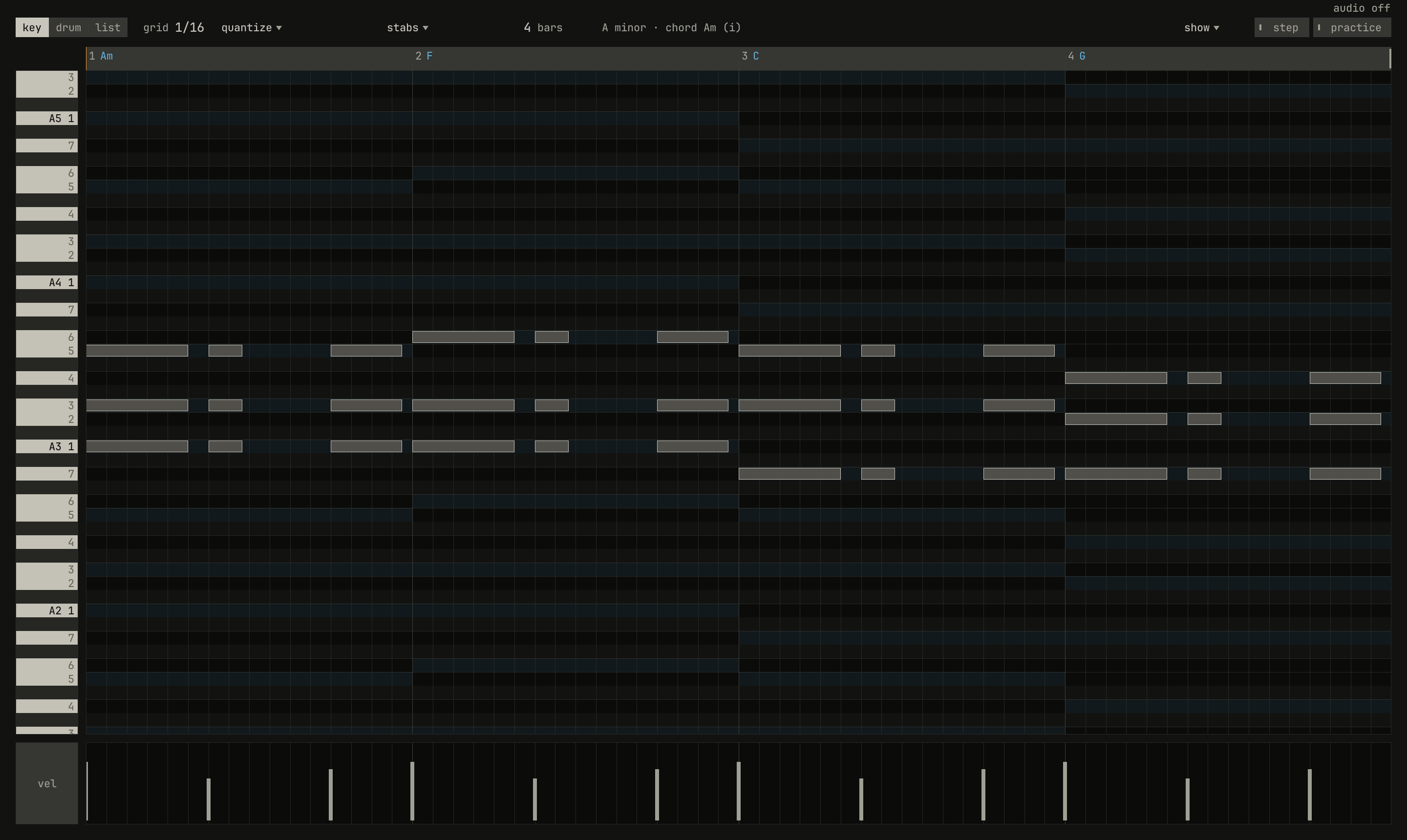
From left to right:
key drum listpicks the editor; Tab steps through them.grid 1/16is the grid notes snap to, drawn in the roll, and the step that the arrow keys, chopping, step input, and Q use. A click steps it to the next, from1/4to1/32Twith each triplet between and round again, Shift and a click back, and the wheel either way.quantize ▾holds the strength quantizing moves notes by,25%to100%, andquantizeitself, Q, which moves the notes selected, or all of them, toward the grid. Automatic quantize, in chapter 14, uses this strength.- The clip's name ▾, here
stabs, drops the clip's menu. - The length,
4 bars, is where the clip's notes loop. The wheel over it changes it a bar at a time. - The key at the clip's start, and the chord sounding at the song position, or the chord the selected notes make, with its numeral; for a part that follows the chords, the pattern it follows.
show ▾holds the roll's layers.stepandpracticeare modes: step input, below, and practice, which chapter 10 is about. While practice is on, its four ways take the grid's and quantize's place.
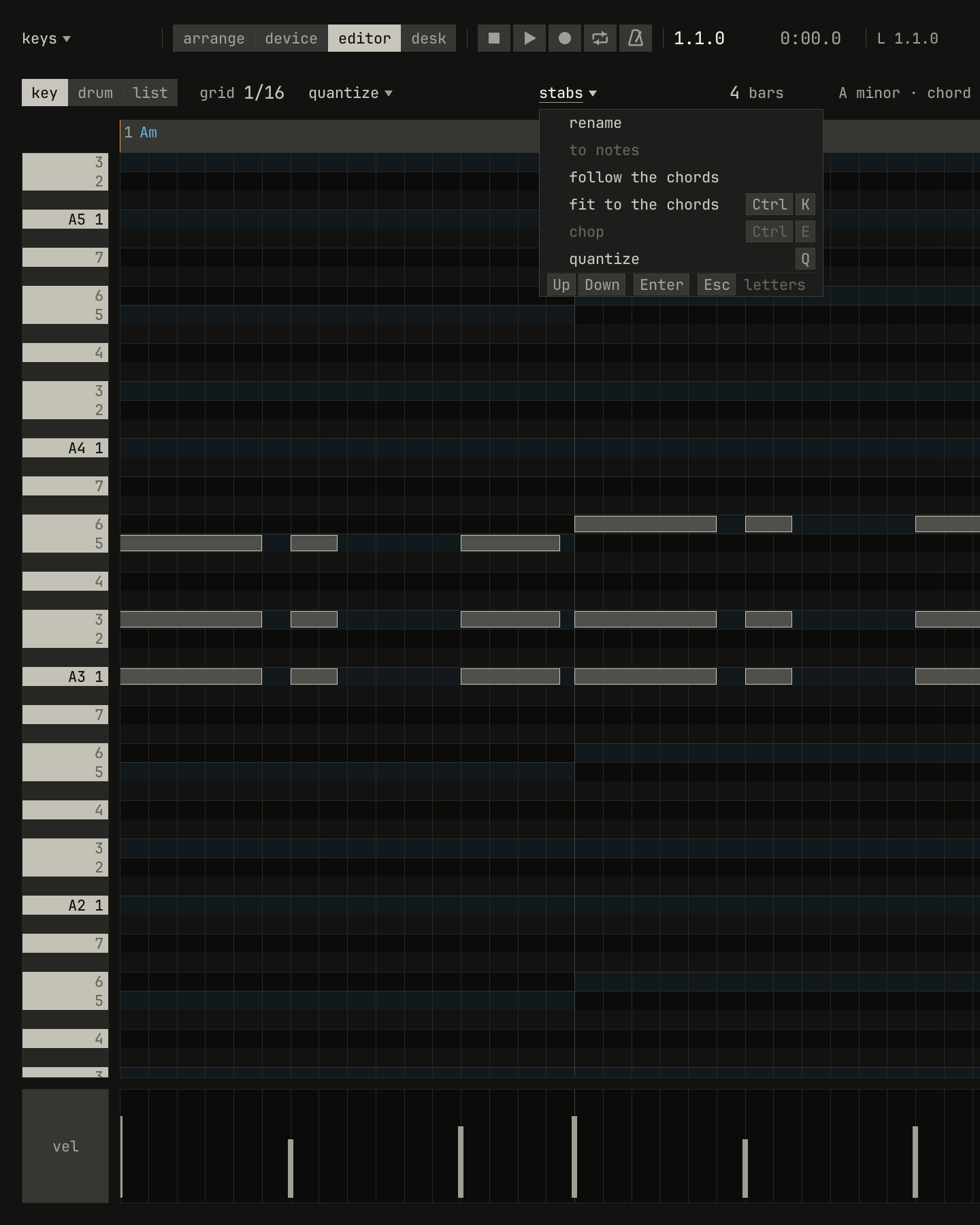
rename, to notes, quiet here since the clip plays no recording, follow the chords, fit to the chords, chop, quiet with no notes selected, and quantize.scriptzig build run-studio -- manual/15-editors/keys --view editor --track 2 --script manual/15-editors/clip-menu.txt
keys/song.json
{
  "tempo": 96,
  "end": "5",
  "key": ["1 A minor"],
  "chords": ["1 Am", "2 F", "3 C", "4 G"],
  "devices": [
    { "name": "synth", "type": "synth", "state": { "parts": [
      { "patch": "A45", "level": -8, "reverb_send": 15 },
      { "patch": "A11", "level": -6 },
      { "patch": "A61", "level": -6, "delay_send": 10 }
    ] } },
    { "name": "808", "type": "drums" }
  ],
  "tracks": [
    { "name": "drums", "device": "808", "channel": 1, "role": "drums", "clips": [{ "at": "1", "length": "4.0.0", "notes": "beat" }] },
    { "name": "keys", "device": "synth", "channel": 1, "keys": "chord", "role": "chords", "clips": [{ "at": "1", "length": "4.0.0", "notes": "stabs" }] },
    { "name": "bass", "device": "synth", "channel": 2, "keys": "pent", "role": "bass", "clips": [{ "at": "1", "length": "4.0.0", "notes": "bass" }] },
    { "name": "lead", "device": "synth", "channel": 3, "keys": "pent", "role": "lead", "clips": [{ "at": "1", "length": "2.0.0", "notes": "tune" }] }
  ],
  "notes": {
    "beat": {
      "length": "1.0.0",
      "notes": [
        "1.1.0 C2 0.0.240 120", "1.1.0 F#2 0.0.240 100", "1.1.480 F#2 0.0.240 70",
        "1.2.0 D2 0.0.240 112", "1.2.0 F#2 0.0.240 96", "1.2.480 F#2 0.0.240 70",
        "1.3.0 C2 0.0.240 116", "1.3.0 F#2 0.0.240 100", "1.3.480 F#2 0.0.240 70", "1.3.720 C2 0.0.240 96",
        "1.4.0 D2 0.0.240 112", "1.4.0 F#2 0.0.240 96", "1.4.480 F#2 0.0.240 70"
      ]
    },
    "stabs": {
      "length": "4.0.0",
      "notes": [
        "1.1.0 A3 0.1.240 100", "1.1.0 C4 0.1.240 100", "1.1.0 E4 0.1.240 100",
        "1.2.480 A3 0.0.400 72", "1.2.480 C4 0.0.400 72", "1.2.480 E4 0.0.400 72",
        "1.4.0 A3 0.0.840 88", "1.4.0 C4 0.0.840 88", "1.4.0 E4 0.0.840 88",
        "2.1.0 A3 0.1.240 100", "2.1.0 C4 0.1.240 100", "2.1.0 F4 0.1.240 100",
        "2.2.480 A3 0.0.400 72", "2.2.480 C4 0.0.400 72", "2.2.480 F4 0.0.400 72",
        "2.4.0 A3 0.0.840 88", "2.4.0 C4 0.0.840 88", "2.4.0 F4 0.0.840 88",
        "3.1.0 G3 0.1.240 100", "3.1.0 C4 0.1.240 100", "3.1.0 E4 0.1.240 100",
        "3.2.480 G3 0.0.400 72", "3.2.480 C4 0.0.400 72", "3.2.480 E4 0.0.400 72",
        "3.4.0 G3 0.0.840 88", "3.4.0 C4 0.0.840 88", "3.4.0 E4 0.0.840 88",
        "4.1.0 G3 0.1.240 100", "4.1.0 B3 0.1.240 100", "4.1.0 D4 0.1.240 100",
        "4.2.480 G3 0.0.400 72", "4.2.480 B3 0.0.400 72", "4.2.480 D4 0.0.400 72",
        "4.4.0 G3 0.0.840 88", "4.4.0 B3 0.0.840 88", "4.4.0 D4 0.0.840 88"
      ],
      "events": ["4.4.0 pedal down", "4.4.900 pedal up"]
    },
    "bass": { "length": "4.0.0", "follow": { "pattern": "eighths", "low": "E2" } },
    "tune": { "length": "2.0.0", "notes": [] }
  }
}
clip-menu.txt
# The clip's name in the header drops the clip's menu.
wait 0.2
click clip
wait 0.1
capture clip-menu.png
rename types the clip's notes a new name in place, which no other notes
may have; Enter keeps it. to notes turns a recording of one voice into
notes (chapter 9); follow the chords
makes the notes follow the chord row on a pattern, and again steps to the
next pattern (chapter 6); fit to the chords,
Ctrl+K, moves notes onto the chords and the key
(chapter 7).
The roll
The roll is time across and pitch up the page, a row a semitone. The piano strip at its left names each row's degree in the song's key, and the rows of the key's notes are lit, those outside it dark, as chapter 3 shows. The song's chords run along the ruler, and the rows of each chord's notes are tinted under it (chapter 4). A click on the piano strip plays its key; the letter keys play the track, as in the arrange view.
The wheel scrolls the roll up and down; over the ruler, or turned sideways, it scrolls along the bars; with Ctrl it zooms about the pointer. A click on the ruler moves the song position.
The mouse in the roll, with the move tool:
| Mouse | Does |
|---|---|
| Double-click an empty place | A note a grid step long; a drag before letting go lengthens it |
| Click a note | Selects it; Shift and a click adds it to the selection, or takes it out |
| Drag a note | Moves it, and every note selected with it, by the grid |
| Drag a note's right end | Lengthens or shortens it, and every note selected by as much |
| Drag an empty place | Selects the notes inside the box; with Shift, adds them |
| Double-click a note | Takes it away |
| Right-click | The roll's menu, or a note's, selecting it first |
A drag snaps to the grid; with Alt held, it goes anywhere. Every edit is one undo step.
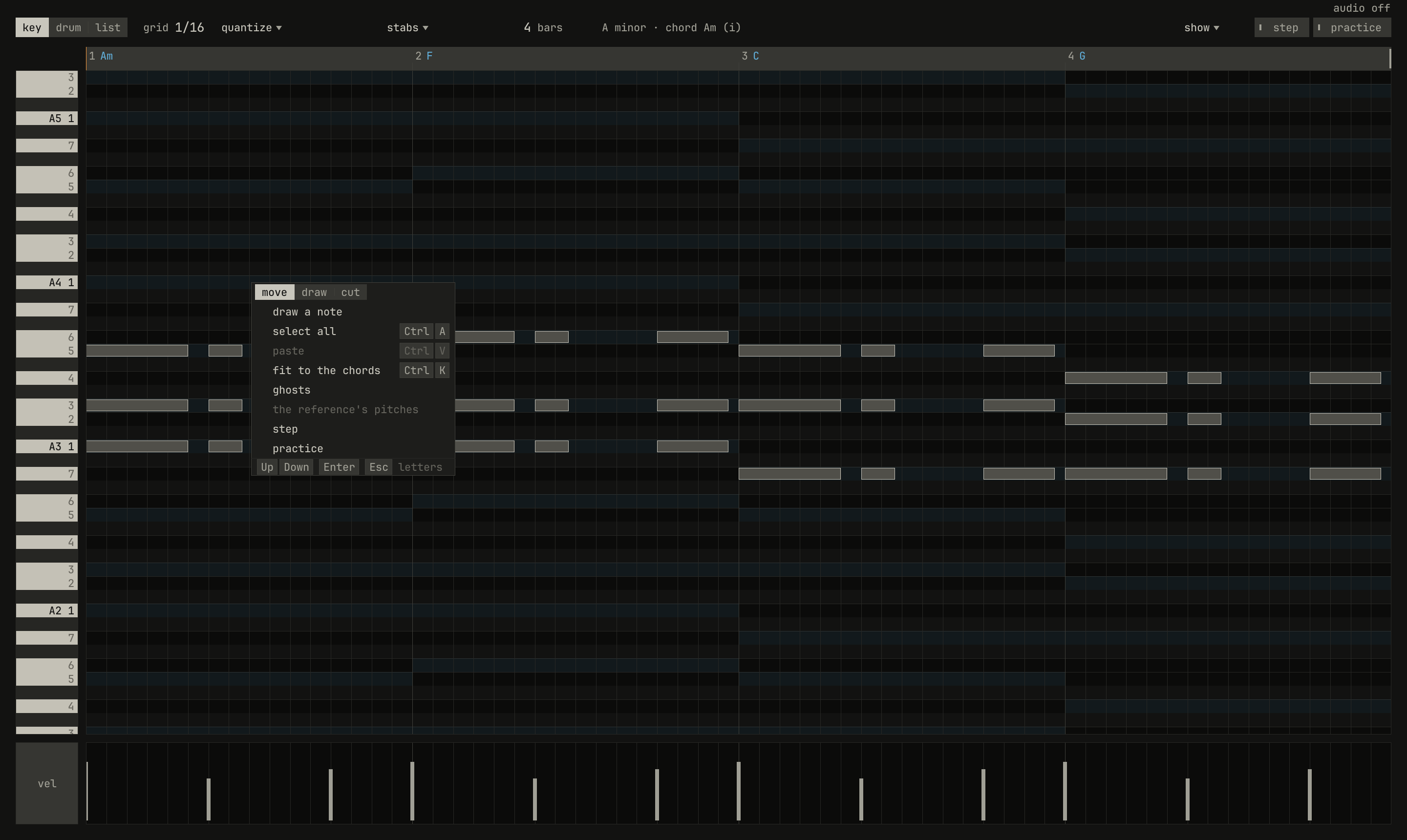
move draw cut, then draw a note, select all, paste, quiet with nothing copied, fit to the chords, ghosts, the reference's pitches, quiet without a reference, step, and practice.scriptzig build run-studio -- manual/15-editors/keys --view editor --track 2 --script manual/15-editors/roll-menu.txt
keys/song.json
{
  "tempo": 96,
  "end": "5",
  "key": ["1 A minor"],
  "chords": ["1 Am", "2 F", "3 C", "4 G"],
  "devices": [
    { "name": "synth", "type": "synth", "state": { "parts": [
      { "patch": "A45", "level": -8, "reverb_send": 15 },
      { "patch": "A11", "level": -6 },
      { "patch": "A61", "level": -6, "delay_send": 10 }
    ] } },
    { "name": "808", "type": "drums" }
  ],
  "tracks": [
    { "name": "drums", "device": "808", "channel": 1, "role": "drums", "clips": [{ "at": "1", "length": "4.0.0", "notes": "beat" }] },
    { "name": "keys", "device": "synth", "channel": 1, "keys": "chord", "role": "chords", "clips": [{ "at": "1", "length": "4.0.0", "notes": "stabs" }] },
    { "name": "bass", "device": "synth", "channel": 2, "keys": "pent", "role": "bass", "clips": [{ "at": "1", "length": "4.0.0", "notes": "bass" }] },
    { "name": "lead", "device": "synth", "channel": 3, "keys": "pent", "role": "lead", "clips": [{ "at": "1", "length": "2.0.0", "notes": "tune" }] }
  ],
  "notes": {
    "beat": {
      "length": "1.0.0",
      "notes": [
        "1.1.0 C2 0.0.240 120", "1.1.0 F#2 0.0.240 100", "1.1.480 F#2 0.0.240 70",
        "1.2.0 D2 0.0.240 112", "1.2.0 F#2 0.0.240 96", "1.2.480 F#2 0.0.240 70",
        "1.3.0 C2 0.0.240 116", "1.3.0 F#2 0.0.240 100", "1.3.480 F#2 0.0.240 70", "1.3.720 C2 0.0.240 96",
        "1.4.0 D2 0.0.240 112", "1.4.0 F#2 0.0.240 96", "1.4.480 F#2 0.0.240 70"
      ]
    },
    "stabs": {
      "length": "4.0.0",
      "notes": [
        "1.1.0 A3 0.1.240 100", "1.1.0 C4 0.1.240 100", "1.1.0 E4 0.1.240 100",
        "1.2.480 A3 0.0.400 72", "1.2.480 C4 0.0.400 72", "1.2.480 E4 0.0.400 72",
        "1.4.0 A3 0.0.840 88", "1.4.0 C4 0.0.840 88", "1.4.0 E4 0.0.840 88",
        "2.1.0 A3 0.1.240 100", "2.1.0 C4 0.1.240 100", "2.1.0 F4 0.1.240 100",
        "2.2.480 A3 0.0.400 72", "2.2.480 C4 0.0.400 72", "2.2.480 F4 0.0.400 72",
        "2.4.0 A3 0.0.840 88", "2.4.0 C4 0.0.840 88", "2.4.0 F4 0.0.840 88",
        "3.1.0 G3 0.1.240 100", "3.1.0 C4 0.1.240 100", "3.1.0 E4 0.1.240 100",
        "3.2.480 G3 0.0.400 72", "3.2.480 C4 0.0.400 72", "3.2.480 E4 0.0.400 72",
        "3.4.0 G3 0.0.840 88", "3.4.0 C4 0.0.840 88", "3.4.0 E4 0.0.840 88",
        "4.1.0 G3 0.1.240 100", "4.1.0 B3 0.1.240 100", "4.1.0 D4 0.1.240 100",
        "4.2.480 G3 0.0.400 72", "4.2.480 B3 0.0.400 72", "4.2.480 D4 0.0.400 72",
        "4.4.0 G3 0.0.840 88", "4.4.0 B3 0.0.840 88", "4.4.0 D4 0.0.840 88"
      ],
      "events": ["4.4.0 pedal down", "4.4.900 pedal up"]
    },
    "bass": { "length": "4.0.0", "follow": { "pattern": "eighths", "low": "E2" } },
    "tune": { "length": "2.0.0", "notes": [] }
  }
}
roll-menu.txt
# A right-click on an empty place in the roll: the tools, then what the
# roll offers.
wait 0.2
rclick roll A4 bar 1.3
wait 0.1
capture roll-menu.png
The roll's three tools head its menu. move works as above. With
draw, a click anywhere draws a note, and a drag sets its length.
With cut, a click on a note splits it in two at the grid line nearest
the pointer, or with Alt where the pointer is. Esc goes back to
move. A right-click on a note opens the notes' menu instead: duplicate,
copy, cut, quantize, fit to the chords, chop, and remove.
Selecting and moving

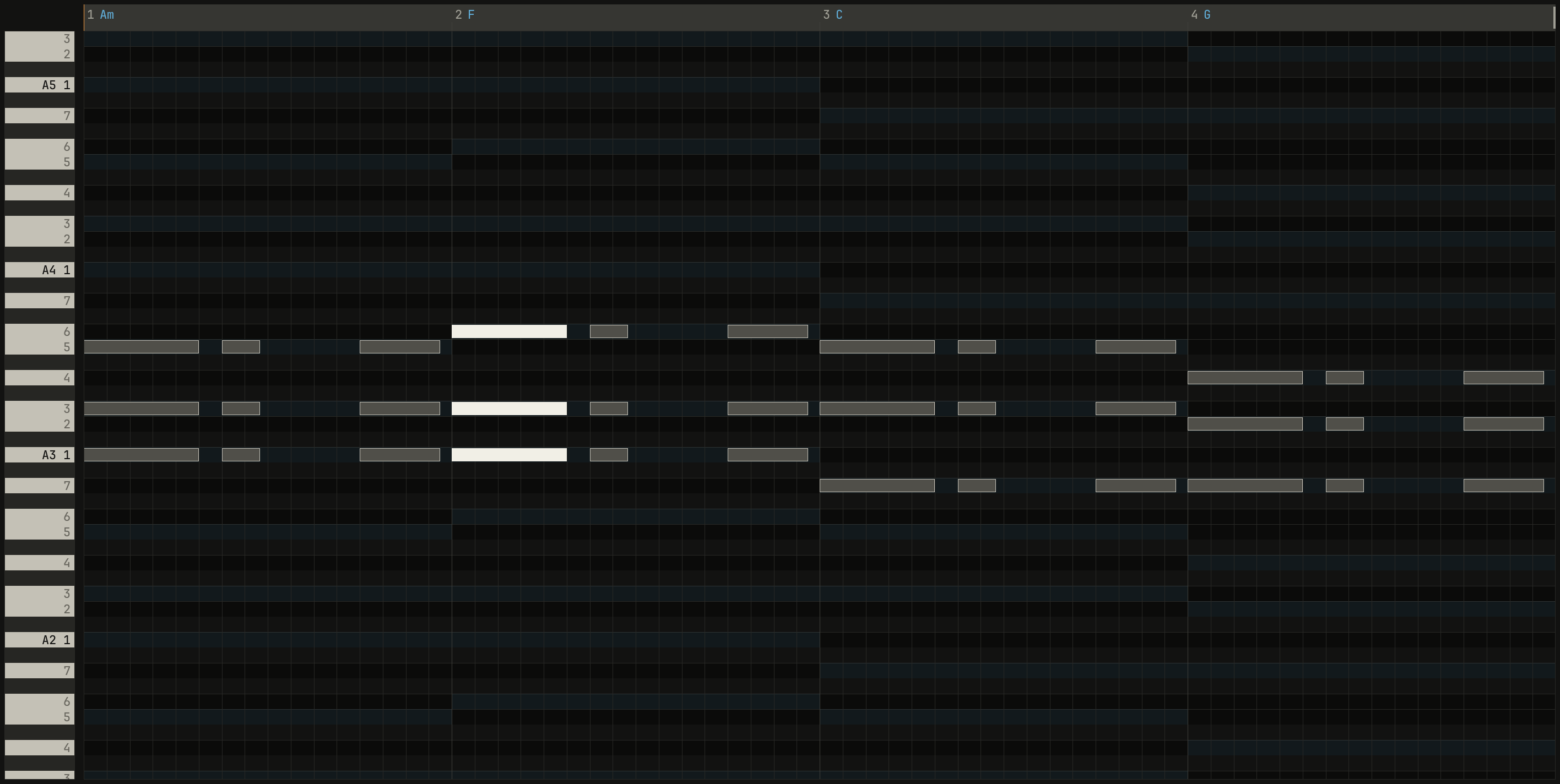
chord F/A (VI), F with its A lowest, the sixth chord of A minor.scriptzig build run-studio -- manual/15-editors/keys --view editor --track 2 --script manual/15-editors/selected.txt
keys/song.json
{
  "tempo": 96,
  "end": "5",
  "key": ["1 A minor"],
  "chords": ["1 Am", "2 F", "3 C", "4 G"],
  "devices": [
    { "name": "synth", "type": "synth", "state": { "parts": [
      { "patch": "A45", "level": -8, "reverb_send": 15 },
      { "patch": "A11", "level": -6 },
      { "patch": "A61", "level": -6, "delay_send": 10 }
    ] } },
    { "name": "808", "type": "drums" }
  ],
  "tracks": [
    { "name": "drums", "device": "808", "channel": 1, "role": "drums", "clips": [{ "at": "1", "length": "4.0.0", "notes": "beat" }] },
    { "name": "keys", "device": "synth", "channel": 1, "keys": "chord", "role": "chords", "clips": [{ "at": "1", "length": "4.0.0", "notes": "stabs" }] },
    { "name": "bass", "device": "synth", "channel": 2, "keys": "pent", "role": "bass", "clips": [{ "at": "1", "length": "4.0.0", "notes": "bass" }] },
    { "name": "lead", "device": "synth", "channel": 3, "keys": "pent", "role": "lead", "clips": [{ "at": "1", "length": "2.0.0", "notes": "tune" }] }
  ],
  "notes": {
    "beat": {
      "length": "1.0.0",
      "notes": [
        "1.1.0 C2 0.0.240 120", "1.1.0 F#2 0.0.240 100", "1.1.480 F#2 0.0.240 70",
        "1.2.0 D2 0.0.240 112", "1.2.0 F#2 0.0.240 96", "1.2.480 F#2 0.0.240 70",
        "1.3.0 C2 0.0.240 116", "1.3.0 F#2 0.0.240 100", "1.3.480 F#2 0.0.240 70", "1.3.720 C2 0.0.240 96",
        "1.4.0 D2 0.0.240 112", "1.4.0 F#2 0.0.240 96", "1.4.480 F#2 0.0.240 70"
      ]
    },
    "stabs": {
      "length": "4.0.0",
      "notes": [
        "1.1.0 A3 0.1.240 100", "1.1.0 C4 0.1.240 100", "1.1.0 E4 0.1.240 100",
        "1.2.480 A3 0.0.400 72", "1.2.480 C4 0.0.400 72", "1.2.480 E4 0.0.400 72",
        "1.4.0 A3 0.0.840 88", "1.4.0 C4 0.0.840 88", "1.4.0 E4 0.0.840 88",
        "2.1.0 A3 0.1.240 100", "2.1.0 C4 0.1.240 100", "2.1.0 F4 0.1.240 100",
        "2.2.480 A3 0.0.400 72", "2.2.480 C4 0.0.400 72", "2.2.480 F4 0.0.400 72",
        "2.4.0 A3 0.0.840 88", "2.4.0 C4 0.0.840 88", "2.4.0 F4 0.0.840 88",
        "3.1.0 G3 0.1.240 100", "3.1.0 C4 0.1.240 100", "3.1.0 E4 0.1.240 100",
        "3.2.480 G3 0.0.400 72", "3.2.480 C4 0.0.400 72", "3.2.480 E4 0.0.400 72",
        "3.4.0 G3 0.0.840 88", "3.4.0 C4 0.0.840 88", "3.4.0 E4 0.0.840 88",
        "4.1.0 G3 0.1.240 100", "4.1.0 B3 0.1.240 100", "4.1.0 D4 0.1.240 100",
        "4.2.480 G3 0.0.400 72", "4.2.480 B3 0.0.400 72", "4.2.480 D4 0.0.400 72",
        "4.4.0 G3 0.0.840 88", "4.4.0 B3 0.0.840 88", "4.4.0 D4 0.0.840 88"
      ],
      "events": ["4.4.0 pedal down", "4.4.900 pedal up"]
    },
    "bass": { "length": "4.0.0", "follow": { "pattern": "eighths", "low": "E2" } },
    "tune": { "length": "2.0.0", "notes": [] }
  }
}
selected.txt
# A box dragged around the chord at bar 2 selects its three notes, and
# the header names them.
wait 0.2
drag roll A4 bar 1.4.900 to roll G3 bar 2.1.480
move 1430 890
wait 0.1
capture selected.png
The keys act on the notes selected:
| Keys | Does |
|---|---|
| Up Down | A semitone up or down; with Shift, an octave |
| Left Right | A grid step earlier or later; with Shift, a bar |
| Ctrl+A | Selects every note |
| Ctrl+C Ctrl+X Ctrl+V | Copy, cut, and paste |
| Ctrl+D | Copies the notes after themselves |
| Ctrl+E | Chops each note into notes a grid step long |
| Q | Moves them toward the grid, by the strength set; with none selected, all |
| Delete | Takes them away |
Notes don't move past the clip's start, or past the top or the bottom of the keyboard: a selection stops there whole. Ctrl+D places the copy right after the selection, by its length rounded up to whole beats, or to whole bars if it's longer than one.
Copy and paste reach across clips: the notes copied keep their places from the first one's, and Ctrl+V puts them in whatever clip is open, at the song position if it's inside the clip, and otherwise at the clip's start. So a chord part's notes paste into the bass's clip, to be thinned into a bass line.
An edit by hand makes a following part's notes its own: they stop following the chords, and keep the notes they had.
Velocity
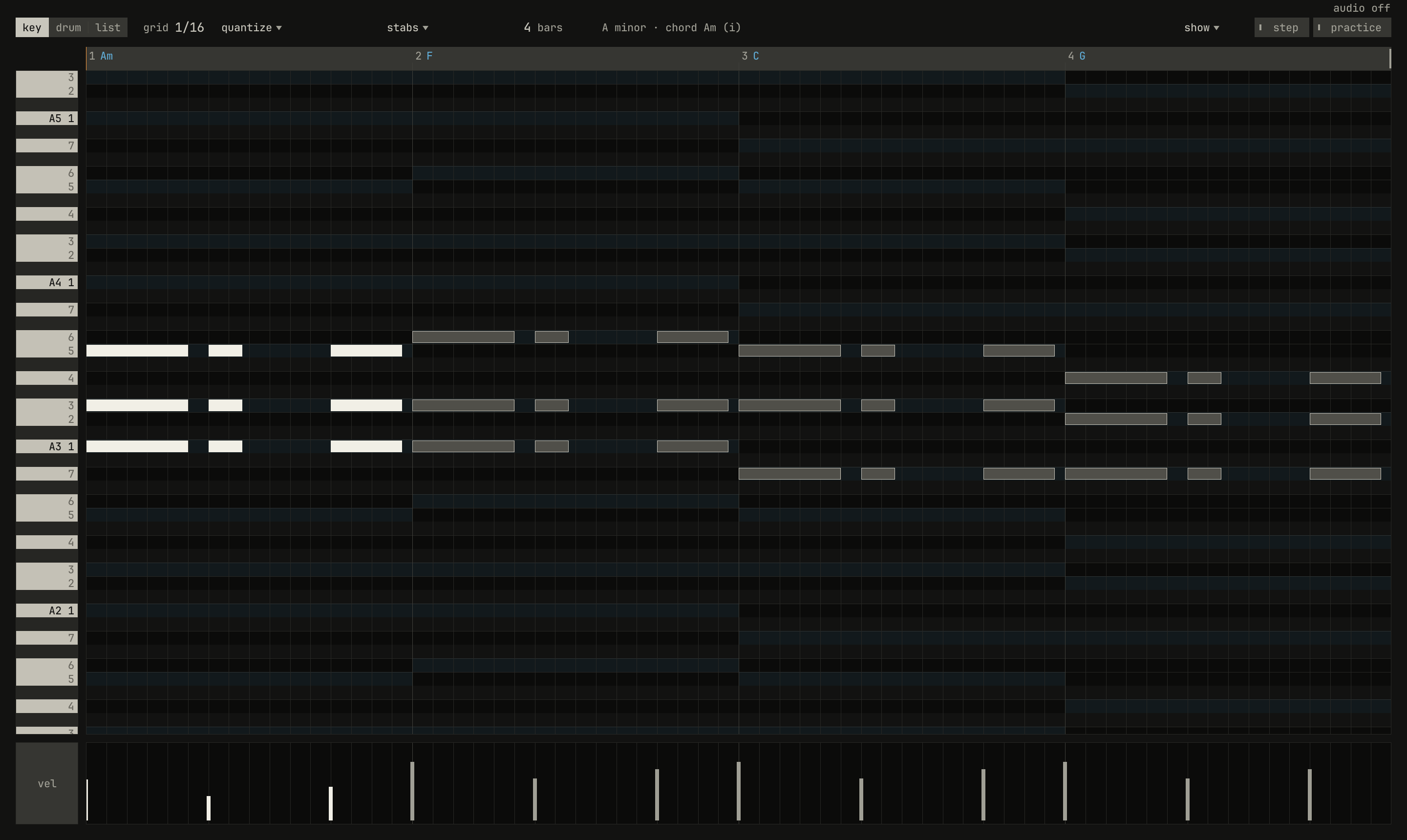
scriptzig build run-studio -- manual/15-editors/keys --view editor --track 2 --script manual/15-editors/velocity.txt
keys/song.json
{
  "tempo": 96,
  "end": "5",
  "key": ["1 A minor"],
  "chords": ["1 Am", "2 F", "3 C", "4 G"],
  "devices": [
    { "name": "synth", "type": "synth", "state": { "parts": [
      { "patch": "A45", "level": -8, "reverb_send": 15 },
      { "patch": "A11", "level": -6 },
      { "patch": "A61", "level": -6, "delay_send": 10 }
    ] } },
    { "name": "808", "type": "drums" }
  ],
  "tracks": [
    { "name": "drums", "device": "808", "channel": 1, "role": "drums", "clips": [{ "at": "1", "length": "4.0.0", "notes": "beat" }] },
    { "name": "keys", "device": "synth", "channel": 1, "keys": "chord", "role": "chords", "clips": [{ "at": "1", "length": "4.0.0", "notes": "stabs" }] },
    { "name": "bass", "device": "synth", "channel": 2, "keys": "pent", "role": "bass", "clips": [{ "at": "1", "length": "4.0.0", "notes": "bass" }] },
    { "name": "lead", "device": "synth", "channel": 3, "keys": "pent", "role": "lead", "clips": [{ "at": "1", "length": "2.0.0", "notes": "tune" }] }
  ],
  "notes": {
    "beat": {
      "length": "1.0.0",
      "notes": [
        "1.1.0 C2 0.0.240 120", "1.1.0 F#2 0.0.240 100", "1.1.480 F#2 0.0.240 70",
        "1.2.0 D2 0.0.240 112", "1.2.0 F#2 0.0.240 96", "1.2.480 F#2 0.0.240 70",
        "1.3.0 C2 0.0.240 116", "1.3.0 F#2 0.0.240 100", "1.3.480 F#2 0.0.240 70", "1.3.720 C2 0.0.240 96",
        "1.4.0 D2 0.0.240 112", "1.4.0 F#2 0.0.240 96", "1.4.480 F#2 0.0.240 70"
      ]
    },
    "stabs": {
      "length": "4.0.0",
      "notes": [
        "1.1.0 A3 0.1.240 100", "1.1.0 C4 0.1.240 100", "1.1.0 E4 0.1.240 100",
        "1.2.480 A3 0.0.400 72", "1.2.480 C4 0.0.400 72", "1.2.480 E4 0.0.400 72",
        "1.4.0 A3 0.0.840 88", "1.4.0 C4 0.0.840 88", "1.4.0 E4 0.0.840 88",
        "2.1.0 A3 0.1.240 100", "2.1.0 C4 0.1.240 100", "2.1.0 F4 0.1.240 100",
        "2.2.480 A3 0.0.400 72", "2.2.480 C4 0.0.400 72", "2.2.480 F4 0.0.400 72",
        "2.4.0 A3 0.0.840 88", "2.4.0 C4 0.0.840 88", "2.4.0 F4 0.0.840 88",
        "3.1.0 G3 0.1.240 100", "3.1.0 C4 0.1.240 100", "3.1.0 E4 0.1.240 100",
        "3.2.480 G3 0.0.400 72", "3.2.480 C4 0.0.400 72", "3.2.480 E4 0.0.400 72",
        "3.4.0 G3 0.0.840 88", "3.4.0 C4 0.0.840 88", "3.4.0 E4 0.0.840 88",
        "4.1.0 G3 0.1.240 100", "4.1.0 B3 0.1.240 100", "4.1.0 D4 0.1.240 100",
        "4.2.480 G3 0.0.400 72", "4.2.480 B3 0.0.400 72", "4.2.480 D4 0.0.400 72",
        "4.4.0 G3 0.0.840 88", "4.4.0 B3 0.0.840 88", "4.4.0 D4 0.0.840 88"
      ],
      "events": ["4.4.0 pedal down", "4.4.900 pedal up"]
    },
    "bass": { "length": "4.0.0", "follow": { "pattern": "eighths", "low": "E2" } },
    "tune": { "length": "2.0.0", "notes": [] }
  }
}
velocity.txt
# The notes of bar 1 selected with a box, then the velocity of the first
# chord's bar dragged from 100 down to 70: every selected note's velocity
# moves 30 down with it.
wait 0.2
drag roll A4 bar 1.1 to roll G3 bar 1.4.900
drag 89 820 to 89 838
move 1430 890
wait 0.1
capture velocity.png
The velocity graph under the roll has a bar for each note, as tall as the note is hard, from 1 to 127. Drag a bar up or down to set its note's velocity. If the note is selected, every selected note moves by the same amount, so a phrase gets softer and keeps its shape. Where notes start together, as a chord's do, the press takes the selected one first, so each note of a chord can be reached.
Chopping
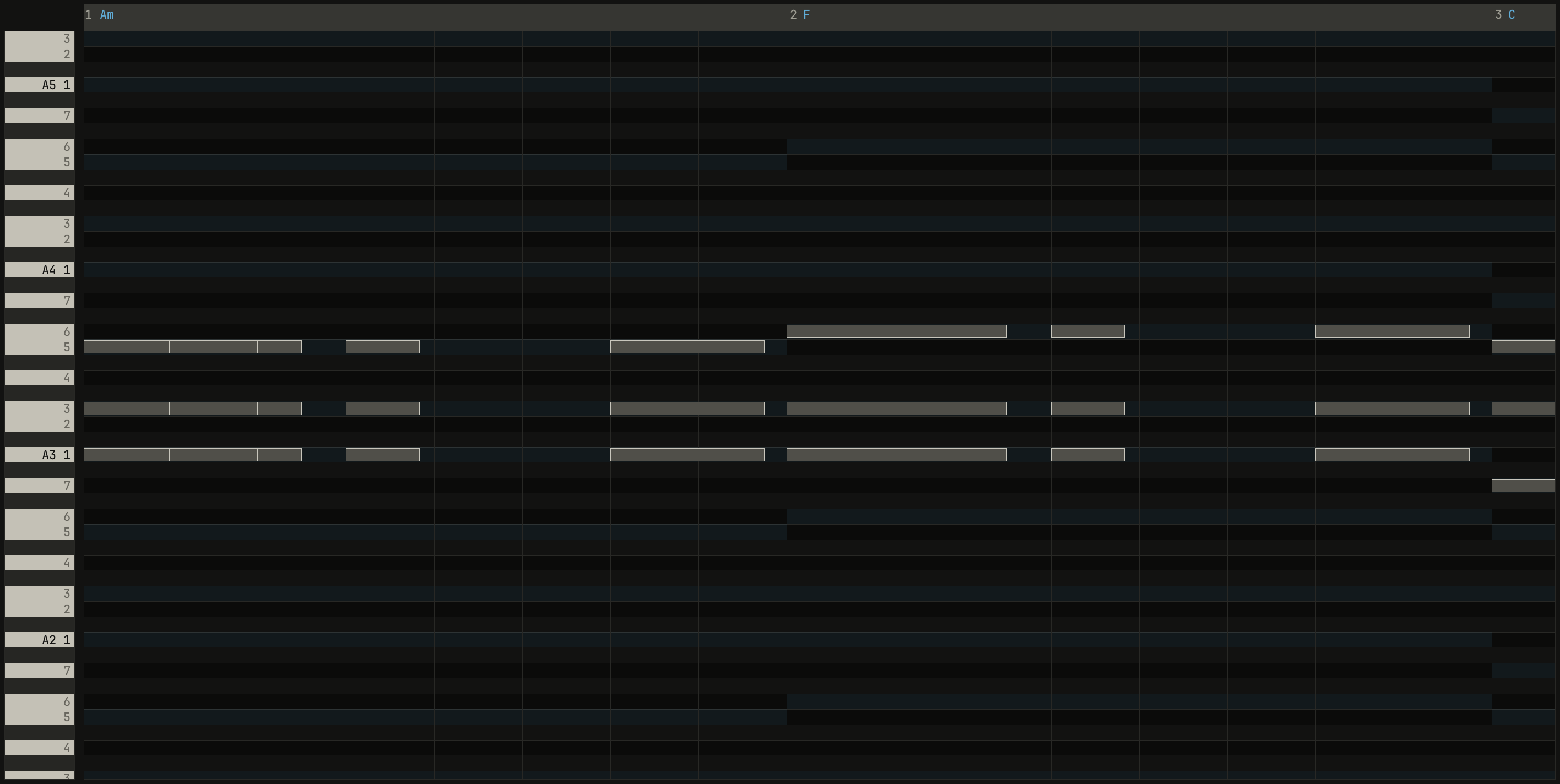
1/8, zoomed in with Ctrl and the wheel: each note, a dotted quarter long, is now two eighths and a sixteenth, the last piece what was left.scriptzig build run-studio -- manual/15-editors/keys --view editor --track 2 --script manual/15-editors/chop.txt
keys/song.json
{
  "tempo": 96,
  "end": "5",
  "key": ["1 A minor"],
  "chords": ["1 Am", "2 F", "3 C", "4 G"],
  "devices": [
    { "name": "synth", "type": "synth", "state": { "parts": [
      { "patch": "A45", "level": -8, "reverb_send": 15 },
      { "patch": "A11", "level": -6 },
      { "patch": "A61", "level": -6, "delay_send": 10 }
    ] } },
    { "name": "808", "type": "drums" }
  ],
  "tracks": [
    { "name": "drums", "device": "808", "channel": 1, "role": "drums", "clips": [{ "at": "1", "length": "4.0.0", "notes": "beat" }] },
    { "name": "keys", "device": "synth", "channel": 1, "keys": "chord", "role": "chords", "clips": [{ "at": "1", "length": "4.0.0", "notes": "stabs" }] },
    { "name": "bass", "device": "synth", "channel": 2, "keys": "pent", "role": "bass", "clips": [{ "at": "1", "length": "4.0.0", "notes": "bass" }] },
    { "name": "lead", "device": "synth", "channel": 3, "keys": "pent", "role": "lead", "clips": [{ "at": "1", "length": "2.0.0", "notes": "tune" }] }
  ],
  "notes": {
    "beat": {
      "length": "1.0.0",
      "notes": [
        "1.1.0 C2 0.0.240 120", "1.1.0 F#2 0.0.240 100", "1.1.480 F#2 0.0.240 70",
        "1.2.0 D2 0.0.240 112", "1.2.0 F#2 0.0.240 96", "1.2.480 F#2 0.0.240 70",
        "1.3.0 C2 0.0.240 116", "1.3.0 F#2 0.0.240 100", "1.3.480 F#2 0.0.240 70", "1.3.720 C2 0.0.240 96",
        "1.4.0 D2 0.0.240 112", "1.4.0 F#2 0.0.240 96", "1.4.480 F#2 0.0.240 70"
      ]
    },
    "stabs": {
      "length": "4.0.0",
      "notes": [
        "1.1.0 A3 0.1.240 100", "1.1.0 C4 0.1.240 100", "1.1.0 E4 0.1.240 100",
        "1.2.480 A3 0.0.400 72", "1.2.480 C4 0.0.400 72", "1.2.480 E4 0.0.400 72",
        "1.4.0 A3 0.0.840 88", "1.4.0 C4 0.0.840 88", "1.4.0 E4 0.0.840 88",
        "2.1.0 A3 0.1.240 100", "2.1.0 C4 0.1.240 100", "2.1.0 F4 0.1.240 100",
        "2.2.480 A3 0.0.400 72", "2.2.480 C4 0.0.400 72", "2.2.480 F4 0.0.400 72",
        "2.4.0 A3 0.0.840 88", "2.4.0 C4 0.0.840 88", "2.4.0 F4 0.0.840 88",
        "3.1.0 G3 0.1.240 100", "3.1.0 C4 0.1.240 100", "3.1.0 E4 0.1.240 100",
        "3.2.480 G3 0.0.400 72", "3.2.480 C4 0.0.400 72", "3.2.480 E4 0.0.400 72",
        "3.4.0 G3 0.0.840 88", "3.4.0 C4 0.0.840 88", "3.4.0 E4 0.0.840 88",
        "4.1.0 G3 0.1.240 100", "4.1.0 B3 0.1.240 100", "4.1.0 D4 0.1.240 100",
        "4.2.480 G3 0.0.400 72", "4.2.480 B3 0.0.400 72", "4.2.480 D4 0.0.400 72",
        "4.4.0 G3 0.0.840 88", "4.4.0 B3 0.0.840 88", "4.4.0 D4 0.0.840 88"
      ],
      "events": ["4.4.0 pedal down", "4.4.900 pedal up"]
    },
    "bass": { "length": "4.0.0", "follow": { "pattern": "eighths", "low": "E2" } },
    "tune": { "length": "2.0.0", "notes": [] }
  }
}
chop.txt
# The first chord selected, the grid stepped to 1/8 with the wheel, and
# Ctrl+E: each note becomes eighths, the last what's left. A click on an
# empty place lets the selection go, and Ctrl and the wheel zoom in.
wait 0.2
drag roll A4 bar 1.1 to roll G3 bar 1.2.200
move grid
wheel -1
wheel -1
key ctrl+e
click roll A5 bar 3
move roll A4 bar 1.1
down ctrl
wheel 1
wheel 1
wheel 1
up ctrl
move 1430 890
wait 0.1
capture chop.pngCtrl+E cuts each selected note into notes a grid step long, the last whatever is left, each with the note's key and velocity. A held chord becomes a pulse, and a long bass note eighths: the quickest way from a chord part to a rhythm part.
The clip's end
The bar on the ruler at the end of the notes, at bar 5 in the first figure, is where the clip's notes loop. Drag it along the ruler, by the grid, to make the loop shorter or longer: notes that start past it go. The clip in the arrange view keeps its length, and plays the shorter loop over again to fill it.
What the roll shows
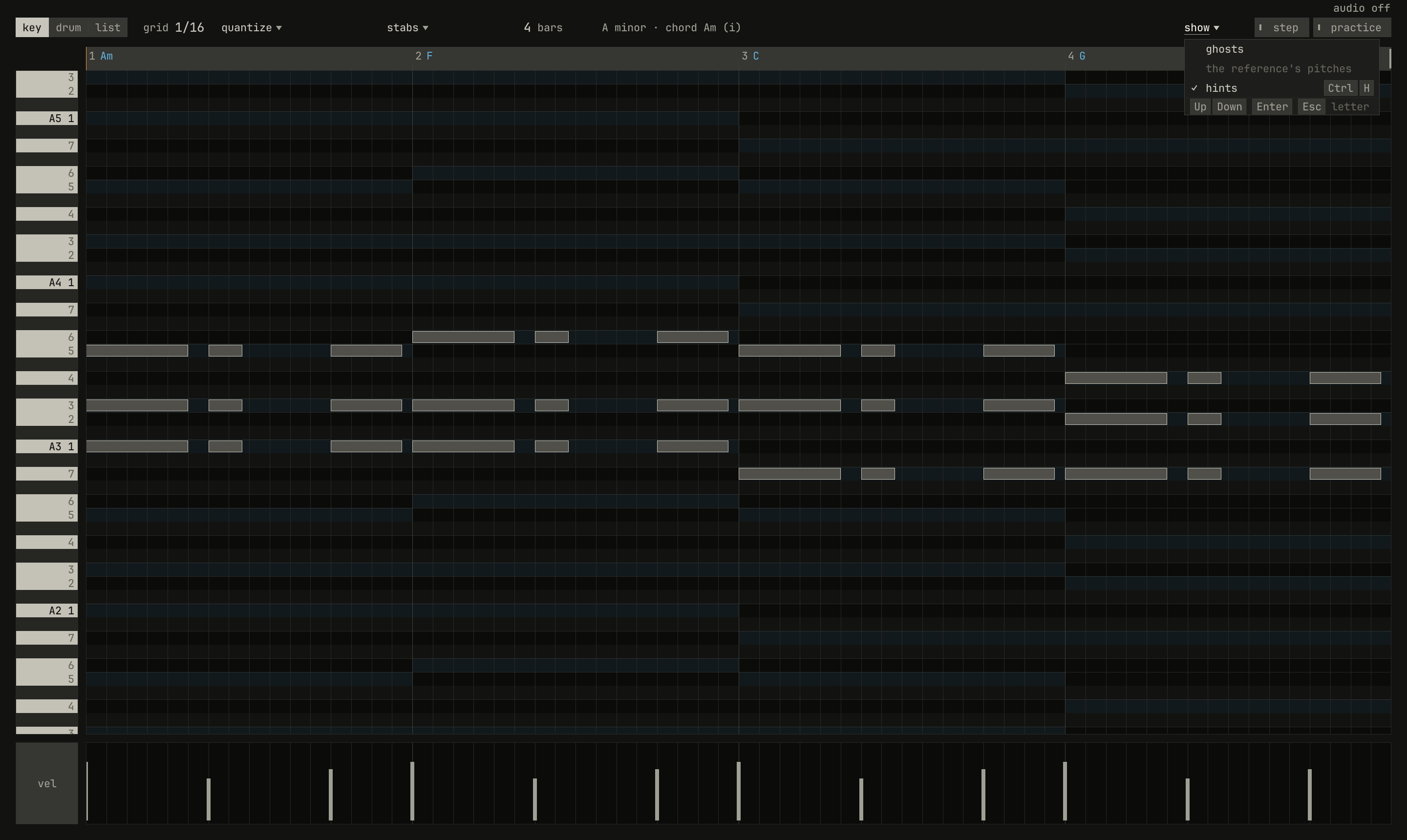
show ▾: ghosts, the reference's pitches, quiet without a reference, and hints, ticked, with its key.scriptzig build run-studio -- manual/15-editors/keys --view editor --track 2 --script manual/15-editors/show-menu.txt
keys/song.json
{
  "tempo": 96,
  "end": "5",
  "key": ["1 A minor"],
  "chords": ["1 Am", "2 F", "3 C", "4 G"],
  "devices": [
    { "name": "synth", "type": "synth", "state": { "parts": [
      { "patch": "A45", "level": -8, "reverb_send": 15 },
      { "patch": "A11", "level": -6 },
      { "patch": "A61", "level": -6, "delay_send": 10 }
    ] } },
    { "name": "808", "type": "drums" }
  ],
  "tracks": [
    { "name": "drums", "device": "808", "channel": 1, "role": "drums", "clips": [{ "at": "1", "length": "4.0.0", "notes": "beat" }] },
    { "name": "keys", "device": "synth", "channel": 1, "keys": "chord", "role": "chords", "clips": [{ "at": "1", "length": "4.0.0", "notes": "stabs" }] },
    { "name": "bass", "device": "synth", "channel": 2, "keys": "pent", "role": "bass", "clips": [{ "at": "1", "length": "4.0.0", "notes": "bass" }] },
    { "name": "lead", "device": "synth", "channel": 3, "keys": "pent", "role": "lead", "clips": [{ "at": "1", "length": "2.0.0", "notes": "tune" }] }
  ],
  "notes": {
    "beat": {
      "length": "1.0.0",
      "notes": [
        "1.1.0 C2 0.0.240 120", "1.1.0 F#2 0.0.240 100", "1.1.480 F#2 0.0.240 70",
        "1.2.0 D2 0.0.240 112", "1.2.0 F#2 0.0.240 96", "1.2.480 F#2 0.0.240 70",
        "1.3.0 C2 0.0.240 116", "1.3.0 F#2 0.0.240 100", "1.3.480 F#2 0.0.240 70", "1.3.720 C2 0.0.240 96",
        "1.4.0 D2 0.0.240 112", "1.4.0 F#2 0.0.240 96", "1.4.480 F#2 0.0.240 70"
      ]
    },
    "stabs": {
      "length": "4.0.0",
      "notes": [
        "1.1.0 A3 0.1.240 100", "1.1.0 C4 0.1.240 100", "1.1.0 E4 0.1.240 100",
        "1.2.480 A3 0.0.400 72", "1.2.480 C4 0.0.400 72", "1.2.480 E4 0.0.400 72",
        "1.4.0 A3 0.0.840 88", "1.4.0 C4 0.0.840 88", "1.4.0 E4 0.0.840 88",
        "2.1.0 A3 0.1.240 100", "2.1.0 C4 0.1.240 100", "2.1.0 F4 0.1.240 100",
        "2.2.480 A3 0.0.400 72", "2.2.480 C4 0.0.400 72", "2.2.480 F4 0.0.400 72",
        "2.4.0 A3 0.0.840 88", "2.4.0 C4 0.0.840 88", "2.4.0 F4 0.0.840 88",
        "3.1.0 G3 0.1.240 100", "3.1.0 C4 0.1.240 100", "3.1.0 E4 0.1.240 100",
        "3.2.480 G3 0.0.400 72", "3.2.480 C4 0.0.400 72", "3.2.480 E4 0.0.400 72",
        "3.4.0 G3 0.0.840 88", "3.4.0 C4 0.0.840 88", "3.4.0 E4 0.0.840 88",
        "4.1.0 G3 0.1.240 100", "4.1.0 B3 0.1.240 100", "4.1.0 D4 0.1.240 100",
        "4.2.480 G3 0.0.400 72", "4.2.480 B3 0.0.400 72", "4.2.480 D4 0.0.400 72",
        "4.4.0 G3 0.0.840 88", "4.4.0 B3 0.0.840 88", "4.4.0 D4 0.0.840 88"
      ],
      "events": ["4.4.0 pedal down", "4.4.900 pedal up"]
    },
    "bass": { "length": "4.0.0", "follow": { "pattern": "eighths", "low": "E2" } },
    "tune": { "length": "2.0.0", "notes": [] }
  }
}
show-menu.txt
# show ▾ drops the roll's layers.
wait 0.2
click show
wait 0.1
capture show-menu.png
show ▾ adds layers to the roll, each a switch:
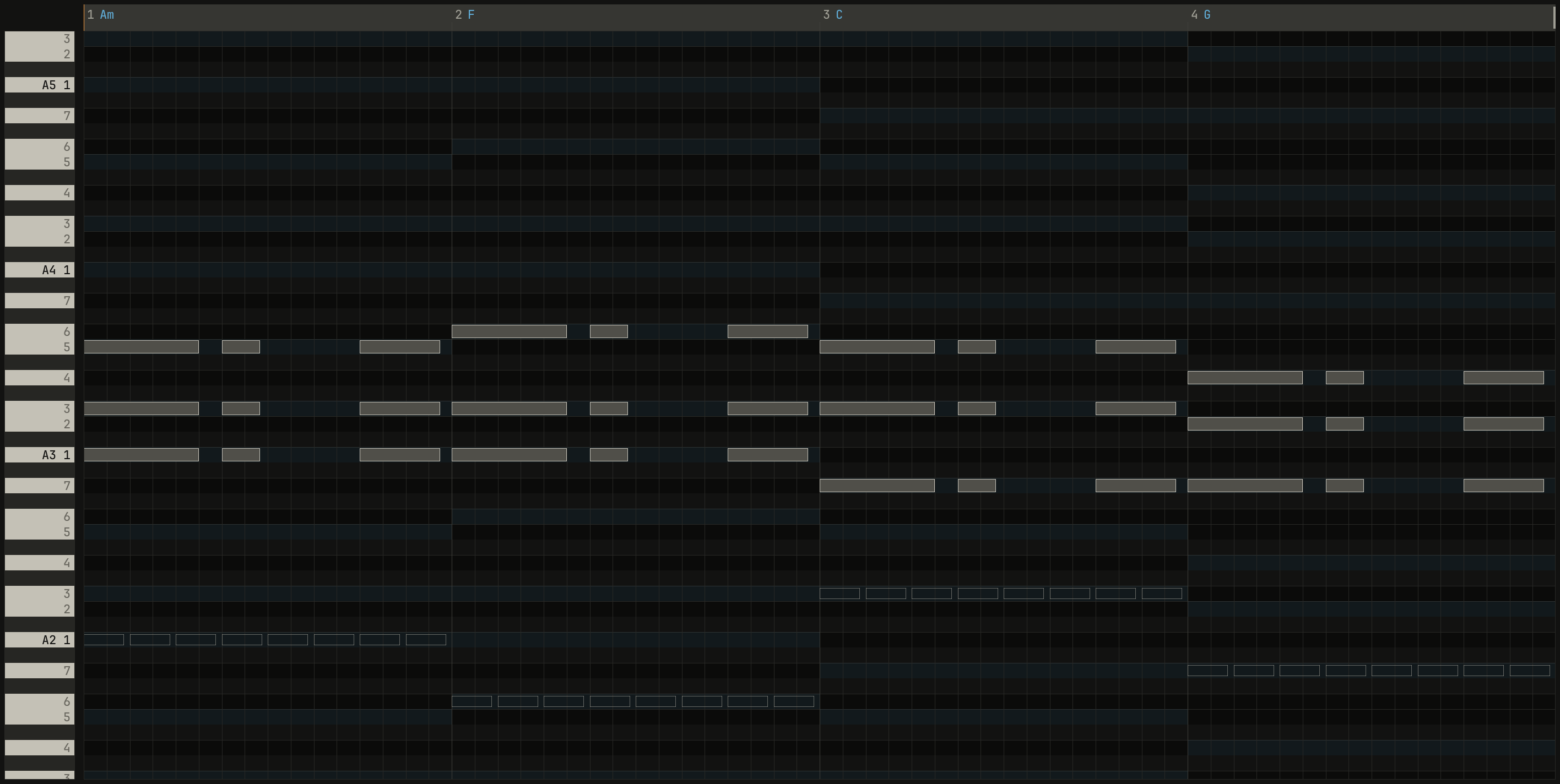
ghostsdraws the other tracks' notes behind the clip's, hollow, so a part is written against the rest. A double-click on a ghost opens its clip. Drum tracks and the reference aren't drawn.the reference's pitchesdraws a recording's semitones behind the roll, bright where loud, to write a bass line or a melody over (chapter 9).hints, Ctrl+H, shows or hides the hints, the chords' tinted rows, and the dots Key Edit draws on a note off its chord on a beat and on one a semitone from another track's (chapter 7). The notch on a note outside the key stays.
scriptzig build run-studio -- manual/15-editors/keys --view editor --track 2 --script manual/15-editors/ghosts.txt
keys/song.json
{
  "tempo": 96,
  "end": "5",
  "key": ["1 A minor"],
  "chords": ["1 Am", "2 F", "3 C", "4 G"],
  "devices": [
    { "name": "synth", "type": "synth", "state": { "parts": [
      { "patch": "A45", "level": -8, "reverb_send": 15 },
      { "patch": "A11", "level": -6 },
      { "patch": "A61", "level": -6, "delay_send": 10 }
    ] } },
    { "name": "808", "type": "drums" }
  ],
  "tracks": [
    { "name": "drums", "device": "808", "channel": 1, "role": "drums", "clips": [{ "at": "1", "length": "4.0.0", "notes": "beat" }] },
    { "name": "keys", "device": "synth", "channel": 1, "keys": "chord", "role": "chords", "clips": [{ "at": "1", "length": "4.0.0", "notes": "stabs" }] },
    { "name": "bass", "device": "synth", "channel": 2, "keys": "pent", "role": "bass", "clips": [{ "at": "1", "length": "4.0.0", "notes": "bass" }] },
    { "name": "lead", "device": "synth", "channel": 3, "keys": "pent", "role": "lead", "clips": [{ "at": "1", "length": "2.0.0", "notes": "tune" }] }
  ],
  "notes": {
    "beat": {
      "length": "1.0.0",
      "notes": [
        "1.1.0 C2 0.0.240 120", "1.1.0 F#2 0.0.240 100", "1.1.480 F#2 0.0.240 70",
        "1.2.0 D2 0.0.240 112", "1.2.0 F#2 0.0.240 96", "1.2.480 F#2 0.0.240 70",
        "1.3.0 C2 0.0.240 116", "1.3.0 F#2 0.0.240 100", "1.3.480 F#2 0.0.240 70", "1.3.720 C2 0.0.240 96",
        "1.4.0 D2 0.0.240 112", "1.4.0 F#2 0.0.240 96", "1.4.480 F#2 0.0.240 70"
      ]
    },
    "stabs": {
      "length": "4.0.0",
      "notes": [
        "1.1.0 A3 0.1.240 100", "1.1.0 C4 0.1.240 100", "1.1.0 E4 0.1.240 100",
        "1.2.480 A3 0.0.400 72", "1.2.480 C4 0.0.400 72", "1.2.480 E4 0.0.400 72",
        "1.4.0 A3 0.0.840 88", "1.4.0 C4 0.0.840 88", "1.4.0 E4 0.0.840 88",
        "2.1.0 A3 0.1.240 100", "2.1.0 C4 0.1.240 100", "2.1.0 F4 0.1.240 100",
        "2.2.480 A3 0.0.400 72", "2.2.480 C4 0.0.400 72", "2.2.480 F4 0.0.400 72",
        "2.4.0 A3 0.0.840 88", "2.4.0 C4 0.0.840 88", "2.4.0 F4 0.0.840 88",
        "3.1.0 G3 0.1.240 100", "3.1.0 C4 0.1.240 100", "3.1.0 E4 0.1.240 100",
        "3.2.480 G3 0.0.400 72", "3.2.480 C4 0.0.400 72", "3.2.480 E4 0.0.400 72",
        "3.4.0 G3 0.0.840 88", "3.4.0 C4 0.0.840 88", "3.4.0 E4 0.0.840 88",
        "4.1.0 G3 0.1.240 100", "4.1.0 B3 0.1.240 100", "4.1.0 D4 0.1.240 100",
        "4.2.480 G3 0.0.400 72", "4.2.480 B3 0.0.400 72", "4.2.480 D4 0.0.400 72",
        "4.4.0 G3 0.0.840 88", "4.4.0 B3 0.0.840 88", "4.4.0 D4 0.0.840 88"
      ],
      "events": ["4.4.0 pedal down", "4.4.900 pedal up"]
    },
    "bass": { "length": "4.0.0", "follow": { "pattern": "eighths", "low": "E2" } },
    "tune": { "length": "2.0.0", "notes": [] }
  }
}
ghosts.txt
# show ▾'s ghosts: the bass's notes behind the keys' chords, hollow.
wait 0.2
click show
choose ghosts
move 1430 890
wait 0.1
capture ghosts.png
Step input
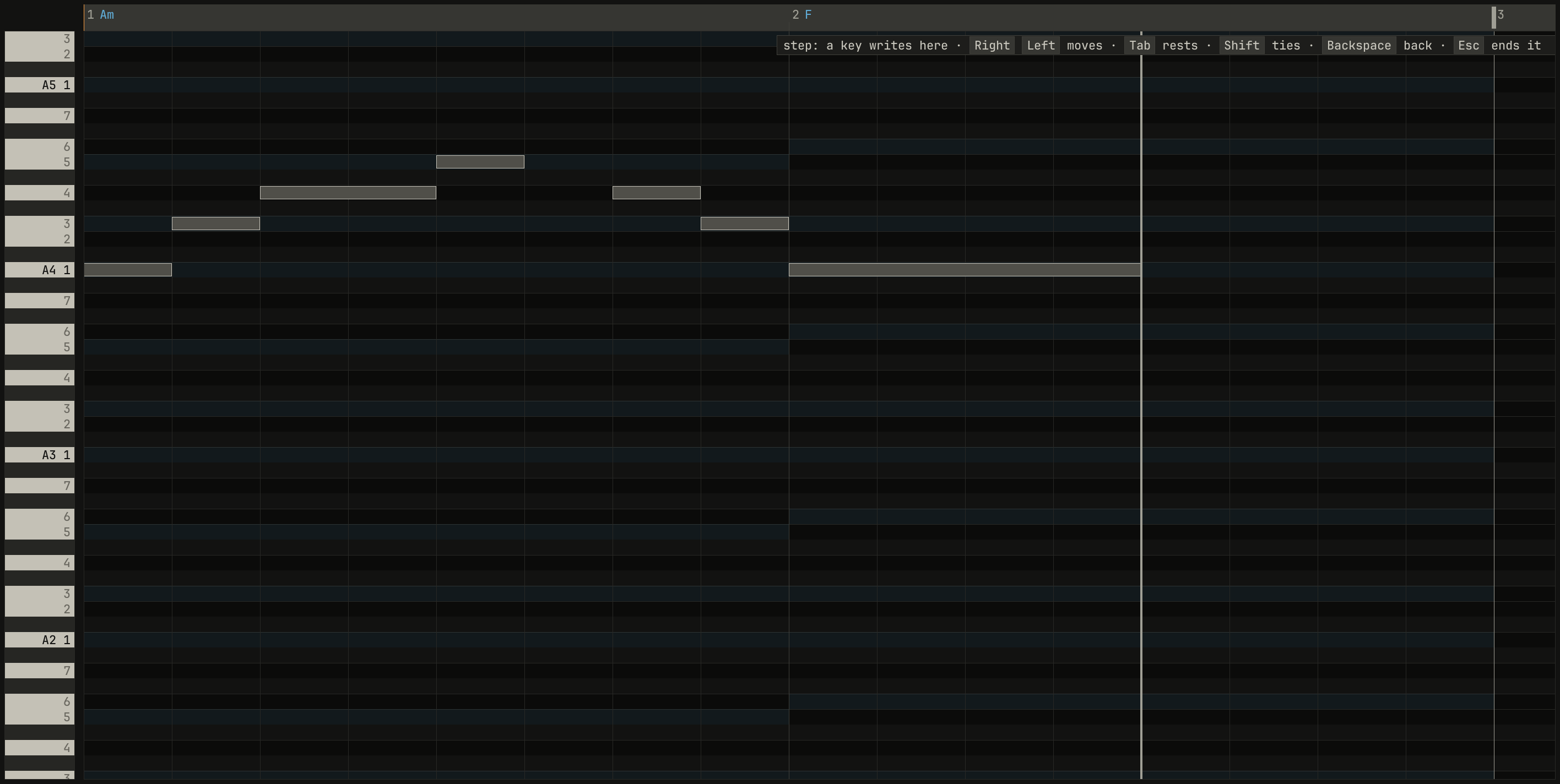
1/8: A, C, D held with Shift, E, a rest with Tab, D, C, and A held three more steps. The cursor waits at bar 2's third beat, and the tag beside it says the mode's keys.scriptzig build run-studio -- manual/15-editors/keys --view editor --track 4 --script manual/15-editors/step.txt
keys/song.json
{
  "tempo": 96,
  "end": "5",
  "key": ["1 A minor"],
  "chords": ["1 Am", "2 F", "3 C", "4 G"],
  "devices": [
    { "name": "synth", "type": "synth", "state": { "parts": [
      { "patch": "A45", "level": -8, "reverb_send": 15 },
      { "patch": "A11", "level": -6 },
      { "patch": "A61", "level": -6, "delay_send": 10 }
    ] } },
    { "name": "808", "type": "drums" }
  ],
  "tracks": [
    { "name": "drums", "device": "808", "channel": 1, "role": "drums", "clips": [{ "at": "1", "length": "4.0.0", "notes": "beat" }] },
    { "name": "keys", "device": "synth", "channel": 1, "keys": "chord", "role": "chords", "clips": [{ "at": "1", "length": "4.0.0", "notes": "stabs" }] },
    { "name": "bass", "device": "synth", "channel": 2, "keys": "pent", "role": "bass", "clips": [{ "at": "1", "length": "4.0.0", "notes": "bass" }] },
    { "name": "lead", "device": "synth", "channel": 3, "keys": "pent", "role": "lead", "clips": [{ "at": "1", "length": "2.0.0", "notes": "tune" }] }
  ],
  "notes": {
    "beat": {
      "length": "1.0.0",
      "notes": [
        "1.1.0 C2 0.0.240 120", "1.1.0 F#2 0.0.240 100", "1.1.480 F#2 0.0.240 70",
        "1.2.0 D2 0.0.240 112", "1.2.0 F#2 0.0.240 96", "1.2.480 F#2 0.0.240 70",
        "1.3.0 C2 0.0.240 116", "1.3.0 F#2 0.0.240 100", "1.3.480 F#2 0.0.240 70", "1.3.720 C2 0.0.240 96",
        "1.4.0 D2 0.0.240 112", "1.4.0 F#2 0.0.240 96", "1.4.480 F#2 0.0.240 70"
      ]
    },
    "stabs": {
      "length": "4.0.0",
      "notes": [
        "1.1.0 A3 0.1.240 100", "1.1.0 C4 0.1.240 100", "1.1.0 E4 0.1.240 100",
        "1.2.480 A3 0.0.400 72", "1.2.480 C4 0.0.400 72", "1.2.480 E4 0.0.400 72",
        "1.4.0 A3 0.0.840 88", "1.4.0 C4 0.0.840 88", "1.4.0 E4 0.0.840 88",
        "2.1.0 A3 0.1.240 100", "2.1.0 C4 0.1.240 100", "2.1.0 F4 0.1.240 100",
        "2.2.480 A3 0.0.400 72", "2.2.480 C4 0.0.400 72", "2.2.480 F4 0.0.400 72",
        "2.4.0 A3 0.0.840 88", "2.4.0 C4 0.0.840 88", "2.4.0 F4 0.0.840 88",
        "3.1.0 G3 0.1.240 100", "3.1.0 C4 0.1.240 100", "3.1.0 E4 0.1.240 100",
        "3.2.480 G3 0.0.400 72", "3.2.480 C4 0.0.400 72", "3.2.480 E4 0.0.400 72",
        "3.4.0 G3 0.0.840 88", "3.4.0 C4 0.0.840 88", "3.4.0 E4 0.0.840 88",
        "4.1.0 G3 0.1.240 100", "4.1.0 B3 0.1.240 100", "4.1.0 D4 0.1.240 100",
        "4.2.480 G3 0.0.400 72", "4.2.480 B3 0.0.400 72", "4.2.480 D4 0.0.400 72",
        "4.4.0 G3 0.0.840 88", "4.4.0 B3 0.0.840 88", "4.4.0 D4 0.0.840 88"
      ],
      "events": ["4.4.0 pedal down", "4.4.900 pedal up"]
    },
    "bass": { "length": "4.0.0", "follow": { "pattern": "eighths", "low": "E2" } },
    "tune": { "length": "2.0.0", "notes": [] }
  }
}
step.txt
# Step input on the lead's empty clip: the grid at 1/8, step on, and a
# phrase typed on the home row, with Shift for ties and Tab for a rest.
wait 0.2
move grid
wheel -1
wheel -1
click step
wait 3
wait 0.1
key a
wait 0.1
key s
wait 0.1
key d
wait 0.1
key shift
wait 0.1
key f
wait 0.1
key tab
wait 0.1
key d
wait 0.1
key s
wait 0.1
key a
wait 0.1
key shift
wait 0.1
key shift
wait 0.1
key shift
move 1430 890
wait 0.1
capture step.png
step in the header turns on step input, Cubase's way to write a part
without playing it in time. The song stops, and a cursor stands at the
clip's start. Each key played, on the letter keys or a keyboard, writes its
note at the cursor, a grid step long, and moves the cursor a step; keys
pressed together write a chord on one step. Then:
| Keys | Command | What it does |
|---|---|---|
| Right | cursor on | Move the step cursor a grid step on |
| Left | cursor back | Move the step cursor a grid step back |
| Tab | rest | A rest: the cursor moves on a step |
| Shift | tie | The last step grows by a step |
| Backspace | take back | Take the last step back |
A tie grows the last step by a step. Set the grid first: at 1/8, each
step is an eighth. Starting the song turns step input off, and so does
Esc. Step input works in Drum Edit too, where each key is a voice.
Drum Edit
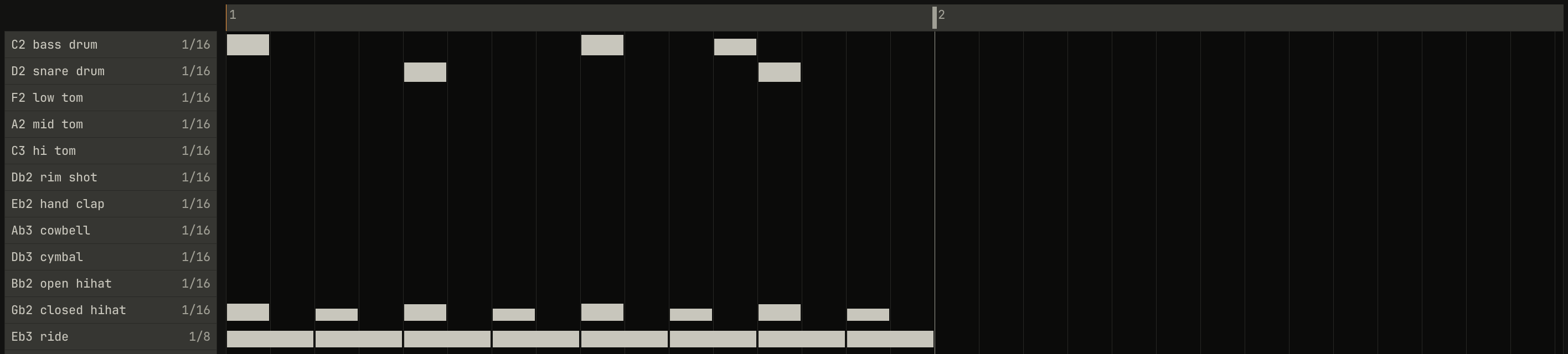
1/8, has just been painted with one drag from bar 1 to its last eighth.scriptzig build run-studio -- manual/15-editors/keys --view editor --track 1 --script manual/15-editors/paint.txt
keys/song.json
{
  "tempo": 96,
  "end": "5",
  "key": ["1 A minor"],
  "chords": ["1 Am", "2 F", "3 C", "4 G"],
  "devices": [
    { "name": "synth", "type": "synth", "state": { "parts": [
      { "patch": "A45", "level": -8, "reverb_send": 15 },
      { "patch": "A11", "level": -6 },
      { "patch": "A61", "level": -6, "delay_send": 10 }
    ] } },
    { "name": "808", "type": "drums" }
  ],
  "tracks": [
    { "name": "drums", "device": "808", "channel": 1, "role": "drums", "clips": [{ "at": "1", "length": "4.0.0", "notes": "beat" }] },
    { "name": "keys", "device": "synth", "channel": 1, "keys": "chord", "role": "chords", "clips": [{ "at": "1", "length": "4.0.0", "notes": "stabs" }] },
    { "name": "bass", "device": "synth", "channel": 2, "keys": "pent", "role": "bass", "clips": [{ "at": "1", "length": "4.0.0", "notes": "bass" }] },
    { "name": "lead", "device": "synth", "channel": 3, "keys": "pent", "role": "lead", "clips": [{ "at": "1", "length": "2.0.0", "notes": "tune" }] }
  ],
  "notes": {
    "beat": {
      "length": "1.0.0",
      "notes": [
        "1.1.0 C2 0.0.240 120", "1.1.0 F#2 0.0.240 100", "1.1.480 F#2 0.0.240 70",
        "1.2.0 D2 0.0.240 112", "1.2.0 F#2 0.0.240 96", "1.2.480 F#2 0.0.240 70",
        "1.3.0 C2 0.0.240 116", "1.3.0 F#2 0.0.240 100", "1.3.480 F#2 0.0.240 70", "1.3.720 C2 0.0.240 96",
        "1.4.0 D2 0.0.240 112", "1.4.0 F#2 0.0.240 96", "1.4.480 F#2 0.0.240 70"
      ]
    },
    "stabs": {
      "length": "4.0.0",
      "notes": [
        "1.1.0 A3 0.1.240 100", "1.1.0 C4 0.1.240 100", "1.1.0 E4 0.1.240 100",
        "1.2.480 A3 0.0.400 72", "1.2.480 C4 0.0.400 72", "1.2.480 E4 0.0.400 72",
        "1.4.0 A3 0.0.840 88", "1.4.0 C4 0.0.840 88", "1.4.0 E4 0.0.840 88",
        "2.1.0 A3 0.1.240 100", "2.1.0 C4 0.1.240 100", "2.1.0 F4 0.1.240 100",
        "2.2.480 A3 0.0.400 72", "2.2.480 C4 0.0.400 72", "2.2.480 F4 0.0.400 72",
        "2.4.0 A3 0.0.840 88", "2.4.0 C4 0.0.840 88", "2.4.0 F4 0.0.840 88",
        "3.1.0 G3 0.1.240 100", "3.1.0 C4 0.1.240 100", "3.1.0 E4 0.1.240 100",
        "3.2.480 G3 0.0.400 72", "3.2.480 C4 0.0.400 72", "3.2.480 E4 0.0.400 72",
        "3.4.0 G3 0.0.840 88", "3.4.0 C4 0.0.840 88", "3.4.0 E4 0.0.840 88",
        "4.1.0 G3 0.1.240 100", "4.1.0 B3 0.1.240 100", "4.1.0 D4 0.1.240 100",
        "4.2.480 G3 0.0.400 72", "4.2.480 B3 0.0.400 72", "4.2.480 D4 0.0.400 72",
        "4.4.0 G3 0.0.840 88", "4.4.0 B3 0.0.840 88", "4.4.0 D4 0.0.840 88"
      ],
      "events": ["4.4.0 pedal down", "4.4.900 pedal up"]
    },
    "bass": { "length": "4.0.0", "follow": { "pattern": "eighths", "low": "E2" } },
    "tune": { "length": "2.0.0", "notes": [] }
  }
}
paint.txt
# The ride's row set to 1/8 with two Shift-clicks on its grid, and a drag
# along it from bar 1 to its last eighth: a hit on every step crossed.
wait 0.2
down shift
click drum row 12 grid
click drum row 12 grid
up shift
drag drum row 12 bar 1 to drum row 12 bar 1.4.480
move 1430 890
wait 0.1
capture paint.png
Drum Edit gives each voice a row of steps, named by the device: the drum machine's twelve, then any other key the clip plays. A clip on a device that names no keys gets a row for every key instead, which the wheel scrolls. A hit is drawn on its step, taller the harder it's struck.
- A click on an empty step adds a hit: velocity 120 in the step's upper half, and 96 in its lower half. The drum machine reads velocity as the 909 does, 64 without accent and 96 with it, the accent growing between and the hit softening below 64, so both clicks play a full accent: its bass drum peaks at −17.4 dBFS from either, 2.4 dB lower at 80, and 5.5 dB lower at 64. For a hit without the accent, drag it down.
- A click on a hit takes it away.
- A drag up or down on a hit sets its velocity.
- A drag along a row paints a hit on every step it crosses, or, if it began on a hit, takes away every hit it crosses. The first move decides which: along the row paints, up or down sets the velocity.
- Each row's grid,
1/16at its right, is the size of its steps: a click steps it to the next, as the header's grid does, Shift and a click back. Q in Drum Edit moves every hit onto its own row's grid, so a hi-hat can be on 16ths and a ride on triplets in one clip. - A right-click opens the drums' menu:
fill a row,quantize,step, andpractice.
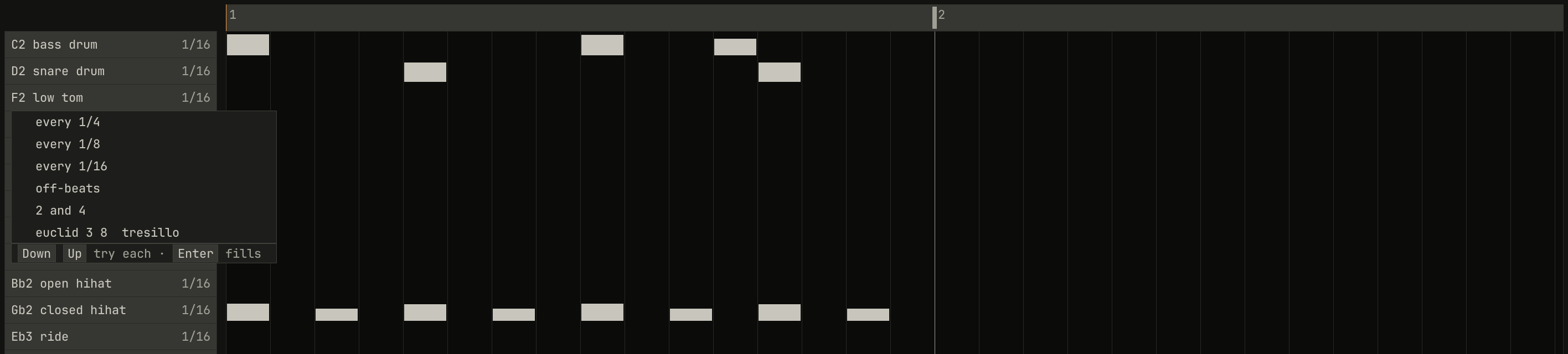
euclid 3 8, the tresillo.scriptzig build run-studio -- manual/15-editors/keys --view editor --track 1 --script manual/15-editors/fill.txt
keys/song.json
{
  "tempo": 96,
  "end": "5",
  "key": ["1 A minor"],
  "chords": ["1 Am", "2 F", "3 C", "4 G"],
  "devices": [
    { "name": "synth", "type": "synth", "state": { "parts": [
      { "patch": "A45", "level": -8, "reverb_send": 15 },
      { "patch": "A11", "level": -6 },
      { "patch": "A61", "level": -6, "delay_send": 10 }
    ] } },
    { "name": "808", "type": "drums" }
  ],
  "tracks": [
    { "name": "drums", "device": "808", "channel": 1, "role": "drums", "clips": [{ "at": "1", "length": "4.0.0", "notes": "beat" }] },
    { "name": "keys", "device": "synth", "channel": 1, "keys": "chord", "role": "chords", "clips": [{ "at": "1", "length": "4.0.0", "notes": "stabs" }] },
    { "name": "bass", "device": "synth", "channel": 2, "keys": "pent", "role": "bass", "clips": [{ "at": "1", "length": "4.0.0", "notes": "bass" }] },
    { "name": "lead", "device": "synth", "channel": 3, "keys": "pent", "role": "lead", "clips": [{ "at": "1", "length": "2.0.0", "notes": "tune" }] }
  ],
  "notes": {
    "beat": {
      "length": "1.0.0",
      "notes": [
        "1.1.0 C2 0.0.240 120", "1.1.0 F#2 0.0.240 100", "1.1.480 F#2 0.0.240 70",
        "1.2.0 D2 0.0.240 112", "1.2.0 F#2 0.0.240 96", "1.2.480 F#2 0.0.240 70",
        "1.3.0 C2 0.0.240 116", "1.3.0 F#2 0.0.240 100", "1.3.480 F#2 0.0.240 70", "1.3.720 C2 0.0.240 96",
        "1.4.0 D2 0.0.240 112", "1.4.0 F#2 0.0.240 96", "1.4.480 F#2 0.0.240 70"
      ]
    },
    "stabs": {
      "length": "4.0.0",
      "notes": [
        "1.1.0 A3 0.1.240 100", "1.1.0 C4 0.1.240 100", "1.1.0 E4 0.1.240 100",
        "1.2.480 A3 0.0.400 72", "1.2.480 C4 0.0.400 72", "1.2.480 E4 0.0.400 72",
        "1.4.0 A3 0.0.840 88", "1.4.0 C4 0.0.840 88", "1.4.0 E4 0.0.840 88",
        "2.1.0 A3 0.1.240 100", "2.1.0 C4 0.1.240 100", "2.1.0 F4 0.1.240 100",
        "2.2.480 A3 0.0.400 72", "2.2.480 C4 0.0.400 72", "2.2.480 F4 0.0.400 72",
        "2.4.0 A3 0.0.840 88", "2.4.0 C4 0.0.840 88", "2.4.0 F4 0.0.840 88",
        "3.1.0 G3 0.1.240 100", "3.1.0 C4 0.1.240 100", "3.1.0 E4 0.1.240 100",
        "3.2.480 G3 0.0.400 72", "3.2.480 C4 0.0.400 72", "3.2.480 E4 0.0.400 72",
        "3.4.0 G3 0.0.840 88", "3.4.0 C4 0.0.840 88", "3.4.0 E4 0.0.840 88",
        "4.1.0 G3 0.1.240 100", "4.1.0 B3 0.1.240 100", "4.1.0 D4 0.1.240 100",
        "4.2.480 G3 0.0.400 72", "4.2.480 B3 0.0.400 72", "4.2.480 D4 0.0.400 72",
        "4.4.0 G3 0.0.840 88", "4.4.0 B3 0.0.840 88", "4.4.0 D4 0.0.840 88"
      ],
      "events": ["4.4.0 pedal down", "4.4.900 pedal up"]
    },
    "bass": { "length": "4.0.0", "follow": { "pattern": "eighths", "low": "E2" } },
    "tune": { "length": "2.0.0", "notes": [] }
  }
}
fill.txt
# A click on a row's name drops the list that fills it.
wait 0.2
click drum row 3
wait 0.1
capture fill.png
A click on a row's name plays its voice and drops the fill list. Its
items fill the row over the whole clip; Down and Up
try each in the song as it plays, Enter writes it, and
Esc puts the row back. Over euclid, the wheel sets its hits, with
Shift its steps, and with Ctrl turns it round;
chapter 2 is about those rhythms.
List Edit
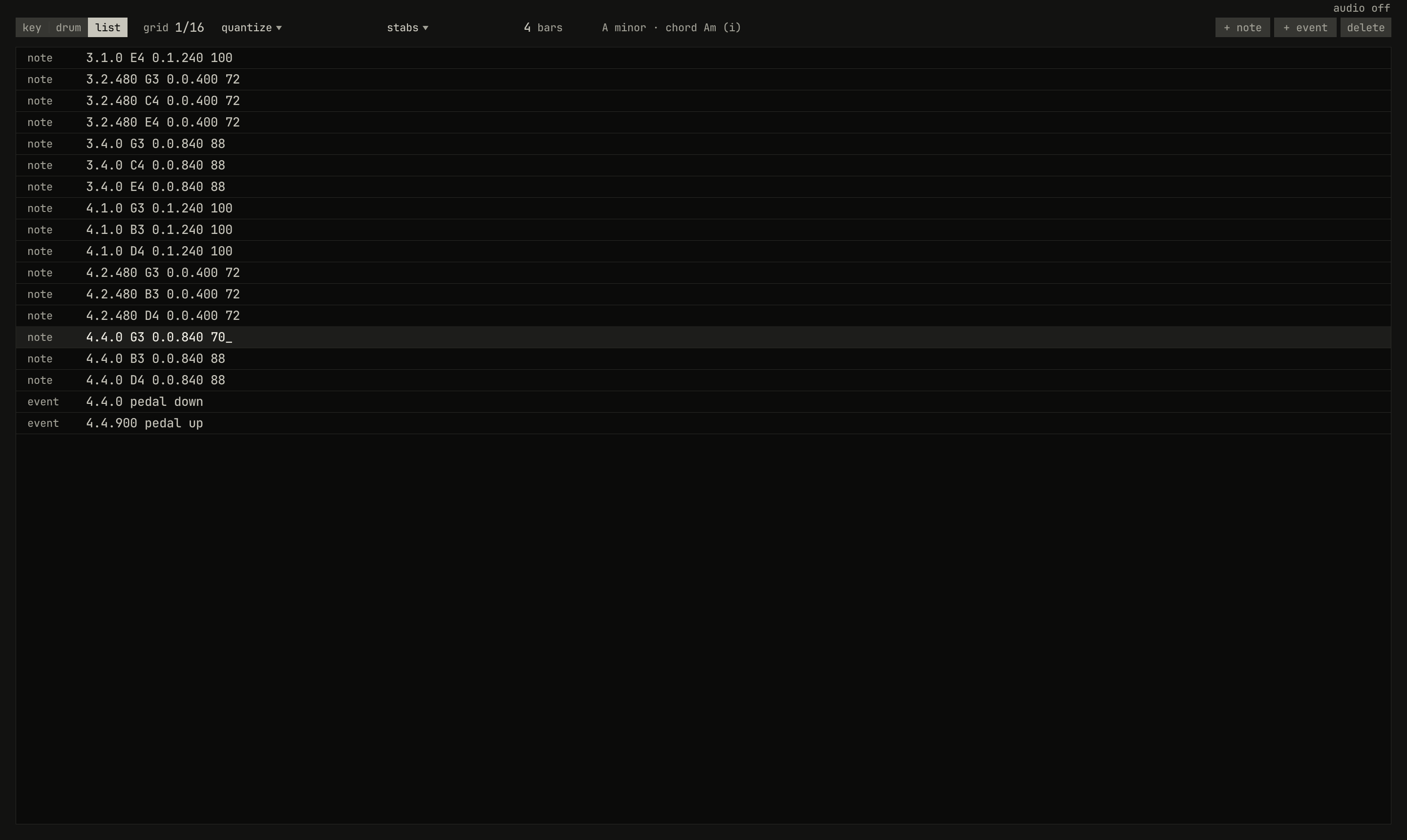
4.4.0 G3 0.0.840 88, its place, key, length, and velocity, and the clip's two events, the pedal down and up, after the notes. The G3 at 4.4.0 is being typed anew, its velocity now 70.scriptzig build run-studio -- manual/15-editors/keys --view editor --track 2 --script manual/15-editors/list.txt
keys/song.json
{
  "tempo": 96,
  "end": "5",
  "key": ["1 A minor"],
  "chords": ["1 Am", "2 F", "3 C", "4 G"],
  "devices": [
    { "name": "synth", "type": "synth", "state": { "parts": [
      { "patch": "A45", "level": -8, "reverb_send": 15 },
      { "patch": "A11", "level": -6 },
      { "patch": "A61", "level": -6, "delay_send": 10 }
    ] } },
    { "name": "808", "type": "drums" }
  ],
  "tracks": [
    { "name": "drums", "device": "808", "channel": 1, "role": "drums", "clips": [{ "at": "1", "length": "4.0.0", "notes": "beat" }] },
    { "name": "keys", "device": "synth", "channel": 1, "keys": "chord", "role": "chords", "clips": [{ "at": "1", "length": "4.0.0", "notes": "stabs" }] },
    { "name": "bass", "device": "synth", "channel": 2, "keys": "pent", "role": "bass", "clips": [{ "at": "1", "length": "4.0.0", "notes": "bass" }] },
    { "name": "lead", "device": "synth", "channel": 3, "keys": "pent", "role": "lead", "clips": [{ "at": "1", "length": "2.0.0", "notes": "tune" }] }
  ],
  "notes": {
    "beat": {
      "length": "1.0.0",
      "notes": [
        "1.1.0 C2 0.0.240 120", "1.1.0 F#2 0.0.240 100", "1.1.480 F#2 0.0.240 70",
        "1.2.0 D2 0.0.240 112", "1.2.0 F#2 0.0.240 96", "1.2.480 F#2 0.0.240 70",
        "1.3.0 C2 0.0.240 116", "1.3.0 F#2 0.0.240 100", "1.3.480 F#2 0.0.240 70", "1.3.720 C2 0.0.240 96",
        "1.4.0 D2 0.0.240 112", "1.4.0 F#2 0.0.240 96", "1.4.480 F#2 0.0.240 70"
      ]
    },
    "stabs": {
      "length": "4.0.0",
      "notes": [
        "1.1.0 A3 0.1.240 100", "1.1.0 C4 0.1.240 100", "1.1.0 E4 0.1.240 100",
        "1.2.480 A3 0.0.400 72", "1.2.480 C4 0.0.400 72", "1.2.480 E4 0.0.400 72",
        "1.4.0 A3 0.0.840 88", "1.4.0 C4 0.0.840 88", "1.4.0 E4 0.0.840 88",
        "2.1.0 A3 0.1.240 100", "2.1.0 C4 0.1.240 100", "2.1.0 F4 0.1.240 100",
        "2.2.480 A3 0.0.400 72", "2.2.480 C4 0.0.400 72", "2.2.480 F4 0.0.400 72",
        "2.4.0 A3 0.0.840 88", "2.4.0 C4 0.0.840 88", "2.4.0 F4 0.0.840 88",
        "3.1.0 G3 0.1.240 100", "3.1.0 C4 0.1.240 100", "3.1.0 E4 0.1.240 100",
        "3.2.480 G3 0.0.400 72", "3.2.480 C4 0.0.400 72", "3.2.480 E4 0.0.400 72",
        "3.4.0 G3 0.0.840 88", "3.4.0 C4 0.0.840 88", "3.4.0 E4 0.0.840 88",
        "4.1.0 G3 0.1.240 100", "4.1.0 B3 0.1.240 100", "4.1.0 D4 0.1.240 100",
        "4.2.480 G3 0.0.400 72", "4.2.480 B3 0.0.400 72", "4.2.480 D4 0.0.400 72",
        "4.4.0 G3 0.0.840 88", "4.4.0 B3 0.0.840 88", "4.4.0 D4 0.0.840 88"
      ],
      "events": ["4.4.0 pedal down", "4.4.900 pedal up"]
    },
    "bass": { "length": "4.0.0", "follow": { "pattern": "eighths", "low": "E2" } },
    "tune": { "length": "2.0.0", "notes": [] }
  }
}
list.txt
# List Edit: the wheel scrolls to the clip's end, a click selects the
# last chord's G3, Enter types it anew, and its velocity becomes 70.
wait 0.2
click edit list
move 700 500
wheel -10
click 300 385
key enter
key backspace
key backspace
type 70
wait 0.1
capture list.png
List Edit shows every note and event of the clip as a line, the way
song.json holds it (chapter 20): a note as its place, its
key, its length, and its velocity; an event as its place and what it does,
pedal down, program A33, or the synth's chord 0 4 7. Notes come
first, then events. It's the one editor that shows the events.
- A click selects a row, and Up and Down move the selection.
- Enter or a double-click types the row anew, from its end; Enter keeps it, and Esc leaves it as it was. A line that doesn't read, such as a key that isn't one, changes nothing, and a callout says so.
+ noteand+ event, at the header's right, start a new line,1.1.0 C4a grid step long or1.1.0 pedal down, to type over.delete, or Delete, takes the selected row away.
The wheel scrolls the list. An edit here is an edit like any other, one undo step.
Try it in the window
- In
keys, double-click an empty place in the roll for a note, drag it somewhere else, and drag its end to lengthen it. Press Ctrl+Z three times. - Select the chords of bar 3 with a box, press Ctrl+C, open the bass's clip from the arrange view, and press Ctrl+V: the chord's notes are in the bass, and it stops following the chords.
- Drag a velocity bar in bar 1 with all of bar 1 selected, then with only one chord selected.
- Turn on
stepin the lead's empty clip and write a phrase: a key for each step, Shift for a longer note, Tab for a rest. - Open the drums in Drum Edit, click the closed hi-hat's name, and try each
fill as the song plays. Set the row's grid to
1/8Tand paint it. - In List Edit, change a note's place from
1.1.0to1.1.240and see it move in Key Edit.
Next: chapter 16, lanes, the moves of a track's controls over time.