VI. Reference
The command line and scripts
The studio is one program, studio. Without a command it opens the
window; with one, it renders songs, makes songs of synth takes and MIDI
files, writes songs as takes, or makes sampler programs of SFZ files, and
opens no window. This chapter is every
command and option, the window scripts that play the window from a file,
the build's steps, the examples in the repository, and what the studio
says when it can't do what it's asked. --help prints the commands:
zig build run-studio -- --help
studio --help
Usage:
  studio [SONG | TAKE.txt | --project FILE] [--play BAR] [--cycle FROM TO] [--track N]
         [--view arrange|device|editor|desk] [--no-midi] [--period FRAMES] [--no-audio]
         [--capture IMAGE.png [--capture-at SECONDS] [--capture-size WxH]] [--script FILE] [--log FILE]
         [--ai live|off|replay DIR|record DIR] [--model NAME]
      Open the studio window on a song's folder, a take made into a new song, or
      a new song with one synth on a synth project, and four tracks for its parts.
  studio render SONG OUTPUT.wav [--from BAR] [--to BAR] [--with-reference]
      Render a song to a 32-bit float WAV file. SONG is the song's folder,
      which holds its song.json. The reference track plays only with
      --with-reference.
  studio import TAKE.txt SONG
      Make a new song of a synth take: its project becomes the synth's state,
      and its script the tracks, clips, and lanes of SONG, a new folder.
  studio import SONG.mid SONG
      Make a new song of a Standard MIDI File: a track for each MIDI track and
      channel, channel 10 on a drum machine, and its tempo, key, and markers.
  studio export SONG TAKE.txt
      Write a song on one synth as a take: TAKE.txt, and its project, TAKE.json,
      beside it. `synth render TAKE.txt` plays it as `studio render` plays SONG.
  studio import-sfz INSTRUMENT.sfz PROGRAM.json [--name NAME]
      Make a sampler program of an SFZ multisample in the library folder: its
      regions become keygroups, folded into four velocity zones each.

Options for every command:
  --library DIR       the folder samples are named in (default: library)
  --sample-memory MB  the sample pool's size, which every sampler shares (default: 512)

Options:
  --project FILE      start a new song on a synth project
  --play BAR          play from this bar, counting from 1
  --cycle FROM TO     loop from the start of bar FROM to the start of bar TO
  --track N           select track N, counting from 1
  --view device       show the selected track's device, on its channel
  --view editor       show the selected clip's editor
  --view desk         show the desk: a strip a device, the returns, and the master
  --no-midi           don't listen for MIDI
  --period FRAMES     frames per audio buffer, 32 to 4096 (default 128)
  --no-audio          don't open an audio device; the song still plays in the window
  --capture FILE.png  save a picture of the window, twice the window's size, and quit
  --capture-at SECONDS
                      take it this many seconds into the song (default 0.5)
  --capture-size WxH  the window's size for the picture, or the script (default 1440x900)
  --script FILE      play a script of the window's keys and mouse in a hidden window, and quit:
                      key ctrl+z, down shift, up shift, click PLACE, rclick PLACE, double PLACE,
                      drag PLACE to PLACE, move PLACE, choose ROW, wheel N, type TEXT, paste TEXT,
                      drop FILE PLACE, wait SECONDS, print, capture FILE.png, a step a line; a
                      PLACE is X Y or a name, such as key, record, lane bass bar 9, or inspector role
  --log FILE         write the session's presses as a script's lines, each with what took it
  --ai live           ask TypeSafe's model for the say line, the start line, and the lists'
                      fields, keeping each answer in the cache: the default with a key in
                      TYPESAFE_API_KEY
  --ai off            ask nothing: the default without a key
  --ai replay DIR     answer only from DIR's kept answers, as tests and scripts do
  --ai record DIR     as live, and keep each request and answer in DIR too
  --model NAME        the model's version (default jev-1.13.0)
  --from BAR          render from this bar, counting from 1, as the song stands there
  --to BAR            stop at the start of this bar
zig build builds the studio into zig-out/bin/studio, beside the synth.
zig build run-studio -- ARGS builds it and runs it with the arguments
after --, from the repository's root, so paths are from there; run
zig-out/bin/studio itself to give paths from anywhere else. The library
folder, library/ unless --library names another, is found from where
the studio runs too.
Opening the window
Without a command, the studio opens its window on what it's given:
| Given | Opens |
|---|---|
| nothing | a new song: a synth, and four tracks, part 1 to part 4, one on each of its channels, 32 bars long |
SONG |
the song in the folder SONG |
TAKE.txt |
a new song of a synth take, as studio import makes it |
--project FILE |
a new song: a synth on the project, and a track for each of its four parts |
A new song has no folder, and its first Ctrl+S asks for one. The
studio opens one of the last three at most: a song and --project
together are a mistake. A MIDI file opens
from a drop on the window, or as studio import makes it;
named on the command line, it's read as a folder, and isn't one.
zig build run-studio -- manual/20-files/fields                  # a song
zig build run-studio -- --project examples/parts.json           # a synth project, made a song
zig build run-studio -- take-1.txt                              # a synth take, made a song
Where it starts
These say where the window starts, whatever it opens:
| Option | Does |
|---|---|
--play BAR |
plays from the start of bar BAR, counting from 1 |
--cycle FROM TO |
puts the locators on bars FROM to TO and cycles between them: from the start of FROM to the start of TO |
--track N |
selects track N, counting from 1, or the last if there are fewer |
--view VIEW |
arrange, the default; device, the selected track's device on its channel; editor, the editor for its first notes clip, Key Edit or Drum Edit; or desk |
zig build run-studio -- studio/examples/shoreline --play 49 --cycle 49 57   # loop Shoreline's build
zig build run-studio -- manual/20-files/fields --view device --track 3      # the drum machine's panel
Audio and MIDI
| Option | Does |
|---|---|
--no-audio |
opens no audio device; the window plays the song itself, silently, and the tag under the meter says audio off |
--period FRAMES |
the audio device's buffer, 32 to 4096 frames; 128, the default, is 2.7 ms at 48 kHz |
--no-midi |
opens no MIDI port, so neither a keyboard nor a controller plays the window |
Without them, the studio opens the system's audio device at 48 kHz, and a
MIDI port, whose address the song's menu shows, as midi 129:0. An audio
device that won't open leaves the song playing silently, with
no audio device in red under the meter. Chapter 18
connects a controller.
Rendering
zig build run-studio -- render manual/20-files/fields fields.wav
zig build run-studio -- render manual/20-files/fields loop.wav --from 3 --to 5
studio render SONG OUT.wav writes the song to a 32-bit float stereo WAV
file at 48 kHz, from bar 1 to the song's end, and says how long it is
and how loud it peaks:
fields.wav: 12.255 s, peak -13.6 dBFS
loop.wav: 4.846 s, peak -13.8 dBFS
--from BARstarts at barBAR. The devices play the song silently from its start up to there, so their sequences, rhythms, and controls stand there as they would; notes started before the bar aren't heard, and the delays and reverbs start empty. A bar at or past the song's end is a mistake.--to BARstops at the start of barBAR, which comes after--from's; a bar past the end stops at the end. The two bars above take 4.846 s, not 4.8, as the tempo slows in bar 4.--with-referenceplays the song's reference track, which a render leaves out otherwise.
A render needs no window or display, and renders the same file every time. Ctrl+Shift+R in the window writes the same file into the song's folder, the bars between the locators while cycle is on.
Takes and the synth
A synth take, the pair of files the synth records, take-1.txt and its
project take-1.json, and a song on one synth go either way:
zig-out/bin/studio export studio/examples/phrase phrase.txt   # a song as a take
zig build run -- render phrase.txt phrase.wav                 # which the synth renders as the song
zig-out/bin/studio import phrase.txt my-phrase                # and a take as a song
phrase.txt: 9.600 s
phrase.wav: 9.600 s, 27 events, peak -17.6 dBFS
my-phrase/song.json: 13 notes on 4 tracks
studio export SONG TAKE.txt writes the song as a take, TAKE.txt,
and its project beside it, TAKE.json: every event the song plays, on its
frame. The project is the synth's state, with the song's first tempo and
swing and "clock": "steady", so the synth's clock never restarts, as the
song's doesn't; tempo and swing changes come on their frames. synth
render plays the take as studio render plays the song, sample for
sample: phrase.wav and studio render studio/examples/phrase are the
same file. A song that plays more than one device is a mistake. A take
holds no desk, so when the desk changes the sound, the synth's strip set
anywhere but flat at 0 dB in the middle with no sends, the master fader
off 0 dB, or a lane on the strip, the export says
studio: the take leaves out the desk: its strip, its returns, and its lanes.
studio import TAKE.txt SONG makes a new song in the folder SONG.
The take's project becomes the synth's state, and each part a track with
one clip of its notes, their keys paired into lengths, and its chords,
pedal, and programs. A patch and a seq play on one frame start a
pattern clip, the other seq and set lines become lane points, and the
take's tempo and swing changes become the song's points. Frames become
positions through the take's own tempo, to the nearest tick, so exporting
an imported take moves no event more than half a tick. A take that loaded
a sequence from the keys loses those lines, and the import counts them. A
folder that holds a song.json already is left as it is, and the import
fails. The synth's book teaches
takes.
MIDI files
zig-out/bin/studio import song.mid my-song
studio import SONG.mid SONG makes a new song of a Standard MIDI File,
as chapter 9 tells: a track for each MIDI
track and channel, channel 10 on a drum machine, the rest on synth parts,
and the file's tempo map, key signatures, markers, and names. It says how
many notes it made on how many tracks, as a take's import does, and on
lines after studio:, what didn't fit: the parts left out past a song's
64 tracks on 8 devices, and time signatures other than 4/4, read as 4/4.
The chords the window offers as a draft, when a MIDI file is dropped on
it, aren't in a song the command line makes: open it, and find chords in
chords ▾ finds them (chapter 9).
Nor does the command line ask the model to name what the file left unnamed.
Sampler programs from SFZ
zig-out/bin/studio import-sfz library/SalamanderGrandPianoV3_48khz24bit/SalamanderGrandPianoV3.sfz library/programs/piano.json --name piano
studio import-sfz INSTRUMENT.sfz PROGRAM.json [--name NAME] makes a
program file of an SFZ multisample: its
regions become keygroups, more than four velocity layers on a key range
fold into four zones that crossfade where they overlap, and release
triggers, round robins after the first, and the pedal's noises are left
out. The SFZ has to be in the library, since the program names its
samples by their place there; the program file may go anywhere, but a song
finds it only in the library. --name names the program, its file's name
without .json otherwise. The command above is how tools/fetch-samples.sh
makes the piano, and says:
library/programs/piano.json: 30 keygroups, 120 samples, from 641 regions
studio: folded 30 keygroups' velocity layers into four crossfading zones
studio: left out 161 regions: release triggers, round robins, and the pedal's
The sampler's book plays them.
The library and sample memory
Two options go with every command, before it or after:
| Option | Does |
|---|---|
--library DIR |
the folder the sampler names its samples in, library by default |
--sample-memory MB |
the pool of sample memory every sampler shares, 1 to 65536 MB, 512 by default |
The pool holds every sound the song's samplers load, as 16-bit frames: the Salamander piano's four velocity layers take 303 MB. A song opens before its samples have loaded, and they sound as they arrive; a capture, a script, and a render load them first. Chapter 20 lays out the library.
Pictures
zig-out/bin/studio manual/20-files/fields --view desk --capture desk.png
--capture FILE.png opens the window hidden, draws it offscreen, saves
the picture, and quits: twice the window's size, 2880 × 1800 pixels.
--capture-at SECONDS takes it that far into the song, 0.5 s by default,
playing from where --play puts it, or stopped. --capture-size WxH sets
the window's size, from 1280x720 to 3840x2160, 1440x900 by default, for a
capture or a script. A capture reads no keys, mouse, or MIDI. With
--no-audio, the window renders the song itself, a frame at a time, as
fast as it can, so the picture is the same every time: that's how this
manual's pictures are made. With an audio device, it plays those seconds
aloud. It still needs a display, to open its hidden window.
Window scripts
--script FILE plays a script of the window's keys and mouse in a
hidden window, and quits at its end. The song plays on the window's own
thread, 60 frames of song a second, as fast as the computer goes, with no
audio device, and the same script always plays the same. A script is a
step a line, and # starts a comment. This one plays chapter 20's song,
mutes its drums, renames its bass, and opens a menu:
wait 0.1
key space                # play from bar 1
wait 2.4                 # a bar at 100 BPM
print                    # where the song is, what plays, the tracks
click mute drums         # the drums' mute, by its track's name
double track bass        # the bass's name, to type a new one
type low
key enter
rclick lane low bar 3    # the menu of its clip at bar 3, at the pointer
wait 0.1
print
capture menu.png         # a picture of the window as it is
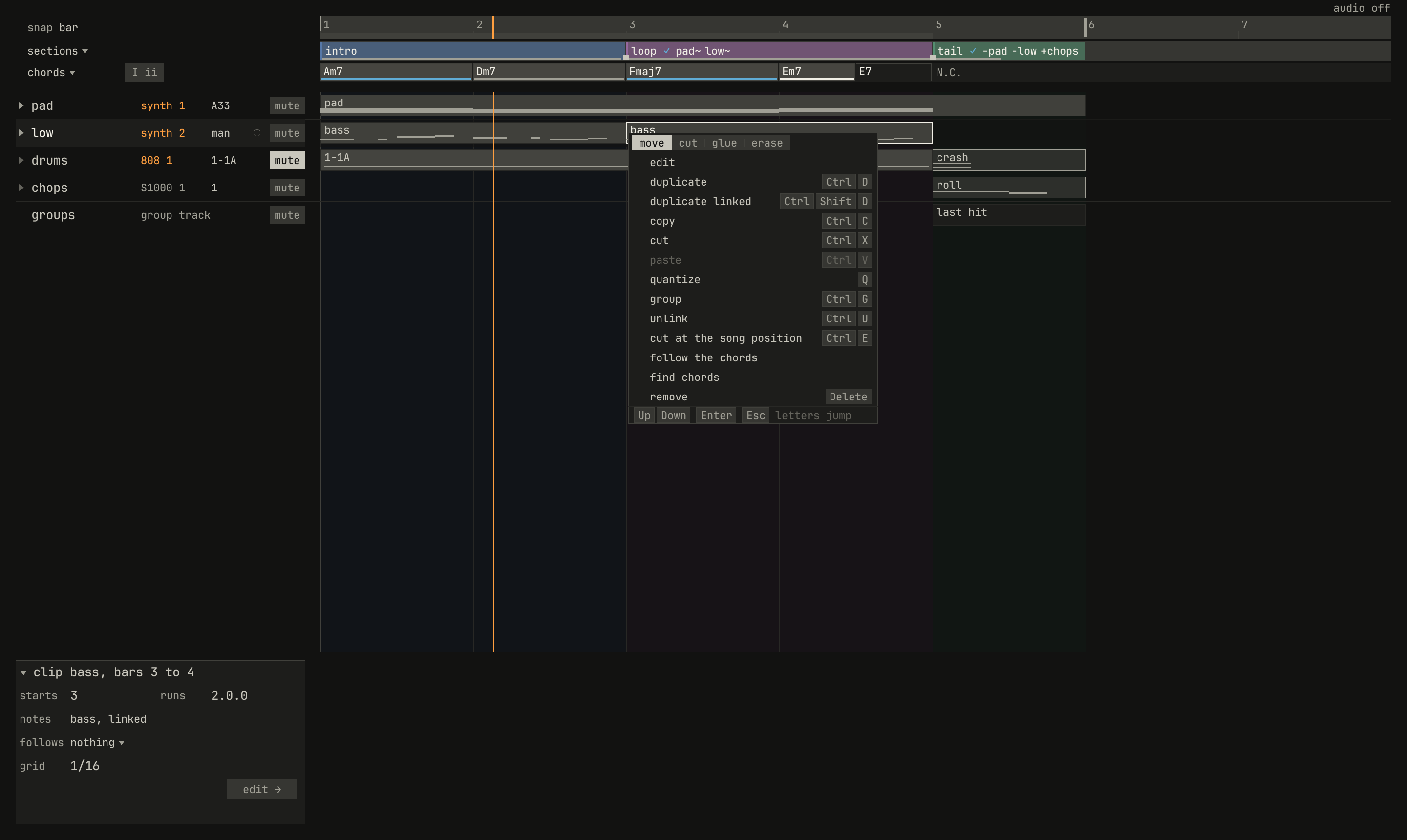
low, and the menu of its clip at bar 3, with the song playing on in bar 2. The inspector says the clip's notes are linked.scriptzig build run-studio -- manual/20-files/fields --script manual/21-command-line/walk.txt
manual/20-files/fields/song.json
{
  "tempo": ["1 100", "4.3 100 ramp", "5 92"],
  "brief": "a short loop in A minor that slows into a last hit",
  "swing": ["1 50", "3 58"],
  "end": "6",
  "sections": ["1 intro", "3 loop", "5 tail"],
  "key": ["1 A minor"],
  "chords": ["1 Am7", "2 Dm7", "3 Fmaj7", "4 Em7", "4.3 E7", "5 N.C."],
  "devices": [
    {
      "name": "synth",
      "type": "synth",
      "state": {
        "delay_time": "1/8.",
        "reverb_decay": 60,
        "parts": [
          { "patch": "A33", "level": -12, "reverb_send": 30 },
          {
            "patch": { "cutoff": 400, "resonance": 35, "filter_env": 3, "decay": 0.3, "sustain": 30, "release": 0.1 },
            "level": -2
          }
        ]
      }
    },
    {
      "name": "808",
      "type": "drums",
      "state": {
        "accent": 60,
        "program": "1-1A",
        "voices": { "bd": { "decay": 70 }, "sd": { "snappy": 60 } },
        "rhythms": {
          "1-1": { "name": "file beat", "scale": 4, "steps": 16, "flam": 3,
            "A": ["BD x.....x...x.....", "SD ....X.......f...", "CH x.x.x.x.x.x.x.x.", "AC ....x.......x..."] },
          "1-F1": { "scale": 4, "steps": 16, "flam": 3,
            "A": ["BD x.....x.........", "SD ....X...x.xXfXFX", "CH x.x.x.x........."] }
        }
      }
    },
    {
      "name": "S1000",
      "type": "sampler",
      "state": {
        "channels": [{ "channel": 1, "program": 1, "level": -4 }],
        "programs": [
          {
            "program": 1,
            "name": "chops",
            "keygroups": [
              { "keys": "C2", "zones": [{ "sample": "kick" }] },
              { "keys": "D2", "zones": [{ "sample": "snare" }] },
              { "keys": "E2", "zones": [{ "sample": "roll" }] }
            ]
          }
        ],
        "samples": {
          "kick": { "file": "breaks/808.wav", "root": "C2", "end": 12000, "mode": "one_shot" },
          "snare": { "file": "breaks/808.wav", "root": "D2", "start": 30000, "end": 42000, "mode": "one_shot" },
          "roll": { "file": "breaks/808.wav", "root": "E2", "start": 30000, "end": 45000, "mode": "until_release", "loops": ["30000 37500 0 3"] }
        }
      }
    }
  ],
  "desk": {
    "master": 0,
    "delay": { "return": -6, "time": "1/8.", "feedback": 35, "tone": 4000 },
    "reverb": { "return": 0, "decay": 60, "damp": 6000 },
    "strips": {
      "synth": { "level": 0, "pan": 0, "muted": false, "reverb": -18 },
      "808": { "level": -4, "pan": 0, "muted": false, "high_gain": 2 },
      "S1000": { "level": -2, "pan": 10, "muted": false, "delay": -20, "delay_pre": true }
    }
  },
  "tracks": [
    {
      "name": "pad",
      "device": "synth",
      "channel": 1,
      "keys": "chord 7",
      "role": "pad",
      "clips": [{ "at": "1", "length": "5.0.0", "notes": "pad" }],
      "lanes": {
        "chorus": ["1 I", "3 II"]
      }
    },
    {
      "name": "bass",
      "device": "synth",
      "channel": 2,
      "keys": "pent",
      "role": "bass",
      "clips": [
        { "at": "1", "length": "2.0.0", "notes": "bass" },
        { "at": "3", "length": "2.0.0", "notes": "bass" }
      ],
      "lanes": {
        "cutoff": ["1 400", "3 400 exponential", "5 1600"],
        "desk_delay": ["1 -60", "4.3 -60 linear", "5 -14"]
      }
    },
    {
      "name": "drums",
      "device": "808",
      "channel": 1,
      "role": "drums",
      "clips": [
        { "at": "1", "length": "3.0.0", "pattern": "1-1A" },
        { "at": "4", "length": "1.0.0", "pattern": "1-F1A" }
      ]
    },
    {
      "name": "chops",
      "device": "S1000",
      "channel": 1,
      "role": "sample"
    },
    {
      "name": "groups",
      "kind": "groups",
      "clips": [{ "at": "5", "length": "1.0.0", "group": "last hit" }]
    }
  ],
  "notes": {
    "pad": { "length": "5.0.0", "follow": { "pattern": "whole", "low": "F3" } },
    "bass": {
      "length": "2.0.0",
      "notes": [
        "1.1.0 A1 0.0.840 104",
        "1.2.480 A1 0.0.240 80",
        "1.3.0 E2 0.1.0 96",
        "1.4.0 G2 0.0.480 88",
        "2.1.0 D2 0.0.840 104",
        "2.2.480 D2 0.0.240 80",
        "2.3.0 A1 0.1.0 96",
        "2.4.0 C2 0.0.480 88"
      ]
    },
    "crash": {
      "length": "1.0.0",
      "notes": ["1.1.0 C2 0.1.0 120", "1.1.0 Db3 0.1.0 110"]
    },
    "roll": {
      "length": "1.0.0",
      "notes": ["1.1.0 E2 0.2.0 110", "1.3.0 C2 0.1.0 100"]
    }
  },
  "groups": {
    "last hit": {
      "length": "1.0.0",
      "clips": [
        { "track": "drums", "at": "1", "length": "1.0.0", "notes": "crash" },
        { "track": "chops", "at": "1", "length": "1.0.0", "notes": "roll" }
      ]
    }
  },
  "scenes": {
    "F1": ["drums", "groups"],
    "F2": ["pad"]
  }
}
walk.txt
# Plays chapter 20's song, mutes its drums, renames its bass, and opens
# the menu of the bass's second clip, printing what the window shows on
# the way. Run it from the repository's root:
#
#   zig-out/bin/studio manual/20-files/fields --script manual/21-command-line/walk.txt
wait 0.1
key space                # play from bar 1
wait 2.4                 # a bar at 100 BPM
print                    # where the song is, what plays, the tracks
click mute drums         # the drums' mute, by its track's name
double track bass        # the bass's name, to type a new one
type low
key enter
rclick lane low bar 3    # the menu of its clip at bar 3, at the pointer
wait 0.1
print
capture menu.png         # a picture of the window as it is
Its print lines write what the window shows, to standard output:
2.53 s: playing 2.1.53, arrange, locators 1 to 5, track pad (cutoff 580), tool move, sections intro 1, loop 3, tail 5, inspector "pad", brief "a short loop in A minor that slows into a last hit"
  tracks: pad on synth 1 (1 clips); bass on synth 2 (2 clips); drums on 808 1 (2 clips); chops on S1000 1 (0 clips); groups [groups, 1 clips];
  devices: synth (synth); 808 (drums); S1000 (sampler);
2.82 s: playing 2.1.506, arrange, locators 1 to 5, track low (cutoff 400), clip at 3, tool move, modified, sections intro 1, loop 3, tail 5, inspector "clip bass, bars 3 to 4", brief "a short loop in A minor that slows into a last hit", menu clip
  tracks: pad on synth 1 (1 clips); low on synth 2 (2 clips); drums on 808 1 (2 clips) [muted] (channel silent); chops on S1000 1 (0 clips); groups [groups, 1 clips];
  devices: synth (synth); 808 (drums); S1000 (sampler);
A line says the script's time, whether the song plays and where, the view,
the locators, the selected track and its device's cutoff, the selected
clip, the tool, modified once the song has changed, the sections, and
then what's open: a callout's note, the reference's proposal, practice's
summary, the inspector's title, F1's screen, a list and how it's ranked,
the brief and its goals, a menu and its row lit, and the say line's panel.
Under it come the tracks, each on its device and channel, muted or silent
or its strip muted, an audio track with its input, and the devices, and in the desk view each strip where it stands.
The steps:
| Step | Does |
|---|---|
wait SECONDS |
lets the song play, 0 to 3600 s, to the nearest frame |
key KEYS |
presses a key and lets it go: a name, or a chord of up to four, as ctrl+shift+z |
down KEY, up KEY |
holds a key down, or lets it go; mouse is the left button, where the pointer is |
click PLACE |
presses the left button there and lets it go |
rclick PLACE |
the right button there: the menu of what's there |
double PLACE |
clicks twice there, a double-click |
drag PLACE to PLACE |
presses at the first, moves to the second over 8 frames, and lets go; or drag X1 Y1 X2 Y2 |
move PLACE |
moves the pointer there |
choose WORDS |
clicks the row of the menu or the list open with these words |
wheel N, wheel X Y |
turns the wheel N notches, up for more than 0 and down for less, or sideways too; 100 at most |
type TEXT |
types what follows, as into a name or a field |
paste TEXT |
puts what follows on the clipboard, \n a line break, and presses Ctrl+V |
say TEXT |
opens the say line, types what follows, and sends it |
drop FILE PLACE |
drops a file on the window there, as from a file manager |
print |
writes a line of what the window shows |
capture FILE.png |
saves a picture of the window as it is, twice its size |
Keys are named by their letter or digit, [, ], ;, ', \,
-, =, /, or: space, esc, enter, tab, backspace, delete,
left, right, up, down, home, end, shift, ctrl, alt, f1
to f12, kp_0 to kp_9, kp_divide, kp_multiply, and kp_enter.
A place is two numbers, X Y in the window's design units, from its
top left at the window's size, or a name, which the window finds as it
stands when the step plays, so a script by names plays the same at any
size. T is a track's name, P a position, as 9 or 9.4.900, and N
a number from 1:
| Where | Names |
|---|---|
| the bar | song; the views, arrange, device, editor, desk; stop, play, record, cycle, click; the locators, left and right; tempo, swing, key, help, meter |
| the arrange view | the headers, snap, sections, chords, numerals; ruler bar P, ruler end, sections bar P, mark bar P (a section's mark), chords bar P, clips bar P; a track's track T, mute T, device T, program T, triangle T, addlane T, lane T bar P, top T bar P (the top of a track's row, where an audio clip's fades are held); a lane's point, point T PARAM bar P, with low or high after it for the lane's bottom or top; below tracks, or below tracks bar P; an empty song's card, card N |
| the inspector | inspector and one of title, plays, role, transpose, level, pan, device, panel, back, next, knob N, follows, grid, edit, try |
| an editor | the header's grid, quantize, clip, length, show, step, practice, exact; edit key, edit drum, edit list; practice's way one key, way wait, way play, way auto; ruler bar P; roll KEY bar P, as roll D2 bar 2.3; drum row N, drum row N grid, drum row N bar P |
choose finds a row by its words: a menu's row or its tools, move,
cut, glue, erase, or draw; a list's item by its label; the program
list's by how it starts; the device list's by a device's name or new
synth, new drums, and new sampler; Ctrl+N's by describe,
empty, or a template's name; and the list a Drum Edit row's name opens,
as every 1/8 or 2 and 4. A device's panel
has no names: a step there gives points, as
studio/examples/two-loop/build.txt does on the sampler's.
Mistakes stop the script and the studio, with the step's line or what it couldn't find:
studio: bad.txt:2: no such step; see `studio --help`
studio: bad.txt: no such place now: mute horns
studio: bad.txt: no row "insert bars" open now
studio: bad.txt:3: nothing took "low"; did a click miss its field?
The last is a type that nothing in the window took in its frame, which
would otherwise land in whatever reads text next. A script, as a capture,
takes no MIDI, neither reads nor writes the keys you've used, and answers
the model's questions from the cache alone.
--log FILE goes the other way: the window, open as usual, writes each
press as a script's line, with a comment saying what took it, and a wait
between presses 50 ms or more apart: a click as its point and the area it
was in, as clips or the editor's header, and a key as its name and the
command it ran, or nothing. Clicks are points, since the log can't know a
place's name; replace them with names to make the log a script that
survives the window's layout changing.
The model
How the studio asks TypeSafe's model for the say line, the start line, and the lists' fields, chapter 11's words:
| Option | Does |
|---|---|
--ai live |
sends what the cache doesn't hold, and keeps each answer: the default with a key in TYPESAFE_API_KEY |
--ai off |
asks nothing: the default without a key |
--ai replay DIR |
answers only from the answers kept in DIR, and sends nothing |
--ai record DIR |
as live, and keeps each request and its answer in DIR too |
--model NAME |
the model's version, jev-1.13.0 by default |
live and record need a key, and say so without one. A key with spaces
inside is no key, and the song's menu says ai: the key has spaces inside.
Every answer goes into the cache,
named by its request, so a request asked twice is sent once. A script or a
capture never waits on the network: it answers from the cache, or with
replay from its folder, and a request neither holds has no answer;
record waits for each answer, so the script plays the same when it
replays. This manual's figures of words replay folders of answers kept
beside their chapters, so they build without a key:
zig-out/bin/studio --script studio/examples/words/build.txt --ai replay studio/examples/words/answers
Only words leave the machine: what you typed, and the studio's words for
the song a question needs, such as piano: chords, warm, struck. Never
audio, a file, or a path. The song's menu shows what the session has
asked: its requests, the tokens they sent, and what they cost, at $0.042 a
million tokens.
Building
The build's steps, run from the repository's root:
| Command | Does |
|---|---|
zig build |
builds zig-out/bin/studio and zig-out/bin/synth |
zig build run-studio -- ARGS |
builds the studio and runs it with ARGS, from the repository's root |
zig build run -- ARGS |
the same for the synth, whose book's chapter 16 has its arguments |
zig build test |
runs the tests: the instruments' DSP, the songs, rendering, the window's layout, the model's answers replayed, and the manual's build tool; -Dtest-filter=WORDS runs those whose names hold the words |
zig build eval |
asks the model the labelled cases in studio/evals/, live with a key, keeps the answers in studio/evals/answers/, and writes studio/evals/report.md; -- --replay measures them again offline, from the answers kept |
zig build manual |
builds this manual into zig-out/manual/; -- --chapter 21 builds one chapter, and --no-capture and --no-clips leave the pictures and the clips out |
zig build bench |
times the transport over an hour of song, the synth as a device on Shoreline, a locate's chase, and the sampler's voices |
-Doptimize= picks the build mode: ReleaseSafe unless you say otherwise,
and Debug for the tests. zig build test replays the model's answers from
studio/evals/answers/, so it needs no key.
The examples
Each folder in studio/examples/ is a song, or a script that builds one in
the window from nothing. Those that name a sound in the library need
tools/fetch-samples.sh first.
| Example | What it shows |
|---|---|
shoreline |
the synth manual's Shoreline, written by its structure: the synth's slots in synth.json, each section a clip, the theme's chords one set of notes that two clips link, the script's control moves as lanes, an 808 groove in 808.json from the breakdown on, with a fill every eighth bar, and the sea on a sampler, from the library |
lantern |
a smaller four-part piece on two synths, mixed on the desk with EQ and sends, its lead's delay send rising on a lane |
phrase |
a four-bar melody on the synth's slot A63, which tools/fetch-samples.sh renders as loops/phrase.wav |
break |
a two-bar break on the drum machine at 96 BPM, which tools/fetch-samples.sh renders as breaks/808.wav |
pads |
that break on a sampler, to chop across the pads in the sampler's view, from the library |
piano |
the Salamander piano's program file, soft and then loud, from the library |
two-loop |
build.txt builds the song of Alex Rome's two-loop rule, dropping the library's two loops |
first-song |
build.txt builds a first song from the pop template, by ear, with only the keys and the mouse |
recreate |
build.txt recreates Shoreline's start from a render of it dropped as the reference, as chapter 9 does; render its first 32 bars to zig-out/shoreline.wav first |
words |
build.txt builds a song by saying what it should be, replaying the answers in answers/ |
tape |
build.txt puts Lantern on tape: its rhythm synth bounced to an audio track, and a render of phrase dropped on another twice, the second fading out; open lantern with it, after rendering phrase to zig-out/phrase.wav |
zig build run-studio -- studio/examples/shoreline
zig build run-studio -- studio/examples/pads --view device
zig-out/bin/studio --script studio/examples/first-song/build.txt
The scripts say how to run them in their first lines, and save their songs
in zig-out/; all but words export them there too.
Exit statuses and errors
The studio exits with:
| Status | When |
|---|---|
| 0 | it did what it was asked, or --help, which prints to standard output |
| 1 | it couldn't, and said why on standard error, after studio: |
| 2 | it couldn't read its arguments, and printed the usage on standard error |
A song that doesn't open names its file's line, as chapter 20 shows; the rest name what they couldn't do:
studio: manual/20-files/fields ends before bar 7
studio: --to 3 should come after --from 3
studio: --cycle 5 3: the loop ends after it starts
studio: --capture-size 800x600: from 1280x720 to 3840x2160
studio: --ai live needs a key in TYPESAFE_API_KEY
studio: manual/20-files/fields plays more than one device, and a take holds one synth
studio: can't make my-phrase/song.json: PathAlreadyExists
studio: kit.sfz isn't in the library folder library, where the sampler finds its samples
studio: can't open a window. Use `studio render` without a display.
An option the studio doesn't know, a number out of its range for
--period or --sample-memory, an unknown view, or a command with the
wrong number of files prints the usage and exits with 2.
Next: the synth's book, the synth on its own, and the other instruments: the drum machine and the sampler.