IV. Working in the studio
A controller
An Arturia MiniLab 37 plays the studio: 37 keys, pitch and mod strips, a pedal input, eight endless knobs, four faders, a main encoder that clicks, eight pads in two banks, and a small screen. Its keys play the selected track, as any MIDI keyboard's do, and the rest are another pair of hands on the window: the knobs turn the selected track's sound, the faders mix, the encoder turns pages and selects tracks, and the pads select, start, and recall. This chapter goes through them. No picture can show the MiniLab, so the figures show what it reaches in the window.
Open the chapter's song, four bars of drums, bass, keys, and a lead on two devices:
zig build run-studio -- manual/18-controller/four
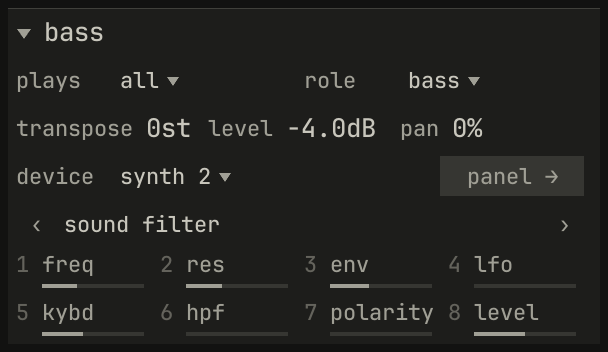
sound filter: the page of eight its device, the synth, offers the MiniLab's knobs, numbered 1 to 8 as the knobs are. Each control's line shows where it stands, as a knob's pointer would.openzig build run-studio -- manual/18-controller/four --track 2
four/song.json
{
  "tempo": 112,
  "end": "5",
  "key": ["1 A minor"],
  "chords": ["1 Am", "2 F", "3 C", "4 G"],
  "devices": [
    { "name": "808", "type": "drums" },
    { "name": "synth", "type": "synth", "state": { "parts": [
      { "patch": "A45", "level": -8 },
      { "patch": "A51", "level": -4 },
      { "patch": { "pulse": "on", "saw": "off", "pwm": 40, "cutoff": 2400, "resonance": 20, "lfo_sync": "on", "lfo_division": "1/8", "pwm_source": "lfo", "attack": 0.01, "decay": 0.5, "sustain": 70, "release": 0.2 }, "level": -12, "delay_send": 20 }
    ] } }
  ],
  "tracks": [
    { "name": "drums", "device": "808", "channel": 1, "role": "drums", "clips": [{ "at": "1", "length": "4.0.0", "notes": "beat" }] },
    { "name": "bass", "device": "synth", "channel": 2, "role": "bass", "clips": [{ "at": "1", "length": "4.0.0", "notes": "bass" }] },
    { "name": "keys", "device": "synth", "channel": 1, "keys": "chord 7", "role": "chords", "clips": [{ "at": "1", "length": "4.0.0", "notes": "keys" }] },
    { "name": "lead", "device": "synth", "channel": 3, "role": "lead", "clips": [{ "at": "1", "length": "4.0.0", "notes": "lead" }] }
  ],
  "notes": {
    "beat": {
      "length": "1.0.0",
      "notes": [
        "1.1.0 C2 0.0.240 120", "1.1.480 F#2 0.0.240 70",
        "1.2.0 C2 0.0.240 112", "1.2.0 D#2 0.0.240 100", "1.2.480 F#2 0.0.240 76",
        "1.3.0 C2 0.0.240 116", "1.3.480 F#2 0.0.240 70",
        "1.4.0 C2 0.0.240 112", "1.4.0 D#2 0.0.240 100", "1.4.480 F#2 0.0.240 80"
      ]
    },
    "bass": { "length": "4.0.0", "follow": { "pattern": "offbeat", "low": "E1" } },
    "keys": { "length": "4.0.0", "follow": { "pattern": "halves", "low": "F3" } },
    "lead": {
      "length": "4.0.0",
      "notes": [
        "1.1.0 E5 0.0.900 100", "1.2.0 D5 0.0.420 92", "1.2.480 C5 0.0.420 92", "1.3.0 A4 0.1.900 96",
        "2.1.0 C5 0.0.900 96", "2.2.0 D5 0.0.900 92", "2.3.0 C5 0.0.900 94", "2.4.0 A4 0.0.900 90",
        "3.1.0 E5 0.1.420 100", "3.2.480 G5 0.0.420 96", "3.3.0 E5 0.0.900 96", "3.4.0 D5 0.0.900 92",
        "4.1.0 D5 0.0.900 96", "4.2.0 E5 0.0.420 90", "4.2.480 D5 0.0.420 92", "4.3.0 G4 0.1.900 100"
      ]
    }
  }
}
The DAW program
The MiniLab plays in one of its programs: Arturia, for Arturia's own software, or DAW, for a sequencer such as this one. Shift and pad 3, on the MiniLab, switch between them. The studio uses the DAW program.
The studio knows the MiniLab by the names of its ports, Minilab37 MIDI
and Minilab37 DAW, and connects to it whenever it's there, when the
window opens or when it's plugged in later; unplugged, it's forgotten. The
two ports have two jobs:
MIDIcarries the keys, the strips, and the pedal, which play the selected track. Nothing else on it plays: in the Arturia program the knobs send Analog Lab's control numbers there, which would otherwise land on whatever synth controls have those numbers.DAWcarries the knobs, the faders, the encoder, and the pads, which go to the window, and takes back what the pads and the screen show.
The window greets the MiniLab in Arturia's DAW protocol, and asks which
program it's in, every half second until it answers: a MiniLab just plugged
in misses what comes while it starts up. Greeted, the MiniLab sends its
controls on its DAW port and shows the studio's lights and screen. While
it's in another program, the studio sends it nothing, and the margin under
the meter says, in red:
minilab: Shift+Pad 3 for DAW
Back in the DAW program, the window greets it again, and the faders let go of what they held, since they may have moved while nothing listened. When the window closes, it says goodbye, and the pads and the screen go back to the MiniLab's own.
The foot of the song's menu shows the studio's own MIDI address, as
midi 129:0, where other programs can send to it; any keyboard the studio
finds plays the selected track the same way.
Keys, strips, and pedal
The keys, the pitch strip, the mod strip, and a pedal play the selected
track, whatever its channel, as every MIDI keyboard does: the strips as a
keyboard's wheels, the pitch bend and the modulation wheel, and the pedal
as a hold pedal. They play the way the track's plays ▾ says, as the
letter keys do (chapter 3), and record as they do
(chapter 14).
The MiniLab's Hold and Oct send no message of their own. Oct transposes the keys on the MiniLab, and the studio sees the notes played. Hold, the MiniLab's chord mode, and its arpeggiator change which notes it sends, the arpeggiator at a tempo of its own rather than the song's, so leave them off and use the synth's.
Knobs and pages
Eight knobs can't each own one of a device's dozens of controls, so a device offers its controls in pages of eight, as a CLAP plugin offers its remote controls. Knobs 1 to 8 turn the current page of the selected track's device, on the track's channel. The inspector shows that page under the track's settings, as in Fig. 18.1: its name, and its eight controls, numbered as the knobs are, each with its name, its value under the pointer, and a line for where it stands. ‹ and › at the page's sides turn it, as the MiniLab's main encoder does. The synth's pages:
| Page | Knobs 1 to 8 |
|---|---|
| 1 filter | cutoff, resonance, filter_env, filter_mod, key_follow, hpf, env_polarity, vca_level |
| 2 osc | range, saw, pulse, pwm, sub, noise, pwm_source, chorus |
| 3 lfo | lfo_rate, lfo_delay, lfo_wave, lfo_sync, vco_mod, portamento, portamento_mode, vca |
| 4 mix | delay_send, reverb_send, pan, divide, delay_time, delay_feedback, reverb_decay, reverb_damp |
The first page holds what you reach for most, and the faders hold the envelope (see the faders). Page 4's sends, pan, and divider are the part's; its delay and reverb are the whole synth's. The tempo and the swing are the song's, so they're on no page.
- Each device keeps its page. Going back to a track finds the page its device last showed. The page is the device's, not the track's: the bass and the keys here both play the synth, so they share it.
- A page shows what the panel shows. While a part's LFO is synced to the clock, the panel's rate fader sets its division, and so does knob 1 on page 3.
- The mouse turns the pages too. Touch a control on a device's panel, and the knobs turn to the page that holds it.
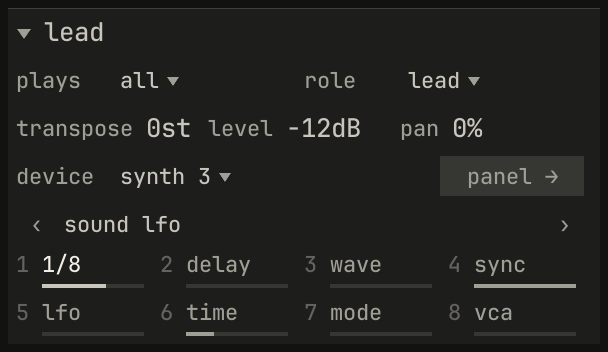
sound lfo, turned with › twice. Knob 1 is the rate, and under the pointer it reads 1/8: synced, it turns the LFO's division.scriptzig build run-studio -- manual/18-controller/four --script manual/18-controller/lfo.txt
four/song.json
{
  "tempo": 112,
  "end": "5",
  "key": ["1 A minor"],
  "chords": ["1 Am", "2 F", "3 C", "4 G"],
  "devices": [
    { "name": "808", "type": "drums" },
    { "name": "synth", "type": "synth", "state": { "parts": [
      { "patch": "A45", "level": -8 },
      { "patch": "A51", "level": -4 },
      { "patch": { "pulse": "on", "saw": "off", "pwm": 40, "cutoff": 2400, "resonance": 20, "lfo_sync": "on", "lfo_division": "1/8", "pwm_source": "lfo", "attack": 0.01, "decay": 0.5, "sustain": 70, "release": 0.2 }, "level": -12, "delay_send": 20 }
    ] } }
  ],
  "tracks": [
    { "name": "drums", "device": "808", "channel": 1, "role": "drums", "clips": [{ "at": "1", "length": "4.0.0", "notes": "beat" }] },
    { "name": "bass", "device": "synth", "channel": 2, "role": "bass", "clips": [{ "at": "1", "length": "4.0.0", "notes": "bass" }] },
    { "name": "keys", "device": "synth", "channel": 1, "keys": "chord 7", "role": "chords", "clips": [{ "at": "1", "length": "4.0.0", "notes": "keys" }] },
    { "name": "lead", "device": "synth", "channel": 3, "role": "lead", "clips": [{ "at": "1", "length": "4.0.0", "notes": "lead" }] }
  ],
  "notes": {
    "beat": {
      "length": "1.0.0",
      "notes": [
        "1.1.0 C2 0.0.240 120", "1.1.480 F#2 0.0.240 70",
        "1.2.0 C2 0.0.240 112", "1.2.0 D#2 0.0.240 100", "1.2.480 F#2 0.0.240 76",
        "1.3.0 C2 0.0.240 116", "1.3.480 F#2 0.0.240 70",
        "1.4.0 C2 0.0.240 112", "1.4.0 D#2 0.0.240 100", "1.4.480 F#2 0.0.240 80"
      ]
    },
    "bass": { "length": "4.0.0", "follow": { "pattern": "offbeat", "low": "E1" } },
    "keys": { "length": "4.0.0", "follow": { "pattern": "halves", "low": "F3" } },
    "lead": {
      "length": "4.0.0",
      "notes": [
        "1.1.0 E5 0.0.900 100", "1.2.0 D5 0.0.420 92", "1.2.480 C5 0.0.420 92", "1.3.0 A4 0.1.900 96",
        "2.1.0 C5 0.0.900 96", "2.2.0 D5 0.0.900 92", "2.3.0 C5 0.0.900 94", "2.4.0 A4 0.0.900 90",
        "3.1.0 E5 0.1.420 100", "3.2.480 G5 0.0.420 96", "3.3.0 E5 0.0.900 96", "3.4.0 D5 0.0.900 92",
        "4.1.0 D5 0.0.900 96", "4.2.0 E5 0.0.420 90", "4.2.480 D5 0.0.420 92", "4.3.0 G4 0.1.900 100"
      ]
    }
  }
}
lfo.txt
# The lead selected, its page turned twice with ›, to the synth's lfo,
# and the pointer on knob 1.
click track lead
click inspector next
click inspector next
move inspector knob 1
wait 0.3
capture lfo.png
A knob moves its control as the panel's fader does, along the control's curve, in 127 steps from one end to the other: the synth's cutoff, from 10 Hz to 20 kHz, moves about a semitone a step. In the synth's view, a step selected takes a knob's move as a lock, as a fader moved there does (the synth's chapter 8).
In the device view, while a MiniLab is attached, a faint underline marks the controls the knobs reach on the current page, so it's plain on the panel which eight they are.
The encoder
The main encoder, the large knob that clicks, turns in steps:
- Turned, it turns the selected track's device's pages, from the first to the last and no further.
- Turned with Shift held, it selects the track above or below, as Up and Down do.
- Clicked, it plays from the song position, or stops, as Space does.
- Clicked with Shift held, it puts the faders on the device's own four,
or back on the mix, and a callout says which:
faders on the deviceorfaders on the mix.
The faders
The four faders start on the mix: the levels of the selected track's
four tracks, tracks 1 to 4 while one of those is selected, 5 to 8 while one
of those is, and so on. A track's level here is its level in the inspector,
its device's channel's (chapter 12).
On a fader's move, the screen names the track, as bass level.
On the device, after Shift and a click of the encoder, they're the four controls the selected track's device keeps under one hand:
| Device | Faders 1 to 4 |
|---|---|
| synth | The envelope: attack, decay, sustain, release |
| drum machine | The levels of the bass drum, snare, closed hi-hat, and open hi-hat |
| sampler | The amplifier's envelope: attack, decay, sustain, release |
Which the faders are on, the mix or the device, holds as you select other tracks, until Shift and a click again.
Nothing jumps
A knob sends where it stands, from 0 to 127, and a control can change underneath it: a page turned, another track selected, a program chosen, a lane, the mouse. Turned then, a knob would jump the control from its value to the knob's. So whenever what a knob turns changes, the window tells the MiniLab where the knob's new control stands, and the next turn goes on from there. The knobs never jump.
A fader can't be told: it's where your hand left it. So a fader picks up: it holds its control only once it crosses the control's value, or lands within a step of it. Until then, moving it changes nothing, and the window draws a hollow mark where the fader sits, so you can see which way to push:
- for a track's level, on a gauge under the track's row in the arrange view;
- for the device's own four, on its panel's fader in the device view;
- for a strip's level, on the desk's fader.
A fader lets go again when what it moves changes, as when you select a track among another four, and when something else moves its control: the mouse, a lane, or MIDI.
The pads
On the synth, which names no keys of its own, the pads are the window's:
| Pads | What they do |
|---|---|
| Bank A, top row, 1 to 4 | Select the faders' four tracks |
| Bank A, bottom row, 5 to 8 | Start or stop those tracks' sequences, on the next bar |
| Bank B, 1 to 8 | Recall mute scenes 1 to 8, as the first eight of Alt+F1–F10 do |
| Shift and pads 4 to 8 | Cycle, stop, play, record, and to the left locator |
Shift and pad 2 switches the MiniLab between bank A and bank B; Shift and
pads 1 and 3 are the MiniLab's own, its arpeggiator and its program. A
sequence started from a pad waits for the next bar, as one started from its
part's row does. A scene recalled says so in a callout, as recalled scene
F1, or scene F2 is empty; chapter 13
tells how Ctrl+Alt+F1–F10 stores them. Shift's pads are the transport's
keys: the first, printed loop, is Num /; record records the selected
track, as Num * does; and the last, printed tap, goes to the left
locator, as Num 1 does, since the song's tempo is its own. Stop,
pressed while the song is stopped, lets go of every note, as Esc
does in the arrange view.
On a track whose keys play chord, the pads play its chords instead: each
bank's eight are the key's degrees from the tonic, as the white keys of an
octave play them, and bank B's have the seventh. Chapter
4 tells chords under one finger.
A drum machine's track
On a drum machine's track, the knobs, the faders, and the pads are the drum machine's. Its pages are its voices' knobs, a few voices a page, and the levels:
| Page | Knobs 1 to 8 |
|---|---|
| 1 kick snare | bd_tune, bd_tone, bd_decay, bd_attack, sd_tune, sd_tone, sd_snappy, accent |
| 2 toms | lt_tune, lt_decay, mt_tune, mt_decay, ht_tune, ht_decay, lt_level, mt_level |
| 3 cymbals | cy_tune, cy_tone, cy_decay, oh_decay, ch_decay, rd_tune, cy_level, rd_level |
| 4 levels | ht_level, rs_level, cp_level, cb_level, oh_level, ch_level, pan, level |
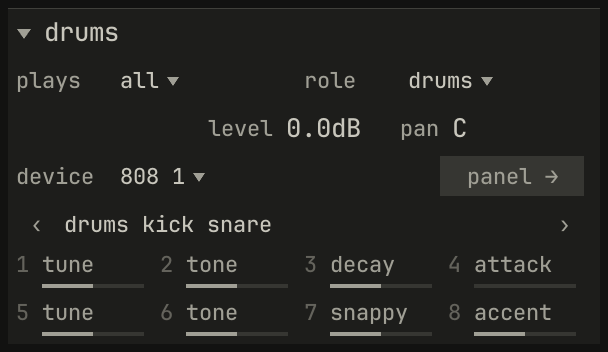
drums kick snare, the bass drum's tune, tone, decay, and attack on knobs 1 to 4, and the snare's tune, tone, and snappy and the accent on 5 to 8.openzig build run-studio -- manual/18-controller/four --track 1
four/song.json
{
  "tempo": 112,
  "end": "5",
  "key": ["1 A minor"],
  "chords": ["1 Am", "2 F", "3 C", "4 G"],
  "devices": [
    { "name": "808", "type": "drums" },
    { "name": "synth", "type": "synth", "state": { "parts": [
      { "patch": "A45", "level": -8 },
      { "patch": "A51", "level": -4 },
      { "patch": { "pulse": "on", "saw": "off", "pwm": 40, "cutoff": 2400, "resonance": 20, "lfo_sync": "on", "lfo_division": "1/8", "pwm_source": "lfo", "attack": 0.01, "decay": 0.5, "sustain": 70, "release": 0.2 }, "level": -12, "delay_send": 20 }
    ] } }
  ],
  "tracks": [
    { "name": "drums", "device": "808", "channel": 1, "role": "drums", "clips": [{ "at": "1", "length": "4.0.0", "notes": "beat" }] },
    { "name": "bass", "device": "synth", "channel": 2, "role": "bass", "clips": [{ "at": "1", "length": "4.0.0", "notes": "bass" }] },
    { "name": "keys", "device": "synth", "channel": 1, "keys": "chord 7", "role": "chords", "clips": [{ "at": "1", "length": "4.0.0", "notes": "keys" }] },
    { "name": "lead", "device": "synth", "channel": 3, "role": "lead", "clips": [{ "at": "1", "length": "4.0.0", "notes": "lead" }] }
  ],
  "notes": {
    "beat": {
      "length": "1.0.0",
      "notes": [
        "1.1.0 C2 0.0.240 120", "1.1.480 F#2 0.0.240 70",
        "1.2.0 C2 0.0.240 112", "1.2.0 D#2 0.0.240 100", "1.2.480 F#2 0.0.240 76",
        "1.3.0 C2 0.0.240 116", "1.3.480 F#2 0.0.240 70",
        "1.4.0 C2 0.0.240 112", "1.4.0 D#2 0.0.240 100", "1.4.480 F#2 0.0.240 80"
      ]
    },
    "bass": { "length": "4.0.0", "follow": { "pattern": "offbeat", "low": "E1" } },
    "keys": { "length": "4.0.0", "follow": { "pattern": "halves", "low": "F3" } },
    "lead": {
      "length": "4.0.0",
      "notes": [
        "1.1.0 E5 0.0.900 100", "1.2.0 D5 0.0.420 92", "1.2.480 C5 0.0.420 92", "1.3.0 A4 0.1.900 96",
        "2.1.0 C5 0.0.900 96", "2.2.0 D5 0.0.900 92", "2.3.0 C5 0.0.900 94", "2.4.0 A4 0.0.900 90",
        "3.1.0 E5 0.1.420 100", "3.2.480 G5 0.0.420 96", "3.3.0 E5 0.0.900 96", "3.4.0 D5 0.0.900 92",
        "4.1.0 D5 0.0.900 96", "4.2.0 E5 0.0.420 90", "4.2.480 D5 0.0.420 92", "4.3.0 G4 0.1.900 100"
      ]
    }
  }
}
Its faders, on the device, are the levels of the bass drum, the snare, and the two hi-hats; the bass drum's and the snare's levels are on no page, since the faders have them. And the pads play its voices, at each pad's velocity, as the drum machine names its keys:
| Row | Bank A | Bank B |
|---|---|---|
| Top row, 1 to 4 | bass drum, snare drum, low tom, mid tom | cymbal, open hihat, closed hihat, ride |
| Bottom row, 5 to 8 | hi tom, rim shot, hand clap, cowbell | mute scenes 5 to 8, as on the synth |
A pad playing a voice goes straight to the drum machine, as a key does, so a drum isn't late, and records as a note. The drum machine has twelve voices, so bank B's bottom row is still the window's.
The sampler names its sixteen pads as keys, so on a sampler's track the MiniLab's sixteen play them, bank A pads 1 to 8 and bank B pads 9 to 16, each top row first, and its knobs and faders turn its program:
| Page | Knobs 1 to 8 |
|---|---|
| 1 filter | cutoff, resonance, filter_env, key_follow, velocity_cutoff, tune, velocity_level, level |
| 2 filter env | filter_attack, filter_decay, filter_sustain, filter_release, attack, decay, sustain, release |
| 3 lfo | lfo_rate, lfo_wave, lfo_delay, lfo_pitch, lfo_cutoff, lfo_level, pan, level |
The drum machine's book and the sampler's book tell their controls.
On the desk
While the desk shows, the MiniLab plays it as a page of a device. The knobs turn the selected track's strip, the faders the levels of four strips, picked up as a track's level is, and the encoder turns no pages, since the desk has one:
| Control | On the desk |
|---|---|
| Knobs 1 to 4 | The strip's high and its gain, its low and its gain |
| Knobs 5 to 7 | Its delay and reverb sends, and its pan |
| Knob 8 | Nothing |
| Faders 1 to 4 | The levels of devices 1 to 4, or 5 to 8, whichever four hold the selected track's |
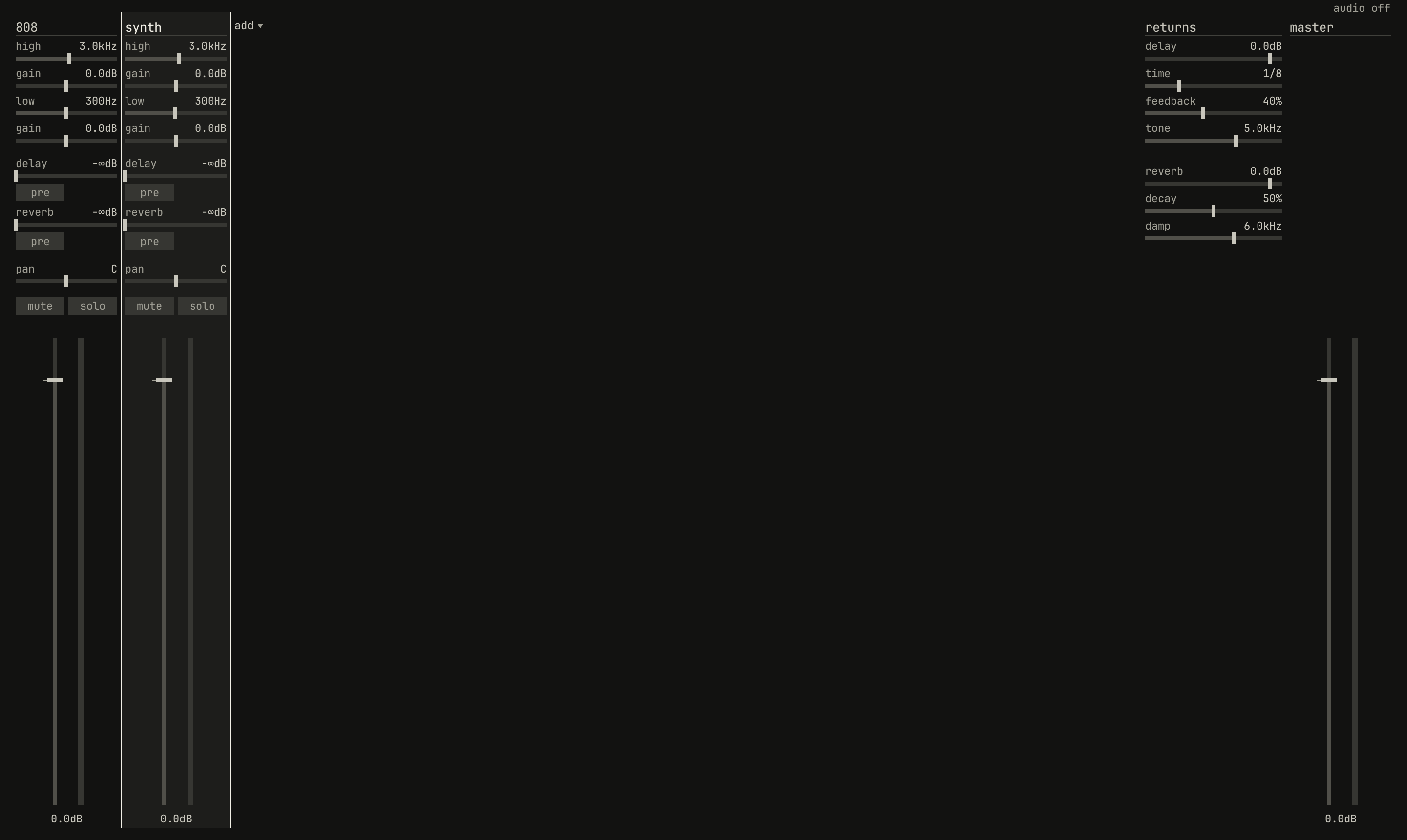
high down to pan; faders 1 and 2 are the 808's level and the synth's.openzig build run-studio -- manual/18-controller/four --view desk --track 4
four/song.json
{
  "tempo": 112,
  "end": "5",
  "key": ["1 A minor"],
  "chords": ["1 Am", "2 F", "3 C", "4 G"],
  "devices": [
    { "name": "808", "type": "drums" },
    { "name": "synth", "type": "synth", "state": { "parts": [
      { "patch": "A45", "level": -8 },
      { "patch": "A51", "level": -4 },
      { "patch": { "pulse": "on", "saw": "off", "pwm": 40, "cutoff": 2400, "resonance": 20, "lfo_sync": "on", "lfo_division": "1/8", "pwm_source": "lfo", "attack": 0.01, "decay": 0.5, "sustain": 70, "release": 0.2 }, "level": -12, "delay_send": 20 }
    ] } }
  ],
  "tracks": [
    { "name": "drums", "device": "808", "channel": 1, "role": "drums", "clips": [{ "at": "1", "length": "4.0.0", "notes": "beat" }] },
    { "name": "bass", "device": "synth", "channel": 2, "role": "bass", "clips": [{ "at": "1", "length": "4.0.0", "notes": "bass" }] },
    { "name": "keys", "device": "synth", "channel": 1, "keys": "chord 7", "role": "chords", "clips": [{ "at": "1", "length": "4.0.0", "notes": "keys" }] },
    { "name": "lead", "device": "synth", "channel": 3, "role": "lead", "clips": [{ "at": "1", "length": "4.0.0", "notes": "lead" }] }
  ],
  "notes": {
    "beat": {
      "length": "1.0.0",
      "notes": [
        "1.1.0 C2 0.0.240 120", "1.1.480 F#2 0.0.240 70",
        "1.2.0 C2 0.0.240 112", "1.2.0 D#2 0.0.240 100", "1.2.480 F#2 0.0.240 76",
        "1.3.0 C2 0.0.240 116", "1.3.480 F#2 0.0.240 70",
        "1.4.0 C2 0.0.240 112", "1.4.0 D#2 0.0.240 100", "1.4.480 F#2 0.0.240 80"
      ]
    },
    "bass": { "length": "4.0.0", "follow": { "pattern": "offbeat", "low": "E1" } },
    "keys": { "length": "4.0.0", "follow": { "pattern": "halves", "low": "F3" } },
    "lead": {
      "length": "4.0.0",
      "notes": [
        "1.1.0 E5 0.0.900 100", "1.2.0 D5 0.0.420 92", "1.2.480 C5 0.0.420 92", "1.3.0 A4 0.1.900 96",
        "2.1.0 C5 0.0.900 96", "2.2.0 D5 0.0.900 92", "2.3.0 C5 0.0.900 94", "2.4.0 A4 0.0.900 90",
        "3.1.0 E5 0.1.420 100", "3.2.480 G5 0.0.420 96", "3.3.0 E5 0.0.900 96", "3.4.0 D5 0.0.900 92",
        "4.1.0 D5 0.0.900 96", "4.2.0 E5 0.0.420 90", "4.2.480 D5 0.0.420 92", "4.3.0 G4 0.1.900 100"
      ]
    }
  }
}
The screen names the strip, as desk synth, over eq sends pan, and a
move pops up the device and the control, as synth high_freq.
Chapter 17 is about the desk.
Recording from the controller
A knob or a fader moves its control as the panel does, so recording takes its moves as moves on the panel: into the record-enabled track's lanes, when the control is its device's, on its channel, or its device's strip. A pad that starts the track's sequence records a pattern clip from the bar the sequence starts on, as a start on the panel does; a pad playing a drum records a note; and a scene recalled is recorded as the mutes it sets. Chapter 14 tells it all.
Only the record-enabled track records. A fader on another track's level changes that track's device, as a move on its panel would, and isn't recorded. A lane still sets its control while the song plays, so a knob turned on a control with a lane holds until the lane's next point; recording the move replaces the lane from its first point to its last.
The screen and the lights
The screen, at rest, shows the selected track and its program, as
bass A51, or man for a sound not from the bank, over the page the
knobs turn, as 1/4 filter, with the record and play icons lit while the
song records and plays. A knob or a fader moved pops up its control's name
and value as the panel words them, as vcf freq over 447Hz, until it
stops. The screen is plain ASCII, so the desk's −∞dB reads -infdB
there.
The pads light what they do:
| Pads | Lit |
|---|---|
| Bank A, top row | Amber on the selected track, brighter while it sounds; dim white on the other three |
| Bank A, bottom row | Green while the track's sequence plays, amber while it waits for the bar, dim green when it has one to play, off when it has none |
| Bank B | Dim white on a stored scene, amber on the one last recalled, off on an empty one |
| Shift's five, while held | Loop amber while cycling, play green while playing, record red while recording; dim otherwise |
| Pads playing voices or keys | Dim white, amber while held |
| Pads playing chords | Dim white on the tonic, at either end of each bank, amber while held |
Every control
The MiniLab's controls in the DAW program, from the studio's own table. Chapter 19 lists it too, beside every key.
| Control | What it does |
|---|---|
| Knobs 1–8 | The current page of the selected track's device, on the track's channel |
| Main encoder | Turn the device's pages: the synth's filter, osc, lfo, and mix |
| Shift + main encoder | Select the track above or below |
| Encoder click | Play from the song position, or stop, as Space |
| Shift + encoder click | The faders on the mix, or on the device's own four: the synth's envelope |
| Faders 1–4 | On the mix, the levels of the selected track's four: tracks 1–4, 5–8, … |
| Pads 1–4 | Select those four tracks |
| Pads 5–8 | Start or stop those tracks' sequences, on the next bar |
| Bank B, pads 1–8 | Recall mute scenes 1 to 8, as Alt+F1 to F8 |
| Shift + Pads 4–8 | Cycle, stop, play, record, and the left locator |
Try it in the window
- Plug in the MiniLab, press Shift and pad 3 until the margin under the meter goes quiet, and play the bass from its keys.
- Select the bass and turn knob 1 and knob 2 on page 1; then turn the encoder to page 2 and back, and see the inspector follow.
- Select the lead and turn knob 1 on page 3; then turn its LFO's sync off on the panel and turn knob 1 again.
- Pull fader 2 to the bottom, select the bass with pad 2, and push the fader up slowly: the bass's level holds until the fader crosses it, and the hollow mark on its row shows where the fader is.
- Press Shift and click the encoder, and shape the synth's envelope with the faders while the keys play.
- Select the drums and play the pads; then open the desk with Ctrl+4 and set the drums' strip from the knobs.
Next: chapter 19, every key, every key and gesture the window takes, and every mark it draws.