VI. Reference
Song files
This chapter is for looking things up: what a song's folder holds, every
field of its song.json in the order the file keeps them, with its type,
its range, and what leaving it out means, and the other files the studio
reads and writes. The figures are one small song that holds a little of
everything: three devices, a follower, linked clips, lanes, a group, and
mute scenes. Its file is behind the first figure's recipe, and the
sections below quote it.
zig build run-studio -- manual/20-files/fields
A song's folder
A song is a folder, and the folder's name is the song's. It holds
song.json, and may hold three other things:
song.json: the whole song. Saving replaces it whole, so a save that fails leaves the file as it was.NAME.wav: Ctrl+Shift+R writes the song there, named after the folder, asfields/fields.wav. It's the filestudio renderwrites (chapter 21).- A device's state file, such as
synth.json, ifsong.jsonnames one in place of the state (devices). The studio reads it, and never writes it. audio/: the audio tracks' recordings, asaudio/vocal-1.wav, a pass a file, 24-bit at 48 kHz: what they recorded, the WAV files dropped on them, copied, and their bounces (audio tracks). A pass undone keeps its file, and saving into another folder copies the whole ofaudio/.
Nothing else lands in the folder. A sampler's recording goes to the
library's recorded/ folder, and a WAV file dropped on the window from
outside the library is copied to its imported/ folder
(the library), so a song names its samples by their place
in the library, and a song folder copied to another machine needs the
library too. Chapter 12 opens, saves,
and exports songs in the window.


0.0 / 12.3 s
peak -13.6 dBFS
chops. The tempo slows from 100 to 92 BPM over the last two beats of bar 4; then listen for the roll's three quick hits under the crash.openzig build run-studio -- manual/20-files/fields
renderzig build run-studio -- render manual/20-files/fields fields.wav
fields/song.json
{
  "tempo": ["1 100", "4.3 100 ramp", "5 92"],
  "brief": "a short loop in A minor that slows into a last hit",
  "swing": ["1 50", "3 58"],
  "end": "6",
  "sections": ["1 intro", "3 loop", "5 tail"],
  "key": ["1 A minor"],
  "chords": ["1 Am7", "2 Dm7", "3 Fmaj7", "4 Em7", "4.3 E7", "5 N.C."],
  "devices": [
    {
      "name": "synth",
      "type": "synth",
      "state": {
        "delay_time": "1/8.",
        "reverb_decay": 60,
        "parts": [
          { "patch": "A33", "level": -12, "reverb_send": 30 },
          {
            "patch": { "cutoff": 400, "resonance": 35, "filter_env": 3, "decay": 0.3, "sustain": 30, "release": 0.1 },
            "level": -2
          }
        ]
      }
    },
    {
      "name": "808",
      "type": "drums",
      "state": {
        "accent": 60,
        "program": "1-1A",
        "voices": { "bd": { "decay": 70 }, "sd": { "snappy": 60 } },
        "rhythms": {
          "1-1": { "name": "file beat", "scale": 4, "steps": 16, "flam": 3,
            "A": ["BD x.....x...x.....", "SD ....X.......f...", "CH x.x.x.x.x.x.x.x.", "AC ....x.......x..."] },
          "1-F1": { "scale": 4, "steps": 16, "flam": 3,
            "A": ["BD x.....x.........", "SD ....X...x.xXfXFX", "CH x.x.x.x........."] }
        }
      }
    },
    {
      "name": "S1000",
      "type": "sampler",
      "state": {
        "channels": [{ "channel": 1, "program": 1, "level": -4 }],
        "programs": [
          {
            "program": 1,
            "name": "chops",
            "keygroups": [
              { "keys": "C2", "zones": [{ "sample": "kick" }] },
              { "keys": "D2", "zones": [{ "sample": "snare" }] },
              { "keys": "E2", "zones": [{ "sample": "roll" }] }
            ]
          }
        ],
        "samples": {
          "kick": { "file": "breaks/808.wav", "root": "C2", "end": 12000, "mode": "one_shot" },
          "snare": { "file": "breaks/808.wav", "root": "D2", "start": 30000, "end": 42000, "mode": "one_shot" },
          "roll": { "file": "breaks/808.wav", "root": "E2", "start": 30000, "end": 45000, "mode": "until_release", "loops": ["30000 37500 0 3"] }
        }
      }
    }
  ],
  "desk": {
    "master": 0,
    "delay": { "return": -6, "time": "1/8.", "feedback": 35, "tone": 4000 },
    "reverb": { "return": 0, "decay": 60, "damp": 6000 },
    "strips": {
      "synth": { "level": 0, "pan": 0, "muted": false, "reverb": -18 },
      "808": { "level": -4, "pan": 0, "muted": false, "high_gain": 2 },
      "S1000": { "level": -2, "pan": 10, "muted": false, "delay": -20, "delay_pre": true }
    }
  },
  "tracks": [
    {
      "name": "pad",
      "device": "synth",
      "channel": 1,
      "keys": "chord 7",
      "role": "pad",
      "clips": [{ "at": "1", "length": "5.0.0", "notes": "pad" }],
      "lanes": {
        "chorus": ["1 I", "3 II"]
      }
    },
    {
      "name": "bass",
      "device": "synth",
      "channel": 2,
      "keys": "pent",
      "role": "bass",
      "clips": [
        { "at": "1", "length": "2.0.0", "notes": "bass" },
        { "at": "3", "length": "2.0.0", "notes": "bass" }
      ],
      "lanes": {
        "cutoff": ["1 400", "3 400 exponential", "5 1600"],
        "desk_delay": ["1 -60", "4.3 -60 linear", "5 -14"]
      }
    },
    {
      "name": "drums",
      "device": "808",
      "channel": 1,
      "role": "drums",
      "clips": [
        { "at": "1", "length": "3.0.0", "pattern": "1-1A" },
        { "at": "4", "length": "1.0.0", "pattern": "1-F1A" }
      ]
    },
    {
      "name": "chops",
      "device": "S1000",
      "channel": 1,
      "role": "sample"
    },
    {
      "name": "groups",
      "kind": "groups",
      "clips": [{ "at": "5", "length": "1.0.0", "group": "last hit" }]
    }
  ],
  "notes": {
    "pad": { "length": "5.0.0", "follow": { "pattern": "whole", "low": "F3" } },
    "bass": {
      "length": "2.0.0",
      "notes": [
        "1.1.0 A1 0.0.840 104",
        "1.2.480 A1 0.0.240 80",
        "1.3.0 E2 0.1.0 96",
        "1.4.0 G2 0.0.480 88",
        "2.1.0 D2 0.0.840 104",
        "2.2.480 D2 0.0.240 80",
        "2.3.0 A1 0.1.0 96",
        "2.4.0 C2 0.0.480 88"
      ]
    },
    "crash": {
      "length": "1.0.0",
      "notes": ["1.1.0 C2 0.1.0 120", "1.1.0 Db3 0.1.0 110"]
    },
    "roll": {
      "length": "1.0.0",
      "notes": ["1.1.0 E2 0.2.0 110", "1.3.0 C2 0.1.0 100"]
    }
  },
  "groups": {
    "last hit": {
      "length": "1.0.0",
      "clips": [
        { "track": "drums", "at": "1", "length": "1.0.0", "notes": "crash" },
        { "track": "chops", "at": "1", "length": "1.0.0", "notes": "roll" }
      ]
    }
  },
  "scenes": {
    "F1": ["drums", "groups"],
    "F2": ["pad"]
  }
}
Reading and writing
song.json is JSON, read whole. Reading checks every name and every
value's range, and a mistake stops the song from opening, with the file's
line and what's wrong, here a third line of "loop": 3:
studio: my-song/song.json:3: a song holds tempo, brief, swing, end, sections, key, chords, devices, desk, tracks, notes, groups, and scenes only, not loop
Reading takes the fields in any order, and any of them may be left out:
{} is a song, at 120 BPM, with no devices or tracks, a bar long. Writing puts them in one order, the order of this chapter, and
writes some always and the rest only where they hold something:
| Field | Written |
|---|---|
tempo |
always |
brief |
when the song has one |
swing |
always |
end |
always |
sections |
when the song has some |
key |
when the song has one |
chords |
when the song has some |
devices |
always, each state inline |
desk |
always |
tracks |
always |
notes |
always |
groups |
when the song has some |
scenes |
when a scene is stored |
A file written by hand can be short; the studio writes it out in full the first time it saves. This chapter's song gives the synth's state in 11 lines, and the studio writes it in 173: every control of the machine, all four parts, and each sound that isn't a slot's, whole. A device's state named by its file is written inline too, and the file stops being read.
A list of points or names goes on one line when it holds six or fewer, and one a line otherwise; clips, notes, and events go one a line. A song lasts an hour at most, at any tempo, and holds up to 8 devices and 64 tracks; the file may be up to 64 MB.
Positions, lengths, and points
Every time in the file is in bars and beats, 960 ticks to a beat, and every song is in 4/4.
- A position reads
bar.beat.tickfrom 1:9is bar 9's first beat,9.3its third, and9.3.480an eighth after that. A beat runs from 1 to 4 and a tick from 0 to 959. The file writes a position as short as it can, but a note's and an event's always whole,1.1.0. - A length reads
bars.beats.ticksfrom 0:8or8.0.0is eight bars,0.1.0a beat, and0.0.240a 16th. A beat runs from 0 to 3. A length is never 0, and the file always writes all three.
| Note value | Ticks | Triplet | Ticks |
|---|---|---|---|
| a quarter note | 960 | 1/4T | 640 |
| an eighth | 480 | 1/8T | 320 |
| a 16th | 240 | 1/16T | 160 |
| a 32nd | 120 | 1/32T | 80 |
Most of the song is points: strings of a position and what holds from
it, as "3 58". Points go in order. Each holds until the next, unless its
last word says it moves there: ramp on a tempo point, and linear or
exponential on a lane's. Before the first point, the first holds; on a
lane, the device's own value does.
The tempo
"tempo": ["1 100", "4.3 100 ramp", "5 92"],
| Type | Range | Left out |
|---|---|---|
a number, or points POSITION BPM or … ramp |
40 to 300 BPM | 120 BPM |
A number is one tempo for the whole song. A point holds its tempo to the
next, or with ramp moves to the next one's over the beats between: here
the song plays at 100 BPM to beat 3 of bar 4, slows to 92 by bar 5, and
holds 92 from there. A list needs at least one point, and the studio writes
a single point on bar 1 without a ramp as a number. Shoreline, in
studio/examples/shoreline, slows over its last bars in 16 points that
hold, a beat apart, as its script did.
The brief
"brief": "a short loop in A minor that slows into a last hit",
| Type | Range | Left out |
|---|---|---|
| a string | up to 256 bytes | no brief |
What the song is meant to be, in your words, which the lists rank by and the coach reads goals from, as chapter 11 tells. It comes right after the tempo, and only when there is one.
The swing
"swing": ["1 50", "3 58"],
| Type | Range | Left out |
|---|---|---|
a number, or points POSITION SWING, which hold |
50 to 75 | 50, straight |
The swing is where the second of each pair of 16ths starts, as a share of
the pair: 50 is straight, and 66 close to a triplet.
Chapter 2 teaches it. Swing points hold: there's no
ramp between them. Here the
intro plays straight, and the loop at bar 3 swings at 58. The studio writes
50 for a song without swing.
The end
"end": "6",
| Type | Range | Left out |
|---|---|---|
| a position | within an hour | a bar after the last clip's end |
Where the song ends, and a render with it. Clips may run past it, but they don't play in a render or an export. Sections, key points, and chords all start before it. The mark on the ruler drags it.
Sections
"sections": ["1 intro", "3 loop", "5 tail"],
| Type | Range | Left out |
|---|---|---|
a list of BAR NAME |
each on a bar line of its own, in order, before the end | no sections |
A section is a bar and a name, which may hold spaces and may repeat, as
verse does in most songs. It holds no clips: it names the bars from its
own to the next section's, or to the bar the song ends in.
Chapter 8 teaches them.
The key
"key": ["1 A minor"],
| Type | Range | Left out |
|---|---|---|
points BAR TONIC MODE |
a tonic with # or b; major, minor, dorian, phrygian, lydian, or mixolydian; each on a bar line of its own, before the end |
no key |
The key from each point on, as "33 Bb mixolydian". Without one, the song
has no key, and nothing that needs one offers itself.
Chapter 3 teaches keys and modes.
The chords
"chords": ["1 Am7", "2 Dm7", "3 Fmaj7", "4 Em7", "4.3 E7", "5 N.C."],
| Type | Range | Left out |
|---|---|---|
points POSITION CHORD |
a chord symbol, or N.C.; each at a position of its own, in order, before the end |
no chords |
A chord holds from its position to the next, or to the song's end, and
starts at any position: E7 here takes the last two beats of bar 4. N.C.
is no chord, and a part that follows the chords rests under it, as the pad
does in bar 5. A symbol is a root in capitals, a kind, and a bass after a
slash: Am7, Bbmaj7, F#m7b5, Dsus4, C/E.
Chapter 4 teaches the chord row. The file
spells each chord as its key does, so A# in F major writes as Bb.
Devices
"devices": [
  { "name": "synth", "type": "synth", "state": { ... } },
  { "name": "808", "type": "drums", "state": { ... } },
  { "name": "S1000", "type": "sampler", "state": { ... } }
],
| Field | Type | Range | Left out |
|---|---|---|---|
name |
a string | not empty, one a device | a mistake |
type |
a string | synth, drums, sampler |
a mistake |
state |
an object, or a file's name beside song.json |
the type's state | the type's own state |
Up to 8 devices, in the desk's order. Tracks and strips name a device by its name, so renaming one on the desk renames it everywhere. A state left out is the type's own on a fresh start: the synth's panel sound on its four parts and the factory bank, the drum machine's factory rhythms, and an empty sampler. The state is where the device starts on the song's first sample; the song's clips and lanes move it from there. Chapter 12 adds and removes them in the window.
The synth's state
"state": {
  "delay_time": "1/8.",
  "reverb_decay": 60,
  "parts": [
    { "patch": "A33", "level": -12, "reverb_send": 30 },
    {
      "patch": { "cutoff": 400, "resonance": 35, "filter_env": 3, "decay": 0.3, "sustain": 30, "release": 0.1 },
      "level": -2
    }
  ]
}
A synth's state is a synth project, as the synth's own window saves it,
with its four parts on the device's channels 1 to 4: its master controls,
each part's patch, a slot's name or a patch whole, and each part's
controls, and under bank, the slots written that differ from the factory
bank's. The synth's book gives the
project's fields and the
patch's.
Two things differ in a song. The tempo and the swing are the song's, so a
state's tempo and swing are read and left out. And a state starts on the
song's first sample, so it holds no beat or clock, which a take's
project does; a state with either doesn't open. A part's "playing": true
starts its own sequence with the song, as a project starts it. The studio
writes every master control but those two, all four parts, and each part's
patch by its slot's name while it makes the slot's sound, and whole once
it doesn't. A part's transpose, level, and pan are the inspector's
transposition, level, and pan for the track on its channel.
The drum machine's state
"state": {
  "accent": 60,
  "program": "1-1A",
  "voices": { "bd": { "decay": 70 }, "sd": { "snappy": 60 } },
  "rhythms": {
    "1-1": { "name": "file beat", "scale": 4, "steps": 16, "flam": 3,
      "A": ["BD x.....x...x.....", "SD ....X.......f...", "CH x.x.x.x.x.x.x.x.", "AC ....x.......x..."] },
    "1-F1": { "scale": 4, "steps": 16, "flam": 3,
      "A": ["BD x.....x.........", "SD ....X...x.xXfXFX", "CH x.x.x.x........."] }
  }
}
| Field | Type | Left out |
|---|---|---|
level, pan, muted, accent, auto_fill, fill, fill_variation |
its control's value | its default |
program |
a basic rhythm, as 1-1A, 2-5B, or 3-12AB |
1-1A |
voices |
each voice's controls, by voice | their defaults |
rhythms |
rhythms by name | the factory rhythms |
program is the rhythm selected when the song starts, never a fill; the
drum machine starts stopped, and a pattern clip starts it. Under voices,
a voice's controls go by their names after the voice's, so the table's
bd_decay is "voices": { "bd": { "decay": 70 } }. A switch takes its
position's name, or true and false where it has two, as muted. Every
control, as the file names it with its voice:
| Name | Range | Default | Curve |
|---|---|---|---|
level | -60 dB to 6 dB | 0 dB | linear |
pan | -100% to 100% | 0% | linear |
muted | off / on | off | switch |
accent | 0% to 100% | 50% | linear |
bd_level | 0% to 100% | 50% | audio |
bd_tune | 0% to 100% | 50% | linear |
bd_tone | 0% to 100% | 50% | linear |
bd_decay | 0% to 100% | 50% | linear |
bd_attack | 0% to 100% | 0% | linear |
sd_level | 0% to 100% | 50% | audio |
sd_tune | 0% to 100% | 50% | linear |
sd_tone | 0% to 100% | 50% | linear |
sd_snappy | 0% to 100% | 50% | linear |
lt_level | 0% to 100% | 50% | audio |
lt_tune | 0% to 100% | 50% | linear |
lt_decay | 0% to 100% | 50% | linear |
lt_conga | tom / conga | tom | switch |
mt_level | 0% to 100% | 50% | audio |
mt_tune | 0% to 100% | 50% | linear |
mt_decay | 0% to 100% | 50% | linear |
mt_conga | tom / conga | tom | switch |
ht_level | 0% to 100% | 50% | audio |
ht_tune | 0% to 100% | 50% | linear |
ht_decay | 0% to 100% | 50% | linear |
ht_conga | tom / conga | tom | switch |
rs_level | 0% to 100% | 50% | audio |
rs_claves | rim / claves | rim | switch |
cp_level | 0% to 100% | 50% | audio |
cp_maracas | clap / maracas | clap | switch |
cb_level | 0% to 100% | 50% | audio |
cy_level | 0% to 100% | 50% | audio |
cy_tune | 0% to 100% | 50% | linear |
cy_tone | 0% to 100% | 50% | linear |
cy_decay | 0% to 100% | 50% | linear |
oh_level | 0% to 100% | 50% | audio |
oh_decay | 0% to 100% | 50% | linear |
ch_level | 0% to 100% | 50% | audio |
ch_decay | 0% to 100% | 50% | linear |
rd_level | 0% to 100% | 50% | audio |
rd_tune | 0% to 100% | 50% | linear |
auto_fill | manual / 16 / 12 / 8 / 4 / 2 | manual | switch |
fill | 1 / 2 / 3 / 4 | 1 | switch |
fill_variation | A / B | A | switch |
run | off / play | off | switch |
run is the song's to say, and the file has none.
Rhythms. A rhythm is its group and number, 1-1 to 3-12, or a fill,
1-F1 to 3-F4, and holds:
| Field | Range | Left out |
|---|---|---|
name |
up to 24 printable characters | the factory rhythm's in its place, if it plays as that one does; otherwise none |
swing |
50 to 75, the swing the rhythm wants | as name |
scale |
3, 4, 6, or 8 steps a beat | 4 |
steps |
the 1st part's steps, 1 to 16, or both parts', as [16, 8] |
16, and no 2nd part |
flam |
1 to 8: 4 to 32 ms between a flam's two hits | 3 |
A, B |
the variation's rows | no hits |
A row is a voice's two letters, BD, SD, LT, MT, HT, RS, CP,
CB, CY, OH, CH, or RD, or AC for the total accent, a space, and
a character a step:
| Step | Plays |
|---|---|
. |
nothing |
x |
a hit |
X |
an accented hit |
f |
a flam |
F |
an accented flam |
The accent's row takes only . and x, and only the drums flam: BD,
SD, and the toms. A 2nd part follows a space in the row. Steps kept past
the last one that plays, as after shortening a part, follow a |, as
"CH x.x.x.x.|x.x." in a rhythm of "steps": 8. The file leaves out a
row with no hits, and a rhythm with no hits, name, or swing whose scale,
steps, and flam are a fresh one's.
Given at all, rhythms is the whole memory: those it leaves out are
empty. Without it, the drum machine holds its factory rhythms. Pattern
clips name a rhythm and its variation, 1-1A, 1-1B, or 1-1AB for both
in turn, and a fill as 1-F1A or 1-F1B. The
drum machine's book teaches all of it.
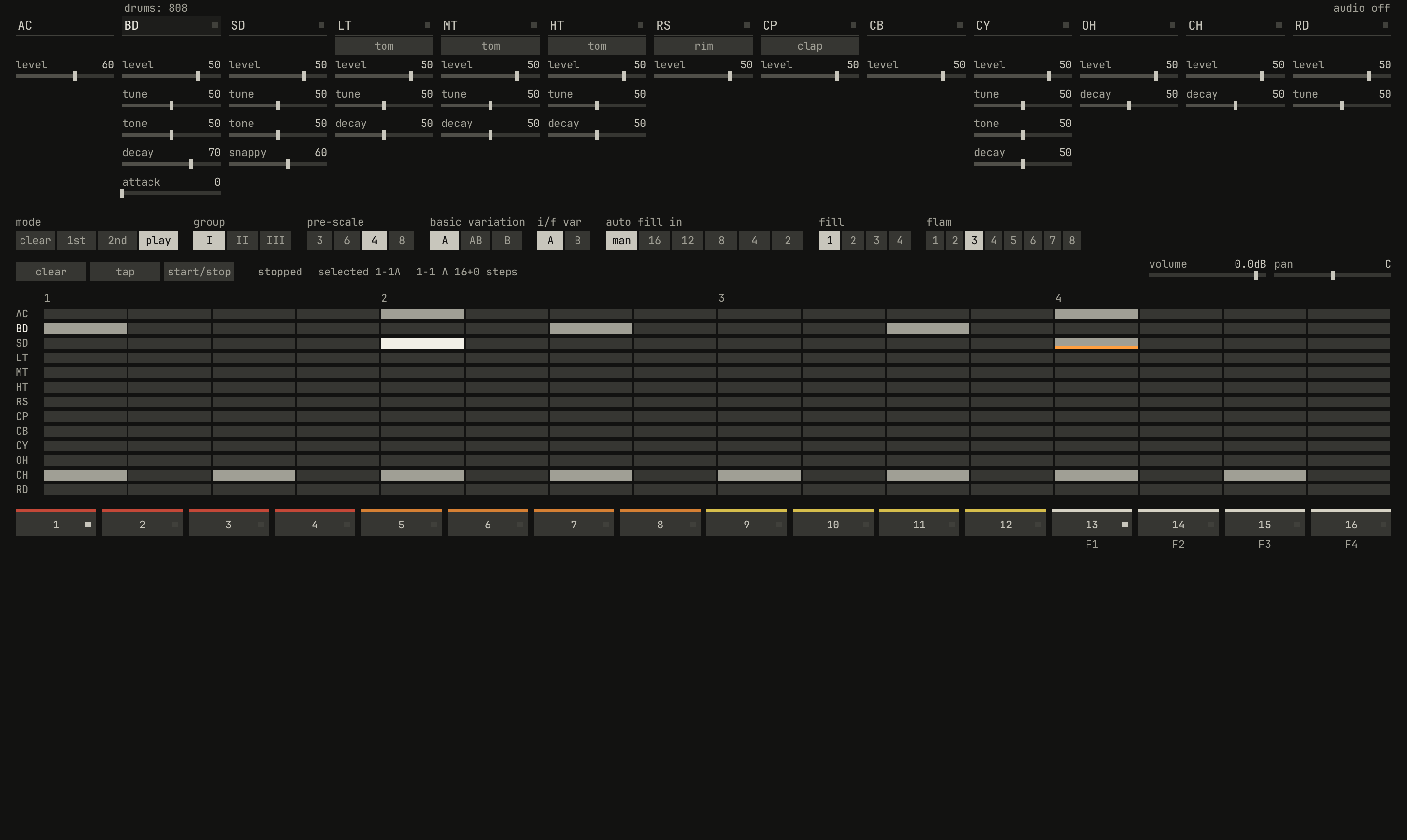
1-1, as the state above writes it: the bass drum on steps 1, 7, and 11; the snare on 5, accented, brighter, and on 13, flammed, underlined; the closed hat on every other step; and the total accent on 5 and 13.openzig build run-studio -- manual/20-files/fields --view device --track 3
fields/song.json
{
  "tempo": ["1 100", "4.3 100 ramp", "5 92"],
  "brief": "a short loop in A minor that slows into a last hit",
  "swing": ["1 50", "3 58"],
  "end": "6",
  "sections": ["1 intro", "3 loop", "5 tail"],
  "key": ["1 A minor"],
  "chords": ["1 Am7", "2 Dm7", "3 Fmaj7", "4 Em7", "4.3 E7", "5 N.C."],
  "devices": [
    {
      "name": "synth",
      "type": "synth",
      "state": {
        "delay_time": "1/8.",
        "reverb_decay": 60,
        "parts": [
          { "patch": "A33", "level": -12, "reverb_send": 30 },
          {
            "patch": { "cutoff": 400, "resonance": 35, "filter_env": 3, "decay": 0.3, "sustain": 30, "release": 0.1 },
            "level": -2
          }
        ]
      }
    },
    {
      "name": "808",
      "type": "drums",
      "state": {
        "accent": 60,
        "program": "1-1A",
        "voices": { "bd": { "decay": 70 }, "sd": { "snappy": 60 } },
        "rhythms": {
          "1-1": { "name": "file beat", "scale": 4, "steps": 16, "flam": 3,
            "A": ["BD x.....x...x.....", "SD ....X.......f...", "CH x.x.x.x.x.x.x.x.", "AC ....x.......x..."] },
          "1-F1": { "scale": 4, "steps": 16, "flam": 3,
            "A": ["BD x.....x.........", "SD ....X...x.xXfXFX", "CH x.x.x.x........."] }
        }
      }
    },
    {
      "name": "S1000",
      "type": "sampler",
      "state": {
        "channels": [{ "channel": 1, "program": 1, "level": -4 }],
        "programs": [
          {
            "program": 1,
            "name": "chops",
            "keygroups": [
              { "keys": "C2", "zones": [{ "sample": "kick" }] },
              { "keys": "D2", "zones": [{ "sample": "snare" }] },
              { "keys": "E2", "zones": [{ "sample": "roll" }] }
            ]
          }
        ],
        "samples": {
          "kick": { "file": "breaks/808.wav", "root": "C2", "end": 12000, "mode": "one_shot" },
          "snare": { "file": "breaks/808.wav", "root": "D2", "start": 30000, "end": 42000, "mode": "one_shot" },
          "roll": { "file": "breaks/808.wav", "root": "E2", "start": 30000, "end": 45000, "mode": "until_release", "loops": ["30000 37500 0 3"] }
        }
      }
    }
  ],
  "desk": {
    "master": 0,
    "delay": { "return": -6, "time": "1/8.", "feedback": 35, "tone": 4000 },
    "reverb": { "return": 0, "decay": 60, "damp": 6000 },
    "strips": {
      "synth": { "level": 0, "pan": 0, "muted": false, "reverb": -18 },
      "808": { "level": -4, "pan": 0, "muted": false, "high_gain": 2 },
      "S1000": { "level": -2, "pan": 10, "muted": false, "delay": -20, "delay_pre": true }
    }
  },
  "tracks": [
    {
      "name": "pad",
      "device": "synth",
      "channel": 1,
      "keys": "chord 7",
      "role": "pad",
      "clips": [{ "at": "1", "length": "5.0.0", "notes": "pad" }],
      "lanes": {
        "chorus": ["1 I", "3 II"]
      }
    },
    {
      "name": "bass",
      "device": "synth",
      "channel": 2,
      "keys": "pent",
      "role": "bass",
      "clips": [
        { "at": "1", "length": "2.0.0", "notes": "bass" },
        { "at": "3", "length": "2.0.0", "notes": "bass" }
      ],
      "lanes": {
        "cutoff": ["1 400", "3 400 exponential", "5 1600"],
        "desk_delay": ["1 -60", "4.3 -60 linear", "5 -14"]
      }
    },
    {
      "name": "drums",
      "device": "808",
      "channel": 1,
      "role": "drums",
      "clips": [
        { "at": "1", "length": "3.0.0", "pattern": "1-1A" },
        { "at": "4", "length": "1.0.0", "pattern": "1-F1A" }
      ]
    },
    {
      "name": "chops",
      "device": "S1000",
      "channel": 1,
      "role": "sample"
    },
    {
      "name": "groups",
      "kind": "groups",
      "clips": [{ "at": "5", "length": "1.0.0", "group": "last hit" }]
    }
  ],
  "notes": {
    "pad": { "length": "5.0.0", "follow": { "pattern": "whole", "low": "F3" } },
    "bass": {
      "length": "2.0.0",
      "notes": [
        "1.1.0 A1 0.0.840 104",
        "1.2.480 A1 0.0.240 80",
        "1.3.0 E2 0.1.0 96",
        "1.4.0 G2 0.0.480 88",
        "2.1.0 D2 0.0.840 104",
        "2.2.480 D2 0.0.240 80",
        "2.3.0 A1 0.1.0 96",
        "2.4.0 C2 0.0.480 88"
      ]
    },
    "crash": {
      "length": "1.0.0",
      "notes": ["1.1.0 C2 0.1.0 120", "1.1.0 Db3 0.1.0 110"]
    },
    "roll": {
      "length": "1.0.0",
      "notes": ["1.1.0 E2 0.2.0 110", "1.3.0 C2 0.1.0 100"]
    }
  },
  "groups": {
    "last hit": {
      "length": "1.0.0",
      "clips": [
        { "track": "drums", "at": "1", "length": "1.0.0", "notes": "crash" },
        { "track": "chops", "at": "1", "length": "1.0.0", "notes": "roll" }
      ]
    }
  },
  "scenes": {
    "F1": ["drums", "groups"],
    "F2": ["pad"]
  }
}
The sampler's state
"state": {
  "channels": [{ "channel": 1, "program": 1, "level": -4 }],
  "programs": [
    {
      "program": 1,
      "name": "chops",
      "keygroups": [
        { "keys": "C2", "zones": [{ "sample": "kick" }] },
        { "keys": "D2", "zones": [{ "sample": "snare" }] },
        { "keys": "E2", "zones": [{ "sample": "roll" }] }
      ]
    }
  ],
  "samples": {
    "kick": { "file": "breaks/808.wav", "root": "C2", "end": 12000, "mode": "one_shot" },
    "snare": { "file": "breaks/808.wav", "root": "D2", "start": 30000, "end": 42000, "mode": "one_shot" },
    "roll": { "file": "breaks/808.wav", "root": "E2", "start": 30000, "end": 45000, "mode": "until_release", "loops": ["30000 37500 0 3"] }
  }
}
Three slices of one sound: the break studio/examples/break renders,
which tools/fetch-samples.sh puts in the library as breaks/808.wav. A
program whose keygroups each hold one key is a kit, so Drum Edit opens its
clips. The state holds three lists, each left out empty:
channels: each channel that differs from a fresh one, by itschannel, 1 to 16: itsprogram, 1 to 100 (left out, 1), and its own controls,level,pan,muted,repeat,levels, andlevels_pad. A channel starts with its program's sound.programs: up to 100, each an object, or the name of a program file in the library, or both, as{ "program": 2, "file": "programs/piano.json", "name": "grand" }, which renames the file's program in the song.samples: up to 256, by name, which the zones name.
| Program field | Range | Left out |
|---|---|---|
program |
1 to 100 | the one after the program before, from 1 |
name |
up to 24 characters | none |
polyphony |
1 to 16 voices | 16 |
crossfade |
true or false: keygroups whose keys overlap crossfade there |
true |
sound |
the sound's controls, below | their defaults |
keygroups |
a list | none: the program is silent |
| Keygroup field | Range | Left out |
|---|---|---|
keys |
a key, or the lowest and highest, as "A0 B0" |
every key, C-1 to G9 |
tune |
−48 to 48 semitones | 0 |
level |
−60 to 24 dB | 0 |
pan |
−100 to 100 | 0 |
cutoff |
−8 to 8 octaves, added to the program's | 0 |
velocity_fade |
true or false: zones crossfade where their velocities overlap |
true |
attack, decay, sustain, release |
as the sound's | the program's |
zones |
up to four: sample, velocity as "1 46" (0 127), tune in cents, ±1200 (0), level in dB, −60 to 24 (0) |
none |
| Sample field | Range | Left out |
|---|---|---|
file |
a WAV file's place in the library | a mistake |
root |
a key, as C4 or 60 |
the file's own, if it gives one, else C4 |
cents |
−100 to 100 | as root, else 0 |
start, end |
frames of the file | its whole |
gain |
−60 to 60 dB | 0 |
mode |
in_release, until_release, none, one_shot |
none |
loops |
up to 8, each "START END CROSSFADE REPEATS", or hold for its repeats |
none |
A sample's mode says what the key does: with in_release, its loops play
on through the release; with until_release, they play while the key
holds, and then the sample plays on to its end; with none, the sample
plays without its loops while the key holds; and with one_shot, it plays
to its end whatever the key does, as a drum hit. A loop plays its repeats,
at least once, or with hold for as long as the mode lets it, and its
crossfade is no longer than the loop or the frames before it. The roll
above plays its first 16th three times, a beat at the break's 96 BPM being
30000 frames, then plays on to its end: three hits and a tail.
The program's sound and the channel's own controls:
| Name | Range | Default | Curve | For |
|---|---|---|---|---|
tune | -24 semitones to 24 semitones | 0 semitones | linear | each channel |
cutoff | 30 Hz to 20000 Hz | 20000 Hz | exponential | each channel |
resonance | 0% to 100% | 0% | linear | each channel |
filter_env | -6 octaves to 6 octaves | 0 octaves | linear | each channel |
filter_attack | 0.001 s to 10 s | 0.001 s | exponential | each channel |
filter_decay | 0.01 s to 30 s | 1 s | exponential | each channel |
filter_sustain | 0% to 100% | 100% | linear | each channel |
filter_release | 0.005 s to 30 s | 0.3 s | exponential | each channel |
key_follow | 0% to 100% | 0% | linear | each channel |
velocity_cutoff | 0% to 100% | 0% | linear | each channel |
velocity_level | 0% to 100% | 75% | linear | each channel |
attack | 0.001 s to 10 s | 0.001 s | exponential | each channel |
decay | 0.01 s to 30 s | 1 s | exponential | each channel |
sustain | 0% to 100% | 100% | linear | each channel |
release | 0.005 s to 30 s | 0.3 s | exponential | each channel |
lfo_rate | 0.05 Hz to 20 Hz | 5 Hz | exponential | each channel |
lfo_wave | triangle / square / random / noise | triangle | switch | each channel |
lfo_delay | 0 s to 5 s | 0 s | cube | each channel |
lfo_pitch | 0 semitones to 12 semitones | 0 semitones | cube | each channel |
lfo_cutoff | 0 octaves to 4 octaves | 0 octaves | cube | each channel |
lfo_level | 0% to 100% | 0% | cube | each channel |
grain | 16-bit / 12-bit | 16-bit | switch | each channel |
| Name | Range | Default | Curve | For |
|---|---|---|---|---|
level | -60 dB to 6 dB | 0 dB | linear | each channel |
pan | -100% to 100% | 0% | linear | each channel |
muted | off / on | off | switch | each channel |
repeat | off / 1/4 / 1/8 / 1/8T / 1/16 / 1/16T / 1/32 | off | switch | each channel |
levels | off / tune / velocity | off | switch | each channel |
levels_pad | 1 to 16 | 1 | linear, steps of 1 | each channel |
The file writes a keygroup's keys with sharps, A#0, where notes use
flats. A program read from a program file is written inline when the song
saves, with every keygroup and sample, and the song stops naming the file.
The sampler's book teaches the rest.
The desk
"desk": {
  "master": 0,
  "delay": { "return": -6, "time": "1/8.", "feedback": 35, "tone": 4000 },
  "reverb": { "return": 0, "decay": 60, "damp": 6000 },
  "strips": {
    "synth": { "level": 0, "pan": 0, "muted": false, "reverb": -18 },
    "808": { "level": -4, "pan": 0, "muted": false, "high_gain": 2 },
    "S1000": { "level": -2, "pan": 10, "muted": false, "delay": -20, "delay_pre": true }
  }
}
| Field | Range | Left out |
|---|---|---|
master |
−60 to 6 dB | 0 |
delay: return |
−60 to 6 dB | 0 |
delay: time |
1/16, 1/8, 1/8., 1/4, 1/2 |
1/8 |
delay: feedback |
0 to 95% | 40 |
delay: tone |
500 to 16000 Hz | 5000 |
reverb: return |
−60 to 6 dB | 0 |
reverb: decay |
0 to 100% | 50 |
reverb: damp |
1000 to 16000 Hz | 6000 |
a strip's level |
−60 to 6 dB | 0 |
pan |
−100 to 100, a balance | 0 |
muted, solo |
true or false |
false |
low_freq |
62 to 1500 Hz | 300 |
low_gain |
−15 to 15 dB | 0 |
high_freq |
1000 to 8000 Hz | 3000 |
high_gain |
−15 to 15 dB | 0 |
delay, reverb |
−60 to 0 dB, the sends | −60, off |
delay_pre, reverb_pre |
true before the fader, false after |
false |
Strips go by their device's name, and a device the desk leaves out has a fresh strip, at 0 dB in the middle, flat, with no sends. A fader or a send at −60 dB, the bottom of its travel, is off. The file writes a strip's level, pan, and mute always, and the rest where they differ from a fresh strip's. Chapter 17 teaches the desk.
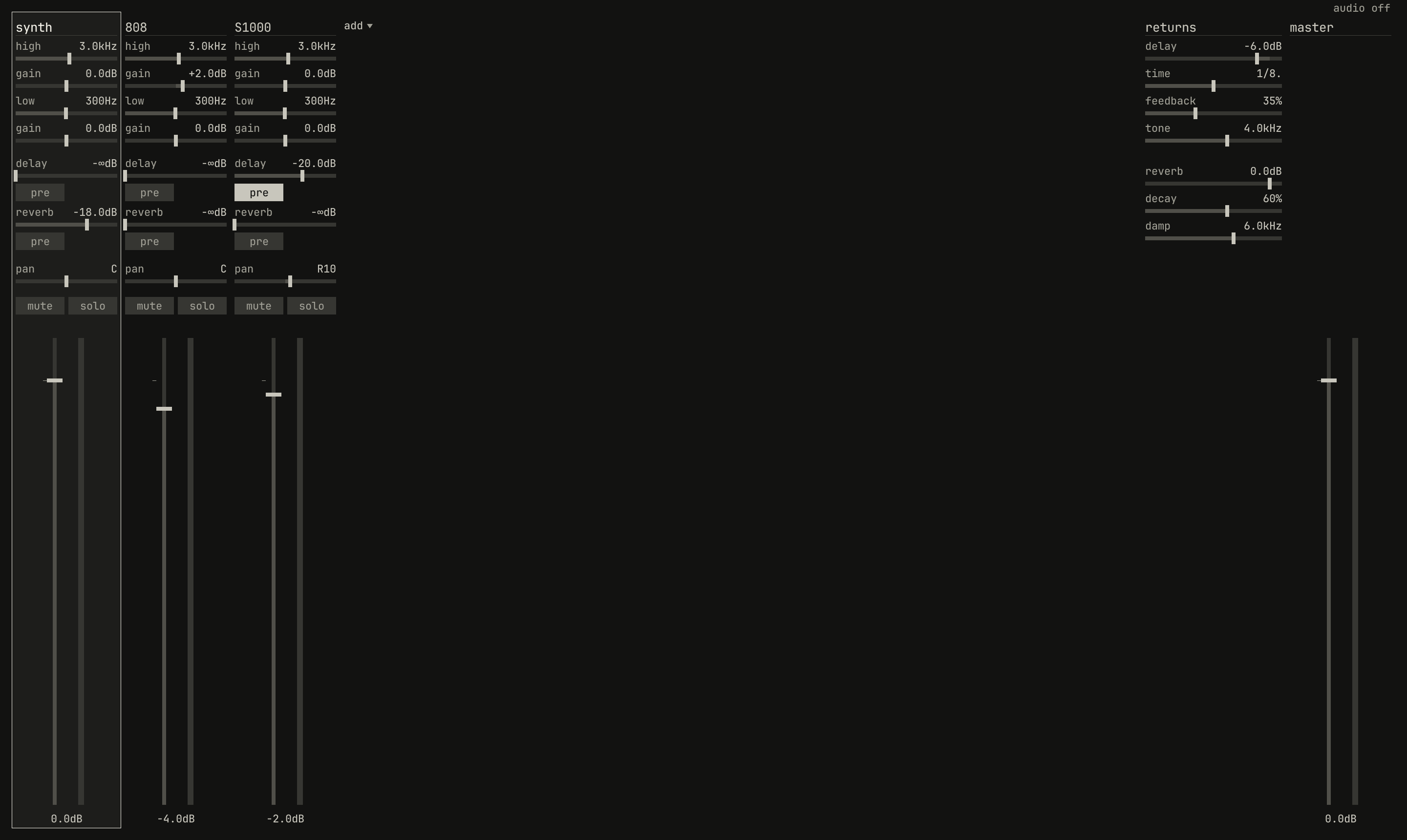
808's high band up 2 dB and its fader at −4 dB, the S1000 panned right and sending to the delay before its fader, the synth sending to the reverb, and the returns.openzig build run-studio -- manual/20-files/fields --view desk
fields/song.json
{
  "tempo": ["1 100", "4.3 100 ramp", "5 92"],
  "brief": "a short loop in A minor that slows into a last hit",
  "swing": ["1 50", "3 58"],
  "end": "6",
  "sections": ["1 intro", "3 loop", "5 tail"],
  "key": ["1 A minor"],
  "chords": ["1 Am7", "2 Dm7", "3 Fmaj7", "4 Em7", "4.3 E7", "5 N.C."],
  "devices": [
    {
      "name": "synth",
      "type": "synth",
      "state": {
        "delay_time": "1/8.",
        "reverb_decay": 60,
        "parts": [
          { "patch": "A33", "level": -12, "reverb_send": 30 },
          {
            "patch": { "cutoff": 400, "resonance": 35, "filter_env": 3, "decay": 0.3, "sustain": 30, "release": 0.1 },
            "level": -2
          }
        ]
      }
    },
    {
      "name": "808",
      "type": "drums",
      "state": {
        "accent": 60,
        "program": "1-1A",
        "voices": { "bd": { "decay": 70 }, "sd": { "snappy": 60 } },
        "rhythms": {
          "1-1": { "name": "file beat", "scale": 4, "steps": 16, "flam": 3,
            "A": ["BD x.....x...x.....", "SD ....X.......f...", "CH x.x.x.x.x.x.x.x.", "AC ....x.......x..."] },
          "1-F1": { "scale": 4, "steps": 16, "flam": 3,
            "A": ["BD x.....x.........", "SD ....X...x.xXfXFX", "CH x.x.x.x........."] }
        }
      }
    },
    {
      "name": "S1000",
      "type": "sampler",
      "state": {
        "channels": [{ "channel": 1, "program": 1, "level": -4 }],
        "programs": [
          {
            "program": 1,
            "name": "chops",
            "keygroups": [
              { "keys": "C2", "zones": [{ "sample": "kick" }] },
              { "keys": "D2", "zones": [{ "sample": "snare" }] },
              { "keys": "E2", "zones": [{ "sample": "roll" }] }
            ]
          }
        ],
        "samples": {
          "kick": { "file": "breaks/808.wav", "root": "C2", "end": 12000, "mode": "one_shot" },
          "snare": { "file": "breaks/808.wav", "root": "D2", "start": 30000, "end": 42000, "mode": "one_shot" },
          "roll": { "file": "breaks/808.wav", "root": "E2", "start": 30000, "end": 45000, "mode": "until_release", "loops": ["30000 37500 0 3"] }
        }
      }
    }
  ],
  "desk": {
    "master": 0,
    "delay": { "return": -6, "time": "1/8.", "feedback": 35, "tone": 4000 },
    "reverb": { "return": 0, "decay": 60, "damp": 6000 },
    "strips": {
      "synth": { "level": 0, "pan": 0, "muted": false, "reverb": -18 },
      "808": { "level": -4, "pan": 0, "muted": false, "high_gain": 2 },
      "S1000": { "level": -2, "pan": 10, "muted": false, "delay": -20, "delay_pre": true }
    }
  },
  "tracks": [
    {
      "name": "pad",
      "device": "synth",
      "channel": 1,
      "keys": "chord 7",
      "role": "pad",
      "clips": [{ "at": "1", "length": "5.0.0", "notes": "pad" }],
      "lanes": {
        "chorus": ["1 I", "3 II"]
      }
    },
    {
      "name": "bass",
      "device": "synth",
      "channel": 2,
      "keys": "pent",
      "role": "bass",
      "clips": [
        { "at": "1", "length": "2.0.0", "notes": "bass" },
        { "at": "3", "length": "2.0.0", "notes": "bass" }
      ],
      "lanes": {
        "cutoff": ["1 400", "3 400 exponential", "5 1600"],
        "desk_delay": ["1 -60", "4.3 -60 linear", "5 -14"]
      }
    },
    {
      "name": "drums",
      "device": "808",
      "channel": 1,
      "role": "drums",
      "clips": [
        { "at": "1", "length": "3.0.0", "pattern": "1-1A" },
        { "at": "4", "length": "1.0.0", "pattern": "1-F1A" }
      ]
    },
    {
      "name": "chops",
      "device": "S1000",
      "channel": 1,
      "role": "sample"
    },
    {
      "name": "groups",
      "kind": "groups",
      "clips": [{ "at": "5", "length": "1.0.0", "group": "last hit" }]
    }
  ],
  "notes": {
    "pad": { "length": "5.0.0", "follow": { "pattern": "whole", "low": "F3" } },
    "bass": {
      "length": "2.0.0",
      "notes": [
        "1.1.0 A1 0.0.840 104",
        "1.2.480 A1 0.0.240 80",
        "1.3.0 E2 0.1.0 96",
        "1.4.0 G2 0.0.480 88",
        "2.1.0 D2 0.0.840 104",
        "2.2.480 D2 0.0.240 80",
        "2.3.0 A1 0.1.0 96",
        "2.4.0 C2 0.0.480 88"
      ]
    },
    "crash": {
      "length": "1.0.0",
      "notes": ["1.1.0 C2 0.1.0 120", "1.1.0 Db3 0.1.0 110"]
    },
    "roll": {
      "length": "1.0.0",
      "notes": ["1.1.0 E2 0.2.0 110", "1.3.0 C2 0.1.0 100"]
    }
  },
  "groups": {
    "last hit": {
      "length": "1.0.0",
      "clips": [
        { "track": "drums", "at": "1", "length": "1.0.0", "notes": "crash" },
        { "track": "chops", "at": "1", "length": "1.0.0", "notes": "roll" }
      ]
    }
  },
  "scenes": {
    "F1": ["drums", "groups"],
    "F2": ["pad"]
  }
}
Tracks
{
  "name": "bass",
  "device": "synth",
  "channel": 2,
  "keys": "pent",
  "role": "bass",
  "clips": [ ... ],
  "lanes": { ... }
}
| Field | Range | Left out |
|---|---|---|
name |
a string, one a track | a mistake |
kind |
instrument, groups for a group track, or audio |
instrument |
device |
a device's name | a mistake |
channel |
1 to the device's channels: the synth 4, the drum machine 1, the sampler 16 | 1 |
keys |
all, key, pent, or chord, chord 7, or chord 9, each with or without bass after it |
all |
role |
none, drums, bass, chords, pad, lead, arp, sample |
none |
reference |
true or false |
false |
muted |
true or false |
false |
clips |
clips | none |
lanes |
lanes | none |
Up to 64 tracks, in the track list's order. keys is the inspector's
plays ▾, the way the letter keys, a keyboard, and the pads play the track
(chapter 3,
chapter 4), and role its
role ▾ (chapter 6). The file writes them only
where they aren't all and none. A muted track's clips play on
underneath, so unmuting comes in on time.
A track keeps no transposition, level, or pan of its own. The inspector's
are its device's controls on its channel: the synth part's transpose,
level, and pan, the sampler channel's level and pan, and the drum
machine's. The device's state holds where they start, and the track's
lanes move them.
A group track, "kind": "groups", holds a name, muted, and clips that
place groups, and nothing else.
Audio tracks
{
  "name": "vocal",
  "kind": "audio",
  "input": "1",
  "monitor": true,
  "strip": { "level": -3, "pan": 0, "muted": false, "reverb": -18 },
  "clips": [
    { "at": "9", "audio": "audio/vocal-1.wav", "offset": 0, "frames": 384000, "gain": -2, "fade_in": 480 }
  ]
}
An audio track, "kind": "audio", has no device or channel. It holds its
name, muted, input, monitor, armed, its strip on the desk, and
clips of its recordings:
| Field | Range | Left out |
|---|---|---|
input |
1, 2, or 1+2, the input it records and hears |
1 |
monitor |
true or false: mon, hearing the input |
false |
armed |
true or false: it records when the song does |
false |
strip |
its strip's controls, as a desk strip's | a flat strip at 0 dB |
An audio clip has at, and in place of length, a recording:
| Field | Range | Left out |
|---|---|---|
audio |
the recording's file, in the song's folder, as audio/vocal-1.wav |
a mistake |
offset |
the frame of the recording it starts from | 0 |
frames |
how many frames it plays, at 48 kHz, 1 or more | a mistake |
gain |
dB | 0 |
fade_in, fade_out |
frames | 0 |
Its frames are what it is: reading works out its length in positions from
them, by the song's tempo, so a tempo change moves its start and keeps its
speed. Its lanes set its strip, as desk_level, and no others. The song
holds up to 16 audio tracks. A recording missing from the folder plays
silence, and the window loads each one on the sampler's disk thread into
its pool of sample memory, at 16 bits, so the song opens at once and its
recordings sound as they arrive. studio render reads them from the
song's folder. Chapter 14 records them.
The chapter's song has no audio track, so the excerpt is another's.
The reference track
{
  "name": "phrase",
  "device": "S1000 2",
  "channel": 1,
  "reference": true,
  "clips": [
    { "at": "1", "length": "4.0.0", "notes": "phrase" }
  ]
}
A recording to compare the song with, as a WAV dropped with Shift makes
it: a track on a sampler of its own, playing the recording on one note. It
plays in the window, but not in an export, nor in a render unless
--with-reference asks, and the coach and the ghosts leave it out. The
window gives a song one reference.
Chapter 9 teaches it. The
excerpt is from this chapter's song with loops/phrase.wav dropped on it
and saved.
Clips
"clips": [
  { "at": "1", "length": "2.0.0", "notes": "bass" },
  { "at": "3", "length": "2.0.0", "notes": "bass" }
]
| Field | Range | Left out |
|---|---|---|
at |
a position in the song | a mistake |
length |
a length | a mistake |
notes |
the name of notes | |
pattern |
a program of the track's device | |
group |
a group's name |
A clip names one of the last three: notes or a pattern on an instrument track, never both, and a group on a group track. A notes clip plays the notes it names from its start, and loops them to its length when it's longer than they are. Two clips naming the same notes are linked, as the bass's two are here: an edit to one is an edit to both. Notes can't be played by two types of device. A pattern clip selects the device's program and plays its own sequence for the clip's length:
| Device | A program |
|---|---|
| synth | a slot, A11 to B88, whose sequence plays |
| drum machine | a rhythm, as 1-1A, 1-1B, 1-1AB, or a fill, 1-F1A |
| sampler | a program's number, as a string, "1" to "100"; it has no sequence, so the clip only selects it |
Clips may come in any order; reading sorts them, and writing writes them by position. Chapter 13 arranges them.
Lanes
"lanes": {
  "cutoff": ["1 400", "3 400 exponential", "5 1600"],
  "desk_delay": ["1 -60", "4.3 -60 linear", "5 -14"]
}
| Type | Range | Left out |
|---|---|---|
points POSITION VALUE, then linear or exponential |
the param's range, or a switch's position | no lanes |
A lane is named for a param of the track's device, as its book's tables
name it, such as the synth's cutoff or the drum machine's bd_decay, or
for one of the device's strip on the desk, the strip's control after
desk_: desk_level, desk_pan, desk_muted, desk_solo,
desk_low_freq, desk_low_gain, desk_high_freq, desk_high_gain,
desk_delay, desk_delay_pre, desk_reverb, and desk_reverb_pre. It
sets the param on the track's channel, or the whole device's where the
param is the device's.
Positions are the song's. A point holds its value to the next, unless its
shape moves it there: linear in a straight line, or exponential along a
curve, as a filter's sweep sounds even, between values of one sign. Here
the bass's filter holds at 400 Hz to bar 3, then opens to 1600 Hz by bar
5, and the synth's delay send holds off until beat 3 of bar 4, then rises
to −14 dB by bar 5. A switch takes its positions by name and holds them,
as the pad's "chorus": ["1 I", "3 II"]. Before its first point, the
device's own value holds. Chapter 16 draws them.
Notes
"bass": {
  "length": "2.0.0",
  "notes": [
    "1.1.0 A1 0.0.840 104",
    "1.2.480 A1 0.0.240 80",
    ...
  ]
}
notes holds what notes clips play, by name:
| Field | Range | Left out |
|---|---|---|
length |
a length: where they loop, in a clip longer than they are | a mistake |
notes |
notes, POSITION KEY LENGTH VELOCITY |
none |
events |
events, POSITION and what happens |
none |
follow |
{ "pattern": NAME, "low": KEY }, in place of notes |
the notes as written |
A note is its position from the start of the notes, bar 1 being their
first bar; its key, a name such as A1, Db3, or C#3, or a number from
0 to 127, with C4 60 and A4 69; its length; and its velocity, 0 to 127.
The file writes keys with flats and positions whole, one note a line, as
List Edit shows them:

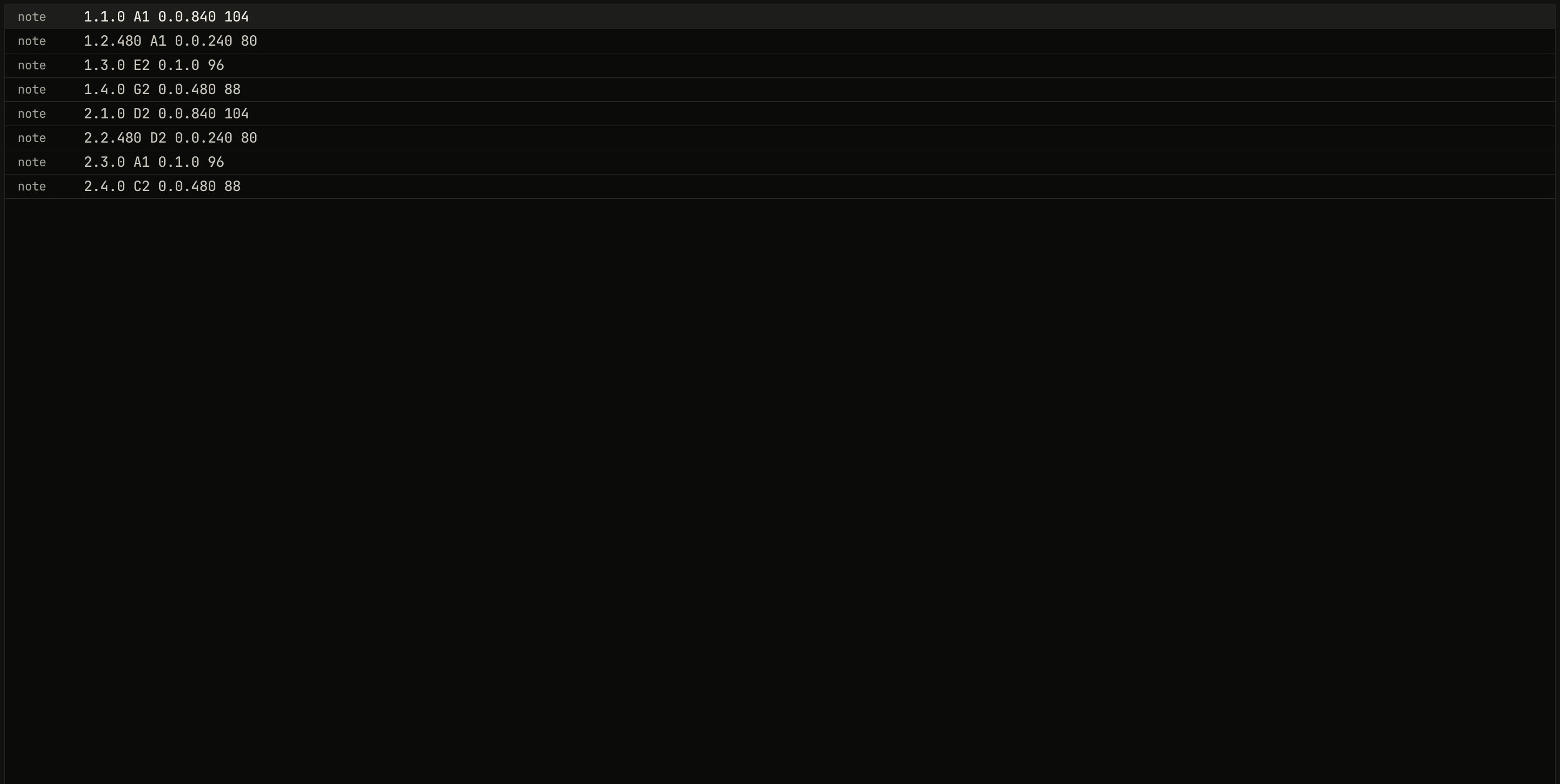
song.json, and typing one anew changes the file's.scriptzig build run-studio -- manual/20-files/fields --view editor --track 2 --script manual/20-files/list.txt
fields/song.json
{
  "tempo": ["1 100", "4.3 100 ramp", "5 92"],
  "brief": "a short loop in A minor that slows into a last hit",
  "swing": ["1 50", "3 58"],
  "end": "6",
  "sections": ["1 intro", "3 loop", "5 tail"],
  "key": ["1 A minor"],
  "chords": ["1 Am7", "2 Dm7", "3 Fmaj7", "4 Em7", "4.3 E7", "5 N.C."],
  "devices": [
    {
      "name": "synth",
      "type": "synth",
      "state": {
        "delay_time": "1/8.",
        "reverb_decay": 60,
        "parts": [
          { "patch": "A33", "level": -12, "reverb_send": 30 },
          {
            "patch": { "cutoff": 400, "resonance": 35, "filter_env": 3, "decay": 0.3, "sustain": 30, "release": 0.1 },
            "level": -2
          }
        ]
      }
    },
    {
      "name": "808",
      "type": "drums",
      "state": {
        "accent": 60,
        "program": "1-1A",
        "voices": { "bd": { "decay": 70 }, "sd": { "snappy": 60 } },
        "rhythms": {
          "1-1": { "name": "file beat", "scale": 4, "steps": 16, "flam": 3,
            "A": ["BD x.....x...x.....", "SD ....X.......f...", "CH x.x.x.x.x.x.x.x.", "AC ....x.......x..."] },
          "1-F1": { "scale": 4, "steps": 16, "flam": 3,
            "A": ["BD x.....x.........", "SD ....X...x.xXfXFX", "CH x.x.x.x........."] }
        }
      }
    },
    {
      "name": "S1000",
      "type": "sampler",
      "state": {
        "channels": [{ "channel": 1, "program": 1, "level": -4 }],
        "programs": [
          {
            "program": 1,
            "name": "chops",
            "keygroups": [
              { "keys": "C2", "zones": [{ "sample": "kick" }] },
              { "keys": "D2", "zones": [{ "sample": "snare" }] },
              { "keys": "E2", "zones": [{ "sample": "roll" }] }
            ]
          }
        ],
        "samples": {
          "kick": { "file": "breaks/808.wav", "root": "C2", "end": 12000, "mode": "one_shot" },
          "snare": { "file": "breaks/808.wav", "root": "D2", "start": 30000, "end": 42000, "mode": "one_shot" },
          "roll": { "file": "breaks/808.wav", "root": "E2", "start": 30000, "end": 45000, "mode": "until_release", "loops": ["30000 37500 0 3"] }
        }
      }
    }
  ],
  "desk": {
    "master": 0,
    "delay": { "return": -6, "time": "1/8.", "feedback": 35, "tone": 4000 },
    "reverb": { "return": 0, "decay": 60, "damp": 6000 },
    "strips": {
      "synth": { "level": 0, "pan": 0, "muted": false, "reverb": -18 },
      "808": { "level": -4, "pan": 0, "muted": false, "high_gain": 2 },
      "S1000": { "level": -2, "pan": 10, "muted": false, "delay": -20, "delay_pre": true }
    }
  },
  "tracks": [
    {
      "name": "pad",
      "device": "synth",
      "channel": 1,
      "keys": "chord 7",
      "role": "pad",
      "clips": [{ "at": "1", "length": "5.0.0", "notes": "pad" }],
      "lanes": {
        "chorus": ["1 I", "3 II"]
      }
    },
    {
      "name": "bass",
      "device": "synth",
      "channel": 2,
      "keys": "pent",
      "role": "bass",
      "clips": [
        { "at": "1", "length": "2.0.0", "notes": "bass" },
        { "at": "3", "length": "2.0.0", "notes": "bass" }
      ],
      "lanes": {
        "cutoff": ["1 400", "3 400 exponential", "5 1600"],
        "desk_delay": ["1 -60", "4.3 -60 linear", "5 -14"]
      }
    },
    {
      "name": "drums",
      "device": "808",
      "channel": 1,
      "role": "drums",
      "clips": [
        { "at": "1", "length": "3.0.0", "pattern": "1-1A" },
        { "at": "4", "length": "1.0.0", "pattern": "1-F1A" }
      ]
    },
    {
      "name": "chops",
      "device": "S1000",
      "channel": 1,
      "role": "sample"
    },
    {
      "name": "groups",
      "kind": "groups",
      "clips": [{ "at": "5", "length": "1.0.0", "group": "last hit" }]
    }
  ],
  "notes": {
    "pad": { "length": "5.0.0", "follow": { "pattern": "whole", "low": "F3" } },
    "bass": {
      "length": "2.0.0",
      "notes": [
        "1.1.0 A1 0.0.840 104",
        "1.2.480 A1 0.0.240 80",
        "1.3.0 E2 0.1.0 96",
        "1.4.0 G2 0.0.480 88",
        "2.1.0 D2 0.0.840 104",
        "2.2.480 D2 0.0.240 80",
        "2.3.0 A1 0.1.0 96",
        "2.4.0 C2 0.0.480 88"
      ]
    },
    "crash": {
      "length": "1.0.0",
      "notes": ["1.1.0 C2 0.1.0 120", "1.1.0 Db3 0.1.0 110"]
    },
    "roll": {
      "length": "1.0.0",
      "notes": ["1.1.0 E2 0.2.0 110", "1.3.0 C2 0.1.0 100"]
    }
  },
  "groups": {
    "last hit": {
      "length": "1.0.0",
      "clips": [
        { "track": "drums", "at": "1", "length": "1.0.0", "notes": "crash" },
        { "track": "chops", "at": "1", "length": "1.0.0", "notes": "roll" }
      ]
    }
  },
  "scenes": {
    "F1": ["drums", "groups"],
    "F2": ["pad"]
  }
}
list.txt
wait 0.1
click edit list
wait 0.1
capture list.png
An event is a position and one of:
| Event | Does |
|---|---|
program NAME |
selects a program, named as a pattern clip names it |
pedal down, pedal up |
the hold pedal |
panic |
lets every key up and stops every sequence |
chord 0 4 7 |
on the synth, chord mode's intervals, as its chord mode takes them |
sysex 7d 01 ... |
any device's SysEx, as its bytes in hex |
studio/examples/phrase opens its notes with "1.1.0 program A63", and
Shoreline's stabs change chord with "1.1.0 chord 0 4 7 11 14". Events
go in order.
A follower has a follow in place of its notes, which the studio makes
from the chord row when it reads the song and again whenever it changes:
"pad": { "length": "5.0.0", "follow": { "pattern": "whole", "low": "F3" } }
pattern is one of the follower patterns, roots, quarters, eighths,
offbeat, octaves, root five, tresillo, and pump for a bass,
whole, halves, stabs, pulse, charleston, and broken for chords,
and up and up down for an arpeggio
(chapter 6). low is the part's lowest
note, E2 if it's left out: a bass's root sits in the octave above it, and a
chord's voicing in the octave and a fifth above. A follower's length is its
clip's, which the studio writes, and a group can't hold one.
Notes no clip names, as after their track was deleted, are kept, and read as the first type of device that has all their programs.
Groups
"groups": {
  "last hit": {
    "length": "1.0.0",
    "clips": [
      { "track": "drums", "at": "1", "length": "1.0.0", "notes": "crash" },
      { "track": "chops", "at": "1", "length": "1.0.0", "notes": "roll" }
    ]
  }
}
| Field | Range | Left out |
|---|---|---|
length |
a length: where the group loops | a mistake |
clips |
clips, each with the instrument track it goes on |
none |
A group is clips across tracks, used as one: a group track's clip places
it, { "at": "5", "length": "1.0.0", "group": "last hit" }, and an edit to
its clips changes every place it's used. A group's clip positions count
from the group's start, bar 1 being its first bar. A group clip longer than
its group loops it, and a member running past the group clip's end stops
there. In the first figure, the outlined clips on drums and chops in
bar 5 are the group's.
Mute scenes
"scenes": {
  "F1": ["drums", "groups"],
  "F2": ["pad"]
}
| Type | Range | Left out |
|---|---|---|
F1 to F10, each a list of tracks' names |
the tracks muted in the scene | no scenes |
A scene is the tracks it mutes: recalling it mutes them and unmutes the rest, so an empty list unmutes every track. Alt+F1–F10 recalls one, and recording records it; Ctrl+Alt+F1–F10 stores the tracks' mutes as one. A scene never stored is left out of the file.
Settings: keys.json, said.json, and audio.json
The studio keeps three files of its own in its settings folder,
$XDG_CONFIG_HOME/studio, or ~/.config/studio without it. It reads them
when the window opens and writes them when it closes; a script or a
capture does neither, so it plays the same every time.
keys.json: the commands whose keys you've used, by their names in this manual's tables, which F1's screen draws blue:["play_stop", "save", "duplicate"]. Without the file, the window treats you as new and says where to start. Delete it to see the window as on your first day.said.json: the last 64 things said on the say line, and what the studio did for each, which Up and Down step through:{"said": "add a chord progression", "did": "the selection: chords minor cadence (i iv V i)"}, one a line.audio.json: the round tripmeasure the latencytimed, in frames at 48 kHz, as{ "latency": 2248 }, written when it's measured (chapter 14).
The model's answers
Every answer TypeSafe's model gives the studio is kept in
$XDG_CACHE_HOME/studio/systemone, or ~/.cache/studio/systemone: a file a
request, named by the SHA-256 of the request's text, as
00351809b04d….json, holding the request and the answer. A request asked
again is answered from the file and not sent. The files are safe to
delete; the next request sends again. --ai record DIR keeps the same
files in a folder of its own, which --ai replay DIR answers from, as this
manual's figures do (chapter 21).
The library
The sampler names its sounds by their place in the library folder,
library/ where the studio runs, or the folder --library names. Nothing
in it is in the repository; tools/fetch-samples.sh fills it:
| Place | What |
|---|---|
SalamanderGrandPianoV3_48khz24bit/ |
the Salamander Grand Piano, as WAV files and SFZ |
programs/piano.json |
the piano as a program file, which studio/examples/piano names |
sea/sea-waves.wav |
the sea, which Shoreline's sea track plays |
breaks/808.wav |
a two-bar 808 break, rendered from studio/examples/break |
loops/phrase.wav, loops/break-122.wav |
the two loops studio/examples/two-loop drops |
ATTRIBUTION.md |
the sounds' authors and licenses |
The studio adds to it as it works:
recorded/take-N.wav: what the sampler's record page records, the first free number.imported/NAME.wav: a WAV file dropped on the window from outside the library, copied in. Another file of the same name becomesNAME-2.wav, and the same file dropped again is the copy already there.
Samples are WAV files, 16, 24, or 32-bit or float, mono or stereo, at any rate. A sample a song names that isn't in the library plays nothing.
Program files
A program file is one sampler program and the samples it plays, kept in
the library so songs can share it, as studio import-sfz writes it
(chapter 21):
{ "program": 1, "name": "piano", "polyphony": 16, "crossfade": true,
  "sound": { "tune": 0, "cutoff": 20000, ... },
  "keygroups": [
    { "keys": "A0 A#0", "zones": [{ "sample": "A0v3", "velocity": "1 46" }, ...] },
    ...
  ],
  "samples": {
    "A0v3": { "file": "SalamanderGrandPianoV3_48khz24bit/48khz24bit/A0v3.wav", "root": "A0" },
    ...
  }
}
It's a program's object, as a song's state holds one, with samples
beside its keygroups. A song's program names it with file, and its
program number in the file is left for the song's. The sampler's library
page lists program files with its samples, and a click loads one into the
channel's program; it's named after its file if it has no name.
Templates and follower patterns
Ctrl+N's templates are songs in studio/templates/, a folder each
with its song.json: two-loop, pop, boom-bap, techno, and
ballad. The follower patterns are in studio/patterns.json, each a role,
a line that says what it plays, and notes whose keys are chord tones, as
"1.1.0 B 1.0.0 100" for the chord's bass held a bar. The build puts both
into the studio, so a change to either needs zig build to be heard. A
template opens as a new song without a folder, so its first save asks for
one.
Next: chapter 21, the command line and scripts, every command and option, and window scripts.