II. Breaks, takes, and songs
Sampling
To sample, on a sampler, is to record: a voice, an instrument, a few bars
of a record, the sea. The record page records from the computer's input
into the sample memory, as the S1000's REC pages did, with two things
later samplers added, a gain and a pre-trigger, and every take becomes a
new sample and a WAV file in the library. The figures here can't sample,
since a capture opens no input; they show the page, and the rest is in the
words.
Open the window on an empty sampler and turn to the record page:
zig build run-studio -- manual/sampler/05-sampling/empty --view device
The input
The input opens the first time the record page shows, or a take begins,
and not before: the studio doesn't listen until a sampler wants it. It's
the system's default input, at the studio's 48 kHz, opened beside the
output on a device of its own, so an input that stalls leaves the output
playing. On macOS, the system asks then whether the terminal running the
studio may use the microphone; without it, the input hears silence. With
no input at all, the status line says no input to sample from.
The meter, at the top of the page, shows the input's level, after gain,
from −60 to 0 dB: no input heard yet under it until something arrives,
and in red with clipping: turn the gain down at full scale. gain turns
the input up or down, from −24 to 24 dB, before everything else. The
S1000's manual, on page 36:
As with all recording processes, setting the level high will increase the final signal-to-noise ratio, but remember that digital clipping is an extremely unpleasant effect, and once recorded, cannot be eliminated.
The studio doesn't pass the input to the output, so you hear what you're sampling from the source itself, not through the studio.
Starting and stopping
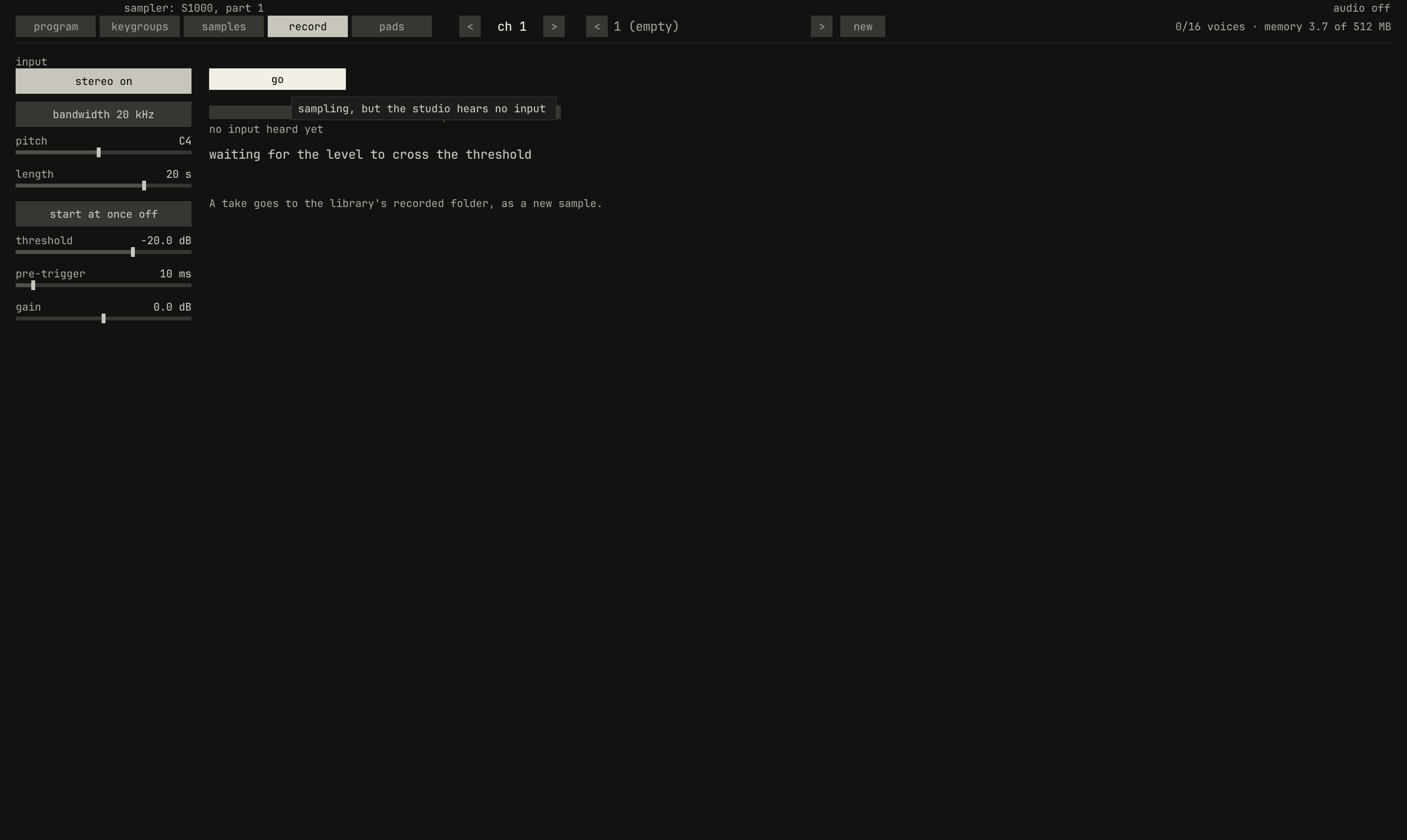
record page after arm: waiting for the level to cross the threshold, the amber mark on the meter, at −20 dB. The button reads go, which starts the take by hand.scriptzig build run-studio -- manual/sampler/05-sampling/empty --view device --track 1 --script manual/sampler/05-sampling/armed.txt
empty/song.json
{
  "tempo": 120,
  "end": "2",
  "devices": [{ "name": "S1000", "type": "sampler" }],
  "tracks": [{ "name": "sampler", "device": "S1000", "channel": 1 }]
}
armed.txt
# The record page, armed: waiting for the level to cross the threshold.
click 315 67
wait 0.1
click 284 121
wait 0.2
capture armed.png
arm takes room in the sample memory for the take and waits. When the
level crosses threshold, from −60 to 0 dB, the take starts by itself;
the S1000's default was −20 dB, and so is this one's. Its manual, on page
35: "You should set the trigger level to be just below the signal level at
which sampling should begin." With start at once on, arm starts the
take at once instead. Armed, the button reads go, which starts it by
hand, as the S1000's GO did; recording, it reads stop, and the page
counts the seconds, as 1.2 of 20 s.
A sound that starts above the threshold has a beginning quieter than the
threshold, which a take that started at the crossing would lose.
pre-trigger keeps it: the take starts that much before the crossing,
from 0 to 100 ms, 10 ms unless it's set.
A take stops at stop, or when it's as long as length, from 1 to 60
seconds, 20 unless it's set. The S1000 went on to the end of its time
whatever you did: "Once the recording process is started (or you press the
GO key), there is no way you can stop the recording process, which will
continue inexorably till it reaches the end of the selected recording
time" (page 36). A take stopped before anything was recorded keeps
nothing, and gives its room back.
What a take is
The rest of the page says what the take will be, as it's armed:
stereo: on, two channels, as the input gives them; off, one, their average.bandwidth:20 kHz, the full rate, or10 kHz, half the rate, 24 kHz, which takes half the memory. The input goes through the half-band filter the synth oversamples with, which passes 10 kHz flat and stops 14 kHz and up, before every second frame is kept.pitch: the take's root, C4 unless it's set.
A take keeps the channels, the bandwidth, and the length it was armed with, so turning them while it waits or records changes the next one; the gain, the threshold, the pre-trigger, and the pitch take effect at once. Its room in the memory is all taken when it's armed: 20 seconds of stereo at 48 kHz is 3.7 MB, as the header counts them. The S1000's manual puts the advice first, on page 32: "In sampling, it is better to start with too much memory space than too little." The S1000's bandwidth was the same choice, on page 34:
Either 10kHz or 20kHz. These figures refer to the audio bandwidth of the completed sample - not the sampling frequency, which is either 44.1kHz or 22.05kHz (for the technically minded, Nyquist's theorem applies here). Sampling at the lower frequency will give you more memory, but filter out the top octave.
The S1000 could also start a take on a MIDI note or a footswitch, and pass the input through to its outputs; this page does neither.
Where takes go
A take stopped becomes a new sample, selected, and the panel turns to the
samples page to show it. Its frames go to the library as a 16-bit WAV
file, recorded/take-1.wav, or the first number the folder doesn't hold
yet, written by the thread that loads samples, so the window doesn't wait
for the disk. A song that names the take finds it there the next time it
opens.
From there it's a sample like any other: trim its silence with start and
end, normalize it, loop it, set its root, put it on keys or pads
(chapter 1, chapter 2, chapter
4).
Next: chapter 6, sounds in the song, recordings dropped on the arrange view and fitted to its bars.