I. The voices
Accent
A drummer doesn't hit every note the same: the beat lands harder, a ghost note barely touches the head. A drum machine's word for a harder hit is accent. The 808 has one, for a whole step at a time, and the 909 adds a second, for one voice on one step; a note played from the keys or a clip sets it by its velocity. This chapter is all three, and what accent does to each voice.
zig build run-studio -- manual/drums/05-accent/ac --view device
The accent row
0.0 / 6.0 s
peak -8.2 dBFS
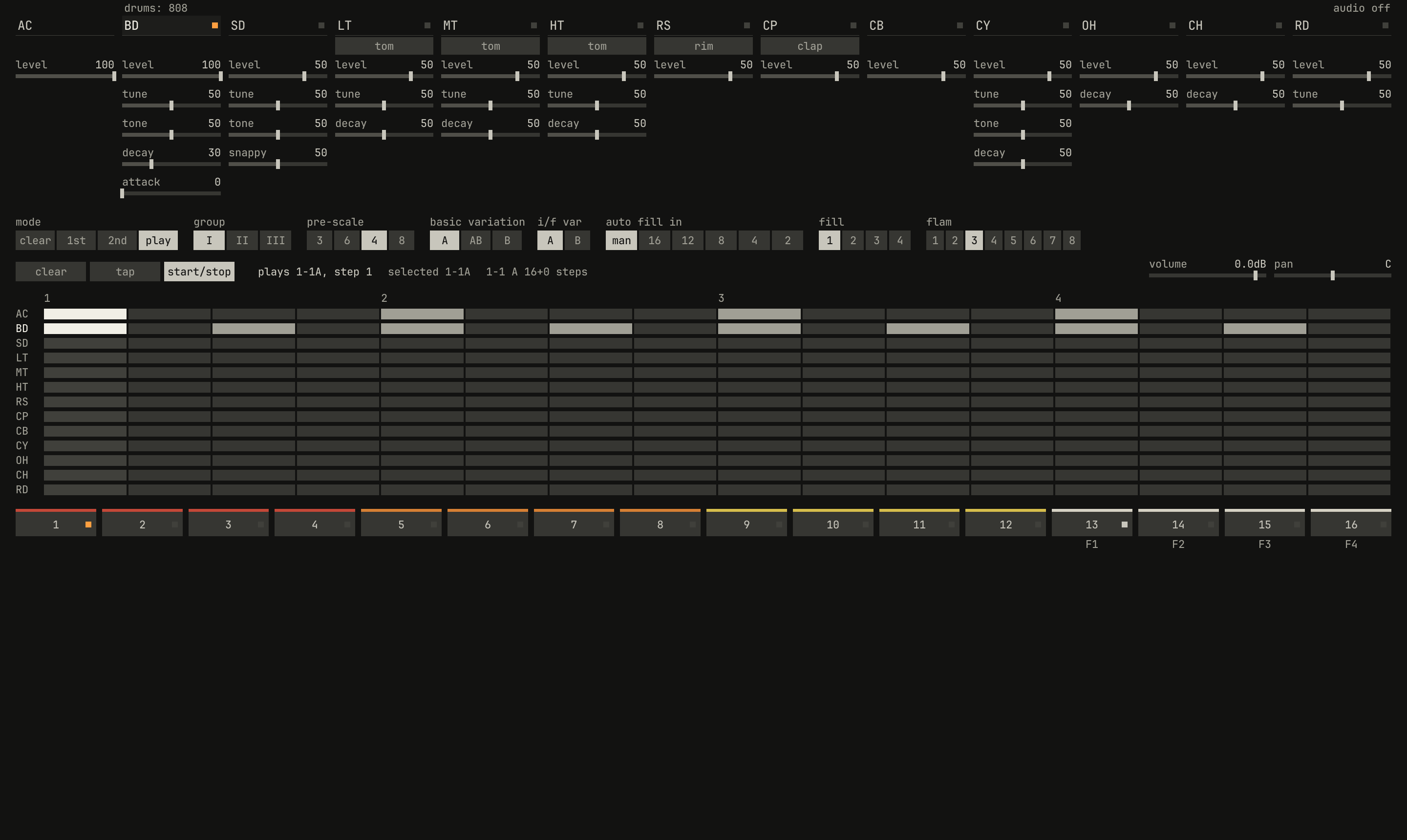
AC row on each beat, at the accent level 0, 50, and 100, a bar each. The picture is in the third bar. At 0 the beats are no louder than the 8ths between them; at 50 they're 5.7 dB louder, and at 100, 9.5 dB.openzig build run-studio -- manual/drums/05-accent/ac --view device --play 1
renderzig build run-studio -- render manual/drums/05-accent/ac ac.wav
ac/song.json
{
  "tempo": 120,
  "end": "4",
  "devices": [{
    "name": "808", "type": "drums",
    "state": {
      "program": "1-1A",
      "voices": { "bd": { "level": 100, "decay": 30 } },
      "rhythms": { "1-1": { "scale": 4, "steps": 16, "A": ["BD x.x.x.x.x.x.x.x.", "AC x...x...x...x..."] } }
    }
  }],
  "tracks": [
    {
      "name": "drums", "device": "808", "channel": 1, "role": "drums",
      "clips": [{ "at": "1", "length": "3.0.0", "pattern": "1-1A" }],
      "lanes": { "accent": ["1 0", "2 50", "3 100"] }
    }
  ]
}
The 808's accent is a row of the rhythm, AC, under the voices: a step
with an accent rings every voice on it harder. The first column of the
panel, AC, has its one knob, level, which sets how much harder, from no
difference at 0 to the full accent at 100. The 808's manual, page 6:
The ACCENT, located at the extreme left of these selectors is used to give emphasis to any other voice programmed on the same step. The LEVEL control sets the amount of emphasis given to the other voices.
The song's rhythm has the bass drum on every 8th and AC on the four beats.
With level at 0 the eight hits of a bar are alike, peaking at −17.2 dBFS;
at 50 the four on the beats peak at −11.6; at 100, at −8.2. The 808's
service notes give its accent's range as 0 to 10 dB (page 1), and the bass
drum's full accent here is about 9 dB.
On the 808, accent raised the trigger pulse that strikes every voice on the step, so it doesn't just turn a voice up: it strikes it harder. A bass drum or a tom struck harder sighs further, as chapter 1 showed, and the metal's swing-type amplifiers bite harder and round their peaks more.
The accent's level is the machine's, so a song keeps it, a lane moves it,
and a controller's first page turns it. Turned down to 0, every AC in
every rhythm goes quiet at once; that's the 808's way to play a rhythm
flat.
A voice's own accent
0.0 / 4.0 s
peak -7.4 dBFS
level at 50: a plain hit, one with its own accent, one with the AC row's, and one with both. They peak at −17.7, −10.4, −11.8, and −8.2 dBFS.openzig build run-studio -- manual/drums/05-accent/both
renderzig build run-studio -- render manual/drums/05-accent/both both.wav
both/song.json
{
  "tempo": 120,
  "end": "3",
  "devices": [{
    "name": "808", "type": "drums",
    "state": {
      "program": "1-1A",
      "voices": { "sd": { "level": 100 } },
      "rhythms": { "1-1": { "scale": 4, "steps": 16, "A": ["SD x...X...x...X...", "AC ........x...x..."] } }
    }
  }],
  "tracks": [
    { "name": "drums", "device": "808", "channel": 1, "role": "drums", "clips": [{ "at": "1", "length": "2.0.0", "pattern": "1-1A" }] }
  ]
}
The 909 can accent one voice on a step and leave the others alone. Its manual, page 24:
There are 2 types of Accents available in the TR-909. Accent A: This accent is to be set by each step. All the voices in that step will take on accents. Accent B: You can put accent to any voice in any step you like. This accent is available only for Bass Drum, Snare Drum, Low Tom, Mid Tom, Hi Tom, and Closed Hi-hat.
The drum machine has both. A step holds each voice as a rest, a hit, or an
accented hit, which the grid draws bright and a song's file writes X; the
bass drum, the snare, the three toms, and the closed hi-hat take one, as on
the 909. A voice's own accent is fixed at 70% of the full accent, since the
909's "cannot be changed".
The two add, up to the full accent. With the accent level at 50, the
song's four snares are a plain hit, a hit with its own accent at 70%, a hit
with the row's at 50%, and one with both, at 120%, held to the full accent.
The higher the row's accent, the less a voice's own accent adds on the steps
the row has, and at 100 it adds nothing; the 909's manual, page 24: "if the
Total Accent Knob is set high, Accent may not be noticed."
Accent on each voice
How much louder a voice is at the full accent is the voice's own. The 808's service notes measured each voice's output with the accent at its least and at its most (page 14), and the drum machine plays each voice at those levels, in volts peak to peak, scaling between them as accent rises:
| Voice | Without accent | Full accent | Difference | Measured |
|---|---|---|---|---|
| bass drum | 3.5 V | 10 V | 9.1 dB | 9.3 dB |
| snare drum | 3 | 10 | 10.5 | 10.5 |
| low tom | 3.5 | 12 | 10.7 | 10.7 |
| mid tom | 3 | 10 | 10.5 | 10.5 |
| hi tom | 3.5 | 12 | 10.7 | 10.7 |
| rim shot | 3 | 10 | 10.5 | 9.9 |
| claves | 2.5 | 8 | 10.1 | 10.1 |
| hand clap | 6 | 12 | 6.0 | 6.8 |
| maracas | 3 | 5 | 4.4 | 4.9 |
| cowbell | 3.5 | 12 | 10.7 | 10.7 |
| cymbal | 3.5 | 7 | 6.0 | 5.1 |
| open hi-hat | 3.5 | 7 | 6.0 | 5.7 |
| closed hi-hat | 3 | 6 | 6.0 | 5.9 |
| ride | 3 | 7 | 7.4 | 6.7 |
The volts are from drums/kit.zig, where 24 volts is the drum machine's
full scale; the measured column is each voice's level over its first 50
milliseconds, at level 50, with and without the full accent. The drums
jump by 9 to 11 dB, the metal and the clap by about 6: an accented hi-hat
is a little louder, an accented snare a lot. The cymbal and the hi-hats
measure under their table's difference because their swing-type amplifiers
flatten loud peaks.
Note: The table on page 14 gives the mid tom 11 volts at the full accent, and the hand clap 2, under its 6 without; the drum machine gives the mid tom the mid conga's 10, and the clap 12, which a misprinted 1 would make it. The ride isn't the 808's, and its levels are the drum machine's own.
Velocity
0.0 / 4.0 s
peak -8.2 dBFS
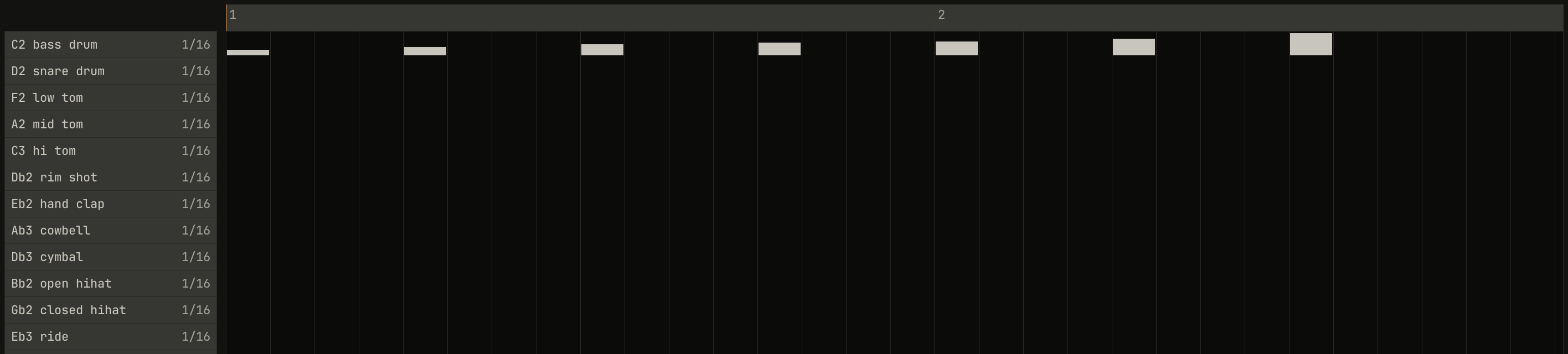
level at 100, in Drum Edit. Each hit is drawn as tall as its velocity. From 64 to 96 the hits grow by 9 dB; under 64 they shrink, and over 96 they don't grow.openzig build run-studio -- manual/drums/05-accent/velocity --view editor
renderzig build run-studio -- render manual/drums/05-accent/velocity velocity.wav
velocity/song.json
{
  "tempo": 120,
  "end": "3",
  "devices": [{ "name": "808", "type": "drums", "state": { "accent": 100, "voices": { "bd": { "level": 100, "decay": 30 } } } }],
  "tracks": [
    { "name": "drums", "device": "808", "channel": 1, "role": "drums", "clips": [{ "at": "1", "length": "2.0.0", "notes": "velocities" }] }
  ],
  "notes": {
    "velocities": {
      "length": "2.0.0",
      "notes": [
        "1.1.0 C2 0.0.240 32", "1.2.0 C2 0.0.240 48", "1.3.0 C2 0.0.240 64", "1.4.0 C2 0.0.240 72",
        "2.1.0 C2 0.0.240 80", "2.2.0 C2 0.0.240 96", "2.3.0 C2 0.0.240 127"
      ]
    }
  }
}
A note played on the drum machine's keys, from a clip, the letter keys, or a controller's pads, has a velocity, from 1 to 127, and the drum machine reads it as the 909 sent it. The 909's MIDI chart gives its velocities as 64 to 96 (page 41): 64 for a hit without accent, 96 for one with. So:
- 64 is a hit without accent, as a step's
x. - 96 is a hit at the accent
level, as a step'sxwithAC. - Between them, the accent grows with the velocity: 80 is halfway.
- Under 64, the hit is softer than a plain one: 32 is half its height, 6 dB down. A ghost note.
- Over 96, nothing more: 127 is the same as 96.
The song plays one hit a beat at velocities 32 to 127, with the accent
level at 100. They peak at −23.4, −19.9, −17.4, −14.1, −11.7, −8.2, and
−8.2 dBFS. With the accent level at 50, as the panel opens, 96 and 127
reach only halfway to the full accent, as a step with AC does.
That makes a velocity of 64 the one to write for a plain hit. A click in
Drum Edit writes 120 in a step's upper half and 96 in its lower half, both
at the accent level, and the letter keys play 127; drag a hit's velocity
down in Drum Edit, or write 64 in List Edit, for a hit without accent.
Chapter 8 has more on notes.
Controls
| Name | Range | Default | Curve |
|---|---|---|---|
accent | 0% to 100% | 50% | linear |
Next: chapter 6, rhythms and the memory, what the drum machine plays by itself.