Introduction
The panel
Before any drums, a tour. The drum machine's front panel is a view of the studio's window, drawn in the window's own colors after the 808's layout: the voices' knobs along the top, the selectors and buttons under them, a grid of the rhythm, and the sixteen step buttons along the bottom. This chapter names each part and says what it does; the chapters after it use these names.
Open the chapter's song on the drum machine's panel:
zig build run-studio -- manual/drums/00-panel/tour --view device
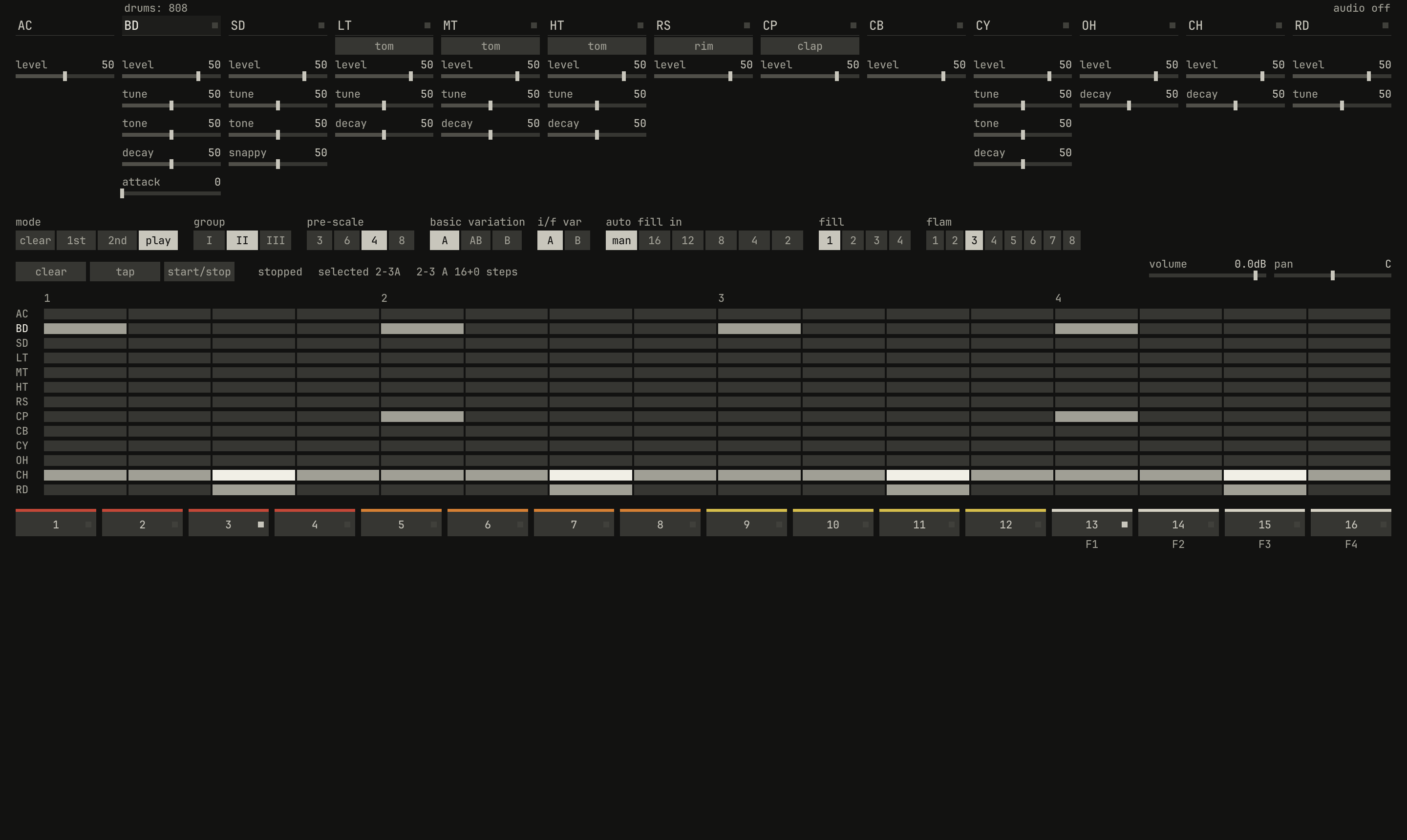
2-3, techno, in variation A; along the bottom, the step buttons.openzig build run-studio -- manual/drums/00-panel/tour --view device
tour/song.json
{
  "tempo": 124,
  "end": "3",
  "devices": [{ "name": "808", "type": "drums", "state": { "program": "2-3A" } }],
  "tracks": [
    { "name": "drums", "device": "808", "channel": 1, "role": "drums", "clips": [{ "at": "1", "length": "2.0.0", "pattern": "2-3A" }] }
  ]
}
The song holds one track, drums, playing a pattern clip of the drum
machine's rhythm 2-3A. The panel shows the device of the track selected,
and Ctrl+2 opens it from anywhere; under the bar, the tag
drums: 808 names the track and the device.
The voices
Thirteen columns run along the top. The first, AC, is the accent; the
other twelve are the voices, in the order of the 808's panel, with the
909's ride last:
| Column | Voice | Column | Voice |
|---|---|---|---|
BD |
bass drum | CP |
hand clap or maracas |
SD |
snare drum | CB |
cowbell |
LT |
low tom or conga | CY |
cymbal |
MT |
mid tom or conga | OH |
open hi-hat |
HT |
hi tom or conga | CH |
closed hi-hat |
RS |
rim shot or claves | RD |
ride |
Each column has the voice's name, a light at its right that flashes amber
when the voice sounds, a switch under the name if the voice has two
instruments, and its knobs: level first, then the rest, top to bottom. A
knob is a slider, as the synth's faders are: drag it along, turn the wheel
over it to nudge it a hundredth of its travel, and double-click it to put it
back where a fresh drum machine has it. A switch, such as tom, steps to its
other position with a click. Every knob reads from 0 to 100, and most open
at 50, the middle of their travel. The levels open at 50 too, but further
along, since they follow an audio taper, as a volume knob does: 50 sits at
three quarters of the way. Chapter 1 to
chapter 4 say what each knob does to its voice.
A click on a voice's name selects it for writing, which the name's raised
background shows, and plays it once, without accent. BD is selected as the
panel opens. A click on AC selects the accent for writing instead.
The selectors
The row under the knobs has eight selectors, each a row of positions, the one in force lit:
mode:clear,1st,2nd, andplay, after the 808's mode knob. Inplaythe step buttons pick rhythms; in1stand2ndthey write the rhythm's first and second part; inclear, theclearbutton empties it.group:I,II, andIII, the 909's three groups of sixteen rhythms, which the step buttons pick from.pre-scale:3,6,4, and8, the steps a beat of the rhythm being written, in the order of the 808's four positions.basic variation:A,AB, andB, the variation a basic rhythm plays, or both in turn.i/f var:AandB, the fill-ins' variation.auto fill in:man,16,12,8,4, and2: a fill by hand only, or on every so many measures.fill:1to4, the fill-in thattapand auto fill play.flam:1to8, the rhythm's flam, from 4 to 32 milliseconds.
Some of them are the drum machine's and some are the rhythm's. i/f var,
auto fill in, and fill are controls of the drum machine, which a song
keeps, a lane can move, and a controller can turn. pre-scale and flam
belong to a rhythm, and are kept with it in the memory: they show and set
the rhythm the panel writes, the one last picked with a step button, or as
the panel opens, the one selected. mode and group are the panel's own,
as the 808's knobs were: a song doesn't keep them, and the panel opens in
play, on the group of the rhythm selected. Chapter 6 is the memory, and
chapter 7 the modes.
The buttons and the status
Under the selectors are three buttons. clear empties a rhythm in clear
mode, and in a write mode sets a part's last step. tap plays the fill-in
selected; in a write mode it writes a hit on the step playing.
start/stop starts the rhythm on the next bar, or stops it.
Beside them, a line says where the drum machine is: stopped, starts on
the bar in amber while it waits for one, or the rhythm and step playing, as
plays 2-3A, step 5; the program selected, as selected 2-3A; and the
rhythm the grid shows, with its variation and the steps in its two parts, as
2-3 A 16+0 steps. In a write mode the line adds the part written.
At the row's right are the channel's volume, in decibels, and pan: the
drum machine's level and place in the mix, before its strip on the desk.
The grid
The grid shows every voice of a rhythm at once: a row for the accent and each voice, a column for each step, and the beats numbered over the columns. A hit is a grey cell, an accented one a bright cell, and a flam an amber bar along a cell's foot. The 2nd part's empty cells are a darker grey than the 1st's.
In play mode, while the rhythm runs, the grid shows the measure playing; otherwise it shows the rhythm last selected, in the variation the switch sets. A click on a cell writes there, as the step buttons do.
The step buttons
0.0 / 3.9 s
peak -12.5 dBFS
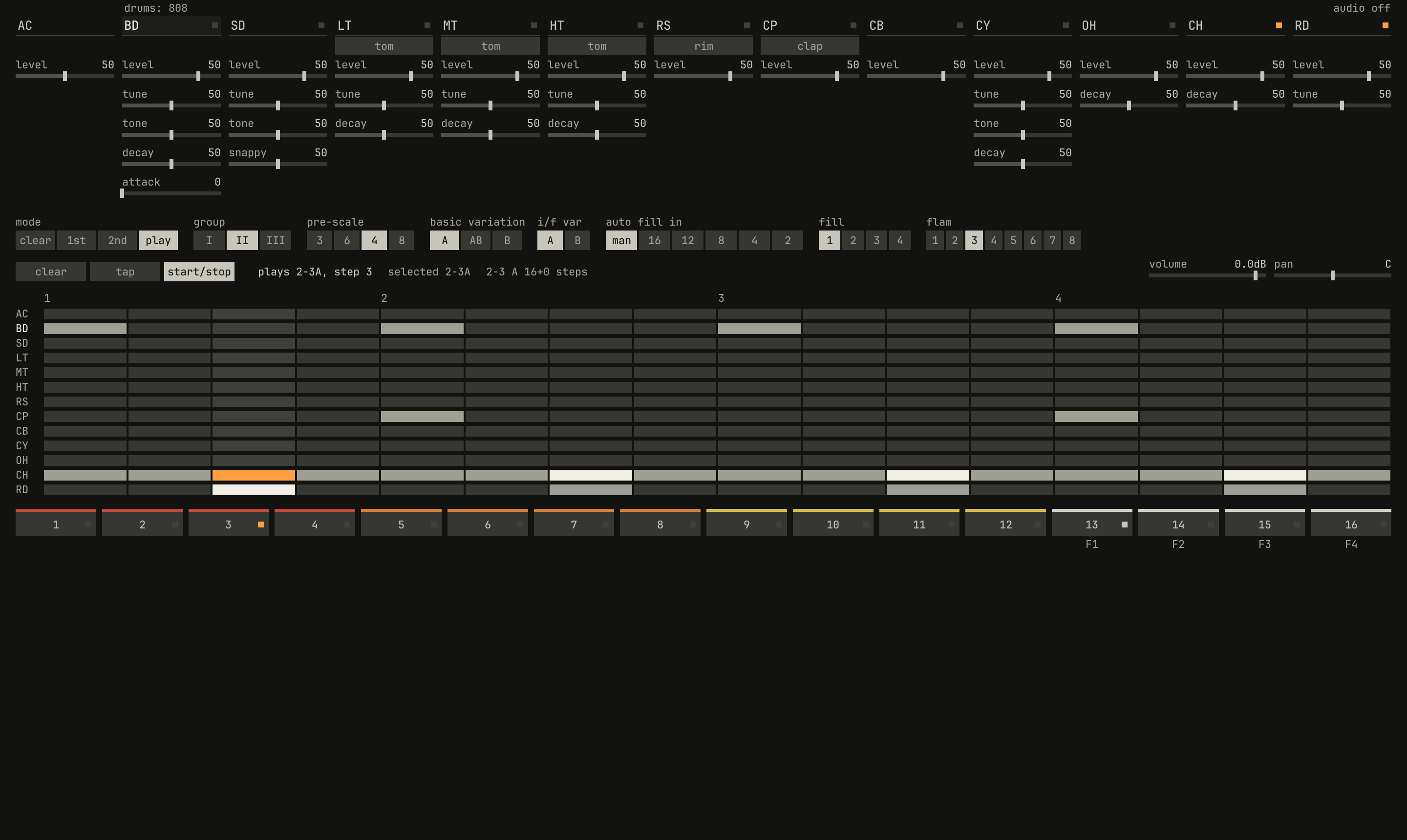
CH and RD lights are lit; the step 3 button's light is amber, and the line reads plays 2-3A, step 3.openzig build run-studio -- manual/drums/00-panel/tour --view device --play 1
renderzig build run-studio -- render manual/drums/00-panel/tour playing.wav
tour/song.json
{
  "tempo": 124,
  "end": "3",
  "devices": [{ "name": "808", "type": "drums", "state": { "program": "2-3A" } }],
  "tracks": [
    { "name": "drums", "device": "808", "channel": 1, "role": "drums", "clips": [{ "at": "1", "length": "2.0.0", "pattern": "2-3A" }] }
  ]
}
Sixteen step buttons run along the bottom, tinted in fours, red, orange,
yellow, and white, as the 808's are, with F1 to F4 under the last four.
In play mode, buttons 1 to 12 select the twelve basic rhythms of the group,
and 13 to 16 its four fill-ins; in a write mode, each is a step of the part
written. A button's light is white on the rhythm selected and on the fill-in
selected, and amber on the step playing.
At 124 BPM a 16th lasts 121 ms, so step 3 starts 0.24 seconds in. Between hits a light fades in a sixth of a second, so the panel shows what has just sounded.
Where the drum machine is

drums; its device and channel, 808 1; and the program the pattern clip plays, 2-3A.openzig build run-studio -- manual/drums/00-panel/tour
tour/song.json
{
  "tempo": 124,
  "end": "3",
  "devices": [{ "name": "808", "type": "drums", "state": { "program": "2-3A" } }],
  "tracks": [
    { "name": "drums", "device": "808", "channel": 1, "role": "drums", "clips": [{ "at": "1", "length": "2.0.0", "pattern": "2-3A" }] }
  ]
}
A song holds up to eight devices, and a drum machine is one of them, named
in the song, here 808. It has one channel: a track plays it on channel 1,
and every track on it plays the same drum machine. The track list names the
device and the program each track's channel plays. A double-click on a
pattern clip shows the drum machine's panel, as Ctrl+2 does.
Chapter 8 is the drum machine in a song.
The drum machine's own controls, beside its voices':
| Name | Range | Default | Curve |
|---|---|---|---|
level | -60 dB to 6 dB | 0 dB | linear |
pan | -100% to 100% | 0% | linear |
muted | off / on | off | switch |
accent | 0% to 100% | 50% | linear |
auto_fill | manual / 16 / 12 / 8 / 4 / 2 | manual | switch |
fill | 1 / 2 / 3 / 4 | 1 | switch |
fill_variation | A / B | A | switch |
fill_variation | A / B | A | switch |
run | off / play | off | switch |
run is start/stop, which a pattern clip turns on and off;
muted is the track list's mute.
Next: chapter 1, the bass drum, a filter that rings.